2008 BMW 335I CONVERTIBLE speed volume
[x] Cancel search: speed volumePage 31 of 272

Controls
29Reference
At a glance
Driving tips
Communications
Navigation
Entertainment
Mobility
>Settings for the display on the Control Dis-
play and in the instrument cluster:
>12h/24h format of the clock, refer to
page82
>Date format, refer to page83
>Brightness of the Control Display, refer
to page86
>Language on the Control Display, refer
to page86
>Units of measure for fuel consumption,
distance covered/remaining distances,
and temperature, refer to page78
>Show visual warning for Park Distance Con-
trol PDC
*, refer to page88
>Light settings:
>Welcome lamps, refer to page100
>Pathway lighting, refer to page101
>Daytime running lamps, refer to
page101
>Automatic climate control: activating/deac-
tivating AUTO program, cooling function
and automatic recirculated-air control, set-
ting temperature, air flow rate and distribu-
tion, refer to page105 ff
>Entertainment:
>Audio volume, refer to page161
>Tone control, refer to page161
>Speed-dependent volume control, refer
to page161
Central locking system
The concept
The central locking system is ready for opera-
tion whenever the driver's door is closed.
The system simultaneously engages and
releases the locks on the following:
>Doors
>Luggage compartment lid
>Fuel filler door
> Convertible: center armrest and glove com-
partment
Operating from outside
>Via the remote control
>Via the door lock
>In cars with convenient access
*, via the
handles on the driver's and front passen-
ger's doors
The anti-theft system is also operated at the
same time. It prevents the doors from being
unlocked using the lock buttons or door han-
dles. In addition, if the remote control is used,
the welcome lamps, interior lamps and the
door's courtesy lamps
* are switched on or off.
The alarm system
* is also armed or disarmed.
For further details of the alarm system,
refer to
page35.
Operating from inside
By means of the button for central locking, refer
to page32.
In the event of a sufficiently severe accident, the
central locking system unlocks automatically. In
addition, the hazard warning flashers and inte-
rior lamps come on.
Opening and closing:
Using the remote control
Persons or animals in a parked vehicle
could lock the doors from the inside. You
should therefore take the remote control with
you when you leave the vehicle so that the latter
can be opened from outside.<
Convertible: to operate the retractable
hardtop with the remote control, the
doors and luggage compartment lid must be
closed and the cargo bay partition must be
folded down and engaged on both sides. Refer
also to page41.<
Unlocking
Press the button.
The interior lamps, the courtesy lamps
* and the
welcome lamps come on.
Page 127 of 272

Driving tips
125Reference
At a glance
Controls
Communications
Navigation
Entertainment
Mobility
Drive defensively
Avoid unnecessary acceleration and braking
maneuvers. To do so, keep an adequate dis-
tance to the forward vehicle. A defensive and
smooth driving style keeps fuel consumption
down.
Avoid high engine speeds
Only use first gear when setting off. In second
and higher gears, accelerate without hesitation
or pauses. When accelerating, shift up before
reaching high engine speeds.
When you reach the desired speed, shift into
the highest applicable gear and drive with the
engine speed as low as possible and at a con-
stant speed.
As a rule: driving at low engine speeds lowers
fuel consumption and reduces wear.
Coasting
When approaching a red light, take your foot off
the accelerator and coast to a stop in the high-
est applicable gear.
O n a d o w n h il l s lo p e , t a k e y o u r f o o t o f f t h e a c c el -
erator and coast in a suitable gear.
The fuel supply is interrupted when coasting.
Switch off the engine during lengthy
stops
Switch off the engine when stopping for lengthy
periods, e.g. at traffic lights, railroad crossings
or in traffic congestions. You achieve fuel sav-
ings even if standing time is as short as approx.
4 seconds.
Switch off functions you do not need at
the moment
Functions such as the air conditioner and the
seat or rear window heating draw large amounts
of power and consume additional fuel. Espe-
cially in city traffic and in stop and go driving
they have a considerable impact. Therefore,
switch these functions off when they are not
really needed.
Have the vehicle serviced
Have the vehicle serviced regularly to achieve
good economy and a long vehicle life. BMW
recommends having the vehicle serviced at a
BMW center. Also note the BMW service sys-
tem, refer to page229.
General driving notes
Close the luggage compartment lid
Operate the vehicle only when the lug-
gage compartment lid is closed. Other-
wise, exhaust fumes could enter the interior of
the vehicle.<
If the vehicle must be driven with the luggage
compartment lid open:
1.Close all windows and the glass roof.
2.Greatly increase the air volume of the auto-
matic climate control system, refer to
page106.
Hot exhaust system
In all vehicles, extremely high tempera-
tures are generated in the exhaust sys-
tem. Do not remove the heat shields installed
adjacent to various sections of the exhaust sys-
tem, and never apply undercoating to them.
When driving, standing at idle and while park-
ing, take care to avoid possible contact
between the hot exhaust system and any highly
flammable materials such as hay, leaves, grass,
etc. Such contact could lead to a fire, with the
risk of serious personal injuries and property
damage. Do not touch hot exhaust tail pipes.
Otherwise there is a risk of burns.<
Hydroplaning
When driving on wet or slushy roads,
reduce road speed. If you do not, a wedge
of water can form between tires and road sur-
face. This situation, known as hydroplaning,
means that the tire can completely lose contact
with the road surface, so that neither the car can
be steered nor the brake be properly applied.<
Page 163 of 272

Navigation
Entertainment
Driving tips
161Reference
At a glance
Controls
Communications
Mobility
Adjusting volume
Turn knob1 on the CD player until the desired
volume is obtained.
You can also adjust the volume with buttons on
the steering wheel, refer to page11.
With the ignition at radio readiness or beyond,
the setting is stored for the remote control cur-
rently in use.
Tone control
You can alter various tone settings, e.g. treble
and bass or the speed-dependent volume
increase.
The tone settings are applied to all audio
sources.
With the ignition at radio readiness or beyond,
the settings are stored for the remote control
currently in use.
Changing tone settings
1.Press the button.
This opens the start menu.
2.Press the controller to open the menu.
3.Turn the controller until "Settings" is
selected and press the controller.
4.Select "Audio" and press the controller.
The tone settings can also be selected if you
have called up "Entertainment" in the start
menu:
Select "Set" and then "Tone", pressing the
controller after each selection.
Treble and bass
1.Select "Treble / Bass" and press the con-
troller.
2.Move the controller to the left or right to
select "Treble" or "Bass".
3.Turn the controller until the desired setting
is selected.
Balance and fader
You can adjust the volume distribution in the
same manner as "Treble / Bass".
>"Balance": left/right volume distribution
>"Fader": front/rear volume distribution
Speed-dependent volume control
The speed-dependent volume control auto-
matically increases the volume with increasing
driving speed. You can set various stages for
the increase in volume.
Page 164 of 272
On/off and settings
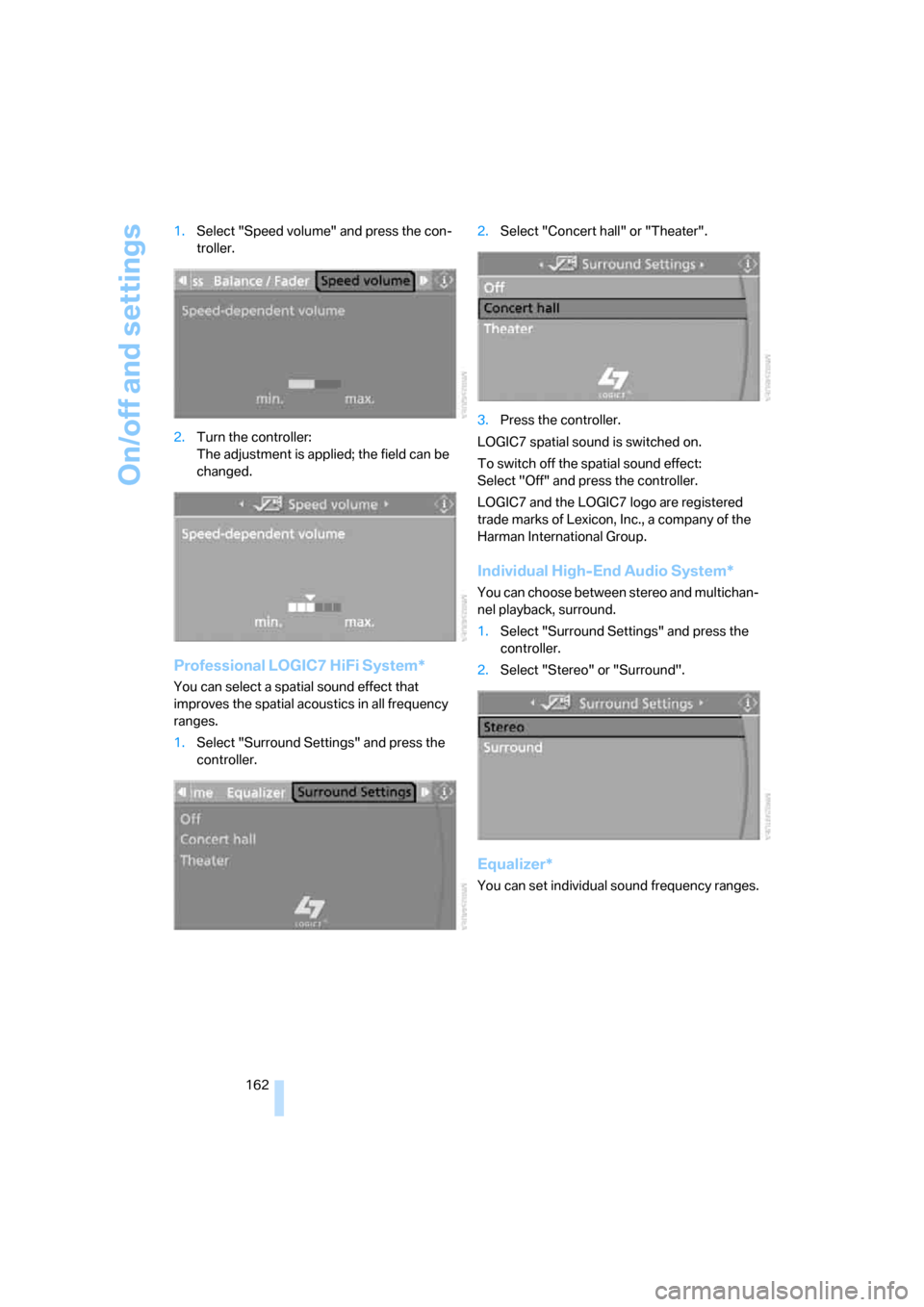
162 1.Select "Speed volume" and press the con-
troller.
2.Turn the controller:
The adjustment is applied; the field can be
changed.
Professional LOGIC7 HiFi System*
You can select a spatial sound effect that
improves the spatial acoustics in all frequency
ranges.
1.Select "Surround Settings" and press the
controller.2.Select "Concert hall" or "Theater".
3.Press the controller.
LOGIC7 spatial sound is switched on.
To switch off the spatial sound effect:
Select "Off" and press the controller.
LOGIC7 and the LOGIC7 logo are registered
trade marks of Lexicon, Inc., a company of the
Harman International Group.
Individual High-End Audio System*
You can choose between stereo and multichan-
nel playback, surround.
1.Select "Surround Settings" and press the
controller.
2.Select "Stereo" or "Surround".
Equalizer*
You can set individual sound frequency ranges.
Page 263 of 272

Reference 261
At a glance
Controls
Driving tips
Communications
Navigation
Entertainment
Mobility
Master key, refer to Remote
control with integrated
key28
Maximum cooling106
Maximum speed
– with winter tires223
Measurements, refer to
Dimensions245
Memory, refer to Seat and
mirror memory50
Memory keys,
programmable21
MENU button16
Menus
– Control Display17
Menus, refer to iDrive16
Message list, traffic
information152
Microfilter
– BMW Maintenance
System229
– for automatic climate
control108
Microfilter/activated-charcoal
filter
– BMW Maintenance
System229
Microphone
– telephone14
– voice input14
Mirror dimming feature53
Mirrors52
– automatic curb monitor53
– exterior mirrors52
– heating53
– interior rearview mirror53
– memory, refer to Seat and
mirror memory50
"Missed calls"194
Missed calls194Mobile phone
– accepted calls194
– adjusting volume191
– calling193
– ending call193
– installation location, refer to
Center armrest114
– missed calls194
– operation via iDrive191
– redialing194
– refer to separate Owner's
Manual
– Top 8194
– touch tone dialing196
Mobile phone, installation
location, refer to Center
armrest114
Mobile phone, refer to the
separate Owner's Manual
Modifications, technical, refer
to For your own safety5
Monitor, refer to iDrive
controls16
Monitoring system for tire
pressures, refer to Flat Tire
Monitor92
"Monitor on / off"54
Most recent mobile phone
numbers194
MP3, refer to Compressed
audio files173
Multifunctional steering
wheel, refer to Buttons on
the steering wheel11
Multifunction switch
– refer to Turn signals/
headlamp flasher63
– refer to Wiper system64
Multimedia screen, refer to
iDrive16
Music tracks, refer to
Tracks174
"Mute on / off"54
N
"Navigation"134,140Navigation announcements,
refer to Switching voice
instructions on/off150
Navigation drive, location132
Navigation DVD132
Navigation system132
– address book142
– changing a route151
– destination entry134
– destination guidance in
assistance window132
– destination list141
– displaying current
position155
– entering a destination
manually134,138
– last destinations141
– navigation DVD132
– opening134
– route display148
– route list150
– searching for a special
destination140
– selecting destination using
information140
– selecting destination via
map139
– selecting route criteria145
– starting destination
guidance147
– switching off, refer to
Terminating/continuing
destination guidance147
– terminating/continuing
destination guidance147
– voice instructions150
– volume adjustment151
"Navigation voice
instructions"133
"Navigation voice
instructions" via buttons on
the steering wheel54
Neck support, refer to Head
restraints47
Nets, refer to Storage
compartments114
"New address" in
navigation143
"New destination"135,139
Page 267 of 272

Reference 265
At a glance
Controls
Driving tips
Communications
Navigation
Entertainment
Mobility
Service requirements79
"Set date"83
"Set time"82
"Settings"207
Settings
– changing settings on the
Control Display86
– clock, 12h/24h mode82
– date format83
– language86
Settings and information78
"Settings" for unlocking30
Settings menu, refer to
imenu17
Setting times, refer to
Preselecting switch-on
times108
Shifting gears
– automatic transmission with
Steptronic62
– manual transmission61
Shiftlock
– automatic transmission,
refer to Changing selector
lever positions62
Short commands for the voice
command system248
Shortest route in navigation,
refer to Selecting route145
"Short route" in
navigation145
"Show current position"140
"Show destination
position"140
Shuffled, refer to Random
– CD changer176
– CD player176
Side airbags97
Side windows, refer to
Windows38
Signal horn, refer to
Horn10,11
Sitting safely45
– with airbags45
– with head restraint45
– with safety belts45
Ski bag119Ski bag for convertible, refer to
Through-loading opening
with integrated transport
bag120
Sliding/tilt sunroof, refer to
Glass roof, electric39
Slot for remote control59
Smokers' package, refer to
Ashtray116
Snap-in adapter, refer to
Center armrest storage
compartment114
Socket, On-Board Diagnosis
OBD230
Socket, refer to Connecting
electrical appliances116
Song search, refer to Playing a
track175
SOS, refer to Sending an
Emergency Request236
Sound output for
entertainment on/off160
Spare fuses,235
Spare fuses, refer to
Fuses235
Speaking, refer to Voice
instructions from navigation
system150
Speed
– Run-Flat Tires93
– with winter tires223
Speed-dependent volume
control161
Speed limit85
Speed limit warning, refer to
Speed limit85
Speedometer12
"Speed volume", refer to Tone
control162
Spray nozzles, refer to
Cleaning windshield and
headlamps65
Stability control, refer to
Driving stability control
systems89
Start/stop button59
– starting the engine60
– switching off the engine60
"Start guidance"137Starting, refer to Starting the
engine60
Starting assistance, refer to
Jump starting237
Starting difficulties
– jump starting237
Starting the engine
– start/stop button59
Start menu17
"Start service"202
"Start Service" for BMW
Assist204
"State / Province" in
destination entry135
Station
– refer to Radio164
"Status"80
Status of this Owner's Manual
at time of printing5
Steering wheel53
– adjustment53
– buttons on steering
wheel11
– lock59
– locking with convenient
access37
"Steering wheel buttons"54
Steering with variable ratio,
refer to Active steering96
Steptronic, refer to Automatic
transmission with
Steptronic61
"Stopwatch"86
Stopwatch86
Storage compartments
114
Storage nets118
"Store" for satellite radio172
"Store in address book" in
navigation143
"Store" on the radio166
Storing current position143
Storing radio stations166
Storing seat positions, refer to
Seat and mirror memory50
Storing tires223
Stowage, refer to Storage
compartments114
"Street" in destination
entry137
Page 270 of 272

Everything from A - Z
268 Ventilation, refer to
Climate104
Ventilation while at a
standstill108
Vents, refer to Ventilation107
"Vent settings"105
Voice commands
– overview23
– short commands248
Voice instructions from
navigation system150
– muting55,151
– repeating55,151
– switching on/off150
– volume151
Voice phone book198
Volume160
– audio sources160
– fuel tank, refer to
Capacities247
– mobile phone191
– speed-dependent
control161
– voice instructions151
Volume distribution
– front/rear161
– left/right161
W
Warning and indicator
lamps13
Warning messages, refer to
Check Control83
Warning triangle237
Washer fluid65
– content of the reservoir65
Washer fluid reservoir65
Washing the car, refer to
Caring for your vehicle
brochure
Waste tray, refer to
Ashtray116
Water on roads, refer to
Driving through water126
Waveband with the radio164
Wear indicators in tires, refer
to Minimum tread depth221
Weights247Welcome lamps100
"Welcome light"101
Wheel/tire combination, refer
to Correct wheels and
tires222
Wheelbase, refer to
Dimensions245
Wheels, new222
Wheels and tires212
Width, refer to
Dimensions245
Wind deflector42
Windows38
– convenient operation30
– convenient operation with
convenient access37
– opening, closing38
– pinch protection system39
Windows, indicator on Control
Display16
Windshield
– cleaning65
Windshield wash64
– filling capacity, reservoir247
– nozzles65
– reservoir for washer fluid65
– washer fluid65
Windshield wiper blades,
changing231
Windshield wipers, blades,
care, refer to Caring for your
vehicle brochure
Windshield wipers, refer to
Wiper system64
Winter tires223
– setting speed limit85
– storage223
Wiper blade replacement231
Wiper system64
"With highways" in
navigation145
Wooden trim, refer to Caring
for your vehicle brochure
Word-matching principle for
navigation146
Work in the engine
compartment224
Wrench/screwdriver, refer to
Onboard tool kit231
X
xDrive90
Xenon lamps
– replacing bulb232
Y
Your individual vehicle
– settings, refer to Personal
Profile28