2008 AUDI TT ROADSTER interior lights
[x] Cancel search: interior lightsPage 52 of 316
Openin g a nd clo sin g
• Cana da mo dels: RSS-210 of Industry Canada .
Operation is subject to the following conditions:
• this device may not cause harmful interference, and
• this device must accept any interference received, including
interference that may cause undesired operation.
0 Note
The manufacturer is not responsible for ANY RADIO OR TV interfer ence caused by unauthorized modifications to this equipment.
Changes or modifications to this unit not express ly approved by the
party responsib le for comp liance could void the user's authority to
operate the equipment .•
Power locking system
General description
The power locking system Jocks or unlocks all doors
simultaneously.
The power locking system in your vehicle incorpora tes the following
functions:
• Central locking function
• Remote contro l feature
=> page 48 .
• Anti -Theft Alarm System
=> page 56.
You can lock and un lock the veh icle from outside either with the
k ey s or the remot e control transmitter inside the master key.
Act ivatin g the po wer loc king sy ste m lo ck s or unlo cks all doo rs
s im ult ane ously.
You can also open or close the windows when you lock or unlock the
driver's door using the key . For safety reasons, you cannot use the
remote contro l to open/close the windows . T
he selective unlock feature makes it possible to open just the
driver's door.
If the power locking system should malfunction, you can lock and
unlock each lock individually using the vehicle key.
A ut om atic lock ing*
The automatic locking feature locks all the vehicle doors and the rear lid when you drive faster than 9 mph (15 km/h) .
You can unlock the vehicle from the inside by:
• removing the key from the ignition switch (the vehicle wi ll auto
matically un lock itself) or
• pressing the unlock part of the power lock switch
oc:'i:l or
pulling the door handle (to open the door).
If you wish, you can have an authorized Audi dealer convert your
power door lock system to automatic loc king .
Unlo cking /locking t he vehi cle
When you unlo ck your vehicle:
• T he anti -theft alarm system is deactivated briefly .
• The vehicle interior lights illuminate for approximate ly 30
seconds.
When you
lo ck the vehicle:
• All doors are locked .
• The anti-theft alarm system is activated.
• The vehicle interior lights turn off.
• The anti-theft alarm system is activated . The horn of the anti
theft a larm system wi ll sound and the anti -theft alarm system readi
ness light, located in the center of the instrument panel below the
windshie ld on the right side of the air vent, will start to blink. .,_
Page 71 of 316
Clear vision
Lights
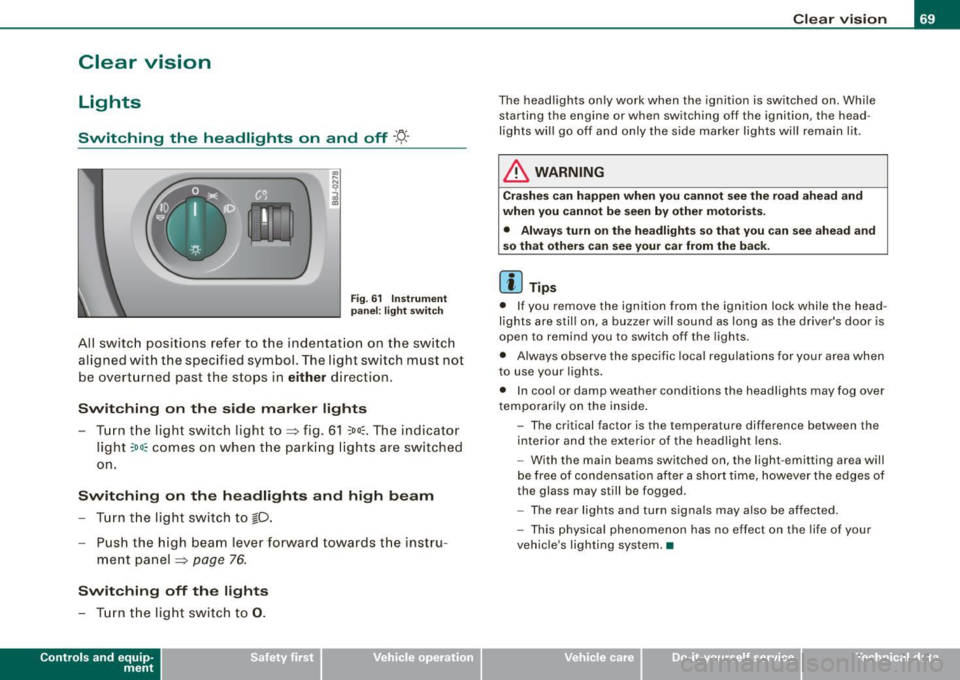
Switching the headlights on and off ·'t!-·
Fig. 6 1 Ins trum ent
p ane l: lig ht sw itch
All sw itc h positions refer to the indentat ion on the switch
aligned with the specified symbol. The light switch must not
be overturned past the stops in
either direction .
Switching on the side marker lights
-Tur n t he light switch ligh t to ==> fig. 61 ;oo; . The indi ca tor
light
; oo ~ comes o n when t he park ing lig hts are sw itched
on .
Switching on the headlights and high beam
- Turn t he light switch to lD.
- Push the high beam leve r fo rward towards t he instru -
ment panel ==> page
76.
Switching off the lights
-Tur n t he lig ht switch to 0 .
Con tro ls and eq uip
ment
Clear vision
The headlights only work when the ignition is switched on . While
starting the engine or when switching off the ignition, the head
lights will go off and only the side marker lights will remain lit .
& WARNING
Crashe s can happen when you cannot see the road ahead and
when you c annot be seen by other motori sts.
• Always tu rn on the headlight s so th at you can see ahead and
so that others can see your ca r from the ba ck.
[ i ] Tips
• I f you remove the ignition from the ignition lock wh ile the head
lights are still on, a buzzer will sound as long as the driver's doo r is
open to remind you to switch off the lights .
• Always observe the spec ific local regulations for your area when
to use your lights .
• I n coo l or damp weather conditions the headlights may fog over
tempo ra rily on the inside .
- The critical factor is the t emperature diff erence between the
interior and the ex te rior of the headlight lens .
- With the main beams switched on, the light -emitting area will
be free o f condensation after a short time, however the edges of
the glass may still be fogged .
- The rear lights and turn signa ls may also be affected.
- This physical phenomenon has no effect on the life of your
vehicle 's lighting system. •
Vehicle care I I irechnical data
Page 79 of 316
Interior lights
Interior lights
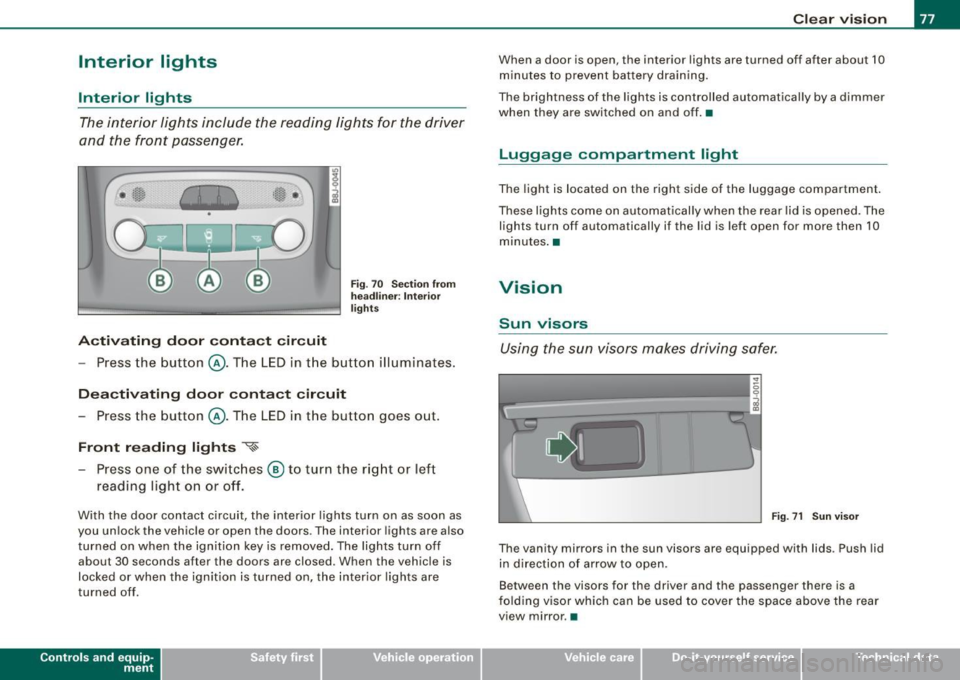
The interior lights include the reading lights for the driver
and the front passenger.
Activating door contact circuit
Fig. 70 Section from
headliner: Interior
lights
- Press the button @. The LED in the button illuminates.
Deactivating door contact circuit
- Press the button @. The LED in the button goes out.
Front reading lights ~
- Press one of the switches @ to turn the right or left
reading light on or off.
With the door contact circuit, the interior lights turn on as soon as
you unlock the vehicle or open the doors. The interior lights are also
turned on when the ignition key is removed. The lights turn off
about 30 seconds after the doors are closed. When the vehicle is
locked or when the ignition is turned on, the interior lights are
turned off .
Contro ls and eq uip
ment
Clear vision
When a door is open, the interior lights are turned off after about 10
minutes to prevent battery draining.
The brightness of the lights is controlled automatically by a dimmer
when they are switched on and off. •
Luggage compa rtm ent light
The light is located on the right side of the luggage compartment.
These lights come on automatically when the rear lid is opened. The
lights turn off automatically if the lid is left open for more then 10
minutes. •
Vision
Sun visors
Using the sun visors makes driving safer.
•
Fig. 71 Sun visor
The vanity mirrors in the sun visors are equipped with lids . Push lid
in direction of arrow to open.
Between the visors for the driver and the passenger there is a
folding visor which can be used to cover the space above the rear
view mirror .•
Vehicle care I I irechnical data
Page 85 of 316

Activating /re ac tiv ating auto dimming
- Press button @
briefly, -the green indicator light ®
goes on.
Aut om ati c dimmin g fun ction
The automatic dimming function is activated every time the ignition
is turned on. The green indicator light is lit to indicate auto dimming
is active .
When dimming is activated, the inside mirror will darken
automati
cally
in response to the amount of light striking the mirror (such as
headlights from rearward approaching vehicles). Even in dimming
mode, the mirror surface turns bright when :
• the interior light is switched on
• reverse gear is engaged .
Sensors for automati c headligh ts *
With the help of the sensors in the mirror, when the light switch is
in the
AUTO posi tion, the low beams are switched on and off auto
matically depending on the ambient light conditions=>
page 70.
& WARNING
The glass of the inside rearview mirror is l ayered and contain s an
e lectrolyt e to a chieve its pr opert ie s . Be aware of liquid electr olyte
le aki ng fr om a broken mirror glass . This l iquid can cause irritation
to skin , eyes , and r espiratory sy stem .
• If you get ele ctrolyt e in your e yes or on your sk in , immediately
rin se with p lenty of water . If irritation per sists, s eek medical atten
tio n.
0 Note
Liquid electrolyte leaked from a broken mirror glass wi ll damage any
p lastic surfaces it comes in contact with. Clean up spilled electrolyte
immediately wi th clear wa ter and a sponge .
Contro ls and eq uip
ment
Clear vision
[ i ] Tip s
• If you switch off the automatic di mming function on the in side
mirr or, automatic dimming of the outside mirrors w ill like wise be
di sabled .
• Check to make sure there are no objects preventing light from
reaching t he inside mirror.
• Do no t attach any stickers to the windshield in front of the two
light sensors, as this would interfere with both the automatic oper
ation of the headlights and the automatic dimming of the inside
mirror(sl. •
Outside mirrors
The outside mirrors are electrically adjusted.
Adjusting the outside mirrors
Fig. 77 Fo rw ar d
s e ctio n of dri ver's
arm rest: pow er m irr or
co ntr ols
Tu rn th e adjust ing knob to pos iti on Q => fig . 77 to adjust
t h e outs ide mirror on t he driver's side .
Tu rn the adjusting knob to position @to adjust the
o utside m irror o n the passenger side .
Press the knob in the appropr iate d irection to
move the
m irror surface so that you have a good view to the rear .
1)1,
Vehicle care I I irechnical data
Page 277 of 316

Fuses and bulbs -
----------------
Equipment No. Equipment
Amps
Engine relay, fuel tank control unit, Airbag Off
16 A/C system (control unit) 10
1
light, light switch (switch illumination), diagnos-10
tic connector
17 Tire pressure monitoring system (control unit) 5
18
Not used
ABS, ASR, ESP, brake light switch
5 19
Not used
3 AFS headlight (left) 5
Not used
Oil level sensor (extended maintenance interval)
(WIV), tire pressure monitoring system, switch
21 Fuel injectors (gasoline engine) 10
4 for Electronic Stability Program (ESP), AFS head-5 Wind deflector (Roadster) 30
lights (control unit), A/C system (pressure sen -23 Horn 20 sorl, backup light switch
Automatic headlight range control, AFS head-
24 Transmission (control unit) 15
5
light (right)/ manual headlight range control, 5/10
25 Heater rear window Coupe/heated rear window 30/20
halogen headlights Roadster
Control unit for CAN data transfer (gateway),
26 Driver's side power window 30
6 electromechanical steering, automatic transmis-5
27 Passenger's side power window 30
sion shift gate
28 Not used
Acoustic Park Assist, automatic dipping interior
rear view mirror, garage door opener, heatable
29 Washer pump 15
7
windshield washer nozzles, washer pump, wind 5
30 Cigarette lighter 20
deflector relay (Roadster)
31 Starter 40
8
Haldex clutch 5 32 Steering column module 5
9
Control unit Audi magnetic ride 5 33
Instrument cluster 5
Airbag control unit 5 34 Radio navigation system, radio 15
1 1 Mass airflow sensor, crankcase heating 5/10
35
Audio amplifier 30
12 Door control unit (central locking driver/passen-10
36 Engine (control unit) 10 ger)
13 Diagnostic connector 10 37 CAN (Gateway) 5
Rain sensor, automatic transmission shift gate 5 38 Not used
15 Roof
light (interior lighting) 5 39 Not used
• Do-it
-yourself service
Page 282 of 316

llll1.--___;E::. m :..:..:. e .::..:..r_,.g ~e:..: n:..:..: c:.!y ;__: s:... i..:.t ..:.u :...a ..:.t:... i..::o ..:.n..:.. s::.... ______________________________________________ _
6. Connect one end of the black jumper cable to the nega
tive term inal
0 of t he booster bat tery @.
7. Connect the other end of the balck jumper cable to the negative terminal (bolt head)
G) in the external starting
point @ of your ve hic le.
8. Route the jumper cables so tha t they cannot catch in any
rotating parts in the engine compartment.
Starting the engin e
9. Start the engine of the vehicle providing assistance and
allow it to run at id le.
10 . Now start t he engine o f the ve hicle wit h the disc harged
battery, wa it for two to three minutes until t he engine
"runs" smoothly.
11 . If the engi ne does not start : Stop tryi ng after 10 seconds
and t hen try ag ain after abo ut 30 secon ds.
12. In the vehicle that has received start assistance, turn on
the heate r blower and the rear window heating to elimi
nate any voltage pea ks when disconnecting. Driving
lights must be switched off!
1 3. Disconnect the cable while the engine is running exactly
in
reverse order to that described in=> page 279,
"Connecting/d isconnecting the jumper cable .". When
doing so, make sure t hat the cable cannot contact
rotating engine parts.
14 . Close the cover on the pos itive terminal.
The battery is vented to the outside to prevent gases from entering
the vehic le interior. Make sure that the jumper clamps are well
connected with their
metal parts in full contact with the battery
termina ls .
& WARNING
To a vo id se riou s pe rso nal in jur y a nd d am age t o the vehi cle, heed
all wa rnings and in stru ction s of th e jumper cable manuf acturer. If
i n doubt , call for r oad ser vic e.
• Jumper c able s mu st be long enough so that the vehicle s do not
t o uch .
• When connecting jumper cable s, make sur e th at they cannot
g et ca ught in any mo ving p arts in the eng ine comp artment .
• Bef ore you che ck anyth ing in the engin e comp artment , alway s
r ea d and heed all WARNING S=:,
page 21 2, "Engine c omp artment ".
0 Note
Improper hook -up of jumper cables can ruin the generator .
• Always connect POS ITIVE ( +l to POSITIVE(+), and NEGAT IVE( -) to
NEGAT IVE( -) ground post of the battery manager control unit .
• Check that al l screw plugs on the battery cells are screwed in
firm ly . I f not, tighten plugs prior to connecting clamp on negative
battery terminal.
• Please note that the procedure for connect ing a jumper cable as
described above applies specifical ly to the case of your vehicle
being jump started. When you are giving a jump start to another
vehicle, do
not connect the negative(-) cable to the negative 1- l
terminal on the discharged battery@. Instead, securely connect
the negative( -) cable to either a sol id metal component that is
firm ly bolted to the engine block or to the engine block itself . If the
battery that is being charged does not vent to the outside, escaping
battery gas could ignite and explode! •
Page 303 of 316

______________________________________________ A_ l.:.. p _h_ a_ b_e _t_ic _ a _ l _in _ d_e _ x __ _
Automatic folding top
closing .. .... .... ....... ..... ... . 62
opening ... ... ... .... .... ... .... .. 62
Automatic headlight control .. ......... 70
Automatic transmission .. .... .... .... 113
Driving Notes ......... .... .. ..... 114
Emergency program .... ...... .... 119
Emergency release . . . . . . . . . . . . . . . 120
Ignition key safety lock . ...... ..... 106
Kick -down .. ... .. .... .... ...... .. 117
Launch Control Program ........... 117
Selector lever lock ........ .... .... 116
Selector lever positions .... ..... .. 115
Tiptronic ... .. .... .... ... .... .... 118
Tiptronic controls on the steering wheel
119
Average speed ... ... ..... ... .... .... . 39
Avoid damaging the vehicle ..... .... . 194
B
Battery .. ... .... .... .... ..... .. 231, 234
Battery location inside the engine
compartment . ...... .... .... 221, 222
Charging ........................ 235
Checking battery acid level .. .. 234, 235
Connecting ...................... 231
Disconnecting .... .... .... ...... . 231
Important warnings when working on the
battery ........................ 232
Replacing the battery .. .......... . 231
Winter operation ................. 231
Working on the battery ... .... .... . 232
Battery voltage . .... .... .... ... .... .. 35
Controls and equip
ment Safety first
Before
driving . .... . .. ... ... ........ 128
Bi -Xenon headlights .................. 75
Blended gasoline . ... .... .... .... .... 214
Body cavity sealing ...... ...... ... .. . 207
Booster seats .. ...... .... .... .... ... 175
How do I properly install a booster seat in
my vehicle? . .......... .... ... .. 175
Safety instructions . .... .... ... .... 175
Brake fluid Changing the brake fluid .. ........ 230
Checking the brake fluid level ...... 230
What is the correct brake fluid level? 230
What should I do if the brake fluid warning
light comes on? ... .. .... .... .... 230
Brake fluid reservoir . ...... ...... .... 230
Brake light defective ........ .... .... .. 36
Brake system ... ... .. .... ........ 32, 230
Anti-lock brake system .. ....... .... 20
Brake Assistant ........ ... .. .... . 189
Brake fluid ................... .... 230
Brake f luid specifications for refill and
replacement .... ...... ...... .... 230
Brake pads ... ... .... .... .... .... 193
General information .............. 188
How does the moisture or road sa lt affect
the brakes? ..... ...... ...... .... 188
Warning/indicator lights .. ...... .... 20
Break -in period ...... ...... ... .. .... 192
Brake pads ...................... 193
Tires .. .... .... ... .... .... .... ... 192
Bulbs .... ... .... .. . .. .............. 277
C
California Proposition 65 Warning . .... 221
Battery specific .... ... .... .... .... 234
Capacities ... .... ........ ... .... .... 291
Car care ... .... ... .. .... .... .... .... 200
Interior ..... .... .. .... ........... 208
Plastic and vinyl .................. 204
Weatherstrips ..... .... ...... ..... 206
Care of exterior .. .... ....... ........ 200
Cargo area
See Luggage compartment . ... .... . 135
Catalytic converter ...... .... .... .... 193
CD changer ..... .... .... .... .... ..... 96
Certification ...... ... .... ...... ...... 45
Changing a flat tire ... .... .... ....... 267
Changing engine oil ............. .... 226
Chassis Undercoating .... ..... ... .... .... 207
See also Audi magnetic ride .... .... 112
Check ing
Battery acid level ......... ... . 234, 235
Engine coolant level .............. 228
Checking tire pressure . ... .... .... ... 244
Child restraint
Danger of using child restraints in the front seat .... ... .... .... .... ... 147
Child restraints Where can I get additional information
about chi ld restraints? ... ........ 180
Child safety ...... .... ... .... ... 168, 173
Booster seats .... .... .... .... ... . 175
Convertible child safety seats ... ... 174
Vehicle operation Vehicle care Do-it-yourself service Technical data
Page 304 of 316
___ A_l.:,. p _h_ a_ b_e _t _i c_ a_l _i n_ d_e _x ____________________________________________ _
Convertible locking retractor . . . . . . . 177
Important safety instructions for using child safety seats .. ..... .. .. .... 171
Important things to know when driving with chi ldren . .... .... ... .... ... 168
Infant seats .. ........ ....... .... 173
Older children and safety belts ..... 177
Safety belts and older children . . . . . 177
Which restraint system should my older child wear? .. .... .... ... ... .... 177
Child safety seat .... .... ... .. ...... . 173
Convertible locking retractor . . . . . . . 177
Installing ..... ............ ...... 177
Ch ild safety seats
How do I properly install a chi ld safety
seat in my vehicle? .. ... .... . .. .. 171
Safety instructions . . . . . . . . . . . . . . . 171
Cigarette lighter ... ..... ... ....... ... 95
Cleaning Alcantara (synthetic suede) . . . . . . . . 211
E ngine compartment ... .. .... .... 212
Fabrics and fabric coverings . ...... 208
Instrument panel ... .. .... ... .... 209
Interior ...... .... .... .... .... ... 208
Leather . . . . . . . . . . . . . . . . . . . . . . . . . 210
P lastic and viny l .. .... ....... .... 204
Plastic parts ..................... 209
Safety belts . . . . . . . . . . . . . . . . . . . . . 212
Trim strips .................. 204, 205
Cleaning and protection ... .. .... .... 200
Climate control A/C operation . . . . . . . . . . . . . . . . . . . . 102
Air distribution . . . . . . . . . . . . . . . . . . 101
Air ven ts . . . . . . . . . . . . . . . . . . . . . . . . 1 02 Automatic mode .
. . . . . . . . . . . . . . . . 101
Defrost . . . . . . . . . . . . . . . . . . . . . . . . . 101
Economical use .................. 103
Fan ... .... ....... .... .... .... .. 100
Heated seats . . . . . . . . . . . . . . . . . . . . 104
Rear window defogger . . . . . . . . . . . . 103
Switching on and off ..... ... .. ... 100
Climate controls ... .. .... ..... .. ... .. 98
Air recirculation mode .. .... ...... 102
Controls ......................... 98
Dust filter ..... ............... .... 98
Heating ........ ... .... .... .... ... 98
Pollen fi lter .. ...... .... .... .... ... 98
Venti lation .... .... .... .... .... ... 98
Clock ... ... .. .... ..... .. ... ... .... .. 13
Co ld tire inflation pressure . ...... .... 242
Coming -home -function ............... 73
Compass mirror ..... .... ... ... .. .... 85
Consumer In formation .... .... ... 136, 293
Contacting NHTSA . . . . . . . . . . . . . . . . . . 136
Con trols and displays . . . . . . . . . . . . . . . . 11
Conve nience close/open feature
P o wer top . . . . . . . . . . . . . . . . . . . . . . . . 63
Windows ... .. .... .... .... .... ... 58
Convertible chi ld seats
How do I proper ly install a convertib le
chi ld seat in my vehic le? ... .... .. 174
Safety instructions ............... 174
Convertible locking retractor Activating ... .. ..... .. .... .... ... 1 79
Deactivati ng . . . . . . . . . . . . . . . . . . . . . 180
Using to secure a chi ld safety seat . . 177,
179 Coolant System
Expansion tank 228
Coolant system ...... .... .... .... ... 227
Cornering light .... ....... ....... .... 72
Cruise contro l ...................... 110
Changing speed ................. 111
Presetting your speed ............. 111
Switching off . .... ..... ... .... ... 111
Switching on .. .... .... ..... .. ... 110
Warning/indicator l ights ........... . 19
Cruising range ..... ... .... .... ...... . 39
Cup holder . ...... .... .... ... .... .... 94
D
Damp ing
See Audi magnet ic ride ..... .... ... 112
Data .......... ... ....... .... ...... 291
Data recorder . ........ ... .. .... .... 184
Date display .. .... .... ............... 13
Daytime running lights ......... ...... 71
Daytime running lights (Canada) ...... . 71
Declaration of conformity ............. 45
def What does this mean when it appears in the trip odometer disp lay? .. ...... 14
Defrosting the windows ............. . 101
De termining correct load li mit ... .. ... 247
Digital clock . .... .... ..... .. ..... .... 13
Setting the time ................... 13
Digital compass ... ....... .... ...... . 85
Digital speedometer ...... .... .... .... 2 4