2008 AUDI TT ROADSTER light
[x] Cancel search: lightPage 123 of 316

HomeLink® -_______________ ___.
Homelink®
Universal remote control
Applies to veh icles: wit h Home link® unive rsa l rem ote cont rol
General information
The Homelink® feature can learn up to three radio
frequency codes for most current transmitters used for
operating garage doors, estate gates, home or outdoor
lighting systems, and other devices.
You must first program the Homelink® transmitter before you can
use the system~
page 121, "Programming the Homelink® trans
mitter" .
In order to program the Homelink® transmitte r for devices utili zing
rolling cod e, a second person on a ladder who can safely reach the
garage door opener motor is recommended. It is also necessary to
locate the "learn" button on your garage door opener motor . Refer
to the operating instructions for the opener, as the location and
color of this button may vary by manufacturer .
You can still use the original remote control for the device at any
time .
& WARNING
• Never use the Homelink"" transmitter with any garage door
opener that does have not the safety stop and reverse feature as
required by federal safety standards. This includes any garage
door opener model manufactured before April 1, 1982.
• A garage door opener which cannot detect an object, signaling
the door to stop and reverse does not meet current federal safety standards. Using a garage door opener without these features
increases risk of serious injury or death .
Con tro ls and eq uip
ment
& WARNING (continued)
• For safety reasons never release the parking brake or start the
engine while anyone is standing in front of the vehicle.
• A garage door or an estate gate may sometimes be set in
motion when the Homelink® remote control is being
programmed .
If the device is repeatedly activated, this can over
strain motor and damage its electrical components -an over
heated motor is a fire hazard!
• To avoid possible injuries or property damage, please always
make absolutely certain that no persons or objects are located in
the range of motion of any equipment being operated. •
Applies to vehi cles : wit h Home link ® un iv ers al re mote co ntrol
Programming the Homelink ® transmitter
The transmitter is programmed in two phases. For rolling
code transmitters, a third phase is also necessary.
0
Vehicle care I I
Fig. 115 Overhead
console: Homelink®
keypad ...
irechnical data
Page 124 of 316
-L_!H~o~m~ e~L:!!in~ k~®~------------------------------------------------
Fig . 116 Front bumper ,
driver side: location of
transmitter unit
Phase 1: programming the overhead keypad
1. Make sure your vehicle is within operating range of the
remote controlled garage door opener.
2. Set the parking brake::::,
& in "Genera l information".
3. Turn the ignition on. Do not start the engine!
4. Press and hold the two outside Homelink® buttons
(D
and @f or approxim~tely 20 sec_onds until indicator
light@::::,
page 121, fig. 115 begins to flash. Then
release both buttons. Do not hold the buttons for longer
than
30 seconds.
- This procedure only needs to be performed
once. It
erases the factory-set default codes and does not have to
be repeated to program additional remote controls.
5. Press and hold the Homelink® button
(D , ® or @ until
the indicator light@starts flashing
slowly. Release the
button.
- The system will remain in programming mode for 5
minutes.
Go to the front of the vehicle and proceed with
phase 2.
Phase 2:
programming the bumper mounted transmitter
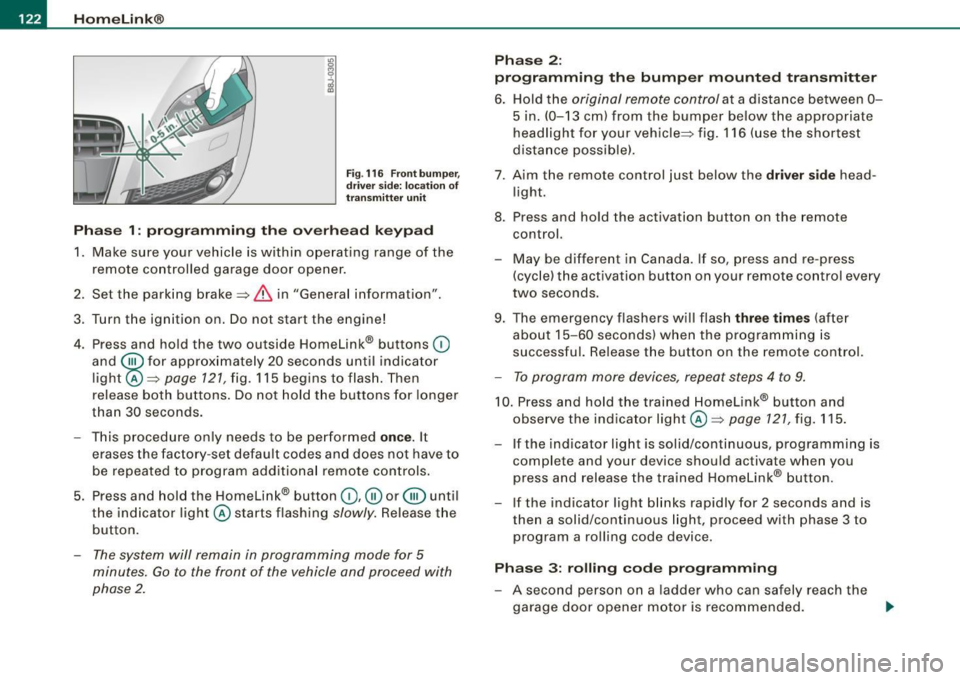
6. Hold the original remote control at a distance between 0-
5 in. (0-13 cm) from the bumper below the appropriate
headlight for your vehicle::::, fig.
116 (use the shortest
distance possible).
7 . Aim the remote control just below the driver side head
light.
8. Press and hold the activation button on the remote control.
- May be different in Canada. If so, press and re-press
(cycle) the activation button on your remote control every
two seconds.
9. The emergency flashers will flash three times (after
about
15-60 seconds) when the programming is
successful. Release the button on the remote control.
- To program more devices, repeat steps 4 to 9.
10. Press and hold the trained Homelink® button and
observe the indicator light @::::,
page 121, fig. 115.
If the indicator light is solid/continuous, programming is
complete and your device should activate when you
press and release the trained Homelink® button.
- If the indicator light blinks rapidly for 2 seconds and is
then a solid/continuous light, proceed with phase 3 to
program a rolling code device.
Phase 3: rolling code programming
- A second person on a ladder who can safely reach the
garage door opener motor is recommended.
~
Page 125 of 316
Home Link® -_______________ ___.
11. Locate the "learn" button on the garage door opener
motor (refer to the operating instructions for the opener,
as the locat ion of this button may vary by manufacturer) .
12 . Press and release the learn button on the garage door
opener motor .
- Note : once the button is pressed, there are 30 se cond s in
wh ich to initiate the next step.
13. On the Homelink ® keypad inside the vehicle, firmly
press and hold the Homelink ® button prev iously
programmed in phases 1 and 2 for two seconds and
release . Repeat th is seque nce twi ce.
- Some vehicles may require the press/hold/re lease
sequence up to three times to complete the training
p rocess.
HomeLink ® should now activate your rolling code
equipped device.
If the 5 minut e tim e lim it is exceeded, the e mer gency flasher s will
flash o ne tim e to indicate that the process has been terminated. In
th is case , re p eat st eps 4 through 9.
If the emergency flashers do not flash
three times (after about 15-
60 se conds) , programming was not successful. In thi s case , repeat
steps 4 through 9.
Remo te con trol uni ts for garage door openers in Canada are set to
stop transm itting radio frequency signals aft er two seconds . Th is
time may not be sufficient for the Homelink® system to learn the
rad io frequency signal. P erform a ll oth er steps as described
above. •
Contro ls and eq uip
ment
A pp lies to veh ic les: wi th Homelin k® un iversa l rem ote contr ol
Operating the Homelink ® transmitter
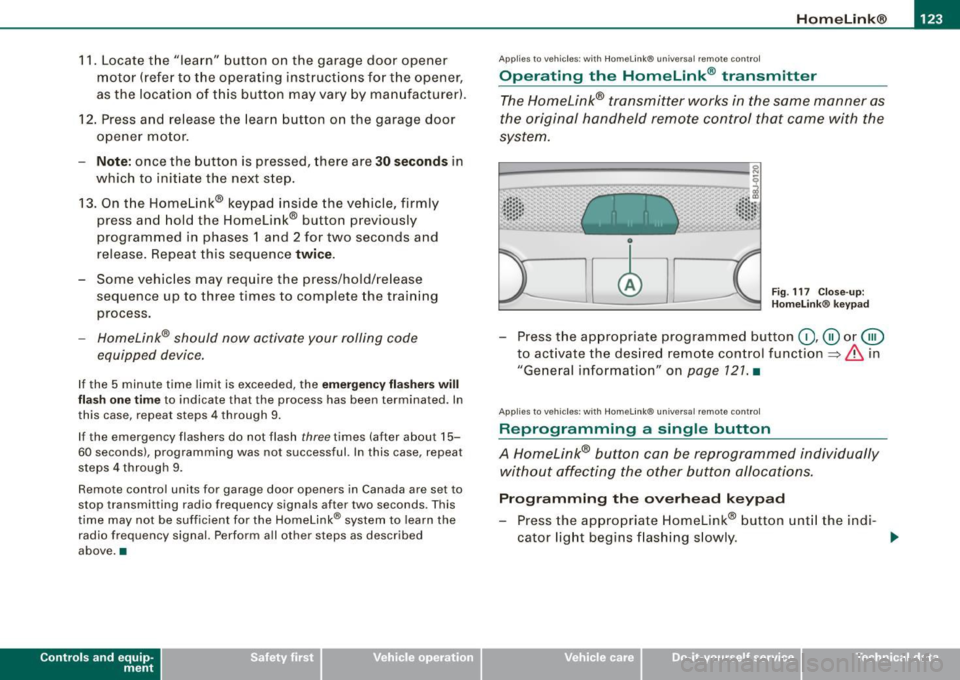
The Homelink® transmitter works in the same manner as
the original handheld remote control that came with the
system.
~ ---- -------- ..... --- --Jlil 9
al ..... .. Cl) .: :: : :: •• •• • .• 1 , .. .• .. .. .. .. ~
Fig . 117 C lose- up:
H ome link® key pad
- Press the appropr iate programmed button G) ,@ or @
to act ivate the des ired remote control function
~ & in
"General information " on
page 121 . •
A pplies to vehi cle s: w it h Homeli nk® univ ersa l re mote c ontro l
Reprogramming a single button
A Homelink® but ton can be reprogrammed individually
without affecting the other button allocations.
Progr amming th e ov erh ea d k eyp ad
- Press the appropriate Homelink® button unt il the ind i-
cator light begins flashing s lowly. _,.
Vehicle care I I irechnical data
Page 126 of 316
• .___H_ o_ m _ e _L_i _ n _k _® ____________________________________________________ _
Pr og ra mming th e bump er m ount ed tr ansmitt er
1. Hold the original remote control at a distance between 0-
5 in. (0 -13 cm ) from the bumper below the appropriate
headlight for your vehicle (use the shortest distance
poss ible).
2. Aim the remote control just below the
dr iver s ide head
l ight.
3. Press and hold the activation button on the remote control.
4. The emergency flashers will flash
three tim es (after
about
15-60 seconds) when the programming is
successful. Now release the button on the remote
co ntrol.
- If the dev ice utilizes a rol ling code, please f ollow phase 3
of ~
page 121, "Programming the Home Link® trans
m itter" for rolling code programming .
This pr oce dure w ill ca use the existing pr ogra mm ing on th e
H om eli nk® button to be eras ed ! •
A pplies to vehicl es: w ith H om eli nk® univ er sal re mot e con tro l
Erasing the programming of the HomeLink ®
transmitter
When you erase the programming, the programming on
all three of the transmitter channels with be lost!
- Perform steps 1 to 4 as described on~ page 122 , "Phase
1 : programming the overhead keypad".
When comp let ed, the Hom elink ® system will be in the program
ming mode and is then ready to learn the codes for remote
controlled devices.
[ i ] T ip s
• Programmed buttons cannot be erased ind ividua lly.
• For security reasons you are adv ised to erase the programming
of the Homelink ® system befo re you sell your vehic le. •
Applies to vehicle s: with Home link® univ er sa l re m ote con tro l
Information and accessories
If you wou ld like more information on Homelink ®, where to
pu rchase the Homelink ® compatib le products , or would li ke to
purchase the Homelink ® Home Lighting Package, please call tol l
free: 1 -800 -355 -3515.
[ i ] T ip s
• The Homelink ® universal transmitter complies with part 15 of
the FCC rules and RSS -2 10 of IC part 15. Operation is subject to th e
following conditions :
- this device may not cause harmful interference, and
- this device must accept any interference that may be received
including in terference that may cause undesired operation .
• Changes or modifications not express ly approved by the party
respons ible for compliance could void th e user 's authority to
operate the device (DOC : ISTC 1763 102 264 Pr ince MODEL/FCC ID :
CB2 V94800l. •
Page 131 of 316

________________________________________________ D_r_iv _ i _n_ g~ S_ a_ fe_ ly __ lllll
- Make sure that all lights and signals are operating
correctly.
- Make sure that the tire pressure is correct.
- Make sure that all windows are clean and afford good
visibility to the outside.
- Secure all luggage and other items carefully =>
page 95.
-Make sure that nothing can interfere with the pedals.
- Adjust front seat, head restraint and mirrors correctly for
your height.
- Instruct passengers to adjust the head restraints
according to their height.
- Make sure to use the right child restraint correctly to
protect children =>
page 168, "Child Safety".
- Sit properly in your seat and make sure that your passen
gers do the same=>
page 87, "General recommenda
tions".
- Fasten your safety belt and wear it properly. Also instruct
your passengers to fasten their safety belts properly
=>
page 137. •
What impairs driving safety?
Safe driving is directly related to the condition of the
vehicle, the driver as well as the driver's ability to concen
trate on the road without being distracted.
The driver is responsible for the safety of the vehicle and all
of its occupants. If your ability to drive is impaired, safety risks for everybody in the vehicle increase and you also
Controls and equip ment Safety first Vehicle operation
become a
hazard to everyone else on the road =>&, .There
fore:
- Do not let yourself be distracted by passengers or by
using a cellular telephone.
- NEVER drive when your driving ability is impaired (by
medications, alcohol, drugs, etc .).
- Observe all traffic laws, rules of the road and speed limits
and plain common sense.
- ALWAYS adjust your speed to road, traffic and weather
conditions.
- Take frequent breaks on long trips. Do not drive for more
than two hours at a stretch.
- Do NOT drive when you are tired, under pressure or when
you are stressed.
in. WARNING
Impaired driving safety increases the risk of serious personal
injury and death whenever a vehicle is being used. •
Vehicle care Do-it-yourself service Technical data
Page 132 of 316
___ D_ ri_v _i_n ..;::g:a.- S_ a_ f _e___, ly'---------------------------------------------------
Proper occupant seating positi ·ons
Proper seating position for the driver
The proper driver seating position is important for safe,
relaxed driving.
"' N
;
Fig. 118 The correct
distance between
driver and steering
wheel
Fig . 119 Correct head
restraint position for
driver
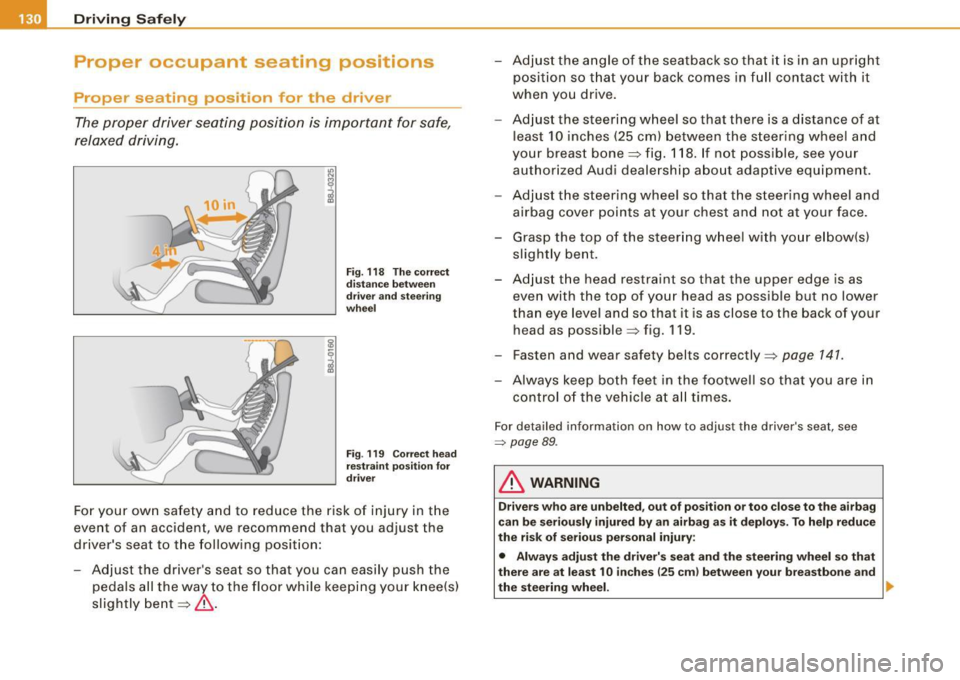
For your own safety and to reduce the risk of injury in the
event of an accident, we recommend that you adjust the
driver's seat to the following position:
- Adjust the driver's seat so that you can easily push the
pedals all the way to the floor while keeping your knee(s)
slightly bent=:>& . - Adjust the angle of the seatback so that it is in an upright
position so that your back comes in full contact with it
when you drive.
- Adjust the steering wheel so that there is a distance of at
least 10 inches (25 cm) between the steering wheel and
your breast bone=:> fig. 118. If not possible, see your
authorized Audi dealership about adaptive equipment.
- Adjust the steering wheel so that the steering wheel and
airbag cover points at your chest and not at your face.
- Grasp the top of the steering wheel with your elbow(s)
slightly bent.
- Adjust the head restraint so that the upper edge is as even with the top of your head as possible but no lower
than eye level and so that it is as close to the back of your
head as possible =:> fig . 119 .
- Fasten and wear safety belts correctly=:>
page 141.
- Always keep both feet in the footwell so that you are in
control of the vehicle at all times.
For detailed information on how to adjust the driver's seat, see
=> page 89 .
& WARNING
Drivers who are unbelted, out of position or too close to the airbag
can be seriously injured by an airbag as it deploys. To help reduce
the risk of serious personal injury:
• Always adjust the driver's seat and the steering wheel so that
there are at least 10 inches
125 cm) between your breastbone and
the steering wheel. ..
Page 139 of 316

Safety belts -----------------=-------
Safety belts
General notes
Always wear safety belts!
Wearing safety belts correctly saves lives!
This chapter explains why safety belts are necessary, how
they work and how to adjust and wear them correctly.
- Read all the information that follows and heed all of the
instruct ions and WARNINGS.
& WARNING
Not wearing safety belts or wearing them improperly increases
the risk of serious personal injury and death.
• Safety belts are the single most effective means available to
reduce the risk of serious injury and death in automobile acci
dents . For your protection and that of your passengers , always
wear the safety belts properly when the vehicle is moving.
• Pregnant women, injured, or physically impaired persons must
also use safety belts . Like all vehicle occupants, they are more
likely to be seriously injured if they do not wear safety belts . The
best way to protect a fetus is to protect the mother -throughout
the entire pregnancy. •
Number of seats
Your Audi TI Roadster has two seating positions. Each seating posi
tion has a safety belt.
Controls and equip ment Safety first
Vehicle operation
& WARNING
Not wearing safety belts or wearing them improperly increases
the risk of serious personal injury and death .
• Never strap more than one person, including small children,
into any belt. It is especially dangerous to place a safety belt over
a child sitting on your lap.
• Never let more people ride in the vehicle than there are safety
belts available.
• Be sure everyone riding in the vehicle is properly restrained
with a separate safety belt or child restraint. •
Safety belt warning light .4
Your vehicle has a warning system for the driver and front
seat passenger to remind you about the importance of
buck/ i ng-u p.
Before driving off, always:
Fig . 121 Safety belt
warning light in the
instrument cluster -
enlarged
- Fasten your safety belt and make sure you wear it prop-
erly.
1J,-
Vehicle care Do-it-yourself service Technical data
Page 140 of 316
___ S_a_ f_ e_ t-= y_ b_e_ l_ t _s _______________________________________________ _
- Make sure that your passengers also b uckle up and prop
erly wea r th eir sa fety belts.
Protect children wit h a child restraint system appropriate
for the size and age.
The warning light i in the instrument cluster lights up when the
ignition is switched on as a reminder to fasten the safety belts. In
addition , you will hear a warning tone.
After the ignition is switched on, the warning light in the instrument cluster will a lways come on for about 6 seconds and if the driver has
not fastened the safety belt, a warning tone will also sound for
about 6 seconds . As soon as the driver has fastened the safety belt,
the warning tone will stop and the warning light will go out .
If the driver or front seat passenger have not buckled -up within
about 10 seconds after the warning tone has stopped and the
vehicle is moving faster than about 15 mph, the warning tone will
sound again for about 6 seconds and then stop for 24 seconds and
then repeat this reminder sequence for a maximum of 2 minutes. At
speeds be low 5 mph, the warning tone will not sound.
Fa sten your safe ty belt and m ake su re that your p assengers also
properl y put on th eir s afet y belts .
& WARNING
• Safety belt s are the single mo st effective mean s available to
reduce th e risk of ser ious injur y and death in a utomobile acci
dent s. For your prote ction and th at of your pas senger s, alwa ys
c orre ctl y we ar safety belt s when t he vehicle is moving .
• Failure t o pay att ention to th e warning light that co me on,
c ould lead to per sonal injury .•
Why safety belts?
Frontal co11isions and the law of physics
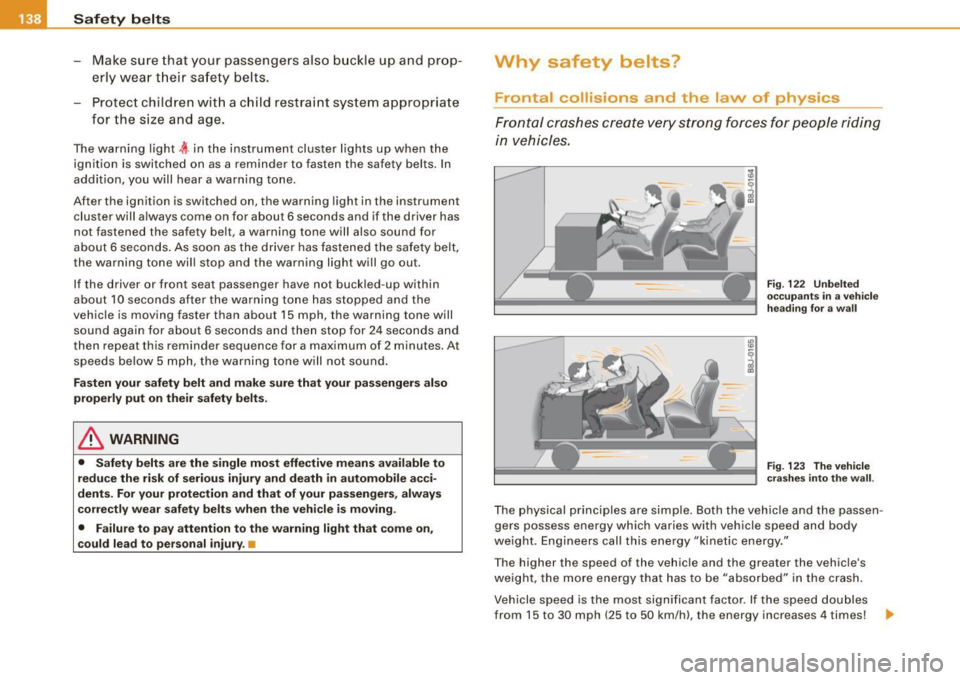
Front al crashes create very strong forces for pe ople riding
in vehicles.
F ig. 122 U nbel ted
o cc up ants i n a ve hicle
he ading for a wa ll
Fi g. 123 T he vehi cle
c ras hes in to t he wa ll.
The physical principles are simple. Both the vehicle and the passen
gers possess energy which varies with vehicle speed and body
we ight . Engineers cal l this energy "kinetic energy ."
T he higher the speed of the vehicle and the greater the vehic le's
we ight, the more energy that has to be "absorbed" in the crash .
Vehicle speed is the most significan t factor. If the speed doubles
from 15 to 30 mph (25 to 50 km/h), the energy increases 4 times! .,