2008 AUDI S8 mirror
[x] Cancel search: mirrorPage 86 of 404

Clear vision
Outside mirrors
The ou tside mirrors are electrically adjusted.
Adjusting the outside mirrors
Fig . 8 0 F orw ard
s e ction of drive r's
a rmre st: powe r m irror
c ontr ols
Turn the adjusti ng knob to position ©~ fig. 80 to adjust
t h e ou ts ide mir ror on t he d river's side .
- Tu rn the knob to posi tion
@ to adjust the outs ide m irror
on the passenger side.
- Press th e kno b in the appropr iate direct io n to move the
m irror surface so t hat you have a good view to the rear.
Folding both outside mirrors in flush
- T urn t he knob
to @ .
The mirror surfaces a re heated whenever you switch on the rear
window defogger in response to the outside temperature .
We recommend folding the outside mirro rs flat t o help when
parking your vehicle or when maneuvering in very tight spaces .
Tilting the passenger's side out side mirror
When you move the se lector lever into R (Reverse), the mirror on the
front passenge r's doo r (knob turned
to @ => fig. 80) w ill til t slight ly downward
. This make is easier for you to see the curb when you are
b acking in to a parking space.
T he mirror returns to its ini tial position as soon as reverse gear is
disengaged and vehicle speed is above about 9 mph (15 km/h). The
m irror also returns to its initia l position if the switch is moved to the
driver's outside mirror
(0 or Neutral @.
Memory setting for the outside mirrors
When the seat posi tion is saved in memory, the position of the
outside mirrors is saved at the same time
=> page 94 .
Automatic anti -glare for the outside mirrors
T he outside mi rrors dim at the same time as the inside mirror . When
t h e ignition is switched on, the mir rors au tomatical ly dim
depending on the amount of light strik ing the mirrors (such as head
l ights shining into the vehicle from the rear).
When you turn on the interior l ight, or when y ou mo ve the se lect or
l ever into
R (Reverse), the anti -g lare function stops and the mirrors
r eturn to their original condi tion (n ot dar ken ed).
0 Note
• Curve d (i. e . convex) mirror sur faces increase your field of view.
Remember that vehic les or other objects w il l appear smaller and
farther away than when seen in a fla t mi rror . If you use this mirror to
estimate distances of fol lowing vehicles when changing lanes, you
cou ld estimate incorrectly and cause an accident .
• I f the mirror housing is moved unintentional ly (for example,
while park ing your vehicle), then you must fi rst fo ld the mirror elec
trically . Do not readjust the mirror housing manually. You could
damage the motor which controls the mirro r.
[ i ] Tips
• I f there should be a malfunction in the elect rical system, you can
st ill adjust the outside m irrors by pressing the edge of t he mirror .
~
Page 87 of 404

• The automatic anti-g lare feature on the mirror wi ll not operate
proper ly if the light shining on the inside mirror is blocked by other
objects .•
Controls and equip
ment
Clea r vision
Page 96 of 404

Seats and storage
Seat memory
Driver's seat memory
The seat adjustment settings for four drivers can be
stored using the memory buttons in the driver's door.
Fig. 94 Driver's door:
Seat memory
In addition to the setting for the driver's seat, the settings for the
head restraints, safety belt height, steering column and both exte
rior mirrors can be stored .
Storing and recalling settings
Using the memory buttons 1, 2, 3 and 4, you can store and recall the
settings for four different
drivers => fig. 94.
The current settings are also automatically stored on the remote
control key being used when the vehicle is locked. When the vehicle
is unlocked, the settings stored on the remote control key being
used are automatically recalled. This function has to be activated in
MMI => page 95.
Turning seat memory on and off
If the [ ON/OFF I switch is depressed, the seat memory is inoperative.
The word
OFF next to the [ON /OFF ! switch illuminates.
All the stored settings are retained. We recommend using the
[ ON /OFF! switch and deactivating the seat memory if the vehicle is only going to be used
temporarily by a driver whose settings are not
going to be stored. •
Storing and recalling a seat position
Before you can store or recall your seat position, the
[ ON /OFF] button must be engaged (down).
Storing settings
-Adjust the driver's seat => page 87.
-Adjust the head restraint => page 91.
-Adjust the steering column => page 128.
-Adjust both outside mirrors=> page 84. In the tilt-down
position, the passenger mirror can be adjusted to the
preferred position and saved in the seat memory.
-Press the [SET] button and hold it down. At the same
time, press one of the memory buttons for at least one
second.
-Release the buttons. The settings are now stored under
the corresponding memory button.
Recalling settings
-Driver's door open - press the desired memory button .
-Driver's door closed - press the corresponding memory
button until the stored position is reached.
When the vehicle is locked, the current settings are stored and
assigned to the remote control key. But the settings stored on
memory buttons 1 to 4 are not deleted. They can be recalled at any
time. When the vehicle is
unlocked , the settings stored on the
remote control key are restored. .,_
Page 156 of 404

___ A_ u_d_ i _s _id _ e_ a_ s_ s_ is_t __________________________________________________ _
Audi side assist
Lane Change Assistant
Applies to vehicles: with side assist
Description
The side assist helps you when changing lanes.
I Audi AS J
Fig. 171 Rear bumper:
Position of radar
sensors (not visible on
outside)
Fig . 172 Signal light
on the outside mirror·
driver's side
Side assist uses radar sensors (not visible on outside) => fig. 171 to
help the driver check blind spots, and see what is happening in
traffic behind the
vehicle => page 155, fig. 174.
Signal lights are built into both outside
mirrors=> fig. 172. The
signal light on the left outside mi rror assists when moving over into the left lane and the signal light on the right outside mirror assists
when moving over into the right lane.
The signal light comes on to tell you that side assist has detected a
vehicle on that side and that the position of this other vehicle
should be taken into account if you were to change lanes. This is
called the
informational stage signal=> page 156. The informational
stage signal is designed so that you notice it only when you are
looking in the outside mirror.
When you activate the turn signal and side assist detects a vehicle
in a notable location, the corresponding signal on the outside
mirror flashes briefly and brightly several times. This is the
alert
stage signal
=> page 156. •
Applies to veh icles : with side assist
Activating and deactivating
-
Activating
Fig . 173 Cockpit : Side
assist button
- Press the~ fig. 173 button. The red indica tor on the
button lights up.
Page 157 of 404

Audi side assist -
----------------
Dea ctivating
Press the button again . The indicator l ight on the butto n
goes out .
The system can assist when driving on highways and secondary
roads . The system works only at speeds faster than 37 mph (60
km/h).
& WARNING
• Improper reliance o n the side assist s ystem can cause colli
s ions and seriou s pers onal injury:
- Ne ver rel y only on side a ssis t w hen ch anging l anes .
- Always che ck re ar view mirror s to make sur e that it i s safe to
c hange lane s.
• Side assi st cannot dete ct all vehicle s under all condition s
danger of accident!
• Side a ssist cannot detect vehicles in time to alert you when
they app roach from behind at very high speed , or fall drop b ack
very quickly.
• The radar sen sor's
vi sion ca n be redu ced or entirel y blo cked b y
rain , snow , and heavy spray . Thi s can result in side a ssis t not
a dequately dete cting veh icles or , in some cases , not detect ing
them at all . Always keep an eye on the direction you are traveling
and the relevant ar ea around th e vehi cle .
• Please note that side a ssis t indicate s th ere are approaching
vehi cle s, or vehi cle s in your bl ind spot , onl y after your vehicle has
reached a driving speed of at lea st 37 mph (60 km /h).
• Side as sist sign al doe s not work around t ight corner s (turning
radiu s less than 218 yard s, or 200
ml.
• Side a ssist is no repla cement for the driver's full attention . The
driver alone i s re spon sible for lane ch anges and similar driving
maneuver s. Always k eep an eye on the d ire ction you are tr aveling
and the relevant area around the vehi cle .
Controls and equip ment
0 Note
• To ensure that you do not adverse ly affect s ide assist, do not
b lock the area on the rear bumper where the radar sensors are
located with foreign objects (suc h as stickers or bicycle racks).
• Make su re that the signal light on the outside mirror is not
b locked by stickers or other items.
[ i ] Tip s
• Side ass ist automatically deactivates if it detects that the radar
sensors are
blocked => page 167. The indicator light on the button
goes out.
• The area on the bumper where the radar sensors are located
must consistently re main free of snow, ice, and heavy so iling so that
side assist can function properly. Follow the additiona l notes on
=> page 761.
• Additiona l tinting on the front side windows can make it harder
to see and correct ly understand the s ignal light on the outside
mirror. •
Applies to veh ic les: with side ass ist
Sensor detection area
Fig . 17 4 Schem atic
illu stratio n: Senso r
det ection ar ea
.,.
Page 158 of 404

___ A_ u_ d_ i_s _i_d _e_ a_ s_ s
_ is_ t __________________________________________________ _
The detection ~ page 155, fig. 174 of the radar sensor detection
area is made up of:
• the approach area (light green area)
G), about 55 yards (50 m)
behind the vehic le, and
• the "blind spot" (dark green
areal@.
The radar sensors cover the adjacent left and right lanes. Other
lanes are
not covered by the radar sensors.
[ i] Tips
S ide ass ist does not measure actual lane width. The system
assumes a fixed lane width. Detection in the left and right lanes is
based on this assumed lane width . When driving on narrow roads or
when driving to the left or right of the center of a travel lane, it is
possible that vehicles wi ll be detected that are
not in the lane next
to the lane you are
using~ page 160 . •
Applies to vehicles: with side assist
Operation
Side assist compares the distance and difference in speed of
detected vehicles with the speed of your vehicle . Whenever the
difference in speed and distance is registered as notable if you were
to change lanes, a signal light appears on the respective m irror.
The signal can light up if you are passed by a vehicle or if you are
passing another vehicle.
If you pass another vehicle slowly (difference in speed less than 9
mph, or
15 km/h), the signal light will come on as soon as the other
vehic le is in your b lind spot and is detected by side assist . When the
difference in speed is greater, the signal light wil l not come on.•
Applies to vehi cles: with side assist
Informational and alert stage signals
Side assist has two signa l stages:
• the informational stage signal, and
• th e alert stage signal.
Side assist helps you by using the appropriate signa l stage,
depending on whether or not you have activated the turn signal,
and thus have indicated that you are or are not changing lanes.
Informational stage signal
As long as you have not activated the turn signa l, side assist informs
you of detected vehicles that are registered as being in a notable
location if you were to change lanes. Whenever the detected
vehic le 's difference in speed and distance is registered by side
assist as notable, the signa l light on the respective mirror produces
muted il lumination .
The brightness of the informationa l stage signa l is designed not to
be as intense, so that it does not interfere with your view of the road
when you are driving and have no intention of changing lanes.
When you look in the outside mirror, you can clearly see the infor
mational stage signal.
Alert stage signal
When you ac tiva te the turn signal, and side assis t has detected a
vehic le in a notable location on that particular side, the signal light
on this side mirror flashes brightly. The repeated brief and bright
flashing of the alert stage signal reminds you to careful ly check
traffic to the rear in the outside mirror and over your shou lder, so
that you can safe ly complete the lane
change~ & in "Safety tips"
on page
161.
[ i] Tips
The brightness of the signal light on the outside mirrors can be
adjusted with the MMI
~ page 159. •
Page 159 of 404
_________________________________________________ A_ u_ d_ i _s _i_
d _e _ a_s_ s_ i_ s _t _ __._
Ap plies to vehicle s: with side assist
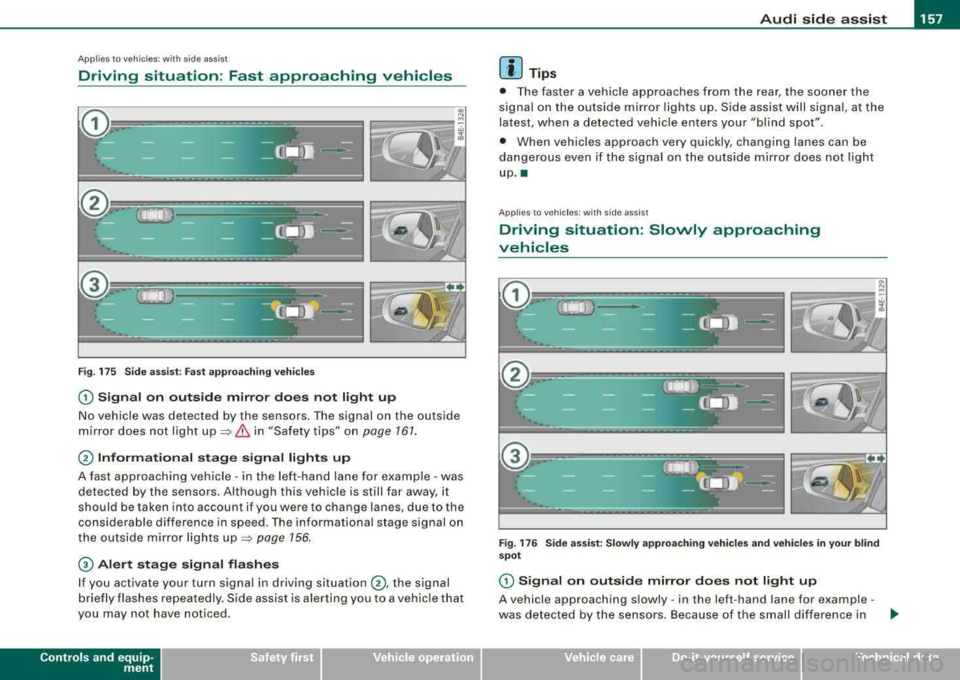
Driving situation: Fast approaching vehicles
Fig. 175 S ide ass ist: Fast a ppro achi ng ve hicles
G) S ig nal on outside mirror do es not l ight up
No vehicle was detected by the sensors. The signal on the outside
m irror does not ligh t
up ~ & in "Safety tips" on page 161.
@ Informational stag e s ignal lights up
A fast approaching vehicle -in the left-hand lane for example -was
detected by the sensors. Although this vehic le is still far away, it
should be taken into account if you were to change lanes, due to the
considerable difference in speed. The informational stage signal on
the outside mirror lights
up ~ page 156 .
© Alert stage signal flashe s
If you activate your turn signal in driving situation @, the signal
b riefly flashes repeatedly. S ide assist is alerting you to a vehicle that
you may not have not iced .
Contro ls a nd eq uip
ment
[ i ] Tips
• The faster a vehicle approaches from the rear, the soone r the
signal on the outside mirror lights up. Side assist will signal, at the
latest, when a detected vehicle enters your "bl ind spot".
• When vehicles approach very quickly, changing lanes can be
dangerous even if the signa l on the outside mirror does not light
up .•
Ap plies to veh ic les: with side ass ist
Driving situation : Slowly approaching
vehicles
F ig . 1 76 Side a ssist: Slowly a pproa ching v ehi cle s and v ehi cle s in y our b li nd
spot
G) Signa l on out side mirror doe s not light up
A vehicle approaching s lowly -in the left-hand lane for example -
was detected by the sensors . Because of the small differe nce in .._
Vehicle care I I irechnical data
Page 160 of 404

___ A_ u_d_ i _s _id _ e_ a_ s_ s_ is_t __________________________________________________ _
speed and the considerable distance from your vehicle, the signal
on the outside mirror will not light
up::::> & in "Safety tips" on
page 161 .
0 Informational stage signal lights up
The distance between your vehicle and that of the slowly
approaching vehicle has narrowed. The informational stage signal
on the outside mirror lights up .
As soon as the difference in speed and distance is registered as
notable if you were to change lanes , a signal on the mirror lights up.
Side assist will signal at the latest when a detected vehicle enters
your "blind spot".
© Alert stage signal flashes
If you activate your turn signal in driving situation 0 , the signal
light briefly flashes repeatedly. Side assist is alerting you of a
vehicle that you may not have noticed .
[ i J Tips
• The faster a vehicle approaches from the rear, the sooner the
signal on the outside mirror lights up . Side assist will signal , at the
latest, when a detected vehicle enters your "blind spot".
• When vehicles approach very quickly, changing lanes can be
dangerous even if the signal on the outside mirror does not light
up.•
App lies to vehi cles : wi th side assist
Driving situation: Vehicles dropping back
slowly
Fig. 177 Side assist: Vehicles dropping back slowly
(D Signal on outside mirror does not light up
The vehicle that you passed has not yet been detected by side assist.
The signal on the outside mirror does not light
up::::> & in "Safety
tips" on
page 161.
0 Informational stage signal lights up
A vehicle dropping back slowly on the right (difference in speed of
less than 9 mph, or 15 km/h) has been detected by side assist. The
informational stage signal on the outside mirror lights up.
© Alert stage signal flashes
If you activate your turn signal in driving situation 0, the signal
briefly flashes repeatedly. Side assist is alerting you of a vehicle tha t
you may not have noticed. •