2008 AUDI S6 ESP
[x] Cancel search: ESPPage 109 of 390
![AUDI S6 2008 Owners Manual ________________________________________________ S_e_ a_ ts_ a_ n_d _ s_t _o _r_ a ....; g::;. e _ __._
0 Note
To avoid damaging the socket, only use plugs that fit properly.
[ i] Tips](/manual-img/6/57596/w960_57596-108.png "AUDI S6 2008 Owners Manual ________________________________________________ S_e_ a_ ts_ a_ n_d _ s_t _o _r_ a ....; g::;. e _ __._
0 Note
To avoid damaging the socket, only use plugs that fit properly.
[ i] Tips")
________________________________________________ S_e_ a_ ts_ a_ n_d _ s_t _o _r_ a ....; g::;. e _ __._
0 Note
To avoid damaging the socket, only use plugs that fit properly.
[ i] Tips
When the engine is off and accessories are still plugged in and are
on, the vehicle battery can still be drained. •
Storage
General overview
There are numerous places to store items in your vehicle.
Glove compartment
Storage compartment in roof
Coat hooks
Storage compartment in the trunk
& WARNING
~ page 107
~ page 108
~ page 109
~ page99
• Always remove objects from the instrument panel. Any items
not stored could slide around inside the vehicle while driving or
when accelerating or when applying the brakes or when driving
around a corner.
• When you are driving make sure that anything you may have
placed in the center console or other storage locations cannot fall
out into the footwells. In case of sudden braking you would not be
able to brake or accelerate.
• Any articles of clothing that you have hung up must not inter
fere with the driver's view. The coat hooks are designed only for
lightweight clothing. Never hang any clothing with hard, pointed
or heavy objects in the pockets on the coat hooks. During sudden
Con tro ls and eq uip
ment
& WARNING !continued)
braking or in an accident -especially if the airbag is deployed -
these objects could injure any passengers inside the vehicle. •
Glove compartment
The media player is in the glove compartment.
To open glove compartment
Fig. 104 Unlocking
button for glove
compartment
Press the button ::!}...--==> fig. 104 (arrow) - the lid opens
automatically.
To close glove compartment
Push the glove compartment lid up until the lock
engages.
In the glove compartment lid you will find a place to store a pen and
a pad of paper.
CD changer*
The CD changer for the radio system and the Navigation drive* is located in the glove compartment . How to change CDs is described
in the pertinent Owner's Manual.
tJ,,,
Vehicle care I I irechnical data
Page 113 of 390

Warm and cold -
----------------
energy are temporarily cut bac k or switched off~ page 265 .
Hea tin g sys tems in particu lar requi re a g rea t dea l of energy. If yo u
not ice, for example, that the seat * or rear w indow heating is not
heati ng, they have bee n tempora rily cu t bac k or switche d off by
energy management . These systems are avai lable a gain as soon as
the energy balance has been resto re d.
& WARNING
Reduced visibility is dangerous and can cause accidents .
• For safe driving it is very important that all windows be free of
ice , snow and condensation.
• Completely familiarize yourself with the proper use and func
tion of the heating and ventilation system and especially how to defog and defrost the windows .
• Never use the windshield wiper /washer system in freezing
weather until you have warmed the windshield first , using the
heating and ventilation system. The washer solution may freeze
on the windshield and reduce visibility.
0 Note
• I f you suspect that the air conditioner has been damaged, turn
on ECO N and con tac t an authori ze d Aud i deale r to hav e the system
inspected .
• R epairs to the A udi air co nd it io ner requ ir e sp ecia l te chni cal
know ledge and special tools . Contact an authorized Audi dealer for
assista nce .
[ i J Tips
• Kee p th e air in ta ke s lots (in fron t of the w inds hield) free from i ce,
snow and debris in order to maintain the proper function of the
cl im ate c ontro l sy ste m.
Controls and equip
ment
• Air escapes through vents under the rear window . When p lacing
i te ms of c lothing on the luggage c ompartme nt c over, e nsu re th at
the openings are not covered .
• Climate c ontro l wor ks mo st e ffec tively if th e windo ws and the
power roof are c losed . However, if the interior of a parked vehicle is
e xt re me ly hot fro m the sun's rays , briefly open ing the windows can
speed up the cooling process .•
I • •
Page 132 of 390
![AUDI S6 2008 Owners Manual • .___O_ n_ t_ h_ e_ r_ o_ a_d ____________________________________________________ _
[ i] Tips
• You can apply the parking brake at any time - even with the igni
tion turned](/manual-img/6/57596/w960_57596-131.png "AUDI S6 2008 Owners Manual • .___O_ n_ t_ h_ e_ r_ o_ a_d ____________________________________________________ _
[ i] Tips
• You can apply the parking brake at any time - even with the igni
tion turned")
• .___O_ n_ t_ h_ e_ r_ o_ a_d ____________________________________________________ _
[ i] Tips
• You can apply the parking brake at any time - even with the igni
tion turned off. The ignition must be turned on in order to release
the parking brake .
• Occasional noises when the parking brake is applied and
released are normal and are not a cause for concern .
• The parking brake goes through a self -test cycle at regular inter
vals - when the vehicle is parked . Any associated noises are
normal. •
Parking
To prevent a parked vehicle from rolling away, there are a
few things you should do.
When you park your vehicle, do the following
- Stop the vehicle using the brake pedal.
- Pull the switch to apply the electromechanical parking
brake.
- Move the selector lever into the
P position ~& .
- Switch off the engine and remove the ignition key from
the ignition lock.
When you park your vehicle on hills, do the
following - Stop the vehicle using the brake pedal.
- Pull the switch to apply the electromechanical parking
brake.
- If you are parking headed downhill, turn the front wheels
toward the curb. - If you are
parking headed uphill, turn the front wheels
awayfrom the curb.
- Move the selector lever into the P position .
- Switch off the engine and remove the ignition key from
the ignition lock.
& WARNING
This is how you can reduce the risk of injury when leaving your
vehicle.
• Never park the vehicle where it can come in contact with dry
grass, spilled fuel or any other flammable materials.
• When parking on hills, always turn the wheels so that the front
wheels will first roll into the curb, if the vehicle should start to roll.
• Never allow anyone -especially small children -to remain in the
vehicle when it is locked. Locked doors make it more difficult for
rescuers to access the passenger compartment in the event of an
emergency. Danger to life!
• Never leave children unsupervised in the vehicle. Children
could release the parking brake or move the gearshift lever out of
gear. The vehicle could start to roll away and cause an accident.
• No matter what the season is, the temperature in a parked
vehicle can reach dangerous levels.
0 Note
• Please exercise care when you park your vehicle in parking areas
with parking barriers or curbs. Parking barriers and curbs vary in height and could damage your bumper and related components as
the front of your vehicle moves over a barrier or curb that is too
high, as you park or as you back out of a parking spot. In order to be
sure that no such damage can occur, you may wish to stop short of
having the front tires of your car touch the parking barrier or curb . ..,_
Page 135 of 390

On the road -
----------------
The display=> page 132, fig. 128 will show the set speed . The
display may vary depending on the type of disp lay in your vehicle .
The indicator light
CRU ISE (US model) I (')0 (Canadian mode l) wi ll also
light up in the instrument cluster.
The speed is kept constant via an engine output adjustment or active brake intervention .
_& WARNING
• Always pa y attent ion to traffic even whe n the crui se control is
switc hed on. You are alw ays r esp onsi ble for your speed and the
di sta nce b etween your vehi cle and other vehi cle s.
• For s afet y reason s, the crui se control should not be u sed in the
c ity , in stop- and-go traffic , on twi sting roads and when road condi
t ion s a re p oor (s uch a s ice , fo g, gra vel , he avy ra in and h ydro
planing ) - risk of accident.
• Turn off the crui se control tempor arily when e nte ring tu rn
lan es, highway exit lanes or in constru ction zone s.
• Plea se note that in adv ertentl y "re sting " yo ur foot on the accel
erator ped al cau se s the cruise control not to brake . Thi s is b ecau se
the crui se control i s overridden b y the dri ve r's acc eleration .
[ i] Tips
The brake lights il luminate as soon as the brakes decelerate
automatically .•
Ap plie s to v ehicl es: w it h c ruise contro l
Changing speed
-Press lever© in the 0 or O directi on => page 132,
fig. 127 t o in crease or d ec reas e your spe ed.
- Re lease the lever to s ave tha t speed.
Controls and equip
ment Change speed in increments of 1 mph (1 km/h) by
lightly pressing
the lever . If you keep the lever pressed down, you will a lter your
speed in 5 mph (10 km /h) increments .
You can a lso press the acce lerator pedal down to increase your
speed, e.g. if you want to pass someone. The speed you saved
earlier will resume as soon as you release the accelerator pedal.
If , however, you exceed your saved speed by 5 mph (10 km/h) for
longer than 5 minutes, the cruise control will turn off temporarily .
The symbol wi ll go ou t bu t the saved speed wi ll be retained. •
Applie s to v ehic le s: with c ruise cont ro l
Presetting your speed
You can prese t your desire d speed while the vehicle is not
moving.
- Turn o n the ignition .
Pu ll lever © into posit ion
G) => page 13 2, fig. 127 .
Press the lever in the
0 or O direction to increase or
decrease your speed .
- Release the lever to save that speed .
This function makes it possible, for example, to save the speed you
want before driving on the highway. Once on the highway , activate
the cruise contro l by pu lli ng the lever toward
G) . •
Ap plies to ve hic les: with c ruise contro l
Switching the system off
Temporary dea ctivation
- Press the brake pedal, or
I • •
Page 138 of 390

• .___A_ d_ a_ p =- t_iv _ e _ C_ r_u _is_ e_ C _ o_ n_ t _r _o_ l --------------------------------------------
& WARNING (continued)
• Always turn off Adaptive Cruise Control when entering turn
lanes, highway exit lanes and construction zones or similar situa
tions because the vehicle will automatically accelerate to the
stored speed.
• Never rest your foot on the accelerator pedal, especially when
the Adaptive Cruise Control is being used because doing so will
override the braking function and prevent the brakes from being
applied by the system when it detects a situation when the brakes
must be applied.
• Always remember that the Adaptive Cruise Control has limits -
it does not react when you drive towards an obstacle or some
thing else on or near the road that is not moving, such as vehicles stopped in a traffic jam, a stalled or disabled vehicle .
• Always remember that the Adaptive Cruise Control cannot
detect a vehicle that is driving towards you in your traffic lane and
that it cannot detect narrow vehicles such as motorcycles and
bicycles .
[ i) Tips
• For safety reasons, the stored speed is deleted when the ignition
is turned off.
• The Electronic Stabilization Program (ESP) and the Anti -Slip
Regulation (ASRl cannot be deactivated when the Adaptive Cruise
Control is switched on. If the ESP and the Anti -Slip Regulation (ASRl
has been deactivated and you then switch on the Adaptive Cruise
Control, the ESP function will also be activated automatically.
• Damage caused by accidents (e.g. if the vehicle is damaged
when parking) can affect the radar sensor settings. This can cause
the system to malfunction or switch off completely.
• The radar sensor cover is heated. In winter conditions, you
should still check before driving to make sure it is free of ice and
snow. If necessary, clean the area near the radar sensor carefully
=>
page 135, fig. 129. • To
ensure that the radar sensor is not blocked, foreign objects
(e.g. stickers, larger license plate mounts, add -on parts) must not
cover the area near the radar sensor=>
page 135, fig. 129. The area
near the radar sensor must not be painted, either. •
Applies to veh ic les: with Adaptive Cruis e Contro l
How does Adaptive Cruise Control work?
Vehicles traveling ahead are detected with the aid of a
radar sensor.
Fig. 130 Radar sensor
measurement range
A radar sensor is built into the front of the vehicle=> fig. 130. The
system is intended to measure the distance to reflective surfaces. If
a measurement is not possible, the system does not respond.
Open road
When the road is clear, the Adaptive Cruise Control works like cruise
control. It maintains a constant target speed specified by the driver.
Driving in traffic
If a vehicle driving ahead is detected, the Adaptive Cruise Control
decelerates (within the limits of the system)=>
page 146, "Driver
intervention prompt" and=>
page 147, "System limitations" to its
speed and after adjusting, tries to maintain the set distance from
the vehicle ahead. The vehicle may temporarily drive slower than
the set speed while adjusting=>
& in "Description" on page 135. .,
Page 143 of 390
_____________________________________________ A_ d_a ...: pc.. t _i_ v _e_ C_ ru_ is_ e_ C_ o_n_ t_ r_ o _ l __ llllll
Distance at 25 mph (40
km/hi
Distance at 50 mph (80
km/hi
Distance at 75 mph (120
km/hi
- -
DISTANCE 1 DISTANCE 2
36 Feet (11 Meters) 46 Feet (14 Meters)
72 Feet (22 Meters) 95 Feet (29 Meters)
108 Feet (33 Meters) 144 Feet (44 Meters)
DISTANCE 3 DISTANCE 4
66 Feet (20 Meters) 82 Feet (25 Meters)
131 Feet (40 Meters) 167 Feet (51 Mete rs)
197 Feet (60 Meters) 249 Feet (76 Meters)
-
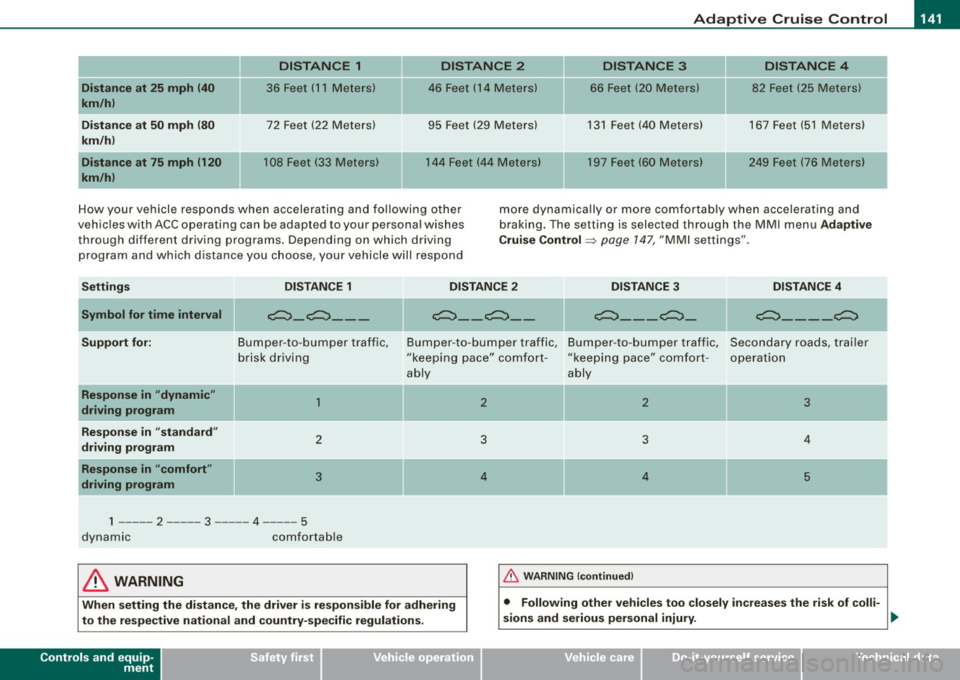
How your vehicle responds when accelerating and following other
vehicles with ACC operating can be adapted to your personal wishes
through different driving programs. Depending on which driving
program and which distance you choose, your vehicle will respond more
dynamically or more comfortably when accelerating and
braking. The setting is selected through the MMI menu Adaptive
Cruise Control =>
page 147, "MMI settings".
Settings DISTANCE 1 DISTANCE 2 DISTANCE 3 DISTANCE 4
-
---
Symbol for time interval
Support for:
-Response in "dynamic"
driving program
Response in "standard"
driving program
Response in "comfort"
driving program
-
e:::::::}_e:::::::} ___
Bumper -to -bumper traffic,
brisk driving
1
2
3
1 ----- 2 ----- 3 ----- 4 -- 5
dynamic comfortable
II
e:::::::}_ - e:::::::}_ -e:::::::} _ - - e:::::::} _ II e:::::::}_ - - _e:::::::}
Bumper
-to -bumper traffic, Bumper -to -bumper traffic, Secondary roads, trailer
"keeping pace" comfort -"keeping pace" comfort -
operation
ably ably
-
2 2 3
3 3 4
4 4 5
& WARNING 1-&_ !_ W_A_ R _N _IN _ G_ (c_o _nt _in _ u_ e _d _ l ------------------1
When setting the distance, the driver is responsible for adhering
to the respective national and country-specific regulations.
Controls and equip
ment • Following other vehicles too
closely increases the risk of colli-
sions and serious personal injury.
~
I • •
Page 148 of 390

• ..__A_ d_a...: p:,..._ ti_v _ e_ C_ ru_ is_ e_ C_ o_n_ t_ r_ o _ l ___________________________________________ _
The ACC sensor is located in the area under the front license plate .
If there is a loss of opera tion d ue to heavy contam ination, this area
should cleaned to restore proper operation.
E PB activatio n
The text message EPB activation appears if emergency braking was
manual ly initia ted with the Electromechanica l Parking Brake (EPB).
The Adaptive Cruise Contro l is turned off. This is accompanied by a
wa rning tone .
ESP activa tio n
The tex t message ESP activat ion appears i f the Elec tronic Stabil iza
tion Program (ESP) has intervened. In this case the Adaptive Cruise
Contr ol is a utomat ical ly turned off . This is accompanied by a
warning tone.
Speed
The set speed in mph (Canada km/h) a lways appears when saving or
cha nging the speed in Adaptive c ruise control =>
page 137, "How is
the speed stored?" and=>
page 138, "Changing stored speed".
Speed range
The text message Speed r ange appears if the current speed is too
low
to set or to hold the requested speed .
When setting a desired speed, it must be at least 20 mph (30 km/h).
At speeds below 12 mph (20 km/h), the cruise control is turned off .
In speeds
over 95 mph (150 km/h), the system remains active and
resumes the speed of 95 mph (150 km/h) if the driver removes the
foot from the accelerator .
Selector lever position!
The text message Selector lever po sition! appears when the
selector lever is moved to position N. In this position, Adaptive
Cruise Control is not ava ilable .•
App lies to vehic les: w ith Ad apt ive Cruise Contro l
Driver intervention prompt
The driver intervention promp t calls on the driver to take
over the situation.
F ig . 140 I nstru ment
c lu ster: Dri ver int er
v ention prompt
In cer tain situati ons, the braking power of t he Adaptive cruise
control is not sufficient to maintain an adequate distance from the
object ahead. In this situation, the Adap tive cruise contro l ca lls on
you as the driver to take action.
The
driver intervent ion prompt a lerts you visual ly and audibly.
• A red vehicle is shown in the instrument c luster disp lay
=> fig. 1 40 .
• The tex t
DISTANCE! appears in the sta tus line.
• The indicator light
,;:::::,11 .. ,;:::::, in the speedometer b links red.
• An warning tone sounds .
[ i ] Tips
• I f the Adaptive cruise control initiates braking, the hydraul ic
brake system is under pressure. Therefore, the brake peda l distance
is shorter and the pedal "feels" harder.
• Adaptive Cruise C ontro l is switched off af ter pressing the foot -
brake. The speed
saved up this point can be resumed. _,,,
Page 152 of 390
-L_!_A~u~d:!!i~la~n~e :...a ~ s~s ~i s ~t _______________________________________________ _
Audi lane assist
Lane assist
Applies to vehic les : w ith lane assist
Description
Lane assist helps you keep your vehicle in your lane.
Lane assist uses a camera to detect lane boundary lines. If the
system detects that your vehicle is about to leave a lane boundary
line, the steering wheel
vibrates to alert the driver . If lane assist
de tects boundary lines on both sides of the vehicle's lane, the
system enters active standby mode, which is indicated by the green
indicator light /: on the instrument cluster.
If the system is in active standby mode and the turn signal is acti
vated before driving over the boundary line, the warning does not
occur since the system allows for intentional lane changes.
The system is designed for driving on freeways and expanded high
ways and thus works only at speeds of 40 mph (65 km/h) or more.
& WARNING
• Lane assist will not keep your vehicle in your lane. The system
only warns the driver when the vehicle is leaving the lane . The
driver is always responsible for keeping the vehicle in the lane .
• The camera is not able to detect all lane boundary lines and in
some cases might also detect lane structures or objects as
boundary lines . This can lead to incorrect warnings or warnings
that fail to go off at all.
• The camera's visibility can be impaired by vehicles ahead of
you , for instance, or by rain, snow, heavy spray or light shining into
the camera lens. This can cause lane assist to fail to detect
boundary lines. •
Applies to veh icle s: with lane assi st
Activating and deactivating
Fig . 147 Turn signal
le ve r: Lane assist
button
Fig . 148 Windshield:
Lane assist camera
viewing window
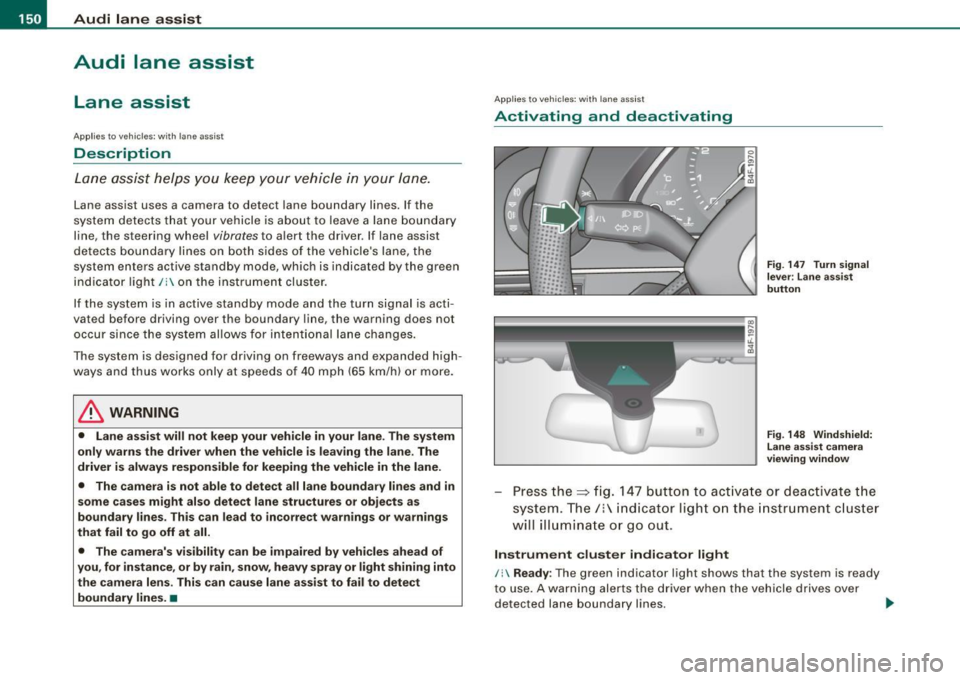
Press the=> fig. 147 button to activate or deactivate the
system. The/: indicator light on the instrument cluster
will illuminate or go out.
Instrument cluster indicator light
/: Ready : The green indicator light shows that the system is ready
to use. A warning alerts the driver when the vehicle drives over
detected lane boundary lines. -.,