2008 AUDI S6 lights
[x] Cancel search: lightsPage 82 of 390

Clear vision
• Always check that the wiper blades are not frozen to the glass
before you turn the wipers on. Loosen a wiper blade which is frozen
in place before operating the wipers to prevent damage to the wiper
blade or the wiper motor.
• Do not use the wipers to clear a frosted window. Using the
wipers as a convenient ice scraper will destroy the wiper blades.
• Before you take your vehicle to an automatic car wash, make sure
you have the windshield wiper system switched off (lever in position
Ol, otherwise the windshield wiper system could get damaged in the
car wash if it should suddenly come on .
[ i ] Tips
• The rain sensor is part of the interva l wiping system. Turning off
the ignition will also deactivate the rain sensor . To reactivate the
sensor, switch off the interval wiping function, then switch it back
on again.
• Worn or dirty windshield wiper blades cause smearing which
can affect the operation of the rain sensor. Check the condition of
your windshield wiper blades regularly.
• Make sure the washer fluid reservoir in the engine compartment
is topped off before going on a long trip. Look up~
page 312for
checking and filling the washer container .•
App lies to vehic les: w ith head light washer system
Headlight washer system
The headlight washer system cleans the headlights.
-Operate the windshield wiper/washer system~ page 78,
fig. 69
® with the headlights turned on by holding the
lever for longer than one second.
The washer jets extend forward out of the front bumper driven by
water pressure to spray the front headlights with water. You should inspect the headlights regularly (for example when refu
e ling) and c lean off any so lid dirt or insects from the lenses.
To ensure the system works properly in winter, keep the washer jets
free of snow and remove any ice using a de -icing spray. •
Service position
The wiper blades can only be changed in the service posi
tion.
Fig . 70 MMI display:
Windshield wipers
At below freezing outside temperatures, make sure first
that the wiper blades are not frozen to the windshield .
Press the
I CAR] function button.
- Select Windshield wipers. The Windshield wipers menu
appears~ fig. 70.
Select Service position on to turn the service position on
or
off to return the windshield wiper to its original posi
tion.
You must only attempt to change the wiper blades when the service
position is activated. This way, when you are working on the wind
shield wipers, you can avoid damaging the paint on the engine
hood.
~
Page 84 of 390

Clear vision
& WARNING
Be sure to in sp ec t the cond it ion of y our wiper bl ad es regul arl y. See
y our authorized Audi deale r for repla ceme nt bl ade s.
0 Note
To prevent damage to the wiper sys tem:
• Always loosen blades which are frozen to the windshield before
operating wipers.
• Do not use gasoline, kerosene , paint thinner, or other solvents on
or near the wiper blades .
• Do not attempt to move the wipers by hand .
• The windshield wiper blades must only be replaced when in the
service position ~
page 80! Otherwise, you risk damaging the paint
on the hood or the windshield wiper motor.
[ i ] Tips
Commercial hot waxes app lied by au tomatic car washes affect the
cleanability of the windshield. •
Mirrors
Manual anti-glare adjustment
Standard setting
Move the small lever (located on the bottom edge of the
mi rror) to the fron t.
Anti-glare setting - Move th e sma ll leve r (located on the bottom edge of th e
m irror) to the rear. •
App lies to vehicles: with aut omat icall y dim ming in side mirro r wi th d igit al c om pass
Automatically dimming inside mirror
The automatic dimming function can be turned on and off
if required.
Disabling auto dimming
F ig . 73 Inside rea r
view mi rror
Press button @~ fig . 73 briefly , - the g reen ind icat or
ligh t® goes ou t.
A ctivating /reactivating auto dimming
- Press button @ briefly, -the green indicato r light ®
goes on.
Automat ic dimming fun ction
The automatic dimming function is activated every time the ignition
is turned on. The green indicator light is lit to ind icate auto dimming
is active.
When dimm ing is activated, the inside mirror will darken
automati
cally in response to the amount of light striking the mirror (such as
headlights from rearwa rd approaching vehicles}. Even in dimm ing
mode , the mirror surface turns bright when :
• the interior light is switched on
• reverse gear is engaged .
Page 85 of 390

& WARNING
The glass of the in sid e re ar view mirror is lay ered and contain s an
e lectrolyte to achieve it s propertie s. Be aware of liquid electr olyte
l e aki ng from a broken mi rror gl ass. This liqui d can cause irritation
to skin , eyes , and re spir ator y system . If you get electrolyte in your
eye s or on your skin , i mm ed iatel y rinse wi th plenty of w ater.
If irri
ta tion per sists , se ek medi cal attention .
0 Note
Liquid electrolyte leaked from a broken mirror glass wi ll damage any
p lastic sur faces it comes in contact with. Clean up spilled electrolyte
immediately with clear water and a sponge.
[ i ] Tip s
• If you sw it ch off the automati c dimming fun ction on the ins ide
mirror , automatic dimming of the out side mirror s will likewise be
disabled .
• Check to make sure there are no objects preventing ligh t from
reaching the inside mirror.
• Do not a ttach any stickers to the windshield in front of the light
sensor, as this wou ld interfere with the automatic operation of the
headlights and the automatic dimm ing of the inside m irror.
• Be aware that automatic dimming of the inside mirror can on ly
operate properly if the rear window sun blind* is retracted. •
Contro ls and eq uip
ment
Clear vision
Outsid e mirrors
The outside mirrors are electrically adjuste d.
Adjusting the outside mirrors
Fig. 74 F orwa rd
s e ction of dri ver's
a rm rest: po wer m ir ro r
co ntr ols
Turn the adjusting knob to position (0 ~ fig. 74 to adjust
the outs ide mirror on t he driver's side .
Turn the adjusting knob to position @ to adjust the
outside mirror on the passenger side.
Press the knob in the appropriate direct ion to
move the
m irror surface so that you have a good view to the rear.
H eated mirrors
- Turn the kn ob to positio n @.
Folding both outside mirrors flat *
-Turn the knob to @.
Depending on the outside temperature, the mirror surfaces are
heated until the ignition is switched off - even if the knob is no
longer in position
@ .
We recommend folding* the outs ide mirrors flat to help when
parking your vehicle or when maneuvering in very tight spaces .
Vehicle care I I irechnical data
Page 86 of 390

Clear vision
Mem ory settin g for th e out sid e mirro rs *
When the seat posi tion is saved in the memory, the posi tion of the
outs ide mirrors is saved at the same time=>
page 91.
If th e position of th e mirror surfac e is changed on a ti lted mirror, this
new position wil l be automatically saved to the remote key when the
vehic le is taken out of reverse gear .
Tilting th e passenger's side out side m irro r (on ly with
e xterior mirror m em ory )
When you move the se lector lever in to R (Reverse), the m irror on the
front passenger's door (knob turned to® =>
page 83, fig. 74) will tilt
s lightly downward. Th is m ake is easier for you to see the curb when
you are backing into a parking spac e.
The mirror returns to its ini tial posit ion as soon as reverse gear is
disengaged and vehic le speed is above about 9 mph (15 km/h). The
mirror also retur ns to its init ia l pos ition if the switch is moved to the
dr iver 's outside mirror
(0 or the ignition is switched off .
Automatic anti-glare for the outside mirror s*
The outside mirrors dim at the same time as the inside mirror . When
the ignition is switched on, the mi rrors automat ically dim
depending on the amount of light striking the mirrors (such as head
lights shi ning into the vehicle from the rear).
When you turn on the interior light, or when you move the selector
lever into
R (Rev erse), the anti-glare function stops and the mirrors
retur n to their original condition (not darkened).
0 Note
• Curved (i .e. convex) mirror surfaces increase you r field o f view .
Remember that vehicles or other objects will appear smaller and
farther away than w hen seen in a flat mirror. If you use this mirr or to
estimate distances of following vehicles when changing lanes , you
cou ld estimate incorrectly and cause an acc ident .
• If the mirror housing is moved unintentionally (for example ,
wh ile pa rking your vehicle), then you must firs t fold the mirro r elec - trically. Do not readjust the mirror housing manually. You cou
ld
damage the m otor wh ich contr ols the mirror .
[ i ] Tips
If the re shou ld be a malfunction in the electrica l system, you can
still adjust the outside mirrors by pressing the edge of the mirror .•
A pplies to vehicle s: w it h a utom ati c d imm ing for out sid e mirro rs
Automatic dimming for outside mirrors
The ou ts ide mirrors are dimmed together with the automa tic
dimming of the inside mirror. When the ign ition is switched on, the
mirrors darken a utomatical ly depending on the lig ht striking them
(e.g. headlights from the rear).
When the interior lighting is switched on and when reverse gear is engaged, the m irrors are switched back to the ir o rigi nal brightness
(not dimmed).
& WARNING
The glas s of the inside rear v iew mirror is layered and contain s an
electrolyte to achieve it s propertie s. Be aware of liquid electrolyte
leaking from a b rok en mirror gla ss . This liquid c an cause irr itat ion
to skin , eyes, and re spiratory sy stem . If you get electrolyte in your
eyes or on your skin , immed iately rinse with plenty of wate r. If i rri
tation persists , seek m edi cal attention .
0 Note
Electrolyte leaking fro m a broken mi rro r glass attacks the veh ic le
paint and p lastic surfaces . Clean up spilled electrolyte immediately
with clear water and a sponge. _,,,
Page 131 of 390
___________________________________________________ O_ n_ t_h _e_ r_o _a_ d _ ___.9I
and then the driver's door is opened. In this instance, the steering is
not locked . The steering is locked :
• If you press the
I STOP ] button aga in for more than 1 second.
• If you c lose the driver's door and lock your vehicle from the
outside .•
Electromechanical parking brake
Operation
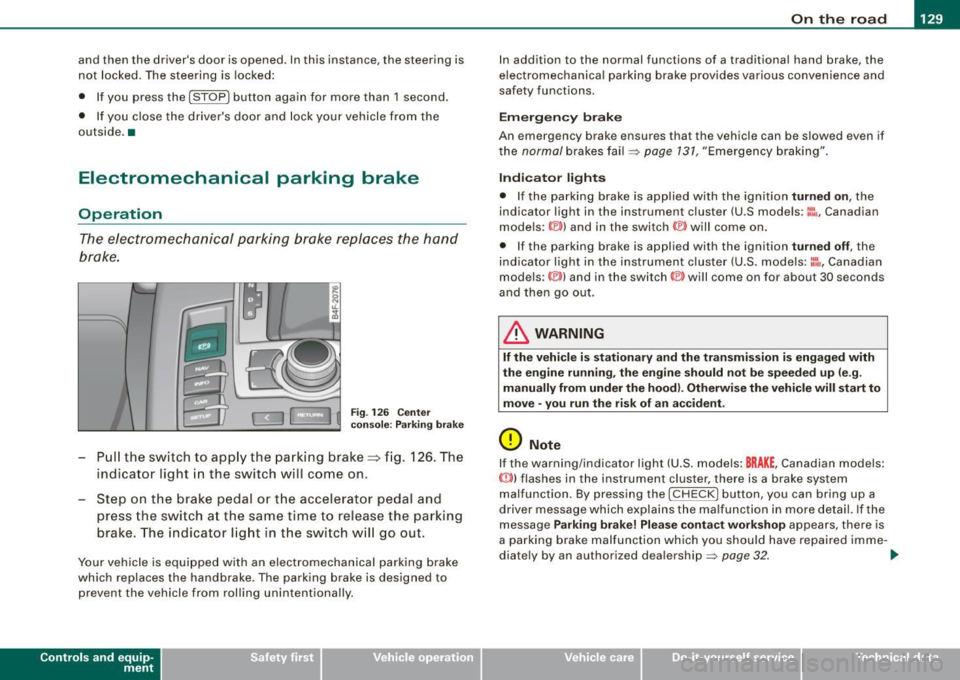
The electromechanical parking brake replaces the hand
brake.
Fi g. 12 6 Center
co nso le: Parki ng bra ke
- Pull the switch to app ly the park ing brake => fig. 12 6. The
indicator light in the switch will come on .
- Step on the brake pedal or the accelerator pedal and
press the switch at the same time to rel ease the parking
brake. The indicator lig ht in the switch wi ll go out.
Your vehicle is equipped with an elect romechanical parking brake
which replaces the handbrake . T he parking brake is designed to
prevent the vehicle from rol ling unintentional ly.
Con tro ls and eq uip
ment
I n add ition to the normal functions of a traditional hand brake, the
e lectromechanica l parking brake provides various convenience and
safety functions.
Emergen cy brake
An emergency brake ensur es that the vehicle can be slowed even if
t he
normal brakes fail=> page 131, "Emergency braking".
Ind icator lights
• If the parking brake is applied with the ignition tu rned on , the
indicator light in the instrument cluster (U.S models :
::i.:,, Canadian
models: ®)) and in the switch <®) will com e on .
• I f the parking brake is app lie d with the ignition
tu rn ed off , the
indicator light in the instrument cluster (U.S. models: ::.:\,, Canadian
models :(®) ) and in the switch© will come on for about 30 seconds
and then go out .
& WARNING
If the vehicle i s stationary and the tr ansmi ssion is engag ed with
the engine ru nning , the engine should not be speeded up (e .g .
manu ally from under the hood ). Otherwi se the vehicle will sta rt to
move -you run the risk of a n accident .
0 Note
If the warning/indica tor light (U.S . mode ls: BRAKE , Canadian mode ls :
(Ci)) ) flashes in the instrument clus ter, there is a brake system
malfunction . By pressing the
I CHECK] button, you can bring up a
driver message which explai ns the ma lfunc tion in more detail. If the
message
P a rki ng brake ! Plea se conta ct w ork shop appears, there is
a par king brake malfunction which you should have repaired imme -
d iate ly by an authorized dealership=>
page 32. ..
Vehicle care
I I irechnical data
Page 135 of 390

On the road -
----------------
The display=> page 132, fig. 128 will show the set speed . The
display may vary depending on the type of disp lay in your vehicle .
The indicator light
CRU ISE (US model) I (')0 (Canadian mode l) wi ll also
light up in the instrument cluster.
The speed is kept constant via an engine output adjustment or active brake intervention .
_& WARNING
• Always pa y attent ion to traffic even whe n the crui se control is
switc hed on. You are alw ays r esp onsi ble for your speed and the
di sta nce b etween your vehi cle and other vehi cle s.
• For s afet y reason s, the crui se control should not be u sed in the
c ity , in stop- and-go traffic , on twi sting roads and when road condi
t ion s a re p oor (s uch a s ice , fo g, gra vel , he avy ra in and h ydro
planing ) - risk of accident.
• Turn off the crui se control tempor arily when e nte ring tu rn
lan es, highway exit lanes or in constru ction zone s.
• Plea se note that in adv ertentl y "re sting " yo ur foot on the accel
erator ped al cau se s the cruise control not to brake . Thi s is b ecau se
the crui se control i s overridden b y the dri ve r's acc eleration .
[ i] Tips
The brake lights il luminate as soon as the brakes decelerate
automatically .•
Ap plie s to v ehicl es: w it h c ruise contro l
Changing speed
-Press lever© in the 0 or O directi on => page 132,
fig. 127 t o in crease or d ec reas e your spe ed.
- Re lease the lever to s ave tha t speed.
Controls and equip
ment Change speed in increments of 1 mph (1 km/h) by
lightly pressing
the lever . If you keep the lever pressed down, you will a lter your
speed in 5 mph (10 km /h) increments .
You can a lso press the acce lerator pedal down to increase your
speed, e.g. if you want to pass someone. The speed you saved
earlier will resume as soon as you release the accelerator pedal.
If , however, you exceed your saved speed by 5 mph (10 km/h) for
longer than 5 minutes, the cruise control will turn off temporarily .
The symbol wi ll go ou t bu t the saved speed wi ll be retained. •
Applie s to v ehic le s: with c ruise cont ro l
Presetting your speed
You can prese t your desire d speed while the vehicle is not
moving.
- Turn o n the ignition .
Pu ll lever © into posit ion
G) => page 13 2, fig. 127 .
Press the lever in the
0 or O direction to increase or
decrease your speed .
- Release the lever to save that speed .
This function makes it possible, for example, to save the speed you
want before driving on the highway. Once on the highway , activate
the cruise contro l by pu lli ng the lever toward
G) . •
Ap plies to ve hic les: with c ruise contro l
Switching the system off
Temporary dea ctivation
- Press the brake pedal, or
I • •
Page 144 of 390

• ..__A_ d_a...: p:,..._ ti_v _ e_ C_ ru_ is_ e_ C_ o_n_ t_ r_ o _ l ___________________________________________ _
& WARNING (continued)
• Setting short distances to the traffic ahead reduces the time
and distance available to bring your vehicle to a safe stop and
makes it even more necessary to pay close attention to traffic.
• Always use good judgment and select a safe following distance
for the traffic, road and weather conditions.
[ i ] Tips
The distance setting is reset to the factory default DISTANCE 3 the
next time the ignition is turned on.•
Driver information
Applies to veh icles : with Ada ptive C ru is e Cont ro l
Displays in the instrument cluster
Depending on the driving situation, driver information is
displayed in the instrument cluster.
Fig. 136 Overview instrument cluster
© Display in the speedometer
® Display in the instrument cluster
© Status indicator
© Display in the speedometer
Important information concerning vehicle operation with Adaptive
Cruise Control is shown in display area@. The desired speed you
set is indicated in the speedometer (LED lights around the edge)
and the indicator lights show whether the system has detected a
vehicle traveling ahead. -.,
Page 157 of 390

Automatic transmission -
------------------'
R -Reverse
The transmission will automatically select the lowest gear ratio
when you shift into reverse .
Select
R only when the vehicle is at a full stop and the engine is
running at idle speed::::;,
& in "Driving the automat ic transmission"
on
page 153 .
Before you move the se lector lever to R , press both the button in the
handle of the selector leve r
and the brake pedal at the same time .
When the ignition is on , the backup lights i lluminate when the
selector lever is moved into
R.
N -Neutral
The transmission is in neutral in this position . Shift to this position
for standing with the brakes applied=>
page 155.
When the vehicle is stationary or at speeds below 3 mph (5 km/h),
you must always apply the footbrake befor e and while moving the
lever out of
N.
D -Normal position for driving forward
Position Dis for norma l city and highway driving. It ranges from zero
to top speed and all six gears shift au tomatically, depending on
engine load, driving speed and automatica lly selected shift
programs. The gear engaged is shown in the right of the display
::::;, page 154, fig. 151.
When the vehicle is stationary or at speeds below 3 mph (5 km/h),
you must always apply the foot brake before and while moving the
lever to
D out of N .
In certain circumstances i t may be advantageous to temporarily
switch to the manual shift program to manua lly se lect gear ratios to
match specific driving conditions::::;,
page 157.
S -Sport position
Se lect this position for spor tier performance . In this position, the
transmission will not upshift as soon, allowing the vehicle to use the
Con tro ls and eq uip
ment
increased power available at higher engine speeds to achieve live
lier acceleration.
When the vehicle is stationary or at speeds below 3 mph (5 km/h),
you must always apply the foot brake before and while moving the lever to
S out of N.
& WARNING
Read and follow all WARNINGS ::::;, & in "Driving the automatic
transmission" on
page 153 .
0 Note
Coasting downhill with the transmission in N and the engine not
running will result in damage to the automatic transmission and
possibly the catalytic converter. •
Applies to ve hic les: with 6-spee d autom atic trans mission
Automatic Shift Lock (ASL)
The Automatic Shift Lock safeguards you against acciden
tally shifting into a forward or the reverse gear and
causing the vehicle to move unintentionally.
Fig. 152 Shift gate:
selec tor leve r loc k
positions and interlock
button highlight ed
The selector lever lock is released as follows:
Vehicle care I I irechnical data