2008 AUDI S6 brakes
[x] Cancel search: brakesPage 145 of 390

_____________________________________________ A_ d_a ...: p_ t_ i_ v _e_ C_ ru_ is_ e_ C_ o_n _ t_ r_o _ l _ __.11111
@ Di spl ay in t he instrum ent clust er
In display area@ information from the navigation system and the
trip computer is disp layed in addition to information about Adap tive
Cruise Cont rol.
You can select among the different information by repeated brie f
taps on the
[RESET) button on the w indsh ie ld wiper lever
=> page 41, "Operation" .
© Statu s indi cator
The information in area@ is not displayed permanently . Informa
tion is displayed only if you set or change the speed setting, change
t he time interval, when messages are disp layed or if the Adaptive
Cruise Control is turned off for safety reasons. •
Applies to veh ic les: with Ad apt ive Cru ise Co nt rol
Display in the speedometer
Desired speed
Fig . 1 37 Display in th e
s pe ed om eter
The desired speed set by the driver is displayed by a red LED .
I f the desired speed was set between two lines on the speedometer
us ing the
[ SET ) button, the two closest light diodes will come on
=> fig. 137.
Con tro ls and eq uip
ment
The system al lows only speeds from 20 to 95 mph (30 to 150 km/h)
t o be set. This speed range is faintly i lluminated in the speedome ter
(LED ligh ts) .
Ind icator light s (sy mbols )
• "'' ~ Open ro ad :
The indicator light""~ shows that Adaptive
Cruise Control is active and that no object is ahead o f the vehicle.
A
stored speed requested is maintained .
• ~'" '~ Driving in traffic: The indicator light~""~ indicates that
an object has been detected trav eling in front. Your speed is
adjusted according to the speed of the vehicle in fr ont . The Adap tive
Cruise Control acce lerates and brakes automatica lly within the
system's operation pa rameters.
• ~" "~ Driver inter vention p rompt : The red flashing warning
light
c::::, ,,, ,~ means Request for driver to a ssume control. Yo u as the
drive r must slow the vehic le with the foot brake . The symbol ~,, ..
~
tel ls you that the Adaptive Cruise Control is not able t o slow t he
vehicle down enough to keep a enough distance to the vehic le in
front of you . An warning tone will also sound when the symbol
appears. For more information about the driver intervention prompt
=> page 146.
[ i ] Tips
• I f you use the accelerator to go faster than the speed of the
object ahead of you, the
driver intervention prompt wi ll no t be
accompanied by a warning signal.
• I f the speed you prev iously set is exceeded, the ind icator light in
the speedometer will switch off. •
Vehicle care I I Technical data
Page 147 of 390

_____________________________________________ A_ d_a ...: p_ t_ i_ v _e_ C_ ru_ is_ e_ C_ o_n _ t_ r_o _ l _ __.11111
Ap plies to vehicles: with Adaptive Cru ise Co nt rol
System status indicator
The text messages and symbols shown in this area of the
display are not displayed perm anently.
T ime intervals
Fig . 139 Sy stem
sta tus indi cator
The different symbols for the time intervals appear if you change the
settings ~ fig. 139 .
The text message ... (three white dots) appears if a setting cannot be implemented with the operating lever . The following are possible
reasons:
• If you pul l the control lever towards you to resume speed but no
requested speed was set .
• I f you push the lever up to increase (or down to reduce) speed
when no speed has been set previously.
• If you push the lever up to increase (or down to reduce) speed
and this speed is outside the range from 20 to 95 mph (Canada
models : 30 to 150 km/h) .
ACC fun cti ona lity limited
The text message AC C functionalit y limited appears when the ACC
System does not detect any objects over an extended time period.
For the time being, the distance to vehicles up ahead is not being
Con tro ls and eq uip
ment
controlled. The ACC system is not switched off, so increased alert
ness is required. The following may be reasons for the text message
ACC Functiona lly limited:
• The ACC sensor is dirty. The ACC system is not reacting, or is not
reacting correctly, to veh ic les travel ing ahead.
• I t is possible that you are driving on a road with very light traffic
without anything at the side of the road (e.g. guard rai ls, traffic
signs, trees). As soon as a vehicle is detected by the system again,
it returns to its control range and the text message disappears .
The ACC sensor is located in the area under the front license plate.
If there is a loss of operation due to heavy contamination, this area
should cleaned to restore proper operation .
ACC not available
The text message ACC n ot ava ila ble appears, for example, if the
t emperature of the brakes is excessive. Adap tive Cruise Control is
temporarily not available . A warning tone sounds as a reminder .
ACC not available!
The text message ACC not ava ilable ! appears in the event of a
malfunction . Adaptive Cruise Contro l is tur ned o ff. A warning to ne
sounds as a reminder. Have the system inspected by a qua lified
dea lership .
ACC se nsor bl ocked !
The text message AC C sensor blocked ! appears when the ACC
System can no longer guarantee safe detection of objects . Adaptive
cruise control is turned off. A chime sounds as a rem inder .
To decide whether it is necessary to switch off the ACC (ACC sensor
blocked
!) or if it is only a temporary condition (ACC functionality
limited), the system wi ll also takes into consideration the outside
temperature and/or the windshield wiper operation.
The ACC sensor is dirty o r blocked (e .g . leaves, sn ow).
Vehicle care I I irechnical data
Page 150 of 390
• ..__A_ d_a...: p:,..._ ti_v _ e_ C_ ru_ is_ e_ C_ o_n_ t_ r_ o _ l ___________________________________________ _
& WARNING
The radar sensor's vision can be reduced by rain, snow and heavy
spray. This can result in vehicles driving ahead being inadequately
detected or, in some circumstances, not detected at all. If neces
sary, take action yourself! •
Applies to ve hicle s: with Ad aptive Cruise Co nt rol
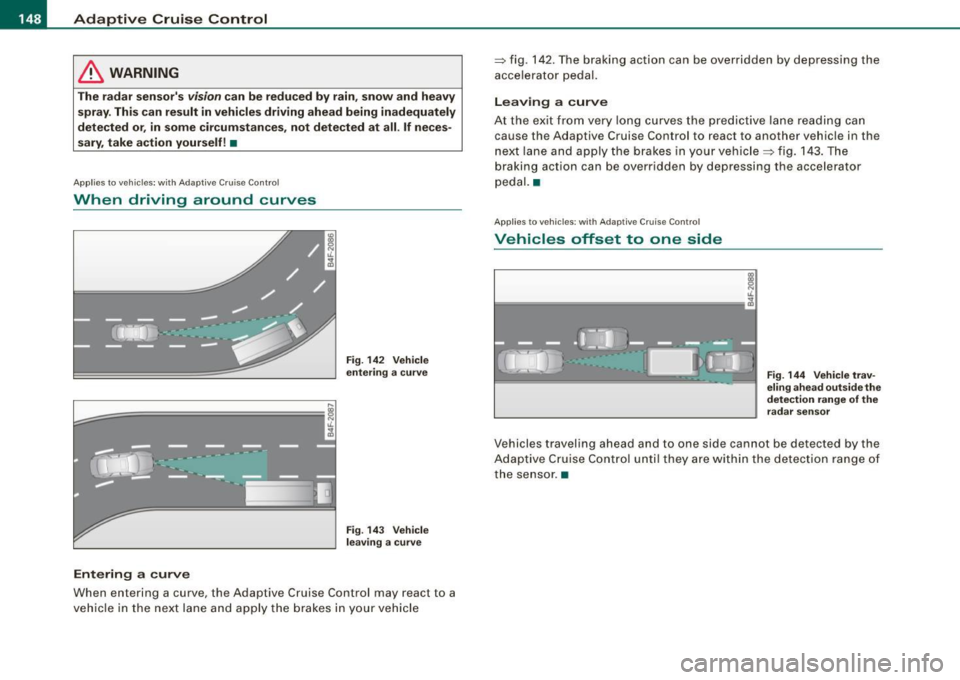
When driving around curves
L=~=======; ~
c'i
Entering a curve
Fig. 142 Vehicle
entering a curve
Fig. 143 Vehicle
leaving a curve
When entering a curve, the Adaptive Cruise Control may react to a
vehicle in the next lane and apply the brakes in your vehicle =>
fig. 142. The braking action can be overridden by depressing the
accelerator pedal.
Leaving a curve
At the exit from very long curves the predictive lane reading can
cause th e Adaptive Cruise Control to react to another vehicle in the
next lane and apply the brakes in your vehicle => fig. 143. The
braking action can be over ridden by depressing the accelerator
pedal. •
Applies to ve hicles: w ith Adaptive C ru ise Co nt rol
Vehicles offset to one side
Fig . 144 Vehicle trav
eling ahead outside the
detection range of the
radar sensor
Vehicles traveling ahead and to one side cannot be detected by the
Adaptive Cruise Control until they are within the detection range of
the sensor. •
Page 157 of 390

Automatic transmission -
------------------'
R -Reverse
The transmission will automatically select the lowest gear ratio
when you shift into reverse .
Select
R only when the vehicle is at a full stop and the engine is
running at idle speed::::;,
& in "Driving the automat ic transmission"
on
page 153 .
Before you move the se lector lever to R , press both the button in the
handle of the selector leve r
and the brake pedal at the same time .
When the ignition is on , the backup lights i lluminate when the
selector lever is moved into
R.
N -Neutral
The transmission is in neutral in this position . Shift to this position
for standing with the brakes applied=>
page 155.
When the vehicle is stationary or at speeds below 3 mph (5 km/h),
you must always apply the footbrake befor e and while moving the
lever out of
N.
D -Normal position for driving forward
Position Dis for norma l city and highway driving. It ranges from zero
to top speed and all six gears shift au tomatically, depending on
engine load, driving speed and automatica lly selected shift
programs. The gear engaged is shown in the right of the display
::::;, page 154, fig. 151.
When the vehicle is stationary or at speeds below 3 mph (5 km/h),
you must always apply the foot brake before and while moving the
lever to
D out of N .
In certain circumstances i t may be advantageous to temporarily
switch to the manual shift program to manua lly se lect gear ratios to
match specific driving conditions::::;,
page 157.
S -Sport position
Se lect this position for spor tier performance . In this position, the
transmission will not upshift as soon, allowing the vehicle to use the
Con tro ls and eq uip
ment
increased power available at higher engine speeds to achieve live
lier acceleration.
When the vehicle is stationary or at speeds below 3 mph (5 km/h),
you must always apply the foot brake before and while moving the lever to
S out of N.
& WARNING
Read and follow all WARNINGS ::::;, & in "Driving the automatic
transmission" on
page 153 .
0 Note
Coasting downhill with the transmission in N and the engine not
running will result in damage to the automatic transmission and
possibly the catalytic converter. •
Applies to ve hic les: with 6-spee d autom atic trans mission
Automatic Shift Lock (ASL)
The Automatic Shift Lock safeguards you against acciden
tally shifting into a forward or the reverse gear and
causing the vehicle to move unintentionally.
Fig. 152 Shift gate:
selec tor leve r loc k
positions and interlock
button highlight ed
The selector lever lock is released as follows:
Vehicle care I I irechnical data
Page 164 of 390

• ..__A_ u_ t _o_ m_ a_ t_ i_ c _ t_r _a _n_ s_ m_ is_ s_i o _ n ________________________________________________ _
Before you move the selector lever to R, press both, the button in the
handle of the selector lever
and the brake pedal at the same time .
When the ignition is on, the backup lights illuminate when the
selector lever is moved into R.
N -N eutr al
Sh ift to this position for standing with brakes applied=> page 762.
When the vehicle is stationary or at speeds below 3 mph (5 km/h),
you must always apply the footbrake before and while moving the
lever out of
N .
Do not use N for coasting downhill.
D -Normal dr iving po sition f or forward
Depending on the load on the engine, vehicle speed and the
dynamic control program, the transm ission will select the
optimal
gear ratio.
In certain circumstances it may be advantageous to temporarily
switch to the manua l shift program to manually select gear ratios to
match specific driving conditions=>
page 164.
When the vehicle is s tationary or at speeds below 3 mph (5 km/h),
you must always apply the footbrake before and while moving the
lever to
D ou t of N.
S -Spor t p osition
Select this position for sportier performance. In this position, the
transmission wil l not upshift as soon, allowing the vehicle to use the
increased power avai lable at higher engine speeds to achieve live
lier acceleration.
When the vehicle is stationary or at speeds below 3 mph (5 km/h),
you must always apply the foot brake before and whi le moving the
lever to
S out of N .
& WARNING
Re ad a nd follo w all WARNIN GS=> & in "Dr iv ing th e multitr oni c®"
on
page 160 .
0 Note
Coasting downhill with the transm ission in N and the engine not
operating will result in damage to the automatic transmission and
possibly the catalytic converter. •
Applies to vehicles: with multitronic® Continuous ly Variable Transmission (CVT)
Automatic Shift Lock (ASL)
The Automatic Shift Lock safeguards you against acciden
tally shifting in to a forward or the reverse gear and
causing the vehicle to move unintentionally.
F ig . 160 Shift gate:
se lect or l ever loc k
pos it ions a nd int erl ock
butt on high lighted
The selector lever l ock is rel eased as f ollows :
T u rn the ignition on .
Step on the brake peda l.
At the same time press and hold
the interlock button on the side of the gear selector knob
=> fig. 160 with your thumb until you have moved the
selector lever to t he desired position.
~
Page 261 of 390

The direction in which the driver wishes to travel is determined with
t he aid of the steering angle and vehicle speed and is continua lly
compared with the actual behavior of the vehicle. If the two do not
match, for example, when the vehic le starts hydrop laning on a wet
road, ESP will automatically brake the appropriate whee l to correct
the prob lem.
The vehicle is then stab ilized by the forces acting on the whee l
during braking. If the vehicle is
oversteering (rear tends to skid out
of the turn), the brakes are mainly app lied on the wheel that is on
the outside of the curve. In the case of a vehicle that is
understeering
(tendency to sl ide out of the curve), the brakes are applied at the
rear wheel that is on the inside of the curve . An acoustic signal indi
cates when ESP brake application cuts in
~ & .
The system operates across the entire speed range in combination
with the ABS system
~ page 262 . If the Anti -Lock Brake System
(ABS) malfunctions, the ESP wi ll be out of action as well.
Ac tivat ing
When you turn on the eng ine, ESP will automatically be activated
and will perform a se lf -test . As soon as the test is comp leted, the
system is in norma l operating mode.
You can activate a deactivated ESP or deactivated ESP/ASR if required by pressing the~
page 258, fig. 225 button . When they are
activated, the message
E S P/AS R on appears briefly in the display.
D eactiv ating
The ESP should normally be activated al l the time . If necessary, you
can deactivate An ti- Slip Regulation (ASR) or the E lectronic Stabiliza
tion Program (ESP) by pressing the button~
page 258, fig. 225.
• Dea ct ivat ing A SR: Tap the button . In certain exceptional situa
tions (e.g. driving with t ire chains) , the Anti-Sl ip Regulation (ASR)
can be deactivated ~
page 260. The message ASR off appears in the
display as we ll.
• Dea ctiv at ing E SP/ASR Press the button for more than 3 seconds.
With the ESP/ASR deactivated, the ESP check light comes on, see
Controls and equip
ment Safety first Vehicle operation
In
te llig ent tec hn olo gy
~ page 19 . The message ES P sw itched off appears in the disp lay as
we ll.
& WARNING
The Electroni c Stabili zation Program i s never thele ss subject to the
la ws o f physics . It is p articularl y import ant t o pay a ttent ion t o th is
f a ct on wet and slippery road s. It is ther efore important tha t y ou
a lw ays a dapt your dr iving to the c ondit ion of th e ro ad and t raffi c
c ondition s. Do n ot allow the inc rea sed safety pro vided b y th e Elec
tr on ic S ta bili zatio n Pr ogram sys tem to lull you in to acc epting
add iti onal safet y risk s. C
Electronic differential tock (EDL)
The electronic differential lock monitors the rotational
speed of the drive wheels.
Gener al note s
The electronic differential lock (EDU helps the car to start moving,
accelerate and c limb a gradient on surfaces providing poor or
almost no grip . Without EDL, this would be difficult, if not impos
sib le .
How th e sys te m wo rk s
The EDL operates automatical ly . It monitors the rotational speed of
the drive wheels on an axle with the he lp of the ABS sensors
~ page 262 . If a noticeable difference in rotational speed between
the drive wheels on one axle is detected (e.g. on slippery ground
on
one side),
the spinning wheel is braked, thereby transferring power
to the other drive wheel or whee ls (a ll -whee l drive) . Th is is done up
to a speed of about 60 mph ( 100 km/h). Noises from the brake
system signal that wheel spin is being control led .
Dr iving off
When driving off , always be sure to keep road conditions in mind as
you accelerate. If one drive wheel spins because it is on a surface
Iii>
•
Vehicle care Do-it-yourself service Technical data
Page 262 of 390

___ ln_ t _e_ ll-'"ig ...,_ e_ n_t _t_ e_ c_ h _ n_o _ l_o _,.g= y,_ __________________________________________ _
with less grip, gradually increase the pressure on the accelerator
pedal until the car starts to move.
Overheating of brakes
To prevent the disc brake of the braked wheel from overheating if
subjected to excessive loads on this wheel, the EDL cuts out tempo
rarily. The vehicle remains operational and behaves in the same way
as a vehicle without EDL.
As soon as the brake has cooled down, EDL switches on again auto
matically.
& WARNING
• When accelerating on slippery surfaces, such as on ice or snow,
always be careful when depressing the accelerator pedal. Even
with the EDL working, the drive wheels can spin and reduce your
ability to control your car. Risk of crash!
• The increased safety afforded by EDL does not mean that you
can take safety risks. Always adapt your driving style to the road
conditions and traffic situation.
[ i] Tips
If a fault occurs in the ABS, the EDL is also not functioning. This is
indicated by the ABS warning light=>
page 22. •
Ant"-Slip Regulation System (ASR)
The Anti-Slip Regulation System prevents the driven
wheels from spinning when the car is accelerating.
General notes
The Anti-Slip Regulation System (ASR) is integrated in the electronic
stabilization program (ESP). When the vehicle starts up and acceler
ates, the wheels are prevented from spinning by adjusting the engine power to match the amount of grip available from the road
surface.
How the system works
ASR
performs automatically, i.e. without the driver's intervention.
With the aid of the ABS sensors=>
page 262, ASR monitors the
speed of the driven wheels. If the wheels start to spin, the engine
torque is reduced automatically until the tires find enough grip to
lock onto the road surface. The system is active across the entire
speed range.
Th e ASR works in conjunction with the ABS. If a malfunction should
occur in the ABS, the ASR will also be out of action.
Activating
The ESP is automatically activated when the engine is started and it
performs a self -test . You can activate a deactivated ASR if required
by pressing the =>
page 258, fig. 225 button . When it is activated,
the message
ESP/ASR on appears briefly in the display. Vehicles
with front-wheel drive a deactivated ASR automatically re-activates
itself at a speed of 40 mph (70 km/h) .
Deactivating
You can deactivate the ASR if required by pressing the button (for
less than 3 seconds)=>
page 258, fig. 225. With the ASR deactivated,
the ESP check light comes on, see=>
page 19. The message ASR off
appears in the display as well. On vehicles with front-wheel drive:
deactivation is possible only up to 30 mph (50 km/h) for safety
reasons . Vehicles with all -wheel drive: the ASR can be deactivated
at any speed .
The ASR should normally be activated all the time. Only in certain
exceptional situations when some slip is desirable does it make
sense to deactivate the ASR. Examples:
• when driving with tire chains
• when driving in deep snow or on loose ground and
• when rocking the vehicle loose after it has become stuck .
Page 263 of 390

When the abnormal situation is over, you should activate the ASR
again.
& WARNING
The increased safety afforded by ASR does not mean that you can
take safety risks. Always adapt your driving style to the road
conditions and traffic situation.
[ i] Tips
To ensure that the ASR works properly, all four wheels must be fitted
with identical tires. Any differences in rolling radius of the tires can
cause the system to reduce engine power when this is not desired.
See also~
page 325, "New tires and replacing tires and wheels". •
Braking
General information
What affects braking efficiency?
Operating conditions and driving habits
The brakes on today's automobiles are still subject to wear,
depending largely on operating conditions and driving habits~& .
On vehicles which are driven mostly in stop-and-go city traffic or
which are driven hard, the brake pads should be checked by your
authorized Audi dealer more often than specified in the
Mainte
nance
& Warranty booklet.
On steep slopes, you should use the braking effect of the engine.
This way, you prevent unnecessary wear on the brake system. If you
must use your brakes, do not hold the brakes down continuously.
Pump the brakes at intervals.
Controls and equip
ment Safety first Vehicle operation
Intelligent technology
Moisture or road salt
If
you are driving faster than 50 mph (80 km/h) and the windshield
wipers are on, the brake pads will briefly touch the brake discs in regular intervals so as to improve reaction time when braking on
wet surfaces. You, the driver, will not notice anything.
Under certain conditions, for example, when driving through water
or very heavy rain, or even after washing your vehicle, the braking
effect can be reduced due to moisture (or in freezing conditions ice)
on the brake pads. A few careful brake applications should dry off
the brake pads or remove any ice coatings .
The effectiveness of the brakes can be reduced when the vehicle is driven on a salt-covered road and the brakes are not used. Here too,
you should clean off accumulated salt coating from brake discs and
pads with a few careful applications of the brake ~& .
Corrosion
There may be a tendency for dirt to build up on the brake pads and
corrosion to form on the discs if the car is not driven regularly or
only for short trips with little use of the brakes.
If the brakes are not used frequently, or if corrosion has formed on
the discs, it is advisable to clean off the pads and discs by braking
firmly a few times from a moderately high speed~&.
Faults in the brake system
If you should notice a sudden increase in brake pedal travel, then
one of the two brake circuits may have failed~& .
Low brake fluid level
Malfunctions can occur in the brake system if the brake fluid level is
too low . The brake fluid level is monitored electronically .
& WARNING
• You should perform braking maneuvers for the purpose of
cleaning the brake system only if road conditions permit. Other
road users must not be put at risk -you may cause an accident!
Vehicle care Do-it-yourself service Technical data