2008 AUDI A5 brake light
[x] Cancel search: brake lightPage 134 of 313
Automatic gearbox 132Reverse gear must only be engaged when the vehicle is stationary
and the engine is idling ⇒.
To move the selector lever to position R, press in the interlock
button and at the same time press the brake pedal. Depending on
the model, one or two reversing lights will come on in selector lever
position R (when ignition is switched on).
N - Neutral
In this position the gearbox is in neutral ⇒.
D - Drive (forwards)
In this position the gearbox automatically selects the best gear
ratio. This depends on the engine load, the road speed and the
dynamic gear control program (DCP).
Press the brake pedal when moving the selector lever from N to D if
the vehicle is stationary or at speeds below 5 km/h ⇒.
In some situations (such as on mountain roads or when towing a
trailer or caravan) it can be advantageous to switch temporarily to
tiptronic mode ⇒page 134, so that the gear ratios can be selected
manually to suit the driving conditions.
S - Sport position
Select this position if you wish to take full advantage of the car's
performance. This setting makes use of the engine's maximum
power output. When accelerating the gear shifts will be noticeable.
Press the brake pedal when moving the selector lever from N to S if
the vehicle is stationary or at speeds below 5 km/h ⇒.
WARNING
•
Never move the selector lever to R or P when driving, as this
could cause an accident.
•
In selector position D or S the vehicle must always be held with
the foot brake when the engine is running. This is because an auto-
matic gearbox still transmits power even at idling speed, and the vehicle tends to “creep”. The throttle must on no account be
opened inadvertently (for instance by hand from the engine
compartment) when a gear is engaged with the vehicle stationary.
The vehicle could otherwise start moving immediately (in some
cases even if the parking brake is engaged) and possibly cause an
accident.
•
To avoid accidents, apply the parking brake and put the
selector lever in position P before opening the bonnet and working
on the vehicle with the engine running. Please observe the impor-
tant safety warnings ⇒page 231, “Working on components in the
engine compartment”.
Applies to vehicles: with multitronic®Selector lever lock
The selector lever lock prevents gears from being
engaged inadvertently, so that the vehicle is not set in
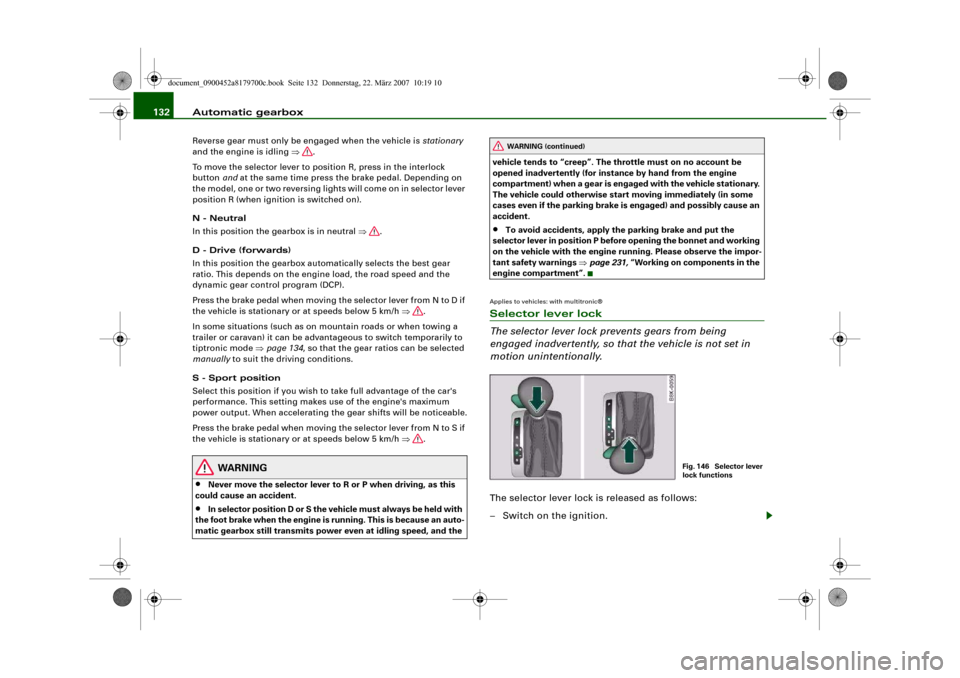
motion unintentionally.The selector lever lock is released as follows:
– Switch on the ignition.
WARNING (continued)
Fig. 146 Selector lever
lock functions
document_0900452a8179700c.book Seite 132 Donnerstag, 22. März 2007 10:19 10
Page 135 of 313
Automatic gearbox133
Controls
Safety
Driving tips
General maintenance
Self-help
Technical data
– Press the brake pedal and at the same time press in the
interlock button.Automatic selector lever lock
The selector lever is locked in the P and N positions when the igni-
tion is on. The brake pedal must be depressed before the lever can
be moved out of either of these positions. The following message
appears in the instrument display as a reminder for the driver when
the selector lever is in position P or N:
WHEN STATIONARY APPLY FOOTBRAKE WHILE SELECTING GEAR.
The selector lever lock only works if the vehicle is stationary or
driving at speeds up to 5 km/h. At higher speeds the selector lever
lock in the N position is disengaged automatically.
The selector lever lock is not engaged if the selector lever is moved
quickly through position N (e.g. when shifting from R to D). This
makes it possible, for instance, to “rock” the vehicle backwards and
forwards if it is stuck in snow or mud. The selector lever lock
engages automatically if the brake pedal is not depressed and the
lever is in position N for more than about a second.
Interlock button
The interlock button on the selector lever handle prevents the driver
from inadvertently engaging particular gears. Press the button in to
disengage the selector lever lock. The illustration shows the selector
lever positions in which the button has to be pressed, highlighted in
colour ⇒page 132, fig. 146.
Safety interlock for ignition key
The key can only be withdrawn with the ignition switched off and
the selector lever in position P. When the ignition key is removed,
the selector lever is locked in position P.
Applies to vehicles: with multitronic®Kick-down feature
The kick-down feature is designed to give maximum
acceleration.When the accelerator pedal is pressed right down past the point of
resistance at full throttle, the gearbox will select a lower gear,
depending on road speed and engine speed. While you keep the
accelerator depressed the engine speed is automatically controlled
to give your vehicle maximum acceleration.
WARNING
Please note that if the road surface is slippery or wet, the kick-
down feature could cause the driving wheels to spin, which could
result in skidding.Applies to vehicles: with multitronic®Dynamic gear control program (DCP)
The multitronic
® gearbox is controlled electronically.
The vehicle is equipped with an electronically controlled gearbox.
The gear ratios are selected automatically according to preset gear-
shift programmes.
When you drive at moderate speeds the gearbox will select the most
economical shift programme. It will then change up early and delay
the downshifts to give better fuel economy.
If you drive at higher speeds with heavy acceleration, if you open the
throttle quickly, or if you use the kick-down or the car's maximum
speed, the gearbox will automatically select the more “sporty” shift
programmes.
The gearbox is self-adapting, and continuously selects the most
suitable shift programme. At the same time, the driver can also
make the gearbox switch to a more "sporty" programme by pressing
document_0900452a8179700c.book Seite 133 Donnerstag, 22. März 2007 10:19 10
Page 141 of 313
Audi parking system139
Controls
Safety
Driving tips
General maintenance
Self-help
Technical data
Activating
– Engage reverse gear to automatically activate the
parking system plus, or
– Press the switch
⇒page 138, fig. 152 in the centre
console to activate the parking system plus manually.
You will hear a short beep to confirm that the parking
system has been activated. The indicator lamp in the
switch will light up.
Deactivating
– Drive forwards faster than approx. 10 km/h, or
– Switch off the ignition to automatically deactivate the
complete parking system, or
– Press the switch
⇒page 138, fig. 152 to deactivate the
parking system plus manually. The indicator lamp in the
switch will go out.
Activate the system manually if you are driving forwards and would
like the system to give a warning as you approach potential obsta-
cles, for instance when parking.
The measuring range of the sensors in the front and rear bumpers
starts at approximately:
Warning beeps
The warning beeps are produced by sound boxes. The volume and
pitch of the beeps can be adjusted in the MMI ⇒page 148.Mute function
An acoustic proximity warning is cancelled when you apply the
parking brake or move the selector lever of the automatic gearbox
to position P. However, the system remains active. The warning
beeps will start again as soon as you release the parking brake or
move the selector lever out of position P if the system has detected
an obstacle.
Reversing/driving forwards
When the vehicle is reversing/driving forwards, the system starts to
beep if it registers an obstacle within its detection range (see
above). The warnings will beep increasingly rapidly as the vehicle
approaches the obstacle.
When the vehicle is less than approx. 0.30 m away from the obstacle
the warning tone will sound continuously. From here at the latest,
the driver should then not reverse/drive forwards any further.
The volume of the warning beeps will be gradually reduced after
about 4 seconds if the vehicle remains at a constant distance from
a detected obstacle (it will not be reduced if the obstacle is closer
than 0.30 m). The warnings will then return to the normal volume if
the vehicle approaches the detected obstacle again.
Parking
If the parking manoeuvre involves shunting backwards and
forwards, the warning sound will be switched off temporarily while
you change gear. The proximity graphic will, however, still be
displayed on the MMI screen. The warnings will then return to the
normal volume if the vehicle approaches the detected obstacle
again.
Graphic display
The segments in the MMI display indicate the distance between the
vehicle and a detected obstacle. The number of segments shown
depends on the obstacle in front of or behind the vehicle. The closer
the vehicle gets to the obstacle the closer the segments move
towards the vehicle in the graphic ⇒page 138, fig. 153. At the latest
when the penultimate segment is highlighted the vehicle has Front
Side
0.90 m
Centre
1.20 m
Rear
Side
0.60 m
Centre
1.60 m
document_0900452a8179700c.book Seite 139 Donnerstag, 22. März 2007 10:19 10
Page 143 of 313
Audi parking system141
Controls
Safety
Driving tips
General maintenance
Self-help
Technical data
Activating
– Engage reverse gear to automatically activate the
parking system advanced, or
– Press the switch
in the centre console ⇒page 138,
fig. 152 to manually activate the parking system
advanced. You will hear a short beep to confirm that the
parking system has been activated. The indicator lamp in
the switch will light up.
Deactivating
– Drive forwards faster than approx. 10 km/h, or
– Switch off the ignition to automatically deactivate the
complete parking system, or
– Press the switch
in the centre console ⇒page 138,
fig. 152 to deactivate the parking system advanced. The
indicator lamp in the switch will go out.
Activate the system manually if you are driving forwards and would
like the system to give a warning as you approach potential obsta-
cles, for instance when parking.
The measuring range of the sensors in the front and rear bumpers
starts at approximately:Warning beeps
The warning beeps are produced by sound boxes. The volume and
pitch of the beeps can be adjusted in the MMI ⇒page 148.
Mute function
An acoustic proximity warning is cancelled when you apply the
parking brake or move the selector lever of the automatic gearbox
to position P. However, the system remains active. The warning
beeps will start again as soon as you release the parking brake or
move the selector lever out of position P if the system has detected
an obstacle.
Reversing/driving forwards
When the vehicle is reversing/driving forwards, the system starts to
beep if it registers an obstacle within its detection range (see
above). The warnings will beep increasingly rapidly as the vehicle
approaches the obstacle.
When the vehicle is less than approx. 0.30 m away from the obstacle
the warning tone will sound continuously. From here at the latest,
the driver should then not reverse/drive forwards any further.
The volume of the warning beeps will be gradually reduced after
about 4 seconds if the vehicle remains at a constant distance from
a detected obstacle (it will not be reduced if the obstacle is closer
than 0.30 m). The warnings will then return to the normal volume if
the vehicle approaches the detected obstacle again.
Parking
If the parking manoeuvre involves shunting backwards and
forwards, the warning sound will be switched off temporarily while
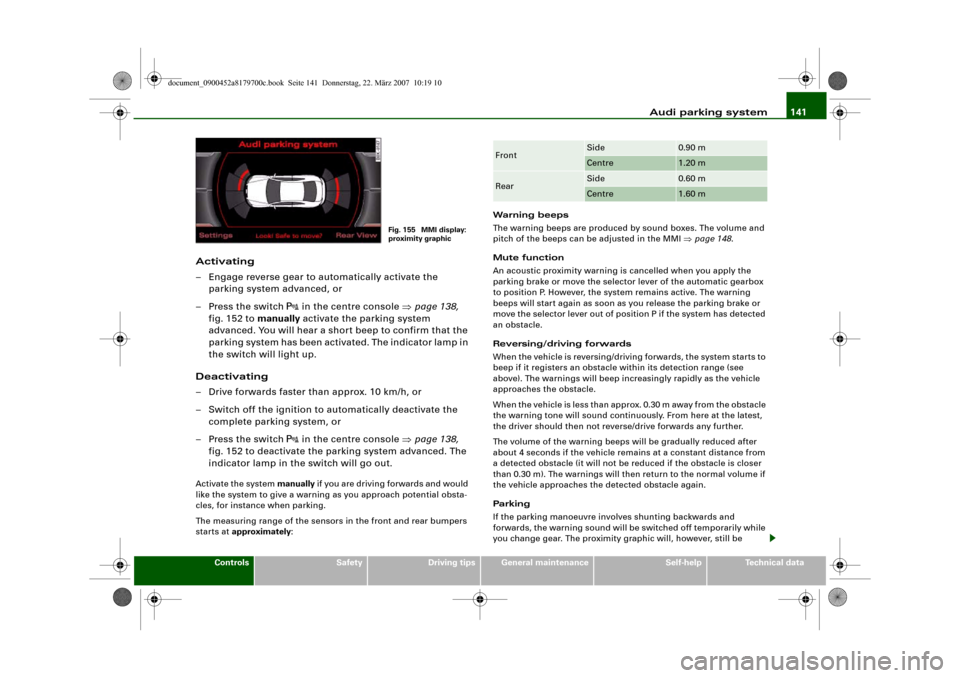
you change gear. The proximity graphic will, however, still be
Fig. 155 MMI display:
proximity graphic
Front
Side
0.90 m
Centre
1.20 m
Rear
Side
0.60 m
Centre
1.60 m
document_0900452a8179700c.book Seite 141 Donnerstag, 22. März 2007 10:19 10
Page 166 of 313
Safe driving 164Correct sitting positionsCorrect sitting position for driver
The correct driving position is important for safe and
fatigue-free driving.For your own safety, and to reduce the risk of injury in the
event of an accident, we recommend the following driving
position.
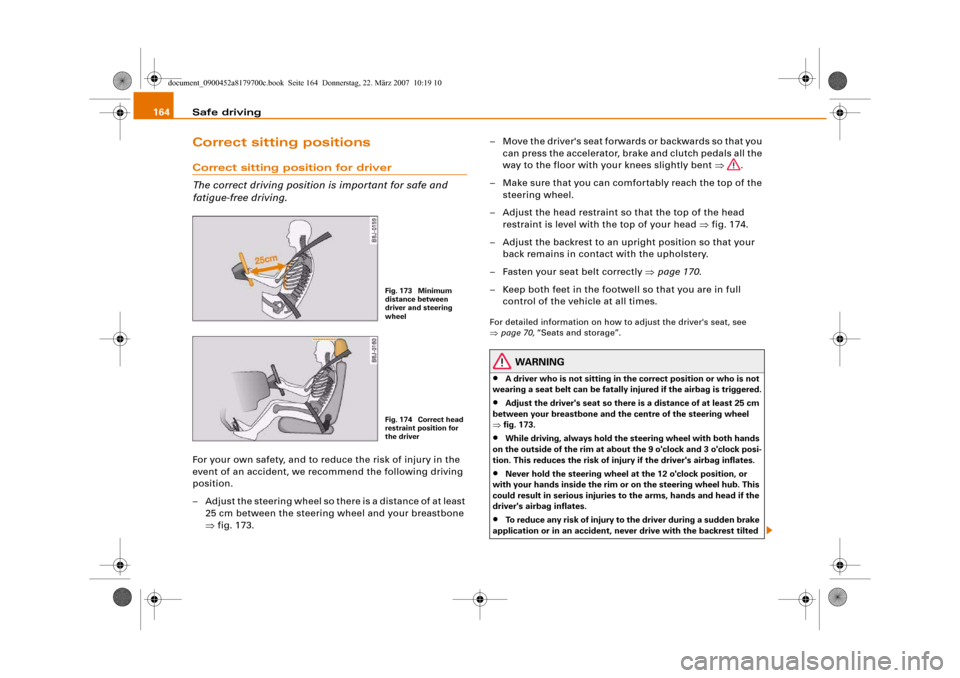
– Adjust the steering wheel so there is a distance of at least
25 cm between the steering wheel and your breastbone
⇒fig. 173.– Move the driver's seat forwards or backwards so that you
can press the accelerator, brake and clutch pedals all the
way to the floor with your knees slightly bent ⇒.
– Make sure that you can comfortably reach the top of the
steering wheel.
– Adjust the head restraint so that the top of the head
restraint is level with the top of your head ⇒fig. 174.
– Adjust the backrest to an upright position so that your
back remains in contact with the upholstery.
– Fasten your seat belt correctly ⇒page 170.
– Keep both feet in the footwell so that you are in full
control of the vehicle at all times.
For detailed information on how to adjust the driver's seat, see
⇒page 70, “Seats and storage”.
WARNING
•
A driver who is not sitting in the correct position or who is not
wearing a seat belt can be fatally injured if the airbag is triggered.
•
Adjust the driver's seat so there is a distance of at least 25 cm
between your breastbone and the centre of the steering wheel
⇒fig. 173.
•
While driving, always hold the steering wheel with both hands
on the outside of the rim at about the 9 o'clock and 3 o'clock posi-
tion. This reduces the risk of injury if the driver's airbag inflates.
•
Never hold the steering wheel at the 12 o'clock position, or
with your hands inside the rim or on the steering wheel hub. This
could result in serious injuries to the arms, hands and head if the
driver's airbag inflates.
•
To reduce any risk of injury to the driver during a sudden brake
application or in an accident, never drive with the backrest tilted
Fig. 173 Minimum
distance between
driver and steering
wheelFig. 174 Correct head
restraint position for
the driver
document_0900452a8179700c.book Seite 164 Donnerstag, 22. März 2007 10:19 10
Page 199 of 313
Intelligent technology197
Controls
Safety
Driving tips
General maintenance
Self-help
Technical data Switching off
The ESP should normally be left switched on at all times. If required,
you can press the ESP OFF button to switch off the traction control
system (ASR) or the electronic stabilisation program (ESP).
•
Switching off the traction control system (ASR): Press the ESP
button briefly. The traction control system (ASR) can be switched off
in special driving conditions, e.g. if you are driving with snow chains
⇒page 198. The message ASR off will appear in the display.
•
Switching off the ESP/traction control system (ASR): Press the
ESP button for longer than 3 seconds. The ESP/ASR warning lamp
lights up when the system is switched off, see ⇒page 16. The
message ESP switched off will appear in the display.
WARNING
•
The ESP is not able to overcome the physical limits of adhesion.
Even with ESP, you should always adjust your speed to suit the
conditions. Please bear this in mind, especially on wet or slippery
road surfaces. Do not let the extra safety provided tempt you into
taking any risks when driving – this can cause accidents.
•
Please note that, when the ESP or ESP/traction control system
(ASR) is switched off, the driven wheels may start to spin, causing
the vehicle to lose grip, in particular on slippery or wet roads -
danger of skidding!
Anti-lock brake system (ABS)
ABS prevents the wheels from locking up under braking.The anti-lock brake system (ABS) is an important part of the car's
active safety system. However, the ABS will not necessarily guar-
antee shorter stopping distances in all conditions. For instance, on
loose gravel or fresh snow on top of an icy surface (conditions which
anyway require extreme care and reduced speed), the stopping
distance with ABS may even be slightly longer.How the ABS works
The system runs an automatic self-check when the car reaches a
road speed of about 6 km/h. This may be accompanied by a noise
from the ABS pump.
If one of the wheels is turning too slowly in relation to the road
speed, and is close to locking up, the system will reduce the pres-
sure in the brake line to this wheel. The driver is made aware of this
control process by a pulsating of the brake pedal and accompa-
nying noise. This is a deliberate warning to the driver that one or
more of the wheels is tending to lock up and the ABS control func-
tion has intervened. In this situation it is important to keep the brake
pedal fully depressed so the ABS can regulate the brake application
- do not “pump” the brake pedal.
WARNING
The grip provided by ABS is still subject to the physical limits of
adhesion. Always bear this in mind, especially on wet or slippery
roads. If you notice that the ABS is working (to counteract locked
wheels under braking), you should reduce speed immediately to
suit the road and traffic conditions. Do not let the extra safety
provided tempt you into taking any risks when driving – this can
cause accidents.
Note
If a malfunction should occur in the ABS, this is indicated by a
warning lamp ⇒page 18.Brake assist system
The brake assist system helps the driver to achieve
optimum braking effect.The brake assist system helps to increase braking power and thus to
achieve a shorter stopping distance. If the driver presses the brake
document_0900452a8179700c.book Seite 197 Donnerstag, 22. März 2007 10:19 10
Page 200 of 313
Intelligent technology 198pedal very quickly, the brake assist system automatically boosts the
braking force to the maximum level, up to the point where the anti-
lock brake function (ABS) intervenes to stop the wheels from
locking. You should then keep the brake pedal pressed until the
vehicle has braked to the required speed. The brake assist system
switches itself off as soon as you release the brake pedal.
The brake assist system will not be operative if there is a malfunc-
tion in the ABS.
WARNING
Please remember that the accident risk always increases if you
drive too fast, especially in corners or on a slippery road, or if you
follow too close behind the vehicle in front of you. An increased
accident risk cannot be compensated even by the brake assist
system, so always be sure to maintain a safe speed.Traction control system (ASR)
The traction control system prevents the driven wheels
from spinning when the car is accelerating.General notes
The traction control system (ASR) is one of the functions incorpo-
rated in the electronic stabilisation program (ESP).
The traction control system (ASR) helps the car to start moving,
accelerate and climb a gradient in slippery conditions where this
may otherwise be difficult or even impossible.
How the system works
The ASR acts automatically i.e. without the driver's intervention.
With the aid of the ABS sensors ⇒page 197, the ASR monitors the
speed of the driven wheels. If the wheels start to spin, the engine
power is reduced automatically to match the amount of grip avail-
able. The system works at all speeds.The ASR works in conjunction with the ABS. If a malfunction should
occur in the ABS, the ASR will also be out of action.
Switching on
The ESP is switched on automatically when the engine is started
and performs a self-test routine. As soon as this routine is complete,
the system switches back to normal operating mode. If the traction
control system (ASR) has been deactivated (for one of the reasons
noted below) you can switch it back on manually by pressing the
switch ⇒page 196, fig. 203. The message ESP/ASR on will appear
briefly in the display. If the traction control system (ASR) has been
deactivated, it will switch back on automatically at a speed of about
70 km/h on vehicles with front-wheel drive.
You can switch the traction control system (ASR) on again if neces-
sary by pressing the switch ⇒page 196, fig. 203.
Switching off
If required, the ASR can also be switched off manually by pressing
the switch briefly ⇒page 196, fig. 203 (for less than 3 seconds). The
ESP warning lamp lights up when the traction control system (ASR)
is switched off, see ⇒page 16. The message ASR off will appear in
the display. For safety reasons, the system can only be switched off
at speeds below 50 km/h on vehicles with front-wheel drive. The
ASR can be deactivated at any speed on vehicles with four-wheel
drive.
The traction control system should normally remain switched on at
all times. It should only be switched off manually in particular
circumstances where a certain amount of wheel slip may be desir-
able. For example:
•
when driving with snow chains
•
when driving in deep snow or on loose surfaces
•
when rocking the car backwards and forwards to free it.
The ASR should be switched on again afterwards as soon as
possible.
document_0900452a8179700c.book Seite 198 Donnerstag, 22. März 2007 10:19 10
Page 201 of 313
Intelligent technology199
Controls
Safety
Driving tips
General maintenance
Self-help
Technical data
Note
To ensure that the ASR works properly, all four wheels must be fitted
with identical tyres. Any differences in the rolling radius of the tyres
can cause the system to reduce engine power when this is not
desired. Also refer to ⇒page 245, “Replacing wheels and tyres”.Electronic differential lock (EDL)
The electronic differential lock monitors the speed of the
driven wheels.General notes
The electronic differential lock (EDL) helps the car to start moving,
accelerate and climb a gradient in slippery conditions where this
may otherwise be difficult or even impossible.
How the system works
The EDL acts automatically. With the aid of the ABS sensors
⇒page 197, the system monitors the rotational speed of the driven
wheels on each axle. Whenever it detects a significant difference in
the speed of the driven wheels of one axle (for example, if the road is
slippery on one side) the system applies the brake to slow down the
spinning wheel so that more of the power is directed to the other
wheel of this axle (or to the three other wheels on vehicles with four-
wheel drive). This function is active up to about 100 km/h. The brake
system will make noises while it is working.
Driving away from a standstill
Sometimes one wheel has less grip and starts spinning, for
example, if one of the driven wheels is on ice. In this case, keep
pressing the accelerator gradually until the car starts moving, even
though the wheel with less grip will still spin.
Overheating of the brakes
To prevent the disc brake of the braked wheel from overheating, the
EDL cuts out automatically if subjected to excessive loads. The car remains operational and will behave in the same way as a car
without EDL.
The EDL will switch on again automatically when the brake has
cooled down.
WARNING
•
When accelerating on a uniformly slippery surface (for instance
all four wheels on ice or snow), press the accelerator gradually and
carefully. The driven wheels may otherwise start to spin (in spite
of the EDL), which would impair the car's stability and could lead
to an accident.
•
Even with EDL, you should always adjust your speed to suit the
conditions. Do not let the extra safety provided tempt you into
taking any risks when driving – this can cause accidents.Note
If the ABS warning lamp lights up, this can also mean there is a fault
in the EDL. Please contact a qualified workshop as soon as
possible.BrakesNew brake pads
New brake pads do not give full braking effect for the first 400 km,
they must first be “bedded in”. However, you can compensate for
the slightly reduced braking effect by applying more pressure on
the brake pedal. Avoid placing a heavy load on the brakes during the
running-in period.
We ar
The rate of wear on the brake pads depends a great deal on how you
drive and the conditions in which the vehicle is operated. Negative
document_0900452a8179700c.book Seite 199 Donnerstag, 22. März 2007 10:19 10