2008 AUDI A4 AVANT light
[x] Cancel search: lightPage 129 of 368

Warm and cold -
----------------
Button(s) Function L..:.:.:..:..::...:.:..:..:..:.... _______ ___. _____ _
IAUTOI Automatic operation => page 127
88 Temperature controls for
!left and driver's side and passenger's side => page 127
right)
~ Air recirculation => page 128
(ECON) Switches off air conditioning
Switches off air conditioning (rather
IOFFI => page 128
than using l ~I )
~ Switches off the air recirculation
(rather than using
I OFF))
88
(in the cen- Adjusts fan speed => page 129
ter)
Air directed to the windows
=> page 130
@) Air directed to the footwells => page 130
@ Air from dashboard outlets => page 130
00 Windshield defroster/defogger => page 131
~ Rear window defroster/defogger
The buttons I-0- 1, (@I, and (,o,) can be selected individually or in
combination. •
Controls and equip
ment
.
I
Automatic mode [AU TO]
The automatic mode is the standard setting for all
seasons .
Switching on AUTO
- Select temperature between 64 °F (+18 °C) and 84 °F
(+29 °C).
Press [AUTO ]
=> page 126, fig. 137.
AUTO only works when you set the inside temperature between
64 °F (18 °C) and 84 °F (29 °C). If you select a temperature below
64 °F (18 °C),
LO will appear in the display. If you select a tempera
ture above 84 °F (29 °C),
HI will appear in the display.
The system automatically compensates for changes in outside
temperature and for the intensity of the sunlight.
[ i] Tips
By keeping the (AUTO I button on the driver's side pressed for
severa l seconds, the temperature of the passenger's side can be
synchronized to the temperature of the driver's side or vice versa.
The new temperature setting will be shown in the display .•
Setting the temperature
Separate temperatures can be selected for the driver's
and front passenger's side.
- Press the 8 button or the G button under each display
=> page 126, fig. 137 until the desired temperature is
reached.
The selected temperature setting appears in the display above the
buttons . ..,
Page 130 of 368

_L_W:...:._: a::..:_: rm:....:...:..~ a::..: n~ d~ c~o :.:l.:::d :.._ _______________________________________________ _
By pressing both !AUTO l buttons for several seconds, the tempera
ture on the passenger's side can be set to the temperature of the
driver's side or vice versa . The new temperature set ting will be
shown in the display. The old temperature setting can be restored
by resetting the display as required. •
Switching between Fahrenheit and
Centigrade
You can change the temperature display from °F (Fahren
heit) to
°C (Centigrade) and vice versa.
- Press and hold[ ~] and press the plus button on the
driver's side temperature
switch ~ page 126, fig. 137 . •
Air recircul ation [~]
The air recirculation prevents exhaust fumes or other
pollution from entering the vehicle.
Switching on the air recirculation
-Press[ ~]~ page 126, fig. 137 ~ &
Switching off the air recirculation
-Press~ again, or
- press [AUTO], or
press[ ®].
In the air recirculation mode , the air in the passenger compartment
is recirculated to prevent exhaust fumes and other pollution from
entering the vehicle. We recommend that you use the manual air recirculation under the following conditions:
• when driving through tunnels
• in a tra ffic jam.
& WARNING
Do not use this setting for extended periods of time . The windows
could fog up since no fresh air can enter the vehicle.
If the
windows fog up, press the air recirculation button again immedi ately to switch off the air recirculation function or select defrost. •
ECON [ECON]
Using ECON helps save fuel
- Press [ECON] to activate ~ page 126, fig. 137.
Press [ECON] again or press [AUTO] to switch off.
In ECON mode the air conditioner is shut off and heating and venti
lation are automatically controlled . "ECON" translates "Economy"
since driving with the air conditioning compressor disengaged
improves your mileage noticeably.
When operating in ECON mode make sure the temperature inside
the vehicle is not lower than the outside temperature. The air is
nei ther cooled nor dehumidified, so there is a risk that the windows
can fog up .•
Switching the air conditioning on and off [ OFF]
Switching the air conditioning off
-Press [ OFF] to turn the air conditioner off and block
outside air from entering the vehicle.
Switching the air conditioning on
-Press [ OFF] again (indicator light comes on again), or
- Press [AUTO], or
- Press one of the following buttons:
[O J,[@!] or [-0, ].
Page 134 of 368

-
Warm and cold
----------------
The rear window defogger works only when the ignition is switched
on. The light in the switch will illuminate when the defogger is on .
When the outside temperature is warmer than 32 °F (O °Cl , the rear
window defogger switches off automatically after about ten minutes.
'£> F o r the sake of the environment
Switch off the defogger when the rear window is clear . When you
save e lectricity, you save fuel. •
Using the climate controls economically
Using the climate controls prudently can help save fuel .
When you use the air conditioner, engine power is reduced
and fuel consumption increases . To save fuel, you should
use the air conditioner only when necessary . Also please
note the following points:
-If you want to save fuel, activate ECON.
-If you are goi ng to drive w ith the windows open, use
ECON.
'£> For th e sake of the environment
By reducing the amount of fue l you use , you also reduce the amount
of pollutants emitted into the air. •
Key coded settings
When the ignition is switched on, the air conditioner
settings are automatically assigned to the key being used.
The air conditioner settings selected are automatically stored and
assigned to the key being used. When the vehicle is started, the air
conditioner automatically selects the settings assigned to that key.
This way every dr iver will ma intain his/her own personal settings
and does not have to reset them manually .
[ i ] Tip s
If a different driver uses your key and changes the air conditioner
set tings, the latest adjustments will erase and replace the settings
you have stored. •
App lies to ve hicles: w ith e lec tric ally heat ed front seats
Electrically heated front seats
With the ignition on, the seat cushion and backrest of the
front seats can be heated.
Fig . 140 Cente r
cons ole: thumb whe els
fo r fr ont seat heati ng
....
Page 137 of 368

On the road -
-----------------'
Power steering
Power steering makes it easier to steer the vehicle when
the engine is running.
If the engine is not running the power steering does not work and
you will find it more difficult to turn the steering wheel.
Whenever the steering wheel is turned all the way to the left or right
a lo t of stress is placed on the power steering pu mp. When this
happens you will hear a noise coming from the power steering
pump .
0 Note
Never hold the steering wheel turned all the way to the left or right
longer than 15 seconds when the en gine is running -damage to
the power steering system is likely! •
Controls and equip
ment
Ignition lock and ignition switch
Ignition lock
T he ignition key starts or stops the engine .
0
Ignition off G)
Fig . 14 3 Ignition lock
pos it io ns
In position => fig. 143 G) both the ignition and engine are off, and
the steering is locked.
To
lo ck the stee ring after you have removed the ignition key, turn
the steering wheel in either direction un til you hear it lock in to
place. You shou ld always lock the steering whenever you leave your
vehicle. This makes a vehicle theft even more
difficult =>& .
Ign iti on on @
If it is d iff icult to turn the key after you have inserte d it into the igni
tion lock, turn the steering whee l back and forth . This will take the
load off the s teering lock mechanism and you will be able to turn the
key free ly and start the engine.
Starting the engine ©
In this position the engine starts. While the engine is starting, the
power supply to the headlights and other e lectrical consumers is
.,
Technical data
Page 139 of 368
_________________________________________________ O_ n_ t_h _e _ ro_ a_d _ __._
0 Note
• Avo id high eng ine speeds, fast acceleration or heavy e ngine
loads while the engine is still cold . This could damage the engine!
• The engine cannot be started by pushing or towing the vehic le.
ffi For the sake of the environment
To avoid unnecessary e ngine wear and to reduce exhaust emis
sions, do not let your vehic le stand and warm up. Be ready to drive
o ff immediate ly aft er starting your vehicle. Mai ntain mode rate
speed until the engine is completely warm. R emember, the engine
per forms bes t at opera ting temperature .•
Stopping the engine
- Tur n t he ignitio n ke y t o posit io n G) => page 135 , fig. 14 3.
& WARNING
• Nev er turn off the engine until the vehicle has come to a
complete stop.
• The brake boo ster and servotronic only work when the engine
is running . With the ignition turned off , you have to app ly more
force when steering or braking . Since you cannot steer and stop
normally, th is can lead to accidents and seriou s injurie s.
• The radiator fan can continue to run for up to 10 minutes even
afte r you have turned off the engine and removed the ignition key .
The radiator fan can also turn on again if the engine coolant heats
up because of intense sunlight or heat build-up in the engine
c ompartment.
Controls and equip
ment
0 Note
Do not stop the e ng ine immed iately after hard or extended drivin g.
Keep the engine running for appro ximate ly two minutes to prevent
e xcessive heat build -up. •
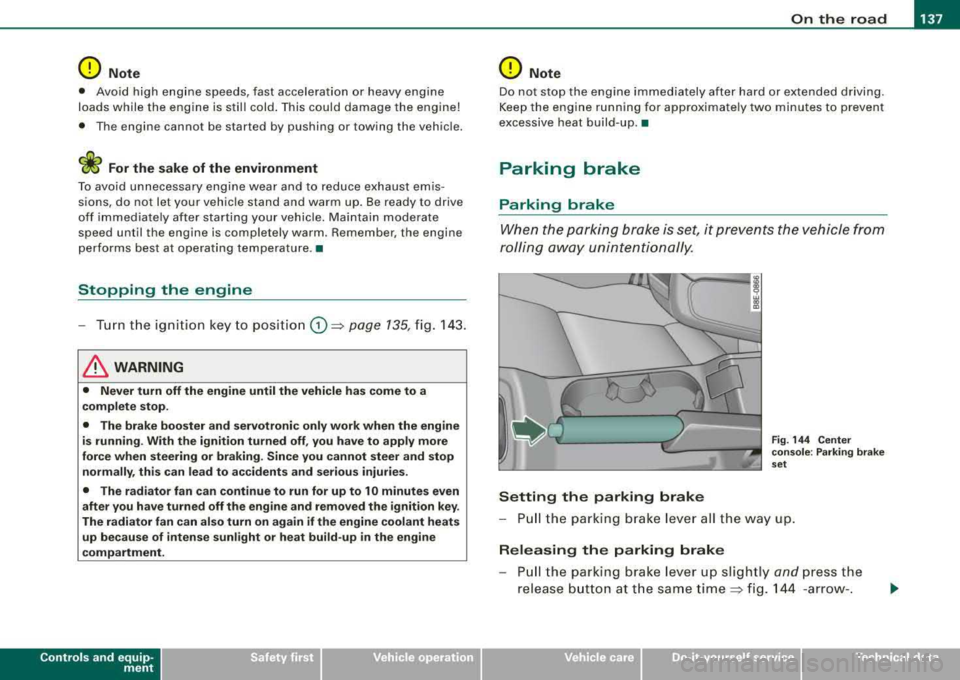
Parking brake
Parking brake
When the parkin g brake is set , it prevents the vehicle from
rolling aw ay unin tentionally.
Setting the parking brake
Fig . 144 Cent er
co nso le : P ark ing bra ke
set
- Pull the p arking brak e lever all the way up.
Releasing the parking brake
Pull t he pa rkin g brake lever up sligh tly and press the
release butto n at th e s ame tim e::::> fig . 144 -ar row- .
irechnical data
Page 140 of 368

___ o_ n_ t_h _e _ r_o _a_ d __________________________________________________ _
-Keep the release button pressed and lower the parking
brake~ &.
If you should drive off with the parking brake still set, a warning tone
will sound and the following will appear in the instrument cluster to
remind you to release the parking brake:
Parking brake set
The parking brake warning comes on only after you have driven for
longer than 3 seconds and faster than 5 mph (5 km/h).
The parking brake warning light Brake (USA)/
«Dl (CDN) illuminates
when the parking brake is set and you switch on the ignition.
& WARNING
Always release the parking brake completely. A partially engaged
brake will overheat the rear brakes, reduce their effectiveness and
cause excessive wear. This could lead to brake failure and an acci
dent.
0 Note
Only after the vehicle has come to complete stop, should you firmly
set the parking brake and either move the gearshift lever into 1st.
gear (manual transmission) or move the selector lever into
"P"
(Automatic transmission).•
Parking
To prevent a parked vehicle from rolling away, there are a
few things you should do.
When you park your vehicle, do the following:
-Stop the vehicle using the brake pedal.
-Set the parking brake firmly.
-Move the selector lever into the P position ~ &.
-Switch off the engine and remove the ignition key from
the ignition lock.
What else you should do when parking your vehicle on
an incline or decline
Turn the steering wheel so that if the vehicle should start to roll, it
will roll into the curb.
If you are parking on a
decline (the front of your vehicle facing
downhill), turn the front wheels to the right so that they point
toward the curb.
If you are parking on an incline (the front of your vehicle facing
uphill), turn the front wheels to the left so that they point
away from
the curb.
Move the selector lever into the P position.
& WARNING
This is how you can reduce the risk of injury when leaving your
vehicle.
• Never park the vehicle where it can come in contact with dry
grass, spilled fuel or any other flammable materials.
• Never allow anyone -especially small children -to remain in the
vehicle when it is locked. Locked doors make it more difficult for
rescuers to access the passenger compartment in the event of an
emergency. Danger to life!
• Never leave children unsupervised in the vehicle. Children
could release the parking brake or move the gearshift lever out of
gear. The vehicle could start to roll away and cause an accident.
• No matter what the season is, the temperature in a parked
vehicle can reach dangerous levels. •
Page 142 of 368

___ O_ n_ t_h _e_ r_o _ a_ d ____________________________________________________ _
Cruise control
General information
The cruise control system allows you to maintain a
constant speed.
The cruise control system allows you to maintain and constant
driving speed when driving faster than 18 mph (30 km/h) -to the
extent this is possible with the given engine power and braking
characteristics. This allow you to take your foot off the "gas" and
rest it, especially on long trips .
The indicator light CRUISE (USA)/
•l'l (CDNl in the instrument cluster
illuminates when the system is on .
& WARNING
• To help keep the vehicle under control, do not use the cruise
control system when driving on winding or slippery roads (as
caused by heavy rain or loose gravel on the road surface), or in
heavy or varying traffic.
• Only use the cruise control when traffic, road and weather
co nd itions allow you to drive at a steady speed.
[ i] Tips
The cruise control cannot maintain a constant speed when driving
downhill. The vehicle will accelerate under its own weight. Down
shift to a lower gear or use the brakes to slow down .•
Storing a speed
You must set and then store a vehicle speed using the
cruise control.
Fig. 145 Cruise control
switches
- Accelerate until you reach the driving speed you want to
store.
- Pull
lever © towards the steering wheel G) => fig. 145 to
switch the system on.
- Press button
@.
After you release button @, the current vehicle speed is stored and
maintained .•
Changing a stored speed
You can change a stored speed.
Accelerate (faster)
-Lift lever © toward 0 => fig. 145 .
- Release the lever to store the new speed.
Page 143 of 368

_________________________________________________ O
_ n_ t_h _e _ r_o _a _d __ ftllll
D ece le rat e (slow er)
- Lower lever @ toward Q => page 140, fig. 145.
- Release the lever to store the new speed.
You can a lso increase the vehic le speed by depressing the acce ler
ator pedal. The vehicle speed wil l increase as long as you keep the
accelerator pedal depressed . When you let up on the accelerator
pedal, t he veh icle speed w ill automatica lly return the to previously
stored vehicle speed in th e cruis e control.
I f the actua l veh icle speed exceeds the stored vehicle speed in the
cruise control for longer than five minutes and by more than 6 mph
(10 km/h), the c ruise control wil l auto matica lly erase the stored
veh ic le speed and you w ill have to rese t the cruise contro l again.
T apping the lever lightly
@
By lightly tapping the lever @toward 0 => page 140, fig. 145, you
can increase ve hicle speed by approximately 1 mph (2 km/h).
By lightly tapp ing the lever @toward
O => page 140, fig. 145, you
can decrease vehicle speed by approximately 1 mph (2 km/h). •
Switching the system off temporarily
Either of the follow ing actions will tempora rily deact ivate
the cru ise con trol:
- press ing t he brake pedal, or
- p ressing t he c lutch pedal (on manua l transmission
mo dels), or
- pu shing the
lever @ towa rds the instrume nt panel 0
(n ot engaging)=> page 140, fig. 14 5.
When you tempo rari ly deac tiva te the cru ise co ntrol fo r a brie f
period, th e previous ly s tored vehicle speed remains in the memory .
Controls and equip
ment T
o resume the previously stored vehicle speed, release the brake (or
clutch) pedal, or you pull lever @toward t he stee ring wheel
G) .
If no veh ic le speed was stored when you switched off the system
temporarily, you must reset a new vehicle speed : Acce lerate to the
des ired speed and press
button @ (SET) => page 140, fig. 145.
& WARNING
Do not use the cruise control if the stored veh icle speed is faster
than exi sting traffic condition s permit .•
Switching off the cruise control system
While driving
- Pu sh lever © towa rds the inst rument p anel 0 un til it
e n gages => page 140, fig . 1 45.
When the vehicle is at a standstill
- Sw itch off the ignit ion. •