Page 116 of 489
�Û�Ý
Press the SEL/RESET button to see
the selections.
When your selection is successf ully
completed, the display changes as
shown above, and then goes back to
the customize item screen.
If the ‘‘SETTING INCOMPLETE’’
message appears, go back to
‘‘SECURITY RELOCK TIMER’’ and
repeat the procedure again.
Select the desired setting by
pressing the INFO ( / ) button,
then enter your selection by pressing
the SEL/RESET button.
Multi-Inf ormation Display
112
�\f���—�\f���—�\f���y�\f�������������y���
�(�)�-���
�\f�y�\f�
�
���y
2008 MDX
Page 117 of 489
�Û
�Ý
�Û�Ý �µ
�µ
�Û�Ý
CONT INUED
Here is one custom setting for the
wiper setup: Each time you press the INFO ( /
) button, the screen changes as
shown in the illustration. Press the
INFO ( / ) button until you see
the setting you want to customize,
then press the SEL/RESET button
to enter your selection. You can select from these two
settings when the wiper switch is in
the INT (intermittent) position:
INTERMITTENT The
intermittent operation varies
according to the selection you make
on the wiper lever’s intermittent
control ring.
WITH VEH SPD The intermittent
operation varies according to vehicle
speed.
While ‘‘WIPER SETUP’’ is shown,
press the SEL/RESET button to
enter the customize mode. WIPER ACTION
Wiper Action
Multi-Inf ormation Display
Wiper Setup
Inst rument s and Cont rols
113
INFO ( / )
BUTTON
SEL/RESET
BUTTON
�\f���—�\f���—�\f���y�\f�������������y���
�(�)�-���
�\f�y�\f�
�
���y
2008 MDX
Page 118 of 489
�Û�Ý�Û�ÝIf the ‘‘SETTING INCOMPLETE’’
message appears, go back to
‘‘WIPER ACTION’’ and repeat the
procedure again.
When your selection is successf ully
completed, the display changes as
shown above, and then goes back to
the customize item screen.
Press the SEL/RESET button to see
the selections.
You can choose this customize item
f rom ‘‘WIPER SETUP’’ by pressing
the INFO ( / ) button repeatedly.
Select the desired setting by
pressing the INFO ( / ) button,
then enter your selection by pressing
the SEL/RESET button.
Multi-Inf ormation Display
114
�\f���—�\f���—�\f���y�\f�������������y���
�(�)�-���
�\f�y�\f�
�
���y
2008 MDX
Page 129 of 489
When you remove the key f rom the
ignition switch, the steering wheel
automatically moves f ully in and up.If your vehicle’s battery is
disconnected or goes dead, or the
f use f or the power tilt and telescopic
steering wheel is removed, the
power tilt and telescopic steering
wheel system needs to be reset
when you reconnect the battery or
install the f use.
Insert the key into the ignition
switch, and remove it. The steering
wheel automatically moves f ully in
and up to let you know the system is
reset.
To change the ‘‘AUTO TILT &
TELESCOPE STEERING WHEEL’’
setting, see page .
The steering wheel then returns to
its original position when you insert
the key back in the ignition switch.
Steering wheel movement is also
controlled by the driving position
memory system (see page ).
99
157
Steering Wheel A djustments
Inst rument s and Cont rols
125
�\f���—�\f���—�\f���y�\f���������
���y���
�(�)�-���
�\f�y�\f�
���\f�y
2008 MDX
Page 137 of 489

The power tailgate has an auto-
reverse f eature. If it meets
resistance while opening or closing,
it will beep three times and reverse
direction. However, the tailgate may
not reverse immediately. Always
make sure passengers and objects
are clear of the tailgate before
opening or closing it.Also check that passengers,
especially children, do not have their
hands on the edge of the tailgate or
on the tailgate sill. The auto reverse
featurestopsworkingwhenthe
tailgate is about to latch so the motor
can pull the tailgate shut.
If your vehicle’s battery is
disconnected, goes dead, or the f use
is removed while the tailgate is f ully
open, the power tailgate needs to be
reset. After connecting the battery
or installing the f use, close the
tailgate f ully by hand.
The power tailgate may not open or
close under the these conditions: Whenthetailgateortheroof is
covered with snow or ice.
Do not install any accessories on the
tailgate. It may cause the tailgate not
to f unction properly. If there is snow
or ice on the tailgate, make sure to
remove it bef ore you operate the
tailgate.
The tailgate has sensors on both
sides. Be caref ul not to damage them.
If the sensors are damaged, the
power tailgate does not f unction
properly.
When the vehicle is swayed in a
strong wind.
The vehicle is parked on a steep
hill. If you push the tailgate release
button inside the handle while the
tailgate is opening or closing, it will
stop moving. You need to open or
close it the rest of the way manually.
CONT INUED
A ut o-Reverse
Tailgate
Inst rument s and Cont rols
133
Closing a power tailgate while
anyone is in the path of the
tailgate can cause serious
injury.
Make sure everyone is clear
before closing the power
tailgate.
�\f���—�\f���—�\f���y�\f�������������y���
�(�)�-���
�\f�y�\f�
�����y
2008 MDX
Page 154 of 489

�µIf your vehicle’s battery is
disconnected or goes dead, or the
driver’s window f use is removed, the
AUTO f unction may be disabled. If
the AUTO f unction is disabled, the
power window system will need to be
reset af ter reconnecting the battery
or installing the f use.
Start the engine. Push down and
hold the driver’s window switch
until the window is f ully open.
Pull and hold the driver’s window
switch to close the window
completely, then hold the switch
f or about 2 seconds.
If the power windows do not operate
properly af ter resetting, have your
vehicle checked by your dealer.
If either f ront
window senses any obstacle while it
is closing automatically, it will
reverse direction and then stop. To
close the window, remove the
obstacle, then use the window switch
again.
Auto reverse stops sensing when the
window is almost closed. You should
always check that all passengers and
objects are away from the window
bef ore closing it.
To close either f ront window f ully,
pull back the window switch f irmly
to the second detent, then release it.
The window automatically goes all
the way up. To stop the window f rom
going all the way up, push down on
the window switch briefly.
When you push the MAIN switch in,
the switch is off, and the passengers’
windows cannot be raised or lowered.
To cancel this f eature, push on the
switch again to get it to pop out.
Keep the MAIN switch pushed in
whenyouhavechildreninthe
vehicle so they do not injure
themselves by operating the
windows unintentionally.
1.
2.
AUTO REVERSE
Power Windows
150
�\f���—�\f���—�\f���y�\f������
������y���
�(�)�-���
�\f�y�\f�
�����y
2008 MDX
Page 185 of 489
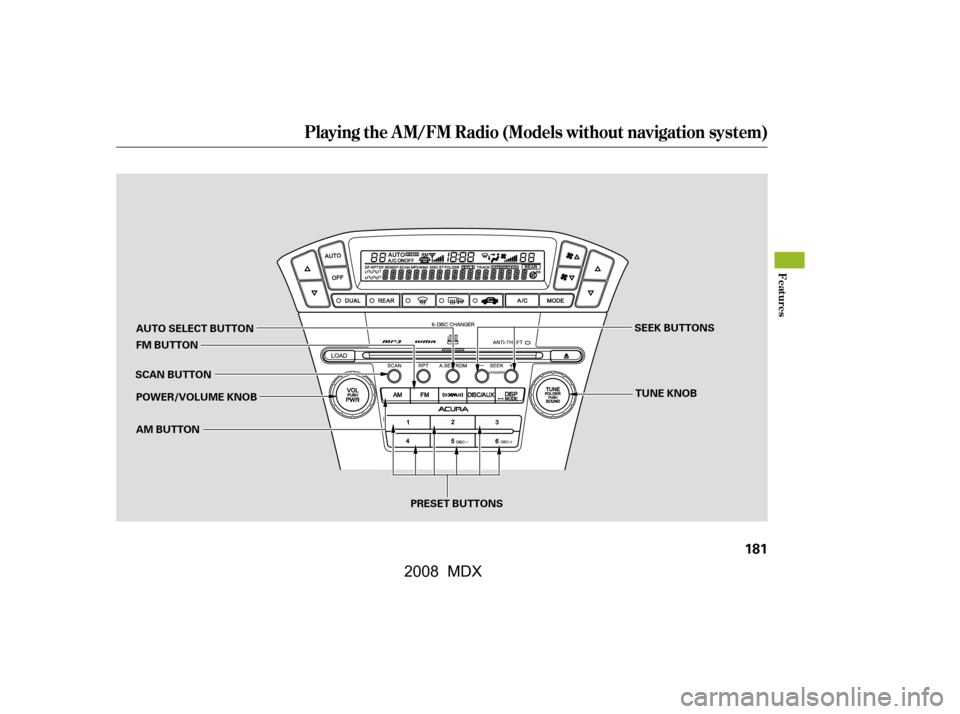
Playing the A M/FM Radio (Models without navigation system)
Features
181
TUNE KNOB
SCAN BUTTON SEEK BUTTONS
PRESET BUTTONS
AUTO SELECT BUTTON
FM BUTTON
AM BUTTON
POWER/VOLUME KNOB
�\f���—�\f���—�\f���y�\f���������\f���y���
�(�)�-���
�\f�y�\f�
�����y
2008 MDX
Page 186 of 489

�µ�µ
�µ �´�µUse the TUNE knob to
tune the radio to a desired f requency.
Turn the knob right to tune to a
higher f requency, or lef t to tune to a
lower f requency.
You can use any of f ive methods to
f ind radio stations on the selected
band: tune, seek, scan, the preset
buttons, and auto select. The scan f unction samples
all stations with strong signals on the
selected band. To activate it, press
the SCAN button, then release it.
You will see SCAN in the display.
The system will scan f or a station
with a strong signal. When it f inds
one, it will stop and play that station
f or about 10 seconds.
The SEEK f unction
searches up and down from the
current f requency to f ind a station
with a strong signal. To activate it,
press the or SEEK button, then
release it. If you do nothing, the system will
scan f or the next strong station and
play it f or 10 seconds. When it plays
a station that you want to listen to,
press the SCAN button again.
The band and f requency that the
radio was last tuned to are displayed.
To change bands, press the AM or
FM button. On the FM band, ST will
be displayed if the station is
broadcasting in stereo. Stereo
reproduction in AM is not available.
On the AM band, AM noise
reduction turns on automatically.
The ignition switch must be in the
ACCESSORY (I) or ON (II) position.
Turn the system on by pushing the
power/volume knob or the AM or
FM button. Adjust the volume by
turning the power/volume knob.
TUNE
To Select a Station SCAN
SEEK
To Play the Radio
Playing the A M/FM Radio (Models without navigation system)
182
�\f���—�\f���—�\f���y�\f���������
���y���
�(�)�-���
�\f�y�\f�
�����y
2008 MDX