2007 VOLVO S60 radio
[x] Cancel search: radioPage 182 of 200

Selecting a sound source
The sound source (e.g. AM, FM, etc.) can be selected in two ways:
Use the sound source buttons (see the center illustration above).
Turn the SOURCE knob (see illustration above) to select a sound source (AM1, AM2, FM1, FM2, FM3, or CD).
Press the knob to select the AM or FM band of your choice.
The sound source selected will be shown in the display.
Scan
Press the SCAN button to start the station scan function. When a station is found, scanning stops for approximately 10
seconds, after which scanning will continue.
Press the SCAN or SOURCE button when a station has been found if you would like to listen to that station and to
discontinue the scan function.
Station seek up/down
Press
or to start the seek function. The radio seeks the next audible station and tunes it in. Repeat the
procedure to continue the seek function.
Manual station search
Press
or and hold it down. MAN will be shown in the display. The radio scans slowly in the selected
direction and will increase the scanning speed after a few seconds. Release the button when the desired frequency
appears in the display. The frequency can be fine-tuned by short presses on the
or keys.
The system will remain in manual search mode for 5 seconds after the button is released, after which it will return to
seek mode.
pg. 218 Specifications
Radio functions HU-650/HU-850
ProCarManuals.com
Page 183 of 200

Steering wheel key pad (option)
If the vehicle is equipped with the key pad in the steering wheel press the right or left arrow to switch between preset
stations.
Storing stations
To store a selected station under one of the station setting buttons 1-6:
- Tune to the desired station.
- Press the button under which the station is to be stored and keep it depressed. The audio system sound will be
interrupted for a few seconds and STORED will appear in the display. The station is now stored.
A total of 30 stations can be stored; 6 stations each in AM1, AM2, FM1, FM2, and FM3.
Storing stations automatically
This function automatically searches for and stores up to 10 strong AM or FM stations in a separate memory. If more
than ten stations are found, the ten strongest ones are stored. This function is especially useful in areas in which you
are not familiar with radio stations or their frequencies.
To use the AUTO function:
- Select radio mode using the AM or FM buttons, or by turning the SOURCE knob.
- Start the search by pressing AUTO for more than 2 seconds.
- AUTO appears in the display and a number of stations with strong signals
pg. 219 Specifications
Radio functions HU-650/HU-850
ProCarManuals.com
Page 184 of 200

(max. 10) from the selected frequency band will be stored in the auto-store memory. If there are no stations with
sufficient signal strength, NO STATION is displayed.
- Press the AUTO button or the arrow keys on the optional steering wheel controls briefly to select the stored stations.
When the radio is in auto-store mode, AUTO is shown in the display. AUTO disappears when you return to the
normal radio mode. Return to the normal radio mode by pressing the AM, FM, or EXIT button.
To return to the Auto-store mode, press the AUTO button briefly.
pg. 220 Specifications
RBDS functions HU-650/HU-850
Radio Broadcast Data System - RBDS
This feature, which may not be available in your area, functions only with FM broadcasts. The radio in your vehicle is
equipped with an advanced system allowing information from broadcasters to be transmitted visually, as text, together
with the audio signal. This information is then decoded by the radio and made available for several new and unique
features.
The RBDS or Radio Broadcast Data System operates in the FM band only, and the information transmitted is supplied
exclusively by participating broadcasters. Volvo has no control over the accuracy of the data or information.
Coverage by local broadcasters may be limited at this time, but as the technology and benefits grow, you will find the
radio in your vehicle is equipped to take advantage of this system.
PI (Program Information) Seek:
When an FM station has been stored as a preset, the radio also stores RBDS program information if it is available.
When the preset is selected at a later time, the radio tries to access updated program information. In weak signal areas,
there may be a delay before the station becomes audible. During this delay, "PI seek" will be displayed and there will
be no sound.
PI seek can be interrupted by pressing EXIT.
Radio text
Certain RBDS stations broadcast program information, which can be shown in the display. The text will be shown
twice in the display.
To start this function:
Press the FM button for several seconds.
To deactivate this function:
Press FM briefly.
Station information will be shown twice in the display.
Alarm
Alarms bulletins are transmitted automatically by certain RBDS stations. The function cannot be deactivated.
"Alarm!" is shown in the radio display when an alarm message is sent. The function is used to warn motorists of
serious accidents, etc.
pg. 221 Specifications
RBDS functions HU-650/HU-850
Program type/station format - PTY
The PTY function allows you to find stations whose programs suit your taste. Use the PTY function to select among
the different station formats shown in the list.
To select a station format:
ProCarManuals.com
Page 185 of 200

- Select radio mode using the FM button, or by turning the SOURCE knob.
- Turn the SOURCE knob, select PTY and press SOURCE.
- Turn the SOURCE knob, select a station format from the list and press SOURCE to confirm the selected station
format. The PTY (station format) of the selected station is now shown in the display.
NOTE: Not all RBDS radio stations have PTY designations.
Station formatsFormat Display text
Off PTY OFF
News NEWS
Current affairs AFFAIRS
Information INFO
Sports SPORT
Education EDUCATION
Drama DRAMA
Art and culture CULTURE
Science SCIENCE
Entertainment VARIED
Pop music POP M
Rock music ROCK M
Easy listening EASY M
Light classics LIGHT M
Classical music CLASSICS
Other music OTHER M
Weather WEATHER
Finance FINANCE
Religious programs RELIGION
Travel TRAVEL
Leisure LEISURE
Jazz music JAZZ
Country music COUNTRY
National music NATION M
Oldies "OLDIES"
Folk music FOLK M
Documentary DOCUMENT
pg. 222 Specifications
RBDS functions HU-650/HU-850
Automatic Frequency update (AF)
The AF function tunes to the strongest transmitter for the current station, if that station supports alternative frequencies.
AF is OFF by default.
To deactivate AF:
- Select radio mode using the FM button, or by turning the SOURCE knob.
- Press SOURCE.
ProCarManuals.com
Page 186 of 200

- Turn the SOURCE knob, select ADVANCED MENU and press SOURCE.
- Turn the SOURCE knob, select RADIO SETTINGS and press SOURCE.
- Turn the SOURCE knob, select AF ON/ OFF (flashing text) and press SOURCE.
- Press EXIT.
To reactivate the function, follow the procedure above and select AF ON in step 5.
Resetting RBDS functions
RBDS functions can be returned to their factory settings as follows:
- Select radio mode using the FM button, or by turning the SOURCE knob.
- Press SOURCE.
- Turn the SOURCE knob, select ADVANCED MENU and press SOURCE.
- Turn the SOURCE knob, select RESET TO DEFAULT and press SOURCE. - Press EXIT.
ASC - speed compensated volume
The audio system's volume is adjusted automatically according to the speed of the vehicle. There are three settings
available: low, medium, or high.
To activate ASC:
- Select radio mode using the FM button, or by turning the SOURCE knob.
- Press SOURCE.
- Turn the SOURCE knob, select ADVANCED MENU and press SOURCE.
- Turn the SOURCE knob, select AUDIO SETTINGS and press SOURCE.
- Turn the SOURCE knob, select ASC LEVEL (flashing text) and press SOURCE.
- Turn the SOURCE knob to select LOW, MEDIUM, HIGH, or OFF and press SOURCE.
- Press EXIT.
NOTE: Please be aware that there are certain RBDS menu selections, for example EON, TP search, News, etc, that
may not be available in North America.
pg. 223 Specifications
HU-650 - CD player
Starting the CD player
Please refer to the illustration on page 213
for the location of the buttons referred to on this page.
- Insert a disc into the player.
- Press the CD button or turn the SOURCE knob to CD.
Changing tracks
Briefly press the
or keys (or the corresponding keys on the optional steering wheel keypad) to skip to the
previous or next track. The track number is shown in the display.
Fast forward/back
Press and hold down the
or keys to search within a track or the entire disc. The search continues for as long
as the buttons are held in.
NOTE: The corresponding keys on the optional steering wheel keypad cannot be used for fast forward/back.
Random play
This function plays the tracks on a CD in random order (shuffle).
Select CD mode and press the RND button. RND is shown in the display as long as the function is activated.
Press RND again to stop random play.
ProCarManuals.com
Page 189 of 200

Fast forward/back
Press and hold down the
or keys to search within a track or the entire disc. The search continues for as long
as the buttons are held in.
The corresponding keys on the optional steering wheel keypad cannot be used for fast forward/back.
Random play
This function plays the tracks on a CD in random order (shuffle).
Select CD mode and press the RND button. RND is shown in the display as long as the function is activated.
Random tracks from randomly selected discs will be played.
Press RND again to stop random play.
Scan
This function plays the first 10 seconds of each track on the CD.
Press SCAN to start the function.
Press SCAN or EXIT to stop the scan function and listen to an entire track.
Scan only works on the selected disc.
pg. 226 Specifications
Dolby Surround Pro Logic II - HU-850 only
Dolby Surround Pro Logic II
Dolby Surround Pro Logic II is a further development of the previous version of the system and provides enhanced
sound quality. The improved sound is particularly apparent to passengers in the rear seat.
Dolby Surround Pro Logic II, together with a center speaker in the dashboard, offers you a sound experience very
close to a live performance. The normal left-right stereo channels are divided to left-center -right. In addition, surround
sound is produced by the rear speakers. This surround sound mirrors the ambience of a concert hall.
NOTE:
Dolby Surround Pro Logic II is optimized for CD mode.
When listening to FM radio stations, Dolby Surround Pro Logic II functions best in areas with strong reception. If
reception is weak, selecting 2 or 3- channel stereo may provide better sound quality.
3 channel stereo is recommended for AM and FM broadcasts.
Dolby Surround Pro Logic II and the Dolby icon are trademarks of Dolby Laboratories Licensing Corporation.
Dolby Pro Logic II Surround System is manufactured under license from Dolby Laboratories Licensing Corporation.
Selecting Dolby Surround Pro Logic II
To select Dolby Surround Pro Logic II mode during CD playback, press "
". "Dolby Pro Logic II" is displayed.
Press "OFF" to return to 2 channel stereo.
ProCarManuals.com
Page 190 of 200

3 Channel stereo
To select 3 channel stereo mode press "3- CH". "3 ch" is displayed. Press "OFF" to return to 2 channel stereo.
pg. 227 Specifications
Dolby Surround Pro Logic II - HU-850 only
Center level
This function is used to set the level of the center speaker in the dashboard. To set the level:
- Press SOURCE.
- Turn the SOURCE knob, select ADVANCED MENU and press SOURCE.
- Turn the SOURCE knob, select AUDIO SETTINGS and press SOURCE.
- Turn the SOURCE knob, select CENTER LEVEL and press SOURCE.
- Turn the SOURCE knob, select the desired level and press SOURCE.
- Press EXIT.
Surround level
This function is used to set the level of the of the rear speakers. To set the level:
- Press SOURCE.
- Turn the SOURCE knob, select ADVANCED MENU and press SOURCE.
- Turn the SOURCE knob, select AUDIO SETTINGS and press SOURCE.
- Turn the SOURCE knob, select SURROUND LEVEL and press SOURCE.
- Turn the SOURCE knob, select the desired level and press SOURCE.
- Press EXIT.
pg. 228 Specifications
Audio systems - specifications
HU-650
Output: 4x25 W
Impedance: 4 Ohm
Voltage required: 12 V, negative ground
External amplifier: 4x50 W or 4x75 W
Radio frequency range:
AM: 530 - 1710 kHz
FM: 87.7 - 107.9 MHz
HU-850
Output 1x25 W center speaker
Impedance: 4 Ohm
Voltage required: 12 V, negative ground
External amplifier
1:
4x50 W or 4x75 W
ProCarManuals.com
Page 191 of 200
Radio frequency range
AM: 530 - 1710 kHz
FM: 87.7 - 107.9 MHz
1. The HU- 850 must be connected to an external amplifier.
Alarm
"Alarm!" is displayed when an alarm message is sent. The function is used to warn the driver of a serious accident
or disaster situation.
CAUTION!
The optional supplementary amplifier (HU-850) may be mounted under the front passenger's seat. If the floor of the
vehicle has become soaked for any reason, do not turn on the radio. This would cause damage to the amplifier.
Contact a Volvo retailer.
Low battery voltage
If the level of battery voltage is low, a message will be displayed. The vehicle's energy conservation function may
switch off the audio system. Recharge the battery by starting the engine.
pg. 229 Specifications
HomeLink® Universal Transceiver (option)
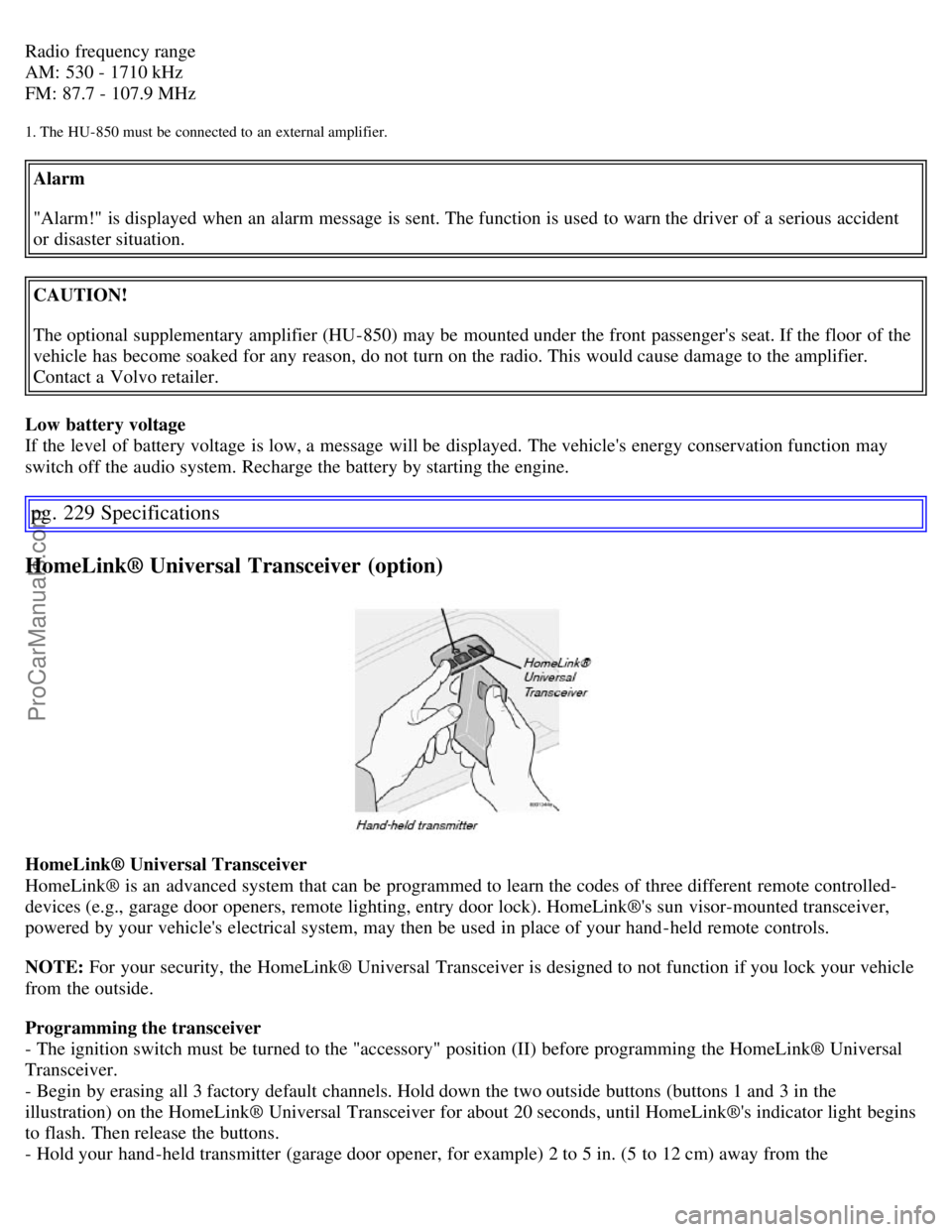
HomeLink® Universal Transceiver
HomeLink® is an advanced system that can be programmed to learn the codes of three different remote controlled-
devices (e.g., garage door openers, remote lighting, entry door lock). HomeLink®'s sun visor-mounted transceiver,
powered by your vehicle's electrical system, may then be used in place of your hand -held remote controls.
NOTE: For your security, the HomeLink® Universal Transceiver is designed to not function if you lock your vehicle
from the outside.
Programming the transceiver
- The ignition switch must be turned to the "accessory" position (II) before programming the HomeLink® Universal
Transceiver.
- Begin by erasing all 3 factory default channels. Hold down the two outside buttons (buttons 1 and 3 in the
illustration) on the HomeLink® Universal Transceiver for about 20 seconds, until HomeLink®'s indicator light begins
to flash. Then release the buttons.
- Hold your hand -held transmitter (garage door opener, for example) 2 to 5 in. (5 to 12 cm) away from the
ProCarManuals.com