2007 VOLVO S60 alarm
[x] Cancel search: alarmPage 87 of 200

WARNING!
Keep vehicle doors and trunk locked and keep keys out of a child's reach. Unsupervised children could lock
themselves in an open trunk and risk injury. Children should be taught not to play in vehicles.
On hot days, the temperature in the trunk or vehicle interior can rise very quickly. Exposure of people to these
high temperatures for even a short period of time can cause heat-related injury or death. Small children are
particularly at risk.
pg. 102 Locks and alarm
Child safety locks
Manual child safety locks - rear doors
The controls are located on the rear door jambs. Use the ignition key or a screwdriver to adjust these controls.
A. The door cannot be opened from the inside. Normal operation from the outside.
B. The door lock functions normally.
WARNING!
Remember, in the event of an accident, the rear seat passengers cannot open the doors from the inside with the
buttons in position A.
pg. 103 Locks and alarm
ProCarManuals.com
Page 88 of 200

Alarm
The alarm is automatically armed whenever you lock your vehicle.
When armed, the alarm continuously monitors a number of points on the vehicle.
The following conditions will set off the alarm:
The hood is forced open.
The trunk is forced open.
A door is forced open.
The ignition switch is tampered with.
If there is movement in the passenger compartment (if the vehicle is equipped with the optional movement sensor).
The vehicle is lifted or towed (if the vehicle is equipped with the optional inclination sensor).
The battery is disconnected (while the alarm is armed).
The siren is disconnected when the alarm is disarmed.
Arming the alarm
Press the LOCK button on the remote control, lock the vehicle using the key in the driver's door or press the central
lock button on the driver's door with the door open. One long flash of the turn signals will confirm that the alarm is
armed.
Disarming the alarm
Press the UNLOCK button on the remote control or unlock the doors with the key.
Turning off (stopping) the alarm
If the alarm is sounding, it can be stopped by pressing the UNLOCK button on the remote control or by unlocking the
driver's door with the key.
Visual alarm signal
The visual alarm signal is given by flashing all turn signals and turning on the interior lighting for approximately 5
minutes.
Audible alarm signal
An audible alarm signal is given by a battery powered siren. One alarm cycle lasts for 25 seconds.
"Panic" button
In an emergency situation, this feature can be used to attract attention.
Activate the "panic" button by pressing the red button on the remote control (see illustration on page 97
) for at least 3
seconds or by pressing this button twice within 3 seconds. The turn signals will flash, and the vehicle's horn will
sound. The function can be turned off by pressing any of the buttons on the remote control or will stop automatically
after 25 seconds. When a button is pressed, there is a 5 second delay before the panic alarm is deactivated.
NOTE: This button will NOT unlock the vehicle.
pg. 104 Locks and alarm
Alarm
ProCarManuals.com
Page 89 of 200

Temporarily turning off the inclination and movement alarm sensor(s) - accessory
This button will only be found in vehicles equipped with the accessory inclination and/ or movement sensors.FCC ID: MAYDA5823
This device complies with part 15 of the FCC rules. Operation is subject to the following conditions: (1) This device
may not cause harmful interference, and (2) this device must accept any interference received, including interference
that may cause undesired operation.
Canadian IC: 4405A-DA5823
Movement sensor DA5823 by Dynex
Operation is subject to the following conditions: (1) this device may not cause interference, and (2) this device must
accept any interference, including interference that may cause undesired operation of the device.
In certain situations it may be desirable to turn off the accessory inclination and movement alarm sensors if, for
example, you drive your vehicle onto a ferry where the rocking of the boat could trigger the alarm or if a pet is left in
the vehicle with the doors locked.
To temporarily turn off the inclination and movement alarm sensors from the alarm system:
From the time the ignition key is turned from the Drive position (position II) until you lock the vehicle, you can press
the button in the center console. The LED in the switch will light up and a message will be displayed in the text
window to indicate that the sensors are disconnected.
The vehicle can then be locked in the usual way to set the alarm.
NOTE:
This function will not turn off the vehicle's standard alarm.
The optional sensors are automatically reconnected to the alarm system the next time the vehicle is unlocked and
then locked again.
LED alarm status signals
The status of the alarm system is indicated by the red LED at the top of the dash:
LED off - the alarm is not armed
LED flashes once per second - the alarm is armed
LED flashes rapidly before the ignition is switched on - the alarm has been triggered
Fault in the alarm system : If a fault has been detected in the alarm system, a message will be displayed in the text
window. Contact your Volvo retailer.
Automatic re-lock/re -arm system
If the vehicle is unlocked with the remote, the vehicle will re-lock and the alarm will re-arm after 2 minutes unless a
ProCarManuals.com
Page 166 of 200

3. Horn15
4.-
5. -
6. -
7. -
8. Alarm siren 5
9. Break light switch feed 5
10. Instrument panel, climate system, power driver's seat (option) 10
11. 12-volt sockets - front and rear seats 15
12. -
13. -
14. Headlight wipers (S60 R) 15
15. ABS, STC/DSTC 5
16. Power steering, Active Bi -Xenon headlights (option) 10
17. Driver's side front foglight (option) 7.5
18. Passenger's side front foglight (option) 7.5
19. -
20. -
21. Transmission control module, reverse gear block (M66) 10
22. Driver's side high beam 10
23. Passenger's side high beam 10
24. -
25. -
26. -
27. -
28. Power passenger's seat (option), audio system 5
29. -
30. -
31. -
32. -
33. Vacuum pump 20
34. Windshield washer pump, headlight wipers (S60 R) 15
35. -
36. -
pg. 193 Maintenance and servicing
Fuses
ProCarManuals.com
Page 181 of 200

Turn the knob clockwise to increase volume. Volume control is electronic and does not have an end stop. If you have
a key pad in the steering wheel, increase or decrease the volume with the + or - buttons.
Volume control - ALARM
If a CD is playing when the radio receives an alarm bulletin (available in certain areas only), the CD player enters
pause mode. The bulletin is broadcast at the volume selected for this type of message.
After the bulletin has been completed, the audio system reverts to the originally selected sound.
pg. 216 Specifications
Radio functions HU-650/HU-850
Sound settings
Bass
Adjust the bass by pressing the button to extend the control and turning it to the left (less bass) or to the right (more
bass). A "detent" indicates "equalized" bass. Press the button back in when you have made the adjustment.
Treble
Adjust the treble by pressing the button to extend the control and turning it to the left (less treble), or to the right (more
treble). A "detent" indicates "equalized" treble. Press the button back in when you have made the adjustment.
Fader - Balance front/rear
Adjust front/rear speaker balance by pressing the button to extend the control and turning it to the left (more sound
from the rear speakers) or to the right (more sound from the front speakers). A "detent" indicates "equalized" balance.
Press the button back in when you have made the adjustment.
Balance right/left
Adjust left/right speaker balance by pressing the button to extend the control, and turning it to the left (more sound
from the left speakers) or to the right (more sound from the right speakers). A "detent" indicates "equalized" balance.
Press the button back in when you have made the adjustment.
MID EQ level
This function is used to fine-tune the balance of sound in the speakers. To set the level:
- Press SOURCE.
- Turn the SOURCE knob, select ADVANCED MENU and press SOURCE.
- Turn the SOURCE knob, select AUDIO SETTINGS and press SOURCE.
- Turn the SOURCE knob, select MID EQ LEVEL and press SOURCE.
- Turn the SOURCE knob, select the desired level and press SOURCE.
- Press EXIT.
pg. 217 Specifications
Radio functions HU-650/HU-850
ProCarManuals.com
Page 184 of 200

(max. 10) from the selected frequency band will be stored in the auto-store memory. If there are no stations with
sufficient signal strength, NO STATION is displayed.
- Press the AUTO button or the arrow keys on the optional steering wheel controls briefly to select the stored stations.
When the radio is in auto-store mode, AUTO is shown in the display. AUTO disappears when you return to the
normal radio mode. Return to the normal radio mode by pressing the AM, FM, or EXIT button.
To return to the Auto-store mode, press the AUTO button briefly.
pg. 220 Specifications
RBDS functions HU-650/HU-850
Radio Broadcast Data System - RBDS
This feature, which may not be available in your area, functions only with FM broadcasts. The radio in your vehicle is
equipped with an advanced system allowing information from broadcasters to be transmitted visually, as text, together
with the audio signal. This information is then decoded by the radio and made available for several new and unique
features.
The RBDS or Radio Broadcast Data System operates in the FM band only, and the information transmitted is supplied
exclusively by participating broadcasters. Volvo has no control over the accuracy of the data or information.
Coverage by local broadcasters may be limited at this time, but as the technology and benefits grow, you will find the
radio in your vehicle is equipped to take advantage of this system.
PI (Program Information) Seek:
When an FM station has been stored as a preset, the radio also stores RBDS program information if it is available.
When the preset is selected at a later time, the radio tries to access updated program information. In weak signal areas,
there may be a delay before the station becomes audible. During this delay, "PI seek" will be displayed and there will
be no sound.
PI seek can be interrupted by pressing EXIT.
Radio text
Certain RBDS stations broadcast program information, which can be shown in the display. The text will be shown
twice in the display.
To start this function:
Press the FM button for several seconds.
To deactivate this function:
Press FM briefly.
Station information will be shown twice in the display.
Alarm
Alarms bulletins are transmitted automatically by certain RBDS stations. The function cannot be deactivated.
"Alarm!" is shown in the radio display when an alarm message is sent. The function is used to warn motorists of
serious accidents, etc.
pg. 221 Specifications
RBDS functions HU-650/HU-850
Program type/station format - PTY
The PTY function allows you to find stations whose programs suit your taste. Use the PTY function to select among
the different station formats shown in the list.
To select a station format:
ProCarManuals.com
Page 191 of 200
Radio frequency range
AM: 530 - 1710 kHz
FM: 87.7 - 107.9 MHz
1. The HU- 850 must be connected to an external amplifier.
Alarm
"Alarm!" is displayed when an alarm message is sent. The function is used to warn the driver of a serious accident
or disaster situation.
CAUTION!
The optional supplementary amplifier (HU-850) may be mounted under the front passenger's seat. If the floor of the
vehicle has become soaked for any reason, do not turn on the radio. This would cause damage to the amplifier.
Contact a Volvo retailer.
Low battery voltage
If the level of battery voltage is low, a message will be displayed. The vehicle's energy conservation function may
switch off the audio system. Recharge the battery by starting the engine.
pg. 229 Specifications
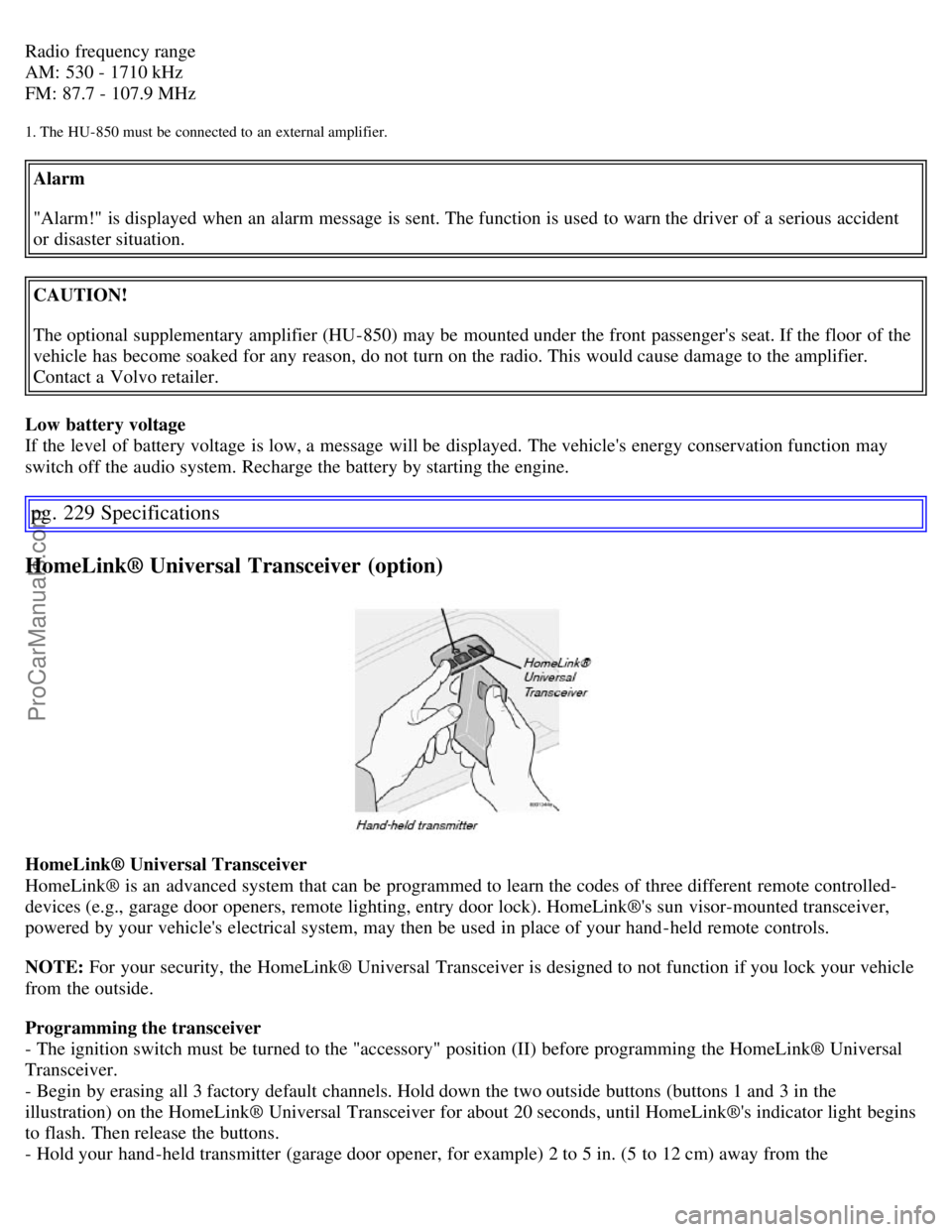
HomeLink® Universal Transceiver (option)
HomeLink® Universal Transceiver
HomeLink® is an advanced system that can be programmed to learn the codes of three different remote controlled-
devices (e.g., garage door openers, remote lighting, entry door lock). HomeLink®'s sun visor-mounted transceiver,
powered by your vehicle's electrical system, may then be used in place of your hand -held remote controls.
NOTE: For your security, the HomeLink® Universal Transceiver is designed to not function if you lock your vehicle
from the outside.
Programming the transceiver
- The ignition switch must be turned to the "accessory" position (II) before programming the HomeLink® Universal
Transceiver.
- Begin by erasing all 3 factory default channels. Hold down the two outside buttons (buttons 1 and 3 in the
illustration) on the HomeLink® Universal Transceiver for about 20 seconds, until HomeLink®'s indicator light begins
to flash. Then release the buttons.
- Hold your hand -held transmitter (garage door opener, for example) 2 to 5 in. (5 to 12 cm) away from the
ProCarManuals.com
Page 194 of 200

2 0 0 7
VOLVO S60
Index
pg. 233-237 Index
A
A/C (air conditioning) 76
ABS2, 47, 123
Accessory installation (special warnings)5
Active Bi -Xenon headlights (ABL)53
Air conditioning75
Air distribution73, 76
Air quality sensor77
Air vents73
Alarm103
All Wheel Drive120
All Wheel Drive - towing129
Anti-lock Brake System (ABS)2, 47
Audio system212
AUTO (climate control)75
Automatic transmission116
Automatic transmission - kickdown117
Automatic transmission, Sport mode119
Average speed59
AWD120
B
Back up light187
Backrest, rear seat, folding90
Battery171, 179
Battery - replacing181
Belt check172
Black Box (Vehicle Event Data)168
Blower (fan)75
Brake circuit122
Brake fluid177
Brake light187
Brake system46, 122
Bulbs182
ProCarManuals.com