Page 14 of 611
52007 TUNDRA from Jul. ’07 Prod. (OM34463U)
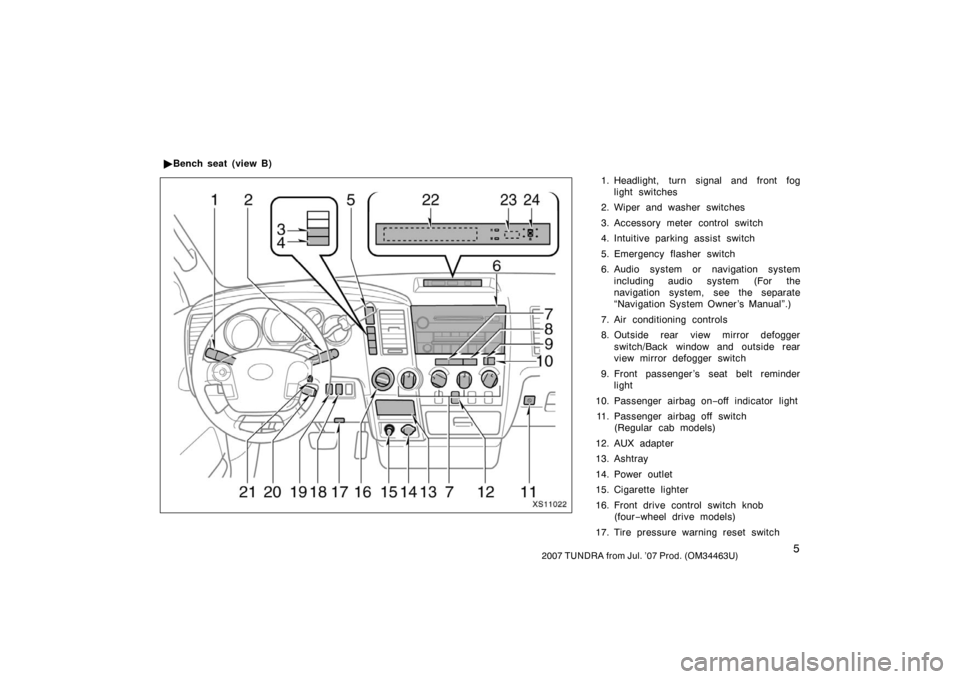
1. Headlight, turn signal and front foglight switches
2. Wiper and washer switches
3. Accessory meter control switch
4. Intuitive parking assist switch
5. Emergency flasher switch
6. Audio system or navigation system including audio system (For the
navigation system, see the separate
“Navigation System Owner ’s Manual”.)
7. Air conditioning controls
8. Outside rear view mirror defogger switch/Back window and outside rear
view mirror defogger switch
9. Front passenger ’s seat belt reminder light
10. Passenger airbag on −off indicator light
11. Passenger airbag off switch (Regular cab models)
12. AUX adapter
13. Ashtray
14. Power outlet
15. Cigarette lighter
16. Front drive control switch knob (four −wheel drive models)
17. Tire pressure warning reset switch
�
Bench seat (view B)
XS11022
Page 16 of 611
72007 TUNDRA from Jul. ’07 Prod. (OM34463U)
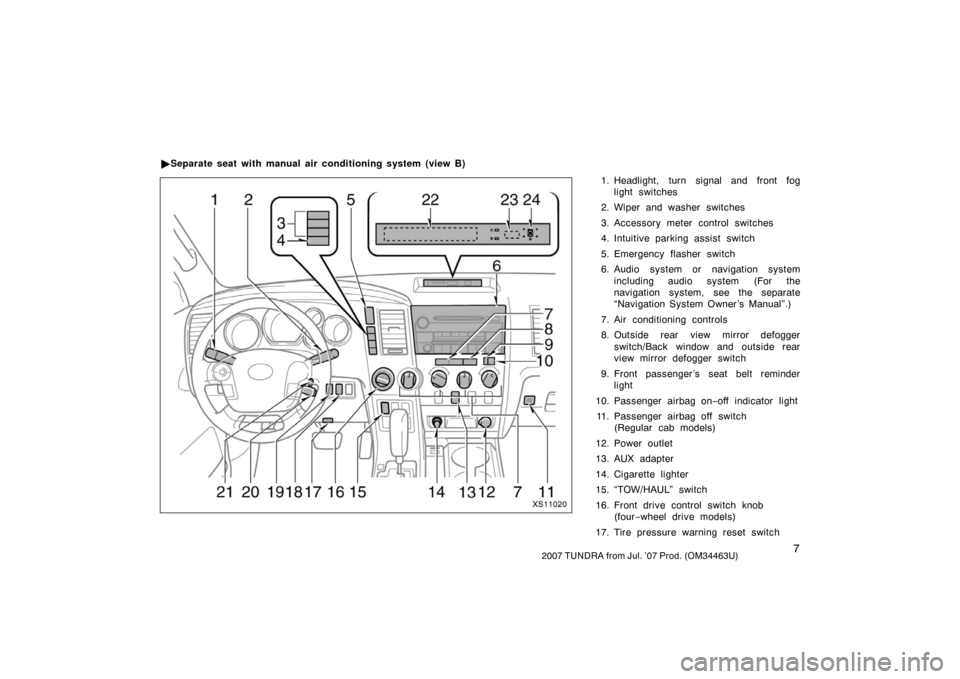
1. Headlight, turn signal and front foglight switches
2. Wiper and washer switches
3. Accessory meter control switches
4. Intuitive parking assist switch
5. Emergency flasher switch
6. Audio system or navigation system including audio system (For the
navigation system, see the separate
“Navigation System Owner ’s Manual”.)
7. Air conditioning controls
8. Outside rear view mirror defogger switch/Back window and outside rear
view mirror defogger switch
9. Front passenger ’s seat belt reminder light
10. Passenger airbag on −off indicator light
11. Passenger airbag off switch (Regular cab models)
12. Power outlet
13. AUX adapter
14. Cigarette lighter
15. “TOW/HAUL” switch
16. Front drive control switch knob (four −wheel drive models)
17. Tire pressure warning reset switch
�
Separate seat with manual air conditioning system (view B)
XS11020
Page 18 of 611
92007 TUNDRA from Jul. ’07 Prod. (OM34463U)
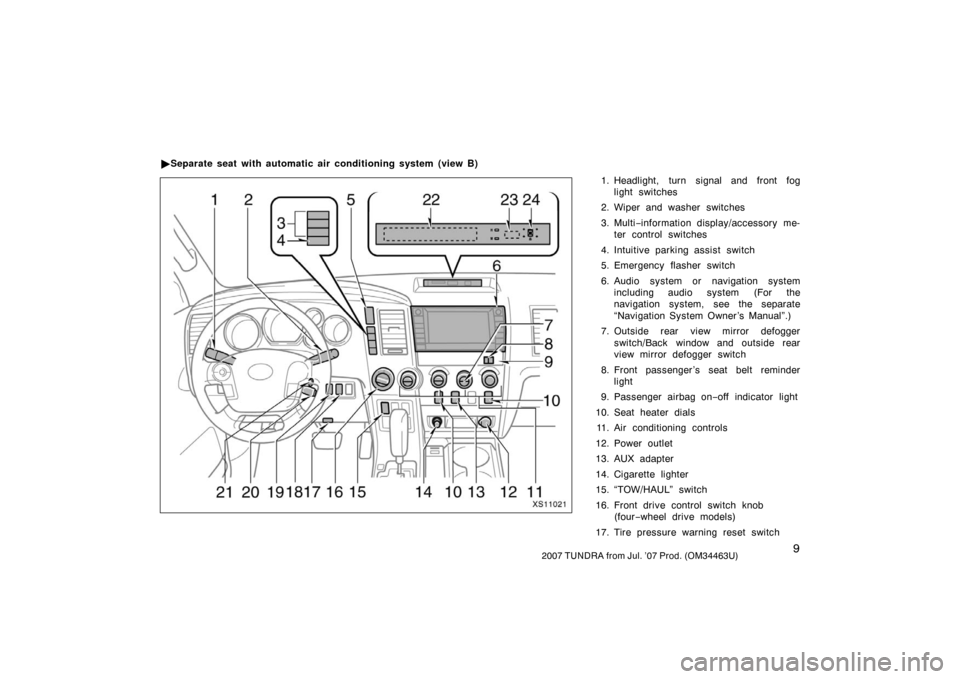
1. Headlight, turn signal and front foglight switches
2. Wiper and washer switches
3. Multi −information display/accessory me-
ter control switches
4. Intuitive parking assist switch
5. Emergency flasher switch
6. Audio system or navigation system including audio system (For the
navigation system, see the separate
“Navigation System Owner ’s Manual”.)
7. Outside rear view mirror defogger switch/Back window and outside rear
view mirror defogger switch
8. Front passenger ’s seat belt reminder light
9. Passenger airbag on −off indicator light
10. Seat heater dials 11. Air conditioning controls
12. Power outlet
13. AUX adapter
14. Cigarette lighter
15. “TOW/HAUL” switch
16. Front drive control switch knob (four −wheel drive models)
17. Tire pressure warning reset switch
�
Separate seat with automatic air conditioning system (view B)
XS11021
Page 175 of 611
1662007 TUNDRA from Jul. ’07 Prod. (OM34463U)
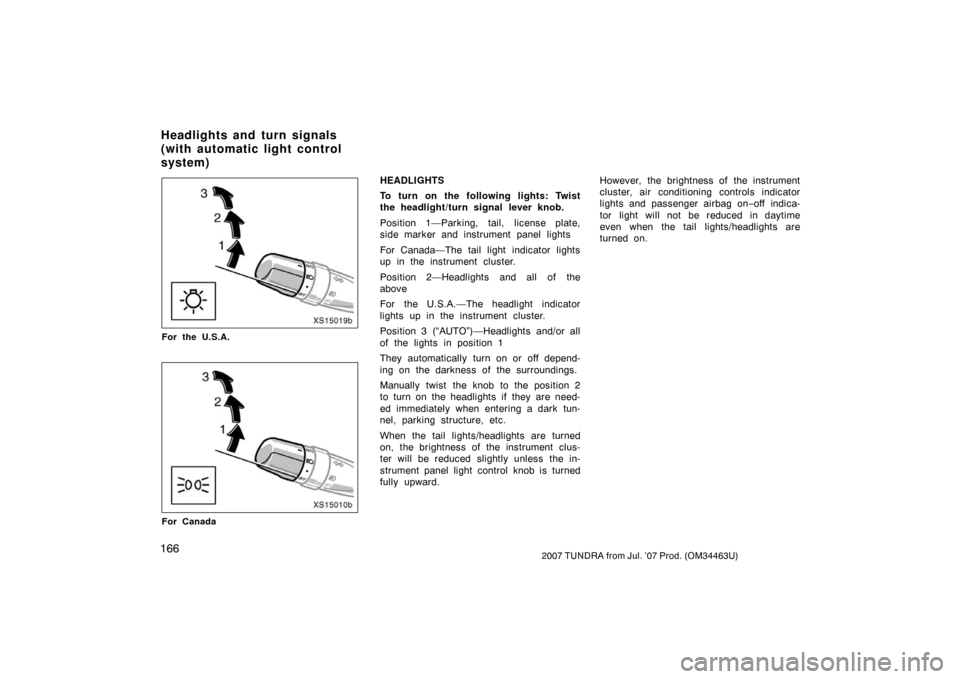
XS15019b
For the U.S.A.
XS15010b
For Canada
HEADLIGHTS
To turn on the following lights: Twist
the headlight/turn signal lever knob.
Position 1—Parking, tail, license plate,
side marker and instrument panel lights
For Canada—The tail light indicator lights
up in the instrument cluster.
Position 2—Headlights and all of the
above
For the U.S.A.—The headlight indicator
lights up in the instrument cluster.
Position 3 (“AUTO”)—Headlights and/or all
of the lights in position 1
They automatically turn on or off depend-
ing on the darkness of the surroundings.
Manually twist the knob to the position 2
to turn on the headlights if they are need-
ed immediately when entering a dark tun-
nel, parking structure, etc.
When the tail lights/headlights are turned
on, the brightness of the instrument clus-
ter will be reduced slightly unless the in-
strument panel light control knob is turned
fully upward.However, the brightness of the instrument
cluster, air conditioning controls indicator
lights and passenger airbag on
−off indica-
tor light will not be reduced in daytime
even when the tail lights/headlights are
turned on.
Headlights and turn signals
(with automatic light control
system)
Page 192 of 611
1832007 TUNDRA from Jul. ’07 Prod. (OM34463U)
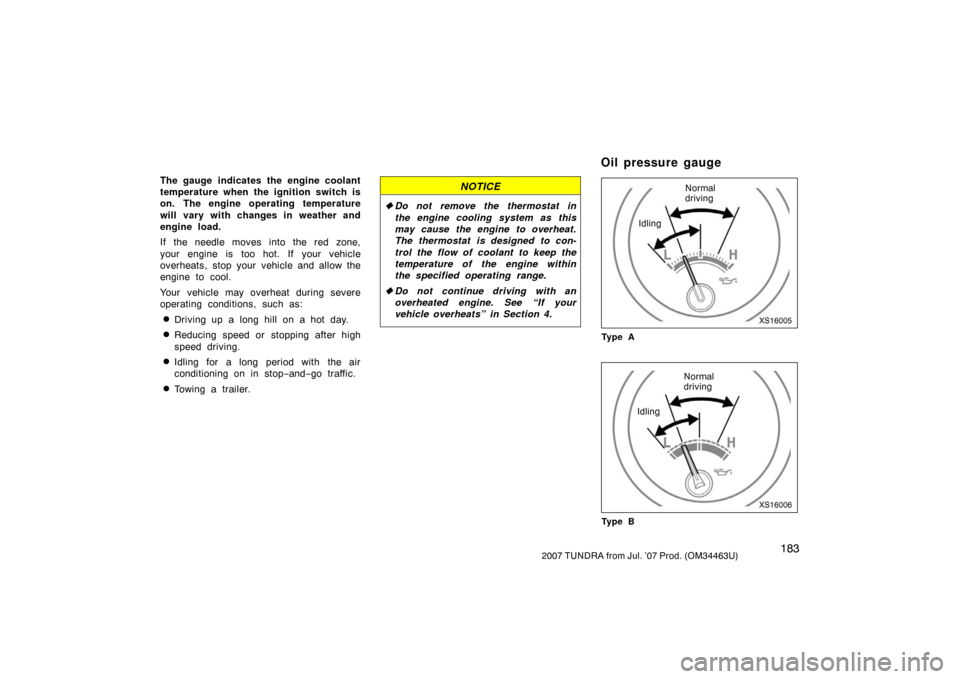
The gauge indicates the engine coolant
temperature when the ignition switch is
on. The engine operating temperature
will vary with changes in weather and
engine load.
If the needle moves into the red zone,
your engine is too hot. If your vehicle
overheats, stop your vehicle and allow the
engine to cool.
Your vehicle may overheat during severe
operating conditions, such as:
�Driving up a long hill on a hot day.
�Reducing speed or stopping after high
speed driving.
�Idling for a long period with the air
conditioning on in stop−and− go traffic.
�Towing a trailer.
NOTICE
�Do not remove the thermostat in
the engine cooling system as this
may cause the engine to overheat.
The thermostat is designed to con-
trol the flow of coolant to keep the
temperature of the engine within
the specified operating range.
� Do not continue driving with an
overheated engine. See “If your
vehicle overheats” in Section 4.
XS16005
Normal
driving
Idling
Ty p e A
XS16006
Normal
driving
Idling
Ty p e B
Oil pressure gauge
Page 350 of 611
3412007 TUNDRA from Jul. ’07 Prod. (OM34463U)
CARING FOR YOUR COMPACT DISC
PLAYER, DVD PLAYER AND DISCS
�Type 2 and type 3—The player is in-
tended for use with 12 cm (4.7 in.)
discs only.
�Extremely high temperatures can keep
your compact disc player and DVD
player from working. On hot days, use
the air conditioning to cool the vehicle
interior before you use the players.
�Bumpy roads or other vibrations may
make your compact disc player and
DVD player skip.
�If moisture gets into your compact disc
player and DVD player, the players
may not play even though they appear
to be working. Remove the disc from
the player and wait until it dries.
CAUTION
Compact disc players and DVD play-
ers use an invisible laser beam which
could cause hazardous radiation ex-
posure if directed outside the unit. Be
sure to operate the player correctly.
XS18016
Compact disc player
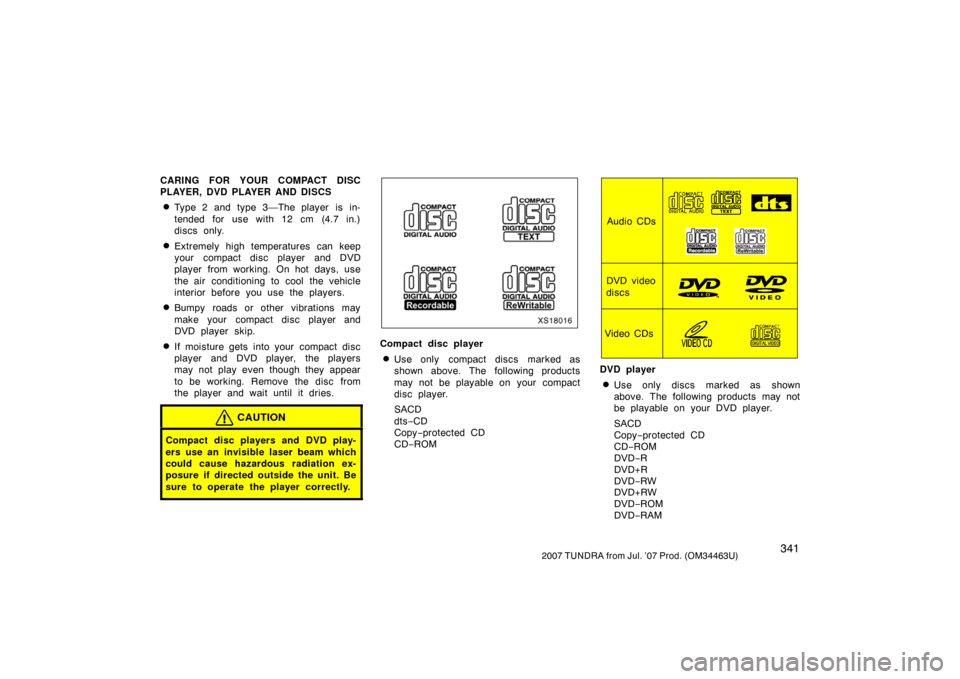
�Use only compact discs marked as
shown above. The following products
may not be playable on your compact
disc player.
SACD
dts−CD
Copy −protected CD
CD− ROM
Audio CDs
DVD video
discs
Video CDs
DVD player
�Use only discs marked as shown
above. The following products may not
be playable on your DVD player.
SACD
Copy −protected CD
CD− ROM
DVD −R
DVD+R
DVD −RW
DVD+RW
DVD −ROM
DVD −RAM
Page 385 of 611

3762007 TUNDRA from Jul. ’07 Prod. (OM34463U)
To transfer a call to the phone:
The received call can be transferred from
the hands−free system to the cellular
phone that is connected to Bluetooth
�. For
details, refer to the user’s guide for the
cellular phone. While talking on the phone, the display is
as follows. The display differs depending
on whether or not the vehicle is in motion.
When the vehicle is stopped:
Number is displayed.
When the vehicle is in motion:
“Talking“ is displayed.
When the call is finished, push the on
−
hook switch.
In the following situations, your voice may
not reach the party.
�Talk alternately with the other party on
the phone. If you talk at the same
time, the voice may not reach each
other. (It is not a malfunction.)
�Keep the volume of receiving voice
down. Otherwise, echo is coming up.
When you talk on the phone, speak
clearly towards the microphone.
�When driving on a rough road.
�When driving at high speeds.
�When the window is open.
�When the air conditioning vents face
the microphone.
�When the sound of the air conditioning
fan is loud. To transfer a call from the phone:
Pushing the off
−hook switch while talking
on the cellular phone that is connected to
Bluetooth
� allows you to talk hands −free.
To transfer a call to the phone:
The call can be transferred from the
hands −free system to the phone that is
connected to Bluetooth
�. For details, refer
to the user’s guide for the cellular phone.
—Talking on the phone
Page 386 of 611

3772007 TUNDRA from Jul. ’07 Prod. (OM34463U)
OPERATION OF INSTRUMENTS AND
CONTROLS
Air conditioning system
Manual air conditioning systemControls 378
. . . . . . . . . . . . . . . . . . . . . . . . . . . . . . . . . . . . .\
. . . . . . . . . . . . .
Air flow selector settings 382
. . . . . . . . . . . . . . . . . . . . . . . . . . . . . . . . . . .
Operating tips 382
. . . . . . . . . . . . . . . . . . . . . . . . . . . . . . . . . . . . \
. . . . . . . . .
Automatic air conditioning system Controls 386
. . . . . . . . . . . . . . . . . . . . . . . . . . . . . . . . . . . . \
. . . . . . . . . . . . . .
Air flow selector settings 390
. . . . . . . . . . . . . . . . . . . . . . . . . . . . . . . . . . .
Operating tips 390
. . . . . . . . . . . . . . . . . . . . . . . . . . . . . . . . . . . . \
. . . . . . . . .
Instrument panel and rear vents 393
. . . . . . . . . . . . . . . . . . . . . . . . . . . . . .
Air conditioning filter 394
. . . . . . . . . . . . . . . . . . . . . . . . . . . . . . . . . . . . \
. . . .
SECTION 1 9