Page 195 of 611
1862007 TUNDRA from Jul. ’07 Prod. (OM34463U)
The tachometer indicates engine speed
in thousands of rpm (revolutions per
minute). Use it while driving to select
correct shift points and to prevent en-
gine lugging and overrevving.
Driving with the engine running too fast
causes excessive engine wear and poor
fuel economy. Remember, in most cases
the slower the engine speed, the greater
the fuel economy.
NOTICE
Do not let the indicator needle get
into the red zone. This may cause
severe engine damage.
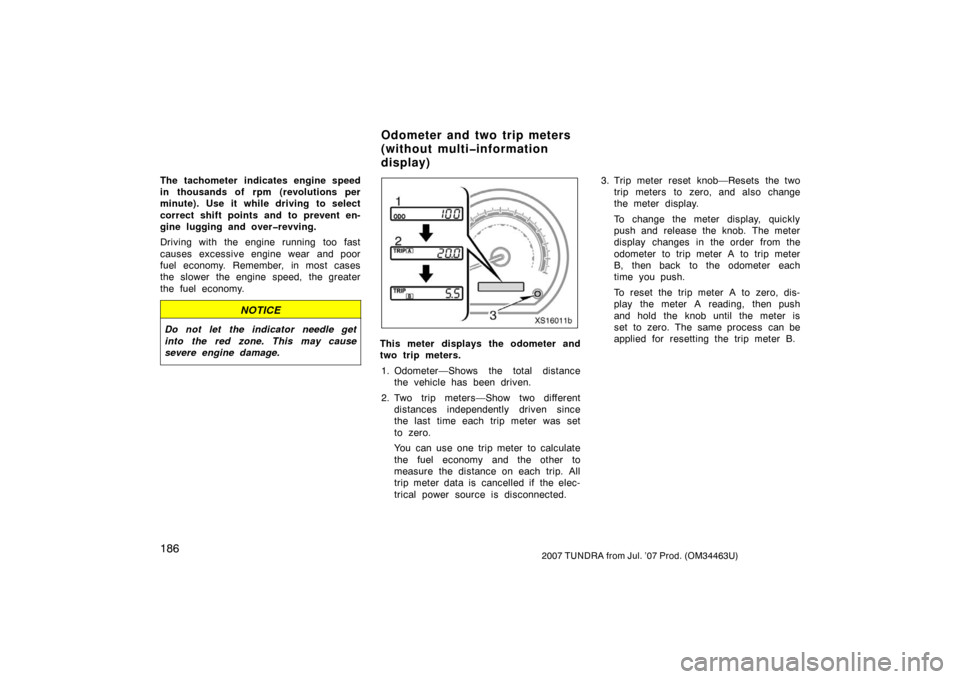
XS16011b
This meter displays the odometer and
two trip meters.1. Odometer—Shows the total distance the vehicle has been driven.
2. Two trip meters—Show two different distances independently driven since
the last time each trip meter was set
to zero.
You can use one trip meter to calculate
the fuel economy and the other to
measure the distance on each trip. All
trip meter data is cancelled if the elec-
trical power source is disconnected. 3. Trip meter reset knob—Resets the two
trip meters to zero, and also change
the meter display.
To change the meter display, quickly
push and release the knob. The meter
display changes in the order from the
odometer to trip meter A to trip meter
B, then back to the odometer each
time you push.
To reset the trip meter A to zero, dis-
play the meter A reading, then push
and hold the knob until the meter is
set to zero. The same process can be
applied for resetting the trip meter B.
Odometer and two trip meters
(without multiinformation
display)
Page 198 of 611

1892007 TUNDRA from Jul. ’07 Prod. (OM34463U)
1. Zoom display of odometer and tripmeter
The odometer and one of the trip meters
are displayed simultaneously. See
“—Odometer and two trip meters”.
2. Average fuel consumption (“Average Fuel Economy”)
Average fuel consumption is calculated
and displayed based on total driving
distance and total fuel consumption
with the engine running.
The displayed value is updated every 10
seconds.
To reset the calculations, push and hold
the “SELECT RESET” button for more
than 2 seconds.
3. Instantaneous fuel consumption (“Current Fuel Economy”)
The instantaneous fuel consumption is
calculated and displayed based on dis-
tance and fuel consumption at 20 revo-
lutions of the engine.
The displayed value is updated for a short
time.
An accurate figure may not be shown if
the vehicle is driving down a long slope,
and engine brake is applied. (The display
will indicate the extremely low fuel con-
sumption.) The display indicates 0 when the vehicle
is stopped with the engine running.
The calculation is reset when the ignition
switch is turned off.
4. Driving range (“Distance To Empty”)
The distance the vehicle can travel with
the remaining fuel is calculated and
displayed based on the quantity of re-
maining fuel and past fuel consumption.
The driving range display indicates the
approximate distance that you can drive
until the fuel gauge reaches “E”. It is
different from the actual distance traveled.
The displayed value is updated every time
the fuel equivalent for 1 mile or 1 km is
consumed.
Every time you refuel the vehicle, the cal-
culation is reset. However, when only a
small amount of fuel is added to the tank,
the display may not be reset.
The actual driving range varies with driv-
ing habits and road conditions. If fuel con-
sumption is good, the driving range will be
longer than indicated. If fuel consumption
is poor, the driving range will be shorter
than indicated. If the low fuel level warning light comes
on, refuel the vehicle even if the display
indicates that the vehicle can be driven
further.
5. Driving time (“Trip Timer”)
To calculate the driving time, display
the “Trip Timer” after the engine has
been started. Then press the “SELECT
RESET” button. To stop the calculation,
press the “SELECT RESET” button
again.
Driving time is counted from 00:00:00. Up
to 99:59:59 (99 hours, 59 minutes and 59
seconds) can be displayed. When the driv-
ing time exceeds 99:59:59, the counter
returns to 00:00:00.
If the ignition switch is turned off while
the driving time is being calculated, the
calculation will cease. When the engine is
next started, it will automatically resume
from the previous value.
If the “SELECT RESET” button is pressed
to cease the calculation and then the igni-
tion switch is turned off, the calculation
will not resume when the engine is next
started. In this case, press the “SELECT
RESET” button to start the calculation.
To reset the calculation, push and hold
the “SELECT RESET” button for more
than 2 seconds.
Page 199 of 611

1902007 TUNDRA from Jul. ’07 Prod. (OM34463U)
6. Average vehicle speed(“Average Speed”)
Average vehicle speed is calculated and
displayed based on total driving dis-
tance and total driving time with the
engine running.
The displayed value is updated every 10
seconds.
To rest the calculations, push and hold the
“SELECT RESET” button for more than 2
seconds. Your vehicle includes a variety of electron-
ic features that can be personalized to
your preferences. The vehicle can be cus-
tomized while the vehicle is stopped.
“KEYLESS ENTRY” is used for some cus-
tomization item names in the screen dis-
play. It means “Wireless door lock” in this
owner ’s manual.
1. Select the item you want to customize unit with the “SETUP US/M” button.
KEYLESS ENTRY FEEDBACK
KEYLESS ENTRY
ALL DOORS UNLOCK KEYLESS ENTRY RELOCK TIMER
DOOR AUTO LOCKING
DOOR AUTO UNLOCKING
HEADLAMPS AUTO OFF TIMER
COURTESY LAMPS OFF TIMER
DEFAULT SETTING UNITS
2. Customize the item with the “SELECTRESET” button.
�Door lock and unlock warning function
Screen text: KEYLESS ENTRY
FEEDBACK
“LAMPS + TONE”
∗
“TONE” “LAMPS”“OFF”
�Time for automatic door lock function
Screen text: KEYLESS ENTRY
RELOCK TIMER
“60 SECONDS”
∗“120 SECONDS”
“OFF”“30 SECONDS”
�Double switch operation to unlock all
the doors
Screen text: KEYLESS ENTRY ALL
DOORS UNLOCK
“2 PRESSES”
∗ ⇔ “1 PRESS”
—Feature customization
Page 202 of 611
1932007 TUNDRA from Jul. ’07 Prod. (OM34463U)
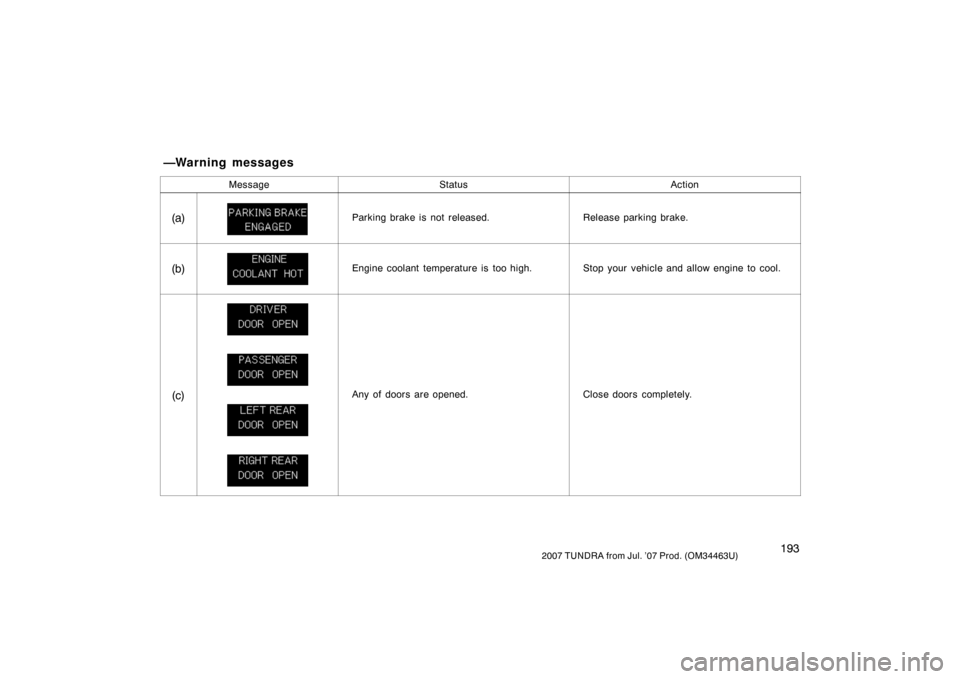
MessageStatusAction
(a)Parking brake is not released.Release parking brake.
(b)Engine coolant temperature is too high.Stop your vehicle and allow engine to cool.
(c)Any of doors are opened.Close doors completely.
—Warning messages
Page 203 of 611
1942007 TUNDRA from Jul. ’07 Prod. (OM34463U)
MessageStatusAction
(d)Fuel in tank becomes nearly empty.Fill up tank.
(e)Automatic transmission fluid temperature is
too high.Stop and check.
(f)Oil change is nearly due.Check engine oil.
(g)Oil change is due.Replace engine oil.
(h)Washer fluid level is low.Add washer fluid.
Page 204 of 611
1952007 TUNDRA from Jul. ’07 Prod. (OM34463U)
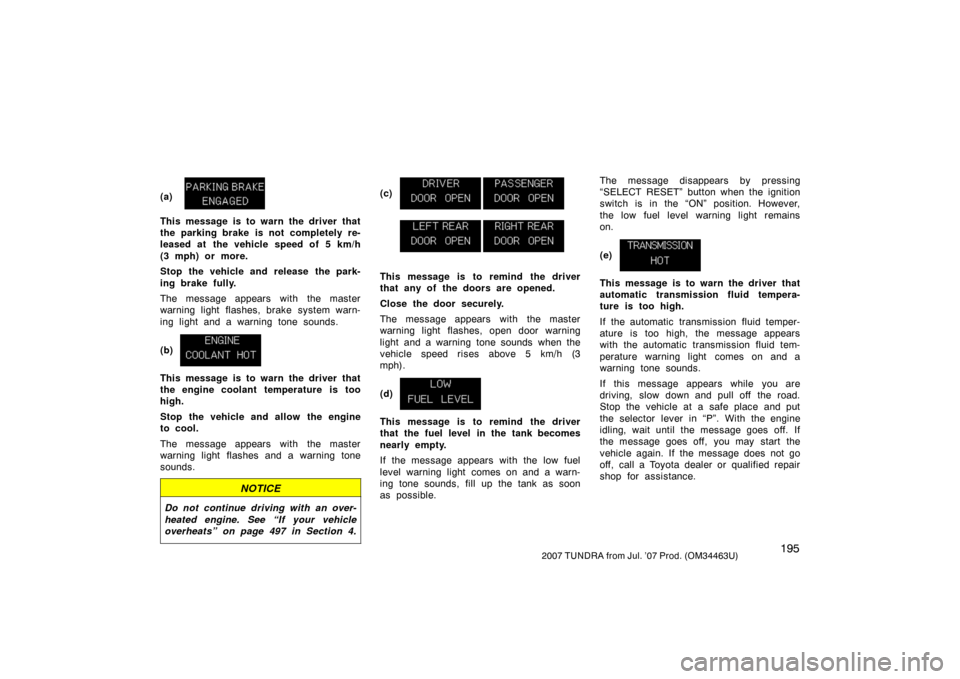
(a)
This message is to warn the driver that
the parking brake is not completely re-
leased at the vehicle speed of 5 km/h
(3 mph) or more.
Stop the vehicle and release the park-
ing brake fully.
The message appears with the master
warning light flashes, brake system warn-
ing light and a warning tone sounds.
(b)
This message is to warn the driver that
the engine coolant temperature is too
high.
Stop the vehicle and allow the engine
to cool.
The message appears with the master
warning light flashes and a warning tone
sounds.
NOTICE
Do not continue driving with an over-
heated engine. See “If your vehicle
overheats” on page 497 in Section 4.
(c)
This message is to remind the driver
that any of the doors are opened.
Close the door securely.
The message appears with the master
warning light flashes, open door warning
light and a warning tone sounds when the
vehicle speed rises above 5 km/h (3
mph).
(d)
This message is to remind the driver
that the fuel level in the tank becomes
nearly empty.
If the message appears with the low fuel
level warning light comes on and a warn-
ing tone sounds, fill up the tank as soon
as possible.The message disappears by pressing
“SELECT RESET” button when the ignition
switch is in the “ON” position. However,
the low fuel level warning light remains
on.
(e)
This message is to warn the driver that
automatic transmission fluid tempera-
ture is too high.
If the automatic transmission fluid temper-
ature is too high, the message appears
with the automatic transmission fluid tem-
perature warning light comes on and a
warning tone sounds.
If this message appears while you are
driving, slow down and pull off the road.
Stop the vehicle at a safe place and put
the selector lever in “P”. With the engine
idling, wait until the message goes off. If
the message goes off, you may start the
vehicle again. If the message does not go
off, call a Toyota dealer or qualified repair
shop for assistance.
Page 205 of 611
1962007 TUNDRA from Jul. ’07 Prod. (OM34463U)
NOTICE
Continue driving with the warning
message on may result in damage of
the automatic transmission.
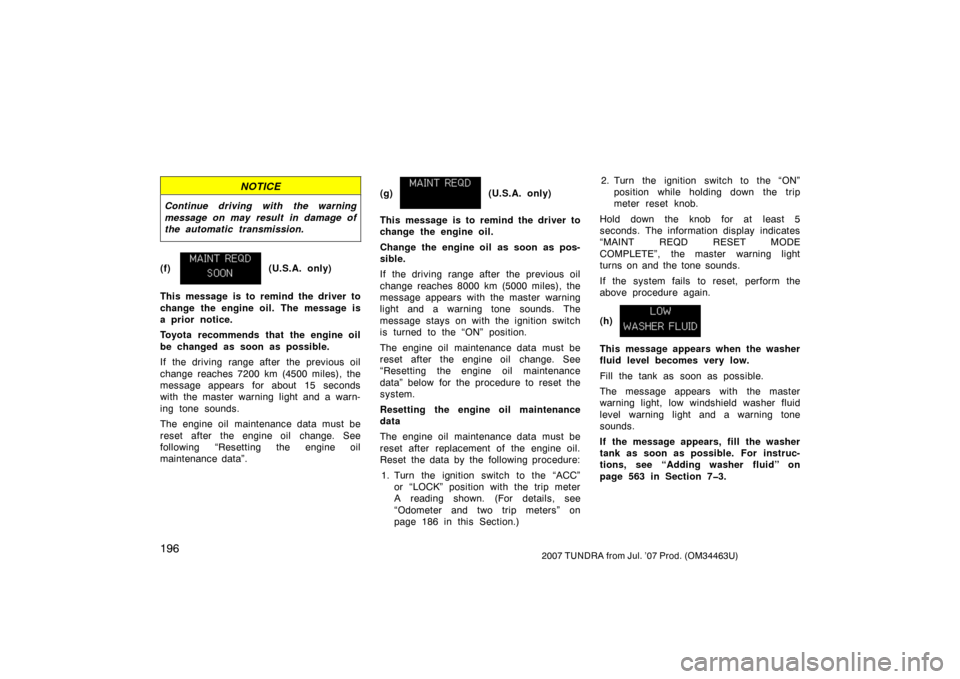
(f) (U.S.A. only)
This message is to remind the driver to
change the engine oil. The message is
a prior notice.
Toyota recommends that the engine oil
be changed as soon as possible.
If the driving range after the previous oil
change reaches 7200 km (4500 miles), the
message appears for about 15 seconds
with the master warning light and a warn-
ing tone sounds.
The engine oil maintenance data must be
reset after the engine oil change. See
following “Resetting the engine oil
maintenance data”. (g)
(U.S.A. only)
This message is to remind the driver to
change the engine oil.
Change the engine oil as soon as pos-
sible.
If the driving range after the previous oil
change reaches 8000 km (5000 miles), the
message appears with the master warning
light and a warning tone sounds. The
message stays on with the ignition switch
is turned to the “ON” position.
The engine oil maintenance data must be
reset after the engine oil change. See
“Resetting the engine oil maintenance
data” below for the procedure to reset the
system.
Resetting the engine oil maintenance
data
The engine oil maintenance data must be
reset after replacement of the engine oil.
Reset the data by the following procedure: 1. Turn the ignition switch to the “ACC” or “LOCK” position with the trip meter
A reading shown. (For details, see
“Odometer and two trip meters” on
page 186 in this Section.) 2. Turn the ignition switch to the “ON”
position while holding down the trip
meter reset knob.
Hold down the knob for at least 5
seconds. The information display indicates
“MAINT REQD RESET MODE
COMPLETE”, the master warning light
turns on and the tone sounds.
If the system fails to reset, perform the
above procedure again.
(h)
This message appears when the washer
fluid level becomes very low.
Fill the tank as soon as possible.
The message appears with the master
warning light, low windshield washer fluid
level warning light and a warning tone
sounds.
If the message appears, fill the washer
tank as soon as possible. For instruc-
tions, see “Adding washer fluid” on
page 563 in Section 73.
Page 207 of 611
1982007 TUNDRA from Jul. ’07 Prod. (OM34463U)
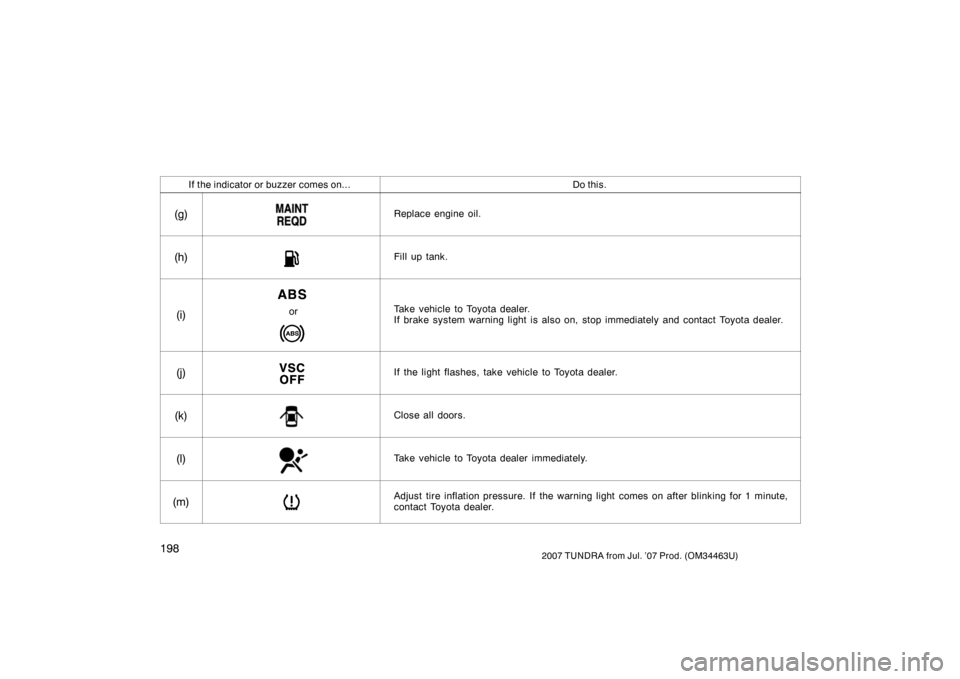
If the indicator or buzzer comes on...Do this.
(g)Replace engine oil.
(h)Fill up tank.
(i)orTake vehicle to Toyota dealer.
If brake system warning light is also on, stop immediately and contact Toyota dealer.
(j)If the light flashes, take vehicle to Toyota dealer.
(k)Close all doors.
(l)Take vehicle to Toyota dealer immediately.
(m)Adjust tire inflation pressure. If the warning light comes on after blinking for 1 minute,
contact Toyota dealer.