Page 262 of 534
07 SIENNA_U (L/O 0612)
254
2007 SIENNA from Oct. ’06 Prod. (OM45437U)
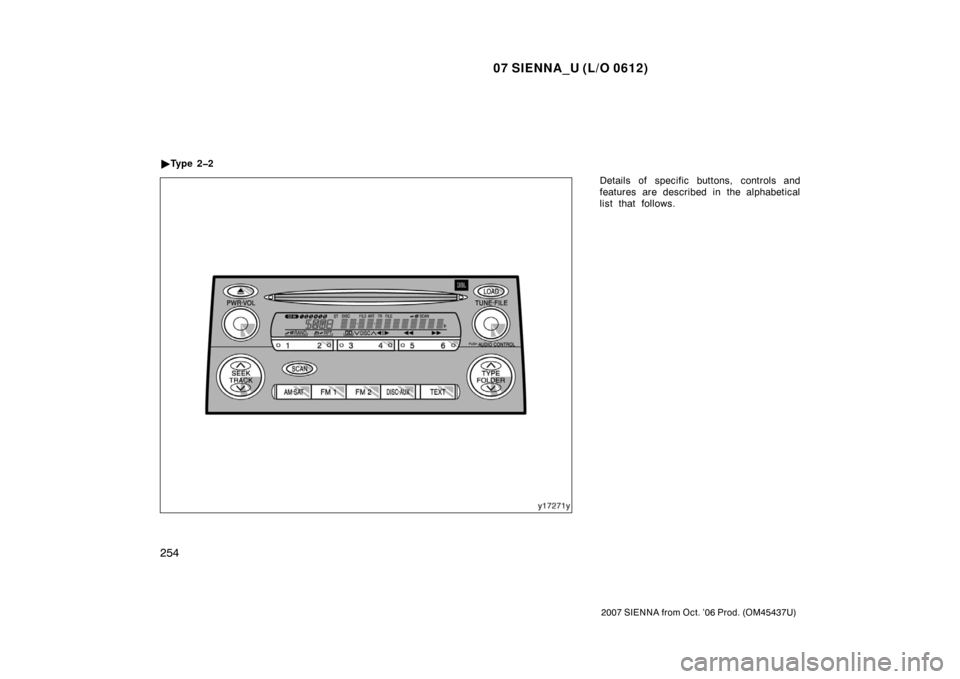
Details of specific buttons, controls and
features are described in the alphabetical
list that follows.
�
Ty p e 2 2
Page 263 of 534

07 SIENNA_U (L/O 0612)
255
2007 SIENNA from Oct. ’06 Prod. (OM45437U)
1 2 3 4 5 6 (Preset buttons)
These buttons are used to preset and
tune in radio stations.
To preset a station to a button: Tune in
the desired station. (See “TUNE·FILE” or
“SEEK/TRACK”.) Push and hold down the
button until you hear a beep—this will set
the station to the button. The preset but-
ton number will appear on the display.
To recall a preset station: Push the button
for the station you want. The preset but-
ton number and station frequency will ap-
pear on the display.
This radio can store one AM and two FM
stations for each button. (The display will
show “AM”, “FM1” or “FM2” when you
push “AM·SAT”, “FM1” or “FM2” button.)
XM� satellite radio
∗—
These buttons are used to preset and
tune in radio channels.
To preset a channel to a button: Tune in
the desired channel. (See “TUNE·FILE” or
“SEEK/TRACK”.) Push and hold down the
button until you hear a beep—this will set
the channel to the button. The preset but-
ton number will appear on the display. To recall a preset channel: Push the but-
ton for the channel you want. The preset
button number and channel number will
appear on the display.
This radio can store three XM
� channels
for each button. (The display will show
“SAT1”, “SAT2” or “SAT3” when you push
“AM·SAT” button.)
∗: Use of satellite radio requires XM �
tuner and service. Contact your Toyota
dealer for details.
(Eject button)
This button is used to eject one or all
compact discs.
To eject the current compact disc, push
and release the compact disc eject button.
To eject a specific disc, push “ �” (preset
button 3) or “ �” (preset button 4) until the
number of the disc you want to eject is
displayed. Push and release the eject but-
ton.
To eject all discs at a time, press and
hold the eject button until you hear a
beep. The last compact disc played before
pushing the button will be ejected first. If
the ejected disc is not removed for a long
time, the eject function will be canceled.
(Reverse/Fastforward button)
Push and hold “
” (preset button 6) or
“
” (preset button 5) to fast forward or
reverse within a compact disc. When you
release the button, the compact disc play-
er will resume playing.
AM·SAT (AM band and XM � satellite ra-
dio
∗)
Push the “AM·SAT” button to turn on the
radio and select the AM or XM � band.
“AM”, “SAT1”, “SAT2” or “SAT3” will ap-
pear on the display.
Error messages
If the satellite radio tuner malfunctions,
your audio system will display the follow-
ing error messages.
“ANTENNA”:
�The XM � antenna is not connected.
Check whether the XM � antenna cable
is attached securely.
�A short −circuit occurs in the antenna or
the surrounding antenna cable. See a
Toyota certified dealer.
Page 266 of 534

07 SIENNA_U (L/O 0612)
258
2007 SIENNA from Oct. ’06 Prod. (OM45437U)
� DISC �
Use these buttons to select a disc you
want to listen to.
Push “ �” (preset button 3) or “� ” (preset
button 4) until the number of the disc you
want to listen to appears on the display.
FM1 FM2
Push the “FM1” or “FM2” button to turn on
the radio and select the FM band. “FM1”
or “FM2” will appear on the display. This
system allows you to set twelve FM sta-
tions, two for each of the preset button.
LOAD
This button is used to load the compact
discs in the compact disc player. This
player can store up to six discs.
To load one compact disc only, quickly
push and release the button, then insert
a compact disc. After the disc is loaded,
the shutter of the slot will close.
If no compact disc is inserted, the shutter
will close after 15 seconds. To load multiple compact discs, push and
hold the button (until you hear a beep
when the audio system is on). When the
indicators on both sides of the slot turn
green, insert the first compact disc. After
the disc is loaded, the shutter of the slot
will close. After a few seconds, the shut-
ter will automatically open again and the
indicators will turn green so the next disc
can be inserted. The same process can
be applied for loading the rest of the
discs. If the player is full of discs, “DISC
FULL” will appear on the display.
If no compact disc is inserted, the shutter
will close after 15 seconds.
PWR·VOL (Power and Volume)
Push “PWR·VOL” to turn the audio system
on and off. Turn “PWR·VOL” to adjust the
volume.
RAND (Random)
Compact disc player
There are two random features—you can
either listen to the tracks on one compact
disc in random order, or listen to the
tracks on all the compact discs in the
magazine in random order.
To play the tracks on one disc in random
order:
Quickly push and release “RAND” (preset
button 1). “
” will appear on the
display and the player will perform the
tracks on the disc you are listening to in
random order. To turn off the random fea-
ture, push this button again.
To play all the tracks in the magazine in
random order:
Push and hold “RAND” (preset button 1)
until you hear a beep. “
” will
appear on the display and the player will
perform all the tracks on all the discs in
the magazine in random order. To turn off
the random feature, push this button
again.
Page 279 of 534
07 SIENNA_U (L/O 0612)
271
2007 SIENNA from Oct. ’06 Prod. (OM45437U)
NOTICE
�Benzene or alkaline solutions may
damage the coated surface of the
screen .
� To prevent the battery from being
discharged, do not turn on the rear
seat entertainment system longer
than necessary when the engine is
not running.
The rear seat entertainment system can
be operated with the rear seat entertain-
ment system remote control and buttons
on the DVD player unit. The system can-
not be operated by touching the switches
on the screen directly.
CAUTION
Do not disassemble or modify the re-
mote control. It may cause an acci-
dent, fire or electric shock.
NOTICE
Keep the remote control away from
direct sunlight, high heat and high
humidity. These conditions could
cause the case to deform or the bat-
tery to explode or leak.
BEFORE USING THE REMOTE
CONTROL
(for new vehicle owners)
A battery is already set in the remote
control with an insulating sheet, which
prevents the battery from being dis-
charged. Before using the remote con-
trol, remove the insulating sheet ac-
cording to the following procedure.
—Rear seat entertainment
system remote control
Page 282 of 534
07 SIENNA_U (L/O 0612)
274
2007 SIENNA from Oct. ’06 Prod. (OM45437U)
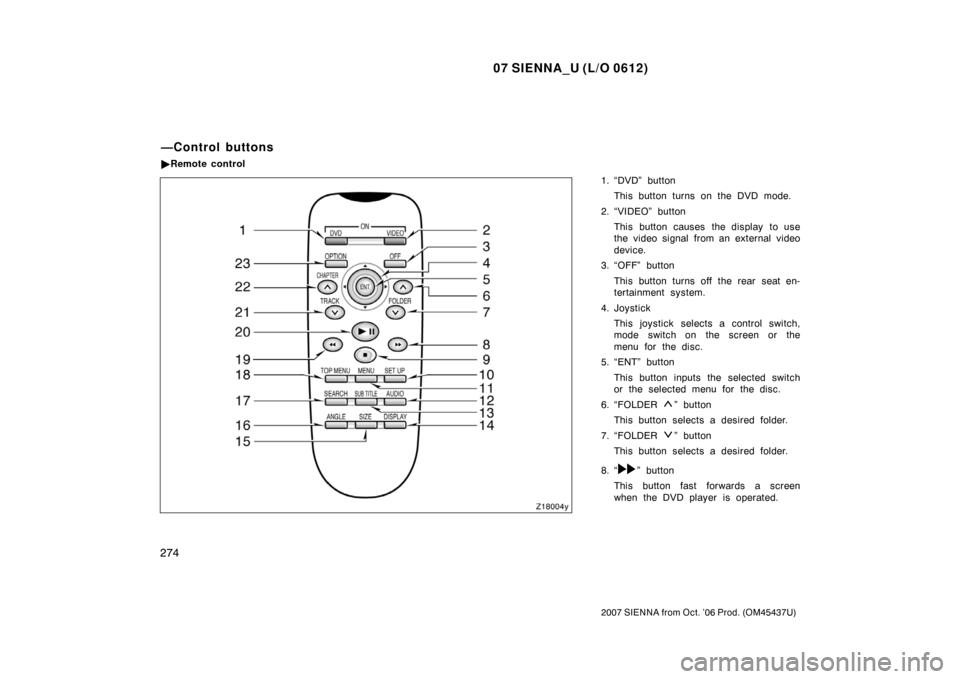
1. “DVD” buttonThis button turns on the DVD mode.
2. “VIDEO” button This button causes the display to use
the video signal from an external video
device.
3. “OFF” button
This button turns off the rear seat en-
tertainment system.
4. Joystick This joystick selects a control switch,
mode switch on the screen or the
menu for the disc.
5. “ENT” button
This button inputs the selected switch
or the selected menu for the disc.
6. “FOLDER
” button
This button selects a desired folder.
7. “FOLDER
” button
This button selects a desired folder.
8. “
” button
This button fast forwards a screen
when the DVD player is operated.
—Control buttons
� Remote control
Page 285 of 534
07 SIENNA_U (L/O 0612)
277
2007 SIENNA from Oct. ’06 Prod. (OM45437U)
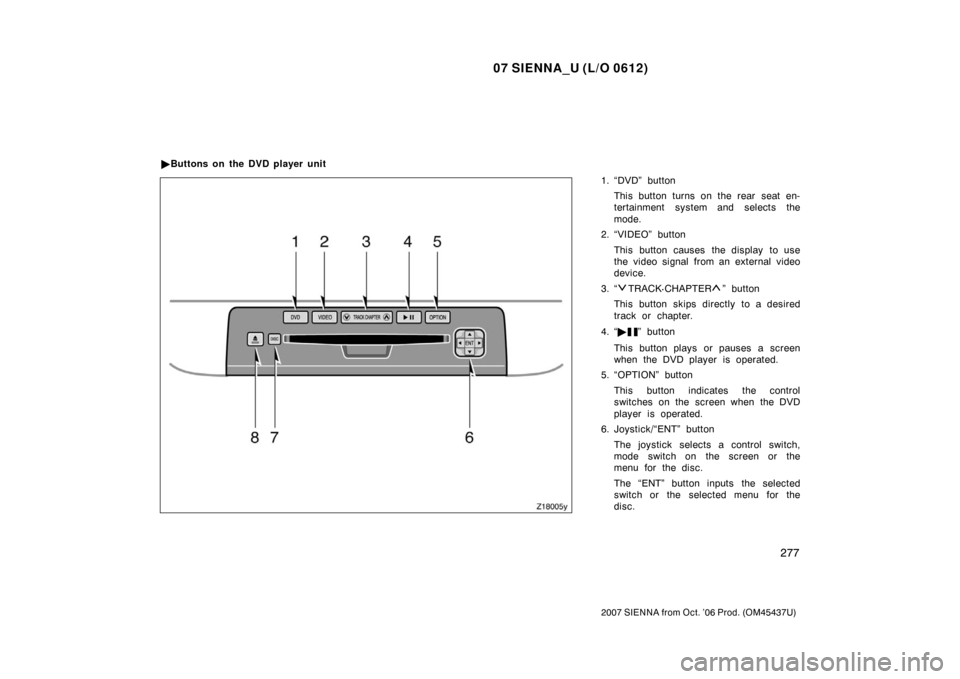
1. “DVD” buttonThis button turns on the rear seat en-
tertainment system and selects the
mode.
2. “VIDEO” button
This button causes the display to use
the video signal from an external video
device.
3. “
TRACK· CHAPTER” button
This button skips directly to a desired
track or chapter.
4. “ �
” button
This button plays or pauses a screen
when the DVD player is operated.
5. “OPTION” button
This button indicates the control
switches on the screen when the DVD
player is operated.
6. Joystick/“ENT” button
The joystick selects a control switch,
mode switch on the screen or the
menu for the disc.
The “ENT” button inputs the selected
switch or the selected menu for the
disc.
�
Buttons on the DVD player unit
Page 290 of 534
07 SIENNA_U (L/O 0612)
282
2007 SIENNA from Oct. ’06 Prod. (OM45437U)
8 cm (3 in.) compact disc singles
Your compact disc player needs an adap-
tor to play compact disc singles. Compact
disc singles are about 8 cm (3 in.) in
diameter−smaller than standard di scs.
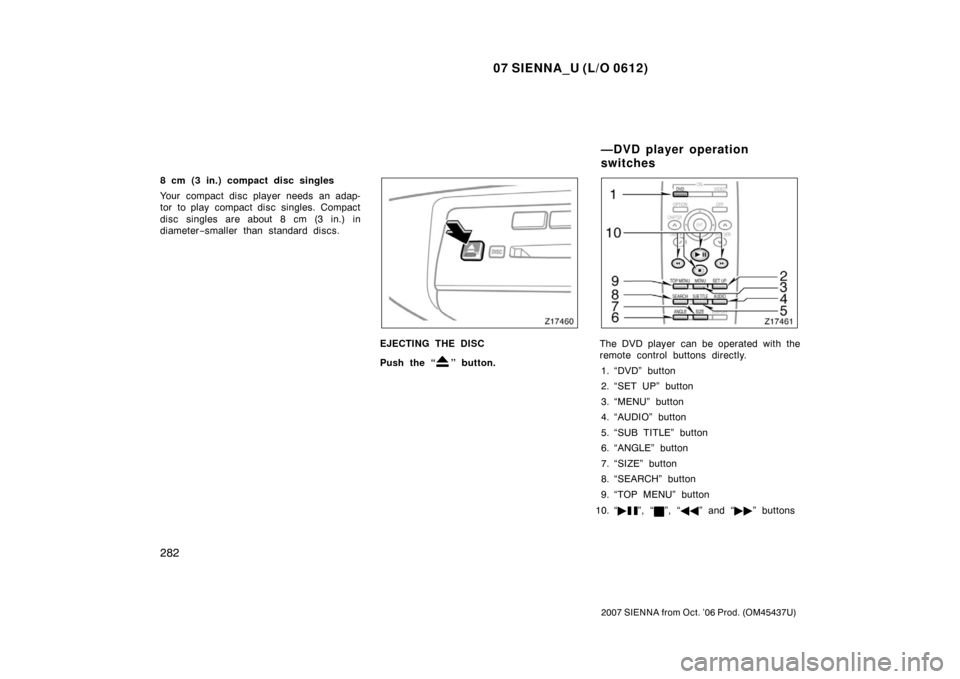
EJECTING THE DISC
Push the “
” button.
The DVD player can be operated with the
remote control buttons directly.
1. “DVD” button
2. “SET UP” button
3. “MENU” button
4. “AUDIO” button
5. “SUB TITLE” button
6. “ANGLE” button
7. “SIZE” button
8. “SEARCH” button
9. “TOP MENU” button
10. “ �
”, “”, “�� ” and “�� ” buttons
—DVD player operation
switches
Page 294 of 534
07 SIENNA_U (L/O 0612)
286
2007 SIENNA from Oct. ’06 Prod. (OM45437U)
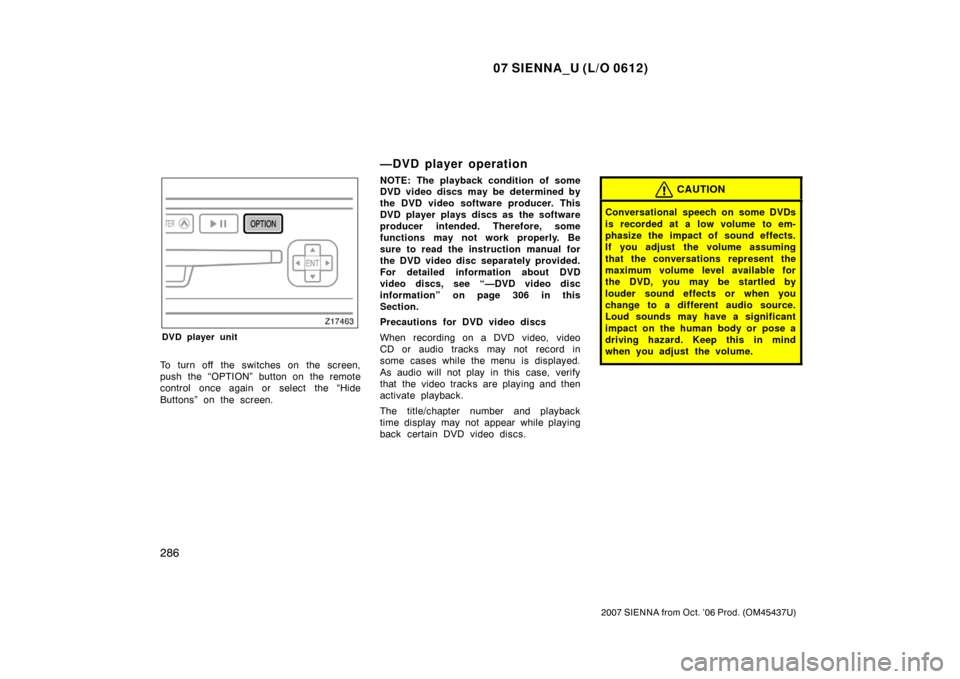
DVD player unit
To turn off the switches on the screen,
push the “OPTION” button on the remote
control once again or select the “Hide
Buttons” on the screen.
—DVD player operation
NOTE: The playback condition of some
DVD video discs may be determined by
the DVD video software producer. This
DVD player plays discs as the software
producer intended. Therefore, some
functions may not work properly. Be
sure to read the instruction manual for
the DVD video disc separately provided.
For detailed information about DVD
video discs, see “—DVD video disc
information” on page 306 in this
Section.
Precautions for DVD video discs
When recording on a DVD video, video
CD or audio tracks may not record in
some cases while the menu is displayed.
As audio will not play in this case, verify
that the video tracks are playing and then
activate playback.
The title/chapter number and playback
time display may not appear while playing
back certain DVD video discs.CAUTION
Conversational speech on some DVDs
is recorded at a low volume to em-
phasize the impact of sound effects.
If you adjust the volume assuming
that the conversations represent the
maximum volume level available for
the DVD, you may be startled by
louder sound effects or when you
change to a different audio source.
Loud sounds may have a significant
impact on the human body or pose a
driving hazard. Keep this in mind
when you adjust the volume.