Page 304 of 458
304
Clock
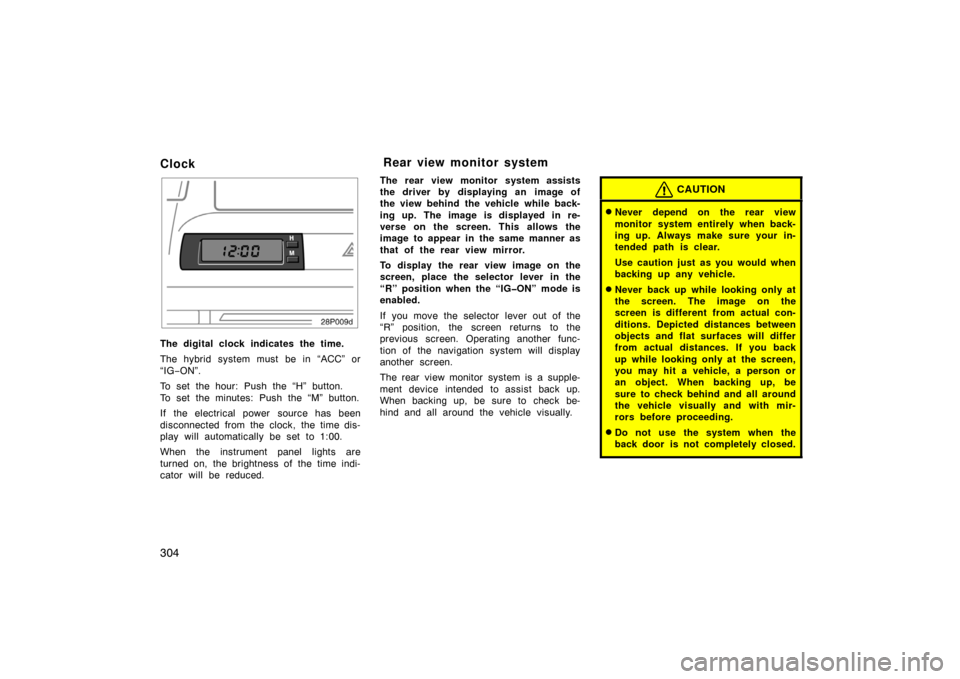
28p009d
The digital clock indicates the time.
The hybrid system must be in “ACC” or
“IG−ON”.
To set the hour: Push the “H” button.
To set the minutes: Push the “M” button.
If the electrical power source has been
disconnected from the clock, the time dis-
play will automatically be set to 1:00.
When the instrument panel lights are
turned on, the brightness of the time indi-
cator will be reduced. The rear view monitor system assists
the driver by displaying an image of
the view behind the vehicle while back-
ing up. The image is displayed in re-
verse on the screen. This allows the
image to appear in the same manner as
that of the rear view mirror.
To display the rear view image on the
screen, place the selector lever in the
“R” position when the “IGON” mode is
enabled.
If you move the selector lever out of the
“R” position, the screen returns to the
previous screen. Operating another func-
tion of the navigation system will display
another screen.
The rear view monitor system is a supple-
ment device intended to assist back up.
When backing up, be sure to check be-
hind and all around the vehicle visually.
CAUTION
�Never depend on the rear view
monitor system entirely when back-
ing up. Always make sure your in-
tended path is clear.
Use caution just as you would when
backing up any vehicle.
�Never back up while looking only at
the screen. The image on the
screen is different from actual con-
ditions. Depicted distances between
objects and flat surfaces will differ
from actual distances. If you back
up while looking only at the screen,
you may hit a vehicle, a person or
an object. When backing up, be
sure to check behind and all around
the vehicle visually and with mir-
rors before proceeding.
�Do not use the system when the
back door is not completely closed.
Rear view monitor system
Page 309 of 458
309
28p128
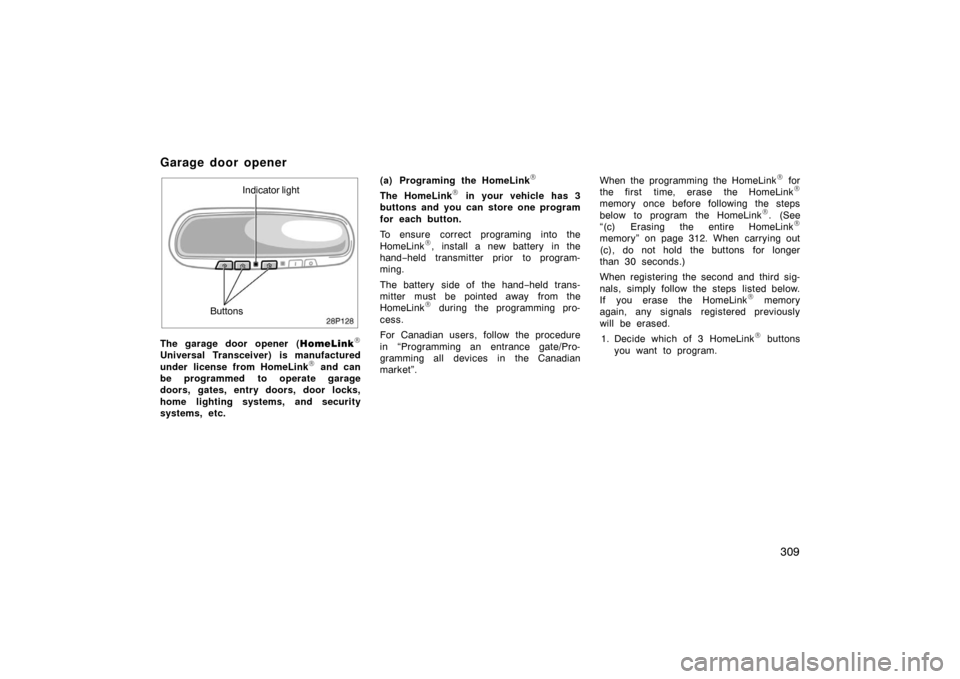
Indicator light
Buttons
The garage door opener ( HomeLink
\f
Universal Transceiver) is manufactured
under license from HomeLink\f and can
be programmed to operate garage
doors, gates, entry doors, door locks,
home lighting systems, and security
systems, etc. (a) Programing the HomeLink
\f
The HomeLink\f in your vehicle has 3
buttons and you can store one program
for each button.
To ensure correct programing into the
HomeLink
\f, install a new battery in the
hand− held transmitter prior to program-
ming.
The battery side of the hand −held trans-
mitter must be pointed away from the
HomeLink
\f during the programming pro-
cess.
For Canadian users, follow the procedure
in “Programming an entrance gate/Pro-
gramming all devices in the Canadian
market”. When the programming the HomeLink
\f for
the first time, erase the HomeLink\f
memory once before following the steps
below to program the HomeLink\f. (See
“(c) Erasing the entire HomeLink\f
memory” on page 312. When carrying out
(c), do not hold the buttons for longer
than 30 seconds.)
When registering the second and third sig-
nals, simply follow the steps listed below.
If you erase the HomeLink
\f memory
again, any signals registered previously
will be erased.
1. Decide which of 3 HomeLink
\f buttons
you want to program.
Garage door opener
Page 311 of 458

311
6. Repeat steps 2 through 5 for each re-maining HomeLink\f button to program
another device.
Programming a rolling code system
If your device is “Rolling Code”
equipped, it is necessary to follow
steps 1 through 4 under the heading
“Programming the HomeLink
\f” before
proceeding with the steps listed below.
1. Locate the “training” button on the ceil- ing mounted garage door opener motor.
The exact location and color of the
button may vary by brand of garage
door opener. Refer to the owner ’s
guide supplied by the garage door
opener manufacturer for the location of
this “training” button.
2. Press the “training” button on the ceil- ing mounted garage door opener motor.
Following this step, you have 30 seconds
in which to initiate step 3 below. 3. Press and release the vehicle’s pro- grammed HomeLink
\f button twice. The
garage door may open. If the door
does open, the programming process is
complete. If the door does not open,
press and release the button a third
time. This third press and release will
complete the programming process by
opening the garage door. The ceiling mounted garage door opener
motor should now recognize the
HomeLink
\f unit and be able activate the
garage door up/down.
4. Repeat steps 1 through 3 each remain- ing HomeLink
\f button to program
another rolling code system.
Programming an entrance gate/Program-
ming all devices in the Canadian market 1. Decide which of the 3 HomeLink
\f but-
tons you want to program.
2. Place your hand −held gate/device
transmitter 25 to 75 mm (1 to 3 in.)
away from the surface of the
HomeLink
\f.
Keep the indicator light on the HomeLink
\f
in view while programming. 3. Press and hold the selected HomeLink
\f button.
4. Continuously press and release ( cycle)
the hand− held gate/device transmitter
button every two seconds until step 5
is complete.
5. When the indicator light on the HomeLink
\f changes from a slow to a
rapid flash, you can release both but-
tons. 6. Test the operation of the HomeLink
\f by
pressing the newly programmed button.
Check to see if the gate/device oper-
ates correctly.
7. Repeat steps 1 through 6 for each re- maining HomeLink
\f button to program
another device.
Programming other devices
To program other devices such as home
security systems, home door locks or
lighting, contact your authorized Toyota
dealer for assistance.
Reprogramming a button
Individual HomeLink
\f buttons cannot be
erased, however, to reprogram a single
button, follow the procedure “Programming
the HomeLink
\f”.
(b) Operating the HomeLink
\f
To operate the HomeLink\f, press the ap-
propriate HomeLink\f button to activate the
programmed device. The HomeLink\f indi-
cator light should come on. The
HomeLink
\f continues to send the signal
for up to 20 seconds as long as the but-
ton is pressed.
Page 315 of 458
315
NOTICE
Do not put a cup or open bottle in
the bottle holder because the con-
tents may spill when the door opens
or closes.
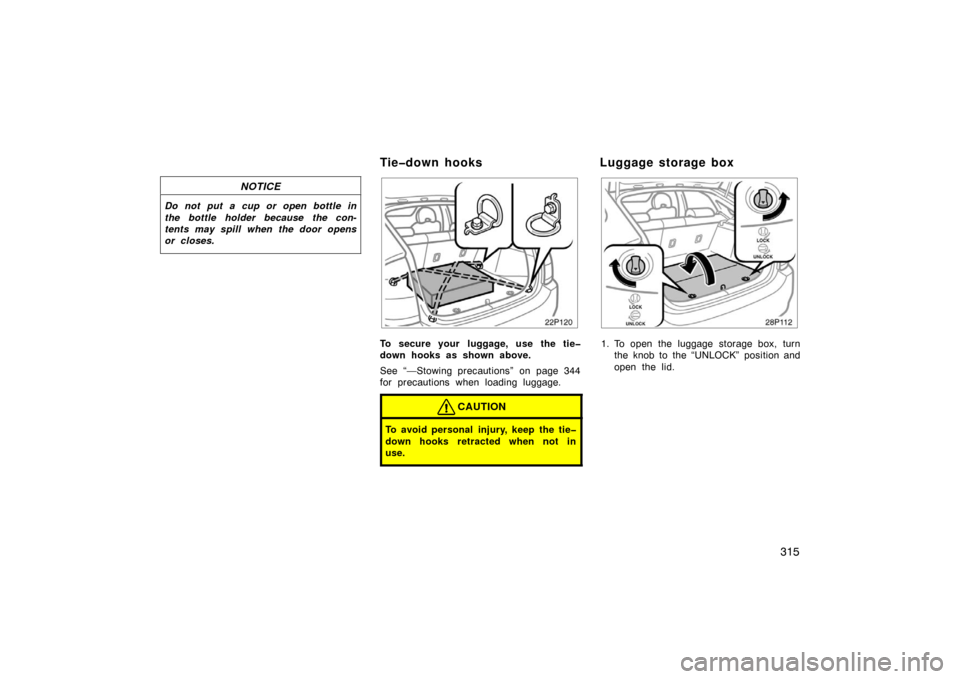
22p120
To secure your luggage, use the tie
down hooks as shown above.
See “—Stowing precautions” on page 344
for precautions when loading luggage.
CAUTION
To avoid personal injury, keep the tie
down hooks retracted when not in
use.
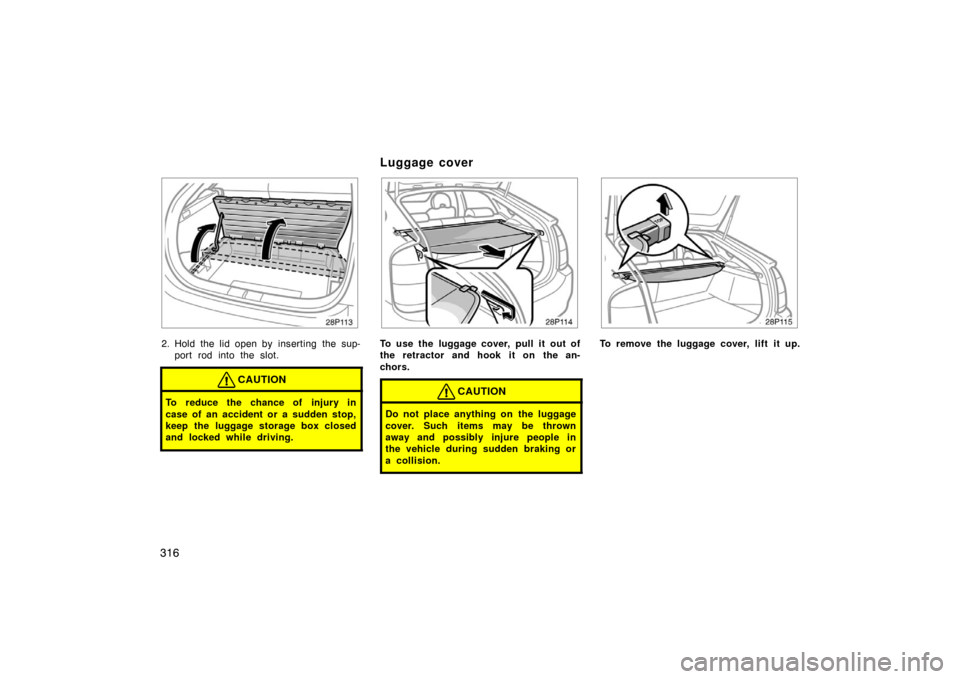
28p112a
1. To open the luggage storage box, turnthe knob to the “UNLOCK” position and
open the lid.
Tiedown hooks Luggage storage box
Page 316 of 458
316
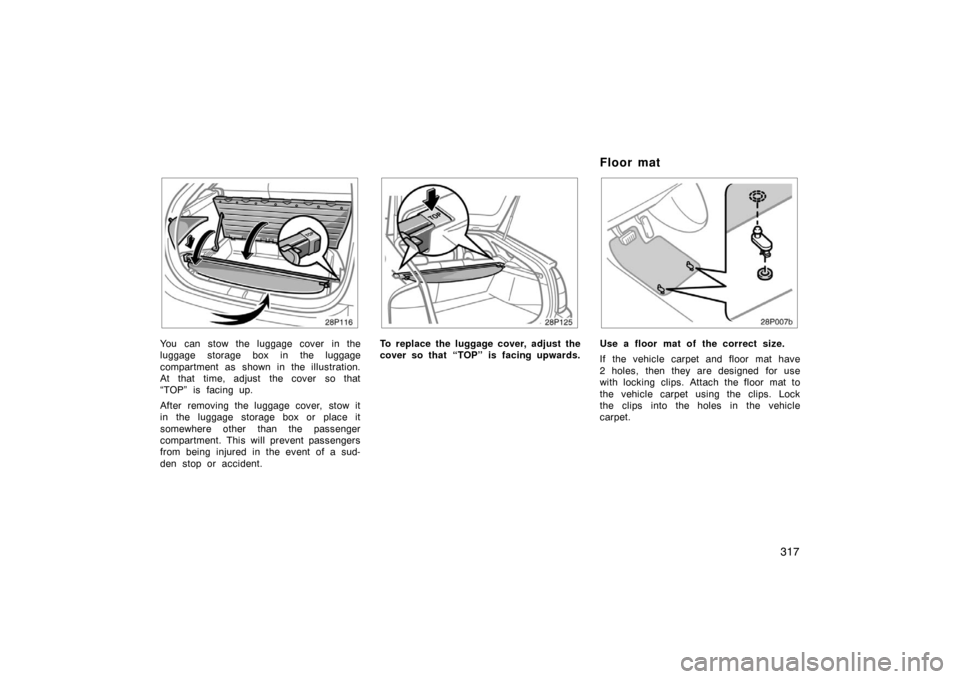
28p113a
2. Hold the lid open by inserting the sup-port rod into the slot.
CAUTION
To reduce the chance of injury in
case of an accident or a sudden stop,
keep the luggage storage box closed
and locked while driving.
28p114
To use the luggage cover, pull it out of
the retractor and hook it on the an-
chors.
CAUTION
Do not place anything on the luggage
cover. Such items may be thrown
away and possibly injure people in
the vehicle during sudden braking or
a collision.
28p115
To remove the luggage cover, lift it up.
Luggage cover
Page 317 of 458
317
28p116a
You can stow the luggage cover in the
luggage storage box in the luggage
compartment as shown in the illustration.
At that time, adjust the cover so that
“TOP” is facing up.
After removing the luggage cover, stow it
in the luggage storage box or place it
somewhere other than the passenger
compartment. This will prevent passengers
from being injured in the event of a sud-
den stop or accident.
28p125
To replace the luggage cover, adjust the
cover so that “TOP” is facing upwards.
28p007b
Use a floor mat of the correct size.
If the vehicle carpet and floor mat have
2 holes, then they are designed for use
with locking clips. Attach the floor mat to
the vehicle carpet using the clips. Lock
the clips into the holes in the vehicle
carpet.
Floor mat
Page 328 of 458
328
CAUTION
�Do not pump the brake pedal if the
hybrid system is not operating.
Each push on the pedal uses up
your reserved brake fluid pressure.
�Even if the power assist is com-
pletely lost, the brakes will still
work. But you will have to push the
pedal hard, much harder than nor-
mal. And your braking distance will
increase.
ANTILOCK BRAKE SYSTEM
The antilock brake system is designed
to automatically help prevent lockup of
the wheels during a sudden braking or
braking on slippery road surfaces. This
assists in providing directional stability
and steering performance of the vehicle
under these circumstances.
Effective way to press the ABS brake
pedal: When the anti −lock brake system
function is in action, the slip indicator in
the instrument cluster flashes and you
will hear a noise. In this situation, to let
the anti −lock brake system work for you,
just hold the brake pedal down more
firmly. Do not pump the brake in a panic
stop. This will result in reduced braking
performance.
The anti −lock brake system becomes op-
erative after the vehicle has accelerated
to a speed in excess of approximately 10
km/h (6 mph). It stops operating when the
vehicle decelerates to a speed below
approximately 5 km/h (3 mph). Depressing the brake pedal on slippery
road surfaces such as on a manhole cov-
er, a steel plate at a construction site,
joints in a bridge, etc. on a rainy day
tends to activate the anti
−lock brake sys-
tem.
When the antilock brake system is ac-
tivated, the following condition may oc-
cur. They do not indicate a malfunction
of the system:
�You may hear the anti −lock brake sys-
tem operating and the vibrations of the
vehicle body and steering wheel. You
may also hear the motor sound in the
engine compartment even after the ve-
hicle is stopped.
Page 329 of 458

329
CAUTION
Do not overestimate the antilock
brake system: Although the antilock
brake system assists in providing ve-
hicle control, it is still important to
drive with all due care and maintain
a moderate speed and safe distance
from the vehicle in front of you, be-
cause there are limits to the vehicle
stability and effectiveness of steering
wheel operation even with the anti
lock brake system on.
If tire grip performance exceeds its
capability, or if hydroplaning occurs
during high speed driving in the rain,
the antilock brake system does not
provide vehicle control.
Antilock brake system is not de-
signed to shorten the stopping dis-
tance: Always drive at a moderate
speed and maintain a safe distance
from the vehicle in front of you.
Compared with vehicles without an
antilock brake system, your vehicle
may require a longer stopping dis-
tance in the following cases:
�Driving on rough, gravel or snow
covered roads.
�Driving with tire chains installed.
�Driving over the steps such as the
joints on the road.
�Driving on roads where the road
surface is pitted or has other differ-
ences in surface height.
Install all 4 tires of specified size at
appropriate pressure: The antilock
brake system detects vehicle speeds
using the speed sensors for respec-
tive wheels’ turning speeds. The use
of tires other than specified may fail
to detect the accurate turning speed,
resulting in a longer stopping dis-
tance.
30p002b
Vehicle sold in the U.S.A.
30p007b
Vehicle sold in Canada