Page 309 of 458
309
28p128
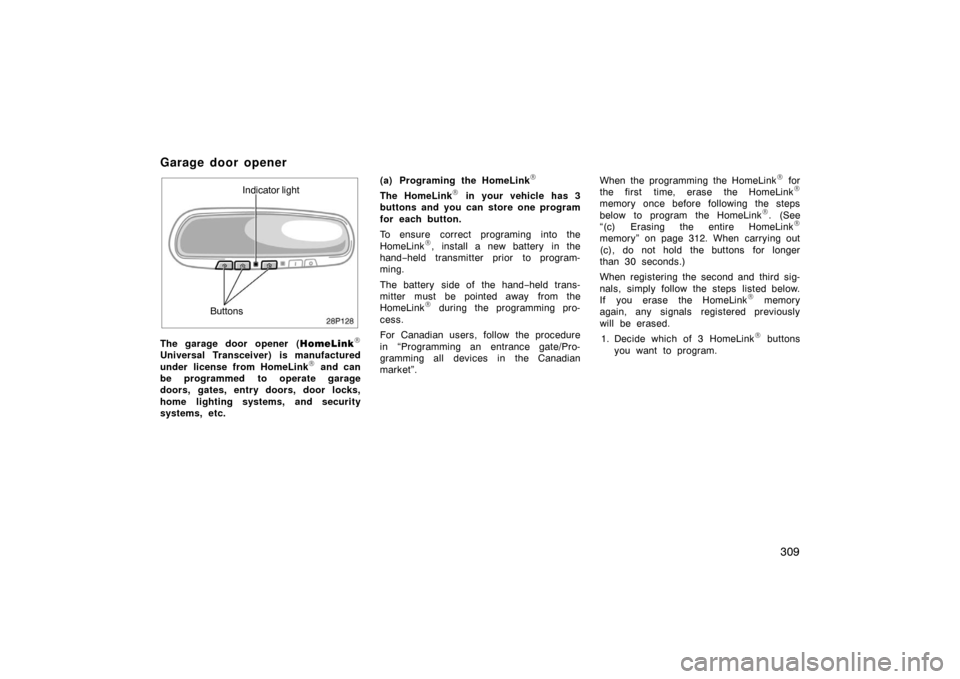
Indicator light
Buttons
The garage door opener ( HomeLink
\f
Universal Transceiver) is manufactured
under license from HomeLink\f and can
be programmed to operate garage
doors, gates, entry doors, door locks,
home lighting systems, and security
systems, etc. (a) Programing the HomeLink
\f
The HomeLink\f in your vehicle has 3
buttons and you can store one program
for each button.
To ensure correct programing into the
HomeLink
\f, install a new battery in the
hand− held transmitter prior to program-
ming.
The battery side of the hand −held trans-
mitter must be pointed away from the
HomeLink
\f during the programming pro-
cess.
For Canadian users, follow the procedure
in “Programming an entrance gate/Pro-
gramming all devices in the Canadian
market”. When the programming the HomeLink
\f for
the first time, erase the HomeLink\f
memory once before following the steps
below to program the HomeLink\f. (See
“(c) Erasing the entire HomeLink\f
memory” on page 312. When carrying out
(c), do not hold the buttons for longer
than 30 seconds.)
When registering the second and third sig-
nals, simply follow the steps listed below.
If you erase the HomeLink
\f memory
again, any signals registered previously
will be erased.
1. Decide which of 3 HomeLink
\f buttons
you want to program.
Garage door opener
Page 311 of 458

311
6. Repeat steps 2 through 5 for each re-maining HomeLink\f button to program
another device.
Programming a rolling code system
If your device is “Rolling Code”
equipped, it is necessary to follow
steps 1 through 4 under the heading
“Programming the HomeLink
\f” before
proceeding with the steps listed below.
1. Locate the “training” button on the ceil- ing mounted garage door opener motor.
The exact location and color of the
button may vary by brand of garage
door opener. Refer to the owner ’s
guide supplied by the garage door
opener manufacturer for the location of
this “training” button.
2. Press the “training” button on the ceil- ing mounted garage door opener motor.
Following this step, you have 30 seconds
in which to initiate step 3 below. 3. Press and release the vehicle’s pro- grammed HomeLink
\f button twice. The
garage door may open. If the door
does open, the programming process is
complete. If the door does not open,
press and release the button a third
time. This third press and release will
complete the programming process by
opening the garage door. The ceiling mounted garage door opener
motor should now recognize the
HomeLink
\f unit and be able activate the
garage door up/down.
4. Repeat steps 1 through 3 each remain- ing HomeLink
\f button to program
another rolling code system.
Programming an entrance gate/Program-
ming all devices in the Canadian market 1. Decide which of the 3 HomeLink
\f but-
tons you want to program.
2. Place your hand −held gate/device
transmitter 25 to 75 mm (1 to 3 in.)
away from the surface of the
HomeLink
\f.
Keep the indicator light on the HomeLink
\f
in view while programming. 3. Press and hold the selected HomeLink
\f button.
4. Continuously press and release ( cycle)
the hand− held gate/device transmitter
button every two seconds until step 5
is complete.
5. When the indicator light on the HomeLink
\f changes from a slow to a
rapid flash, you can release both but-
tons. 6. Test the operation of the HomeLink
\f by
pressing the newly programmed button.
Check to see if the gate/device oper-
ates correctly.
7. Repeat steps 1 through 6 for each re- maining HomeLink
\f button to program
another device.
Programming other devices
To program other devices such as home
security systems, home door locks or
lighting, contact your authorized Toyota
dealer for assistance.
Reprogramming a button
Individual HomeLink
\f buttons cannot be
erased, however, to reprogram a single
button, follow the procedure “Programming
the HomeLink
\f”.
(b) Operating the HomeLink
\f
To operate the HomeLink\f, press the ap-
propriate HomeLink\f button to activate the
programmed device. The HomeLink\f indi-
cator light should come on. The
HomeLink
\f continues to send the signal
for up to 20 seconds as long as the but-
ton is pressed.
Page 314 of 458
314
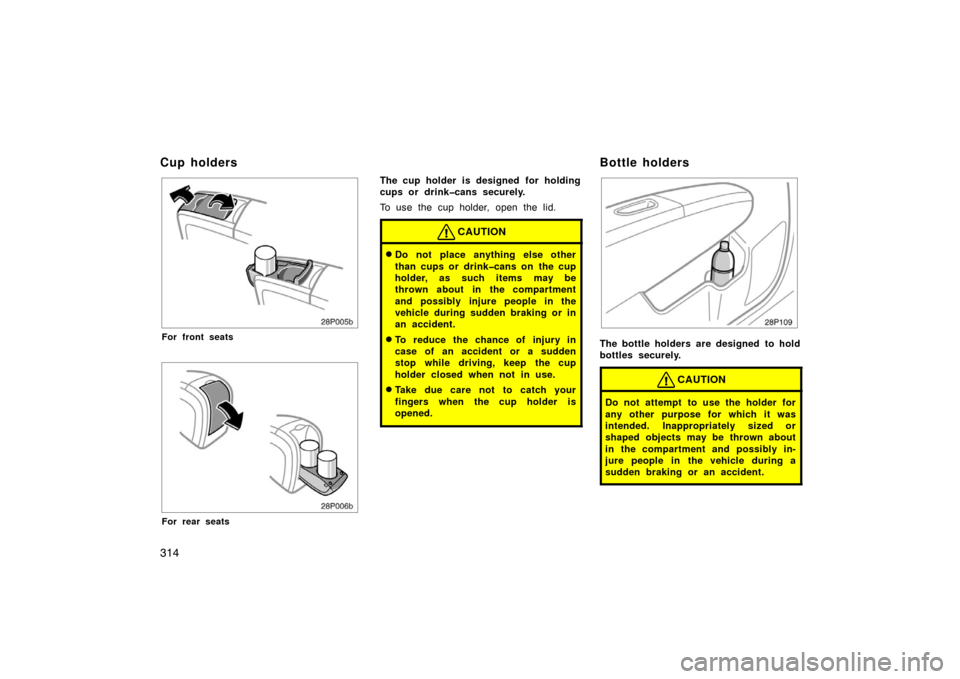
28p005b
For front seats
28p006b
For rear seats
The cup holder is designed for holding
cups or drinkcans securely.
To use the cup holder, open the lid.
CAUTION
�Do not place anything else other
than cups or drinkcans on the cup
holder, as such items may be
thrown about in the compartment
and possibly injure people in the
vehicle during sudden braking or in
an accident.
�To reduce the chance of injury in
case of an accident or a sudden
stop while driving, keep the cup
holder closed when not in use.
�Take due care not to catch your
fingers when the cup holder is
opened.
28p109
The bottle holders are designed to hold
bottles securely.
CAUTION
Do not attempt to use the holder for
any other purpose for which it was
intended. Inappropriately sized or
shaped objects may be thrown about
in the compartment and possibly in-
jure people in the vehicle during a
sudden braking or an accident.
Cup holdersBottle holders
Page 315 of 458
315
NOTICE
Do not put a cup or open bottle in
the bottle holder because the con-
tents may spill when the door opens
or closes.
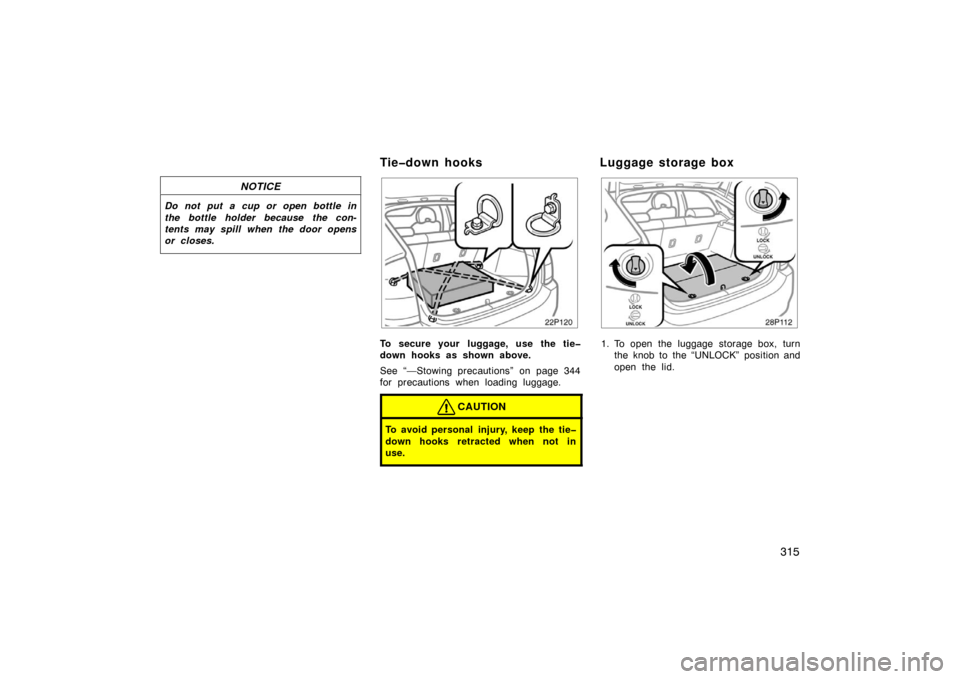
22p120
To secure your luggage, use the tie
down hooks as shown above.
See “—Stowing precautions” on page 344
for precautions when loading luggage.
CAUTION
To avoid personal injury, keep the tie
down hooks retracted when not in
use.
28p112a
1. To open the luggage storage box, turnthe knob to the “UNLOCK” position and
open the lid.
Tiedown hooks Luggage storage box
Page 345 of 458
345
�Never allow anyone to ride in
the luggage compartment. It is
not designed for passengers.
They should ride in their seats
with their seat belts properly
fastened. Otherwise, they are
much more likely to suffer seri-
ous bodily injury, in the event
of sudden braking or a colli-
sion.
� Do not place anything on the
luggage cover. Such items may
be thrown about and possibly
injure people in the vehicle
during sudden braking or an
accident. Secure all items in a
safe place.
� Do not drive with objects left
on top of the instrument panel.
They may interfere with the
driver’s field of view. Or they
may move during sharp vehicle
acceleration or turning, and im-
pair the driver’s control of the
vehicle. In an accident they
may injure the vehicle occu-
pants.NOTICE
Do not load the vehicle beyond the
vehicle capacity weight given in Sec-
tion 9.
Cargo capacity depends on the to-
tal weight of the occupants.
(Cargo capacity) = (Total load capac-
ity) – (Total weight of occupants)
Steps for Determining Correct
Load Limit—
(1) Locate the statement “The com-
bined weight of occupants and
cargo should never exceed XXX
kg or XXX lbs.” on your vehicle’s
placard.
(2) Determine the combined weight of the driver and passengers that will
be riding in your vehicle.
(3) Subtract the combined weight of the driver and passengers from
XXX kg or XXX lbs.
—Capacity and distribution
Page 353 of 458
353
CAUTION
�Before driving off, make sure the
parking brake is fully released and
the parking brake reminder light is
off.
�Do not leave your vehicle unat-
tended with the “READY” light on.
�Do not rest your foot on the brake
pedal while driving. It can cause
dangerous overheating, needless
wear, and poor fuel economy.
�To drive down a long or steep hill,
reduce your speed and downshift.
Remember, if you ride the brakes
excessively, they may overheat and
not work properly.
�Be careful when accelerating or
braking on a slippery surface. Sud-
den acceleration or engine braking,
could cause the vehicle to skid or
spin.
�Do not drive in excess of the speed
limit. Even if the legal speed limit
permits it, do not drive over 140
km/h (85 mph) unless your vehicle
has highspeed capability tires.
Driving over 140 km/h (85 mph)
may result in tire failure, loss of
control and possible injury. Be sure
to consult a tire dealer to determine
whether the tires on your vehicle
are highspeed capability tires or
not before driving at such speeds.
�Do not continue normal driving
when the brakes are wet. If they are
wet, your vehicle will require a lon-
ger stopping distance, and it may
pull to one side when the brakes
are applied. Also, the parking brake
will not hold the vehicle securely.
Driving on a slippery road surface
Drive carefully when it is raining, because
visibility will be reduced, the windows may
become fogged−up, and the road will be
slippery.
�Drive carefully when it starts to rain,
because the road surface will be espe-
cially slippery.
�Refrain from high speeds when driving
on an expressway in the rain, because
there may be a layer of water between
the tires and the road surface, prevent-
ing the steering and brakes from oper-
ating properly.
Driving in the rain
Page 368 of 458
368
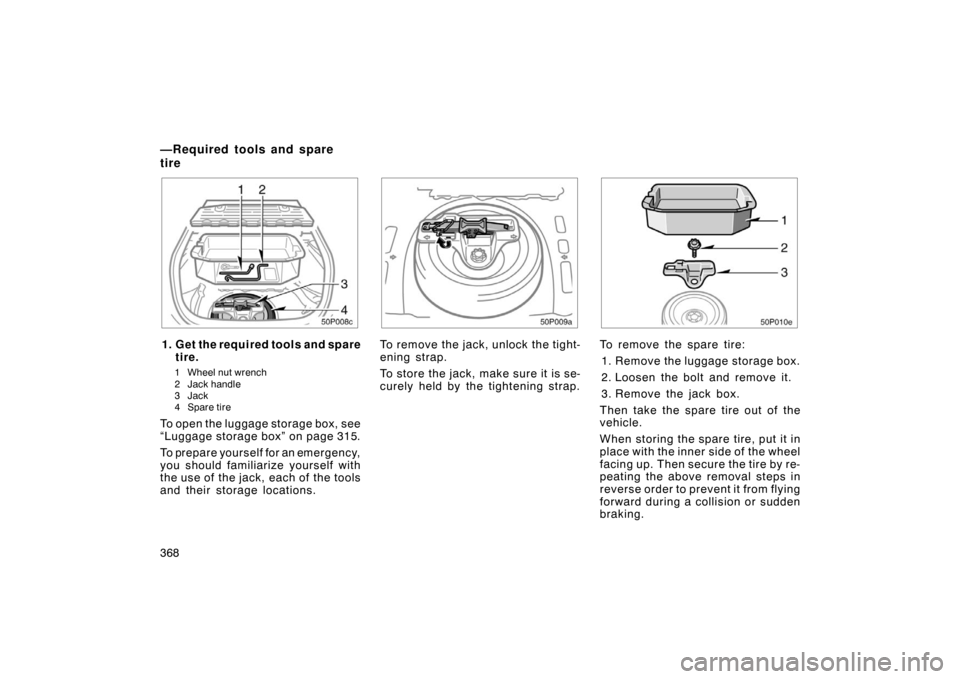
50p008c
1. Get the required tools and sparetire.
1 Wheel nut wrench
2 Jack handle
3Jack
4 Spare tire
To open the luggage storage box, see
“Luggage storage box” on page 315.
To prepare yourself for an emergency,
you should familiarize yourself with
the use of the jack, each of the tools
and their storage locations.
50p009a
To remove the jack, unlock the tight-
ening strap.
To store the jack, make sure it is se-
curely held by the tightening strap.
50p010e
To remove the spare tire:
1. Remove the luggage storage box.
2. Loosen the bolt and remove it.
3. Remove the jack box.
Then take the spare tire out of the
vehicle.
When storing the spare tire, put it in
place with the inner side of the wheel
facing up. Then secure the tire by re-
peating the above removal steps in
reverse order to prevent it from flying
forward during a collision or sudden
braking.
—Required tools and spare
tire
Page 372 of 458
372
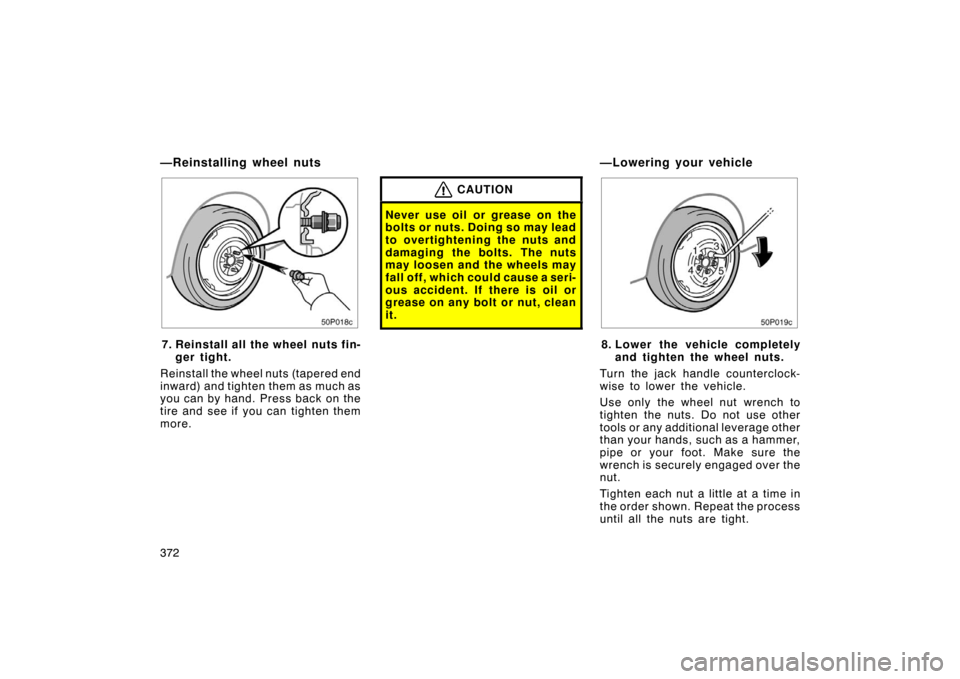
50p018c
7. Reinstall all the wheel nuts fin-ger tight.
Reinstall the wheel nuts (tapered end
inward) and tighten them as much as
you can by hand. Press back on the
tire and see if you can tighten them
more.
CAUTION
Never use oil or grease on the
bolts or nuts. Doing so may lead
to overtightening the nuts and
damaging the bolts. The nuts
may loosen and the wheels may
fall off, which could cause a seri-
ous accident. If there is oil or
grease on any bolt or nut, clean
it.
50p019c
8. Lower the vehicle completely and tighten the wheel nuts.
Turn the jack handle counterclock-
wise to lower the vehicle.
Use only the wheel nut wrench to
tighten the nuts. Do not use other
tools or any additional leverage other
than your hands, such as a hammer,
pipe or your foot. Make sure the
wrench is securely engaged over the
nut.
Tighten each nut a little at a time in
the order shown. Repeat the process
until all the nuts are tight.
—Reinstalling wheel nuts —Lowering your vehicle