Page 197 of 470

1872007 4Runner from Aug. ’06 Prod. (OM35866U)
NOTICE
�If the vehicle height is changed fre-
quently when the vehicle is heavily
loaded, the compressor may over-
heat, causing the vehicle height ad-
justment operation to stop.
� Before you lower the vehicle height
with the height select switch, check
under the vehicle to make sure
nothing to damage the vehicle or
no one to be injured is there and
that the underbody of the vehicle
does not touch the ground.
� After unloading, the height of a ve-
hicle equipped with the rear height
control air suspension becomes
slightly higher than the normal ve-
hicle height. Take sufficient care
where the overhead height is re-
stricted.
� Do not select the “LO” mode in the
bumpy roads. If the underbody of
the vehicle touches the rugged road
surface, the vehicle may be dam-
aged.
CY16015
(d) Turning off the rear height control
air suspension
To turn off the rear height control air
suspension with the vehicle stopped,
push the “HEIGHT CONTROL OFF”
switch. The height control “OFF” indi-
cator light comes on and the vehicle
height is fixed in the same mode as the
height control switch is pushed.
This status is memorized in the system
even after the engine is stopped.
If you push the switch again, the height
control “OFF” indicator light goes out and
the rear height control air suspension is
turned on.
Even after the rear height control air sus-
pension is turned off with the “HEIGHT
CONTROL OFF” switch, if the vehicle
speed exceeds 30 km/h (19 mph), the
rear height control air suspension automat-
ically selects the “N” mode.
Page 280 of 470

2702007 4Runner from Aug. ’06 Prod. (OM35866U)
NOTICE
�To prevent the battery from being
discharged, do not use the power
outlet longer than necessary when
the engine is not running.
� Close the power outlet lid when the
power outlet is not in use. Inserting
a foreign object other than the ap-
propriate plug that fits the outlet
may cause electrical failure or short
circuit.
The power outlet is not designed for
the following electric appliances even if
their power consumption is under 115
VAC/100W. These appliances may not
operate properly.
�Appliances with high initial peak watt-
age: cathode− ray tube type televisions,
compressor −driven refrigerators, electric
pumps, electric tools, etc.
�Measuring devices which process pre-
cise data: medical equipment, measur-
ing instruments, etc.
�Other appliances requiring an extremely
stable power supply: microcomputer −
controlled electric blankets, touch sen-
sor lamps, etc.
Certain electrical appliances may cause
radio noise.NOTICE
To ensure correct audio/video system
operation:
� Be careful not to spill beverages
over the system.
� Do not put anything other than a
compact disc into the slot.
� Do not put anything other than a
DVD video, video CD, dtsCD or au-
dio CD into the DVD player.
� The use of a cellular phone inside
or near the vehicle may cause a
noise from the speakers of the sys-
tem which you are listening to.
However, this does not indicate a
malfunction.
RADIO RECEPTION
Usually, a problem with radio reception
does not mean there is a problem with
your radio—it is just the normal result of
conditions outside the vehicle.
Audio/video system operating
hints
Page 317 of 470
3072007 4Runner from Aug. ’06 Prod. (OM35866U)
NOTICE
�To prevent the battery from being
discharged, do not use the power
outlet longer than necessary when
the engine is not running.
� Close the power outlet lid when the
power outlet is not in use. Inserting
anything other than an appropriate
plug that fits the outlet may cause
electrical failure or short circuits.
The power outlet is not designed for
the following electric appliances even
though their power consumption is un-
der 115 VAC/100W. These appliances
may not operate properly.
�Appliances with high initial peak watt-
age: cathode −ray tube type televisions,
compressor −driven refrigerators, electric
pumps, electric tools, etc.
�Measuring devices which process pre-
cise data: medical equipment, measur-
ing instruments, etc.
�Other appliances requiring an extremely
stable power supply: microcomputer −
controlled electric blankets, touch sen-
sor lamps, etc.
Certain electrical appliances may cause
radio noise.
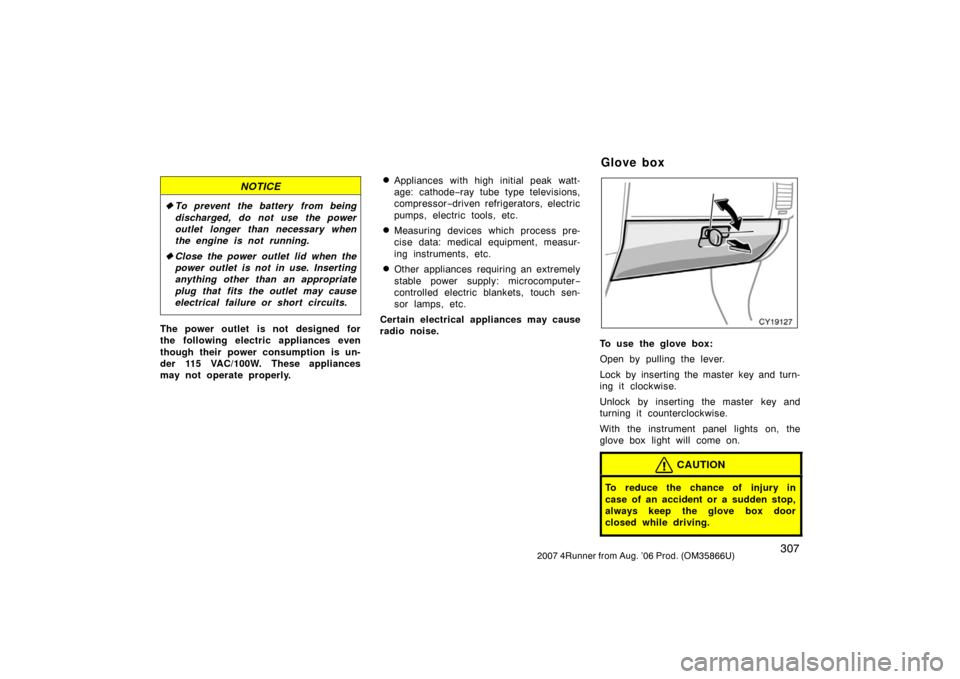
CY19127
To use the glove box:
Open by pulling the lever.
Lock by inserting the master key and turn-
ing it clockwise.
Unlock by inserting the master key and
turning it counterclockwise.
With the instrument panel lights on, the
glove box light will come on.
CAUTION
To reduce the chance of injury in
case of an accident or a sudden stop,
always keep the glove box door
closed while driving.
Glove box