2007 SUZUKI XL7 lights
[x] Cancel search: lightsPage 93 of 274
3-11 INSTRUMENT PANEL
78J00-03E
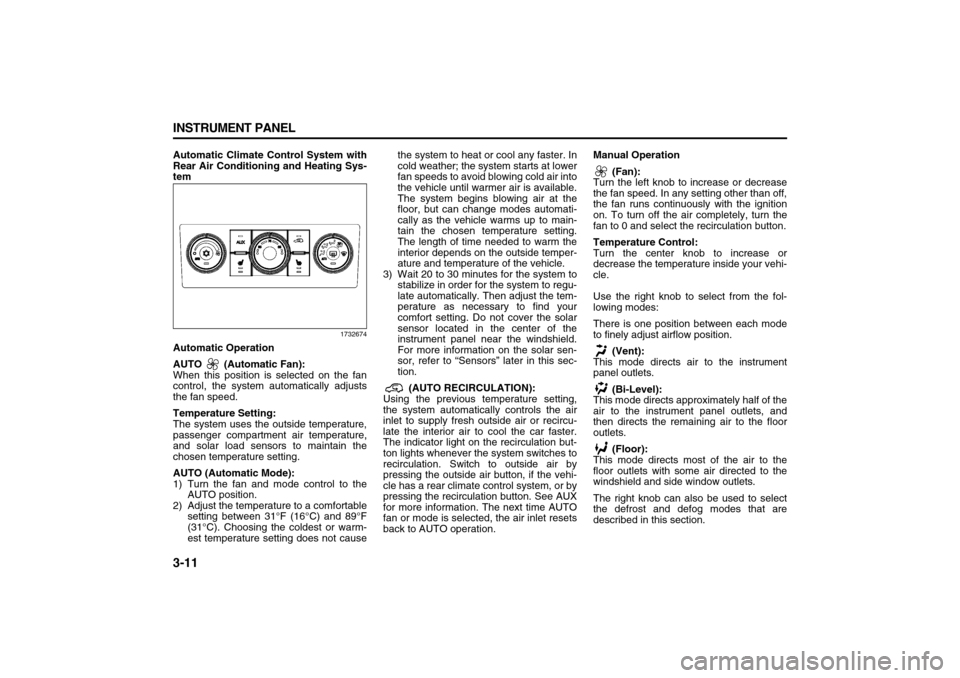
Automatic Climate Control System with
Rear Air Conditioning and Heating Sys-
tem
1732674
Automatic Operation
AUTO (Automatic Fan):
When this position is selected on the fan
control, the system automatically adjusts
the fan speed.
Temperature Setting:
The system uses the outside temperature,
passenger compartment air temperature,
and solar load sensors to maintain the
chosen temperature setting.
AUTO (Automatic Mode):
1) Turn the fan and mode control to the
AUTO position.
2) Adjust the temperature to a comfortable
setting between 31°F (16°C) and 89°F
(31°C). Choosing the coldest or warm-
est temperature setting does not causethe system to heat or cool any faster. In
cold weather; the system starts at lower
fan speeds to avoid blowing cold air into
the vehicle until warmer air is available.
The system begins blowing air at the
floor, but can change modes automati-
cally as the vehicle warms up to main-
tain the chosen temperature setting.
The length of time needed to warm the
interior depends on the outside temper-
ature and temperature of the vehicle.
3) Wait 20 to 30 minutes for the system to
stabilize in order for the system to regu-
late automatically. Then adjust the tem-
perature as necessary to find your
comfort setting. Do not cover the solar
sensor located in the center of the
instrument panel near the windshield.
For more information on the solar sen-
sor, refer to “Sensors” later in this sec-
tion.
(AUTO RECIRCULATION):
Using the previous temperature setting,
the system automatically controls the air
inlet to supply fresh outside air or recircu-
late the interior air to cool the car faster.
The indicator light on the recirculation but-
ton lights whenever the system switches to
recirculation. Switch to outside air by
pressing the outside air button, if the vehi-
cle has a rear climate control system, or by
pressing the recirculation button. See AUX
for more information. The next time AUTO
fan or mode is selected, the air inlet resets
back to AUTO operation.Manual Operation
(Fan):
Turn the left knob to increase or decrease
the fan speed. In any setting other than off,
the fan runs continuously with the ignition
on. To turn off the air completely, turn the
fan to 0 and select the recirculation button.
Temperature Control:
Turn the center knob to increase or
decrease the temperature inside your vehi-
cle.
Use the right knob to select from the fol-
lowing modes:
There is one position between each mode
to finely adjust airflow position.
(Vent):
This mode directs air to the instrument
panel outlets.
(Bi-Level):
This mode directs approximately half of the
air to the instrument panel outlets, and
then directs the remaining air to the floor
outlets.
(Floor):
This mode directs most of the air to the
floor outlets with some air directed to the
windshield and side window outlets.
The right knob can also be used to select
the defrost and defog modes that are
described in this section.
Page 97 of 274

3-15 INSTRUMENT PANEL
78J00-03E
Warning Lights, Gages, and
IndicatorsThis part describes the warning lights and
gages that may be on your vehicle. The
pictures will help you locate them.
Warning lights and gages can signal that
something is wrong before it becomes seri-
ous enough to cause an expensive repair
or replacement. Paying attention to your
warning lights and gages could also save
you or others from injury.
Warning lights come on when there may
be or is a problem with one of your vehi-
cle’s functions. As you will see in the
details on the following pages, some warn-
ing lights come on briefly when you start
the engine just to let you know they are
working. If you are familiar with this sec-
tion, you should not be alarmed when this
happens.
Gages can indicate when there may be or
is a problem with one of your vehicle’s
functions. Often gages and warning lights
work together to let you know when there
is a problem with your vehicle.
When one of the warning lights comes on
and stays on when you are driving, or
when one of the gages shows there may
be a problem, check the section that tells
you what to do about it. Please follow this
manual’s advice. Waiting to do repairs can
be costly and even dangerous. So pleaseget to know your warning lights and gages.
They are a big help.
Instrument Panel ClusterYour instrument panel cluster is designed
to let you know at a glance how your vehi-
cle is running. You will know how fast you
are going, how much fuel you are using,
and many other things you will need to
drive safely and economically.
United States version shown,
Canada similar
1716507
Speedometer and OdometerYour speedometer lets you see your speed
in both miles per hour (mph) and kilome-
ters per hour (km/h).
Your odometer shows how far your vehicle
has been driven, in either miles (used in
the United States) or kilometers (used in
Canada).
Your vehicle has a tamper resistant odom-
eter. The digital odometer will read 999999
if someone tries to turn it back.
You may wonder what happens if your
vehicle needs a new odometer installed. If
the new one can be set to the mileage total
of the old odometer, then it must be. If not,
then it is set at zero and a label must be
put on the driver’s door to show the old
mileage reading when the new odometer
was installed.Trip OdometerYour trip odometer is located in the Driver
Information Center and shows how far your
vehicle has been driven since the trip
odometer was last reset. For more infor-
mation refer to “DIC Operation and Dis-
plays” in this section.
Page 98 of 274

3-16 INSTRUMENT PANEL
78J00-03E
TachometerThe tachometer shows your engine speed
in revolutions per minute (rpm).Safety Belt Reminder LightWhen the key is turned to RUN or START,
a chime will come on for several seconds
to remind people to fasten their safety
belts, unless the driver’s safety belt is
already buckled.
808234
The safety belt light will also come on and
stay on for several seconds, then it will
flash for several more.
If the driver’s belt is already buckled, nei-
ther the chime nor the light will come on.
Passenger Safety Belt Reminder
LightSeveral seconds after the key is turned to
RUN or START, a chime will sound for sev-
eral seconds to remind the front passenger
to buckle their safety belt. This would only
occur if the passenger airbag is enabled.
Refer to “Passenger Sensing System” in
“Airbag System” in the “Seats and
Restraint Systems” section for more infor-
mation. The passenger safety belt light will
also come on and stay on for several sec-
onds, then it will flash for several more.
1468137
This chime and light will be repeated if the
passenger remains unbuckled and the
vehicle is in motion.
If the passenger’s safety belt is buckled,
neither the chime nor the light will come
on.
Airbag Readiness LightThere is an airbag readiness light on the
instrument panel, which shows the airbag
symbol. The system checks the airbag’s
electrical system for malfunctions. The
light tells you if there is an electrical prob-
lem. The system check includes the airbag
sensor, the airbag modules, the wiring and
the crash sensing and diagnostic module.
808322
This light will come on when you start your
vehicle, and it will flash for a few seconds.
Then the light should go out. This means
the system is ready.
If the airbag readiness light stays on after
you start the vehicle or comes on when
you are driving, your airbag system may
not work properly. Have your vehicle ser-
viced right away.
CAUTION
If you operate the engine with the
tachometer in the solid red area, your
vehicle could be damaged. The dam-
ages would not be covered by your
warranty. Do not operate the engine
in the solid red area.
Page 100 of 274

3-18 INSTRUMENT PANEL
78J00-03E
If the word ON or the on symbol is lit on the
passenger airbag status indicator, it means
that the right front passenger’s frontal air-
bag is enabled (may inflate).If the word OFF or the off symbol is lit on
the airbag status indicator, it means that
the passenger sensing system has turned
off the right front passenger’s frontal air-
bag. Refer to “Passenger Sensing System”
in “Airbag System” in the “Seats and
Restraint Systems” section for more on
this, including important safety information.
If, after several seconds, all status indicator
lights remain on, or if there are no lights at
all, there may be a problem with the lights
or the passenger sensing system. See
your dealer for service.
WARNING
Even though the passenger sensing
system is designed to turn off the
passenger’s frontal airbag if the sys-
tem detects a rear-facing child
restraint, no system is fail-safe, and
no one can guarantee that an airbag
will not deploy under some unusual
circumstance, even though it is
turned off. We recommend that rear-
facing child restraints be trans-
ported in vehicles with a rear seat
that will accommodate a rear-facing
child restraint, whenever possible.
WARNING
If the on indicator comes on when
you have a rear-facing child restraint
installed in the right front passen-
ger’s seat, it means that the passen-
ger sensing system has not turned
off the passenger’s frontal airbag. A
child in a rear-facing child restraint
can be seriously injured or killed if
the right front passenger’s airbag
inflates. This is because the back of
the rear-facing child restraint would
be very close to the inflating airbag.
Do not use a rear-facing child
restraint in the right front passen-
ger’s seat if the airbag is turned on.
WARNING
If the off indicator and the airbag
readiness light ever come on
together, it means that something
may be wrong with the airbag sys-
tem. If this ever happens, have the
vehicle serviced promptly, because
an adult-size person sitting in the
right front passenger seat may not
have the protection of the frontal air-
bag. Refer to “Airbag Readiness
Light” in this section.
Page 118 of 274

3-36 INSTRUMENT PANEL
78J00-03E
NO CHANGE:
No change will be made to this feature.
The current setting will remain.
Choose one of the available settings and
press the set/reset button while it is dis-
played on the DIC to select it.
AUTO LOCK
This feature allows you to select when the
vehicle’s doors will automatically lock.
Refer to “Programmable Automatic Door
Locks” in “Doors and Locks” in the “Fea-
tures and Controls” section for more infor-
mation.
Press the vehicle information button until
AUTO LOCK appears on the DIC display.
Press the set/reset button to access the
settings for this feature. Then press the
vehicle information button to scroll through
the following settings:
SHIFT OUT OF PARK (default):
The vehicle’s doors automatically lock
when the doors are closed and the vehi-
cle is shifted out of PARK (P).
AT VEHICLE SPEED:
The vehicle’s doors automatically lock
when the vehicle speed is above 5 mph
(8 km/h) for three seconds.
NO CHANGE:
No change will be made to this feature.
The current setting will remain.
Choose one of the available settings and
press the set/reset button while it is dis-
played on the DIC to select it.AUTO UNLOCK
This feature allows you to select whether
or not to turn off the automatic door unlock-
ing feature. It also allows you to select
which doors and when the doors will auto-
matically unlock. Refer to “Programmable
Automatic Door Locks” in “Doors and
Locks” in the “Features and Controls” sec-
tion for more information.
Press the vehicle information button until
AUTO UNLOCK appears on the DIC dis-
play. Press the set/reset button to access
the settings for this feature. Then press the
vehicle information button to scroll through
the following settings:
OFF:
None of the doors will automatically
unlock.
DRIVER AT KEY OUT:
Only the driver’s door will unlock when
the key is taken out of the ignition.
DRIVER IN PARK:
Only the driver’s door will unlock when
the vehicle is shifted into PARK (P).
ALL AT KEY OUT:
All of the doors will unlock when the key
is taken out of the ignition.
ALL IN PARK (default):
All of the doors will unlock when the
vehicle is shifted into PARK (P).
NO CHANGE:
No change will be made to this feature.
The current setting will remain.Choose one of the available settings and
press the set/reset button while it is dis-
played on the DIC to select it.
REMOTE LOCK
This feature allows you to select the type of
feedback you will receive when locking the
vehicle with the Remote Keyless Entry
(RKE) transmitter. You will not receive
feedback when locking the vehicle with the
RKE transmitter if any of the doors are
open. Refer to “Remote Keyless Entry
(RKE) System Operation” in “Keys” in the
“Features and Controls” section for more
information.
Press the vehicle information button until
REMOTE LOCK appears on the DIC dis-
play. Press the set/reset button to access
the settings for this feature. Then press the
vehicle information button to scroll through
the following settings:
OFF:
There will be no feedback when you
press the lock button on the RKE trans-
mitter.
LIGHTS ONLY:
The exterior lamps will flash when you
press the lock button on the RKE trans-
mitter.
HORN ONLY:
The horn will sound on the second press
of the lock button on the RKE transmit-
ter.
HORN & LIGHTS (default):
The exterior lamps will flash when you
Page 119 of 274

3-37 INSTRUMENT PANEL
78J00-03E
press the lock button on the RKE trans-
mitter, and the horn will sound when the
lock button is pressed again within five
seconds of the previous command.
NO CHANGE:
No change will be made to this feature.
The current setting will remain.
Choose one of the available settings and
press the set/reset button while it is dis-
played on the DIC to select it.
REMOTE UNLOCK
This feature allows you to select the type of
feedback you will receive when unlocking
the vehicle with the RKE transmitter. You
will not receive feedback when unlocking
the vehicle with the RKE transmitter if the
doors are open. Refer to “Remote Keyless
Entry (RKE) System Operation” in “Keys”
in the “Features and Controls” section for
more information.
Press the vehicle information button until
REMOTE UNLOCK appears on the DIC
display. Press the set/reset button to
access the settings for this feature. Then
press the vehicle information button to
scroll through the following settings:
LIGHTS OFF:
The exterior lamps will not flash when
you press the unlock button on the RKE
transmitter.
LIGHTS ON (default):
The exterior lamps will flash when you
press the unlock button on the RKE
transmitter. NO CHANGE:
No change will be made to this feature.
The current setting will remain.
Choose one of the available settings and
press the set/reset button while it is dis-
played on the DIC to select it.
DELAY LOCK
This feature allows you to select whether
or not the locking of the vehicle’s doors will
be delayed. The locking of the vehicle’s
doors is delayed for up to 10 seconds after
a power door lock switch is pressed when
a door is open, or after the lock button on
the RKE transmitter is pressed while a
door is open. The key must be out of the
ignition for this feature to work. Refer to
“Delayed Locking” in “Doors and Locks” in
the “Features and Controls” section for
more information.
Press the vehicle information button until
DELAY LOCK appears on the DIC display.
Press the set/reset button to access the
settings for this feature. Then press the
vehicle information button to scroll through
the following settings:
OFF:
There will be no delayed locking of the
vehicle’s doors.
ON (default):
The locking of the vehicle’s doors will be
delayed by 10 seconds after a power
door lock switch is pressed when a door
is open, or the lock button on the RKEtransmitter is pressed while a door is
open.
NO CHANGE:
No change will be made to this feature.
The current setting will remain.
Choose one of the available settings and
press the set/reset button while it is dis-
played on the DIC to select it.
EXIT LIGHTING
If it is dark enough outside, this feature
allows you to select the amount of time you
want the exterior lamps to remain on. This
happens after the key is turned from RUN
to LOCK.
Press the vehicle information button until
EXIT LIGHTING appears on the DIC dis-
play. Press the set/reset button to access
the settings for this feature. Then press the
vehicle information button to scroll through
the following settings:
OFF:
The exterior lamps will not turn on.
30 SECONDS (default):
The exterior lamps will stay on for 30
seconds.
1 MINUTE:
The exterior lamps will stay on for one
minute.
2 MINUTES:
The exterior lamps will stay on for two
minutes.
NO CHANGE:
No change will be made to this feature.
The current setting will remain.
Page 120 of 274

3-38 INSTRUMENT PANEL
78J00-03E
Choose one of the available settings and
press the set/reset button while it is dis-
played on the DIC to select it.
APPROACH LIGHTING
This feature allows you to select whether
or not to have the exterior lights turn on
briefly during low light periods after unlock-
ing the vehicle using the RKE transmitter.
Press the vehicle information button until
APPROACH LIGHTING appears on the
DIC display. Press the set/reset button to
access the settings for this feature. Then
press the vehicle information button to
scroll through the following settings:
OFF:
The exterior lights will not turn on when
you unlock the vehicle with the RKE
transmitter.
ON (default):
If it is dark enough outside, the exterior
lights will turn on briefly when you unlock
the vehicle with the RKE transmitter.
The lights will remain on for 20 seconds
or until the lock button on the RKE trans-
mitter is pressed, or the vehicle is no
longer off. Refer to “Remote Keyless
Entry (RKE) System Operation” in
“Keys” in the “Features and Controls”
section for more information.
NO CHANGE:
No change will be made to this feature.
The current setting will remain.Choose one of the available settings and
press the set/reset button while it is dis-
played on the DIC to select it.
CHIME VOLUME
This feature allows you to select the vol-
ume level of the chime.
Press the vehicle information button until
CHIME VOLUME appears on the DIC dis-
play. Press the set/reset button to access
the settings for this feature. Then press the
vehicle information button to scroll through
the following settings:
NORMAL (default):
The chime volume will be set to a normal
level.
LOUD:
The chime volume will be set to a loud
level.
NO CHANGE:
No change will be made to this feature.
The current setting will remain.
Choose one of the available settings and
press the set/reset button while it is dis-
played on the DIC to select it.
REMOTE START
If your vehicle has this feature, it allows
you to turn the remote start off or on. The
remote start feature allows you to start the
engine from outside of the vehicle using
your RKE transmitter. Refer to “Remote
Vehicle Start” under “Remote Keyless
Entry (RKE) System Operation” in “Keys”in the “Features and Controls” section for
more information.
Press the vehicle information button until
REMOTE START appears on the DIC dis-
play. Press the set/reset button to access
the settings for this feature. Then press the
vehicle information button to scroll through
the following settings:
OFF:
The remote start feature will be disabled.
ON (default):
The remote start feature will be enabled.
NO CHANGE:
No change will be made to this feature.
The current setting will remain.
Choose one of the available settings and
press the set/reset button while it is dis-
played on the DIC to select it.
FACTORY SETTINGS
This feature allows you to set all of the per-
sonalization features back to their factory
default settings.
Press the vehicle information button until
FACTORY SETTINGS appears on the DIC
display. Press the set/reset button to
access the settings for this feature. Then
press the vehicle information button to
scroll through the following settings:
RESTORE ALL (default):
The personalization features will be set
to their factory default settings.
Page 161 of 274

4-3 DRIVING YOUR VEHICLE
78J00-03E
There is something else about drinking
and driving that many people do not know.
Medical research shows that alcohol in a
person’s system can make crash injuries
worse, especially injuries to the brain, spi-
nal cord, or heart. This means that when
anyone who has been drinking – driver or
passenger – is in a crash, that person’s
chance of being killed or permanently dis-
abled is higher than if the person had not
been drinking.Control of a VehicleYou have three systems that make your
vehicle go where you want it to go. They
are the brakes, the steering, and the accel-
erator. All three systems have to do their
work at the places where the tires meet the
road.
Sometimes, as when you are driving on
snow or ice, it is easy to ask more of those
control systems than the tires and roadcan provide. That means you can lose con-
trol of your vehicle.
Adding non-Suzuki accessories can affect
your vehicle’s performance. Refer to
“Accessories and Modifications” in “Ser-
vice” in the “Service and Appearance
Care” section.
BrakingRefer to “Brake System Warning Light” in
“Warning Lights, Gages, and Indicators” in
the “Instrument Panel” section.
Braking action involves perception time
and reaction time.
First, you have to decide to push on the
brake pedal. That is perception time. Then
you have to bring up your foot and do it.
That is reaction time.
Average reaction time is about three-
fourths of a second. But that is only an
average. It might be less with one driver
and as long as two or three seconds or
more with another. Age, physical condition,
alertness, coordination, and eyesight all
play a part. So do alcohol, drugs, and frus-
tration. But even in three-fourths of a sec-
ond, a vehicle moving at 60 mph (100 km/
h) travels 66 feet (20 m). That could be a
lot of distance in an emergency, so keeping
enough space between your vehicle and
others is important.
And, of course, actual stopping distances
vary greatly with the surface of the road,whether it is pavement or gravel; the con-
dition of the road, whether it is wet, dry, or
icy; tire tread; the condition of the brakes;
the weight of the vehicle; and the amount
of brake force applied.
Avoid needless heavy braking. Some peo-
ple drive in spurts – heavy acceleration fol-
lowed by heavy braking – rather than
keeping pace with traffic. This is a mistake.
The brakes may not have time to cool
between hard stops. The brakes will wear
out much faster if you do a lot of heavy
braking. If you keep pace with the traffic
and allow realistic following distances, you
will eliminate a lot of unnecessary braking.
That means better braking and longer
brake life.
If your vehicle’s engine ever stops while
you are driving, brake normally but do not
pump the brakes. If you do, the pedal may
get harder to push down. If the engine
stops, you will still have some power brake
assist. But you will use it when you brake.
Once the power assist is used up, it may
take longer to stop and the brake pedal will
be harder to push.
Adding non-Suzuki accessories can affect
your vehicle’s performance. Refer to
“Accessories and Modifications” in “Ser-
vice” in the “Service and Appearance
Care” section.
WARNING
Drinking and then driving is very dan-
gerous. Your reflexes, perceptions,
attentiveness, and judgment can be
affected by even a small amount of
alcohol. You can have a serious – or
even fatal – collision if you drive after
drinking. Please do not drink and
drive or ride with a driver who has
been drinking. Ride home in a cab; or
if you are with a group, designate a
driver who will not drink.