2007 SUZUKI XL7 ignition
[x] Cancel search: ignitionPage 74 of 274

2-18 FEATURES AND CONTROLS
78J00-03E
4) Remove the key and take it with you. If
you can leave your vehicle with the igni-
tion key in your hand, your vehicle is in
PARK (P).
Leaving Your Vehicle With the Engine
Running
If you have to leave your vehicle with the
engine running, be sure your vehicle is in
PARK (P) and your parking brake is firmly
set before you leave it. After you have
moved the shift lever into PARK (P), hold
the regular brake pedal down. Then, see if
you can move the shift lever away from
PARK (P) without first pushing the button.
If you can, it means that the shift lever was
not fully locked into PARK (P).
Torque Lock
If you are parking on a hill and you do not
shift your transaxle into PARK (P) properly,
the weight of the vehicle may put too muchforce on the parking pawl in the transaxle.
You may find it difficult to pull the shift
lever out of PARK (P). This is called
“torque lock.” To prevent torque lock, set
the parking brake and then shift into PARK
(P) properly before you leave the driver’s
seat. To find out how, refer to “Shifting Into
Park (P)” in this section.
When you are ready to drive, move the
shift lever out of PARK (P) before you
release the parking brake.
If torque lock does occur, you may need to
have another vehicle push yours a little
uphill to take some of the pressure from
the parking pawl in the transaxle, so you
can pull the shift lever out of PARK (P).
Shifting Out of Park (P)Your vehicle has an automatic transaxle
shift lock control system. You have to fully
apply your regular brakes before you can
shift from PARK (P) when the ignition is in
RUN.
If you cannot shift out of PARK (P), ease
pressure on the shift lever – push the shift
lever all the way into PARK (P), as you
maintain brake application. Then, press
the button on the shift lever and move the
shift lever into the gear you wish.
If you ever hold the brake pedal down but
still cannot shift out of PARK (P), try this:
1) Turn the key to LOCK.2) Apply and hold the brake until the end
of Step 4.
3) Shift to NEUTRAL (N).
4) Start the vehicle and then shift to the
desired drive gear.
5) Have your vehicle fixed as soon as you
can.
Parking Over Things That Burn
806406
WARNING
It can be dangerous to leave your
vehicle with the engine running. Your
vehicle could move suddenly if the
shift lever is not fully in PARK (P)
with the parking brake firmly set.
And, if you leave the vehicle with the
engine running, it could overheat and
even catch fire. You or others could
be injured. Do not leave your vehicle
with the engine running.
WARNING
Things that can burn could touch hot
exhaust parts under your vehicle and
ignite. Do not park over papers,
leaves, dry grass, or other things that
can burn.
Page 80 of 274

2-24 FEATURES AND CONTROLS
78J00-03E
SunroofIf your vehicle has this feature, the sunroof
switch is located on the headliner above
the rearview mirror. The ignition must be in
RUN or ACC, or Retained Accessory
Power (RAP) must be active, to operate
the sunroof. Refer to “Retained Accessory
Power (RAP)” in this section for more infor-
mation.
1753772
To express-open the sunroof glass panel
and sunshade, press the switch rearward
and release it.
To stop the sunroof before it is completely
open, press the switch rearward again.
The sunshade cannot be closed with the
sunroof open.
To close the sunroof, press forward and
hold the switch until the sunroof stops, lifts,
and seals at the back of the sunroof glass.Press forward on the switch again to make
sure the sunroof is fully closed.
To put the sunroof in the vent position, pull
down on the front of the switch. Push up on
the front of the switch to close it.
Page 85 of 274

3-3 INSTRUMENT PANEL
78J00-03E
Hazard Warning FlashersThe hazard warning flashers let you warn
the police and others that you have a prob-
lem. The front and rear turn signal lamps
will flash on and off.
1223926
The hazard warning flasher button is
located in the center of the instrument
panel.
The hazard warning flashers work no mat-
ter what position the key is in, and even if
the key is not in the ignition switch.
Press the button to make the front and rear
turn signal lamps flash on and off. Press
the button again to turn the flashers off.
While the hazard warning flashers are on,
the turn signals do not work.Other Warning DevicesIf you carry reflective triangles, you can set
them up at the side of the road about 300
feet (100 m) behind your vehicle.HornPress near or on the horn symbols on your
steering wheel pad to sound the horn.
Tilt WheelYour vehicle has a tilt wheel that allows you
to adjust the steering wheel.
1262086
The lever to tilt the steering wheel is
located on the left side of the steering col-
umn.
To tilt the wheel, hold the steering wheel
and push the lever down. Then, move the
steering wheel to a comfortable position
and pull the lever up firmly to lock the col-
umn in place.
Turn Signal/Multifunction Lever
1766015
The lever on the left side of the steering
column includes the following:
Turn and Lane-Change Signals.
Refer to “Turn and Lane-Change Sig-
nals” in this section.
Headlamp High/Low-Beam
Changer. Refer to “Headlamp High/Low-
Beam Changer” in this section.
Flash-to-Pass. Refer to “Flash-to-Pass”
in this section.
Exterior Lamp Control. Refer to
“Headlamps” in this section.
Turn and Lane-Change Signals
The turn signal has two upward (for right)
and two downward (for left) positions.
These positions allow you to signal a turn
or a lane change.
Page 89 of 274

3-7 INSTRUMENT PANEL
78J00-03E
the vehicle’s speed for approximately 60
seconds, cruise control will disengage.
Using Cruise Control on Hills
How well your cruise control will work on
hills depends upon your speed, load, and
the steepness of the hills. When going up
steep hills, you may have to step on the
accelerator pedal to maintain your vehi-
cle’s speed. When going downhill, you may
have to brake or shift to a lower gear to
limit the vehicle’s speed. Of course, apply-
ing the brakes ends cruise control. Many
drivers find this to be too much trouble and
do not use cruise control on steep hills.
Ending Cruise Control
There are three ways to end cruise control:
Step lightly on the brake pedal.
Press the cancel button on the steering
wheel.
Press the On/Off button on the steering
wheel.
Erasing Speed Memory
When the cruise control or the ignition is
turned off, the cruise control set speed
memory is erased.
HeadlampsThe exterior lamp control is located on the
turn signal/multifunction lever.
(Exterior Lamp Control):
Turn the control with this symbol on it to
operate the exterior lamps.
The exterior lamp control has the following
positions:
AUTO (Off/Automatic Headlamps):
Turn the control to this position to put the
headlamps in automatic mode. Automatic
mode will turn the exterior lamps on and off
depending upon how much light is avail-
able outside of the vehicle.
(Parking Lamps):
Turn the control to this position to turn on
the parking lamps together with the follow-
ing:
Sidemarker Lamps
Taillamps
License Plate Lamps
Instrument Panel Lights
(Headlamps):
Turning the control to this position turns on
the headlamps, together with the previ-
ously listed lamps and lights.
Headlamps on Reminder
If you open the driver’s door with the igni-
tion off and the lamps on, you will hear a
warning chime.Daytime Running Lamps (DRL)
Daytime Running Lamps (DRL) can make
it easier for others to see the front of your
vehicle during the day. DRL can be helpful
in many different driving conditions, but
they can be especially helpful in the short
periods after dawn and before sunset.
Fully functional daytime running lamps are
required on all vehicles first sold in Can-
ada.
A light sensor on top of the instrument
panel makes the DRL work, so be sure it is
not covered.
The DRL system’s automatic headlamp
control will make the low-beam headlamps
come on at a reduced brightness when the
following conditions are met:
The ignition is in RUN.
The exterior lamps control is in AUTO.
The engine is running.
When the DRL are on, only the low-beam
headlamps, at a reduced level of bright-
ness, will be on. The headlamps, taillamps,
sidemarker, and other lamps will not be on.
The instrument panel and cluster will also
not be lit.
When it is dark enough outside, the DRL
will turn off and the headlamps and parking
lamps will turn on. The other lamps that
come on with the headlamps will also
come on.
Page 91 of 274

3-9 INSTRUMENT PANEL
78J00-03E
your vehicle will come on when any door is
opened. In addition, the light will come on
when the remote keyless entry unlock but-
ton is pressed. It will stay on for 20 sec-
onds or until a door is opened. After the
door is opened the light will remain on and
stay on for 20 seconds after the doors are
closed, or until you put the key in the igni-
tion and turn the key to RUN.Map Lamps
1788863
Your vehicle may have lamps located on
the headliner above the rearview mirror.
Push on the lens in the lamp to turn them
on and off.
Cargo LampThe cargo lamp is located over the rear
compartment, and is controlled by the
dome lamp. Refer to “Dome Lamp” in this
section.Electric Power ManagementThe vehicle has Electric Power Manage-
ment (EPM) that estimates the battery’s
temperature and state of charge. It then
adjusts the voltage for best performance
and extended life of the battery.
When the battery’s state of charge is low,
the voltage is raised slightly to quickly put
the charge back in. When the state of
charge is high, the voltage is lowered
slightly to prevent overcharging. If the vehi-
cle has a voltmeter gage or voltage display
on the Driver Information Center (DIC), you
may see the voltage move up or down.
This is normal. If there is a problem, an
alert will be displayed.
The battery can be discharged at idle if the
electrical loads are very high. This is true
for all vehicles. This is because the gener-
ator (alternator) may not be spinning fast
enough at idle to produce all the power
that is needed for very high electrical
loads.
A high electrical load occurs when several
of the following loads are on: headlamps,
high beams, fog lamps, rear window defog-
ger, climate control fan at high speed,
heated seats, engine cooling fans, trailerloads, and loads plugged into accessory
power outlets.
EPM works to prevent excessive discharge
of the battery. It does this by balancing the
generator’s output and the vehicle’s electri-
cal needs. It can increase engine idle
speed to generate more power, whenever
needed. It can temporarily reduce the
power demands of some accessories.
Normally, these actions occur in steps or
levels, without being noticeable. In rare
cases at the highest levels of corrective
action, this action may be noticeable to the
driver. If so, a Driver Information Center
(DIC) message might be displayed, such
as Battery Saver Active or Service Battery
Charging System. If this message is dis-
played, it is recommended that the driver
reduce the electrical loads as much as
possible. Refer to “DIC Warnings and Mes-
sages” in this section.
Battery Run-Down ProtectionYour vehicle has a battery saver feature
designed to protect the vehicle’s battery.
When any interior lamp is left on and the
ignition is turned off, the battery rundown
protection system will automatically turn
the lamp off after 20 minutes. This will
avoid draining the battery. This vehicle also
has a retained accessory power feature. If
the radio is on, it will turn off after 10 min-
utes or if any door on the vehicle is
opened. Refer to “Retained Accessory
Page 93 of 274
3-11 INSTRUMENT PANEL
78J00-03E
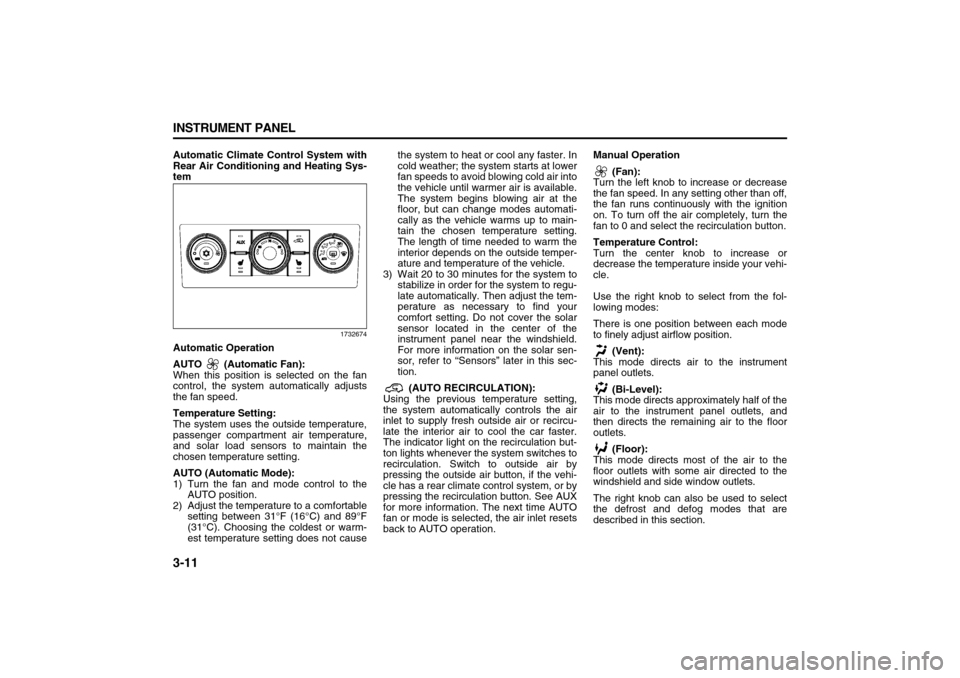
Automatic Climate Control System with
Rear Air Conditioning and Heating Sys-
tem
1732674
Automatic Operation
AUTO (Automatic Fan):
When this position is selected on the fan
control, the system automatically adjusts
the fan speed.
Temperature Setting:
The system uses the outside temperature,
passenger compartment air temperature,
and solar load sensors to maintain the
chosen temperature setting.
AUTO (Automatic Mode):
1) Turn the fan and mode control to the
AUTO position.
2) Adjust the temperature to a comfortable
setting between 31°F (16°C) and 89°F
(31°C). Choosing the coldest or warm-
est temperature setting does not causethe system to heat or cool any faster. In
cold weather; the system starts at lower
fan speeds to avoid blowing cold air into
the vehicle until warmer air is available.
The system begins blowing air at the
floor, but can change modes automati-
cally as the vehicle warms up to main-
tain the chosen temperature setting.
The length of time needed to warm the
interior depends on the outside temper-
ature and temperature of the vehicle.
3) Wait 20 to 30 minutes for the system to
stabilize in order for the system to regu-
late automatically. Then adjust the tem-
perature as necessary to find your
comfort setting. Do not cover the solar
sensor located in the center of the
instrument panel near the windshield.
For more information on the solar sen-
sor, refer to “Sensors” later in this sec-
tion.
(AUTO RECIRCULATION):
Using the previous temperature setting,
the system automatically controls the air
inlet to supply fresh outside air or recircu-
late the interior air to cool the car faster.
The indicator light on the recirculation but-
ton lights whenever the system switches to
recirculation. Switch to outside air by
pressing the outside air button, if the vehi-
cle has a rear climate control system, or by
pressing the recirculation button. See AUX
for more information. The next time AUTO
fan or mode is selected, the air inlet resets
back to AUTO operation.Manual Operation
(Fan):
Turn the left knob to increase or decrease
the fan speed. In any setting other than off,
the fan runs continuously with the ignition
on. To turn off the air completely, turn the
fan to 0 and select the recirculation button.
Temperature Control:
Turn the center knob to increase or
decrease the temperature inside your vehi-
cle.
Use the right knob to select from the fol-
lowing modes:
There is one position between each mode
to finely adjust airflow position.
(Vent):
This mode directs air to the instrument
panel outlets.
(Bi-Level):
This mode directs approximately half of the
air to the instrument panel outlets, and
then directs the remaining air to the floor
outlets.
(Floor):
This mode directs most of the air to the
floor outlets with some air directed to the
windshield and side window outlets.
The right knob can also be used to select
the defrost and defog modes that are
described in this section.
Page 94 of 274

3-12 INSTRUMENT PANEL
78J00-03E
The modes can also be selected by press-
ing the following buttons:
AUX (Auxiliary):
This button is on a vehicle that has the
Rear Climate Control System. Press it to
turn on the rear heating and air condition-
ing. Refer to “Rear Air Conditioning and
Heating System” in this section for more
information.
(Outside Air):
Press this button to turn on the outside air
mode. While this mode is on, outside air
circulates throughout the vehicle. An indi-
cator light in the button comes on when
this button is pressed. The outside air
mode can be used with all modes, but it
cannot be used with the recirculation
mode.
(Recirculation):
Press this button to recirculate cabin air
through the vehicle. It can be used to pre-
vent outside air and odors from entering
the vehicle or to help heat or cool the air
inside the vehicle more quickly. An indica-
tor light above the symbol comes on in this
mode. Operation in this mode during peri-
ods of high humidity and cool outside tem-
peratures can result in increased window
fogging. If window fogging is experienced,
select the defrost mode.
The recirculation mode cannot be used
with outside air, floor, defog, or defrost
modes.If your vehicle has a Rear Climate Control
System, use this button to switch between
outside air and recirculation.
(Air Conditioning):
Press this button to turn the air condition-
ing system on or off. When this button is
pressed, an indicator light on the button
comes on to let you know the air condition-
ing is activated.
On hot days, open the windows to let hot
inside air escape, then close them. This
helps to reduce the time it takes for the
vehicle to cool down. It also helps the sys-
tem to operate more efficiently.
The air conditioning system removes mois-
ture from the air, so you might notice a
small amount of water dripping underneath
the vehicle while idling or after turning off
the engine. This is normal.
(Heated Seats):
If your vehicle has heated seats, refer to
“Heated Seats” in the “Seats and Restraint
Systems” section for more information.
Defogging and Defrosting
Fog or frost on the inside of windows is a
result of high humidity (moisture) condens-
ing on the cool window glass. This can be
minimized if the climate control system is
used properly. To avoid fogging windows
on rainy and humid days at temperatures
above freezing, run the air conditioning
compressor. It is best to avoid the use of
the recirculation mode, except when maxi-mum A/C performance is needed or for
short times to avoid exterior odors.
Use the floor/defog mode to clear the win-
dows of fog or moisture and warm the pas-
sengers. Use the defrost mode to remove
fog or frost from the windshield more
quickly.
When either of these modes or the floor
mode is selected, the system runs the air
conditioning compressor and cancels recir-
culation mode to dry the air; however, the
recirculation light stays on. For best
results, clear all snow and ice from the
windshield before defrosting.
Turn the right knob to select the defog or
defrost mode.
(Floor/Defog):
This mode directs about half of the air to
the floor outlets and the remaining air to
the windshield and the side window out-
lets.
(Defrost):
This mode directs most of the air to the
windshield and the side window outlets.
Rear Window Defogger
The rear window defogger uses a warming
grid to remove fog from the rear window.
The rear window defogger only works
when the ignition is in RUN.
Page 95 of 274

3-13 INSTRUMENT PANEL
78J00-03E
(Rear):
Press this button to turn the rear window
defogger on or off. An indicator light on the
button comes on to let you know that the
rear window defogger is activated.
The rear window defogger only works
when the ignition is in RUN. The rear win-
dow defogger stays on for approximately
15 minutes after the button is pressed,
unless the ignition is turned to ACC or
LOCK. If turned on again, the defogger
only runs for about five minutes before
turning off. The defogger can also be
turned off by pressing the button again or
by turning off the engine.
Outlet AdjustmentUse the louvers located on the air outlets
to change the direction of the airflow.
Operation Tips
Clear away any ice, snow, or leaves from
the air inlets at the base of the vehicle
that may block the flow of air into your
vehicle.
Do not use any non-SUZUKI approved
hood deflectors that could adversely
affect the performance of the system.
Keep the path under the front seats clear
of objects to help circulate the air inside
of your vehicle more effectively.Rear Air Conditioning and Heating
SystemIf your vehicle has this system, the rear
controls are three knobs located on the
rear of the center floor console. The sys-
tem can be controlled from the front con-
trols as well as the rear controls.
To turn the system on, press the AUX but-
ton on the front climate control system, an
indicator light will be lit. Pressing the AUX
button the first time will turn the rear sys-
tem on in a mimic mode. In this mode, the
airflow in the rear will be similar to the air-
flow direction, temperature, and fan speed
of the front controls. The rear system can
be turned off by pressing the AUX button
again or by turning the rear fan control
knob counterclockwise all the way.If the rear controls are adjusted after the
AUX button is pressed, the system will
enter a rear independent mode. Airflow in
the rear is then directed according to the
settings of the rear controls.
1732690
Fan Knob
Turn the left knob clockwise or counter-
clockwise to increase or decrease the fan
speed. Turn the knob all the way counter-
clockwise to turn the rear system off.
Temperature Knob
The middle knob on the control panel lets
you select the temperature of the air flow-
ing into the passenger area. Turn the knob
clockwise toward the red area for warmer
air. Turn the knob counterclockwise toward
the blue area for cooler air.
CAUTION
Do not use anything sharp on the
inside of the rear window. If you do,
you could cut or damage the warm-
ing grid, and the repairs would not be
covered by your warranty. Do not
attach a temporary vehicle license,
tape, a decal or anything similar to
the defogger grid.