2007 SUZUKI FORENZA key
[x] Cancel search: keyPage 53 of 225
2-5 FEATURES AND CONTROLS
85Z03-03E
manual door lock located on the window
sill on each door.
From the inside, you can also lock and
unlock the doors with the power door lock
switches located on the driver’s door trim
pad.Central Door Locking SystemThe central door locking system is acti-
vated using the switch on the driver’s door.
From the outside, you can lock or unlock all
of the doors on your vehicle from the
driver’s door by using either the key or the
optional keyless entry transmitter. From the
inside, you can lock or unlock all of the
doors using the driver’s power door lock
switch.
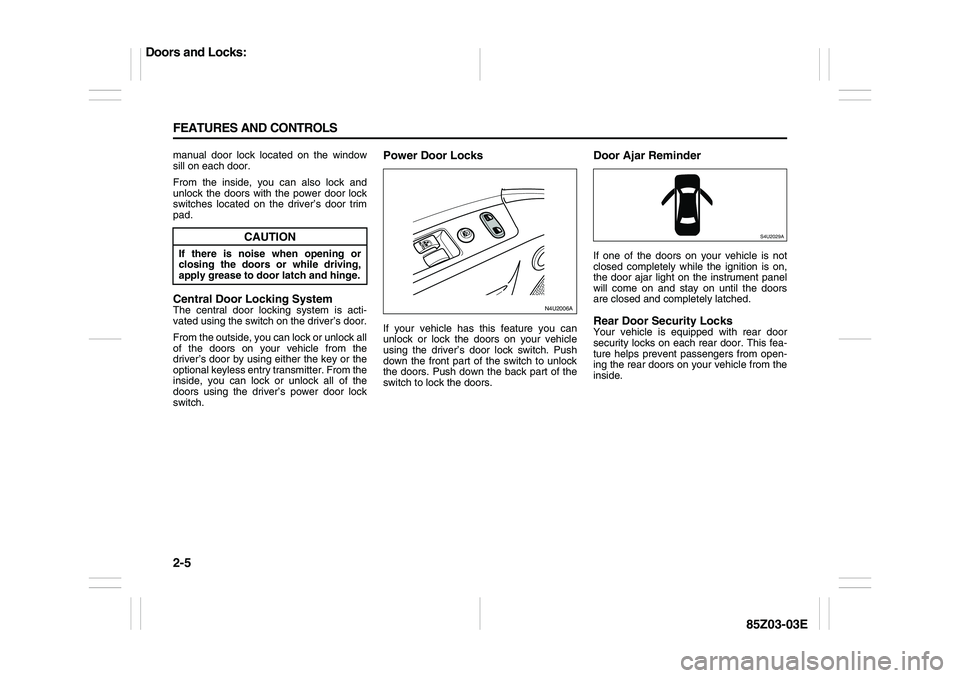
Power Door LocksIf your vehicle has this feature you can
unlock or lock the doors on your vehicle
using the driver’s door lock switch. Push
down the front part of the switch to unlock
the doors. Push down the back part of the
switch to lock the doors.
Door Ajar ReminderIf one of the doors on your vehicle is not
closed completely while the ignition is on,
the door ajar light on the instrument panel
will come on and stay on until the doors
are closed and completely latched.Rear Door Security LocksYour vehicle is equipped with rear door
security locks on each rear door. This fea-
ture helps prevent passengers from open-
ing the rear doors on your vehicle from the
inside.
CAUTION
If there is noise when opening or
closing the doors or while driving,
apply grease to door latch and hinge.
N4U2006A
S4U2029A
Doors and Locks:
Page 54 of 225
2-6 FEATURES AND CONTROLS
85Z03-03E
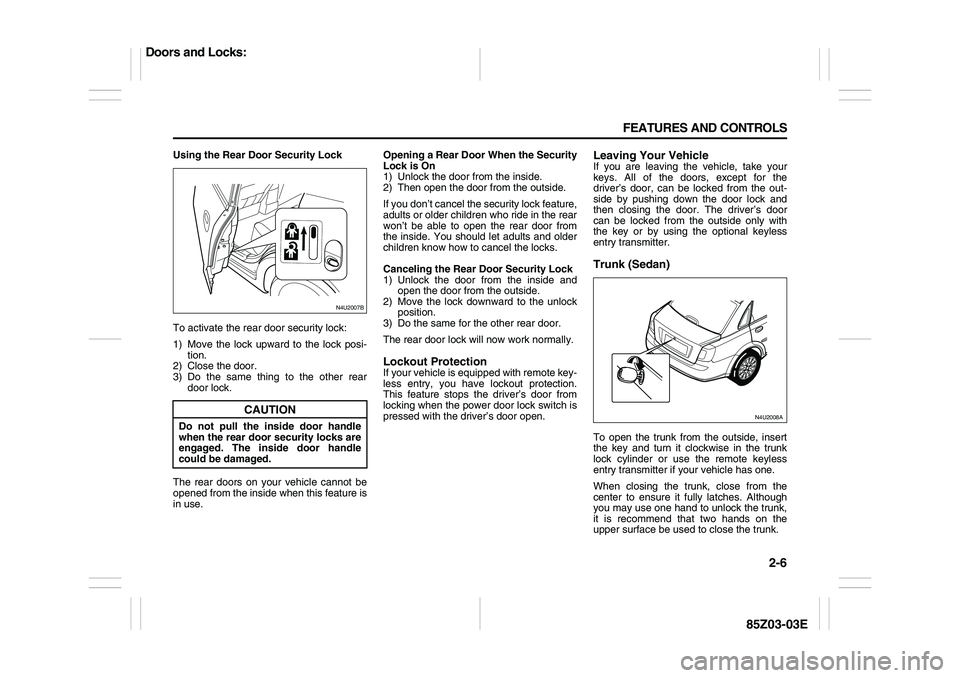
Using the Rear Door Security Lock
To activate the rear door security lock:
1) Move the lock upward to the lock posi-
tion.
2) Close the door.
3) Do the same thing to the other rear
door lock.
The rear doors on your vehicle cannot be
opened from the inside when this feature is
in use.Opening a Rear Door When the Security
Lock is On
1) Unlock the door from the inside.
2) Then open the door from the outside.
If you don’t cancel the security lock feature,
adults or older children who ride in the rear
won’t be able to open the rear door from
the inside. You should let adults and older
children know how to cancel the locks.
Canceling the Rear Door Security Lock
1) Unlock the door from the inside and
open the door from the outside.
2) Move the lock downward to the unlock
position.
3) Do the same for the other rear door.
The rear door lock will now work normally.
Lockout ProtectionIf your vehicle is equipped with remote key-
less entry, you have lockout protection.
This feature stops the driver’s door from
locking when the power door lock switch is
pressed with the driver’s door open.
Leaving Your VehicleIf you are leaving the vehicle, take your
keys. All of the doors, except for the
driver’s door, can be locked from the out-
side by pushing down the door lock and
then closing the door. The driver’s door
can be locked from the outside only with
the key or by using the optional keyless
entry transmitter.Trunk (Sedan)To open the trunk from the outside, insert
the key and turn it clockwise in the trunk
lock cylinder or use the remote keyless
entry transmitter if your vehicle has one. When closing the trunk, close from the
center to ensure it fully latches. Although
you may use one hand to unlock the trunk,
it is recommend that two hands on the
upper surface be used to close the trunk.
CAUTION
Do not pull the inside door handle
when the rear door security locks are
engaged. The inside door handle
could be damaged.
N4U2007B
N4U2008A
Doors and Locks:
Page 56 of 225
2-8 FEATURES AND CONTROLS
85Z03-03E
Liftgate (Wagon)
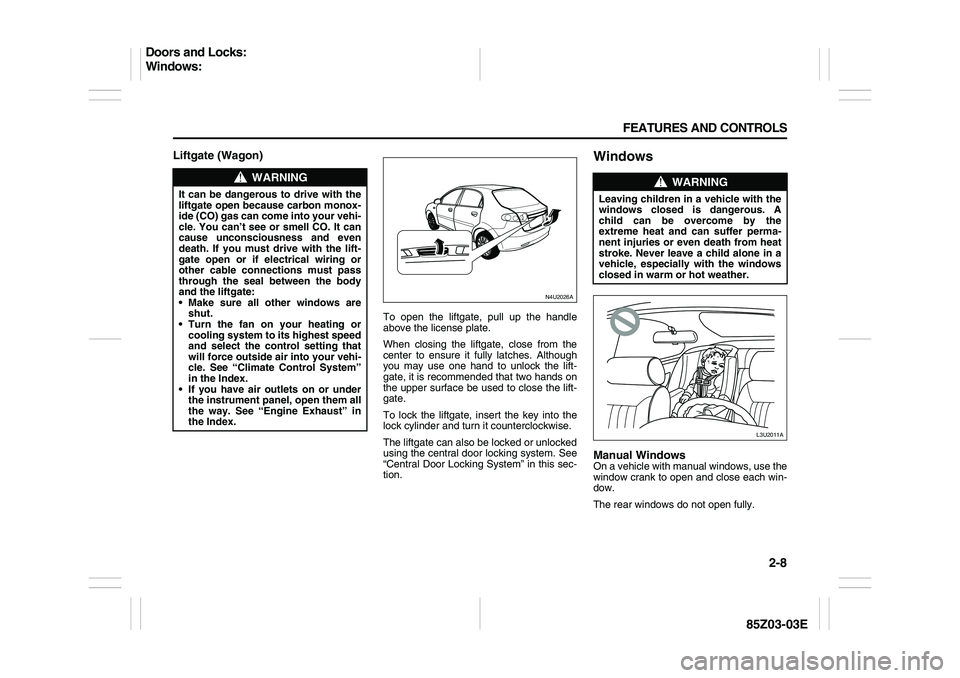
To open the liftgate, pull up the handle
above the license plate.
When closing the liftgate, close from the
center to ensure it fully latches. Although
you may use one hand to unlock the lift-
gate, it is recommended that two hands on
the upper surface be used to close the lift-
gate.
To lock the liftgate, insert the key into the
lock cylinder and turn it counterclockwise.
The liftgate can also be locked or unlocked
using the central door locking system. See
“Central Door Locking System” in this sec-
tion.
WindowsManual WindowsOn a vehicle with manual windows, use the
window crank to open and close each win-
dow.
The rear windows do not open fully.
WARNING
It can be dangerous to drive with the
liftgate open because carbon monox-
ide (CO) gas can come into your vehi-
cle. You can’t see or smell CO. It can
cause unconsciousness and even
death. If you must drive with the lift-
gate open or if electrical wiring or
other cable connections must pass
through the seal between the body
and the liftgate:
Make sure all other windows are
shut.
Turn the fan on your heating or
cooling system to its highest speed
and select the control setting that
will force outside air into your vehi-
cle. See “Climate Control System”
in the Index.
If you have air outlets on or under
the instrument panel, open them all
the way. See “Engine Exhaust” in
the Index.
N4U2026A
WARNING
Leaving children in a vehicle with the
windows closed is dangerous. A
child can be overcome by the
extreme heat and can suffer perma-
nent injuries or even death from heat
stroke. Never leave a child alone in a
vehicle, especially with the windows
closed in warm or hot weather.
L3U2011A
Doors and Locks:
Windows:
Page 58 of 225
2-10 FEATURES AND CONTROLS
85Z03-03E
Theft-Deterrent SystemsVehicle theft is big business, especially in
some cities. Although your vehicle has a
number of theft-deterrent features, we
know that nothing we put on it can make it
impossible to steal.Theft-Deterrent SystemYour vehicle may have a theft-deterrent
system.
Arming the System
To arm the system, do the following:
1) Turn the ignition switch to the LOCK
and remove the key from the ignition. If
the key is inserted in the ignition switch,
the transmitter will not operate the theft-
deterrent system.
2) Close the doors, the windows, the
hood, and the trunk. Make sure the win-
dows are closed, as the system can be
activated even if the windows are open.
3) Lock the doors using the remote key-
less entry transmitter. The transmitter
must be used to activate the theft-deter-
rent system.
– The LED on the transmitter will flash
once.
– All of the doors will lock.
– The hazard warning lamps will flash
once and the horn will chirp.
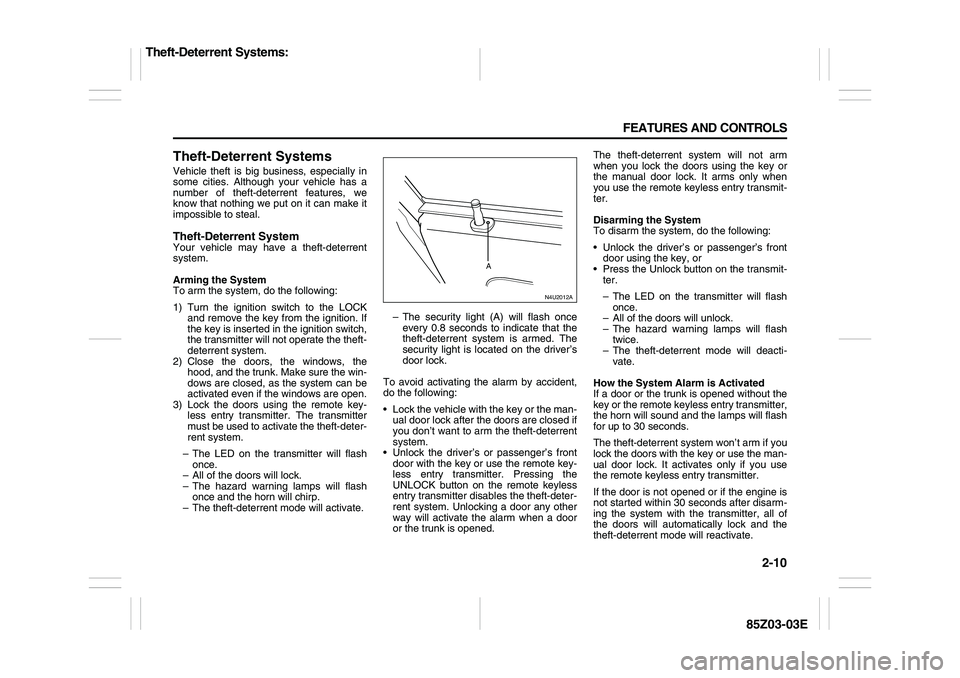
– The theft-deterrent mode will activate.– The security light (A) will flash once
every 0.8 seconds to indicate that the
theft-deterrent system is armed. The
security light is located on the driver’s
door lock.
To avoid activating the alarm by accident,
do the following:
Lock the vehicle with the key or the man-
ual door lock after the doors are closed if
you don’t want to arm the theft-deterrent
system.
Unlock the driver’s or passenger’s front
door with the key or use the remote key-
less entry transmitter. Pressing the
UNLOCK button on the remote keyless
entry transmitter disables the theft-deter-
rent system. Unlocking a door any other
way will activate the alarm when a door
or the trunk is opened.The theft-deterrent system will not arm
when you lock the doors using the key or
the manual door lock. It arms only when
you use the remote keyless entry transmit-
ter.
Disarming the System
To disarm the system, do the following:
Unlock the driver’s or passenger’s front
door using the key, or
Press the Unlock button on the transmit-
ter.
– The LED on the transmitter will flash
once.
– All of the doors will unlock.
– The hazard warning lamps will flash
twice.
– The theft-deterrent mode will deacti-
vate.
How the System Alarm is Activated
If a door or the trunk is opened without the
key or the remote keyless entry transmitter,
the horn will sound and the lamps will flash
for up to 30 seconds.
The theft-deterrent system won’t arm if you
lock the doors with the key or use the man-
ual door lock. It activates only if you use
the remote keyless entry transmitter.
If the door is not opened or if the engine is
not started within 30 seconds after disarm-
ing the system with the transmitter, all of
the doors will automatically lock and the
theft-deterrent mode will reactivate.
N4U2012A
A
Theft-Deterrent Systems:
Page 59 of 225

2-11 FEATURES AND CONTROLS
85Z03-03E
How to Turn Off the System Alarm
If the system alarm is active, it can be
deactivated using the following methods:
Press the Lock or Unlock button on the
remote keyless entry transmitter.
Unlock the driver’s or passenger’s front
door using the key.
Otherwise, the alarm will automatically
stop after 30 seconds. The system will
then lock the doors and reactivate the
theft-deterrent system.
How to Detect a Tamper Condition
If the hazard lamps flash once when the
Lock or Unlock button on your transmitter
is pressed, that means the theft-security
system alarm was triggered while you
were away.
Daily Inspection ChecklistBefore Driving1) Make sure that windows, mirrors, lights
and reflectors are clean and unob-
structed.
2) Visually check the tires for the following
points:
– the depth of the tread groove
– abnormal wear, cracks and damage
– loose wheel nuts
– existence of foreign material such as
nails, stones, etc.
Refer to “Tires” in the “SERVICE AND
APPEARANCE CARE” section for details.
3) Look for oil or other fluid leaks.
NOTE:
It is normal for water to drip from the air
conditioning system after use.
4) Make sure the hood is fully closed and
latched.
5) Check the headlights, turn signal lights,
brake lights and horn for proper opera-
tion.
6) Lock all doors.
7) Adjust the seat and adjustable head
restraints (if equipped).
8) Check the brake pedal.
9) Adjust the mirrors.
10)Make sure that you and all passengers
have properly fastened your safety
belts.11)Make sure that all warning lights come
on as the key is turned to the “ON” or
“START” position.
12)Check all gauges.
13)Make sure that the BRAKE light turns
off when the parking brake is released.
Once a week, or each time you fill your fuel
tank, perform the following under-hood
checks:
1) Engine oil level
2) Coolant level
3) Brake fluid level
4) Power steering (if equipped) fluid level
5) Windshield washer fluid level
6) Hood latch operation
Pull the hood release handle inside the
vehicle. Make sure that you cannot
open the hood all the way without
releasing the secondary latch. Be sure
to close the hood securely after check-
ing for proper latch operation. See the
item “Lubricate Locks, Hinges & Hood
Latch” under “Chassis and Body” in the
“MAINTENANCE SCHEDULE” section
for the lubrication schedule.
WARNING
Make sure the hood is fully closed
and latched before driving. If it is not,
it can fly up unexpectedly during
driving, obstructing your view and
resulting in an accident.
Theft-Deterrent Systems:
Daily Inspection Checklist:
Page 60 of 225

2-12 FEATURES AND CONTROLS
85Z03-03E
Starting and Operating Your
VehicleNew Vehicle Break-InIgnition Positions
With the key in the ignition switch, you can
turn the key to four different positions.LOCK:
This position locks your steering wheel,
ignition, automatic transmission shift lever
and automatic transmission. This is the
only position from which you can remove
the key. For easier key operation when
unlocking the steering wheel, move the
steering wheel back and forth while turning
the key to the ACC position.
ACC (ACCESSORY):
This position operates some of your elec-
trical accessories, such as the radio, but
not the ventilation fan. Press in the switch
as you turn it away from you.
ON:
This is the position to which the switch
returns after you start your engine and
release the key. The switch stays in ON
when the engine is running. But even when
the engine is not running, you can use ON
to operate your electrical accessories, and
to display some instrument panel warning
lights.
START:
This position starts the engine. When the
engine starts, release the key. The ignition
switch will return to ON for normal driving.
Do not turn the key to START if the engine
is running.
Even if the engine is not running, ACC and
ON allow you to operate electrical acces-
sories, such as the radio.
CAUTION
Your vehicle doesn’t need an elabo-
rate “break-in.” But it will perform
better in the long run if you follow
these guidelines:
Don’t drive at any one speed – fast
or slow – for the first 500 miles (805
km). Don’t make full-throttle starts.
Avoid making hard stops for the
first 200 miles (322 km) or so. Dur-
ing this time your new brake linings
aren’t yet broken in. Hard stops
with new linings can mean prema-
ture wear and earlier replacement.
Follow this break-in guideline every
time you get new brake linings.
WARNING
On manual transmission vehicles,
turning the key to LOCK and remov-
ing it will lock the steering column
and result in a loss of ability to steer
the vehicle. This could cause a colli-
sion. If you need to turn the engine
off while the vehicle is moving, turn
the key only to ACC. Don’t push the
key in while the vehicle is moving.
CAUTION
If your key seems stuck in LOCK and
you can’t turn it, be sure you are
using the correct key; if so, is it all
the way in? If it is, then turn the steer-
ing wheel left and right while you turn
the key hard. Turn the key only with
your hand. Using a tool to force it
could break the key or the ignition
switch. If none of these works, then
your vehicle needs service.
S4U2015A
Starting and Operating Your Vehicle:
Page 61 of 225

2-13 FEATURES AND CONTROLS
85Z03-03E
Starting Your EngineAutomatic Transmission
Move your shift lever to PARK (P) or NEU-
TRAL (N). Your engine won’t start in any
other position – that’s a safety feature. To
restart when you’re already moving, use
NEUTRAL (N) only.
Manual Transmission
The gear selector should be in NEUTRAL
and the parking brake engaged. Hold the
clutch pedal to the floor and start the
engine. Your vehicle won’t start if the clutch
pedal is not all the way down.
Starting Your Engine
1) With your foot off the accelerator pedal,
turn your ignition key to START. When
the engine starts, let go of the key. The
idle speed will go down as your engine
gets warm.2) If it doesn’t start, wait about 15 seconds
and try again to start the engine by
turning the ignition key to START. Wait
about 15 seconds between each try.
When your engine has run about 10
seconds to warm up, your vehicle is
ready to be driven. Don’t “race” your
engine when it’s cold. If the weather is
below freezing (32°F or 0°C), let the
engine run for a few minutes to warm
up.
3) If your engine still won’t start (or starts
but then stops), it could be flooded with
too much gasoline. Try pushing your
accelerator pedal all the way to the floor
and holding it there as you hold the key
in START for about three seconds. If
the vehicle starts briefly but then stops
again, do the same thing, but this time
keep the pedal down for five or six sec-
onds. This clears the extra gasoline
from the engine.
Automatic Transmission OperationIf your vehicle is equipped with an auto-
matic transmission, the shift lever is
located on the console between the seats.
Movement between certain positions
requires pushing the shift lever to the pas-
senger side while shifting. This prevents
you from changing positions unexpectedly
CAUTION
Don’t try to shift to PARK (P) if your
vehicle is moving. If you do, you
could damage the transmission. Shift
to PARK (P) only when your vehicle is
stopped.
CAUTION
Holding your key in START for longer
than 15 seconds at a time will cause
your battery to be drained much
sooner. And the excessive heat can
damage your starter motor. Wait
about 15 seconds between each try
to help avoid draining your battery or
damaging your starter.
CAUTION
Your engine is designed to work with
the electronics in your vehicle. If you
add electrical parts or accessories,
you could change the way the engine
operates. Before adding electrical
equipment, check with your SUZUKI
dealer. If you don’t, your engine
might not perform properly.
N4U2014A
H
O
L
D
Starting and Operating Your Vehicle:
Page 62 of 225
2-14 FEATURES AND CONTROLS
85Z03-03E
by blocking the straight movement of the
shift lever when the vehicle is moving.
PARK (P):
This position locks your front wheels. It’s
the best position to use when you start
your engine because your vehicle can’t
move easily. Also, this is the only position
from which you can remove the key after
turning it to LOCK.
Ensure the shift lever is fully in PARK (P)
before starting the engine. Your vehicle
has an automatic transmission shift lock
control system. You have to apply your reg-
ular brakes before you can shift from PARK
(P) when the ignition is in the ON position.
If you cannot shift out of PARK (P), ease
pressure on the shift lever – push the shiftlever all the way into PARK (P) – as you
maintain brake application. Then move the
shift lever into the gear you wish. See
“Shifting Out of Park (P)” on a later page in
this section.
REVERSE (R):
Use this gear to back up. In order to move
from NEUTRAL (N) to REVERSE (R), you
must press down on the shift lever while
shifting.
To rock your vehicle back and forth to get
out of snow, ice or sand without damaging
your transmission, see “If You Are Stuck: In
Sand, Mud, Ice or Snow” in section 4.
NEUTRAL (N):
In this position, your engine doesn’t con-
nect with the wheels. To restart when
you’re already moving, use NEUTRAL (N)
only. Also, use NEUTRAL (N) when your
vehicle is being towed.AUTOMATIC OVERDRIVE (D):
This position is for normal driving.
THIRD (3):
This position is also used for normal driv-
ing, however, it offers more power and
lower fuel economy than AUTOMATIC
OVERDRIVE (D). Here are some times
you might choose THIRD (3) instead of
AUTOMATIC OVERDRIVE (D):
When driving on hilly, winding roads.
When doing down a steep hill.
WARNING
It is dangerous to get out of your
vehicle if the shift lever is not fully in
PARK (P) with the parking brake
firmly set. Your vehicle can roll.
Don’t leave your vehicle when the
engine is running unless you have to.
If you have left the engine running,
the vehicle can move suddenly. You
or others could be injured. To be sure
your vehicle won’t move, even when
you’re on fairly level ground, always
set your parking brake and move the
shift lever to PARK (P). See “Shifting
Into Park (P)” in the Index.
CAUTION
Shifting to REVERSE (R) while your
vehicle is moving forward could dam-
age your transmission. The repairs
would not be covered by your war-
ranty. Shift to REVERSE (R) only after
your vehicle is stopped.
WARNING
Shifting into a drive gear while your
engine is “racing” (running at high
speed) is dangerous. Unless your
foot is firmly on the brake pedal, your
vehicle could move very rapidly. You
could lose control and hit people or
objects. Don’t shift into a drive gear
while your engine is racing.
CAUTION
Damage to your transmission caused
by shifting into a drive gear with the
engine racing isn’t covered by your
warranty. Be sure the engine is not
racing when shifting your vehicle.
Starting and Operating Your Vehicle: