Page 93 of 232
Downloaded from www.Manualslib.com manuals search engine 4-28 INSTRUMENT PANEL
54G27-03E
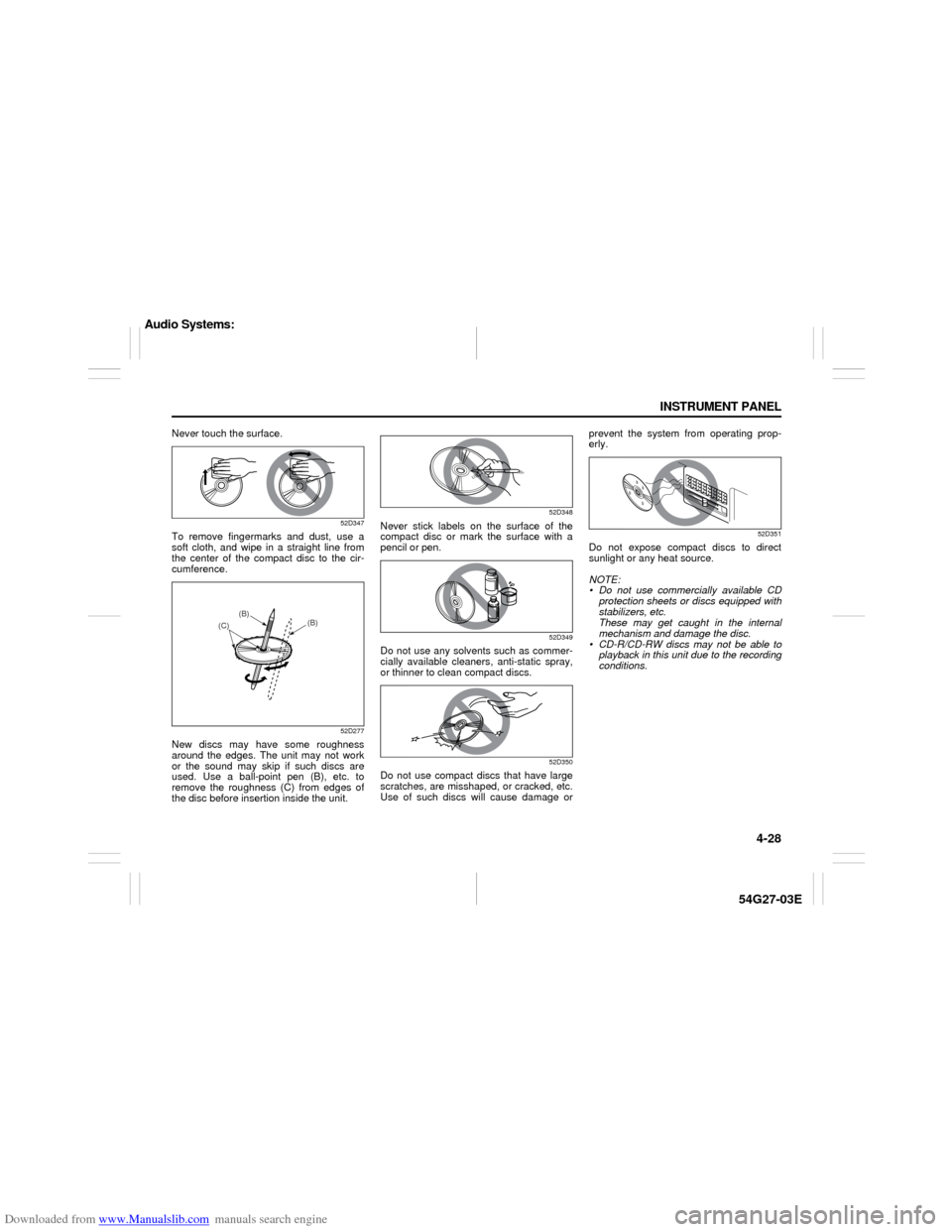
Never touch the surface.
52D347
To remove fingermarks and dust, use a
soft cloth, and wipe in a straight line from
the center of the compact disc to the cir-
cumference.
52D277
New discs may have some roughness
around the edges. The unit may not work
or the sound may skip if such discs are
used. Use a ball-point pen (B), etc. to
remove the roughness (C) from edges of
the disc before insertion inside the unit.
52D348
Never stick labels on the surface of the
compact disc or mark the surface with a
pencil or pen.
52D349
Do not use any solvents such as commer-
cially available cleaners, anti-static spray,
or thinner to clean compact discs.
52D350
Do not use compact discs that have large
scratches, are misshaped, or cracked, etc.
Use of such discs will cause damage orprevent the system from operating prop-
erly.
52D351
Do not expose compact discs to direct
sunlight or any heat source.
NOTE:
Do not use commercially available CD
protection sheets or discs equipped with
stabilizers, etc.
These may get caught in the internal
mechanism and damage the disc.
CD-R/CD-RW discs may not be able to
playback in this unit due to the recording
conditions.
(B)
(B)
(C)
Audio Systems:
Page 94 of 232
Downloaded from www.Manualslib.com manuals search engine 4-29 INSTRUMENT PANEL
54G27-03E
Basic Operations
54G594
(1)
(2)(2)
(1)
Type 1 AM/FM CD PLAYER
Type 2 AM/FM 6-CD PLAYER
(1) Power on/off knob
Volume control knob
(2) Tone/balance/fader control knob
Turning power on/off
Press the power on/off knob (1).
The unit starts in the function mode it was
in when the power was turned off last.
Adjusting the volume
Turn the volume control knob (1).
Turning it clockwise increases the volume;
turning it counterclockwise decreases the
volume.
NOTE:
While driving, adjust the volume to an
extent that sound and/or noise coming
from outside the car can be heard.
Audio Systems:
Page 95 of 232
Downloaded from www.Manualslib.com manuals search engine 4-30 INSTRUMENT PANEL
54G27-03E
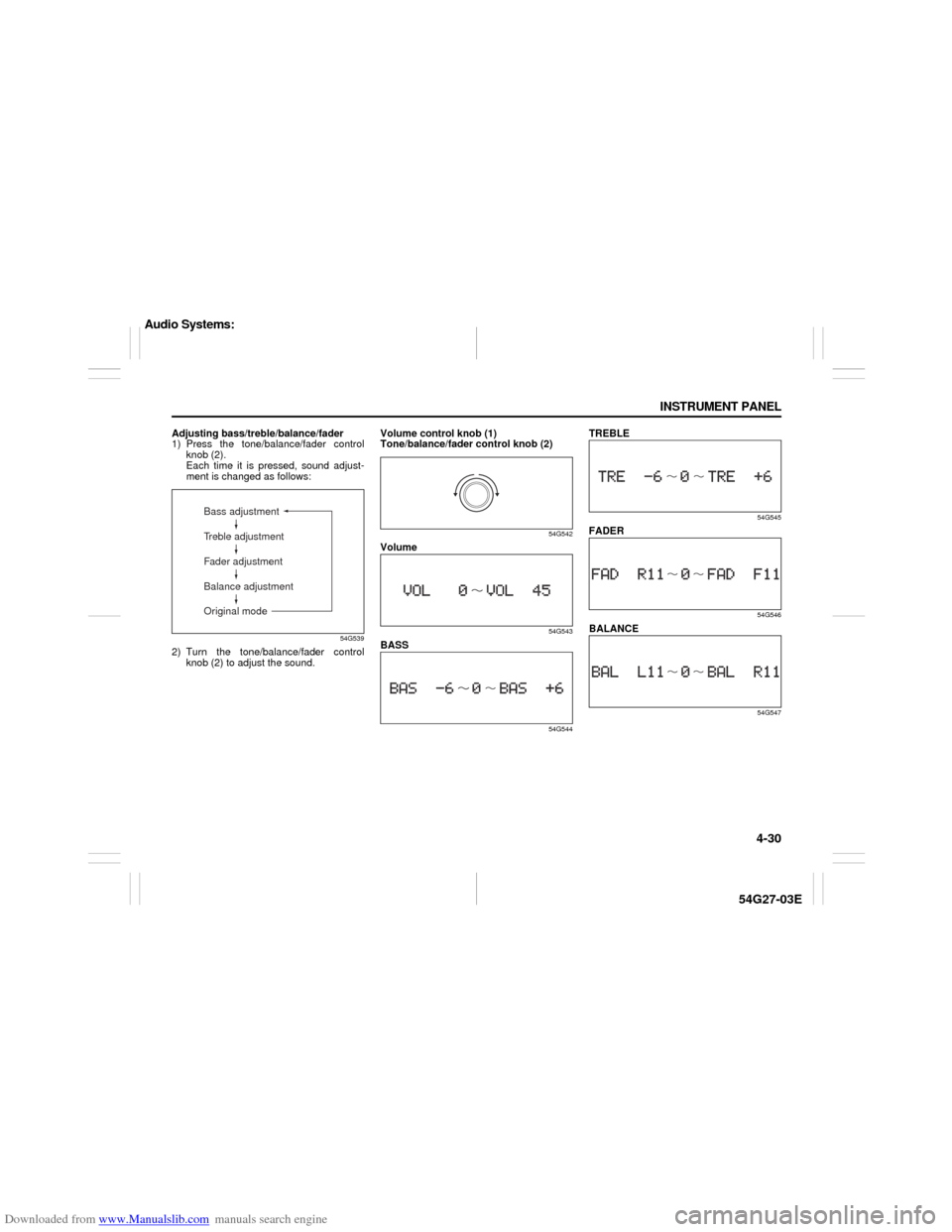
Adjusting bass/treble/balance/fader
1) Press the tone/balance/fader control
knob (2).
Each time it is pressed, sound adjust-
ment is changed as follows:
54G539
2) Turn the tone/balance/fader control
knob (2) to adjust the sound.Volume control knob (1)
Tone/balance/fader control knob (2)
54G542
Volume
54G543
BASS
54G544
TREBLE
54G545
FADER
54G546
BALANCE
54G547
Bass adjustment
Treble adjustment
Fader adjustment
Balance adjustment
Original mode
Audio Systems:
Page 99 of 232
Downloaded from www.Manualslib.com manuals search engine 4-34 INSTRUMENT PANEL
54G27-03E
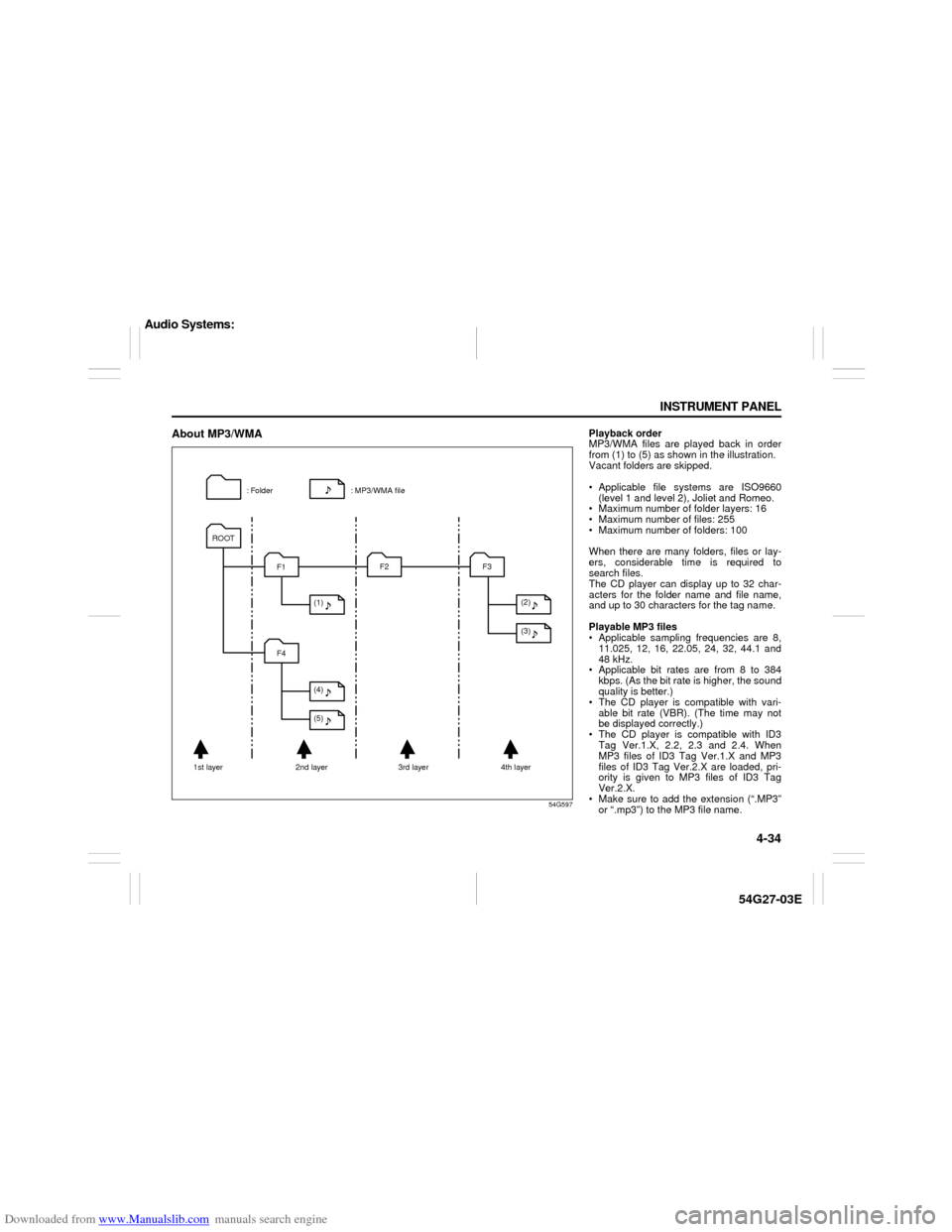
About MP3/WMA
54G597
: MP3/WMA file : Folder
1st layer 2nd layer 3rd layer 4th layerROOT
F1
F4F2 F3
(1)
(4)
(5)(2)
(3)
Playback order
MP3/WMA files are played back in order
from (1) to (5) as shown in the illustration.
Vacant folders are skipped.
Applicable file systems are ISO9660
(level 1 and level 2), Joliet and Romeo.
Maximum number of folder layers: 16
Maximum number of files: 255
Maximum number of folders: 100
When there are many folders, files or lay-
ers, considerable time is required to
search files.
The CD player can display up to 32 char-
acters for the folder name and file name,
and up to 30 characters for the tag name.
Playable MP3 files
Applicable sampling frequencies are 8,
11.025, 12, 16, 22.05, 24, 32, 44.1 and
48 kHz.
Applicable bit rates are from 8 to 384
kbps. (As the bit rate is higher, the sound
quality is better.)
The CD player is compatible with vari-
able bit rate (VBR). (The time may not
be displayed correctly.)
The CD player is compatible with ID3
Tag Ver.1.X, 2.2, 2.3 and 2.4. When
MP3 files of ID3 Tag Ver.1.X and MP3
files of ID3 Tag Ver.2.X are loaded, pri-
ority is given to MP3 files of ID3 Tag
Ver.2.X.
Make sure to add the extension (“.MP3”
or “.mp3”) to the MP3 file name.
Audio Systems:
Page 100 of 232

Downloaded from www.Manualslib.com manuals search engine 4-35 INSTRUMENT PANEL
54G27-03E
Playable WMA files
Applicable sampling frequencies are 32,
44.1 and 48 kHz.
Applicable bit rates are from 32 to 320
kbps. (As the bit rate is higher, the sound
quality is better.)
The CD player is compatible with vari-
able bit rate (VBR). (The time may not
be displayed correctly.)
The CD player is compatible with tags
specified by the Advanced Systems For-
mat (ASF) Specification.
Make sure to add the extension (“.WMA”
or “.wma”) to the WMA file name.
Explanation of terms
MP3
This is the abbreviation of “MPEG Audio
Layer 3”, and indicates a sound compres-
sion method.
This method can compress sound data
into approximately 1/10 of the original
quantity, and offers high quality sound.
WMA
This is the abbreviation of “Windows Media
Audio”, and indicates a sound compres-
sion method developed by Microsoft. This
method can create and store music files in
which sound data is compressed at a rate
higher than that of MP3.ID3 Tag
This identifies the data including the track
name, artist name and album name
recorded in an MP3 file.
VBR
This is the abbreviation of “Variable Bit
Rate”, and indicates a method which can
change the bit rate in accordance with the
data quantity.
ISO9660
This is the standard describing the logical
format for CD-ROMs specified by the Inter-
national Standardization Organization
(ISO).
Level 1:
The maximum number of characters in
folder names is 8 characters.
The file name consists of up to 8 charac-
ters plus an extension (3 characters).
Half-width capital alphabets, half-width
numeric characters and “_ (underscore)”
can be used.
Level 2:
The maximum number of characters in
folder names is 31 characters.
The file name consists of up to 27 charac-
ters plus an extension (3 characters).
Half-width capital alphabets, half-width
numeric characters and “_ (underscore)”
can be used.Joliet
This is a proposed logical format for CD-
ROMs by Microsoft, and maximum number
of characters is 64 characters.
Romeo
This is a proposed logical format for CD-
ROMs, and maximum number of charac-
ters is 128 characters.
Audio Systems:
Page 112 of 232

Downloaded from www.Manualslib.com manuals search engine 4-47 INSTRUMENT PANEL
54G27-03E
TroubleshootingApplicable to every device
Radio
CDPhenomenon Cause Remedy
Power is not turned on.
(No sound is produced)Fuse is blown. Contact your authorized SUZUKI dealer.
Connections are not properly made. Contact your authorized SUZUKI dealer.
Phenomenon Cause Remedy
Too much noises. Not tuned correctly to the frequency of a sta-
tion.Tune the frequency correctly to the station.
Stations cannot be selected by
seek tuning.There is no station with strong radio waves. Select stations by manual tuning.
Phenomenon Cause Remedy
Compact disc cannot be loaded. Another compact disc is already loaded. Eject the compact disc before loading the new
one.
Sound skips or is noisy. Compact disc is dirty. Clean the compact disc with a soft cloth.
Compact disc is heavily scratched or warped. Replace with a compact disc with no scratches.
Sound is bad directly after power
is turned on.Water droplets may form on the internal lens
when the car is parked in a humid place.Let dry for about 1 hour with the power on.
Audio Systems:
Page 113 of 232
Downloaded from www.Manualslib.com manuals search engine 4-48 INSTRUMENT PANEL
54G27-03E
Error Display
An error message may not be displayed quickly depending on the degree of scratches or dirt on the CD.
If sound is not output for a while after a CD is inserted, there may be scratches or dirt on the CD. Eject it, and insert another CD.
Error code Mode Description
E01CD, CD changer Focus error (TOC information cannot be read.)
E02CD, CD changerData cannot be read due to scratches, dirt etc.
A CD-ROM is inserted.
E03CD, CD changer Loading error, eject error or pickup position error.
E HOTCD, CD changerThe high temperature protection function is activated. (Wait until the temperature
decrease.)
NO DISC– No disc is present in the unit.
ECD, CD changer Power supply system error, internal communication error or another error.
Audio Systems: