2007 SUBARU TRIBECA remote start
[x] Cancel search: remote startPage 25 of 377
22
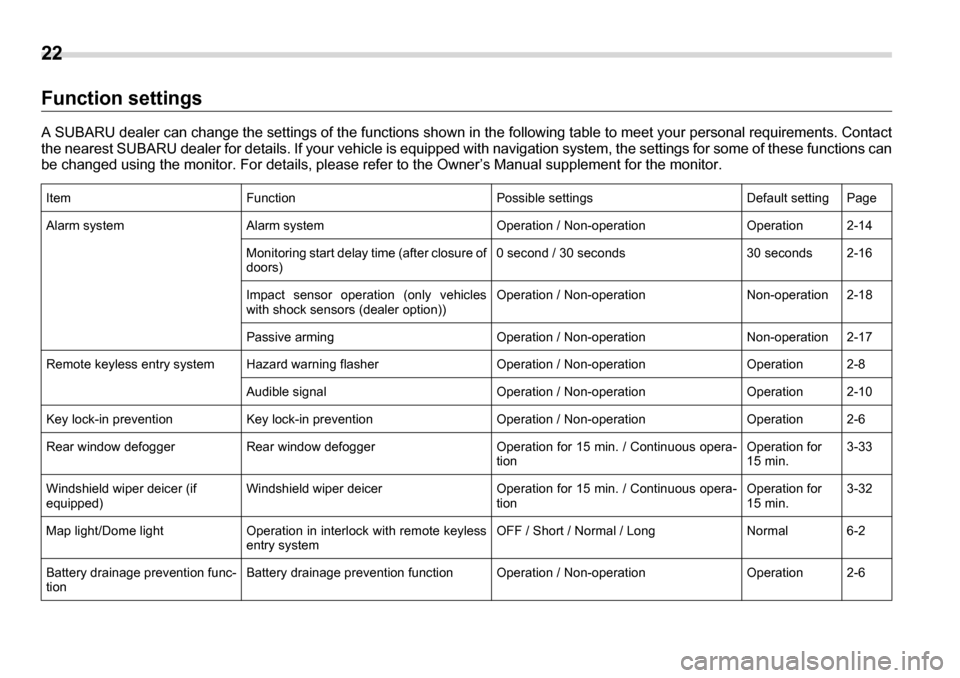
Function settings
A SUBARU dealer can change the settings of the functions shown in the following table to meet your personal requirements. Conta ct
the nearest SUBARU dealer for details. If your vehicle is equipped with navigation system, the settings for some of these funct ions can
be changed using the monitor. For details, please refer to the Owner’s Manual supplement for the monitor.
ItemFunctionPossible settingsDefault settingPage
Alarm systemAlarm systemOperation / Non-operationOperation2-14
Monitoring start delay time (after closure of doors)0 second / 30 seconds30 seconds2-16
Impact sensor operation (only vehicles
with shock sensors (dealer option))Operation / Non-operationNon-operation2-18
Passive armingOperation / Non-operationNon-operation2-17
Remote keyless entry systemHazard warning flasherOperation / Non-operationOperation2-8
Audible signalOperation / Non-operationOperation2-10
Key lock-in preventionKey lock-in preventionOperation / Non-operationOperation2-6
Rear window defoggerRear window defoggerOperation for 15 min. / Continuous opera- tionOperation for 15 min.3-33
Windshield wiper deicer (if equipped)Windshield wiper deicerOperation for 15 min. / Continuous opera- tionOperation for 15 min.3-32
Map light/Dome lightOperation in interlock with remote keyless entry systemOFF / Short / Normal / LongNormal6-2
Battery drainage prevention func- tionBattery drainage prevention functionOperation / Non-operationOperation2-6
Page 109 of 377
2-14 Keys and doors
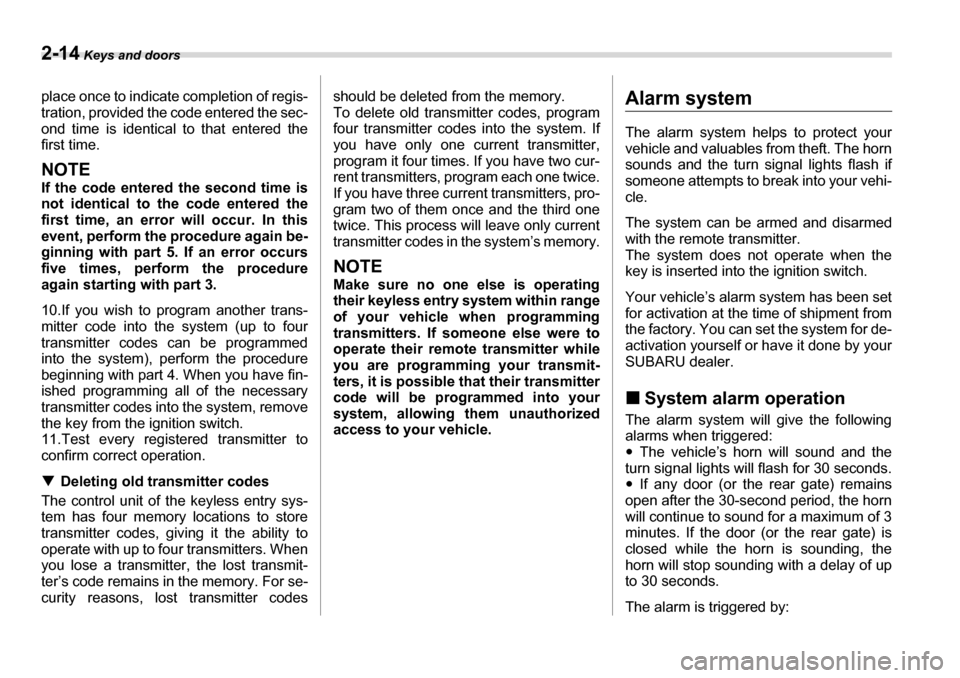
place once to indicate completion of regis-
tration, provided the code entered the sec-
ond time is identical to that entered the
first time.
NOTE
If the code entered the second time is not identical to the code entered the
first time, an error will occur. In this
event, perform the procedure again be-
ginning with part 5. If an error occurs
five times, perform the procedure
again starting with part 3.
10.If you wish to program another trans-
mitter code into the system (up to four
transmitter codes can be programmed
into the system), perform the procedure
beginning with part 4. When you have fin-
ished programming all of the necessary
transmitter codes into the system, remove
the key from the ignition switch.
11.Test every registered transmitter to
confirm correct operation. TDeleting old transmitter codes
The control unit of the keyless entry sys-
tem has four memory locations to store
transmitter codes, giving it the ability to
operate with up to four transmitters. When
you lose a transmitter, the lost transmit-
ter’s code remains in the memory. For se-
curity reasons, lost transmitter codes should be deleted from the memory.
To delete old transmitter codes, program
four transmitter codes into the system. If
you have only one current transmitter,
program it four times. If you have two cur-
rent transmitters, program each one twice.
If you have three current transmitters, pro-
gram two of them once and the third one
twice. This process will leave only current
transmitter codes in the system’s memory.
NOTE
Make sure no one else is operating
their keyless entry system within range
of your vehicle when programming
transmitters. If someone else were tooperate their remote transmitter while
you are programming your transmit-
ters, it is possible that their transmitter
code will be programmed into your
system, allowing them unauthorized
access to your vehicle.
Alarm system
The alarm system helps to protect your
vehicle and valuables from theft. The horn
sounds and the turn signal lights flash if
someone attempts to break into your vehi-cle.
The system can be armed and disarmed
with the remote transmitter.
The system does not operate when the
key is inserted into the ignition switch.
Your vehicle’s alarm system has been set
for activation at the time of shipment from
the factory. You can set the system for de-
activation yourself or have it done by your
SUBARU dealer. „
System alarm operation
The alarm system will give the following
alarms when triggered: y The vehicle’s horn will sound and the
turn signal lights will flash for 30 seconds. y If any door (or the rear gate) remains
open after the 30-second period, the horn
will continue to sound for a maximum of 3
minutes. If the door (or the rear gate) is
closed while the horn is sounding, the
horn will stop sounding with a delay of up
to 30 seconds.
The alarm is triggered by:
Page 111 of 377
2-16 Keys and doors
sound once, the turn signal lights will flash
once and the indicator lights will start
flashing rapidly. After rapid flashing for 30
seconds (standby time), the indicator
lights will then flash slowly (twice approxi-
mately every two seconds), indicating that
the system has been armed for surveil-
lance.
If any of the doors, (or the rear gate) is not
fully closed, an electronic chirp sounds
five times, the turn signal lights flash five
times to alert you that the doors (or the
rear gate) are not properly closed. When
you close the door, the system will auto-
matically arm and doors will automatically
lock. TTo arm the system using power
door locking switches
1. Close all windows.
2. Remove the key from the ignitionswitch.
3. Open the doors and get out of the vehi- cle.
4. Make sure that the engine hood is
locked.
5. Close the doors and the rear gate but
leave only the driver’s door or the front
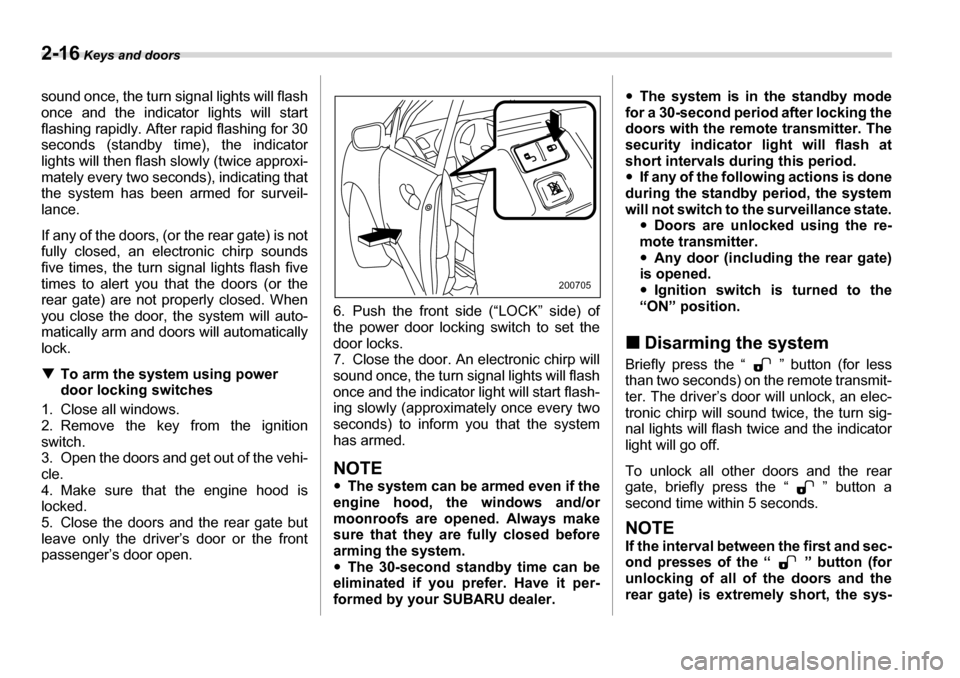
passenger’s door open. 6. Push the front side (“LOCK” side) of
the power door locking switch to set the
door locks.
7. Close the door. An electronic chirp will
sound once, the turn signal lights will flash
once and the indicator light will start flash-
ing slowly (approximately once every two seconds) to inform you that the system has armed.
NOTE y
The system can be armed even if the
engine hood, the windows and/or
moonroofs are opened. Always make
sure that they are fully closed before
arming the system.y The 30-second standby time can be
eliminated if you prefer. Have it per-
formed by your SUBARU dealer. y
The system is in the standby mode
for a 30-second period after locking the
doors with the remote transmitter. The
security indicator light will flash at
short intervals during this period. y If any of the following actions is done
during the standby period, the system
will not switch to the surveillance state. yDoors are unlocked using the re-
mote transmitter.y Any door (including the rear gate)
is opened. y Ignition switch is turned to the
“ON” position.
„ Disarming the system
Briefly press the “ ” button (for less
than two seconds) on the remote transmit-
ter. The driver’s door will unlock, an elec-
tronic chirp will sound twice, the turn sig-
nal lights will flash twice and the indicator
light will go off.
To unlock all other doors and the rear
gate, briefly press the “ ” button a
second time within 5 seconds.
NOTE
If the interval between the first and sec-
ond presses of the “ ” button (for
unlocking of all of the doors and the
rear gate) is extremely short, the sys-
200705
Page 157 of 377
3-36 Instruments and controls
„Outside mirrors
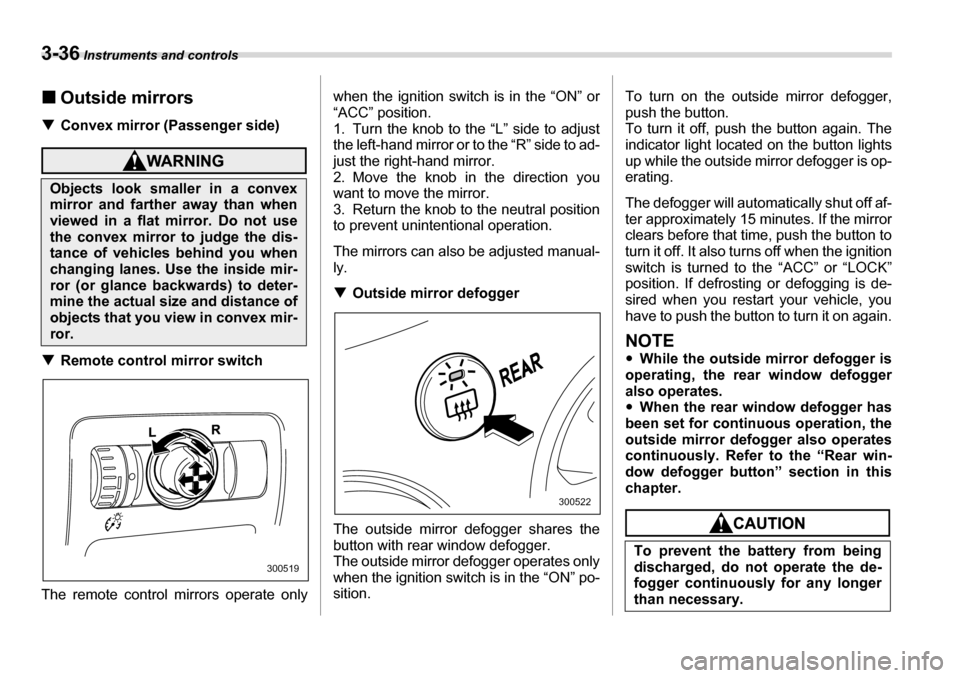
T Convex mirror (Passenger side)
TRemote control mirror switch
The remote control mirrors operate only when the ignition switch is in the “ON” or
“ACC” position.
1. Turn the knob to the “L” side to adjust
the left-hand mirror or to the “R” side to ad-
just the right-hand mirror.
2. Move the knob in the direction you
want to move the mirror.
3. Return the knob to the neutral position
to prevent unintentional operation.
The mirrors can also be adjusted manual- ly. T
Outside mirror defogger
The outside mirror defogger shares the
button with rear window defogger.
The outside mirror defogger operates only
when the ignition switch is in the “ON” po- sition. To turn on the outside mirror defogger,
push the button.
To turn it off, push the button again. The
indicator light located on the button lights
up while the outside mirror defogger is op-
erating.
The defogger will automatically shut off af-
ter approximately 15 minutes. If the mirror
clears before that time, push the button to
turn it off. It also turns off when the ignition
switch is turned to the “ACC” or “LOCK”
position. If defrosting or defogging is de-
sired when you restart your vehicle, you
have to push the button to turn it on again.
NOTE y
While the outside mirror defogger is
operating, the rear window defogger
also operates.y When the rear window defogger has
been set for continuous operation, the
outside mirror defogger also operates
continuously. Refer to the “Rear win-
dow defogger button” section in this
chapter.
Objects look smaller in a convex
mirror and farther away than when
viewed in a flat mirror. Do not use
the convex mirror to judge the dis-
tance of vehicles behind you when
changing lanes. Use the inside mir-ror (or glance backwards) to deter-
mine the actual size and distance of
objects that you view in convex mir-
ror.
300519
300522
To prevent the battery from being
discharged, do not operate the de-
fogger continuously for any longer
than necessary.
Page 369 of 377
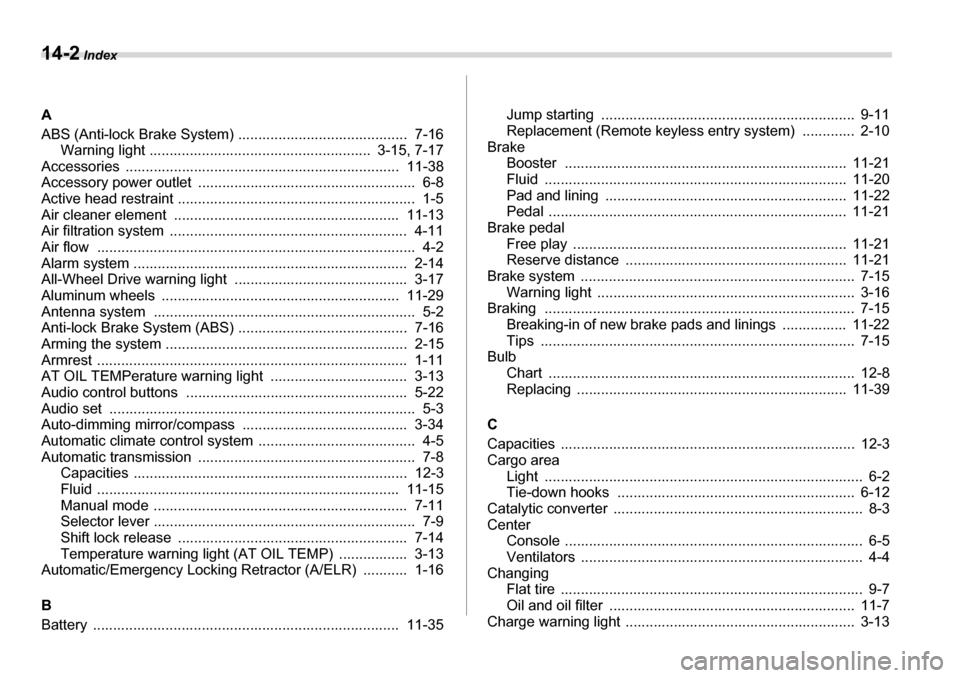
14-2 Index
A
ABS (Anti-lock Brake System) .......................................... 7-16 Warning light ....................................................... 3-15, 7-17
Accessories .................................................................... 11-38
Accessory power outlet ...................................................... 6-8
Active head restraint ........................................................... 1-5
Air cleaner element ........................................................ 11-13
Air filtration system ........................................................... 4-11
Air flow ............................................................................... 4-2
Alarm system .................................................................... 2-14
All-Wheel Drive warning light ........................................... 3-17
Aluminum wheels ........................................................... 11-29
Antenna system ................................................................. 5-2
Anti-lock Brake System (ABS) .......................................... 7-16
Arming the system ............................................................ 2-15
Armrest ............................................................................. 1-11
AT OIL TEMPerature warning light .................................. 3-13
Audio control buttons ....................................................... 5-22
Audio set ............................................................................ 5-3
Auto-dimming mirror/compass ......................................... 3-34
Automatic climate control system ....................................... 4-5
Automatic transmission ...................................................... 7-8 Capacities .................................................................... 12-3
Fluid ........................................................................... 11-15
Manual mode ............................................................... 7-11
Selector lever ................................................................. 7-9
Shift lock release ......................................................... 7-14
Temperature warning light (AT OIL TEMP) ................. 3-13
Automatic/Emergency Locking Retractor (A/ELR) ........... 1-16 B
Battery ............................................................................ 11-35 Jump starting ............................................................... 9-11
Replacement (Remote keyless entry system) ............. 2-10
Brake
Booster ...................................................................... 11-21
Fluid ........................................................................... 11-20
Pad and lining ............................................................ 11-22
Pedal .......................................................................... 11-21
Brake pedal
Free play .................................................................... 11-21
Reserve distance ....................................................... 11-21
Brake system .................................................................... 7-15
Warning light ................................................................ 3-16
Braking ............................................................................. 7-15 Breaking-in of new brake pads and linings ................ 11-22
Tips .............................................................................. 7-15
Bulb Chart ............................................................................ 12-8
Replacing ................................................................... 11-39
C
Capacities ......................................................................... 12-3
Cargo area Light ............................................................................... 6-2
Tie-down hooks ........................................................... 6-12
Catalytic converter .............................................................. 8-3
Center Console .......................................................................... 6-5
Ventilators ...................................................................... 4-4
Changing
Flat tire ........................................................................... 9-7
Oil and oil filter ............................................................. 11-7
Charge warning light ......................................................... 3-13