2007 SUBARU TRIBECA ECU
[x] Cancel search: ECUPage 214 of 377
Interior equipment 6-17
– CONTINUED –
ory of all three buttons.
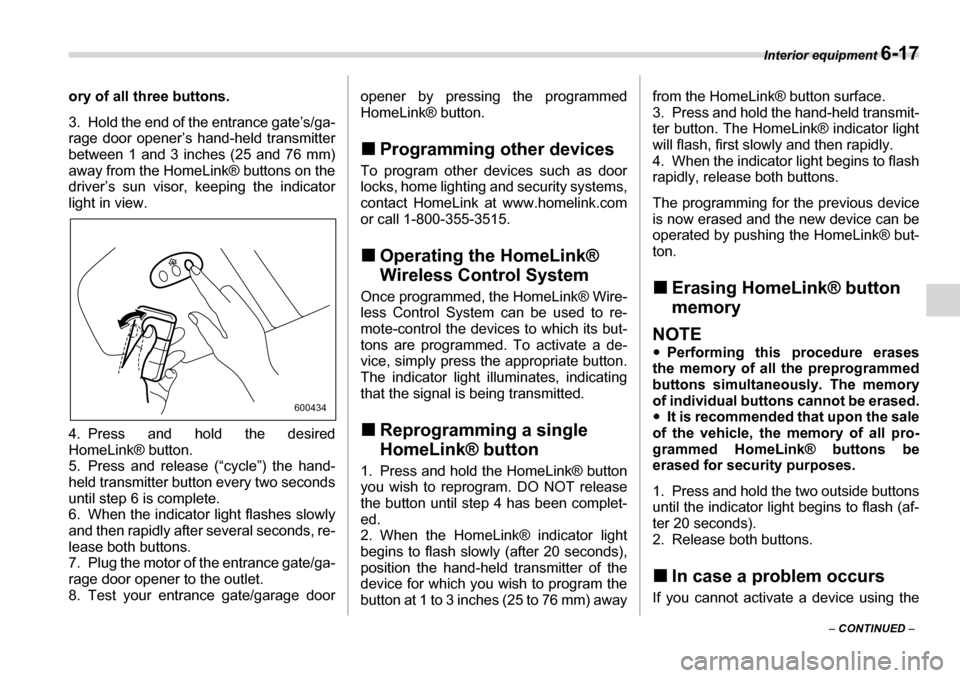
3. Hold the end of the entrance gate’s/ga-
rage door opener’s hand-held transmitter
between 1 and 3 inches (25 and 76 mm)
away from the HomeLink® buttons on the
driver’s sun visor, keeping the indicator
light in view.
4. Press and hold the desired
HomeLink® button.
5. Press and release (“cycle”) the hand-
held transmitter button every two seconds
until step 6 is complete.
6. When the indicator light flashes slowly
and then rapidly after several seconds, re-
lease both buttons.
7. Plug the motor of the entrance gate/ga-
rage door opener to the outlet.
8. Test your entrance gate/garage door
opener by pressing the programmed
HomeLink® button. „
Programming other devices
To program other devices such as door
locks, home lighting and security systems,
contact HomeLink at www.homelink.com
or call 1-800-355-3515. „ Operating the HomeLink®
Wireless Control System
Once programmed, the HomeLink® Wire-
less Control System can be used to re-
mote-control the devices to which its but-
tons are programmed. To activate a de-
vice, simply press the appropriate button.
The indicator light illuminates, indicating
that the signal is being transmitted. „ Reprogramming a single
HomeLink® button
1. Press and hold the HomeLink® button
you wish to reprogram. DO NOT release
the button until step 4 has been complet-
ed.
2. When the HomeLink® indicator light
begins to flash slowly (after 20 seconds),
position the hand-held transmitter of the
device for which you wish to program the
button at 1 to 3 inches (25 to 76 mm) away from the HomeLink® button surface.
3. Press and hold the hand-held transmit-
ter button. The HomeLink® indicator light
will flash, first slowly and then rapidly.
4. When the indicator light begins to flash
rapidly, release both buttons.
The programming for the previous device
is now erased and the new device can be
operated by pushing the HomeLink® but-ton. „
Erasing HomeLink® button
memory
NOTE yPerforming this procedure erases
the memory of all the preprogrammed
buttons simultaneously. The memory
of individual buttons cannot be erased.y It is recommended that upon the sale
of the vehicle, the memory of all pro-
grammed HomeLink® buttons be
erased for security purposes.
1. Press and hold the two outside buttons
until the indicator light begins to flash (af-
ter 20 seconds).
2. Release both buttons. „ In case a problem occurs
If you cannot activate a device using the
600434
Page 252 of 377
Driving tips 8-7
– CONTINUED –
underbody. Clear off any such matter from
the underbody. If the vehicle is used with
these materials trapped or adhering to the
underbody, a mechanical breakdown or
fire could occur. y
Secure all cargo carried inside the vehi-
cle and make certain that it is not piled
higher than the seatbacks. During sudden
stops or jolts, unsecured cargo could be
thrown around in the vehicle and cause in-
jury. Do not pile heavy loads on the roof.
Those loads raise the vehicle’s center of
gravity and make it more prone to tip over. y If you must rock the vehicle to free it
from sand or mud, depress the accelera-
tor pedal slightly and move the selector le-
ver back and forth between “D” and “R” re-
peatedly. Do not race the engine. For the
best possible traction, avoid spinning the
wheels when trying to free the vehicle. y When the road surface is extremely
slippery, you can obtain better traction by
starting the vehicle with the transmission
in 2nd than 1st. y Never equip your vehicle with tires larg-
er than those specified in this manual. y Wash the vehicle’s underbody after off-
road driving. Suspension components are
particularly prone to dirt buildup, so they
need to be washed thoroughly. y Frequent driving of an AWD vehicle un-
der hard-driving conditions such as rough roads or off roads will necessitate more
frequent replacement of engine oil, brake
fluid and transmission oil than that speci-
fied in the maintenance schedule de-
scribed in the “Warranty and Maintenance Booklet”.
Remember that damage done to your
SUBARU while operating it off-road and
not using common sense precautions
such as those listed above is not eligible for warranty coverage.
Winter driving „
Operation during cold weath- er
Carry some emergency equipment, such
as tire chains, a window scraper, a bag of
sand, flares, a small shovel, and jumper cables.
Check the battery and cables. Cold tem-
peratures reduce battery capacity. The
battery must be in good condition to pro-
vide enough power for cold winter starts.
Use an engine oil of proper grade and vis-
cosity for cold weather. Heavy summer oil
will cause harder starting.
Keep the door locks from freezing by
800201
Page 257 of 377
8-12 Driving tips
NOTE
For better fuel economy, do not carry
unneeded cargo. „Vehicle capacity weight
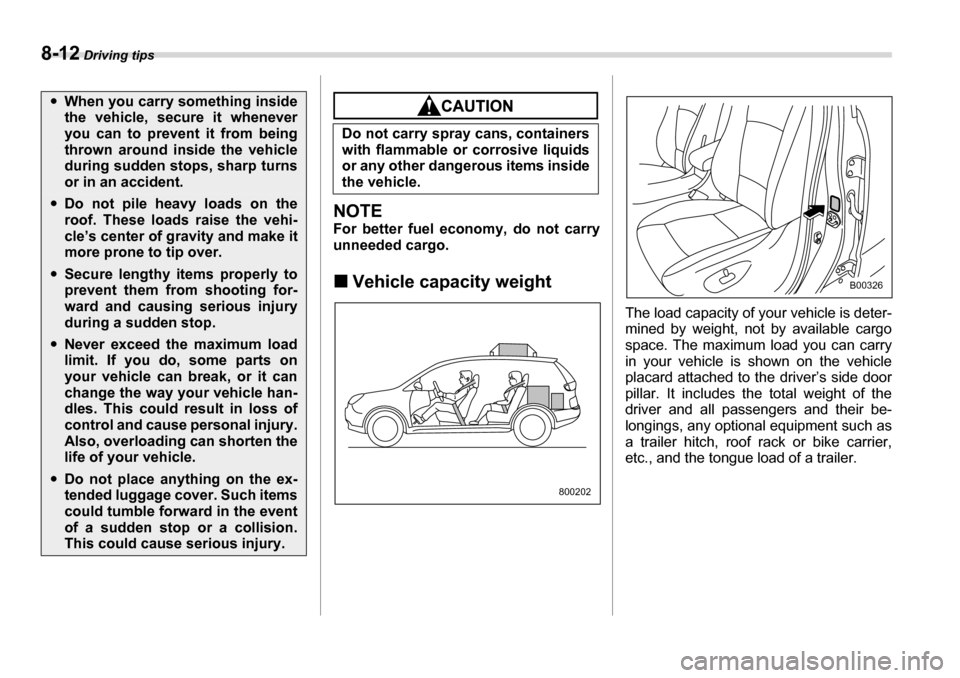
The load capacity of your vehicle is deter-
mined by weight, not by available cargo
space. The maximum load you can carry
in your vehicle is shown on the vehicle
placard attached to the driver’s side door
pillar. It includes the total weight of the
driver and all passengers and their be-
longings, any optional equipment such as
a trailer hitch, roof rack or bike carrier,
etc., and the tongue load of a trailer.
yWhen you carry something inside
the vehicle, secure it whenever
you can to prevent it from being
thrown around inside the vehicle
during sudden stops, sharp turns
or in an accident.
yDo not pile heavy loads on the
roof. These loads raise the vehi-
cle’s center of gravity and make it
more prone to tip over.
ySecure lengthy items properly to
prevent them from shooting for-
ward and causing serious injury
during a sudden stop.
yNever exceed the maximum load
limit. If you do, some parts on
your vehicle can break, or it can
change the way your vehicle han-
dles. This could result in loss of
control and cause personal injury.
Also, overloading can shorten the
life of your vehicle.
yDo not place anything on the ex-
tended luggage cover. Such items
could tumble forward in the event
of a sudden stop or a collision.
This could cause serious injury.
Do not carry spray cans, containers
with flammable or corrosive liquids
or any other dangerous items inside
the vehicle.
800202
B00326
Page 259 of 377
8-14 Driving tips
Cargo can be carried after securing the
roof crossbar kit to the roof rail and install-
ing the appropriate carrying attachment.
When installing the roof crossbar kit, fol-
low the manufacturer’s instructions.
When you carry cargo on the roof using
the roof crossbar kit and a carrying attach-
ment, never exceed the maximum load
limit explained in the following. You should
also be careful that your vehicle does not
exceed the Gross Vehicle Weight Rating
(GVWR) and front and rear Gross Axle
Weight Rating (GAWR). See the “Loading
your vehicle” section in this chapter for in-
formation on loading cargo into or onto
your vehicle. The maximum load limit of
the cargo, crossbars and carrying attach-
ment must not exceed 150 lbs (67.5 kg).
Place the heaviest load at the bottom,
nearest the roof, and evenly distribute the
cargo. Always properly secure all cargo. T
Installing carrying attachments on
the crossbars
When installing any carrying attachment
such as a bike carrier, ski carrier, kayak
carrier, cargo basket, etc. on the cross-
bars, follow the manufacturer’s instruc-
tions and make sure that the attachment is
securely fixed to the crossbars. Use only
attachments designed specifically for the
crossbars. A set of the crossbars is de-
signed to carry loads (cargo and attach-
ment) of not more than 150 lbs (67.5 kg).
Before operating the vehicle, make sure
that the cargo is properly secured on the
attachment.
NOTE
Remember that the vehicle’s center of
gravity is altered with the weight of the
load on the roof, thus affecting the
driving characteristics.
Drive carefully. Avoid rapid starts, hard
cornering and abrupt stops. Crosswind
effects will be increased. T
Removal and installation of the
crossbars
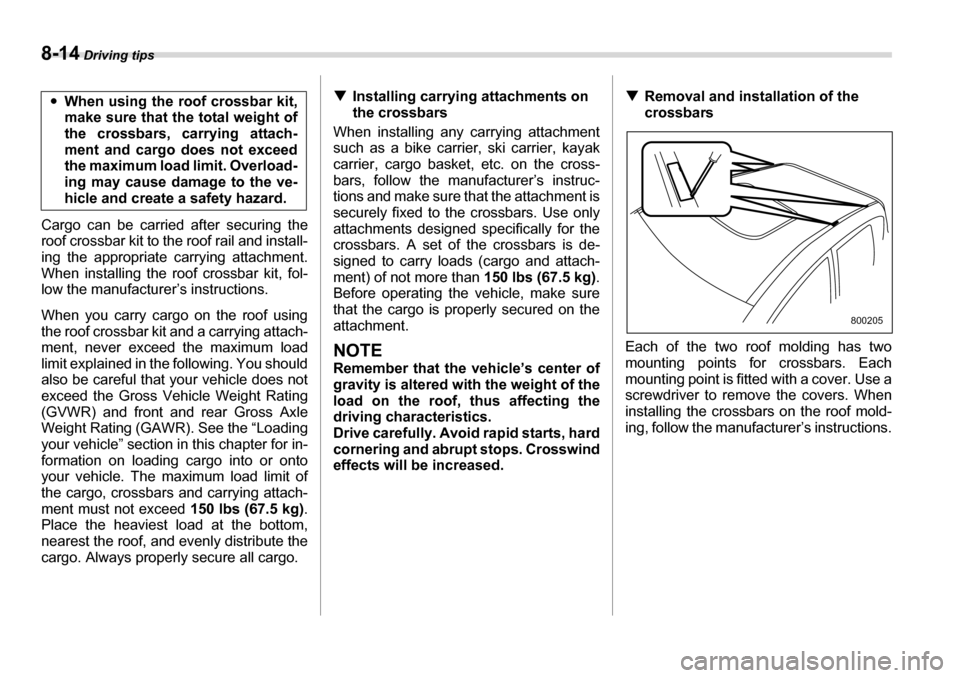
Each of the two roof molding has two
mounting points for crossbars. Each
mounting point is fitted with a cover. Use a
screwdriver to remove the covers. When
installing the crossbars on the roof mold-
ing, follow the manufacturer’s instructions.
y
When using the roof crossbar kit,
make sure that the total weight of
the crossbars, carrying attach-
ment and cargo does not exceed
the maximum load limit. Overload-
ing may cause damage to the ve-
hicle and create a safety hazard.
800205
Page 261 of 377
8-16 Driving tips
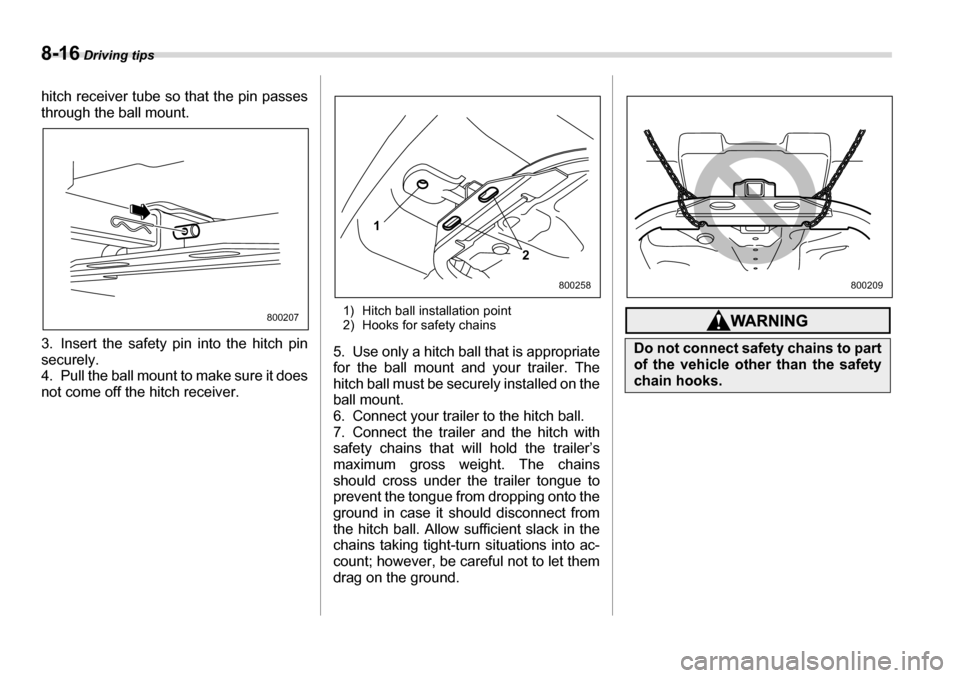
hitch receiver tube so that the pin passes
through the ball mount.
3. Insert the safety pin into the hitch pin securely.
4. Pull the ball mount to make sure it does
not come off the hitch receiver. 1) Hitch ball installation point
2) Hooks for safety chains
5. Use only a hitch ball that is appropriate
for the ball mount and your trailer. The
hitch ball must be securely installed on the
ball mount.
6. Connect your trailer to the hitch ball.
7. Connect the trailer and the hitch with
safety chains that will hold the trailer’s
maximum gross weight. The chains
should cross under the trailer tongue to
prevent the tongue from dropping onto the
ground in case it should disconnect from
the hitch ball. Allow sufficient slack in the
chains taking tight-turn situations into ac-
count; however, be careful not to let them
drag on the ground.
800207
1
2
800258
Do not connect safety chains to part
of the vehicle other than the safety
chain hooks.
800209
Page 265 of 377
8-20 Driving tips
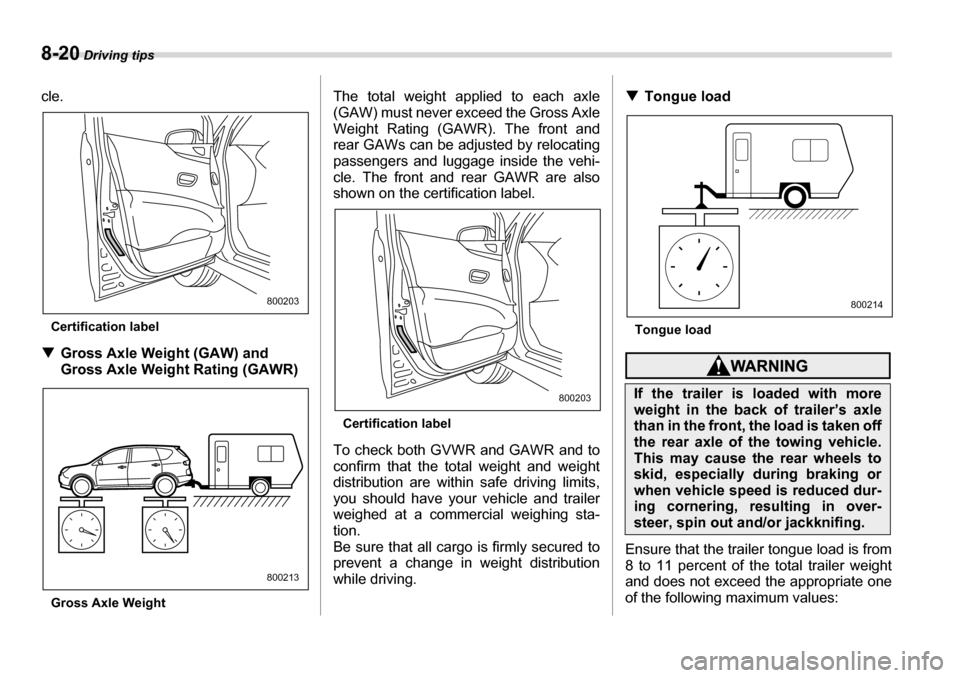
cle.
Certification label
T Gross Axle Weight (GAW) and
Gross Axle Weight Rating (GAWR)
Gross Axle Weight The total weight applied to each axle
(GAW) must never exceed the Gross Axle
Weight Rating (GAWR). The front and
rear GAWs can be adjusted by relocating
passengers and luggage inside the vehi-
cle. The front and rear GAWR are also
shown on the certification label.
Certification label
To check both GVWR and GAWR and to
confirm that the total weight and weight
distribution are within safe driving limits,
you should have your vehicle and trailer
weighed at a commercial weighing sta-
tion.
Be sure that all cargo is firmly secured to
prevent a change in weight distribution
while driving. T
Tongue load
Tongue load
Ensure that the trailer tongue load is from
8 to 11 percent of the total trailer weight
and does not exceed the appropriate one
of the following maximum values:
800203
800213
800203If the trailer is loaded with more
weight in the back of trailer’s axle
than in the front, the load is taken off
the rear axle of the towing vehicle.
This may cause the rear wheels to
skid, especially during braking or
when vehicle speed is reduced dur-
ing cornering, resulting in over-
steer, spin out and/or jackknifing.
800214
Page 266 of 377
Driving tips 8-21
– CONTINUED –
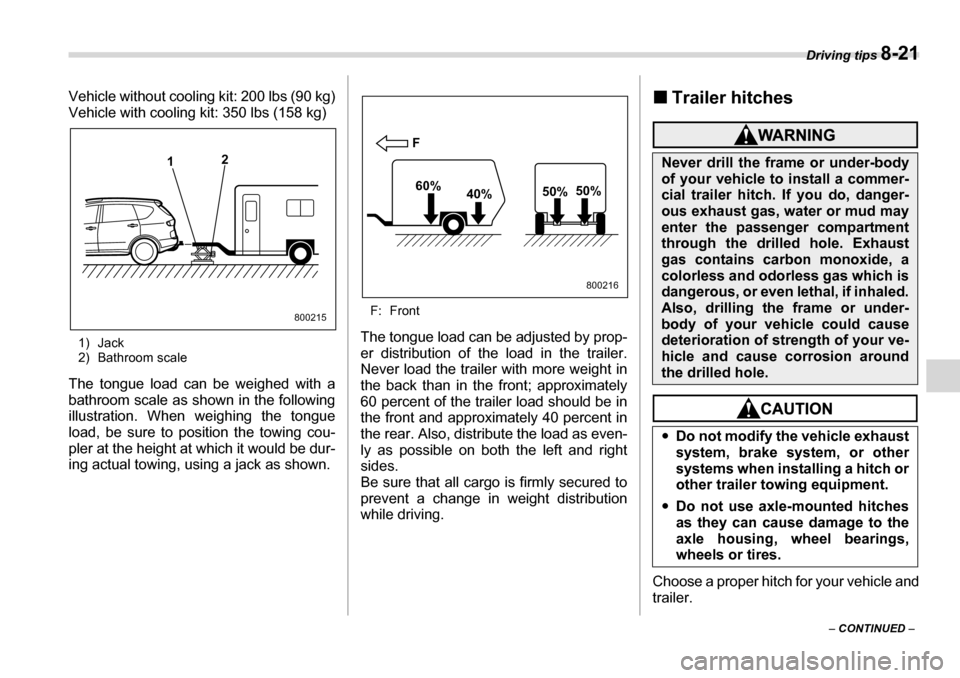
Vehicle without cooling kit: 200 lbs (90 kg)
Vehicle with cooling kit: 350 lbs (158 kg)
1) Jack
2) Bathroom scale
The tongue load can be weighed with a
bathroom scale as shown in the following
illustration. When weighing the tongue
load, be sure to position the towing cou-
pler at the height at which it would be dur-
ing actual towing, using a jack as shown. F: Front
The tongue load can be adjusted by prop-
er distribution of the load in the trailer.
Never load the trailer with more weight in
the back than in the front; approximately
60 percent of the trailer load should be in
the front and approximately 40 percent in
the rear. Also, distribute the load as even-
ly as possible on both the left and rightsides.
Be sure that all cargo is firmly secured to
prevent a change in weight distribution
while driving. „
Trailer hitches
Choose a proper hitch for your vehicle and
trailer.
1 2
800215
F
60% 40% 50%
50%
800216
Never drill the frame or under-body
of your vehicle to install a commer-
cial trailer hitch. If you do, danger-
ous exhaust gas, water or mud may
enter the passenger compartment
through the drilled hole. Exhaust
gas contains carbon monoxide, a
colorless and odorless gas which is
dangerous, or even lethal, if inhaled.
Also, drilling the frame or under-
body of your vehicle could cause
deterioration of strength of your ve-
hicle and cause corrosion around
the drilled hole. y
Do not modify the vehicle exhaust
system, brake system, or other
systems when installing a hitch or
other trailer towing equipment.
y Do not use axle-mounted hitches
as they can cause damage to the
axle housing, wheel bearings,
wheels or tires.
Page 268 of 377
Driving tips 8-23
– CONTINUED –
T
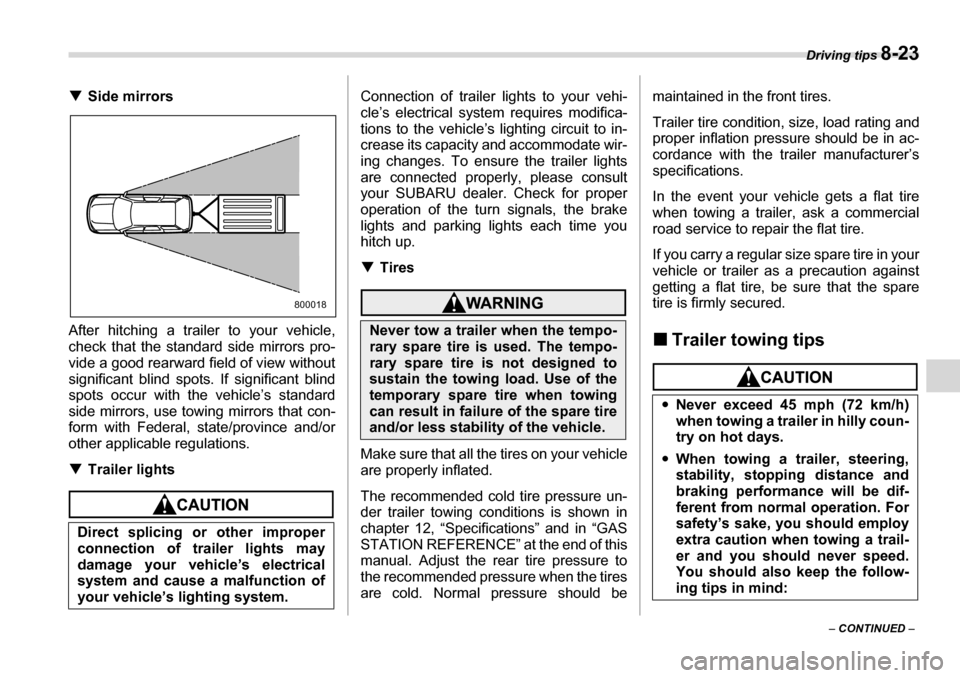
Side mirrors
After hitching a trailer to your vehicle,
check that the standard side mirrors pro-
vide a good rearward field of view without
significant blind spots. If significant blind
spots occur with the vehicle’s standard
side mirrors, use towing mirrors that con-
form with Federal, state/province and/or
other applicable regulations. T Trailer lights
Connection of trailer lights to your vehi-
cle’s electrical system requires modifica-
tions to the vehicle’s lighting circuit to in-
crease its capacity and accommodate wir-
ing changes. To ensure the trailer lights
are connected properly, please consult
your SUBARU dealer. Check for proper
operation of the turn signals, the brake
lights and parking lights each time you
hitch up. TTires
Make sure that all the tires on your vehicle
are properly inflated.
The recommended cold tire pressure un-
der trailer towing conditions is shown in
chapter 12, “Specifications” and in “GAS
STATION REFERENCE” at the end of this
manual. Adjust the rear tire pressure to
the recommended pressure when the tires
are cold. Normal pressure should be maintained in the front tires.
Trailer tire condition, size, load rating and
proper inflation pressure should be in ac-
cordance with the trailer manufacturer’s
specifications.
In the event your vehicle gets a flat tire
when towing a trailer, ask a commercial
road service to repair the flat tire.
If you carry a regular size spare tire in your
vehicle or trailer as a precaution against
getting a flat tire, be sure that the spare
tire is firmly secured. „
Trailer towing tips
Direct splicing or other improper
connection of trailer lights may
damage your vehicle’s electrical
system and cause a malfunction of
your vehicle’s lighting system.
800018
Never tow a trailer when the tempo-
rary spare tire is used. The tempo-
rary spare tire is not designed to
sustain the towing load. Use of the
temporary spare tire when towing
can result in failure of the spare tire
and/or less stability of the vehicle.
yNever exceed 45 mph (72 km/h)
when towing a trailer in hilly coun-
try on hot days.
y When towing a trailer, steering,
stability, stopping distance and
braking performance will be dif-
ferent from normal operation. For
safety’s sake, you should employ
extra caution when towing a trail-
er and you should never speed.
You should also keep the follow-
ing tips in mind: