Page 179 of 442

4-6Climate control
on. At the same time, the air inlet
selection is automatically set to “out-
side air ”mode.
In this state, you cannot select “recir-
culation ”mode by manually pressing
the air inlet selection button.
Also, you cannot stop the air condi-
tioner compressor by pressing the air
conditioner button.. Warm air also comes out from the
right and left air outlets. To stop warm
air flow from these outlets, turn the
corresponding wheel to the “
”posi-
tion. ! Heating and defrosting
To direct warm air toward the floor and the windshield:
1. Set the air inlet selection lever to the “ OFF ”position.
2. Set the air flow control dial to the “
”
position.
3. Set the temperature control dial to the
most comfortable level.
4. Set the fan speed control dial to the
desired speed.
NOTE . In a vehicle equipped with an air
conditioner, when the dial is placed in the “
”position or “”position the air conditioner compressor automati-
cally operates to quickly defog the
windshield. However the indicator on
the air conditioner button will not come
on. At the same time, the air inlet
selection is automatically set to
“out-
side air ”mode.
In this state, you cannot select “recir-
culation ”mode by manually pressing
the air inlet selection button.
Also, you cannot stop the air condi-
tioner compressor by pressing the air
conditioner button.. Warm air also comes out from the
right and left air outlets. To stop warm
air flow from these outlets, turn the
corresponding wheel to the “
”posi-
tion. ! Heating
To direct warm air toward the floor:
1. Set the air inlet selection button to the
OFF position.
2. Set the air flow control dial to the “
”
position.
3. Set the temperature control dial to the
most comfortable level.
4. Set the fan speed control dial to the
desired speed. NOTE
Warm air also comes out from the right
and left air outlets. To stop warm air
flow from these outlets, turn the corre-
sponding wheel to the
“
”position.
! Bi-level heating
This setting allows you to direct air of
different temperatures from the instrument
panel and foot outlets. The air from the
foot outlets is slightly warmer than from
the instrument panel outlets.
1. Set the air inlet selection button to the
OFF position.
2. Set the air flow control dial to the “
”
position.
3. Set the temperature control dial to the
desired temperature level.
4. Set the fan speed control dial to the
desired speed.
Setting the temperature control dial fully
turned to the red area or blue area
decreases the temperature difference
between the air from the instrument panel
outlets and the air from the foot outlets. ! Ventilation
To force outside air through the instrument
panel outlets:
1. Set the air inlet selection button to the
OFF position.
Page 183 of 442

4-10Climate control
the air conditioner compressor turns on,
air flow is directed towards the windshield
and front door windows, and the indicator
light on the button comes on.
After eliminating the fogging from the
windshield, return the climate control
system to the AUTO mode by pushingthe “AUTO ”button or turn off by pushing
the “OFF ”button.
Alternatively, push the “
”button again
to return the system to the setting that was
selected before you activated the defros-
ter. ! Fan speed control button
The fan speed control button has 6
different fan speed positions.
The fan speed is shown by the display. !
A/C –Air conditioner button
If the windshield starts to fog when the
climate control system is operated in the
AUTO mode, push the air conditionerbutton “A/C ”to defog and dehumidify.
When this button is pushed, the air
conditioner compressor turns on and the
indicator light “A/C ”on the display comes
on. After eliminating the fogging from the
windshield, set the system back to the
AUTO mode by pushing the “AUTO ”
button.
NOTE
The air conditioner compressor does
not operate when the outside air tem-
perature is below 32 8F(0 8C). !
Air flow mode selection buttonSelect the desired air flow mode by
pushing the air flow mode selection
button. The selected air flow mode is
shown by the display.
(Ventilation): Ai r flows through the
instrument panel outlets.
(Bi-level): Air flows through the instru-
ment panel outlets and the foot outlets.
(Heat): Air flows through the instrument
panel outlets, the foot outlets, and some
through the windshield defroster outlets.
(Heat-def): Air flows through the instru-
ment panel outlets, the windshield defros-
ter outlets, and the foot outlets.
Page 216 of 442
Interior light......................................................... 6-2
Dome light .......................................................... 6-2
Cargo area light (Station wagon) .......................... 6-2
Map light .............................................................. 6-2
Sun visors ........................................................... 6-3
Sun visor extension plate .................................... 6-3
Vanity mirror with light ........................................ 6-4
Storage compartment ......................................... 6-4
Glove box ........................................................... 6-5
Center console box ............................................. 6-5
Center panel compartment (if equipped)... ............ 6-6
Overhead console (if equipped) ........................... 6-7
Pocket ................................................................ 6-7
Cup holder ........................................................... 6-7
Front passenger ’s cup holder .............................. 6-8
Rear passenger ’s cup holder ............................... 6-8
Accessory power outlets .................................... 6-8
Coat hook ........................................................... 6-10
Rear passenger area .......................................... 6-10
Shopping bag hook ............................................ 6-11
For Sedan models .............................................. 6-11
For Station wagon models .................................. 6-11
Floor mat ............................................................ 6-12
Cargo area cover (Station wagon) .................... 6-12
Using the cover .................................................. 6-12 To remove the cover housing ...
.......................... 6-13
To remove the rear gate board . .......................... 6-13
Stowage of the cargo area cover and rear gate board .............................................................. 6-13
To install the cover housing ............................... 6-14
To install the rear gate board ... .......................... 6-15
Stowage boxes (Station wagon) ....................... 6-15
Convenient tie-down hooks (if equipped) ........ 6-16
Under-floor storage compartment .................... 6-16
Sedan ................................................................ 6-17
Station wagon ................................................... 6-17
HomeLink ®Wireless Control System
(if equipped) .................................................... 6-17
Garage door opener programming in the U.S.A. .............................................................. 6-18
Programming rolling-code-protected garage door openers in the U.S.A. ....................................... 6-19
Programming for entrance gates and garage door openers in Canada ........................................... 6-20
Programming other devices ............................... 6-21
Operating the HomeLink ®Wireless Control
System ............................................................ 6-21
Reprogramming a single HomeLink ®
button ............................................................. 6-21
Erasing HomeLink ®button memory ................... 6-21
In case a problem occurs ................................... 6-21
Interior equipment
6
Page 218 of 442
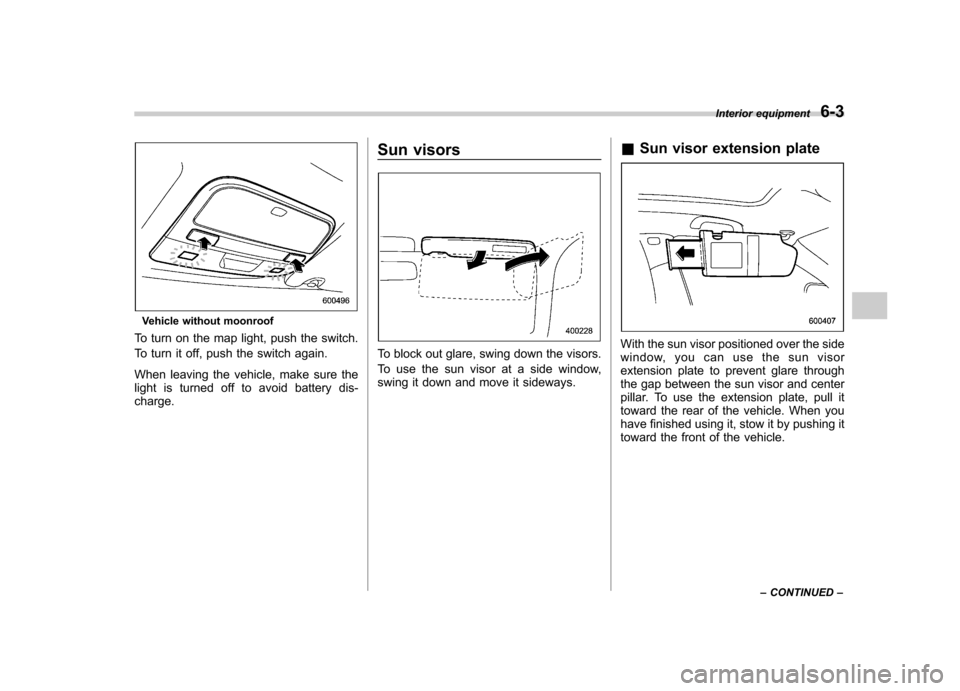
Vehicle without moonroof
To turn on the map light, push the switch.
To turn it off, push the switch again.
When leaving the vehicle, make sure the
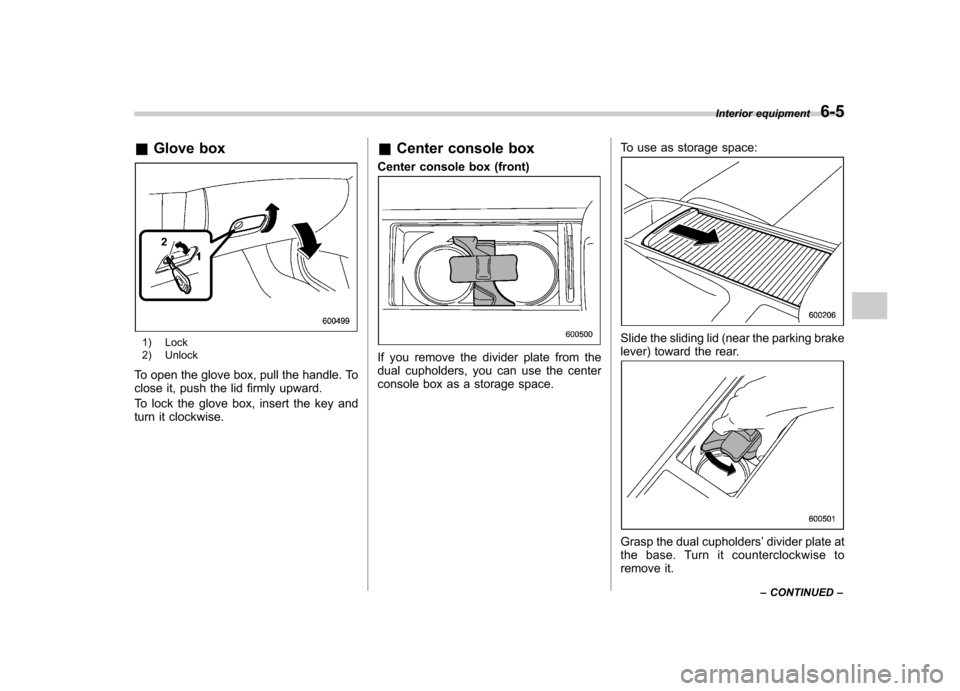
light is turned off to avoid battery dis-charge. Sun visors
To block out glare, swing down the visors.
To use the sun visor at a side window,
swing it down and move it sideways.
&
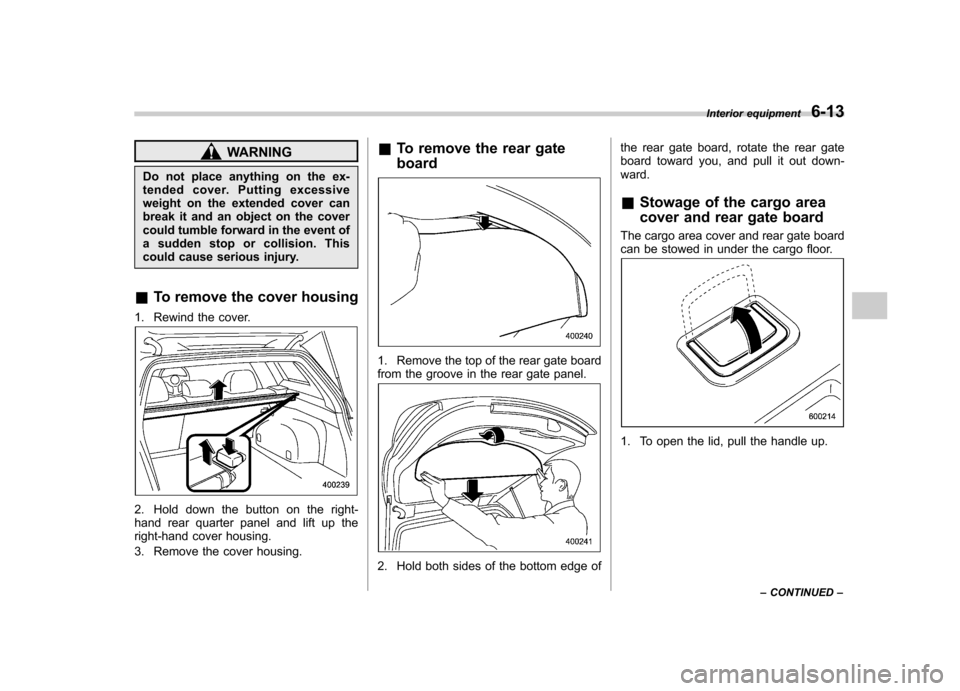
Sun visor extension plateWith the sun visor positioned over the side
window, you can use the sun visor
extension plate to prevent glare through
the gap between the sun visor and center
pillar. To use the extension plate, pull it
toward the rear of the vehicle. When you
have finished using it, stow it by pushing it
toward the front of the vehicle. Interior equipment
6-3
– CONTINUED –
Page 220 of 442
&Glove box
1) Lock
2) Unlock
To open the glove box, pull the handle. To
close it, push the lid firmly upward.
To lock the glove box, insert the key and
turn it clockwise. &
Center console box
Center console box (front)
If you remove the divider plate from the
dual cupholders, you can use the center
console box as a storage space. To use as storage space:
Slide the sliding lid (near the parking brake
lever) toward the rear.
Grasp the dual cupholders
’divider plate at
the base. Turn it counterclockwise to
remove it. Interior equipment
6-5
– CONTINUED –
Page 223 of 442
6-8Interior equipment
&Front passenger ’s cup holder
The dual cup holder is built into the center
console near the parking brake lever.
To access the cup holder, pull the lid
toward the rear. &
Rear passenger ’s cup holder
The rear passenger ’s cup holder is
located on the lower side of the back of
the center console. To use the cup holder,
open the lid by pulling its upper edge. Accessory power outlets
Outlet beside front pocket
Outlet in center console
Page 228 of 442
WARNING
Do not place anything on the ex-
tended cover. Putting excessive
weight on the extended cover can
break it and an object on the cover
could tumble forward in the event of
a sudden stop or collision. This
could cause serious injury.
& To remove the cover housing
1. Rewind the cover.
2. Hold down the button on the right-
hand rear quarter panel and lift up the
right-hand cover housing.
3. Remove the cover housing. &
To remove the rear gate board
1. Remove the top of the rear gate board
from the groove in the rear gate panel.
2. Hold both sides of the bottom edge of the rear gate board, rotate the rear gate
board toward you, and pull it out down-ward. &
Stowage of the cargo area
cover and rear gate board
The cargo area cover and rear gate board
can be stowed in under the cargo floor.
1. To open the lid, pull the handle up. Interior equipment
6-13
– CONTINUED –
Page 229 of 442
6-14Interior equipment
2. To keep the lid open, hang the hook
(provided on the back of the lid) on the
rear edge of the roof.
3. Remove the left and right parts of the
cargo floor lid.4. Stow the cover housing and rear gate
board in the cargo area end. &
To install the cover housing
To install the cover housing, insert both
ends of the cover housing into theretainers.