Page 221 of 442
6-6Interior equipment
CAUTION
If you hold the divider plate at the
top while turning it counterclock-
wise, it may break.
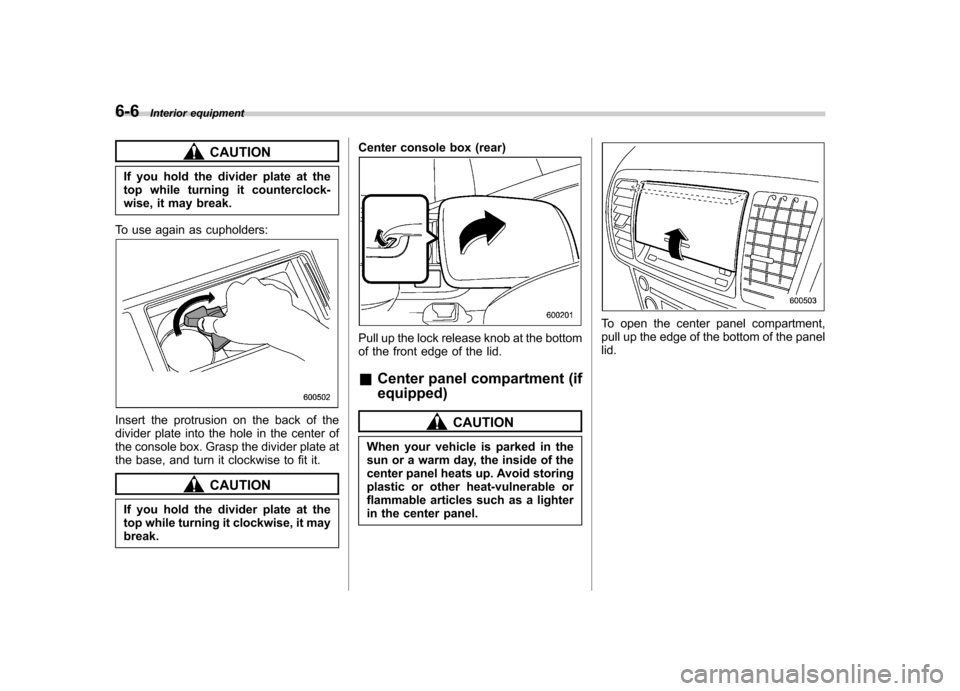
To use again as cupholders:
Insert the protrusion on the back of the
divider plate into the hole in the center of
the console box. Grasp the divider plate at
the base, and turn it clockwise to fit it.
CAUTION
If you hold the divider plate at the
top while turning it clockwise, it maybreak. Center console box (rear)
Pull up the lock release knob at the bottom
of the front edge of the lid. &
Center panel compartment (if equipped)
CAUTION
When your vehicle is parked in the
sun or a warm day, the inside of the
center panel heats up. Avoid storing
plastic or other heat-vulnerable or
flammable articles such as a lighter
in the center panel.
To open the center panel compartment,
pull up the edge of the bottom of the panellid.
Page 222 of 442

&Overhead console (if equipped)
To open the console, push on the lid lightly
and it will automatically open.
CAUTION
When your vehicle is parked in the
sun or on a warm day, the inside of
the overhead console heats up.
Avoid storing plastic or other heat-
vulnerable or flammable articles
such as a lighter in the overheadconsole. &
Pocket
CAUTION
Do not use the pocket as an ashtray
or leave a lighted cigarette in the
pocket. This could cause a fire.
To use the pocket, push lightly on the lid
below the climate controls. Cup holder
CAUTION
. When not in use, always keep the
cup holder stored while driving
to reduce the risk of injury in the
event of a sudden stop or anaccident.
. Do not pick up a cup from the cup
holder or put a cup in the holder
while you are driving, as this may
distract you and lead to anaccident.
. Take care to avoid spills. Bev-
erages, if hot, might burn you or
your passengers. Spilled bev-
erages may also damage uphols-
tery or carpets. Interior equipment
6-7
– CONTINUED –
Page 224 of 442

Outlet in cargo area
Accessory power outlets are provided
beside the front ashtray, in the center
console and in the cargo area. Electrical
power (12V DC) from the battery is
available at any of the outlets when the
ignition switch is in either the “ACC ”or
“ ON ”position.
You can use an in-car electrical appliance
by connecting it to an outlet.
The maximum power rating of an appli-
ance that can be connected varies among
outlets as shown in the following. Do not
use an appliance which exceeds the
indicated wattage for each outlet.
Outlet beside front pocket: 80W or less
Outlets in center console and cargo area:
120W or less
When using appliances connected to two or more outlets simultaneously, the total
power consumed by them must not
exceed 120W.
CAUTION
. Do not attempt to use a cigarette
lighter in the accessory power outlet.
. Do not place any foreign objects,
especially metal ones such as
coins or aluminum foil, into the
accessory power outlet. That
could cause a short circuit. Al-
ways put the cap on the acces-
sory power outlet when it is not
in use.
. Use only electrical appliances
which are designed for 12V DC.
The maximum power rating of an
appliance that can be connected
varies among outlets as shown in
the following. Do not use an
appliance which exceeds the in-
dicated wattage for each outlet.
Outlet beside front pocket: 80W
or less
Outlets in center console and
cargo area: 120W or less
When using appliances con-
nected to two or more outlets simultaneously, the total power
consumed by them must not
exceed 120W. Overloading the
accessory power outlet can
cause a short circuit. Do not use
double adapters or more than
one electrical appliance.
. If the plug on your electric appli-
ance is either too loose or too
tight for the accessory power
outlet, this can result in a poor
contact or cause the plug to get
stuck. Only use plugs that fit
properly.
. Use of an electric appliance in the
accessory power outlet for a long
period of time while the engine is
not running can cause batterydischarge.
. Before driving your vehicle, make
sure that the plug and the cord
on your electrical appliance will
not interfere with your shifting
gears and operating the accel-
erator and brake pedals. If they
do, do not use the electrical
appliance while driving. Interior equipment
6-9
– CONTINUED –
Page 227 of 442
6-12Interior equipment
Floor mat
A retaining pin is located on the driver ’s
side of the vehicle next to the fuel filler
door release. Fit the grommet in the carpet
onto the pin to prevent the carpet frommoving.
CAUTION
Make sure the driver ’s floor mat is
placed back in its proper location
and correctly secured on its retain-
ing pin. If the floor mat slips forward
and interferes with the movement of
the pedals during driving, it could
cause an accident. Cargo area cover (Station wagon)
The cargo area cover is provided for
covering the cargo area and to protect its
contents from direct sunlight. This cover is
detachable to make room for additionalcargo. &
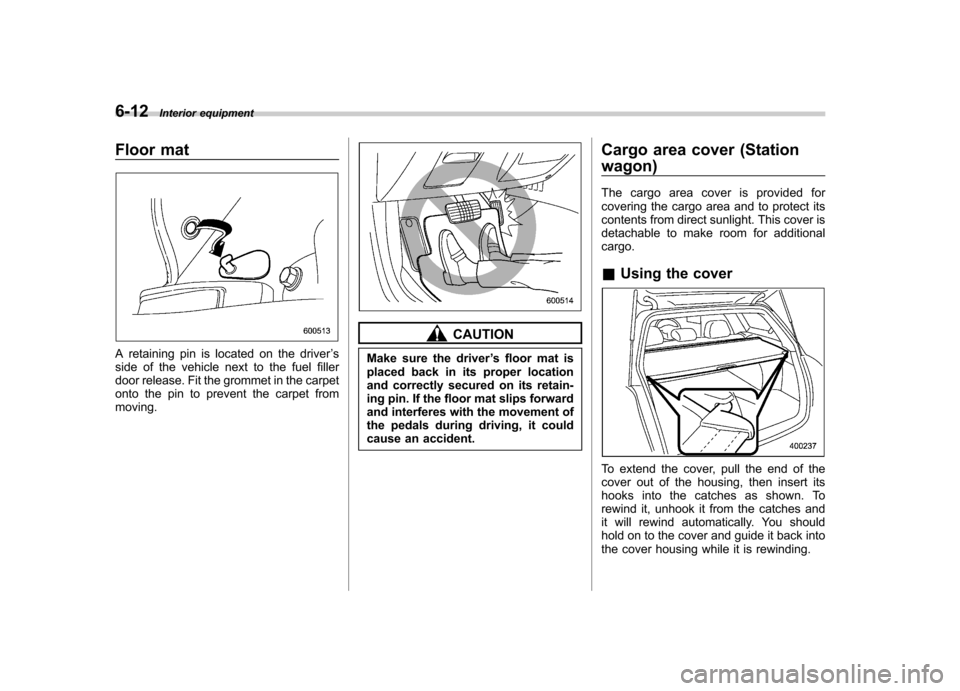
Using the cover
To extend the cover, pull the end of the
cover out of the housing, then insert its
hooks into the catches as shown. To
rewind it, unhook it from the catches and
it will rewind automatically. You should
hold on to the cover and guide it back into
the cover housing while it is rewinding.
Page 231 of 442

6-16Interior equipment
Convenient tie-down hooks
(if equipped)
CAUTION
The convenient tie-down hooks are
designed only for securing light
cargo. Never try to secure cargo
that exceeds the capacity of the
hooks. The maximum load capacity
is 44 lbs (20 kg) per hook.
The cargo area is equipped with four tie-
down hooks so that cargo can be secured
with a luggage net or ropes.
When using the tie-down hooks, turn them
down out of the storing recesses. When
not in use, put the hooks up into the storing recesses.
Under-floor storage compart- ment
The subfloor storage compartment is
located under the floor of the trunk or
cargo area and can be used to store small
items. To open the lid, pull the tab or
handle up. NOTE
When storing a flat tire, put the sub-
floor storage in the trunk or cargo area.
CAUTION
. Always keep the lid of the sub-
floor storage compartment
closed while driving to reduce
the risk of injury in the event of
sudden stop or an accident.
. Do not store spray cans, contain-
ers with flammable or corrosive
liquids or any other dangerous
items in the subfloor storagecompartment.
Page 232 of 442
&Sedan
&Station wagon
Hang the hook provided on the underside
of the lid on the rear edge of the roof to keep the lid open.
HomeLink®Wireless Control
System (if equipped)
1) HomeLink® buttons
2) Indicator light
3) Hand-held transmitter* * Not part of your vehicle ’s keyless entry
system but of a HomeLink®-compatible device.
The HomeLink® Wireless Control System,
located on the driver ’s sun visor, is a
handy way to operate, from inside of your
vehicle, up to three remote-controlled
indoor and outdoor devices, such as
garage door openers, entrance gates,
door locks, home lighting, and security
systems. There are three HomeLink®
buttons on the sun visor, each of which
you can program for operation of one Interior equipment
6-17
– CONTINUED –
Page 234 of 442

2. Press and hold the two outside
HomeLink® buttons until the indicator light
begins to flash (after 20 seconds). Re-
lease both buttons. NOTE
If any of the HomeLink®buttons are
already programmed for other devices,
skip step 2 because it clears the
memory of all the three buttons.
3. Hold the end of the garage door opener ’s hand-held transmitter between
1 and 3 inches (25 and 76 mm) away from
the HomeLink® buttons on the driver ’s
sun visor, keeping the indicator light in
view.4. Using both hands, simultaneously
push the hand-held transmitter button
and the desired HomeLink® button. DO
NOT release the buttons until step 5 has
been completed.
5. Hold down both buttons until the
HomeLink® indicator light flashes, first
slowly then rapidly. When the indicator
light flashes rapidly, both buttons may be
released. (The rapidly flashing light indi-
cates successful programming of the new
frequency signal.)
6. Press and hold the programmed but-
ton and check the HomeLink® indicator
light. If the indicator light stays on con-
tinuously, your garage door should acti-
vate and the programming is completed.
If the indicator light flashes rapidly for two
seconds and then stays on continuously, your garage door opener may be pro-
tected by a rolling code feature. In this
case you need to perform the additional
steps for
“Programming rolling-code-pro-
tected garage door openers in the U.S.A. ”
described in the following. NOTE
Rolling-code-protected garage door
openers are manufactured after 1996.
See the instruction manual of your
garage opener for confirmation.
7. Reconnect the motor of your garage
door opener to the outlet.
8. Test your garage door opener by
pressing the programmed HomeLink®button. & Programming rolling-code-
protected garage door open-
ers in the U.S.A.
If your garage door opener has a rolling
code feature, program the HomeLink®
Wireless Control System for it by following
steps 1 through 5 in the "Programming
garage door openers in the U.S.A." sec-
tion above and then continuing with the
following steps. NOTE
The assistance of a second person Interior equipment
6-19
– CONTINUED –
Page 235 of 442
6-20Interior equipment
may make the programming quicker
and easier.
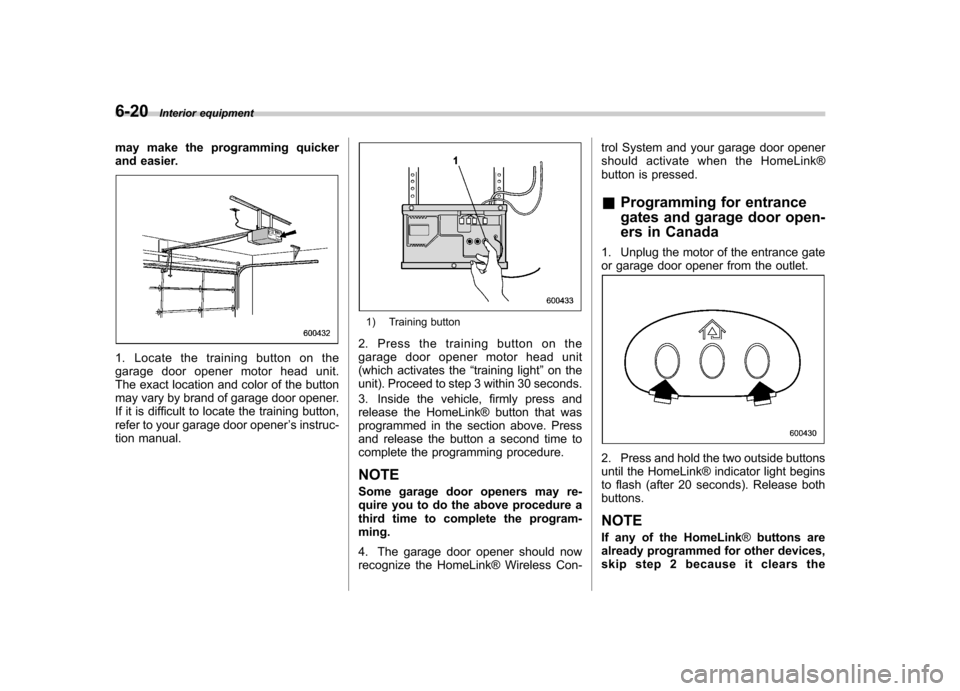
1. Locate the training button on the
garage door opener motor head unit.
The exact location and color of the button
may vary by brand of garage door opener.
If it is difficult to locate the training button,
refer to your garage door opener ’s instruc-
tion manual.
1) Training button
2. Press the training button on the
garage door opener motor head unit
(which activates the “training light ”on the
unit). Proceed to step 3 within 30 seconds.
3. Inside the vehicle, firmly press and
release the HomeLink® button that was
programmed in the section above. Press
and release the button a second time to
complete the programming procedure.
NOTE
Some garage door openers may re-
quire you to do the above procedure a
third time to complete the program-ming.
4. The garage door opener should now
recognize the HomeLink® Wireless Con- trol System and your garage door opener
should activate when the HomeLink®
button is pressed. &
Programming for entrance
gates and garage door open-
ers in Canada
1. Unplug the motor of the entrance gate
or garage door opener from the outlet.
2. Press and hold the two outside buttons
until the HomeLink® indicator light begins
to flash (after 20 seconds). Release bothbuttons. NOTE
If any of the HomeLink ®buttons are
already programmed for other devices,
skip step 2 because it clears the