2007 SUBARU FORESTER audio
[x] Cancel search: audioPage 167 of 356
Audio 5-13
– CONTINUED –
V
Display illumination dimness can-
cellation (BRIGHT)
The brightness of the radio display dims
when the light switch is in the “ ” or
“ ” position. If this makes the display
difficult to read, press the volume dial for
more than 2 seconds to return the display
to original brightness. Subsequently
pressing the volume dial again for more
than 2 seconds or if you can safely do so,
turning the light switch to the OFF position
and back to the “ ” or “ ” posi-
tion makes the radio display dim again. T FM/AM selection button (FM/AM)
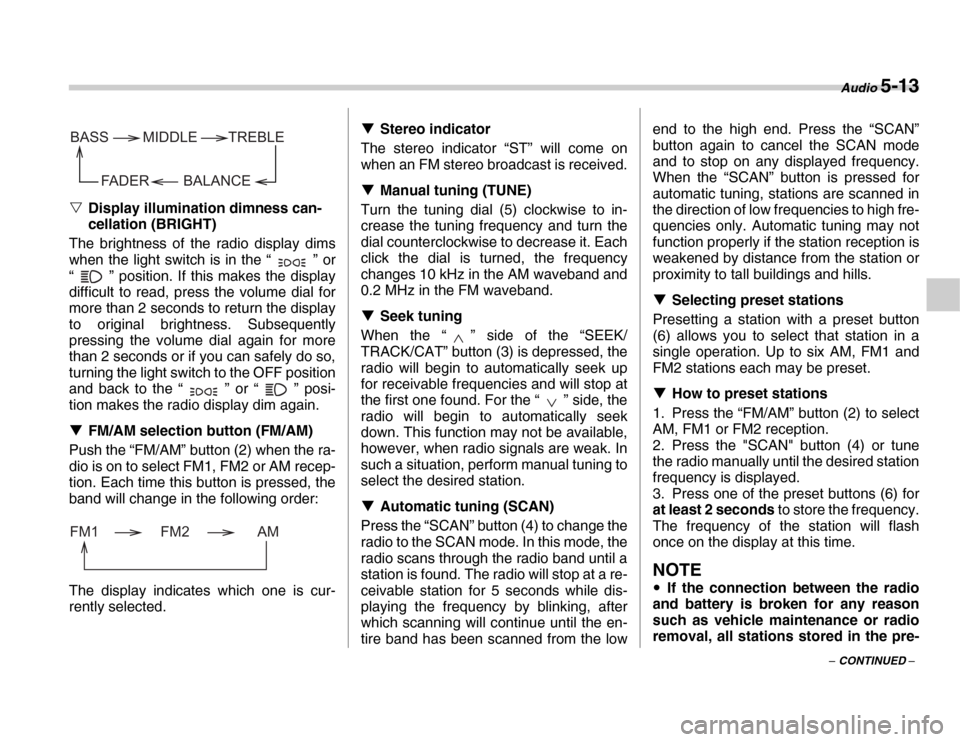
Push the “FM/AM” button (2) when the ra-
dio is on to select FM1, FM2 or AM recep-
tion. Each time this button is pressed, the
band will change in the following order:
The display indicates which one is cur-
rently selected. T
Stereo indicator
The stereo indicator “ST” will come on
when an FM stereo broadcast is received. T Manual tuning (TUNE)
Turn the tuning dial (5) clockwise to in-
crease the tuning frequency and turn the
dial counterclockwise to decrease it. Each
click the dial is turned, the frequency
changes 10 kHz in the AM waveband and
0.2 MHz in the FM waveband. T Seek tuning
When the “ ” side of the “SEEK/
TRACK/CAT” button (3) is depressed, the
radio will begin to automatically seek up
for receivable frequencies and will stop at
the first one found. For the “ ” side, the
radio will begin to automatically seek
down. This function may not be available,
however, when radio signals are weak. In
such a situation, perform manual tuning to
select the desired station. T Automatic tuning (SCAN)
Press the “SCAN” button (4) to change the
radio to the SCAN mode. In this mode, the
radio scans through the radio band until a
station is found. The radio will stop at a re-
ceivable station for 5 seconds while dis-
playing the frequency by blinking, after
which scanning will continue until the en-
tire band has been scanned from the low end to the high end. Press the “SCAN”
button again to cancel the SCAN mode
and to stop on any displayed frequency.
When the “SCAN” button is pressed for
automatic tuning, stations are scanned in
the direction of low frequencies to high fre-
quencies only. Automatic tuning may not
function properly if the station reception is
weakened by distance from the station or
proximity to tall buildings and hills. T
Selecting preset stations
Presetting a station with a preset button
(6) allows you to select that station in a
single operation. Up to six AM, FM1 and
FM2 stations each may be preset. T How to preset stations
1. Press the “FM/AM” button (2) to select
AM, FM1 or FM2 reception.
2. Press the "SCAN" button (4) or tune
the radio manually until the desired station
frequency is displayed.
3. Press one of the preset buttons (6) for
at least 2 seconds to store the frequency.
The frequency of the station will flash
once on the display at this time.
NOTE
y If the connection between the radio
and battery is broken for any reason
such as vehicle maintenance or radio
removal, all stations stored in the pre-
BALANCE
BASS
FADER TREBLE
MIDDLE
FM1 FM2 AM
Page 168 of 356

5-14 Audio
set buttons are cleared. If this occurs,
it is necessary to reset the preset but-
tons. yIf a cell phone is placed near the ra-
dio, it may cause the radio to emit
noise when the phone receives calls.
This noise does not indicate a problem
with the radio.
Page 169 of 356
Audio 5-15
– CONTINUED –
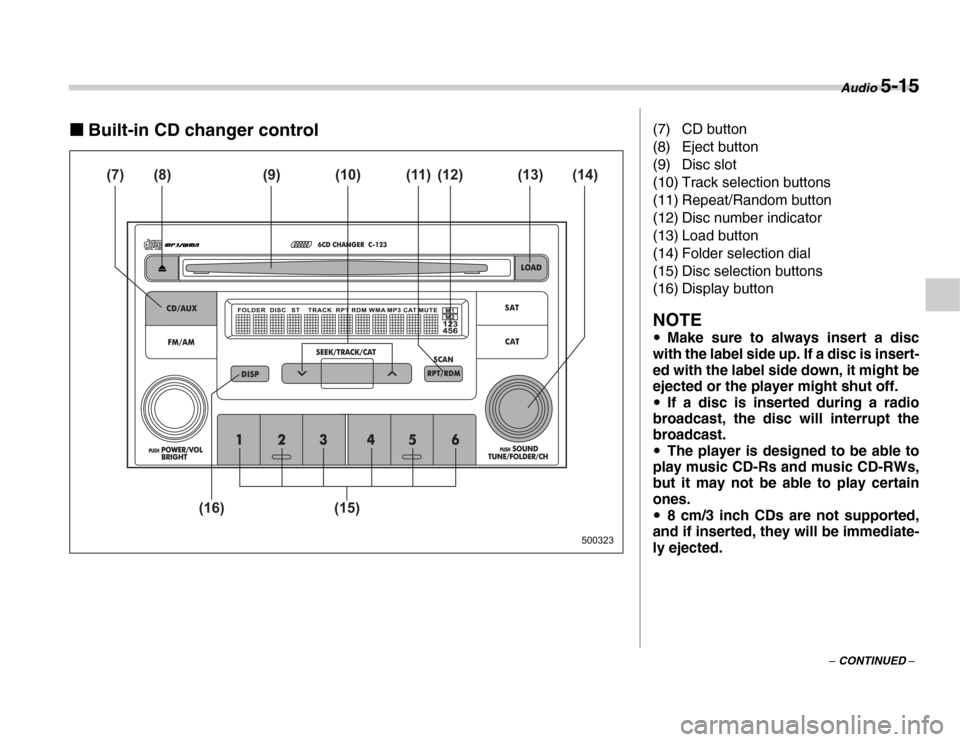
„Built-in CD changer control
500323
(7) (8) (9) (12) (11)
(10) (14) (13)
(15)
(16)
(7) CD button
(8) Eject button
(9) Disc slot
(10) Track selection buttons
(11) Repeat/Random button
(12) Disc number indicator
(13) Load button
(14) Folder selection dial
(15) Disc selection buttons
(16) Display button
NOTE y Make sure to always insert a disc
with the label side up. If a disc is insert-
ed with the label side down, it might be
ejected or the player might shut off. y If a disc is inserted during a radio
broadcast, the disc will interrupt the
broadcast. y The player is designed to be able to
play music CD-Rs and music CD-RWs,
but it may not be able to play certain
ones. y 8 cm/3 inch CDs are not supported,
and if inserted, they will be immediate-
ly ejected.
Page 170 of 356

5-16 Audio
THow to insert a CD(s)
V Inserting a CD
1. Briefly press the “LOAD” button (13). If
the magazine in the player has an idle po-
sition where you can insert a disc, the disc
number indicator associated with the idle
position will blink. If no indicator blinks, it
means that there is no idle position in the
magazine.
2. When “IN” is displayed, insert the disc.
Once you have inserted the disc, the disc
number indicator will stop blinking. The
disc will be then automatically drawn in,
and the player will begin to play back the
first track of the disc. y To insert more discs in succession, re-
peat Steps 1 and 2. The magazine will be
loaded with discs in the ascending order
of position number. If you do not insert any
disc within 15 seconds after you have
pressed the “LOAD” button and “IN” is dis-
played, the player will begin to play back
the first track of the last disc you have in-
serted. y While the player is in the loading mode,
if you press the “FM/AM” button (2), the
player will enter the standby mode. Press
the “CD/AUX” button (7) to start playback. V
Inserting a disc in a desired position
1. Briefly press the “LOAD” button (13). If
the magazine in the player has an idle po-
sition where you can insert a disc, the disc
number indicator (12) associated with the
idle position will blink.
2. Press the disc selection button (15) at
the position where you want to insert a
disc. The associated disc number indica-
tor will blink.
3. If you insert a disc during the 15 sec-
ond period while “IN” is displayed, the disc
will be automatically drawn in, and the
player will start playback of the disc, be-
ginning with the first track. y To insert more discs in succession, re-
peat Steps 1 and 3. y While the player is in the loading mode,
if you press the “FM/AM” button (2), the
player will enter standby mode. Press the
“CD/AUX” button (7) to start playback. V Loading all the magazine (Full disc
loading mode)
1. If you continue to press the “LOAD”
button (13) for more than 2 seconds, the
player will enter the full disc loading mode.
2. The disc number indicator (12) associ-
ated with the idle position will blink. The
magazine will be loaded with discs in the
ascending order of position number.
3. When the loading of a disc is complete, the next disc number indicator (12) will
blink. Then repeat Step 2.
4. When the magazine is filled with discs
by repeating Steps 2 and 3, the player will
start playback of the discs, beginning with
the one inserted first. If you fail to insert
any disc during each 15 seconds interval,
the full disc loading mode will be can-
celed, and the player will start playback of
the disc inserted first. T
How to play back a CD or make a
pause
V When there is no CD inserted:
Insert a CD by referring to “How to insert a
CD(s)”.
When a CD is loaded, the player will start
playback of the CD, beginning with the
first track. V When there are CDs loaded:
Depress the “CD/AUX” button to turn on
the CD (when the last mode of the player
is CD) and press a desired one of the disc
select buttons (15). The player will then
start playback of the selected CD, begin-
ning with the first track. T To select a track from its beginning
V Forward direction
Briefly press the “ ” side of the button
(10) to skip to the beginning of the next
Page 171 of 356
Audio 5-17
– CONTINUED –
track. Each time the button is pressed, the
indicated track number will increase. V
Backward direction
Briefly press the “ ” side of the button
(10) to skip to the beginning of the current
track. Each time the button is pressed, the
indicated track number will decrease. T To select a folder (for MP3/WMA au-
dio)
Turn the “TUNE/FOLDER/CH” dial (14) to
select the folder. T Fast-forwarding and fast-reversing
V Fast-forwarding
Press the “ ” side of the button (10)
continuously to fast-forward the disc. Re-
lease the button to stop fast-forwarding. V Fast-reversing
Press the “ ” side of the button (10)
continuously to fast-reverse the disc. Re-
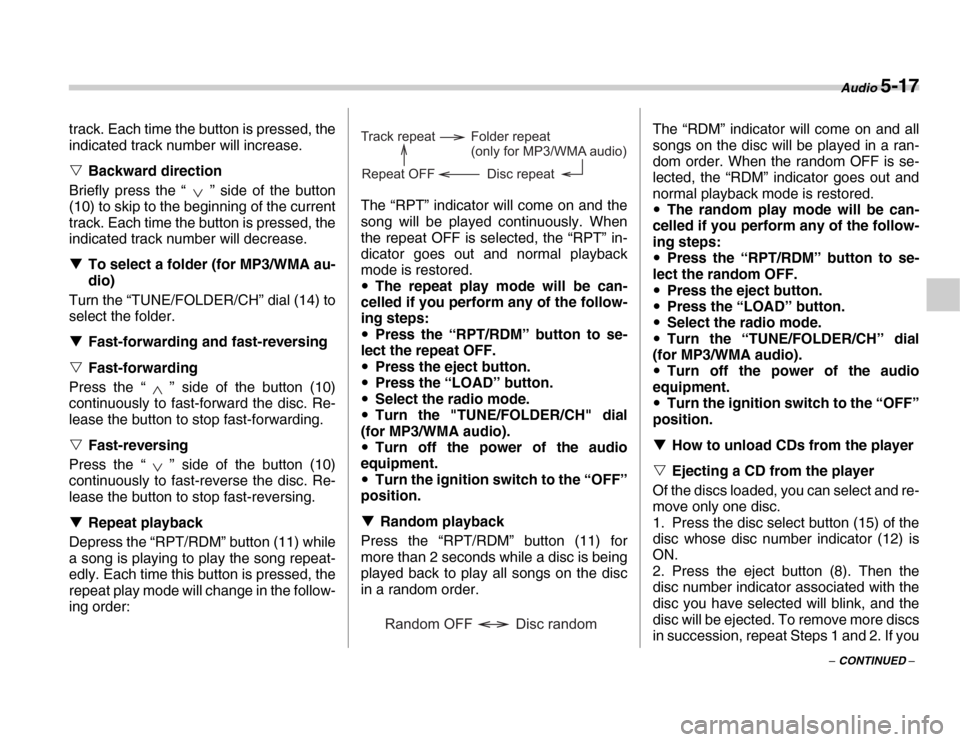
lease the button to stop fast-reversing. T Repeat playback
Depress the “RPT/RDM” button (11) while
a song is playing to play the song repeat-
edly. Each time this button is pressed, the
repeat play mode will change in the follow-
ing order: The “RPT” indicator will come on and the
song will be played continuously. When
the repeat OFF is selected, the “RPT” in-
dicator goes out and normal playback
mode is restored. y
The repeat play mode will be can-
celled if you perform any of the follow-
ing steps: y Press the “RPT/RDM” button to se-
lect the repeat OFF. y Press the eject button.
y Press the “LOAD” button.
y Select the radio mode.
y Turn the "TUNE/FOLDER/CH" dial
(for MP3/WMA audio).y Turn off the power of the audio
equipment. y Turn the ignition switch to the “OFF”
position. T Random playback
Press the “RPT/RDM” button (11) for
more than 2 seconds while a disc is being
played back to play all songs on the disc
in a random order. The “RDM” indicator will come on and all
songs on the disc will be played in a ran-
dom order. When the random OFF is se-
lected, the “RDM” indicator goes out and
normal playback mode is restored. y
The random play mode will be can-
celled if you perform any of the follow-
ing steps: y Press the “RPT/RDM” button to se-
lect the random OFF. y Press the eject button.
y Press the “LOAD” button.
y Select the radio mode.
y Turn the “TUNE/FOLDER/CH” dial
(for MP3/WMA audio). y Turn off the power of the audio
equipment. y Turn the ignition switch to the “OFF”
position. T How to unload CDs from the player
V Ejecting a CD from the player
Of the discs loaded, you can select and re-
move only one disc.
1. Press the disc select button (15) of the
disc whose disc number indicator (12) isON.
2. Press the eject button (8). Then the
disc number indicator associated with the
disc you have selected will blink, and the
disc will be ejected. To remove more discs
in succession, repeat Steps 1 and 2. If you
Track repeat
Disc repeat
Repeat OFF Folder repeat
(only for MP3/WMA audio)
Disc random
Random OFF
Page 172 of 356
5-18 Audio
press the eject button after turning OFF
the ignition switch, only one disc will be
ejected. VEjecting all discs from the player
(All disc ejection mode)
1. If you continue to press the eject button
(8) for more than 2 seconds, the player will
enter the all disc ejection mode.
2. Remove the disc that has been eject-
ed, the display indicates “CD ALL EJECT”
(when the ignition switch is in the “Acc” po-
sition) and disc indicator will blink. The
other discs loaded will then be ejected one
after another. If you do not remove the
ejected disc within 15 seconds, the “All
disc ejection mode” will be canceled.
NOTE
Avoid driving the vehicle with a CD
sticking out, because vibration might
make it fall out.
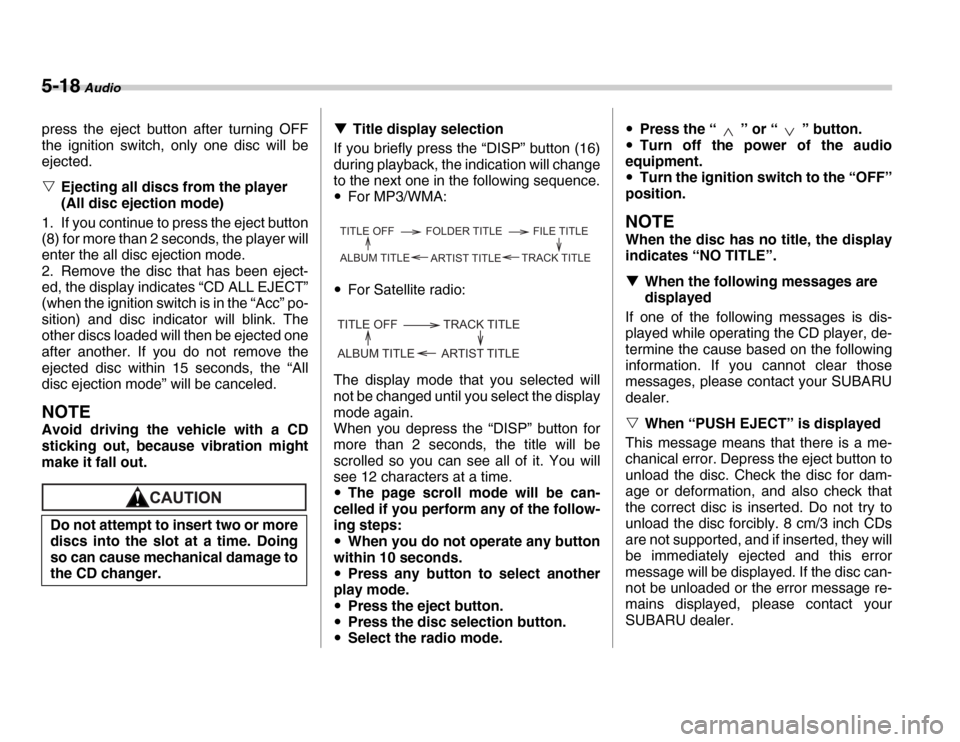
T Title display selection
If you briefly press the “DISP” button (16)
during playback, the indication will change
to the next one in the following sequence.y For MP3/WMA:
y For Satellite radio:
The display mode that you selected will
not be changed until you select the display
mode again.
When you depress the “DISP” button for
more than 2 seconds, the title will be
scrolled so you can see all of it. You will
see 12 characters at a time.y The page scroll mode will be can-
celled if you perform any of the follow-
ing steps: y When you do not operate any button
within 10 seconds.y Press any button to select another
play mode. y Press the eject button.
y Press the disc selection button.
y Select the radio mode. y
Press the “ ” or “ ” button.
y Turn off the power of the audio
equipment. y Turn the ignition switch to the “OFF”
position.
NOTE
When the disc has no title, the display
indicates “NO TITLE”. T When the following messages are
displayed
If one of the following messages is dis-
played while operating the CD player, de-
termine the cause based on the following
information. If you cannot clear those
messages, please contact your SUBARU
dealer. V When “PUSH EJECT” is displayed
This message means that there is a me-
chanical error. Depress the eject button to
unload the disc. Check the disc for dam-
age or deformation, and also check that
the correct disc is inserted. Do not try to
unload the disc forcibly. 8 cm/3 inch CDs
are not supported, and if inserted, they will
be immediately ejected and this error
message will be displayed. If the disc can-
not be unloaded or the error message re-
mains displayed, please contact your
SUBARU dealer.
Do not attempt to insert two or more
discs into the slot at a time. Doing
so can cause mechanical damage to
the CD changer.TITLE OFF FOLDER TITLE FILE TITLE
TRACK TITLE
ARTIST TITLE
ALBUM TITLE
TITLE OFF TRACK TITLE
ARTIST TITLE
ALBUM TITLE
Page 173 of 356
Audio 5-19
– CONTINUED –
V
When “CHECK DISC” is displayed
Press the eject button to unload the discs.
Check that the disc is not damaged or
scratched, and also check that the disc is
inserted correctly. Some CD-RW discs
may be causing this error message to ap-
pear. Check that the disc type (i.e., 8 cm/
3 inch CDs are not supported) and data
format are correct. This player can only
play MP3 and WMA data formats. If the
disc cannot be unloaded or the error mes-
sage remains displayed, please contact
your SUBARU dealer.
Page 174 of 356
5-20 Audio
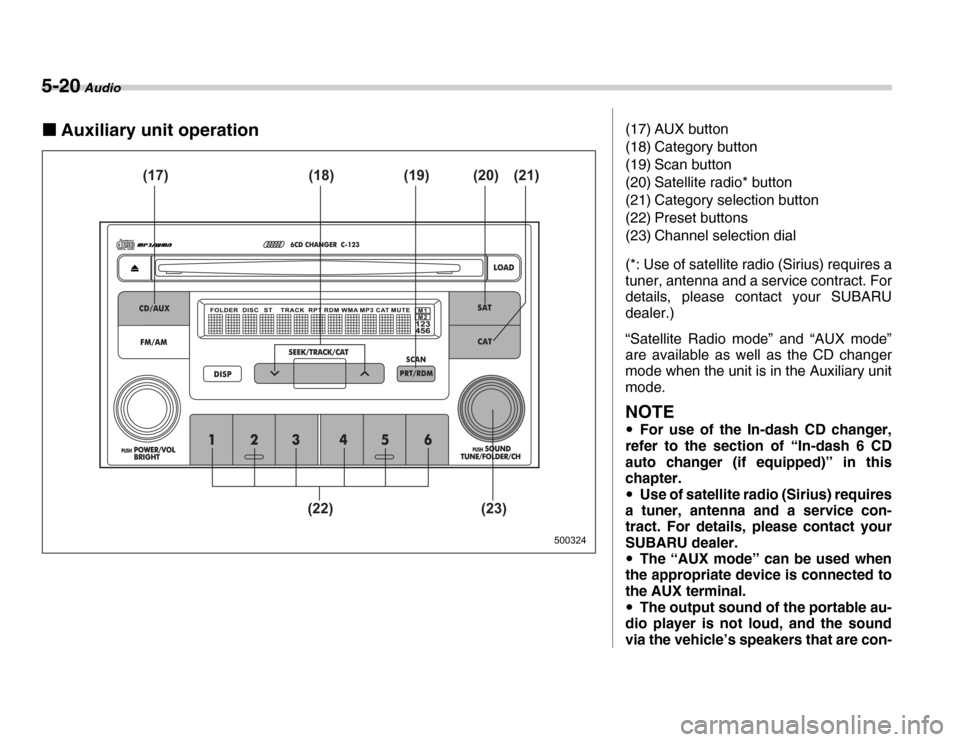
„Auxiliary unit operation
500324
(17) (19) (18) (20) (21)
(22) (23)
(17) AUX button
(18) Category button
(19) Scan button
(20) Satellite radio* button
(21) Category selection button
(22) Preset buttons
(23) Channel selection dial
(*: Use of satellite radio (Sirius) requires a
tuner, antenna and a service contract. For
details, please contact your SUBARU
dealer.)
“Satellite Radio mode” and “AUX mode”
are available as well as the CD changer
mode when the unit is in the Auxiliary unit
mode.
NOTE y For use of the In-dash CD changer,
refer to the section of “In-dash 6 CD
auto changer (if equipped)” in this
chapter. y Use of satellite radio (Sirius) requires
a tuner, antenna and a service con-
tract. For details, please contact your
SUBARU dealer. y The “AUX mode” can be used when
the appropriate device is connected to
the AUX terminal. y The output sound of the portable au-
dio player is not loud, and the sound
via the vehicle’s speakers that are con-