2007 SUBARU FORESTER Audio
[x] Cancel search: AudioPage 159 of 356
Audio 5-5
– CONTINUED –
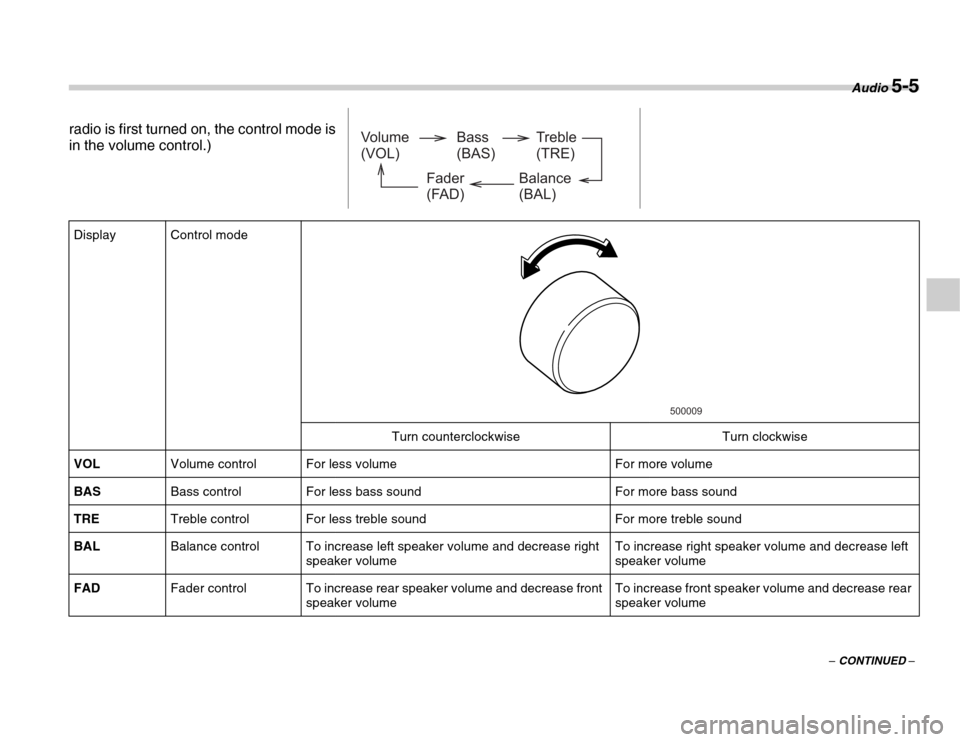
radio is first turned on, the control mode is
in the volume control.)Volume (VOL)Bass(BAS)Treble(TRE)
Balance(BAL)
Fader
(FAD)
Display Control mode
Turn counterclockwise Turn clockwise
VOL Volume control For less volume For more volume
BAS Bass control For less bass sound For more bass sound
TRE Treble control For less treble sound For more treble sound
BAL Balance control To increase left speaker volume and decrease right
speaker volume To increase right speaker volume and decrease left
speaker volume
FAD Fader control To increase rear speaker volume and decrease front
speaker volume To increase front speaker volume and decrease rear
speaker volume
500009
Page 160 of 356

5-6 Audio
TFM/AM band selection button
(BAND)
Push the “BAND” button when the radio is
on to select FM1, FM2 or AM band recep-
tion. Each time this button is pressed, the
band will change in the following order:
The display indicates which one is cur-
rently selected. T Stereo indicator
The stereo indicator “ST” will come on
when an FM stereo broadcast is received. T Tuning (TUNE)
V Manual tuning (TUNE)
Push the “ ” side of the tuning button
(3) to increase the tuning frequency and
press the “ ” side of the button to de-
crease it.
Each time the button is pressed, the fre-
quency changes 10 KHz in the AM wave-
band and 0.2 MHz in the FM waveband. T Seek tuning
If the tuning button (3) is pressed for long-
er than half of a second, the radio will be-
gin to automatically search for receivable frequencies and will stop at the first one
found. This function may not be available,
however, when radio signals are weak. In
such a situation, perform manual tuning to
select the desired station. T
Automatic tuning (SCAN)
Press the “SCAN” button (6) to change the
radio to the SCAN mode. In this mode, the
radio scans through the radio band until a
station is found. The radio will stop at the
station for five seconds while displaying
the frequency, after which scanning will
continue until the entire band has been
scanned from the low end to the high end.
Press the “SCAN” button again to cancel
the SCAN mode and to stop on any dis-
played frequency.
When the “SCAN” button is pressed for
automatic tuning, stations are scanned in
the direction of low frequencies to high fre-
quencies only.
Automatic tuning may not function proper-
ly if the station reception is weakened by
distance from the station or proximity to
tall buildings and hills. T Selecting preset stations
Presetting a station with a preset button
(4) allows you to select that station in a
single operation. Up to six AM, FM1 and
FM2 stations each may be preset. T
How to preset stations
1. Press the “BAND” selection button to
select AM, FM1 or FM2 reception.
2. Press the “SCAN” button (6) or tune
the radio manually until the desired station
frequency is displayed.
3. Press one of the preset buttons (4) for
at least 2 seconds to store the frequency.
At this time, there will momentarily be no
sound from the radio. If the button is
pressed for less than 2 seconds, the pre-
ceding selection will remain in memory.
NOTE
y If the connection between the radio
and battery is broken for any reason
such as vehicle maintenance or radio
removal, all stations stored in the pre-
set buttons are cleared. If this occurs,
it is necessary to reset the preset but-
tons. y If a cell phone is placed near the ra-
dio, it may cause the radio to emit
noise when it receives calls. This noise
does not indicate a radio fault.
FM1 FM2 AM
Page 161 of 356
Audio 5-7
– CONTINUED –
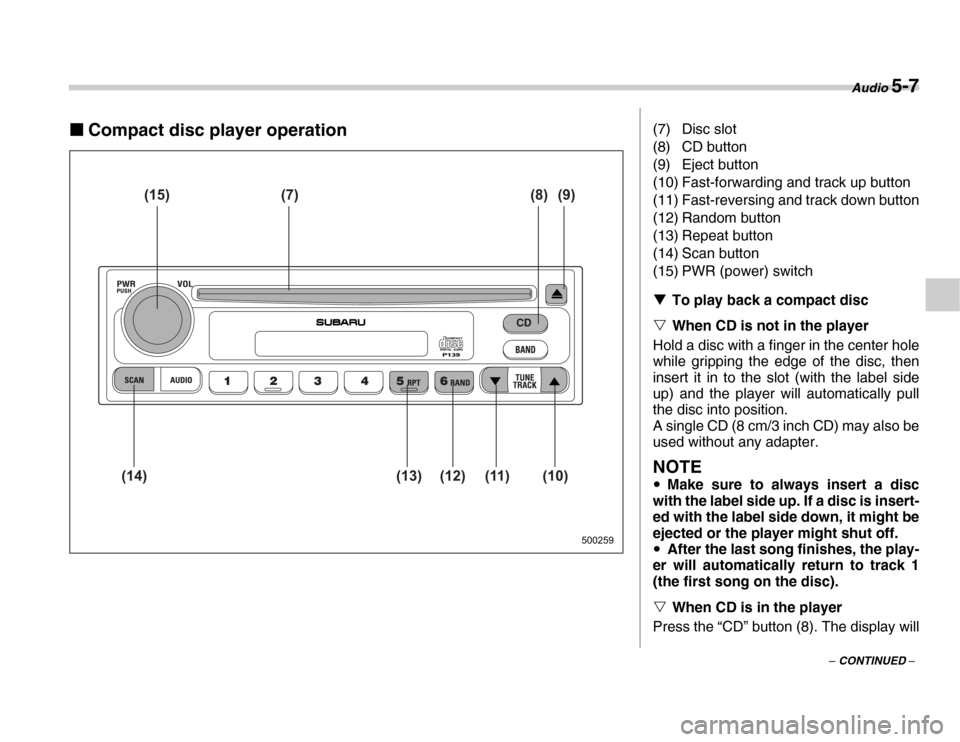
„Compact disc player operation
500259
(15) (7) (8) (9)
(10)
(11)
(12)
(13)
(14)
(7) Disc slot
(8) CD button
(9) Eject button
(10) Fast-forwarding and track up button
(11) Fast-reversing and track down button
(12) Random button
(13) Repeat button
(14) Scan button
(15) PWR (power) switch T To play back a compact disc
V When CD is not in the player
Hold a disc with a finger in the center hole
while gripping the edge of the disc, then
insert it in to the slot (with the label side
up) and the player will automatically pull
the disc into position.
A single CD (8 cm/3 inch CD) may also be
used without any adapter.
NOTE
y Make sure to always insert a disc
with the label side up. If a disc is insert-
ed with the label side down, it might be
ejected or the player might shut off. y After the last song finishes, the play-
er will automatically return to track 1
(the first song on the disc). V When CD is in the player
Press the “CD” button (8). The display will
Page 162 of 356

5-8 Audio
show “CD-IN” and the player will start
playback.
NOTE
After the last song finishes, playback
will automatically return to track 1 (the
first song on the disc). TTo stop playback of a CD
When the “PWR” button (15) is pressed
during playback of a CD, the CD stops
playing temporarily. To let the CD resume
playing, press the button again. T To select a song from its beginning
V Forward direction
Briefly press the “ ” side of the button
(10) to skip to the beginning of the next
track. Each time this side of the button is
pressed, the indicated track number will
increase. V Backward direction
Briefly press the “ ” side of the button
(11) to skip to the beginning of the current
track. Each time this side of the button is
pressed, the indicated track number will
decrease. T Fast-forwarding and fast-reversing
V Fast-forwarding
Press the “ ” side of the button (10) continuously to fast-forward the disc.
Release the button to stop fast-forward-
ing. V
Fast-reversing
Press the “ ” side of the button (11)
continuously to fast-reverse the disc.
Release the button to stop fast-reversing. T Repeat playback
Briefly press the “RPT” button (13) while a
song is playing to play the song repeated-
ly. The “RPT” indicator will come on and
the song will be played continuously. To
cancel the repeat mode, press the button
again. Then the “RPT” indicator goes out,
and normal playback mode is restored. T Random playback
Briefly press the “RAND” button (12) while
a disc is being played back to play all
songs on the disc in a random order. The
“RAND” indicator will come on and all
songs on the disc will be played in a ran-
dom order.
To cancel the random mode, press the
button again. Then the “RAND” indicator
goes out, and normal playback mode is
restored. T Scan
Briefly press the “SCAN” button (14), and
you can hear the first 10 seconds of each track to search for the desired program.
To continue listening to the program,
press the “SCAN” button again. After all
tracks on the disc has been scanned, nor-
mal playback mode is restored. T
To eject a disc from the player
When a disc is being played back or when
a disc is in the player, press the eject but-
ton “ ” (9). The disc will be ejected.
The disc may be removed even when the
ignition switch is in the “LOCK” position.
NOTE
Avoid driving the vehicle with a CD
sticking out, because vibration might
make it fall out.
Page 163 of 356

Audio 5-9
– CONTINUED –
„CD changer control (if optional in-dash CD changer is connect- ed)
An optional CD changer can be connected to this audio unit. Consult the instructions that
accompany the CD changer for operating the CD changer itself (e.g., how to load or un-
load CDs). See your SUBARU dealer for more information.
500260
(16)
(17)
(18)
(19)
(20)
(16) CD button
(17) Track selection buttons
(18) RAND (Random) button
(19) RPT (Repeat) button
(20) SCAN button T To start playback
When the “CD” button (16) is pressed, the
CD changer will start playback. The dis-
play shows the current disc number, track
number and the elapsed time during play-
back.
NOTE
y If a disc is in the player, the “DISC”
button is used to change from CD play-
er operation to DISC changer opera-
tion. Each time the “DISC” button is
pressed, the operating mode will
change alternately. y At the end of the disc, the player au-
tomatically continues with the next
disc. y After playback on the last disc finish-
es, playback will automatically return
to the first disc. y If you have loaded fewer than 6
discs, any missing disc is automatical-
ly skipped. T Selection of a desired disc
You can select a desired disc from among
Page 164 of 356

5-10 Audio
the discs contained in the CD changer
only by pressing the corresponding num-
ber on one of the disc select buttons. If
you are to listen to the 5th disc in the CD
changer, press the “5” button of the disc
select buttons. All other discs in the CD
changer can also be selected in a similar
way.
NOTE yNo disc change takes place if the
button corresponding to the storage
tray in which no disc is loaded is
pressed. y If the disc select button correspond-
ing to the disc now in playback is
pressed again, the disc will be replayed
from its beginning. T To select a song from its beginning
V Forward direction
Briefly press the “ ” side of the button
(17) to skip to the beginning of the next
track. Each time this side of the button is
pressed, the indicated track number will
increase. V Backward direction
Briefly press the “ ” side of the button
(17) to skip to the beginning of the current
track. Each time this side of the button is
pressed, the indicated track number will decrease. T
Fast-forwarding and fast-reversing
V Fast-forwarding
Press the “ ” side of the button (17)
continuously to fast-forward the disc.
Release the button to stop fast-forward-
ing.
If you continue fast-forwarding to the end
of the disc, the CD changer will automati-
cally stop fast-forwarding and start play-
back beginning with the first track on the
current disc. V Fast-reversing
Press the “ ” side of the button (17)
continuously to fast-reverse the disc.
Release the button to stop fast-reversing.
If you continue fast-reversing to the begin-
ning of the disc, the CD changer will auto-
matically stop fast-reversing and start
playback beginning with the first track on
the current disc. T Repeat playback
Press the “RPT” button (19) while a song
is playing to play the song repeatedly. The
“RPT” indicator will come on and the song
will be played continuously. To cancel the
repeat mode, press the button again.
Then the “RPT” indicator goes out, and
normal playback mode is restored. T
Random playback
Press the “RAND” button (18) while a disc
is being played back to play all songs on
the disc in a random order. The “RAND”
indicator will come on and all songs on the
disc will be played in a random order.
To cancel the random mode, press the
button again. Then the “RAND” indicator
goes out, and normal playback mode is
restored. T Scan (a convenient way to become
familiar with a disc)
1. Press the “SCAN” button (20). – The display shows “SCAN” and the
track number being scanned.
– You hear the first 10 seconds of each
track.
– The operation is automatically
cleared after playing all programs.
Then, normal playback starts.
2. Press the “SCAN” button again when
you hear a track you like. – Normal playback resumes.
T To stop playback
To stop playback and switch over to the
radio mode, press the “BAND” button.
Page 165 of 356
Audio 5-11
– CONTINUED –
Type B audio set (if equipped)
The audio set will operate only when the ignition switch is in the “ACC” or “ON” position. „Radio operation
500325
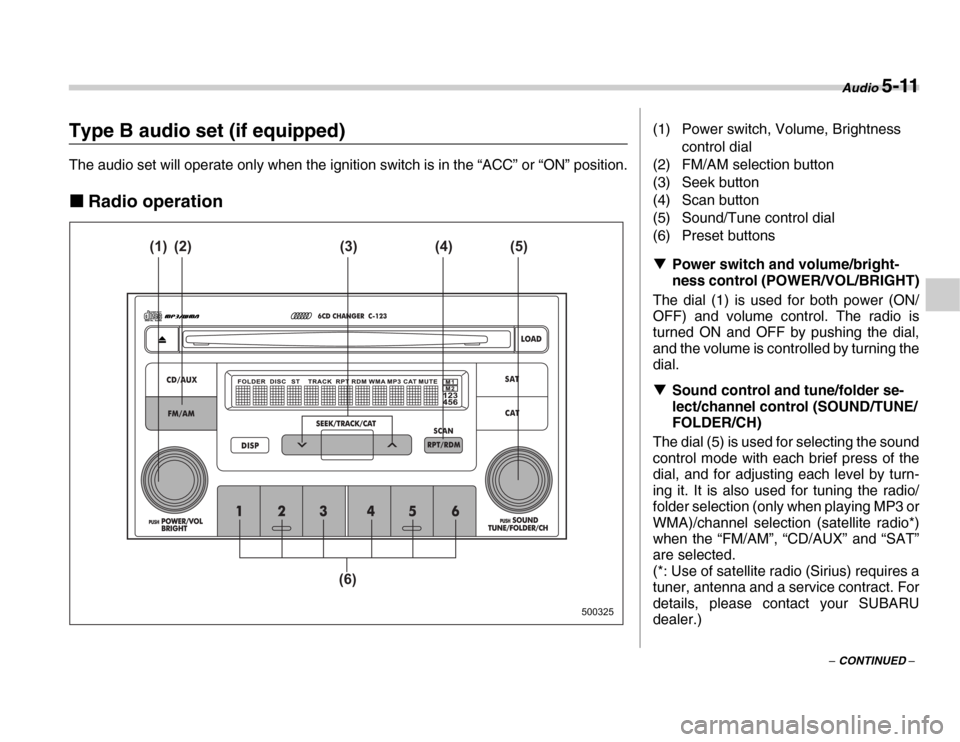
(1) (2) (4)
(3) (5)
(6)
(1) Power switch, Volume, Brightness control dial
(2) FM/AM selection button
(3) Seek button
(4) Scan button
(5) Sound/Tune control dial
(6) Preset buttons T Power switch and volume/bright-
ness control (POWER/VOL/BRIGHT)
The dial (1) is used for both power (ON/
OFF) and volume control. The radio is
turned ON and OFF by pushing the dial,
and the volume is controlled by turning the
dial. T Sound control and tune/folder se-
lect/channel control (SOUND/TUNE/
FOLDER/CH)
The dial (5) is used for selecting the sound
control mode with each brief press of the
dial, and for adjusting each level by turn-
ing it. It is also used for tuning the radio/
folder selection (only when playing MP3 or
WMA)/channel selection (satellite radio*)
when the “FM/AM”, “CD/AUX” and “SAT”
are selected.
(*: Use of satellite radio (Sirius) requires a
tuner, antenna and a service contract. For
details, please contact your SUBARU
dealer.)
Page 166 of 356
5-12 Audio
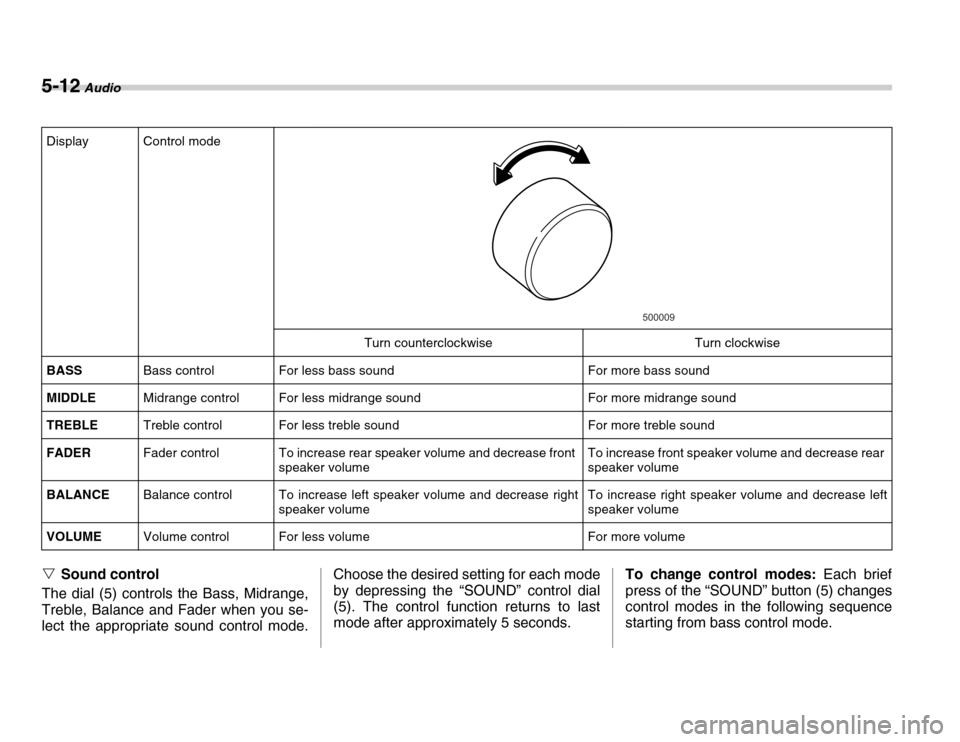
VSound control
The dial (5) controls the Bass, Midrange,
Treble, Balance and Fader when you se-
lect the appropriate sound control mode. Choose the desired setting for each mode
by depressing the “SOUND” control dial
(5). The control function returns to last
mode after approximately 5 seconds.
To change control modes:
Each brief
press of the “SOUND” button (5) changes
control modes in the following sequence
starting from bass control mode.
Display Control mode
Turn counterclockwise Turn clockwise
BASS Bass control For less bass sound For more bass sound
MIDDLE Midrange control For less midrange sound For more midrange sound
TREBLE Treble control For less treble sound For more treble sound
FADER Fader control To increase rear speaker volume and decrease front
speaker volume To increase front speaker volume and decrease rear
speaker volume
BALANCE Balance control To increase left speaker volume and decrease right
speaker volume To increase right speaker volume and decrease left
speaker volume
VOLUME Volume control For less volume For more volume
500009