2007 SKODA SUPERB battery
[x] Cancel search: batteryPage 40 of 259

Unlocking and locking39
Using the systemSafetyDriving TipsGeneral MaintenanceBreakdown assistanceTechnical Data
WARNING
If the vehicle is locked from the outside and the safe securing system is acti-
vated, there must not be any person in the vehicle as it is then not possible
to open either a door or a window from the inside. The locked doors make it
more difficult for rescuers to get into the vehicle in an emergency - hazard!
Note
•Operate the radio remote control only when the doors and boot lid are closed
and you have visual contact with the vehicle.
•Once in the car, you must not press the lock button of the master key before
inserting the key into the ignition lock in order to avoid the car being inadvertently
locked and, in addition, the anti-theft al arm system* being switched on. Should this
happen, press the unlock button
of the master key.
Synchonisation of the remote control
If the vehicle cannot be unlocked by actuatin g the remote control system then it is
possible that the code in the key and the control unit in the vehicle are no longer
synchronised. This can occur when the butt ons on the radio-operated key are actu-
ated a number of times outside of the operative range of the equipment or the
battery on the remote control was replaced.
This means it is necessary to synchronise the code as follows:
•Press any button on the remote control.
•pressing of the button means that the door will unlock with the key within 1
minute.
Anti-theft alarm system*
Description
The anti-theft alarm system increases the level of protection against people seeking
to break into the vehicle. The system triggers audible and visual warning signals if
an attempt is made to break into the vehicle.
How is the alarm sy stem switched on?
The anti-theft alarm system is activated automatically when the vehicle is locked
with the key on the closed driver's door or by using the remote control. It is acti-
vated 30 seconds after closing the door.
How is the alarm sy stem switched off?
The anti-theft alarm system is switched off if the vehicle is unlocked by only using
the remote control. The vehicle is automati cally locked again if the vehicle is not
opened within 30 seconds after reactivating the anti-theft alarm system.
Once you unlock the vehicle by inserting the key into the driver door you then have
to insert the key into the ignition lock and switch the ignition on within 15 seconds
after opening the door in order to deactivate the anti-theft alarm system. The
alarm will be triggered if you do not switch on the ignition within 15 seconds.
When is the alarm triggered?
The following security areas of the locked vehicle are monitored:
•Bonnet,
•Boot lid,
•Doors,
•Ignition lock,
•Vehicle interior* ⇒page 40,
•A drop in voltage of the on-board power supply.
An alarm is immediately triggered if either of the two battery terminals is discon-
nected while the anti-theft alarm system is activated.
If you unlock and open the boot lid with the key, the alarm is immediately triggered.
NKO B5 20.book Page 39 Friday, March 2, 2007 1:46 PM
Page 43 of 259

Unlocking and locking
42
A button for the relevant window is provided in these doors.
Opening a window
– Press the appropriate button down and hold it until the window has
moved into the desired position.
Closing a window
– Press the appropriate button up and hold it until the window has
moved into the desired position.
WARNING
The system is fitted with a force limiter. The closing process will be stop if an
obstruction is detected and the window will open again. You should then
take particular care when closing the windows! You may otherwise suffer
severe injuries as a result of getting an arm, for example, jammed in the
window!
Note
After switching the ignition off, it is still possible to open or close the windows for a
further 10 minutes. The automatic closing and opening functions will not operate
during this time. The power windows are switched off completely once you open
the driver or front passenger door.
Window convenience operation
You can open and close the electric ally powered windows as follows
when unlocking and locking the vehicle (just closing of the sliding roof).
Opening windows with the key
– Turn the key in the lock of the driver door into the opening position or
press the opening button of the radio remote control until all the
windows are open. Closing windows with the key
– Turn the key in the lock of the driver door into the closing position or
press the closing button of the remote control until all the windows
are closed ⇒.
You can interrupt the opening or closing operation of the windows immediately by
releasing the key of the button of the remote control.
WARNING
•Obstruction protection is not active during the convenience operating
feature ⇒ in “Button in front passenger door and in rear doors” on
page 41.
•You should take particular care when closing the windows! You may
otherwise suffer severe injuries as a re sult of getting an arm, for example,
jammed in the window!
Operational faults
Electrically operated power windows do not operate
If the battery of the car has been disco nnected and then reconnected, the electri-
cally operated power windows do not oper ate. The system must be activated.
Proceed as follows in order to re-establish the function:
•turn the key in the lock of the driver d oor into the closing position and hold it
there until all of the windows are closed,
•release the key,
•Once again insert the key and turn it into the closing position for about 3
seconds.
Operation in winter
Ice accumulating on the surface of the windows during the winter may result in a
greater resistance when closing the windows and the window may stop and move
back several centimetres
Proceed as follows to close the window fully:
NKO B5 20.book Page 42 Friday, March 2, 2007 1:46 PM
Page 44 of 259

Unlocking and locking43
Using the systemSafetyDriving TipsGeneral MaintenanceBreakdown assistanceTechnical Data
•turn the key in the lock of the driver door into the closing position and hold it
there until all of the windows are closed,
•repeat this operation until the window stops.
WARNING
•Obstruction protection is not active during the closing of the windows
⇒ in “Button in front passenger door and in rear doors” on page 41.
•You should take particular care when closing the windows! You may
otherwise suffer severe injuries as a re sult of getting an arm, for example,
jammed in the window!
Electric sliding/tilting roof*
Description
The sliding/tilting roof is operated by means of the control dial ⇒fig. 31 and only
functions when the ignition is switched on . The control dial has a number of fixed
positions.
After switching the ignition off, it is still possible to open or close the sliding/tilting
roof for a further 10 minutes. It is no long er possible to operate the sliding/tilting
roof after opening or closing on e of the front doors, however.
Note
•If the battery has been disconnected and reconnected, it is possible that the
sliding/tilting roof does not close fully. Here you have to set the control dial to the
switch position and press it forward for about 10 seconds.
•It is necessary after each emergency oper ation (using crank handle) to move the
sliding/tilting roof into the basic position. Here you have to set the control dial to
the switch position and press it forward for about 10 seconds.
Opening and tilting
Comfort position
– Turn the switch to position ⇒fig. 31 .
Opening roof fully
– Turn the switch to position and hold it in this position (spring-
tensioned position).
Tilting roof
– Turn the switch to position .
The wind noise in the comfort position is less than when the roof is fully opened.
The sun screen is also opened automatica lly when the roof slides open. You can
slide the sun screen into the opened or closed position by hand when the
sliding/tilting roof is closed. (This does not apply for models fitted with
sliding/tilting roof with solar cells, in which the sun screen is a fixed element.)
Caution
It may be necessary during winter to remo ve any ice and snow in the area of the
sliding/tilting roof before opening it in order to prevent damaging the opening
mechanism.
Fig. 31 Control dial for
the power sliding/tilting
roof
AA
AA
AC
AB
AD
NKO B5 20.book Page 43 Friday, March 2, 2007 1:46 PM
Page 51 of 259

Lights and Visibility
50
– Switch off the ignition.
– Flash one time with the headlights.
– Open the door, the low beam lights up.
If you shift the lever into the main be am position, the main beam lights up.
If the door remains open, the ligh t remains on for about 3 minutes.
If the door is closed, the light remains on for about 30 seconds.
Interior lighting
Front interior lighting and storage compartment on front
passenger side
Door contact setting
– Position the switch ⇒ fig. 40 into middle position
.
Switching the interior light on
– Press the switch on the symbol
. Switching the interior light off
– Press the switch on the symbol O.
Front reading lights
– Press on one of the switches
⇒fig. 40 in order to switch the right
or left reading light on or off.
Lighting of storage compartme nt on the front passenger side
– Open the flap of the storage compartment on the front passenger side, the lighting of the storage compartment switches on automati-
cally and switches off when the flap is closed.
If the interior lighting is fitted with a dela yed-off control*, the lighting of the interior
of the car remains on for a few seconds after the doors are closed.
The interior light comes on as soon as yo u unlock the car or open a door or when
the ignition key has been removed. The light goes out again about 30 seconds after
all the doors have been closed. The interior lighting is switched off when you lock
the car or switch the ignition on. This on ly applies when the switch for the corre-
sponding interior lights is standing n the door contact setting.
The interior lighting goes off after about 60 minutes when a door has been left open
in order to avoid discharging the battery of the vehicle.
Two LEDs are integrated in the interior li ghting, which illuminates the shift lever and
the middle of the dash panel. They are switched on automatically when switching
on the parking light.
In addition, the lighting of the door handle is switched on after the ignition is
switched on when the side lights are switched on.
B1Z-0042HB1Z-0042H
Fig. 40 Detail of the
headliner: front interior
lighting
AA
AA
AA
AB
NKO B5 20.book Page 50 Friday, March 2, 2007 1:46 PM
Page 67 of 259

Seats and Stowage
66
Seat heaters*
You can heat the surfaces of the seats and of the backrests of the front
seats and the two outer rear seats.
Front seats
– You can switch on and adjust the heaters of the driver and front
passenger seats by turning the rotary controls and ⇒fig. 62 ,
respectively. Rear seats
– You can switch on and adjust the heat
ers of the left and right rear seats
by turning the rotary controls and ⇒fig. 63 , respectively.
If the rotary controls are in the 0 position, the seat heater is switched off. When the
seat heater is switched on, the numerical marking of the rotary control is illumi-
nated. The control range extends from 1 to 5.
Caution
•You should not kneel on the seats or otherwise apply pressure at specific points
in order to avoid damaging the heating elements of the seat heaters.
•Do not clean the seats moist ⇒page 178.
•If you have a subdued pain and/or temperature sensitivity, e.g. through medi-
cation, paralysis or because of chronic i llness (e.g. diabetes), we recommend not
to use the seat heating. Th is can lead to burns on the back, the posterior and the
legs which are difficult to heal. If the se at heating is used, we recommend to make
regular breaks in your journey when driving long distances, so that in specific cases
as mentioned above the body can recuperate from the stress of the journey. Please
consult your doctor, who can eval uate your specific condition.
Note
The seat heating should only be switched on when the engine is running. This has
a significant effect of savi ng on the battery capacity.
Pedals
You should use only footmats which do not obstruct the movement of the pedals
and have an anti-slip protection.
Operation of the pedals must not be hindered!
Fig. 62 Dash panel:
Control dial for heating
the front seats
Fig. 63 Centre console at
rear: Rotary controls for
heaters of rear seats
A1A2
AAAB
NKO B5 20.book Page 66 Friday, March 2, 2007 1:46 PM
Page 74 of 259

Seats and Stowage73
Using the systemSafetyDriving TipsGeneral MaintenanceBreakdown assistanceTechnical Data
The cool box behind the armrest of the rear seats*
Using the system
The contents of the cool box is cool ed to a temperature of about 20 °C
below the ambient temperature, but to a maximum of approx.+ 5 °C.
Opening and Closing
– Pull the handle ⇒fig. 74 and pull the lid downwards.
– Open up the lid of the cool box upwards until it is heard to lock.
Switching on and off
– The cooling action of the cool box is switched on and off using switch
⇒ fig. 74 . It is signalised by the lighting up of the indicator light on
the switch.
You can remove the cool box if necessary ⇒page 74. You can replace the cool box
with a storage net ⇒fig. 75 .
Caution
Never cover the ventilator on the cool box otherwise it will overheat and could be
damaged.
Note
The cool box also operates if the ignition is switched off. The battery will not run
down fully, however, since the system is fitted with a device which monitors the
battery charge level. The cool box will be automatically switched off when it is
threatening to empty the battery.
Partition with storage net
If the cool box is removed, install the partition with the storage net
⇒ fig. 75 which is fixed with a velcro fastener to the side wall of the cool
box.
– The partition is installed and removed in a similar way to the cool box ⇒page 74.
Fig. 74 Cool box
AA
Fig. 75 Partition with
storage net
NKO B5 20.book Page 73 Friday, March 2, 2007 1:46 PM
Page 82 of 259
Seats and Stowage81
Using the systemSafetyDriving TipsGeneral MaintenanceBreakdown assistanceTechnical Data
Cigarette lighters and power sockets
Cigarette lighter
You can also use the socket on th e cigarette lighter for other elec-
trical appliances.
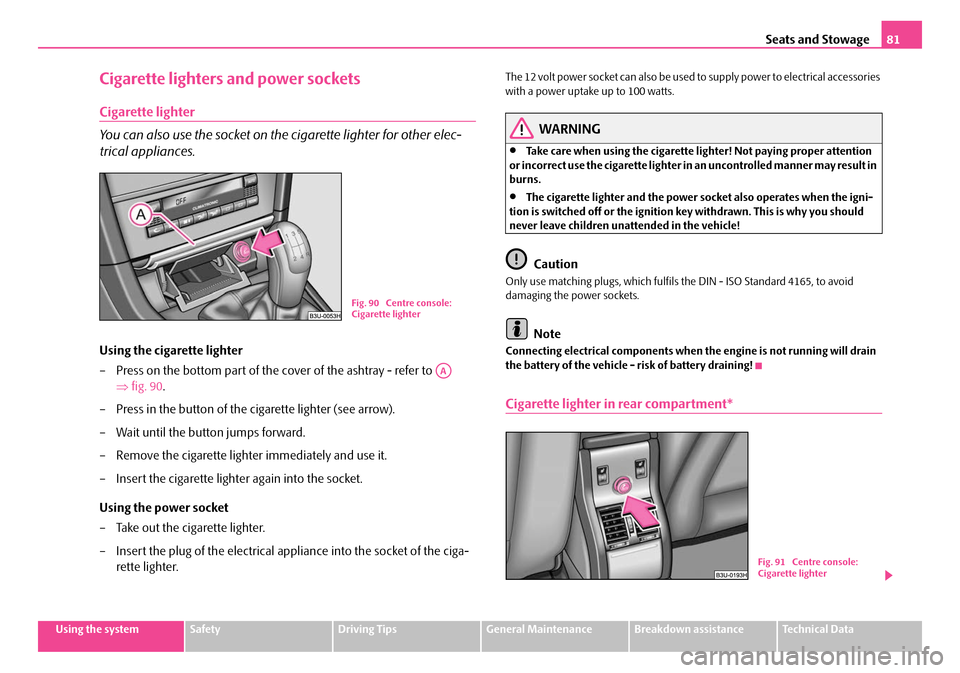
Using the cigarette lighter
– Press on the bottom part of the cover of the ashtray - refer to
⇒fig. 90 .
– Press in the button of the cigarette lighter (see arrow).
– Wait until the button jumps forward.
– Remove the cigarette lighter immediately and use it.
– Insert the cigarette lighter again into the socket.
Using the power socket
– Take out the cigarette lighter.
– Insert the plug of the electrical a ppliance into the socket of the ciga-
rette lighter.
The 12 volt power socket can also be used to supply power to electrical accessories
with a power uptake up to 100 watts.
WARNING
•Take care when using the cigarette li ghter! Not paying proper attention
or incorrect use the cigarette lighter in an uncontrolled manner may result in
burns.
•The cigarette lighter and the power so cket also operates when the igni-
tion is switched off or the ignition key withdrawn. This is why you should
never leave children unattended in the vehicle!
Caution
Only use matching plugs, which fulfils the DIN - ISO Standard 4165, to avoid
damaging the power sockets.
Note
Connecting electrical components when the engine is not running will drain
the battery of the vehicle - risk of battery draining!
Cigarette lighter in rear compartment*
Fig. 90 Centre console:
Cigarette lighter
AA
B1Z-0042HB1Z-0042HFig. 91 Centre console:
Cigarette lighter
NKO B5 20.book Page 81 Friday, March 2, 2007 1:46 PM
Page 83 of 259

Seats and Stowage
82
Operating and further information regarding the use of the cigarette lighter
⇒ page 81.
Power socket in the luggage compartment
– Open the cover of the power socket ⇒fig. 92 .
– Connect the plug of the electr ical appliance to the socket.
The power socket fulfils the requirements of DIN standard ISO 4165 and must only
be used for connecting approved electrical accessories with a power uptake of up
to 100 watts. The vehicle battery will be discharged in the process if the engine is
stationary.
Further information concerning use of the power socket ⇒page 205, “Accessories
and replacement parts”.
Storage facilities
Overview
You will find the following storag e facilities in your vehicle:
WARNING
•Please do not place anything on top of the dash panel. Such objects
might slide or fall down when driving (when accelerating or cornering) and
may distract you from concentrating on the traffic situation - risk of acci-
dent!
•Ensure that when driving no objects from the centre console of from
other storage possibilities may get into the footwell of the driver. You would
then no longer be able to apply the br akes, operate the clutch or accelerator
- risk of accident!
Fig. 92 Luggage
compartment: Power
socket
First-aid box⇒ page 207
Stowage compartment for warning triangle⇒page 207
Storage compartment on the front passenger side⇒page 83
Storage drawer*⇒page 84
Stowage compartment in centre console⇒page 84
Stowage compartment for spectacles*⇒page 85
Stowage compartment below steering wheel⇒page 85
Stowage compartment in door panel⇒page 85
Stowage compartment for an umbrella*⇒page 86
Armrest with stowage compartment⇒page 87
Rear armrest with stowage compartment*⇒page 87
Clothes hooks⇒page 88
NKO B5 20.book Page 82 Friday, March 2, 2007 1:46 PM