2007 SKODA ROOMSTER Time
[x] Cancel search: TimePage 105 of 248
Communication104
Universal telephone preinstallation with voice
control*
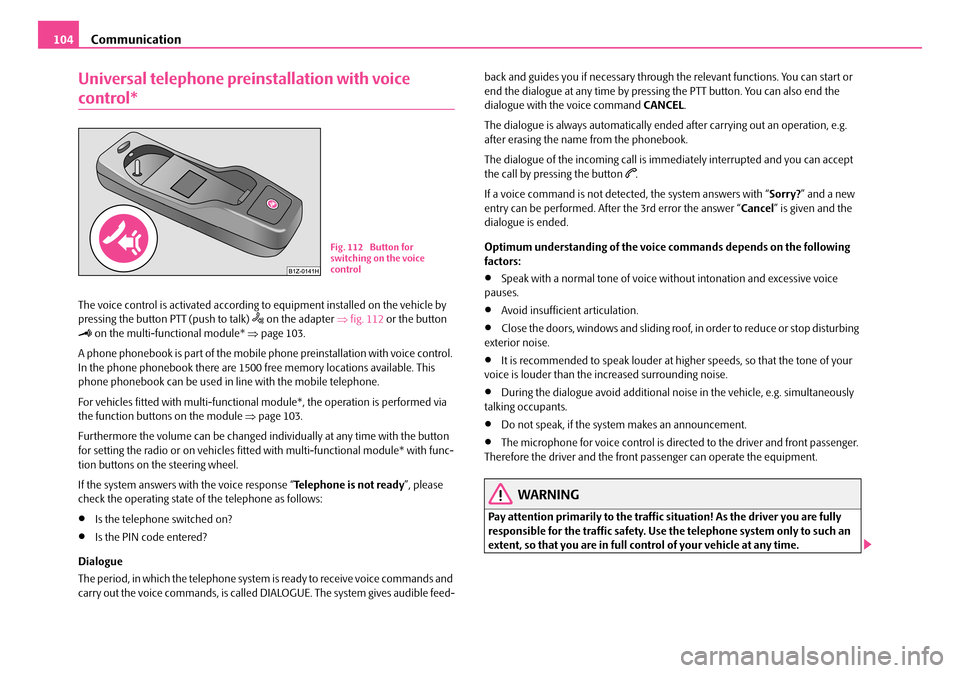
The voice control is activated according to equipment installed on the vehicle by pressing the button PTT (push to talk) on the adapter ⇒fig. 112 or the button on the multi-functional module* ⇒page 103.
A phone phonebook is part of the mobile phone preinstallation with voice control. In the phone phonebook there are 1500 free memory locations available. This phone phonebook can be used in line with the mobile telephone.
For vehicles fitted with multi-functional module*, the operation is performed via the function buttons on the module ⇒page 103.
Furthermore the volume can be changed indi vidually at any time with the button for setting the radio or on vehicles fitted with multi-functional module* with func- tion buttons on the steering wheel.
If the system answers with the voice response “ Telephone is not ready”, please check the operating state of the telephone as follows:
•Is the telephone switched on?
•Is the PIN code entered?
Dialogue
The period, in which the telephone system is ready to receive voice commands and carry out the voice commands, is called DIALOGUE. The system gives audible feed-
back and guides you if necessary through the relevant functions. You can start or end the dialogue at any time by pressi ng the PTT button. You can also end the dialogue with the voice command CANCEL.
The dialogue is always automatically ended after carrying out an operation, e.g. after erasing the name from the phonebook.
The dialogue of the incoming call is i mmediately interrupted and you can accept the call by pressing the button .
If a voice command is not detected, the system answers with “ Sorry?” and a new entry can be performed. After the 3rd error the answer “ Cancel” is given and the dialogue is ended.
Optimum understanding of the voice commands depends on the following factors:
•Speak with a normal tone of voice wi thout intonation and excessive voice pauses.
•Avoid insufficient articulation.
•Close the doors, windows and sliding roof, in order to reduce or stop disturbing exterior noise.
•It is recommended to speak louder at higher speeds, so that the tone of your voice is louder than the increased surrounding noise.
•During the dialogue avoid additional nois e in the vehicle, e.g. simultaneously talking occupants.
•Do not speak, if the system makes an announcement.
•The microphone for voice control is directed to the driver and front passenger. Therefore the driver and the front passenger can operate the equipment.
WARNING
Pay attention primarily to the traffic si tuation! As the driver you are fully responsible for the traffic safety. Use the telephone system only to such an extent, so that you are in full control of your vehicle at any time.
Fig. 112 Button for switching on the voice control
NKO A05R 20 MR08.book Page 104 Wednesday, March 28, 2007 9:42 AM
Page 107 of 248

Communication106
When inserting the mobile phone the next time only perform an update of the rele- vant phone book. The updating takes a few minutes, first of all the last read phone- book appears on the information displa y. Newly stored telephone numbers are only shown after the updating has ended.
The telephone numbers are loaded from the mobile phone depending on the memory date, beginning with the oldest entry. If the number of telephone numbers exceed 1 500, the newly stored telephone numbers are not loaded from the mobile phone. If several telephon e numbers in the phonebook are under one name, all the telephone numbers with the same name are loaded separately.
If a telephone event (e.g. incoming or outg oing call, dialogue of the voice control) occurs during the updating procedure, the updating is interrupted. After the tele- phone event has ended, the updating starts anew.
The following is shown one after the other on the display:
PLEASE WAIT
LOADING... LAST CALLS
LOADING... ACCEPTED CALLS
LOADING... MISSED CALLS
LOADING... PHONE BOOK
After loading is completed, phone book, la st calls, accepted calls, missed calls and memory appear in the display.
Using the system
•You can scroll through the telephone me mory for individual names or menus by slowly turning the thumbwheel ⇒page 105, fig. 114.
•You can scroll through from A to Z or from Z to A within the telephone memory by slowly turning the thumbwheel downwards or upwards.
•You can always return to one level higher in the menu of the information display by pressing the button at the top for a lengthy period.
•The selected menu is displayed by briefly pressing the button .
Overview of the possible functions and read outs:
You can operate the mobile phone via the voice control ⇒page 104 or via the buttons of the multi- functional module* ⇒page 103.
Note
It a yellow warning symbol lights up in the information display, the menu phone- book cannot be selected.
Voice commands
Voice commands for mo bile phone operation
AA
AA
AB
AB
ActivityRead out in display
Call terminatedINCOMING CALL TERMINATED
Number engagedLINE BUSY
No service foundNO SERVICE
Enter PIN codeENTER PIN
Voice commandActivity
ENTER PIN/PIN CODEAfter this command the PIN code of the mobile phone can be entered ⇒page 107.
DIAL NUMBERAfter this command a telephone number can be entered which establishe s a connection to the requested partner ⇒page 108.
REDIALAfter this command the last selected telephone number is selected again ⇒page 108.
NKO A05R 20 MR08.book Page 106 Wednesday, March 28, 2007 9:42 AM
Page 109 of 248
Communication108
•When entering an incorrect PIN code, the system indicates “The PIN is incor- rect ”.
•If the incorrect PIN code has been entered three times consecutively, the card is blocked. With the aid of the person al unblocking code PUK (Personal Unblock Key), the SIM card can be unblocked. The unblocking code can only be entered via the phone keypad and not through the voice control.
Example for entering the PIN code
You can interrupt the dialogue at any time by pressing the PTT button or with the voice command CANCEL.
Select number
– Press the PTT button.
– Give the command DIAL NUMBER after the signal tone.
After giving this command, the system requests the entry of a telephone number. The telephone number can be entered as an interconnected spoken row of digits (complete number), in the form of order of digits (separation through a brief voice pause) or through individually spoken digits. After each order of digits (separation through brief voice pause) the detected digits are repeated.
The digits zero to nine are permitted. The system detects no continuous digit combinations such as twenty-three, but only individually spoken digits (two, three).
When entering more than 20 digits, the system answers with voice response “ The number is too long ”.
Additionally for international calls a Plus (+) has to be entered in front of the 20 digits.
Example when entering a telephone number
You can interrupt the dialogue at any time by pressing the PTT button or with the voice command CANCEL.
Repeat last call
– Press the PTT button.
– Give the command REDIAL after the signal tone.
After giving this command, the last number selected via voice input is selected again.
Voice commandAnnouncement
ENTER PIN/PIN CODE“ The PIN please”
e.g. ZERO ONE TWO THREE“Zero One Two Three”
If no entry is put in, the following announcement is made after about 5 sec- onds.
“ Possible commands are: store, repeat, back, delete or more digits ”
STORE“The PIN is saved” (end of dialogue)
Voice commandAnnouncement
DIAL NUMBER“ The number please”
e.g. ZERO SIX ZERO THREE“Zero Six Zero Three”
If no entry is put in, the following announcement is made after about 5 sec- onds.
“ Possible commands are: dial, repeat, back, delete or more digits ”
FIVE SEVEN TWO“Five Seven Two”
DIAL“The number is being dialed”
NKO A05R 20 MR08.book Page 108 Wednesday, March 28, 2007 9:42 AM
Page 110 of 248

Communication109
Using the systemSafetyDriving TipsGeneral MaintenanceBreakdown assistancePraktikTechnical Data
Example of redial
You can interrupt the dialogue at any time by pressing the PTT button or with the voice command CANCEL.
Phone voice phonebook*
Store name
– Press the PTT button.
– Give the command SAVE/STORE NAMES/NAME/NUMBER after the
signal tone.
After giving this command, the system requests the entry of a name and a tele- phone number which should be stored in the phone voice phonebook. In the phone voice phonebook up to 50 entries can be stored.
The telephone number can be entered as an interconnected spoken row of digits (complete number), in the form of order of digits (separation through a brief voice pause) or through individually spoken digi ts. After each order of digits (separation through brief voice pause) the detected digits are repeated.
The digits zero to nine are permitted. The system detects no continuous digit combinations such as twenty-three, but only individually spoken digits (two, three).
When entering more than 20 digits, the system answers with voice response “ The number is too long ”.
Additionally a Plus (+) has to be entered in front of the 20 digits.
The stored entry is displayed on the information display* with an arrow in front of the name.
For similar names additional information (e.g. first names) should be stored.
Example for storing in the phone voice phonebook
You can interrupt the dialogue at any time by pressing the PTT button or with the voice command CANCEL.
Select name
– Press the PTT button.
– Give the command DIAL/SELECT NAMES/NAME after the signal
tone.
After giving this command, there is the possibility to select a stored entry out of the phone voice phonebook.
Voice commandAnnouncement
REDIAL“ The number is being dialed”
Voice commandAnnouncement
SAVE/STORE NAMES/NAME/NUMBER“ The name please”
COMPANY XYZ“Please repeat the name”
COMPANY XYZ“The number please”
ZERO ONE TWO THREE“Zero One Two Three”
FOUR FIVE SIX“Four Five Six”
If no entry is put in, the following announcement is made after about 5 sec- onds.
“ Possible commands are: store, repeat, back, delete or more digits ”
STORE“The name COMPANY XYZ is stored”
NKO A05R 20 MR08.book Page 109 Wednesday, March 28, 2007 9:42 AM
Page 111 of 248
Communication110
Example for selecting an entry out of the phone voice phonebook
You can interrupt the dialogue at any time by pressing the PTT button or with the voice command CANCEL.
Listening-in to the voice phonebook
– Press the PTT button.
– Give the command LISTEN TO/PLAY PHONEBOOK after the signal
tone.
After giving this command th e phone voice phone book is read out by the system. By pressing the PTT button when announc ing the desired name the corresponding number is being dialed; the system answers: “ The number is being dialed”.
Delete names
– Press the PTT button.
– Give the command DELETE NAMES/NAME after the signal tone.
After giving this command, there is the possibility to erase a stored entry in the phone voice phone book.
Example for erasing an entry out of the phone voice phonebook
You can interrupt the dialogue at any time by pressing the PTT button or with the voice command CANCEL.
If the user answers with NO, the system answers with “Cancel” and the dialogue is ended.
Delete voice phonebook
– Press the PTT button.
– Give the command DELETE PHONEBOOK after the signal tone.
After giving this command there is the possibility to erase the complete phone voice phone book or the individually st ored names out of the phone phone book.
Voice commandAnnouncement
SELECT NAMES/NAME“The name please”
COMPANY XYZ“Company XYZ”
If no entry is put in, the following announcement is made after about 5 sec- onds.
“ Possible commands are: dial, repeat, back”
DIAL“The number is being dialed”
Voice commandAnnouncement
DELETE NAMES/NAME“The name please”
COMPANY XYZ“Do you want to delete the entry Company XYZ? ”
YES“Delete?”
If no entry is put in, the following announcement is made after about 5 sec- onds.
“ Possible commands are: yes, no, repeat, cor- rect ”
YES“The name is deleted”
NKO A05R 20 MR08.book Page 110 Wednesday, March 28, 2007 9:42 AM
Page 112 of 248

Communication111
Using the systemSafetyDriving TipsGeneral MaintenanceBreakdown assistancePraktikTechnical Data
Example for erasing the complete voice phonebook
You can interrupt the dialogue at any time by pressing the PTT button or with the voice command CANCEL.
Example for erasing individual name s out of the phone voice phonebook
As long as the voice phonebook is read out, other entries can be erased by pressing the PTT button.
You can end the dialogue at any time with the voice command CANCEL.
Bluetooth™*
The Bluetooth technology serves as cableless connection of a mobile
phone to a hands-free system of your vehicle.
In order to connect a mobile phon e with Bluetooth to the hands-free
system, it is necessary to adapt the phone and the hands-free system to
each other. Detailed information on this is provided in the operating
instructions of your mobile phone. The following essential steps for
connecting the mobile phone must be carried out:
– Switch on the ignition.
– If necessary switch on the mobile phone.
– Select the corresponding menu option on the mobile phone, which
searches for suitable Bluetoot h devices (hands-free system).
– If the hands-free system on the display of the mobile telephone
announces Skoda UHV, enter the PIN 1234 within 30 seconds and
wait, until the connection is established. 3)
Voice commandAnnouncement
DELETE PHONEBOOK“ Do you want to delete the whole phonebook? ”
If no entry is put in, the following announcement is made after about 5 sec- onds.
“ Possible commands are: yes, no, repeat ”
YES“Are you sure?”
YES“The phonebook is deleted”
Voice commandAnnouncement
DELETE PHONEBOOK“Do you want to delete the whole phonebook? ”
If no entry is put in, the following announcement is made after about 5 sec- onds.
“ Possible commands are: yes, no, repeat ”
NOThe phonebook is read out.
When announcing the entry to be erased, press the PTT button.“ Do you want to delete (name)?”
If no entry is put in, the following announcement is made after about 5 sec- onds.
“ Possible commands are: yes, no”
YES“The name is deleted”
Continue reading out the phone book.
3)Some mobile phones have a menu, in which the authorization for establishing a Bluetooth connection is performed via the input of a code. If the input for the authorization is neces-sary, it must always be performed when re-establishing the Bluetooth connection.
Voice commandAnnouncement
NKO A05R 20 MR08.book Page 111 Wednesday, March 28, 2007 9:42 AM
Page 113 of 248

Communication112
In the modern business world as well as within the private sector the mobile communication gains increasi ngly on importance. Mobile phones from different manufacturers can be connected with the hands-free system by means of Blue- tooth. During the connecting procedure, no other mobile phone may be connected via Bluetooth with the hands-free system.
Up to four mobile phones can be connected to the hands-free system by means of Bluetooth, whereby only one mobile ph one can communicate via Bluetooth with the hands-free system. If a fifth mobile phone is connected to the handsfree- system, then the telephone, which has not been used together with the handsfree system for the longest period, is disconnected.
Establishing the Bluetooth connection
After switching on the ignition, the Blue tooth connection is automatically estab- lished for the already adapted mobile phone 3). You can hear an increasing tone sequence from the loudspeakers of the vehicle.
Disconnecting the Bluetooth connection
After withdrawing the ignition key, the Bluetooth connection is disonnected. You can hear an increasing tone sequence from the loudspeakers of the vehicle.
WARNING
•Pay attention primarily to the traffic situation! As the driver you are fully responsible for the traffic safety. Use the telephone system only to such an extent, so that you are in full control of your vehicle at any time - risk of acci- dent!
•In the event of air transport, the Bluetooth function of the handsfree- system must be switched off by a specialist garage.
Caution
Taking the mobile phone out of the adapter during the call can lead to interruption of the connection. When taking out th e mobile phone, the connection to the factory-fitted antenna is interrupted, this reduces the quality of the transmitting and receiving signal. This might result additionally in harmful radiation from the mobile phone in the interior of the ve hicle and the charging of the telephone battery is interrupted.
Note
•Not valid for all mobile phones which enable a communication via Bluetooth.
•Please operate your mobile phone exclusively with a suitable adapter, in order to keep a low radiation in the vehicle.
•Inserting the mobile phone into the adapter ensures an optimal sending and receiving power and offers at the same time the advantage of the battery charging.
•If you insert the mobile telephone in to the adapter, the connection is estab- lished via the interface in the adapter set and the Bluetooth connection is discon-nected. You can hear an incr easing tone sequence from the loudspeakers of the vehicle.
•Note that the range of the Bluetooth connection to the handsfree-system is limited to the vehicle interior. The range is dependent on local factors, e.g. obstacles between the devices and interferences with other devices. If your mobile phone is e.g. in a jacket pocket, this can lead to difficulties when establishing the Bluetooth connection with the handsfree-sy stem or the data transfer.
•If you have set the Portuguese language in the information display, it is used automatically for the mobile phone operat ion, as this is the language, which was entered during coding of the handsfree-system.
•On certain mobile phones with operating system, it is necessary to install on the mobile phone an application of the mobi le phone manufacturer, which enables the take-over of the phone phonebook via Bluetooth.
Mobile phones and tw o-way radio systems
We recommend that you have the installation of a mobile phone and two-way radio system in a vehicle carried out by a Škoda Service Partner.
Škoda Auto a.s. permits the operation of mobile phones and two-way radio systems with a professionally installed external aerial and a maximum transmission power of up to 10 watts.
Our Škoda Service Partners are also happy to inform you about the possibilities available for installing and operating mo bile telephones and radio transmitters which have an output greater than 10 watt s. The Škoda Service Partners can provide
NKO A05R 20 MR08.book Page 112 Wednesday, March 28, 2007 9:42 AM
Page 119 of 248
Passive Safety118
Before setting off
The driver is always fully respon sible for his occupants and for the
operating safety of the vehicle.
For your own safety and the safety of the people travelling with you, please pay attention to the following points before setting off.
•Ensure that the lighting and the turn signal system are functioning properly.
•Inspect the tyre inflation pressure.
•Ensure that all the windows offer a good visibility to the outside.
•Safely attach the items of luggage ⇒page 62, “Loading the luggage compart- ment”.
•Ensure that no objects can obstruct the pedal.
•Adjust the mirror, the front seat and the head restraint to match your body size.
•Point out to your occupants that the head restraints must be adjusted to match their body size.
•Protect the children in suitable child se ats with correctly fastened seat belts ⇒ page 137, “Transporting children safely”.
•Adopt the correct seated position. Also inform your occupants to adopt the correct seated position.
•Fasten the seat belt correctly. Also inform your occupants to properly fasten the seat belts ⇒page 124, “How are seat belts correctly fastened?”.
What influences the driving safety?
The driving safety is primarily dete rmined by the style of driving and
the personal behaviour of all the occupants.
The driver is fully responsible for himself and his occupants. If your driving safety is effected, you place yourself and the oncomi ng traffic at risk. Please refer to the following guidelines.
•Do not get distracted from concentrating on the traffic situation, e.g. by your occupants or mobile phone calls.
•Never drive when your driving ability is impaired, e.g. through medication, alcohol, drugs.
•Keep to the traffic regulations and the permissible speed limit.
•Adjust the driving speed at all times to the road condition as well as to the traffic and weather conditions.
•Take regular breaks on long journe ys - at the latest every two hours.
NKO A05R 20 MR08.book Page 118 Wednesday, March 28, 2007 9:42 AM