2007 SKODA OCTAVIA ignition
[x] Cancel search: ignitionPage 243 of 288

Breakdown assistance
242
Tow-starting a vehicle
If the engine does not start, we generally do not recommend to tow-start
your vehicle. One should attempt to start the engine using jump start
cables ⇒page 238 or call on the servic es of the SERVICE mobile.
If your vehicle has to be towed:
– Engage 2nd or 3rd gear wi th the vehicle stationary.
– Depress the clutch pedal fully and keep it depressed.
– Switch on the ignition.
– Wait until both vehicles are movi ng then release the clutch pedal
slowly.
– Depress the clutch pedal fully when the engine fires and take the vehicle out of gear.
For technical reasons it is not possibl e to tow-start a car fitted with an automatic
gearbox .
WARNING
There is high risk of having an accide nt when tow-starting a vehicle, when
for example the towed vehicle r uns into the towing vehicle.
Caution
Vehicles which are fitted with a catalytic converter should not be tow-started over
a distance of more than 50 metres. Unburnt fuel may get into the catalytic converter
and damage it.
Towing in a vehicle fitted with a manual gearbox
Please refer to the notes ⇒page 239. The car can be towed in with a tow bar or a
tow rope or with the front or rear wheels
raised. The maximum towing speed is 50 km/h.
Towing of a vehicle with an automatic gearbox
Please refer to the notes ⇒ page 239.
The car can be towed in with a tow bar or a tow rope. Refer at the same time to the
following guidelines:
•Move selector lever into N .
•The maximum towing speed is 50 km/h.
•The maximum permissible towing distance is 50 km. The gear oil pump does
not operate when the engine is not runni ng; the gearbox would not be adequately
lubricated at higher speeds an d over longer towing distance.
Caution
If the vehicle is towed in by a recovery vehi cle, it should only be towed in with the
front wheels raised. If the vehicle is ra ised at rear, the automatic gearbox is
damaged! (Does not apply to the automatic gearbox DSG).
Note
The vehicle must be transported on a special vehicle or trailer if it is not possible to
tow in the vehicle in the way described or if the towing distance is greater than
50 km.
NKO A5 20 MR08.book Page 242 Wednesday, April 11, 2007 2:54 PM
Page 244 of 288

Fuses and light bulbs243
Using the systemSafetyDriving TipsGeneral MaintenanceBreakdown assistanceTechnical Data
Fuses and light bulbs
Electric fuses
Replacing fuses
Defect fuses must be replaced.
Individual electrical circuits are protected by fuses. The fuses are located
on the left side of the dash panel behind the safety cover and under the
cover in the engine compartment on the left.
– Switch the ignition off and also the electrical component affected.
– Use a screwdriver to take off the fuse cover on the side of the dash panel ⇒fig. 222 or the fuse cover in the engine compartment
⇒ page 244.
– Find out which fuse belongs to the relevant component ⇒page 247,
“Fuse assignment in the dash panel”, ⇒page 244, “Fuse assignment
in engine compartment - version 1” or ⇒page 246, “Fuse assignment
in engine compartment - version 2”.
– Take the plastic clip out of its fixture in the fuse cover, insert it onto the respective fuse and pull out this fuse. – Defect fuses can be detected by their melted metal strips. Replace the
defect fuse by a new fuse of the same ampere number.
– Fit on the fuse cover again.
We recommend that you carry the box of replacement fuses with you which was
delivered in your vehicle. You can obtain replacement fuses 12) from a Škoda
Service Partner.
Colour coding of fuses
Caution
•Never attempt to “repair” fuses and also do not replace them with a fuse of a
higher amperage - risk of fire! This may also cause damage at another part of the
electrical system.
•Have the electrical system checked as quickly as possible by a specialist garage
if a newly inserted fuse blows again after a short time.
Fig. 222 Fuse cover: left
side of the dash panel
12)Replacement fuses are, on the other hand, part of the basic equipping of the vehicle in some
countries.
ColourMaximum amperage
light brown5
brown7,5
red10
blue15
yellow20
white25
green30
orange40
red50
NKO A5 20 MR08.book Page 243 Wednesday, April 11, 2007 2:54 PM
Page 246 of 288

Fuses and light bulbs245
Using the systemSafetyDriving TipsGeneral MaintenanceBreakdown assistanceTechnical Data
F11Lambda probe upstream of catalytic converter,
engine control unit10
F12Lambda probe downstream of catalytic converter10
F13Control unit for automatic gearbox15
F14Not assigned
F15Coolant pump10
F16Windshield wiper lever and turn signal light lever5
F17Instrument cluster5
F18Audio amplifier (sound system)30
F19Radio15
F20Phone5
F21Not assigned
F22Not assigned
F23Engine control unit10
F24Control unit for CAN databus5
F25Not assigned
F26Not assigned
F27Not assigned
F28Engine control unit25
F29Actuation for coolant pump after-running5
F30Control unit for auxiliary heating20
F31Front window wiper30
F32Not assigned
F33Not assigned
F34Not assigned
No.Power consumerAmperes
F35Not assigned
F36Not assigned
F37Not assigned
F38Radiator fan, valves10
F39Clutch pedal switch, brake pedal switch5
F40Ignition coils20
F41Not assigned
F42Actuation of fuel pump5
F43Not assigned
F44Not assigned
F45Not assigned
F46Not assigned
F47Central control unit, Left main headlights30
F48Central control unit, Right main headlights30
F49Power supply for terminal 15 (ignition on)40
F50Not assigned
F51Not assigned
F52Power supply relay - terminal X a)40
F53Accessory equipment50
F54Not assigned
a)In order not to drain the battery unnecessarily when starting the engine, the electrical
components of this terminal are automatically switched off.
No.Power consumerAmperes
NKO A5 20 MR08.book Page 245 Wednesday, April 11, 2007 2:54 PM
Page 247 of 288

Fuses and light bulbs
246
Fuse assignment in engine compartment - version 2
Certain electrical components are only st andard on certain vehicle model versions
or only suppliable as optional equipment for certain models.
No.Power consumerAmperes
F1Not assigned
F2Windshield wiper lever and turn signal light lever5
F3Measuring circuit5
F4Valves for ABS30
F5Control unit for automatic gearbox15
F6Instrument cluster5
F7Not assigned
F8Radio15
F9Phone5
F10Engine control unit, Main relay5
F11Control unit for auxiliary heating20
Fig. 225 Schematic
representation of fuse
box in engine compart-
ment - version 2
F12Control unit for CAN databus5
F13Engine control unit15
F14Ignition20
F15Lambda probe, NOx-sensor, Fuel pump relay
Glow plug system relay15 5
F16Pump for ABS30
F17Horn15
F18Amplifier for digital sound processor30
F19Front window wiper30
F20Not assigned5
F21Lambda probe15
F22Clutch pedal switch, brake pedal switch5
F23Secondary air pump
Air mass meter
Fuel high pressure pump5
10
15
F24Activated charcoal filter, exhaust gas recirculation
valve10
F25Right lighting system30
F26Left lighting system30
F27Secondary air pump
Preglowing40
50
F28Power suppy terminal 15, Starter40
F29Power supply terminal 3050
F30Te r m i n a l Xa)40
a)In order not to drain the battery unnecessarily when starting the engine, the electrical
components of this terminal are automatically switched off.
No.Power consumerAmperes
NKO A5 20 MR08.book Page 246 Wednesday, April 11, 2007 2:54 PM
Page 251 of 288

Fuses and light bulbs
250
The headlight must be removed in order to change the light bulb of the
parking lights, low beam lights and main beam lights as well as the turn
signal lights.
Removing the headlight
– Switch the ignition and all lights off.
– Open the bonnet ⇒page 209.
– Unscrew the plastic nut ⇒page 249, fig. 227 .
– Pull the locking lever of the headlight as far as the stop in the direction
of arrow .
– Unplug the plug connector and carefully take out the headlight in the direction of arrow .
Installation takes place in the reverse order.
Note
We recommend that you have the headlight setting checked by a specialist garage
after installing the headlight.
Parking light at the front
Removing the light bulb for the parking light
– Switch the ignition and all lights off.
– Remove the headlight ⇒ page 249.
– Press the wire clamps in the direction of arrow to the side and remove the cover ⇒fig. 228 .
– Press the contact studs in the direction of arrow and remove the holder with the light bulb of the parking light ⇒ fig. 229.
– Take the faulty bulb out of the fixture and insert a new one.
Installation takes place in the reverse order.
Note
We recommend that you have the headlight setting checked by a specialist garage
after installing the headlight.
AA
A1
A2
Fig. 228 Removing the
cover for the parking and
low beam light
Fig. 229 Removing the
light bulb for the parking
light
NKO A5 20 MR08.book Page 250 Wednesday, April 11, 2007 2:54 PM
Page 252 of 288
Fuses and light bulbs251
Using the systemSafetyDriving TipsGeneral MaintenanceBreakdown assistanceTechnical Data
Low beam
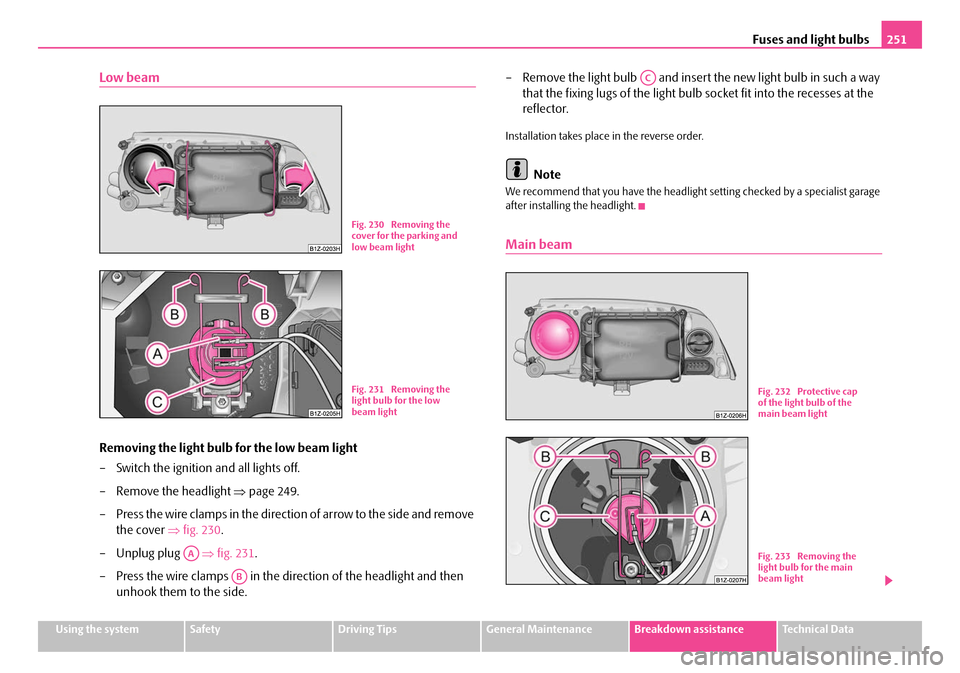
Removing the light bulb for the low beam light
– Switch the ignition and all lights off.
– Remove the headlight ⇒page 249.
– Press the wire clamps in the direction of arrow to the side and remove the cover ⇒fig. 230 .
– Unplug plug ⇒fig. 231 .
– Press the wire clamps in the direction of the headlight and then unhook them to the side. – Remove the light bulb and insert the new light bulb in such a way
that the fixing lugs of the light bulb socket fit into the recesses at the
reflector.
Installation takes place in the reverse order.
Note
We recommend that you have the headlight setting checked by a specialist garage
after installing the headlight.
Main beam
Fig. 230 Removing the
cover for the parking and
low beam light
Fig. 231 Removing the
light bulb for the low
beam light
AA
AB
AC
Fig. 232 Protective cap
of the light bulb of the
main beam light
Fig. 233 Removing the
light bulb for the main
beam light
NKO A5 20 MR08.book Page 251 Wednesday, April 11, 2007 2:54 PM
Page 253 of 288

Fuses and light bulbs
252
Removing the light bulb for the main beam light
– Switch the ignition and all lights off.
– Remove the headlight ⇒page 249.
– Remove the protective cover at the rear of the headlight ⇒page 251,
fig. 232 .
– Unplug plug ⇒page 251, fig. 233 .
– Press the wire clamps in the direction of the headlight and then unhook them to the side.
– Remove the light bulb and insert the new light bulb in such a way that the fixing lugs of the light bulb socket fit into the recesses at the
reflector.
Installation takes place in the reverse order.
Note
We recommend that you have the headlight setting checked by a specialist garage
after installing the headlight.
Turn signal light (at the front)
Changing light bulb for turn signal light (at the front)
– Switch the ignition and all lights off.
– Remove the headlight ⇒ page 249.
– Turn the socket in the direction of arrow OPEN (open) and take it out
together with the light bulb for the turn signal light ⇒fig. 234 .
– Press the defective light bulb into the socket, turn to the left and remove.
– Press a new light bulb into the socket and turn the light bulb to the right as far as the stop.
– Insert the socket with the changed light bulb into the headlight and secure it by turning in the direction of arrow CLOSE (close) to the
right.
Note
We recommend that you have the headlight setting checked by a specialist garage
after installing the headlight.
AA
AB
AC
Fig. 234 Removing the
light bulb for the turn
signal light
NKO A5 20 MR08.book Page 252 Wednesday, April 11, 2007 2:54 PM
Page 254 of 288

Fuses and light bulbs253
Using the systemSafetyDriving TipsGeneral MaintenanceBreakdown assistanceTechnical Data
Light unit (Octavia)
Changing light bulbs in the lamp holder
– Switch the ignition and all lights off.
– Unlock the locking button and open the cover of the lamp holder
⇒ fig. 235 .
– Press the catches in the directio n of arrow and take out the lamp
holder ⇒fig. 236 .
– Press the defective light bulb into the socket, turn to the left and
remove. – Press a new light bulb into the socket and turn the light bulb to the
right as far as the stop.
– Insert the lamp holder in such a wa y that the catches lock in place in
the housing.
– Close and lock the cover of the lamp holder.
Changing light bulb for tail light
– Switch the ignition and all lights off.
– Unlock the locking button and open the cover of the lamp holder ⇒fig. 235 .
– Take the defective light bulb (arrow or ⇒fig. 236 ) out of the
housing and replace it with a new one.
– Close and lock the cover of the lamp holder.
Fig. 235 Luggage
compartment: Cover for
the lamp holder
Fig. 236 Removing the
lamp holder
A1A2
NKO A5 20 MR08.book Page 253 Wednesday, April 11, 2007 2:54 PM