2007 Seat Alhambra warning light
[x] Cancel search: warning lightPage 142 of 291
Seats and stowage
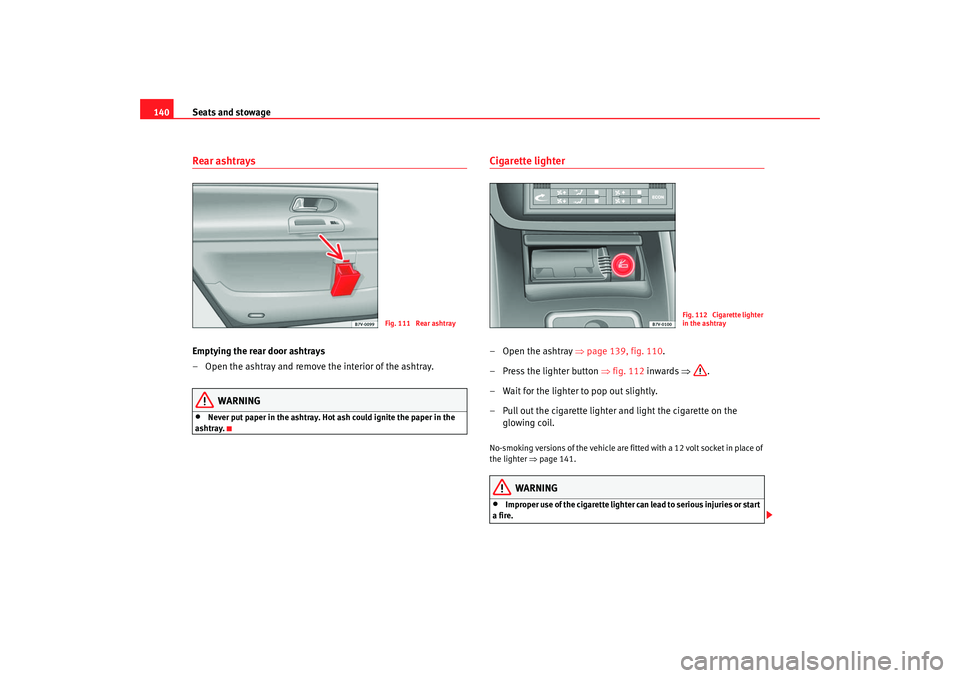
140Rear ashtraysEmptying the rear door ashtrays
– Open the ashtray and remove the interior of the ashtray.
WARNING
•
Never put paper in the ashtray. Hot ash could ignite the paper in the
ashtray.
Cigarette lighter–Open the ashtray ⇒page 139, fig. 110 .
– Press the lighter button ⇒fig. 112 inwards ⇒.
– Wait for the lighter to pop out slightly.
– Pull out the cigarette lighter and light the cigarette on the glowing coil.No-smoking versions of the vehicle are fitted with a 12 volt socket in place of
the lighter ⇒page 141.
WARNING
•
Improper use of the cigarette lighter can lead to serious injuries or start
a fire.
Fig. 111 Rear ashtray
Fig. 112 Cigarette lighter
in the ashtray
alhambra ingles.book Seite 140 Donnerstag, 19. April 2007 4:04 16
Page 143 of 291

Seats and stowage141
Safety First
Operating instructions
Tips and Maintenance
Te c h n i c a l D a t a
•
Take care when using the cigarette lighter. Carelessness or negligence
when using the cigarette lighter can cause burns, risk of injury.
•
The cigarette lighter also works when the ignition is off and when the
ignition key is removed. To avoid the ri sk of fire, never leave children unsu-
pervised in the vehicle.
Sockets
Electrical equipment can be connected to any of the 12 volt
sockets.
Socket in the centre console
The 12 Volt socket in the stowage area or the 12 Volt socket of the cigarette
lighter
34) can be used for further electrical consumers with a power rating of
up to 120 Watt.
Socket, luggage compartment
34)
Electrical equipment can be connected to the 12-volt socket in the luggage
compartment ⇒fig. 113 The appliances connected to each socket must not
exceed a power rating of 120 Watt.
The socket is supplied with electricity from the additional battery on vehicles
equipped with an additional battery
34).
WARNING
The electrical sockets and any appliances connected to them are also func-
tional with the ignition switched off and the key removed. Improper use of
the sockets or electrical accessories can lead to serious injuries or cause a
fire. To avoid the risk of injury, never leave children unsupervised in the
vehicle.
Note
•
Using electrical appliances with the engine switched off will drain the
battery.
•
Before using any electrical accessories, see the instructions on
⇒ page 202.
WARNING (continued)
Fig. 113 Socket, luggage
compartment
34)Optional equipment
alhambra ingles.book Seite 141 Donnerstag, 19. April 2007 4:04 16
Page 146 of 291
Seats and stowage
144During a collision or an accident, even small and light objects can build up so
much energy that they can cause very severe injuries. The amount of “kinetic
energy” depends on the speed of the vehicle and the weight of the object.
The most significant factor, however, is the speed of the vehicle.
For example: an object weighing 4.5 kg is lying unsecured in the vehicle.
During a frontal collision at a speed of 50 km/h, this object generates a force
corresponding to 20 times its weight. That means that the effective weight of
the object increases to about 90 kg. You can imagine the severity of the inju-
ries which might be sustaine d if this “projectile” strikes an occupant as it flies
through the passenger compartment. This increased risk of injury will be
further increased if a loose object is struck by an inflating airbag.
WARNING
If pieces of baggage or other objects are secured to the fastening rings with
inappropriate or damaged retaining cords, injuries could result in the event
of braking manoeuvres or accidents.•
To prevent pieces of luggage or other objects from flying forward,
always use appropriate retaining cords which are secured to the fastening
rings.
•
Never secure a child seat on the fastening rings.
Loading heavy objects
Special care is required when loading heavy objects and
when driving a vehicle which contains heavy objects.Observe the following points to prevent damage and accidents:
– If necessary, remove the seats to increase the load area. –
Before loading the vehicle place a sturdy mat or similar cover
flush on floor of the vehicle.
– Where necessary, do not cover protruding parts of the vehicle floor.
– Protect the seat anchor points from damage.
– Avoid overloading small areas - spread the load.
– Use suitable straps to secure the objects to retaining rings.
– Drive particularly carefully and think ahead.
– If possible, avoid sudden braking and driving manoeuvres.
WARNING
For safety reasons, you should read and observe all information on loading
the vehicle ⇒ page 144.
Caution
•
If you have removed the seats from the passenger compartment, you
should place a large, robust covering over the seat rails to prevent damage.
•
Avoid overloading small areas - spread the load.
Safety notes on loading the vehicle
WARNING
Loose luggage and other objects in the luggage compartment can cause
serious injuries.
alhambra ingles.book Seite 144 Donnerstag, 19. April 2007 4:04 16
Page 148 of 291
Seats and stowage
146
Opening the luggage compartment cover
– After fitting the luggage compartment cover, pull the handle on the cover back and hook in the cover on the side.
Removing the luggage compartment cover
– Press the unlock button (with the luggage compartment cover rolled up) ⇒ page 145, fig. 114 in the direction of the arrow
and remove the cover from the right holder upwards.
– Remove the cover from the left holder in the direction of the arrow and remove from the vehicle.
Fitting the luggage compartment cover
– Push the luggage compartment cover to the stop in the direction of the arrow ⇒page 145, fig. 115 into the left-hand holder.
– Press the cover down into the right-hand holder until it engages in position.Light items of clothing or other objects on the luggage compartment cover
can restrict visibility through the rear window.
WARNING
•
Never leave hard, heavy or sharp objects on the shelf (unrolled) or in the
pockets of clothing on the luggage compartment cover. Animals must
never be allowed onto the luggage compartment cover. During a sudden
braking or driving manoeuvre or an accident, these objects and animals
endanger all vehicle occupants. Risk of injury.
Caution
The wires of the heating element in the rear window and the window aerial in
the rear side windows could be damaged if objects on the luggage compart-
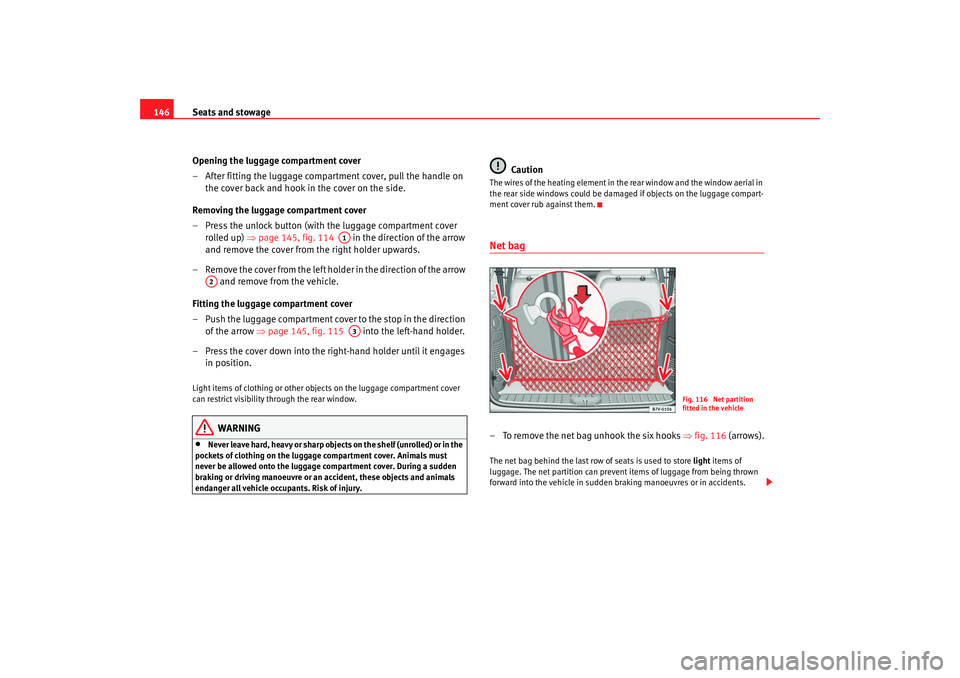
ment cover rub against them.Net bag – To remove the net bag unhook the six hooks ⇒fig. 116 (arrows).The net bag behind the last row of seats is used to store light items of
luggage. The net partition can prevent items of luggage from being thrown
forward into the vehicle in sudden braking manoeuvres or in accidents.
A1
A2
A3
Fig. 116 Net partition
fitted in the vehicle
alhambra ingles.book Seite 146 Donnerstag, 19. April 2007 4:04 16
Page 154 of 291

Heating, Ventilation and Air conditioning
152
− ECON (cooling system off) or
− OFF (entire system off)
Outside temperature display
Display for windscreen defrosting – lights up when the windscreen
defrosting function is switched on
Display for air recirculation mode
Display for air flow
Display of the selected interior temperature front
Display of the blower setting rear
Display of the selected interior temperature rear
Button for the automatic mode
Button for air recirculation mode
Button for reducing the blower speed front
Button for raising the blower speed front
Button for directing th e air flow to the chest
Button for directing the air flow to the footwell
Button for reducing the temperature front
Button for raising the temperature front
Button for reducing the blower speed rear
Button for raising the blower speed rear
Button for reducing the temperature rear
Button for raising the temperature rear
Button for switching the cooling system off
Switching between Celsius and Fahrenheit
Press and hold the button and press the button.
The selected temperature unit is then displayed.
WARNING
For road safety all windows must be clear of ice, snow, and condensation.
This is essential to ensure good visibility. Please familiarise yourself with
the correct operation of the heating and ventilation system, including the
demist/defrost functions for the windows.
Note
Please observe the general notes ⇒page 157.Automatic mode
In automatic mode air temperature, flow, and distribution are
automatically regulated so that a specified temperature is
attained as quickly as possible and then maintained.Switching on automatic mode
– Press the button .
– Select the desired temperature. We recommend 22°C (72°F).A comfortable interior climate is quickly reached when a temperature of
+22°C (72°F) is set in automatic mode. It can be changed as necessary to suit
individual preferences or particular cir cumstances. It is possible to select
interior temperatures from +18°C (64° F) to +29°C (86°F). These are approxi-
mate temperatures and the actual temperature may be slightly higher or
lower depending on the outside conditions.
If a temperature below +18°C (17.78°C) is selected, the display switches to
LO The temperature is not controlled and in AUTO mode, the system runs at
maximum cooling output.
A4A5A6A7A8A9A10A11
AUTO
A12
A13
A14
A15
A16
A17
A18
A19
A20
A21
A22
A23
ECON
ECON
AUTO
AUTO
alhambra ingles.book Seite 152 Donnerstag, 19. April 2007 4:04 16
Page 156 of 291

Heating, Ventilation and Air conditioning
154Temperature
The selected temperature setting is shown on the display. It is possible to
select interior temperatures from +18°C (64°F) to +29°C (86°F). These are
approximate temperatures and the actual temperature may be slightly higher
or lower depending on the outside conditions.
If a temperature below +18°C (17.78°C) is selected, the display switches to
LO The temperature is not controlled and in AUTO mode, the system runs at
maximum cooling output.
If a temperature above +29°C (86°F) is selected, the display switches to HI In
this setting the system runs at maximum heating output and the temperature
is not controlled.
Blower
The blower can be adjusted gradually using the controls y . Always
have the blower running at a low setting to ensure a constant flow of fresh air
into the vehicle. If the blower is set to 0, the Climatronic is switched off.
Air distribution
The air distribution is adjusted using the buttons and . It is also
possible to open and close some of the air outlets separately.
Switching off the cooling system
Pressing the button switches off th e air cooling system to save fuel.
The temperature continues to be controll ed, but the air cannot be cooled. The
set temperature can then only be reached if it is higher than the outside
temperature.
Switching the Climatronic on/off
Press button until OFF is shown on display . The Climatronic is switched
off. This function should be used in ce rtain situations only (e. g. if the system
develops a fault).
The Climatronic is switched back on by pressing button .
WARNING
When the Climatronic is off open a window to ensure an adequate supply of
fresh air in the vehicle. Otherwise, when the Climatronic is switched off, no
fresh air enters the vehicle. Stale or contaminated air inside the vehicle
may cause drowsiness, increasing the risk of accident.Air recirculation mode
Air recirculation mode prevents fumes or unpleasant smells
from entering the vehicle.– Press the button ⇒page 153, fig. 119 to switch air recircula-
tion mode on or off. This is ON if the symbol is displayed
on the screen.Air recirculation mode pr events strong odours in the ambient air from
entering the vehicle interior, for example when passing through a tunnel or in
queuing traffic.
When the outside temperature is low, us ing air recirculation mode provides
more effective heating by heating air from the vehicle interior instead of cold
air from outside.
When the outside temperature is high, using air recirculation mode provides
more effective cooling by cooling air fr om the vehicle interior instead of warm
air from outside.
ECON
A13
A3
AUTO
A12
A6
alhambra ingles.book Seite 154 Donnerstag, 19. April 2007 4:04 16
Page 162 of 291

Driving
160•
Adjust the driver seat or steering wheel so that there is a distance of at
least 25 cm between the steering wheel and your breast bone ⇒page 159,
fig. 124. If you fail to observe the minimum distance, the airbag will not
protect you. Risk of fatal injury.
•
If your physical constitution prevents you from maintaining the
minimum distance of 25 cm, contact an Authorised Service Centre. The
Authorised Service Centre will help you decide if special specific modifica-
tions are necessary.
•
If you adjust the steering wheel so tha t it points towards your face, the
driver airbag will not protect you properly in the event of an accident. Make
sure that the steering wheel points towards your chest.
•
When driving, always hold the steer ing wheel with both hands on the
outside of the ring at the 9 o'clock and 3 o'clock positions. Never hold the
steering wheel at the 12 o'clock positi on, or in any other manner (e.g. in
the centre of the steering wheel, or on the inside of the rim). In such cases,
you could receive severe injuries to the arms, hands and head.
SafetyElectronic stabilisation programme (ESP)
ESP helps make driving safer in certain situations.The Electronic Stabilisation Programme (ESP) contains the electronic differ-
ential lock (EDL) and the traction control system (TCS). The ESP works
together with the anti-locking brake system (ABS). Both warning lamps will
light up if the ESP or ABS systems are faulty.
The ESP is started automatically when the engine is started.
In specific circumstances where you require less traction, you can switch off
the ESP by pressing button ⇒fig. 125 .
For example:•
when driving with snow chains,
•
when driving in deep snow or on loose surfaces,
WARNING (continued)
Fig. 125 Section of the
dash panel: switch for ESP
alhambra ingles.book Seite 160 Donnerstag, 19. April 2007 4:04 16
Page 163 of 291

Driving161
Safety First
Operating instructions
Tips and Maintenance
Te c h n i c a l D a t a
•
when rocking the vehicle backwards and forwards to free it from mud, for
example.
You should press the button to switch the ESP back on when you no longer
need wheel spin.
The TCS and EDL are also switched off if the ESP is switched off. This means
that this technology is not available for as long as the ESP remains switched
off.
When does the inscriptio nOFF light up on the button?
•
It will light up continuously if there is a malfunction in the ESP.
•
It will light up continuously if the ESP is switched off.
WARNING
•
The electronic stabilisation program (ESP) cannot defy the laws of
physics. This should be kept in mind, particularly on slippery and wet
roads and when towing a trailer.
•
Always adapt your driving style to suit the condition of the roads and
the traffic situation. Do not let the extra safety afforded by ESP tempt you
into taking any risks when driving, this can cause accidents.
•
Please refer to the corresponding warning notes on ESP.
Ignition lockPosition of the ignition keyIgnition switched off, steering lock
In position ⇒fig. 126 the ignition is switched off, and the steering wheel
lock can be engaged.
To engage the steering wheel lock, take out the key and turn the wheel
slightly until you hear the pin engage. You should always lock the steering
wheel when you leave your vehicle. This makes vehicle theft more difficult
⇒ .
Switching on the ignition or glow plug system
Tu rn the ignition key to this position and let go of the key. If the key canno t b e
turned or is difficult to turn from position to position , move the
steering wheel (to take the load off the steering lock mechanism) until the key
turns freely.
ESP
Fig. 126 Ignition key
positions
A1
A1
A2
A1
A2
alhambra ingles.book Seite 161 Donnerstag, 19. April 2007 4:04 16