2007 PONTIAC G6 door lock
[x] Cancel search: door lockPage 181 of 486

Battery Run-Down Protection
Your vehicle has a battery run-down feature
designed to protect your vehicle’s battery.
When any interior lamp (trunk, reading lamps, or
dome lamp) is left on when the ignition is
turned off, the battery run-down protection system
will automatically shut the lamp off after
20 minutes. This will avoid draining the battery.
To reactivate the interior lamps, do one of
the following:
Open any door.
Press any remote keyless entry transmitter
button.
Press the power door lock switch.
Press the remote trunk release.
Turn the lamp that was left on to off and then
to on again.
Accessory Power Outlet(s)
Accessory power outlets can be used to connect
auxiliary electrical equipment such as a cellular
telephone or CB radio. The outlet can accept
electrical equipment rated at a maximum of
20 Amps.
There are two accessory power outlets. Both are
located on the center console below the climate
controls unless the vehicle is equipped with
enhanced traction or traction control system.
If the vehicle is equipped with a traction system,
one accessory power outlet is in the center storage
console and the other is located on the center
console below the climate controls.
To use an outlet, remove the protective cap.
When not in use, always cover the outlet with the
protective cap. The accessory power outlet is
operational at all times.
Notice:If electrical devices are left plugged
into a power outlet, the battery may drain
causing your vehicle not to start or damage to
the battery. This would not be covered by
the warranty. Always unplug all electrical
devices when turning off your vehicle.
181
Page 211 of 486

AV (Average) SPEED:Press the information
button until AV SPEED is displayed. This shows the
vehicle’s average speed in miles per hour (mph) or
kilometers per hour (km/h).
Press and hold the enter button while AV SPEED is
displayed to reset the average vehicle speed.
OIL LIFE:Press the information button until
OIL LIFE is displayed. The engine oil life system
shows an estimate of the oil’s remaining useful life.
It shows 100% when the system is reset after
an oil change. It will alert you to change the oil on
a schedule consistent with your driving conditions.
Always reset the engine oil life system after an oil
change. SeeEngine Oil Life System on page 328.
In addition to the engine oil life system monitoring
the oil life, additional maintenance is recommended
in the Maintenance Schedule in this manual. See
Scheduled Maintenance on page 431andEngine
Oil on page 325.Personalization
MENU:Press this button while the ignition is ON to
scroll through each of the personalization options in
the following order. To avoid excessive drain on the
battery, it is recommended that the headlamps are
turned off. If the vehicle is moving faster than 2 mph
(3 km/h), the personalization menu options are not
available, except for the UNITS option. All of the
personalization options may not be available on
your vehicle. Only the options available display on
the DIC.
Oil Life Reset
Units Selection (English/Metric)
Remote Start Capability
Horn Chirp During Remote Keyless Entry
Locking
Horn Chirp During Remote Keyless Entry
Unlocking
Exterior Light Flash During Remote Keyless
Entry Locking or Unlocking
Delayed Locking
Automatic Vehicle Unlocking: Specic Doors
211
Page 217 of 486

UNLOCK HORN:If your vehicle has Remote
Keyless Entry (RKE), this option which allows the
vehicle’s horn to chirp every time the unlock button
on the RKE transmitter is pressed, can be enabled
or disabled. When UNLOCK HORN appears on the
display, press the enter button to move between
ON and OFF. When you have made your choice,
press the MENU button to record your selection.
The initial setting from the factory is OFF.
LIGHT FLASH:If your vehicle has Remote
Keyless Entry (RKE), this option which allows the
vehicle’s exterior perimeter lighting to ash every
time the lock, unlock, or trunk release buttons on
the RKE transmitter are pressed, can be enabled or
disabled. When LIGHT FLASH appears on the
display, press the enter button to move between
OFF and ON. When you have made your choice,
press the MENU button to record your selection.
The initial setting from the factory is ON.
DELAY LOCK:The delayed locking option, which
delays the actual locking of the vehicle, can be
enabled or disabled. When DELAY LOCK appears
on the display, press the enter button to move
between OFF and ON. When you have made your
choice, press the MENU button to record your
selection. The initial setting from the factory is ON.AUTO UNLK (Unlock):The automatic door
unlocking option, which allows the vehicle
to automatically unlock certain doors can be
enabled or disabled. When AUTO UNLK appears
on the display, press the enter button to move
between ALL, DRIVER, or NONE. When you have
made your choice, press and the MENU button
to record your selection. The initial setting from the
factory is ALL.
If you have a manual transaxle vehicle, the
door(s) will automatically unlock when the ignition
is turned off.
If you have an automatic transaxle vehicle, you
can select when the automatic unlocking will occur.
See “UNLK (Unlock) (Automatic Transaxle
Only)” following.
SeeProgrammable Automatic Door Unlock on
page 111for more information.
217
Page 218 of 486
UNLK (Unlock) (Automatic
Transaxle Only):This screen displays only if
your vehicle has an automatic transaxle and
DRIVER or ALL is selected for the AUTO UNLK
option. This option determines when the automatic
door unlocking will occur, when either the key is
turned to OFF or the vehicle is shifted into
PARK (P). When UNLK appears on the display,
press the enter button to move between KEY OFF
and SHIFT TO P (Park). When you have made
your choice, press the MENU button to record your
selection. The initial setting from the factory is
SHIFT TO P (Park). SeeProgrammable Automatic
Door Unlock on page 111for more information.
EXT (Exterior) LIGHTS:If your vehicle has
Remote Keyless Entry (RKE), this option, which
allows the vehicle’s exterior perimeter lighting
to turn on each time the unlock button on the RKE
transmitter is pressed, can be enabled or
disabled. When EXT LIGHTS appears on the
display, press the enter button to move between
ON and OFF. When you have made your
choice, press the MENU button to record your
selection. The initial setting from the factory is ON.LANGUAGE:To select your choice of language,
press the enter button to move between the
optional languages.
The languages are ENGLISH, FRENCH,
SPANISH, and GERMAN.
Choosing a language will display all of the
information on the DIC in the desired language.
When you have made your choice, press the
MENU button for at least one second to record
your selection. The initial setting from the factory is
ENGLISH.
218
Page 289 of 486

Tire and Loading Information Label
A vehicle specic Tire and Loading Information
label is attached to the vehicle’s center pillar
(B-pillar). With the driver’s door open, you will
nd the label attached below the door lock post
(striker). The tire and loading information label
shows the number of occupant seating
positions (A), and the maximum vehicle
capacity weight (B) in kilograms and pounds.The Tire and Loading Information label also shows
the tire size of the original equipment tires (C) and
the recommended cold tire ination pressures (D).
For more information on tires and ination seeTires
on page 370andInation - Tire Pressure on
page 379.
There is also important loading information on the
Certication label. It tells you the Gross Vehicle
Weight Rating (GVWR) and the Gross Axle Weight
Rating (GAWR) for the front and rear axle; see
“Certication Label” later in this section.
Steps for Determining Correct Load Limit
1. Locate the statement “The combined
weight of occupants and cargo should never
exceed XXX kg or XXX pounds” on your
vehicle placard.
2. Determine the combined weight of the driver
and passengers that will be riding in your
vehicle.
3. Subtract the combined weight of the driver
and passengers from XXX kilograms or XXX
pounds.
Label Example
289
Page 300 of 486

Total Weight on Your Vehicle’s Tires
Be sure your vehicle’s tires are inated to the upper
limit for cold tires. You will nd these numbers on
the Tire-Loading Information label at the rear edge
of the driver’s door or seeLoading Your Vehicle on
page 288. Then be sure you do not go over the
GVW limit for your vehicle, including the weight of
the trailer tongue.
Hitches
It is important to have the correct hitch equipment.
Crosswinds, large trucks going by and rough roads
are a few reasons why you’ll need the right hitch.
Here are some rules to follow:
The rear bumper on your vehicle is not
intended for hitches. Do not attach rental
hitches or other bumper-type hitches to it. Use
only a frame-mounted hitch that does not attach
to the bumper.
Will you have to make any holes in the body of
your vehicle when you install a trailer hitch? If
you do, then be sure to seal the holes later
when you remove the hitch. If you do not seal
them, deadly carbon monoxide (CO) from your
exhaust can get into your vehicle. SeeEngine
Exhaust on page 140. Dirt and water can, too.
Safety Chains
You should always attach chains between your
vehicle and your trailer. Cross the safety chains
under the tongue of the trailer so that the tongue will
not drop to the road if it becomes separated from
the hitch. Instructions about safety chains may be
provided by the hitch manufacturer or by the trailer
manufacturer. Follow the manufacturer’s
recommendation for attaching safety chains and do
not attach them to the bumper. Always leave just
enough slack so you can turn with your rig. And,
never allow safety chains to drag on the ground.
Trailer Brakes
Does your trailer have its own brakes?
Be sure to read and follow the instructions for the
trailer brakes so you will be able to install,
adjust and maintain them properly. And because
you may have anti-lock brakes, do not try to
tap into your vehicle’s brake system. If you do,
both systems will not work well, or at all.
300
Page 313 of 486
Filling the Tank
{CAUTION:
Fuel vapor burns violently and a fuel re
can cause bad injuries. To help avoid
injuries to you and others, read and follow
all the instructions on the pump island.
Turn off your engine when you are
refueling. Do not smoke if you are near
fuel or refueling your vehicle. Keep
sparks, ames, and smoking materials
away from fuel. Do not leave the fuel
pump unattended when refueling your
vehicle. This is against the law in some
places. Keep children away from the fuel
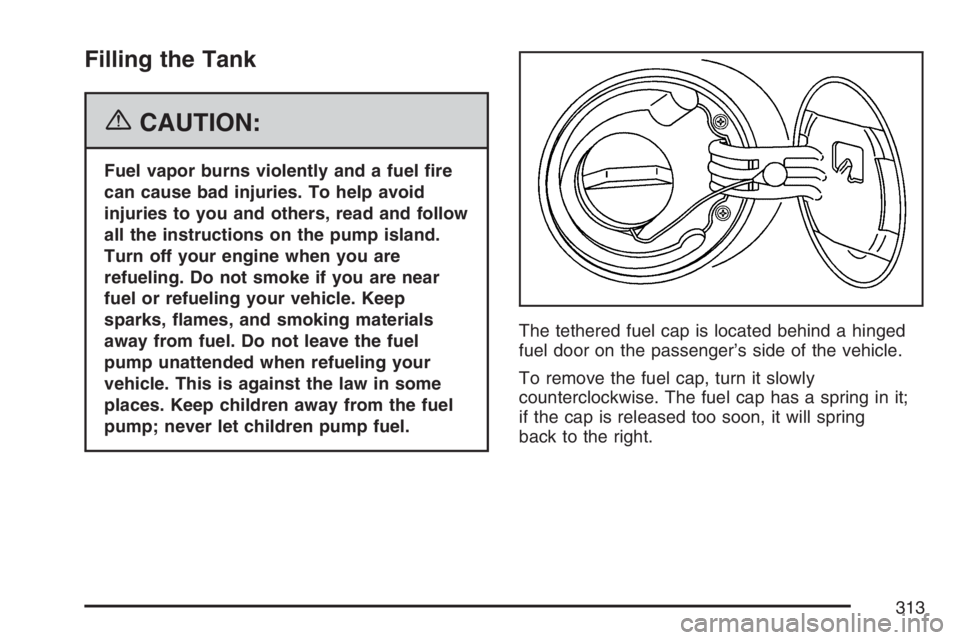
pump; never let children pump fuel.The tethered fuel cap is located behind a hinged
fuel door on the passenger’s side of the vehicle.
To remove the fuel cap, turn it slowly
counterclockwise. The fuel cap has a spring in it;
if the cap is released too soon, it will spring
back to the right.
313
Page 314 of 486

While refueling, hang the tethered fuel cap from
the hook on the fuel door.
{CAUTION:
If you spill fuel and then something
ignites it, you could be badly burned. Fuel
can spray out on you if you open the fuel
cap too quickly. This spray can happen if
your tank is nearly full, and is more likely
in hot weather. Open the fuel cap slowly
and wait for any hiss noise to stop. Then
unscrew the cap all the way.
Be careful not to spill fuel. Do not top off or overll
the tank, and wait a few seconds after you have
nished pumping before removing the nozzle.
Clean fuel from painted surfaces as soon
as possible. SeeWashing Your Vehicle on
page 408.
When replacing the fuel cap, turn it clockwise until it
clicks. Make sure the cap is fully installed. The
diagnostic system can determine if the fuel cap hasbeen left off or improperly installed. This would
allow fuel to evaporate into the atmosphere.
SeeMalfunction Indicator Lamp on page 204.
The CHECK GAS CAP message will be displayed
on the Driver Information Center (DIC) if the fuel
cap is not properly installed. SeeDIC Warnings and
Messages on page 212for more information.
{CAUTION:
If a re starts while you are refueling, do
not remove the nozzle. Shut off the ow
of fuel by shutting off the pump or by
notifying the station attendant. Leave the
area immediately.
Notice:If you need a new fuel cap, be sure to
get the right type. Your dealer can get one
for you. If you get the wrong type, it may not
t properly. This may cause your malfunction
indicator lamp to light and may damage
your fuel tank and emissions system. See
Malfunction Indicator Lamp on page 204.
314