2007 NISSAN VERSA instrument panel
[x] Cancel search: instrument panelPage 67 of 304

2 Instruments and controls
Instrument panel...................................2-2
Meters and gauges................................2-3
Speedometer and odometer.....................2-3
Tachometer....................................2-4
Fuel gauge....................................2-5
Warning/indicator lights and audible reminders.......2-6
Checking bulbs................................2-7
Warning lights.................................2-7
Indicator lights................................2-11
Audible reminders.............................2-13
Security systems (if so equipped)..................2-14
Vehicle security system (if so equipped)..........2-14
NISSAN vehicle immobilizer system.............2-15
Windshield wiper and washer switch...............2-17
Switch operation..............................2-17
Rear window wiper and washer switch
(if so equipped)..................................2-18
Rear window and outside mirror (if so equipped)
defroster switch..................................2-18
Headlight and turn signal switch....................2-19
Headlight control switch........................2-19
Daytime running light system (Canada only)......2-20
Instrument brightness control...................2-20Turn signal switch.............................2-21
Fog light switch (if so equipped)................2-21
Hazard warning flasher switch.....................2-21
Horn............................................2-22
Power outlet.....................................2-22
Storage.........................................2-23
Map pockets..................................2-23
Storage trays.................................2-23
Sunglasses holder (if so equipped)..............2-24
Cup holders..................................2-25
Glove box....................................2-26
Console box (if so equipped)...................2-26
Covered storage bin...........................2-27
Tonneau cover (if so equipped)..................2-27
Windows........................................2-28
Power windows (if so equipped)................2-28
Manual windows..............................2-30
Sunroof (if so equipped)...........................2-31
Automatic sunroof.............................2-31
Interior light......................................2-32
Map lights (if so equipped)........................2-33
Luggage compartment light........................2-33
ZREVIEW COPYÐ2007 Versa(vrs)
Owners ManualÐUSA_English(nna)
10/05/06Ðdebbie
X
Page 68 of 304

1. Outside mirror control switch (P. 3-31)
2. Headlight/fog light (if so equipped)/turn
signal switch (P. 2-19)
3. Steering wheel switch for audio control
and BluetoothThands-free phone sys-
tem (if so equipped) (P. 4-26, 4-28)4. Driver’s supplemental air bag/horn
(P. 1-34, 2-22)
5. Meters and gauges (P. 2-3)
6. Cruise control main/set switches
(if so equipped) (P. 5-23)7. Windshield wiper/washer switch
(P. 2-17, 2-18)
8. Audio system (P. 4-10)
9. Storage bin (P. 2-23)
10. Center ventilator (P. 4-2)
11. Passenger’s supplemental air bag
(P. 1-34)
12. Side ventilator (P. 4-2)
13. Glove box (P. 2-26)
14. Hazard warning flasher switch (P. 2-21)
15. Cup holders (P. 2-25)
16. Shift selector lever (P. 5-13)
17. Defroster switch (P. 2-18)
18. Climate control (P. 4-3)
19. Passenger air bag status light (P. 1-42)
20. Ignition switch (P. 5-5)
21. Tilt steering (P. 3-29)
22. Hood release lever (P. 3-23)
23. Fuel-filler door release lever (P. 3-28)
24. Instrument brightness control (P. 2-20)
See the page number indicated in paren-
theses for operating details.LIC0960
INSTRUMENT PANEL
2-2Instruments and controls
ZREVIEW COPYÐ2007 Versa(vrs)
Owners ManualÐUSA_English(nna)
10/05/06Ðdebbie
X
Page 85 of 304
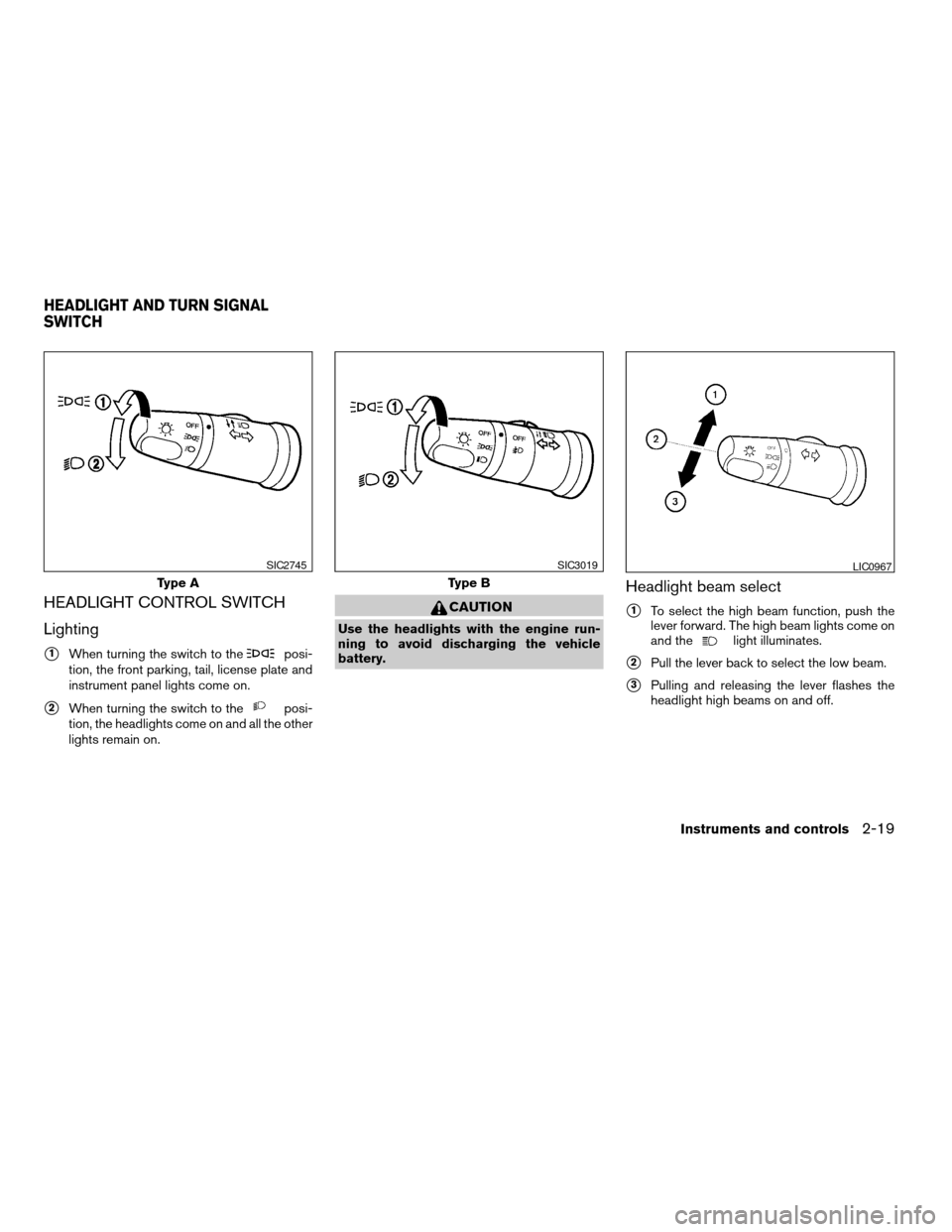
HEADLIGHT CONTROL SWITCH
Lighting
s1When turning the switch to theposi-
tion, the front parking, tail, license plate and
instrument panel lights come on.
s2When turning the switch to theposi-
tion, the headlights come on and all the other
lights remain on.
CAUTION
Use the headlights with the engine run-
ning to avoid discharging the vehicle
battery.
Headlight beam select
s1To select the high beam function, push the
lever forward. The high beam lights come on
and the
light illuminates.
s2Pull the lever back to select the low beam.
s3Pulling and releasing the lever flashes the
headlight high beams on and off.
Type A
SIC2745
Type B
SIC3019LIC0967
HEADLIGHT AND TURN SIGNAL
SWITCH
Instruments and controls2-19
ZREVIEW COPYÐ2007 Versa(vrs)
Owners ManualÐUSA_English(nna)
10/05/06Ðdebbie
X
Page 86 of 304
Battery saver system
If the ignition switch is turned OFF while the
headlight switch is in theorposi-
tion, the headlights will turn off after 5 minutes.
CAUTION
Even though the battery saver feature au-
tomatically turns off the headlights after a
period of time, you should turn the head-
light switch to the OFF position when the
engine is not running to avoid discharging
the vehicle battery.
DAYTIME RUNNING LIGHT SYSTEM
(Canada only)
The headlights automatically illuminate at a re-
duced intensity when the engine is started with
the parking brake released. The daytime running
lights operate with the headlight switch in the
OFF position or in the
position. Turn the
headlight switch to theposition for full
illumination when driving at night.
If the parking brake is applied before the engine is
started, the daytime running lights do not illumi-
nate. The daytime running lights illuminate when
the parking brake is released. The daytime run-
ning lights will remain on until the ignition switch
is turned off.
WARNING
When the daytime running light system is
active, tail lights on your vehicle are not
on. It is necessary at dusk to turn on your
headlights. Failure to do so could cause
an accident injuring yourself and others.
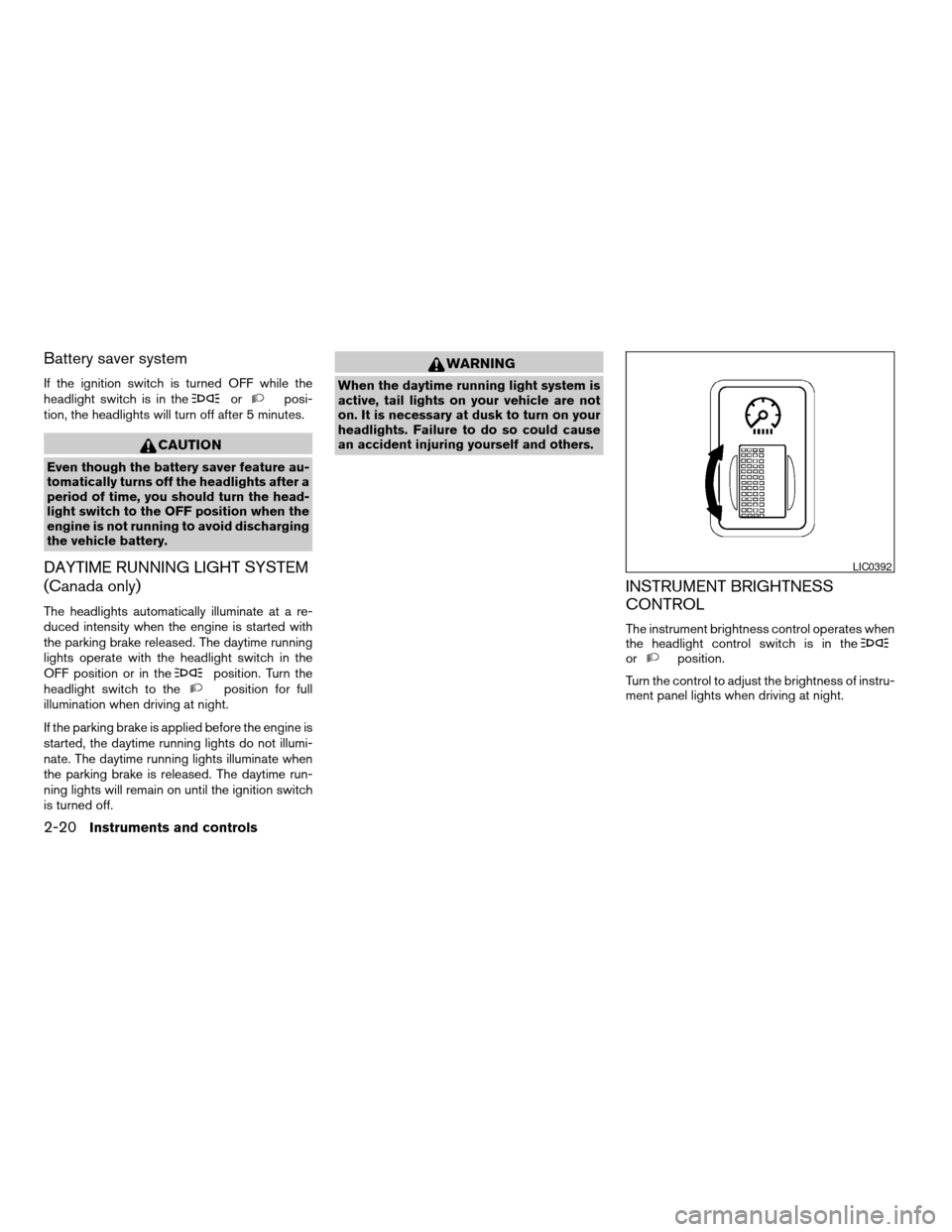
INSTRUMENT BRIGHTNESS
CONTROL
The instrument brightness control operates when
the headlight control switch is in the
orposition.
Turn the control to adjust the brightness of instru-
ment panel lights when driving at night.
LIC0392
2-20Instruments and controls
ZREVIEW COPYÐ2007 Versa(vrs)
Owners ManualÐUSA_English(nna)
10/05/06Ðdebbie
X
Page 94 of 304
POWER WINDOWS (if so equipped)
WARNING
cMake sure that all passengers have
their hands, etc. inside the vehicle while
it is in motion and before closing the
windows. Use the window lock switch
to prevent unexpected use of the power
windows.
cDo not leave children unattended inside
the vehicle. They could unknowingly ac-
tivate switches or controls and become
trapped in a window. Unattended chil-
dren could become involved in serious
accidents.
The power windows operate when the ignition
switch is in the ON position, or for about 45
seconds after the ignition switch is turned to the
OFF position. If the driver’s or passenger’s door
is opened during this period of about 45 sec-
onds, power to the windows is canceled.
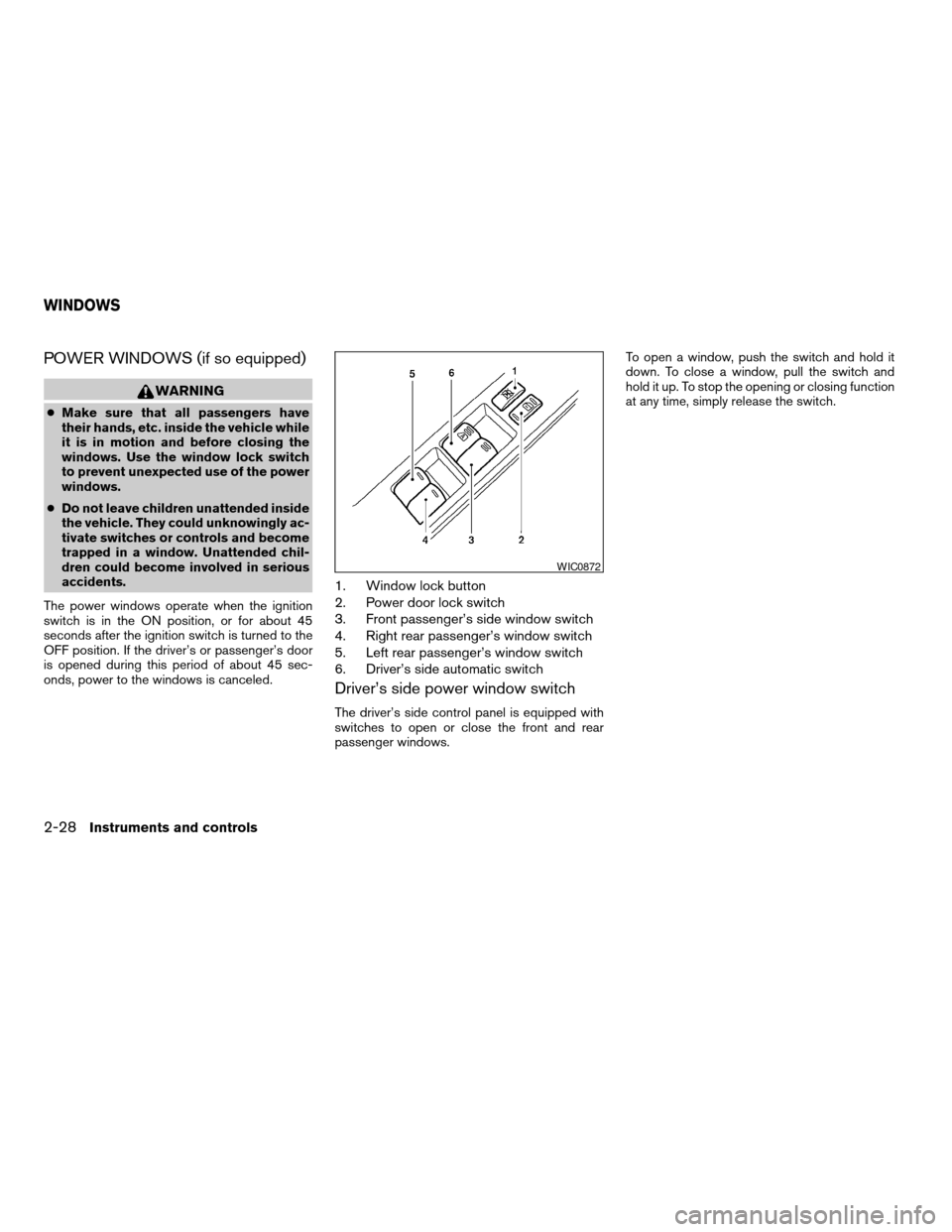
1. Window lock button
2. Power door lock switch
3. Front passenger’s side window switch
4. Right rear passenger’s window switch
5. Left rear passenger’s window switch
6. Driver’s side automatic switch
Driver’s side power window switch
The driver’s side control panel is equipped with
switches to open or close the front and rear
passenger windows.To open a window, push the switch and hold it
down. To close a window, pull the switch and
hold it up. To stop the opening or closing function
at any time, simply release the switch.
WIC0872
WINDOWS
2-28Instruments and controls
ZREVIEW COPYÐ2007 Versa(vrs)
Owners ManualÐUSA_English(nna)
10/05/06Ðdebbie
X
Page 115 of 304
cThe request switch is operational only
when the Intelligent Key has been de-
tected by the Intelligent Key system.
Lockout protection
To prevent the Intelligent Key from being acci-
dentally locked in the vehicle, lockout protection
is equipped with the Intelligent Key system.
When the driver’s side door is open, the doors
are locked, and then the Intelligent Key is put
inside the vehicle and all the doors are closed;
the lock will automatically unlock and the door
buzzer sounds.
CAUTION
The lockout protection may not function
under the following conditions:
cWhen the Intelligent Key is placed on
top of the instrument panel.
cWhen the Intelligent Key is placed on
top of the rear parcel.
cWhen the Intelligent Key is placed on
the tonneau cover.
cWhen the Intelligent Key is placed in-
side the glove box or a storage bin.
cWhen the Intelligent Key is placed in-
side the door pockets.cWhen the Intelligent Key is placed on or
under the spare tire area.
cWhen the Intelligent Key is placed in-
side or near metallic materials.
The lockout protection may function when
the Intelligent Key is outside the vehicle
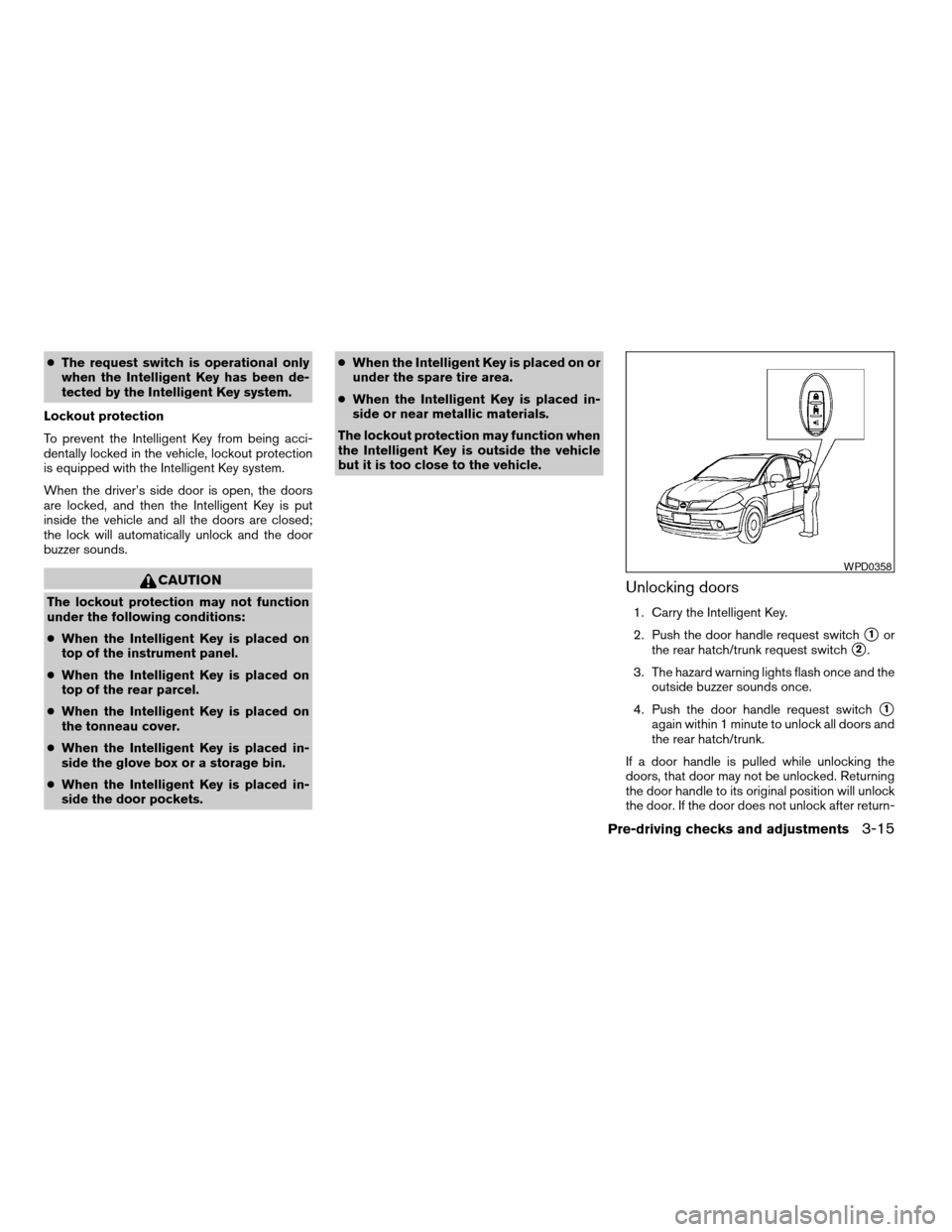
but it is too close to the vehicle.Unlocking doors
1. Carry the Intelligent Key.
2. Push the door handle request switch
s1or
the rear hatch/trunk request switch
s2.
3. The hazard warning lights flash once and the
outside buzzer sounds once.
4. Push the door handle request switch
s1
again within 1 minute to unlock all doors and
the rear hatch/trunk.
If a door handle is pulled while unlocking the
doors, that door may not be unlocked. Returning
the door handle to its original position will unlock
the door. If the door does not unlock after return-
WPD0358
Pre-driving checks and adjustments3-15
ZREVIEW COPYÐ2007 Versa(vrs)
Owners ManualÐUSA_English(nna)
10/05/06Ðdebbie
X
Page 120 of 304
CAUTION
When the buzzer sounds and the warning
light illuminates, be sure to check both
the vehicle and the Intelligent Key.
WARNING SIGNALS
To help prevent the vehicle from moving unex-
pectedly by erroneous operation of the Intelligent
Key or to help prevent the vehicle from being
stolen, a chime or buzzer sounds from inside and
outside the vehicle and a warning light comes on
in the instrument panel.
When a chime or beep sounds or the warning
light comes on, be sure to check the vehicle and
the Intelligent Key.
Audible reminder and warning when
locking the doors
When the chime or buzzer sounds from inside
and outside the vehicle, check for the following:
cThe ignition switch is turned to the LOCK
position.
cThe Intelligent Key is not left inside the ve-
hicle.
cThe selector lever is in the P position.
Audible reminder and warning when
the engine stops
When the P position selecting warning light
() (CVT models) in the instrument panel
blinks in red:
cMake sure the selector lever is in the P
position.
When the chime sounds intermittently:
cMake sure the selector lever is in the P
position and the ignition switch is turned to
the LOCK position.
If the chime sounds continuously when the driv-
er’s door is opened, check the following:
cThe selector lever is in the P position and the
ignition switch is turned to the LOCK posi-
tion.
cThe mechanical key is not inserted into the
ignition switch.
cThe warning chime may stop when one of
the following is performed.
– Returning the ignition switch to the LOCK
position.
– Removing the mechanical key.
– Closing the doors.When the Intelligent Key lock warning light
(
) (M/T models) in the instrument panel
blinks:
cMake sure the selector lever is in the P
position.
cMake sure the ignition switch is in the LOCK
position.
Alarm and warning when the engine
starts
When the Intelligent Key system warning light
() blinks red and the outside buzzer
sounds, make sure the Intelligent Key is inside the
vehicle.
Warning for low battery power
When the Intelligent Key battery is low, the Intel-
ligent Key system warning light () will blink
green for about 30 seconds after the ignition
switch is turned to the ON position. This warning
is to let you know that the battery of the Intelligent
Key will run down soon. Replace it with a new
one. Refer to “Battery replacement” in the “Main-
tenance and do-it-yourself” section.
NISSAN recommends replacing the battery at a
NISSAN dealer.
3-20Pre-driving checks and adjustments
ZREVIEW COPYÐ2007 Versa(vrs)
Owners ManualÐUSA_English(nna)
10/05/06Ðdebbie
X
Page 122 of 304
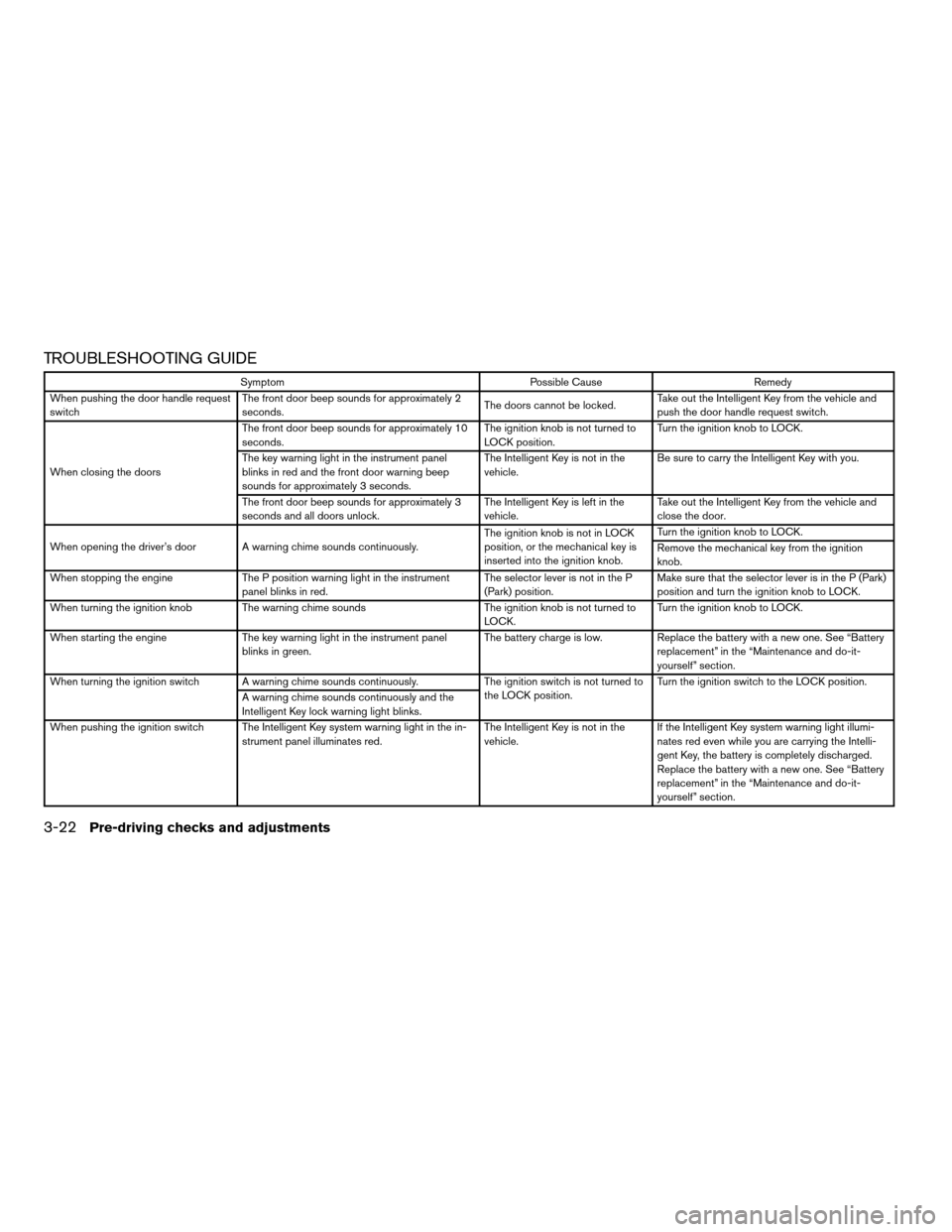
TROUBLESHOOTING GUIDE
Symptom Possible Cause Remedy
When pushing the door handle request
switchThe front door beep sounds for approximately 2
seconds.The doors cannot be locked.Take out the Intelligent Key from the vehicle and
push the door handle request switch.
When closing the doorsThe front door beep sounds for approximately 10
seconds.The ignition knob is not turned to
LOCK position.Turn the ignition knob to LOCK.
The key warning light in the instrument panel
blinks in red and the front door warning beep
sounds for approximately 3 seconds.The Intelligent Key is not in the
vehicle.Be sure to carry the Intelligent Key with you.
The front door beep sounds for approximately 3
seconds and all doors unlock.The Intelligent Key is left in the
vehicle.Take out the Intelligent Key from the vehicle and
close the door.
When opening the driver’s door A warning chime sounds continuously.The ignition knob is not in LOCK
position, or the mechanical key is
inserted into the ignition knob.Turn the ignition knob to LOCK.
Remove the mechanical key from the ignition
knob.
When stopping the engine The P position warning light in the instrument
panel blinks in red.The selector lever is not in the P
(Park) position.Make sure that the selector lever is in the P (Park)
position and turn the ignition knob to LOCK.
When turning the ignition knob The warning chime sounds The ignition knob is not turned to
LOCK.Turn the ignition knob to LOCK.
When starting the engine The key warning light in the instrument panel
blinks in green.The battery charge is low. Replace the battery with a new one. See “Battery
replacement” in the “Maintenance and do-it-
yourself” section.
When turning the ignition switch A warning chime sounds continuously. The ignition switch is not turned to
the LOCK position.Turn the ignition switch to the LOCK position.
A warning chime sounds continuously and the
Intelligent Key lock warning light blinks.
When pushing the ignition switch The Intelligent Key system warning light in the in-
strument panel illuminates red.The Intelligent Key is not in the
vehicle.If the Intelligent Key system warning light illumi-
nates red even while you are carrying the Intelli-
gent Key, the battery is completely discharged.
Replace the battery with a new one. See “Battery
replacement” in the “Maintenance and do-it-
yourself” section.
3-22Pre-driving checks and adjustments
ZREVIEW COPYÐ2007 Versa(vrs)
Owners ManualÐUSA_English(nna)
10/05/06Ðdebbie
X