2007 NISSAN VERSA buttons
[x] Cancel search: buttonsPage 156 of 304

several times to skip back through tracks. The
compact disc will go back the number of times
the button is pressed.
When the
button is pressed for less than
1.5 seconds while the compact disc is playing,
the next track will start to play from its beginning.
Press several times to skip through tracks. The
compact disc will advance the number of times
the button is pressed. (When the last track on the
compact disc is skipped through, the first track
will be played.)
TUNE/FF·REW/FOLDER:
While playing an MP3, press the
TUNE/FF·REW/FOLDER button
orto scan forward or backward through available
folders.
To fast forward or rewind through an audio track,
press the TUNE/FF·REW/FOLDER
button
orfor more than 1.5 sec-
onds.
SCAN button:
While listening to a CD, press the SCAN button
to preview the first 10 seconds of each track on
the current CD playing. Pressing the SCAN but-
ton during this 10 second period stops the scan
and the CD remains on that track.Press the SCAN button for more than 1.5 sec-
onds to preview 10 seconds of the first track on
each disc, only if more than 1 disc is loaded into
the CD changer. Pressing the button again dur-
ing this 10 second period will stop the scan and
the CD that was being previewed will remain on
and will continue the regular playback.
CD select buttons:
To play another CD that has been loaded, press a
CD select button (1 – 6) .
RPT/RDM button:
When the RPT/RDM button is pressed while the
compact disc is played, the play pattern can be
changed as follows:
RPT DISC!RPT TRACK!RDM ALL DISC!
RDM DISC!RPT ALL DISC!RPT DISC
RPT DISC: The disc that is currently playing will
be repeated.
RPT TRACK: The track that is currently playing
will be repeated.
RDM ALL DISC: Tracks from all discs will be
played randomly.
RDM DISC: Tracks from the disc that is currently
playing will be played randomly.
RPT ALL DISC: All discs will be played normally,
with no special play pattern enabled.MP3 RPT/RDM mode:
When the RPT/RDM button is pressed while an
MP3 compact disc is played, the play pattern can
be changed as follows:
RPT DISC!RPT FOLDER!RPT TRACK!
RDM ALL DISC!RDM DISC!RDM FOLDER
!RPT ALL DISC!RPT DISC
RPT DISC: The disc that is currently playing will
be repeated.
RPT FOLDER: The folder selected that is cur-
rently playing will be repeated.
RPT TRACK: The track that is currently playing
will be repeated.
RDM ALL DISC: Tracks from all discs will be
played randomly.
RDM DISC: The discs loaded into the cd
changer will be selected randomly.
RDM FOLDER: The folders on the disc will be
played randomly.
RPT ALL DISC: All discs will be played normally,
with no special play pattern enabled.
EJECT button:
Current disc:
cPress the slot number (1 – 6) for the desired
disc, then press the
button. The com-
pact disc will be ejected.
4-24Heater, air conditioner, audio and phone systems
ZREVIEW COPYÐ2007 Versa(vrs)
Owners ManualÐUSA_English(nna)
10/05/06Ðdebbie
X
Page 164 of 304
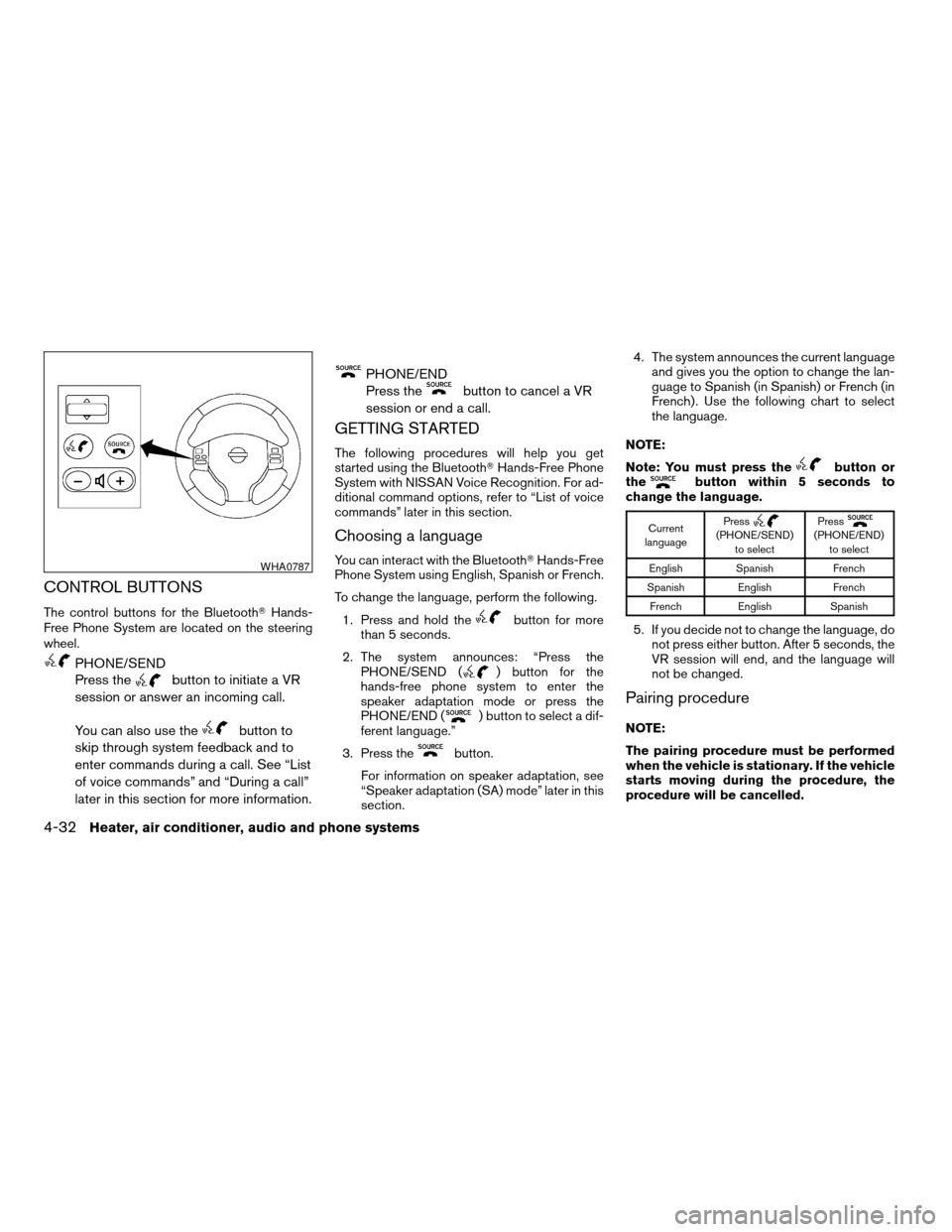
CONTROL BUTTONS
The control buttons for the BluetoothTHands-
Free Phone System are located on the steering
wheel.
PHONE/SEND
Press the
button to initiate a VR
session or answer an incoming call.
You can also use the
button to
skip through system feedback and to
enter commands during a call. See “List
of voice commands” and “During a call”
later in this section for more information.
PHONE/END
Press the
button to cancel a VR
session or end a call.
GETTING STARTED
The following procedures will help you get
started using the BluetoothTHands-Free Phone
System with NISSAN Voice Recognition. For ad-
ditional command options, refer to “List of voice
commands” later in this section.
Choosing a language
You can interact with the BluetoothTHands-Free
Phone System using English, Spanish or French.
To change the language, perform the following.
1. Press and hold the
button for more
than 5 seconds.
2. The system announces: “Press the
PHONE/SEND (
) button for the
hands-free phone system to enter the
speaker adaptation mode or press the
PHONE/END (
) button to select a dif-
ferent language.”
3. Press the
button.
For information on speaker adaptation, see
“Speaker adaptation (SA) mode” later in this
section.4. The system announces the current language
and gives you the option to change the lan-
guage to Spanish (in Spanish) or French (in
French) . Use the following chart to select
the language.
NOTE:
Note: You must press the
button or
thebutton within 5 seconds to
change the language.
Current
languagePress(PHONE/SEND)
to selectPress(PHONE/END)
to select
English Spanish French
Spanish English French
French English Spanish
5. If you decide not to change the language, do
not press either button. After 5 seconds, the
VR session will end, and the language will
not be changed.
Pairing procedure
NOTE:
The pairing procedure must be performed
when the vehicle is stationary. If the vehicle
starts moving during the procedure, the
procedure will be cancelled.
WHA0787
4-32Heater, air conditioner, audio and phone systems
ZREVIEW COPYÐ2007 Versa(vrs)
Owners ManualÐUSA_English(nna)
10/05/06Ðdebbie
X
Page 187 of 304
AUTOMATIC TRANSMISSION (if so
equipped)
WARNING
cDo not depress the accelerator pedal
while shifting from P (Park) or N (Neu-
tral) to R (Reverse) , D (Drive) , 2 or 1.
Always depress the brake pedal until
shifting is completed. Failure to do so
could cause you to lose control and
have an accident.
cCold engine idle speed is high, so use
caution when shifting into a forward or
reverse gear before the engine has
warmed up.
cNever shift to P (Park) or R (Reverse)
while the vehicle is moving. This could
cause an accident.
CAUTION
cWhen stopping the vehicle on an uphill
grade, do not hold the vehicle by de-
pressing the accelerator pedal. The foot
brake should be used for this purpose.
cDo not downshift abruptly on slippery
roads. This may cause a loss of control.The automatic transmission in your vehicle is
electronically controlled to produce maximum
power and smooth operation.
The recommended operating procedures for this
transmission are shown on the following pages.
Follow these procedures for maximum vehicle
performance and driving enjoyment.
Starting the vehicle
1. After starting the engine, fully depress the
foot brake pedal before attempting to move
the shift selector lever out of the P (Park)
position.
2. Keep the foot brake pedal depressed and
move the shift selector lever into a driving
gear.
3. Release the foot brake, then gradually start
the vehicle in motion.
The automatic transmission is designed so
the foot brake pedal MUST be depressed
before shifting from P (Park) to any drive
position while the ignition switch is in the
ON position.
The shift selector lever cannot be moved
out of P (Park) and into any of the other
gear positions if the ignition key is turned
to the LOCK, OFF or ACC position or if the
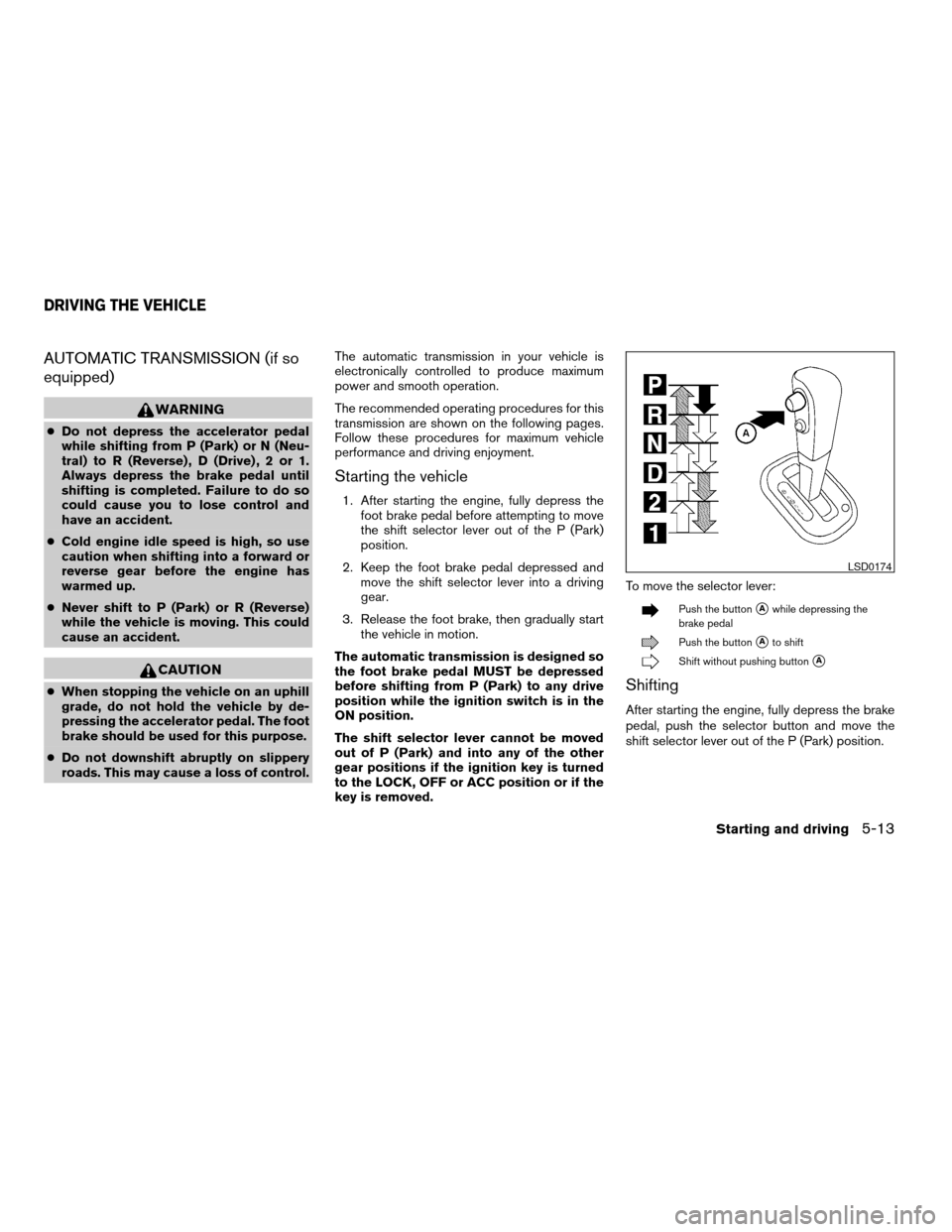
key is removed.To move the selector lever:
Push the buttonsAwhile depressing the
brake pedal
Push the buttonsAto shift
Shift without pushing buttonsA
Shifting
After starting the engine, fully depress the brake
pedal, push the selector button and move the
shift selector lever out of the P (Park) position.
LSD0174
DRIVING THE VEHICLE
Starting and driving5-13
ZREVIEW COPYÐ2007 Versa(vrs)
Owners ManualÐUSA_English(nna)
10/05/06Ðdebbie
X
Page 191 of 304
CAUTION
When stopping the vehicle on an uphill
grade, do not hold the vehicle by depress-
ing the accelerator pedal. The foot brake
should be used for this purpose.
The CVT in your vehicle is electronically con-
trolled to produce maximum power and smooth
operation.
The recommended operating procedures for this
transmission are shown on the following pages.
Follow these procedures for maximum vehicle
performance and driving enjoyment.
NOTE:
Engine power may be automatically re-
duced to protect the CVT if the engine
speed increases quickly when driving on
slippery roads or while being tested on
some dynamometers.
Starting the vehicle
1. After starting the engine, fully depress the
foot brake pedal before attempting to move
the shift selector lever out of the P (Park)
position.
2. Keep the foot brake pedal depressed and
move the shift selector lever into a driving
gear.
3. Release the foot brake, then gradually start
the vehicle in motion.
4. Stop the vehicle completely before attempt-
ing to shift the selector lever to the P (Park)
position.
The CVT is designed so the foot brake
pedal MUST be depressed before shifting
from P (Park) to any drive position while
the ignition switch is in the ON position.
The shift selector lever cannot be moved
out of P (Park) and into any of the other
gear positions if the ignition key is turned
to the LOCK, OFF or ACC position or if the
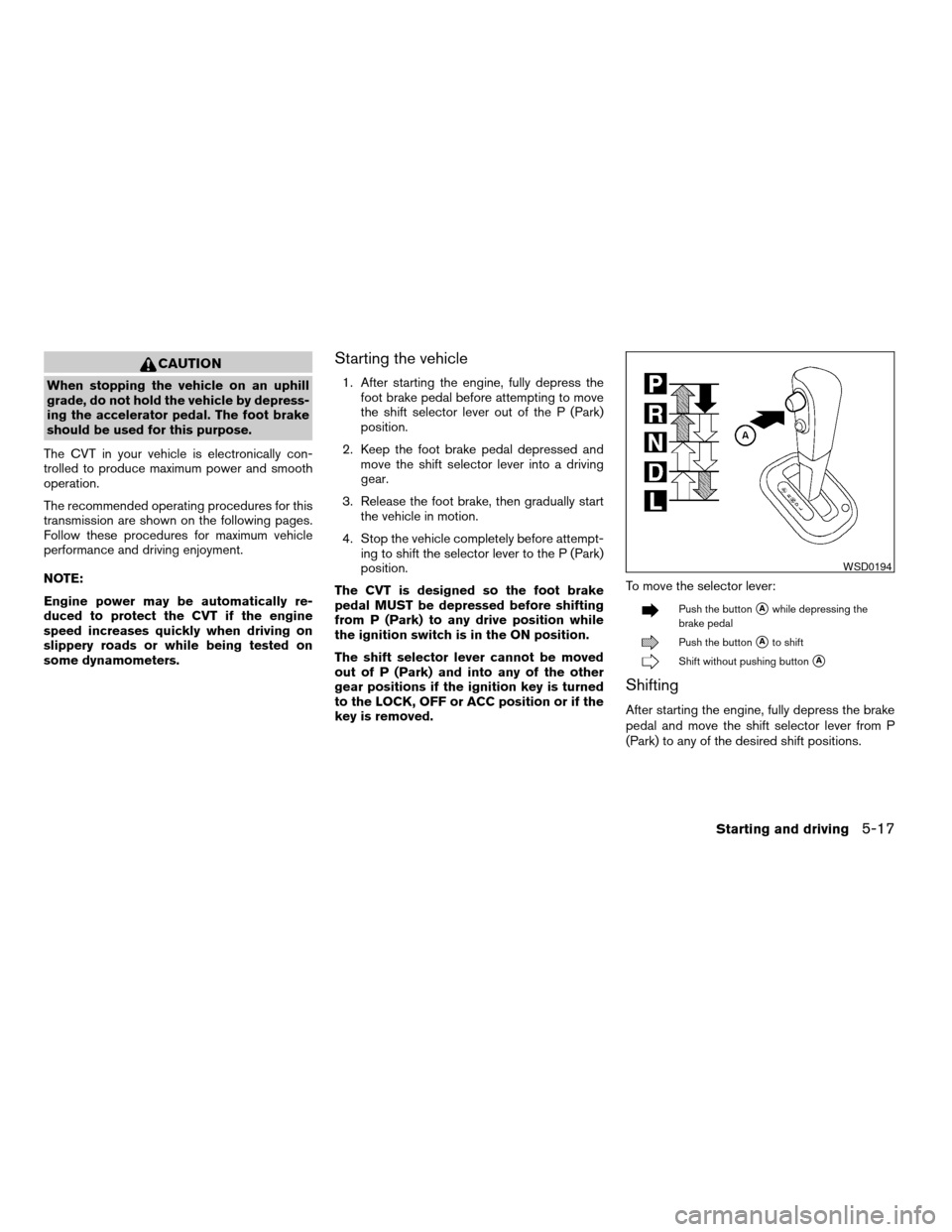
key is removed.To move the selector lever:
Push the buttonsAwhile depressing the
brake pedal
Push the buttonsAto shift
Shift without pushing buttonsA
Shifting
After starting the engine, fully depress the brake
pedal and move the shift selector lever from P
(Park) to any of the desired shift positions.
WSD0194
Starting and driving5-17
ZREVIEW COPYÐ2007 Versa(vrs)
Owners ManualÐUSA_English(nna)
10/05/06Ðdebbie
X
Page 252 of 304
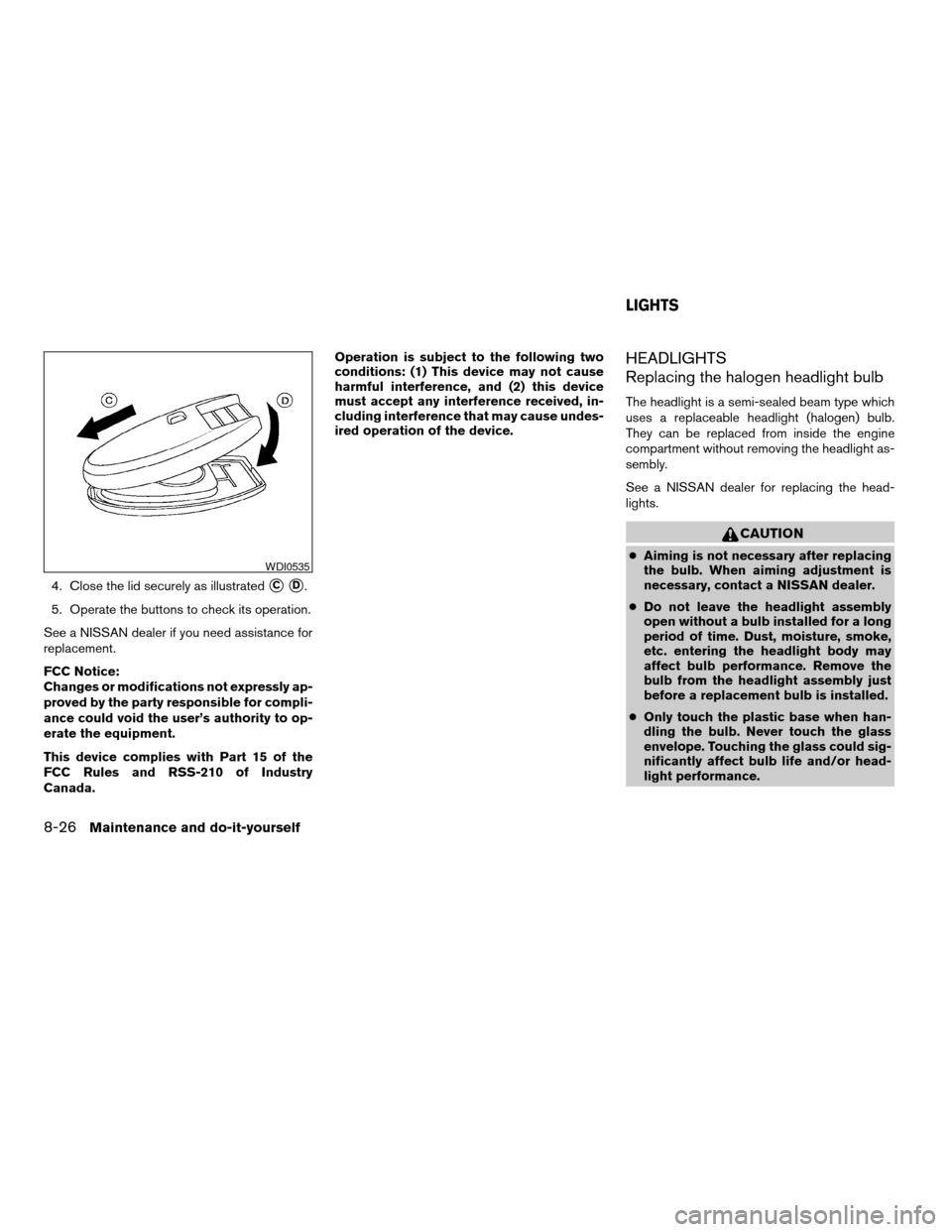
4. Close the lid securely as illustratedsCsD.
5. Operate the buttons to check its operation.
See a NISSAN dealer if you need assistance for
replacement.
FCC Notice:
Changes or modifications not expressly ap-
proved by the party responsible for compli-
ance could void the user’s authority to op-
erate the equipment.
This device complies with Part 15 of the
FCC Rules and RSS-210 of Industry
Canada.Operation is subject to the following two
conditions: (1) This device may not cause
harmful interference, and (2) this device
must accept any interference received, in-
cluding interference that may cause undes-
ired operation of the device.
HEADLIGHTS
Replacing the halogen headlight bulb
The headlight is a semi-sealed beam type which
uses a replaceable headlight (halogen) bulb.
They can be replaced from inside the engine
compartment without removing the headlight as-
sembly.
See a NISSAN dealer for replacing the head-
lights.
CAUTION
cAiming is not necessary after replacing
the bulb. When aiming adjustment is
necessary, contact a NISSAN dealer.
cDo not leave the headlight assembly
open without a bulb installed for a long
period of time. Dust, moisture, smoke,
etc. entering the headlight body may
affect bulb performance. Remove the
bulb from the headlight assembly just
before a replacement bulb is installed.
cOnly touch the plastic base when han-
dling the bulb. Never touch the glass
envelope. Touching the glass could sig-
nificantly affect bulb life and/or head-
light performance.WDI0535
LIGHTS
8-26Maintenance and do-it-yourself
ZREVIEW COPYÐ2007 Versa(vrs)
Owners ManualÐUSA_English(nna)
10/05/06Ðdebbie
X