Page 167 of 345

Indicator light is not illuminated. — OFF
Adjust driver seat when exiting vehicle:
The driver’s seat automatically moves back and
returns to the original position for ease of exit
and entry.
Selective door unlock:
This key can switch the unlock doors of the 1st
unlocking operation as follows:
ON (Only the driver side door)←→OFF (All the
doors)Keyless Remote Response — Horn*:
This key changes the horn chirp mode that
occurs when pushing the LOCK button on the
keyfobor the Intelligent Key.
Keyless Remote Response — Lights*:
This key changes the hazard indicator flash
mode that occurs when pushing the LOCK or
UNLOCK button on the keyfob or the Intelligent
Key.
* Even if you change the horn chirp or the
hazard flash with the keyfob or the Intel-
ligent Key, the change may not be re-
flected in the display. Use the keyfob orthe Intelligent Key to return to the previ-
ous mode.
Auto Re-Lock Time:
The length of the auto door re-lock time can be
set. Select the “Auto Re-Lock Time” key, then
move the joystick and push the ENTER button to
adjust the time.
Sensitivity of Automatic Headlights:
Automatic light illumination can be set as de-
sired.
Select the “Sensitivity of Automatic Headlights”
key, then move the joystick to the left (lower) or
right (higher).
Automatic Headlights Off Delay:
You can control how long it takes the automatic
turn off timer to extinguish the headlights in the
AUTO position.
Select the “Automatic Headlights Off Delay” key,
then move the joystick to the left or right to
adjust the timer.
Speed Dependent Wiper:
When this item is turned to on, the wiper interval
is adjusted automatically according to the ve-
hicle speed.
SAA1548
SAA1549
4-8
Display screen, heater, air conditioner and audio systems
�
06.7.5/Z50-D/V5.0
�
Page 168 of 345

Intelligent Key Lock Response — Sound
(if so equipped):
The sound pattern of the Intelligent request
switch operation can be set as desired. Select
the “Intelligent Key lock response — Sound” key,
then push the ENTER button to change the
sound pattern.
Intelligent Key Unlock Response — Beep
Sound (if so equipped):
The beep sounds when unlocking door with the
Intelligent request switch can be turned on or off.
Return All Settings to Default:
When this key is selected and turned on using
the “ENTER” button, all settings made by
VEHICLE ELECTRONICS will return to the initial
conditions.
System settingsLanguage/Unit:
The LANGUAGE/UNIT screen will appear when
selecting the “Language/Unit” key and pushing
the “ENTER” button.
Language: English or French
Unit: US — Mile, °F, MPG
Metric — km, °C, L/100 km
You can select the language and unit using the
joystick and “ENTER” button.Clock:
Adjusting the time
Select the “Hours” or “Minutes” key and move
the joystick to the right or left to adjust the time.
The time will change step by step.
After completion of the setting, push the “BACK”
button.
SAA1327
SAA1353
Display screen, heater, air conditioner and audio systems
4-9
�
06.7.5/Z50-D/V5.0
�
Page 169 of 345
“DAY/NIGHT” BUTTONPushing the “DAY/NIGHT” button will change
the display to the DAY or NIGHT display. Then,
adjust the brightness moving the joystick right or
left.
If no operation is done within 10 seconds, or if
the “BACK” button is pushed, the display will
return to the previous display.
Pushing the “DAY/NIGHT” button for more than
approximately 2 seconds will turn the display off
and on.4-10
Display screen, heater, air conditioner and audio systems
�
06.7.5/Z50-D/V5.0
�
Page 170 of 345
1. “DAY/NIGHT” button
2. “BACK” button
3. Joystick and “ENTER” button
4. “SETTING” button
5. “TRIP” button�A: For Navigation system control buttons; refer
to the separate Navigation System Owner’s
Manual.
When you use this system, make sure the engine
is running.
If you use the system with the engine not
running (ignition ONor ACC) for a long
time, it will use up all the battery power,
and the engine will not start.
HOW TO USE JOYSTICK AND
“ENTER” BUTTONChoose an item on the display using the joystick
and push the “ENTER” button for operation.HOW TO USE “BACK” BUTTONThis has two functions.
�Go back to the previous display (cancel).
If you push the “BACK” button during setup, the
setup will be canceled and/or the display will
return to the previous screen.
SAA1316
CONTROL PANEL BUTTONS —
WITH NAVIGATION SYSTEM
Display screen, heater, air conditioner and audio systems
4-11
�
06.7.5/Z50-D/V5.0
�
Page 171 of 345

�Finish setup.
If you push the “BACK” button after the setup is
completed, the setup will start over, and the
display will return to the climate control or Audio
mode, and Navigation screen.SETTING UP THE START-UP
SCREENWhen you turn the ignition switch to ACC, the
SYSTEM START-UP warning is displayed on
the screen. Read the warning and select the
“I AGREE” (English) or “ENTER” (Franc¸ ais) key
then push the “ENTER” button.
If you do not push the “ENTER” button, this
system will not proceed to the next step display.
If you do not push the button or select the
screen key for more than 1 minute on the TRIP,
SETTING or START-UP screen, the screen will
change to TRIP screen automatically.
To proceed to the next step, refer to the separate
Navigation System Owner’s Manual.
HOW TO USE THE “TRIP” BUTTONWhen the “TRIP” button is pushed, the following
modes will display on the screen.
Warning message (if there are any)→TRIP 1→
TRIP 2→FUEL ECONOMY→MAINTE-
NANCE.
“TRIP” informationElapsed Time, Driving Distance and Average
Speed will be displayed.
To reset, select the “Reset” key using the joy-
stick and push the “ENTER” button or push the
“TRIP” button for more than approximately 1.5
seconds.
SAA1317
4-12
Display screen, heater, air conditioner and audio systems
�
06.7.5/Z50-D/V5.0
�
Page 172 of 345

“FUEL ECONOMY” informationAverage Fuel Economy and Distance to Empty
will be displayed for reference.
To reset, select the “Reset” key using the joy-
stick and push the “ENTER” button or push the
“TRIP” button for more than approximately 1.5
seconds.
“MAINTENANCE” informationYou can set the engine oil and the tire rotation
interval.
And the tire pressure will appear on the screen
(if the tire pressure system is equipped).
To display the setting of the maintenance inter-
val, select the “Engine Oil” or “Tire Rotation” key
using the joystick and push the “ENTER” button.To set the maintenance interval, select the
“Maintenance Schedule” key by using the joy-
stick and move the joystick to the right or left.
To reset the maintenance interval, select the
“Reset” key using the joystick and push the
“ENTER” button.
To display the MAINTENANCE NOTICE, auto-
matically when setting trip distance is reached,
select the “Display Maintenance Notification”
key and push the “ENTER” button.
SAA1318
SAA1319
SAA1320
Display screen, heater, air conditioner and audio systems
4-13
�
06.7.5/Z50-D/V5.0
�
Page 173 of 345

MAINTENANCE NOTICEThe “MAINTENANCE NOTICE” screen (“EN-
GINE OIL” or “TIRE ROTATION”) will be auto-
matically displayed as shown when both of the
following conditions are met:
�the vehicle is driven the set distance and the
ignition switch is turned OFF.
�the ignition key is turned ON the next time the
vehicle will be driven.
To return to the previous display after the
“MAINTENANCE NOTICE” screen is displayed,
push the “BACK” button.The “MAINTENANCE NOTICE” screen displays
each time the key is turned ON until one of the
following conditions are met:
�“RESET” is selected.
�“Display Maintenance Notification” is set
OFF.
�the maintenance interval is set again.
Tire pressure information (if so
equipped)To view “TIRE PRESSURE” information, push
the “TRIP” button repeatedly until the “MAINTE-
NANCE” screen is displayed. Select “TIRE
PRESSURE” using the joystick and push the
“ENTER” button.
Pressure indication in ** psi on the screen
indicates that the pressure is being measured.
After a few driving trips, the pressure for each
tire will be displayed randomly.
The order of tire pressure figures displayed on
the screen does not correspond with the actual
SAA1354
SAA1321
4-14
Display screen, heater, air conditioner and audio systems
�
06.7.5/Z50-D/V5.0
�
Page 174 of 345
order of the tire position.
Tire pressure rises and falls depending on the
heat caused by the vehicle’s traveling condition
and the temperature.
In case of low tire pressure, a message is
displayed on the screen:
FLAT TIRE — low tire air pressure.
WARNING
�When a spare tire is mounted or a
wheel is replaced, tire pressure will
not be indicated, the TPMS will not
function and the low tire pressure
warning light will flash for approxi-
mately 1 minute and remain on after
the 1 minute. Contact your NISSAN
dealer as soon as possible for tire
replacement and/or system reset-
ting.
�Replacing tires with those not origi-
nally specified by NISSAN could af-
fect the proper operation of the
TPMS.* — Refer to the separate Navigation System
Owner’s Manual.
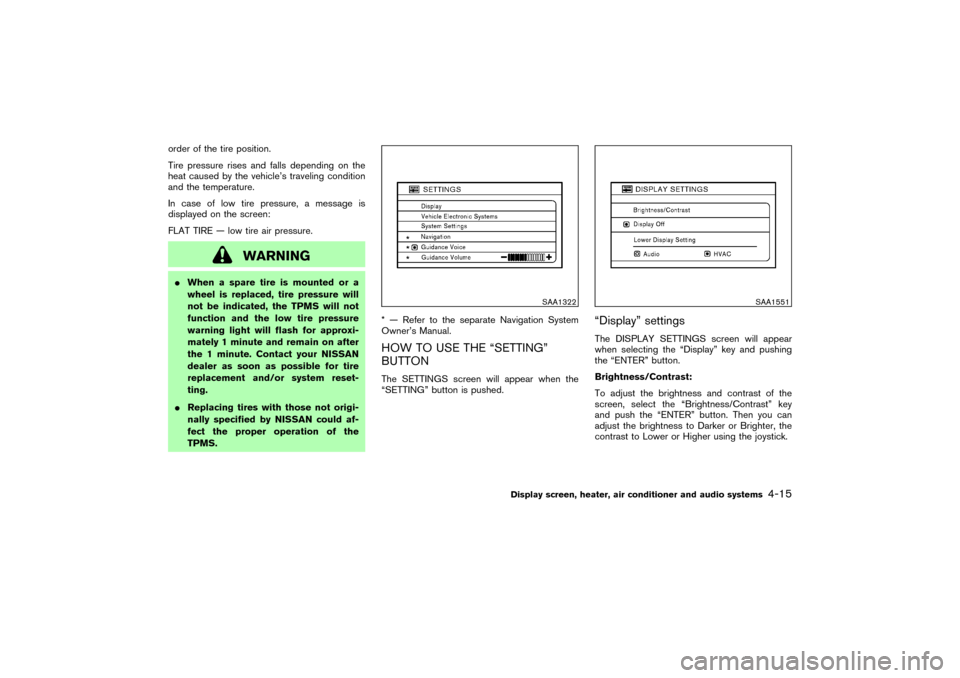
HOW TO USE THE “SETTING”
BUTTONThe SETTINGS screen will appear when the
“SETTING” button is pushed.
“Display” settingsThe DISPLAY SETTINGS screen will appear
when selecting the “Display” key and pushing
the “ENTER” button.
Brightness/Contrast:
To adjust the brightness and contrast of the
screen, select the “Brightness/Contrast” key
and push the “ENTER” button. Then you can
adjust the brightness to Darker or Brighter, the
contrast to Lower or Higher using the joystick.
SAA1322
SAA1551
Display screen, heater, air conditioner and audio systems
4-15
�
06.7.5/Z50-D/V5.0
�