Page 161 of 345
WARNING
�Do not disassemble or modify this
system. If you do, it may result in
accidents, fire, or electrical shock.
�Do not use this system if you notice
any abnormality, such as a frozen
screen or lack of sound. Continued
use of the system may result in acci-
dent, fire or electric shock.
�In case you notice any foreign object
in the system hardware, spill liquid
on it, or notice smoke or smell com-
ing from it, stop using the system
immediately and contact a NISSAN
dealer. Ignoring such conditions may
lead to accidents, fire, or electrical
shock.
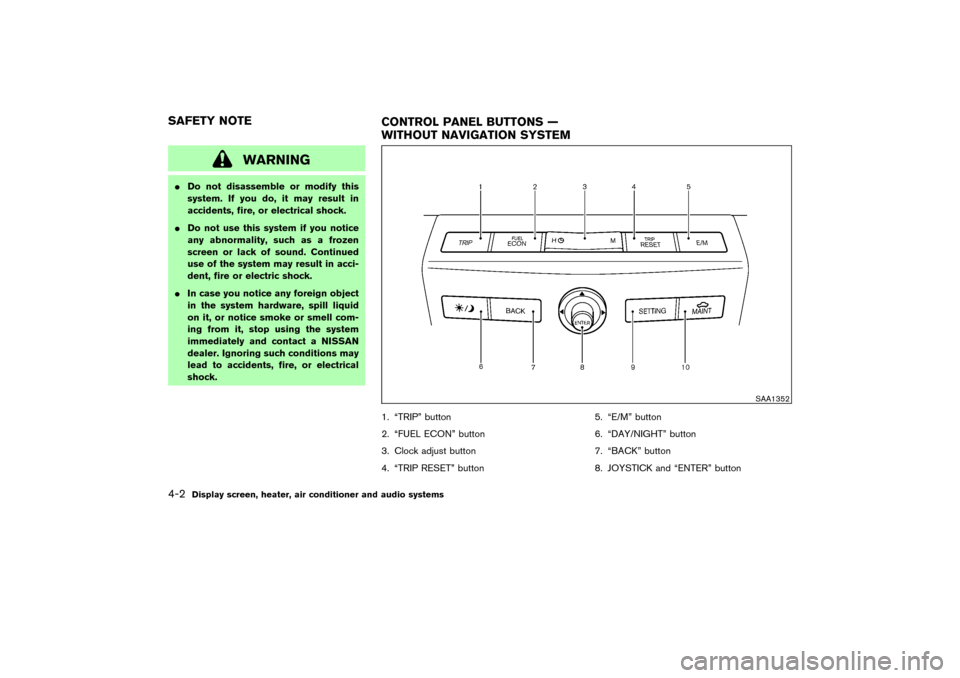
1. “TRIP” button
2. “FUEL ECON” button
3. Clock adjust button
4. “TRIP RESET” button5. “E/M” button
6. “DAY/NIGHT” button
7. “BACK” button
8. JOYSTICK and “ENTER” button
SAA1352
SAFETY NOTE
CONTROL PANEL BUTTONS —
WITHOUT NAVIGATION SYSTEM4-2
Display screen, heater, air conditioner and audio systems
�
06.7.5/Z50-D/V5.0
�
Page 162 of 345

9. “SETTING” button
10. “MAINT” maintenance button
Make sure the engine is running before using
this system.
If you use the system with the engine not
running (ignition ONor ACC) for a long
time, it will use up all the battery power,
and the engine will not start.HOW TO USE JOYSTICK AND
“ENTER” BUTTONChoose an item on the display using the joystick.
Push the “ENTER” button only when the use of
it is instructed on the display.HOW TO USE “BACK” BUTTONFinish setup:
If you push the “BACK” button after the setup is
completed, the display will return to the previous
screen.
HOW TO USE “TRIP” BUTTONWhen the “TRIP” button is pushed, the following
modes will display on the screen.
TRIP 1 (TIME, DIST, AVG)→TRIP 2 (TIME,
DIST, AVG)→OFF
Elapsed Time, Driving Distance and Average
Speed will be displayed.
To reset, select the “Reset” key using the joy-
stick and push the “ENTER” button, or push the
“TRIP RESET” or “TRIP” button for more than
approximately 1.5 seconds.
HOW TO USE “FUEL ECON”
BUTTONAverage Fuel Economy and Distance to Empty
will be displayed for reference when the “FUEL
ECON” button is pushed.
To reset, select the “Reset” key using the joy-
stick and push the “ENTER” button, or push the
“TRIP RESET” or “TRIP” button for more than
approximately 1.5 seconds.
SAA1317
SAA1318
Display screen, heater, air conditioner and audio systems
4-3
�
06.7.5/Z50-D/V5.0
�
Page 163 of 345

CLOCKThe digital clock displays time when the ignition
switch is in ACC or ON.
If the battery cable is disconnected, the
clock will not indicate the correct time.
Readjust the time.Adjusting the timeTo adjust the time, push the “H” or “M” button for
more than approximately 1.5 seconds. The time
indicator will flash.
Push theHbutton to adjust the hour.
Push theMbutton to adjust the minute.To finish the adjusting, push the “BACK” button
or the screen will return to normal after 10
seconds.
The clock can be adjusted on the setting display.
See the “HOW TO USE “SETTING” BUTTON”
later in this section.
HOW TO USE “E/M” BUTTONYou can change the unit as follows using the
“E/M” (English/Metric) button.
Unit: US — Mile, °F, MPG
Metric — km, °C, L/100 km
HOW TO USE “MAINT”
(Maintenance) BUTTONMaintenance and tire pressure information (if so
equipped) will be displayed when the “MAINT”
button is pushed.
To display the setting of the maintenance inter-
val, select the “Engine Oil” or “Tire Rotation” key
using the joystick and push the “ENTER” button.
To set the maintenance interval, select the
“Maintenance Schedule” key by using the joy-
stick and move the joystick to the right or left.
To reset the maintenance interval, select the
SAA1353
SAA1319
4-4
Display screen, heater, air conditioner and audio systems
�
06.7.5/Z50-D/V5.0
�
Page 164 of 345

“Reset” key using the joystick and push the
“ENTER” button.
To display the MAINTENANCE NOTICE, auto-
matically when setting trip distance is reached,
select the “Display Maintenance Notification”
key and push the “ENTER” button.
MAINTENANCE NOTICEThe “MAINTENANCE NOTICE” screen (“EN-
GINE OIL” or “TIRE ROTATION”) will be auto-
matically displayed as shown when both of the
following conditions are met:
�the vehicle is driven the set distance and the
ignition switch is turned OFF.
�the ignition key is turned ON the next time the
vehicle will be driven.
To return to the previous display after the
“MAINTENANCE NOTICE” screen is displayed,
push the “BACK” button.The “MAINTENANCE NOTICE” screen displays
each time the key is turned ON until one of the
following conditions are met:
�“RESET” is selected.
�“Display Maintenance Notification” is set
OFF.
�the maintenance interval is set again.
SAA1320
SAA1354
Display screen, heater, air conditioner and audio systems
4-5
�
06.7.5/Z50-D/V5.0
�
Page 165 of 345
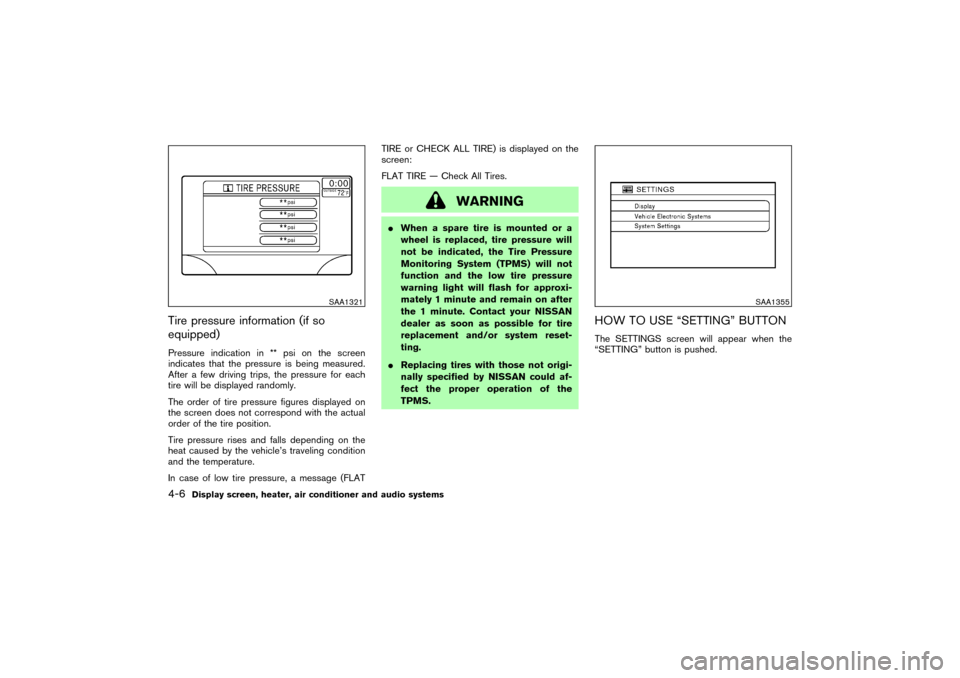
Tire pressure information (if so
equipped)Pressure indication in ** psi on the screen
indicates that the pressure is being measured.
After a few driving trips, the pressure for each
tire will be displayed randomly.
The order of tire pressure figures displayed on
the screen does not correspond with the actual
order of the tire position.
Tire pressure rises and falls depending on the
heat caused by the vehicle’s traveling condition
and the temperature.
In case of low tire pressure, a message (FLATTIRE or CHECK ALL TIRE) is displayed on the
screen:
FLAT TIRE — Check All Tires.
WARNING
�When a spare tire is mounted or a
wheel is replaced, tire pressure will
not be indicated, the Tire Pressure
Monitoring System (TPMS) will not
function and the low tire pressure
warning light will flash for approxi-
mately 1 minute and remain on after
the 1 minute. Contact your NISSAN
dealer as soon as possible for tire
replacement and/or system reset-
ting.
�Replacing tires with those not origi-
nally specified by NISSAN could af-
fect the proper operation of the
TPMS.
HOW TO USE “SETTING” BUTTONThe SETTINGS screen will appear when the
“SETTING” button is pushed.
SAA1321
SAA1355
4-6
Display screen, heater, air conditioner and audio systems
�
06.7.5/Z50-D/V5.0
�
Page 171 of 345

�Finish setup.
If you push the “BACK” button after the setup is
completed, the setup will start over, and the
display will return to the climate control or Audio
mode, and Navigation screen.SETTING UP THE START-UP
SCREENWhen you turn the ignition switch to ACC, the
SYSTEM START-UP warning is displayed on
the screen. Read the warning and select the
“I AGREE” (English) or “ENTER” (Franc¸ ais) key
then push the “ENTER” button.
If you do not push the “ENTER” button, this
system will not proceed to the next step display.
If you do not push the button or select the
screen key for more than 1 minute on the TRIP,
SETTING or START-UP screen, the screen will
change to TRIP screen automatically.
To proceed to the next step, refer to the separate
Navigation System Owner’s Manual.
HOW TO USE THE “TRIP” BUTTONWhen the “TRIP” button is pushed, the following
modes will display on the screen.
Warning message (if there are any)→TRIP 1→
TRIP 2→FUEL ECONOMY→MAINTE-
NANCE.
“TRIP” informationElapsed Time, Driving Distance and Average
Speed will be displayed.
To reset, select the “Reset” key using the joy-
stick and push the “ENTER” button or push the
“TRIP” button for more than approximately 1.5
seconds.
SAA1317
4-12
Display screen, heater, air conditioner and audio systems
�
06.7.5/Z50-D/V5.0
�
Page 172 of 345

“FUEL ECONOMY” informationAverage Fuel Economy and Distance to Empty
will be displayed for reference.
To reset, select the “Reset” key using the joy-
stick and push the “ENTER” button or push the
“TRIP” button for more than approximately 1.5
seconds.
“MAINTENANCE” informationYou can set the engine oil and the tire rotation
interval.
And the tire pressure will appear on the screen
(if the tire pressure system is equipped).
To display the setting of the maintenance inter-
val, select the “Engine Oil” or “Tire Rotation” key
using the joystick and push the “ENTER” button.To set the maintenance interval, select the
“Maintenance Schedule” key by using the joy-
stick and move the joystick to the right or left.
To reset the maintenance interval, select the
“Reset” key using the joystick and push the
“ENTER” button.
To display the MAINTENANCE NOTICE, auto-
matically when setting trip distance is reached,
select the “Display Maintenance Notification”
key and push the “ENTER” button.
SAA1318
SAA1319
SAA1320
Display screen, heater, air conditioner and audio systems
4-13
�
06.7.5/Z50-D/V5.0
�
Page 173 of 345

MAINTENANCE NOTICEThe “MAINTENANCE NOTICE” screen (“EN-
GINE OIL” or “TIRE ROTATION”) will be auto-
matically displayed as shown when both of the
following conditions are met:
�the vehicle is driven the set distance and the
ignition switch is turned OFF.
�the ignition key is turned ON the next time the
vehicle will be driven.
To return to the previous display after the
“MAINTENANCE NOTICE” screen is displayed,
push the “BACK” button.The “MAINTENANCE NOTICE” screen displays
each time the key is turned ON until one of the
following conditions are met:
�“RESET” is selected.
�“Display Maintenance Notification” is set
OFF.
�the maintenance interval is set again.
Tire pressure information (if so
equipped)To view “TIRE PRESSURE” information, push
the “TRIP” button repeatedly until the “MAINTE-
NANCE” screen is displayed. Select “TIRE
PRESSURE” using the joystick and push the
“ENTER” button.
Pressure indication in ** psi on the screen
indicates that the pressure is being measured.
After a few driving trips, the pressure for each
tire will be displayed randomly.
The order of tire pressure figures displayed on
the screen does not correspond with the actual
SAA1354
SAA1321
4-14
Display screen, heater, air conditioner and audio systems
�
06.7.5/Z50-D/V5.0
�