2007 NISSAN MAXIMA ECO mode
[x] Cancel search: ECO modePage 162 of 336

Brightness/contrast/map background:
Select the “Brightness/Contrast/Map Back-
ground” key to adjust the brightness and contrast
of the map background. Use the joystick to adjust
the brightness to darker or brighter and the con-
trast to lower or higher.
Use the joystick to select the “Map Background”
key. Press the ENTER button or move the joystick
right or left to choose a “Dark” or “Bright” map
background.
The new settings are automatically saved when
you exit the setting screen by pressing the BACK
button or any other mode button.Display off:
Select the “Display Off” key. The indicator of the
“Display Off” turns amber and the message
above will be displayed briefly. When the audio,
HVAC (Heater and air conditioner) , or any mode
button on the control panel is operated, the dis-
play turns on for that operation. If one of the
control panel buttons is pressed, the display will
not automatically turn off until that operation is
finished. Otherwise, the screen turns off auto-
matically after 5 seconds.To turn the screen on,
cPress the SETTING button and select the
“Display” key and then select the “Display
Off” key. Then set the screen to on by press-
ing the ENTER button, or
cHold the
button for approximately 2
seconds and the message “resuming dis-
play” will appear and the “Display Off” key
will be automatically turned on (no amber
indicator) .
LHA0633LHA0642
4-12Display screen, heater, air conditioner, audio and phone systems
ZREVIEW COPYÐ2007 Maxima(max)
Owners ManualÐUSA_English(nna)
01/26/07Ðarosenma
X
Page 169 of 336
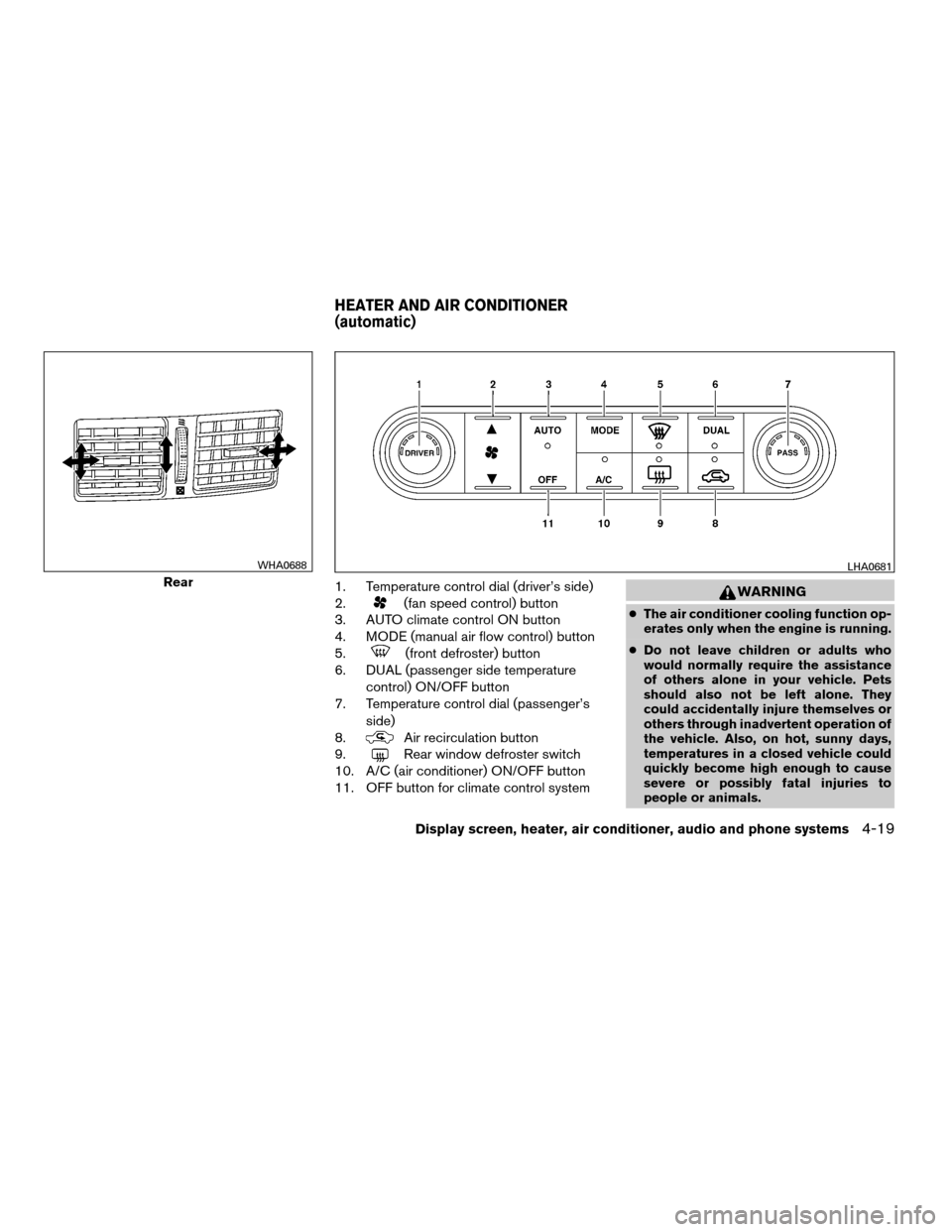
1. Temperature control dial (driver’s side)
2.
(fan speed control) button
3. AUTO climate control ON button
4. MODE (manual air flow control) button
5.
(front defroster) button
6. DUAL (passenger side temperature
control) ON/OFF button
7. Temperature control dial (passenger’s
side)
8.
Air recirculation button
9.
Rear window defroster switch
10. A/C (air conditioner) ON/OFF button
11. OFF button for climate control system
WARNING
cThe air conditioner cooling function op-
erates only when the engine is running.
cDo not leave children or adults who
would normally require the assistance
of others alone in your vehicle. Pets
should also not be left alone. They
could accidentally injure themselves or
others through inadvertent operation of
the vehicle. Also, on hot, sunny days,
temperatures in a closed vehicle could
quickly become high enough to cause
severe or possibly fatal injuries to
people or animals.
Rear
WHA0688LHA0681
HEATER AND AIR CONDITIONER
(automatic)
Display screen, heater, air conditioner, audio and phone systems4-19
ZREVIEW COPYÐ2007 Maxima(max)
Owners ManualÐUSA_English(nna)
01/26/07Ðarosenma
X
Page 170 of 336
cDo not use the recirculation mode for
long periods as it may cause the interior
air to become stale and the windows to
fog up.
Start the engine and operate the controls to
activate the air conditioner.
AUTOMATIC OPERATION
Cooling and/or dehumidified heating
(AUTO)
This mode may be used all year round as the
system automatically works to keep a constant
temperature. Air flow distribution and fan speed
are also controlled automatically.
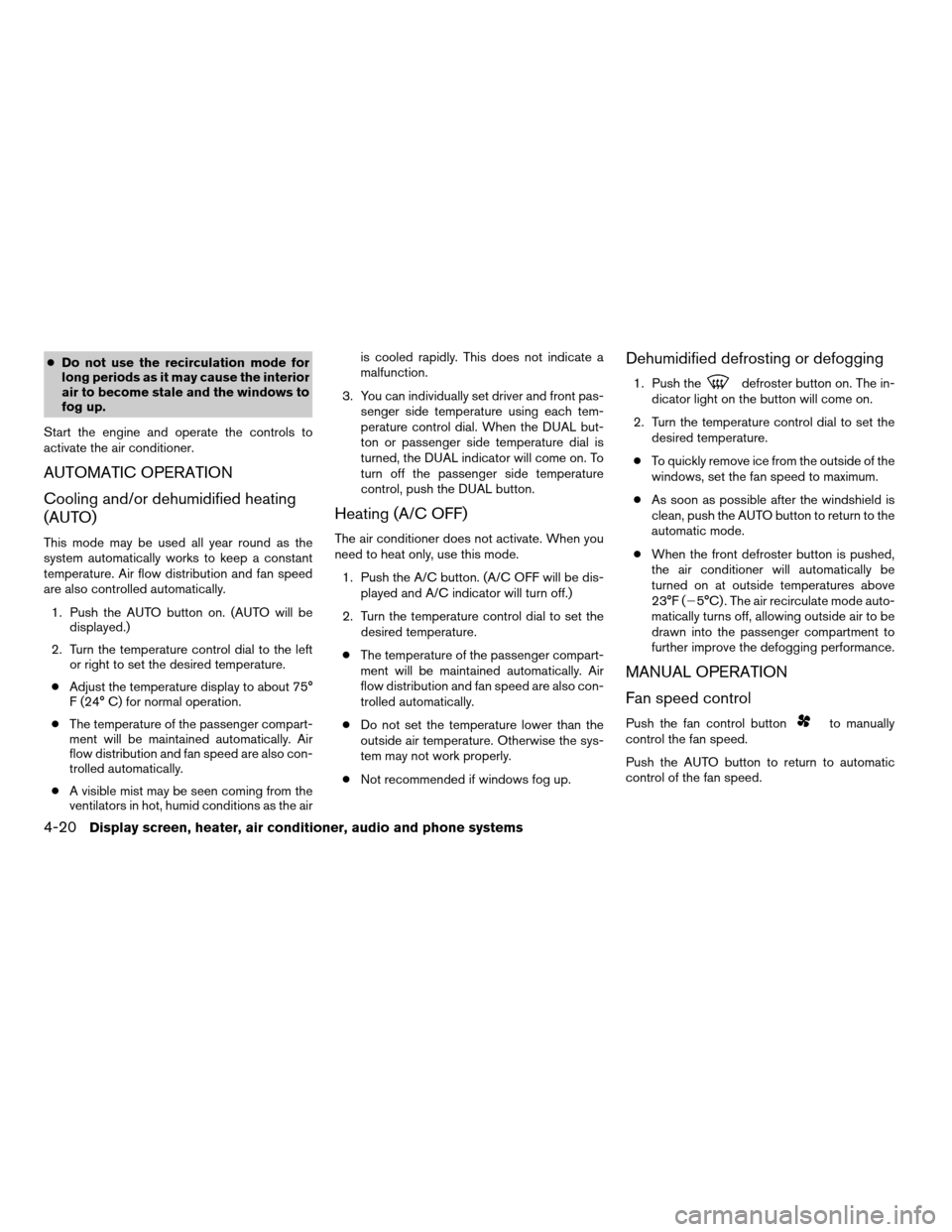
1. Push the AUTO button on. (AUTO will be
displayed.)
2. Turn the temperature control dial to the left
or right to set the desired temperature.
cAdjust the temperature display to about 75°
F (24° C) for normal operation.
cThe temperature of the passenger compart-
ment will be maintained automatically. Air
flow distribution and fan speed are also con-
trolled automatically.
cA visible mist may be seen coming from the
ventilators in hot, humid conditions as the airis cooled rapidly. This does not indicate a
malfunction.
3. You can individually set driver and front pas-
senger side temperature using each tem-
perature control dial. When the DUAL but-
ton or passenger side temperature dial is
turned, the DUAL indicator will come on. To
turn off the passenger side temperature
control, push the DUAL button.
Heating (A/C OFF)
The air conditioner does not activate. When you
need to heat only, use this mode.
1. Push the A/C button. (A/C OFF will be dis-
played and A/C indicator will turn off.)
2. Turn the temperature control dial to set the
desired temperature.
cThe temperature of the passenger compart-
ment will be maintained automatically. Air
flow distribution and fan speed are also con-
trolled automatically.
cDo not set the temperature lower than the
outside air temperature. Otherwise the sys-
tem may not work properly.
cNot recommended if windows fog up.
Dehumidified defrosting or defogging
1. Push thedefroster button on. The in-
dicator light on the button will come on.
2. Turn the temperature control dial to set the
desired temperature.
cTo quickly remove ice from the outside of the
windows, set the fan speed to maximum.
cAs soon as possible after the windshield is
clean, push the AUTO button to return to the
automatic mode.
cWhen the front defroster button is pushed,
the air conditioner will automatically be
turned on at outside temperatures above
23°F (25°C) . The air recirculate mode auto-
matically turns off, allowing outside air to be
drawn into the passenger compartment to
further improve the defogging performance.
MANUAL OPERATION
Fan speed control
Push the fan control buttonto manually
control the fan speed.
Push the AUTO button to return to automatic
control of the fan speed.
4-20Display screen, heater, air conditioner, audio and phone systems
ZREVIEW COPYÐ2007 Maxima(max)
Owners ManualÐUSA_English(nna)
01/26/07Ðarosenma
X
Page 171 of 336

Air recirculation
Push the air recirculation button to recirculate
interior air inside the vehicle. The indicator light
on the button will come on.
The air recirculation cannot be activated when
the air conditioner is in the front defrosting mode.
Air flow control
Pushing the MODE button manually controls air
flow and selects the air outlet:
— Air flows from center and side
ventilators.
— Air flows from center and side
ventilators and foot outlets.
— Air flows mainly from foot outlets.
— Air flows from defroster and foot
outlets.
— Air flows from defroster outlets.
To turn system off
Press the OFF button.
OPERATING TIPS
cWhen the engine coolant temperature and
outside air temperature are low, the air flow
from the foot outlets may not operate for a
maximum of 150 seconds. However, this is
not a malfunction. After the coolant tempera-
ture warms up, air flow from the foot outlets
will operate normally.
The sunload sensor, located on the top passen-
ger side of the instrument panel, helps the system
maintain a constant temperature. Do not put any-
thing on or around this sensor.
WHA0209
Display screen, heater, air conditioner, audio and phone systems4-21
ZREVIEW COPYÐ2007 Maxima(max)
Owners ManualÐUSA_English(nna)
01/26/07Ðarosenma
X
Page 180 of 336

Audio main operation
POWER/VOLUME control:
Turn the ignition key to ACC or ON, and then
press the PWR/VOL control knob while the sys-
tem is off to call up the mode (radio or CD) which
was playing immediately before the system was
turned off.
To turn the system off, press the PWR/VOL con-
trol knob.
Turn the PWR/VOL control knob to adjust the
volume.
This vehicle may be equipped with Speed Sen-
sitive Volume (SSV) for audio. The audio volume
changes as the driving speed changes.
AUDIO button (Bass, Mid, Treble,
Fade, Balance, SSV, Beep and
Language):
Press the
AUDIO button to change the
mode as follows:
Bass!Mid!Treble!Fade!Balance!
Speed Sense Volume (if so equipped)!Beep
ON/OFF!Language!Audio or OFF!Bass
To adjust Bass, Treble, Fade and Balance, press
the
AUDIO button until the desired mode
appears in the display. Press the TUNE button to
adjust Bass and Treble to the desired level. Youcan also use the TUNE button to adjust Fader
and Balance modes. Fader adjusts the sound
level between the front and rear speakers and
Balance adjusts the sound between the right and
left speakers.
To change the SSV mode to OFF, LEVEL1 to
LEVEL5 press the TUNE button left or right.
To change the Beep to ON or OFF, press the
TUNE button left or right. This will enable or
disable the beep sound heard during menu se-
lection.
To change the Language to English or Français,
press the TUNE button left or right.
Once you have adjusted the sound quality to the
desired level, press the
AUDIO button re-
peatedly until the radio or CD display reappears.
Otherwise, the radio or CD display will automati-
cally reappear after about 5 seconds.
CLOCK DISP (display) button:
Pressing the CLOCK DISP (display) button will
show text information about CD or MP3 and SAT
(satellite, if so equipped) in the audio display.
CD display mode
To change the text displayed while playing a CD
with text, press the CLOCK DISP button. The
CLOCK DISP button will allow you to scrollthrough CD text as follows: Track number and
Track timeÃ!Album titleÃ!Song title.
cTrack number displays the track number se-
lected on the disc.
cTrack time displays the amount of time the
track has played.
cAlbum title displays the title of the CD being
played.
cSong title displays the title of the selected
CD track.
MP3 display mode (Type B only)
To change the text displayed when listening to a
CD with MP3s and ID3 tags, press the CLOCK
DISP button. The CLOCK DISP button will scroll
through the CD text as follows: Disc number,
Track number and Folder numberÃ!Folder title
Ã!Album titleÃ!Artist nameÃ!Song title.
cDisc number displays the number of the
current disc playing.
cTrack number displays the number of the
track playing on the selected disc.
cFolder number displays the number of the
current folder on the MP3 CD.
cFolder title displays the title of the folder.
4-30Display screen, heater, air conditioner, audio and phone systems
ZREVIEW COPYÐ2007 Maxima(max)
Owners ManualÐUSA_English(nna)
01/26/07Ðarosenma
X
Page 181 of 336

cAlbum title displays the title of the album of
the song playing.
cArtist name displays the name of the artist of
the song playing.
cSong title displays the title of the song play-
ing.
Display satellite radio display mode (if so
equipped)
To change the text displayed when listening to
satellite radio (if so equipped) press the CLOCK
DISP button. The CLOCK DISP button will scroll
through the broadcast information as follows:
Channel numberÃ!Category nameÃ!
Channel nameÃ!Artist nameÃ!Song title.
cChannel number displays the channel num-
ber of the selected satellite radio station.
cCategory name displays the category name
of the selected satellite radio station.
cChannel name displays the channel name of
the selected satellite radio station.
cArtist name displays the name of the artist,
host or weather condition of the selected
satellite radio station.
cSong title displays the song title, show
name, or temperature of the selected satel-
lite radio station.Clock operation
Pressing the CLOCK DISP button displays the
clock with the radio on or off. Press the CLOCK
DISP button again to turn off the clock display.
For additional information on setting the clock,
see “Adjusting the time” earlier in this section.
pause/mute button (Type A only):
To mute or pause the audio sound, press
the
pause/mute button.
Press the button again to resume the audio
sound.
FM/AM/SAT radio operation
FM/AM/SAT band select:
Pressing the RADIO button will change the band
as follows:
AMÃ!FMÃ!SAT (satellite, if so equipped)
When the RADIO button is pressed while the
ignition switch is in the ACC or ON position, the
radio will come on at the station last played.
No satellite radio reception is available when the
RADIO button is pressed to access satellite radio
stations unless optional satellite receiver and an-
tenna are installed and an XMTor SIRIUS™ sat-
ellite radio service subscription is active. Satellite
radio can only be installed in vehicles that werefactory pre-wired for satellite radio. Satellite radio
is not available in Alaska, Hawaii and Guam. If
satellite radio is not operational then the RADIO
button is used to toggle between AM and FM
bands.
If a compact disc is playing when the RADIO
button is pressed, the compact disc will auto-
matically be turned off and the last radio station
played will come on.
The FM stereo indicator ST will glow during FM
stereo reception. When the stereo broadcast
signal is weak, the radio will automatically change
from stereo to monaural reception.
TUNE (tuning) button:
To manually tune the radio, press the TUNE
button
or.
To move quickly through the channels, press and
hold either the
orbutton.
SEEK (tuning) button:
Press the SEEK button
orfor less
than 1.5 seconds to tune from high to low or low
to high frequencies and stop at the next broad-
casting station.
Display screen, heater, air conditioner, audio and phone systems4-31
ZREVIEW COPYÐ2007 Maxima(max)
Owners ManualÐUSA_English(nna)
01/26/07Ðarosenma
X
Page 184 of 336

CD/AUX button:
When the CD/AUX button is pressed with the
system off and the compact disc loaded, the
system will turn on and the compact disc will start
to play.
When the CD/AUX button is pressed with the
compact disc loaded but the radio playing, the
radio will automatically be turned off and the
compact disc will start to play.
TUNE (Rewind and Fast
Forward) button:
While playing a compact disc without MP3 press
the TUNE button
(rewind) or(fast
forward) , the compact disc will play while rewind-
ing or fast forwarding. When the button is re-
leased, the compact disc will return to normal
play speed.
MP3 TUNE
(CAT•FOLDER) button:
While playing an MP3, press the TUNE
button
orto scan forward or back-
ward through available folders.
To fast forward or rewind through an audio track,
press the TUNE button
orfor more
than 1.5 seconds.
SEEK button:
When the SEEK button
is pressed for less
than 1.5 seconds while a CD or MP3 CD is
playing, the track or file being played returns to its
beginning. Press
button several times to
skip back through tracks or files. The CD or MP3
CD will go back the number of times the button is
pressed.
When the SEEK button
button is pressed
for less than 1.5 seconds while a CD or MP3 CD
is playing, the next track or file will start to play
from its beginning. Press
button several
times to skip through tracks or files. The CD or
MP3 CD will advance the number of times the
button is pressed. When the last track or file on
the CD or MP3 CD is skipped through, the first
track or file will be played. If there are multiple
CDs in the CD changer, when the last track or file
is skipped through, the next CD will start to play.
CD select buttons:
To play another CD that has been loaded, press a
CD select button (1 – 6) .MIX/RPT button:
When the MIX/RPT button is pressed while a
compact disc is being played, the play pattern
can be changed as follows:
Repeat All!Repeat Disc!Repeat Track!Mix
All Discs!Mix Disc!Repeat All
Repeat Disc: The disc that is currently playing will
be repeated.
Repeat Track: The track that is currently playing
will be repeated.
Mix All Disc: Tracks from all discs will be played
randomly.
Mix Disc: Tracks from the disc that is currently
playing will be played randomly.
Repeat All: All discs will be played normally, with
no special play pattern enabled.
MP3 MIX/RPT mode:
When the MIX/RPT button is pressed while an
MP3 compact disc is being played, the play
pattern can be changed as follows:
Repeat All!Repeat Disc!Repeat Folder!
Repeat Track!Mix All Disc!Mix Disc!Mix
Folder!Repeat All
Repeat Disc: The disc that is currently playing will
be repeated.
Repeat Folder: The folder selected that is cur-
rently playing will be repeated.
4-34Display screen, heater, air conditioner, audio and phone systems
ZREVIEW COPYÐ2007 Maxima(max)
Owners ManualÐUSA_English(nna)
01/26/07Ðarosenma
X
Page 185 of 336

Repeat Track: The track that is currently playing
will be repeated.
Mix All Disc: Tracks from all discs will be played
randomly.
Mix Disc: Tracks from the disc that is currently
playing will be played randomly.
Mix Folder: Tracks from that folder that is cur-
rently accessed will be played randomly.
Repeat All: All discs will be played normally, with
no special play pattern enabled.
SCAN button:
While listening to a CD, press the
SCAN
button to preview the first 10 seconds of each
track on the CD playing. Pressing the
SCAN button again during this 10 second period
stops the scan and the CD remains on that track.
MP3 SCAN mode:
While listening to an MP3 CD, press the
SCAN button to preview the first 10 seconds of
each file in the current folder. The scan will con-
tinue on to the next folder and files if there is more
than one folder on the MP3 CD. Pressing
the
SCAN button again during this 10
second period stops the scan and the MP3 CD
remains in that folder.CD/AUX (Auxiliary) button:
The AUX jack is located on the CD player. The
AUX audio input jack accepts any standard ana-
log audio input such as from a portable cassette
tape/CD player, MP3 player or laptop computers.
Press the CD/AUX button to play a compatible
device when it is plugged into the AUX jack.
CD EJECT:
Current/Selected disc:
cPress the
button, then press the slot
number (1 – 6) for the desired disc. The
compact disc will be ejected. If no slot num-
ber (1 – 6) is pressed, the current loaded
disc will be ejected. Also, if the ejected disc
is not removed within 15 seconds, the disc
will reload.
All discs:
cPress and hold the
button for more
than 1.5 seconds. The compact discs will be
ejected one by one. If a disc is not removed
within 15 seconds, or the
button is
pressed again during the eject sequence,
the entire disc eject sequence will be can-
celed.When this button is pressed while the compact
disc is being played, the compact disc will eject
and the last source will be played.
CD IN indicator:
The slot numbers (1 – 6) will illuminate if CDs
have been loaded into the changer in CD mode
only.
Display screen, heater, air conditioner, audio and phone systems4-35
ZREVIEW COPYÐ2007 Maxima(max)
Owners ManualÐUSA_English(nna)
01/26/07Ðarosenma
X