2007 NISSAN ARMADA buttons
[x] Cancel search: buttonsPage 189 of 344
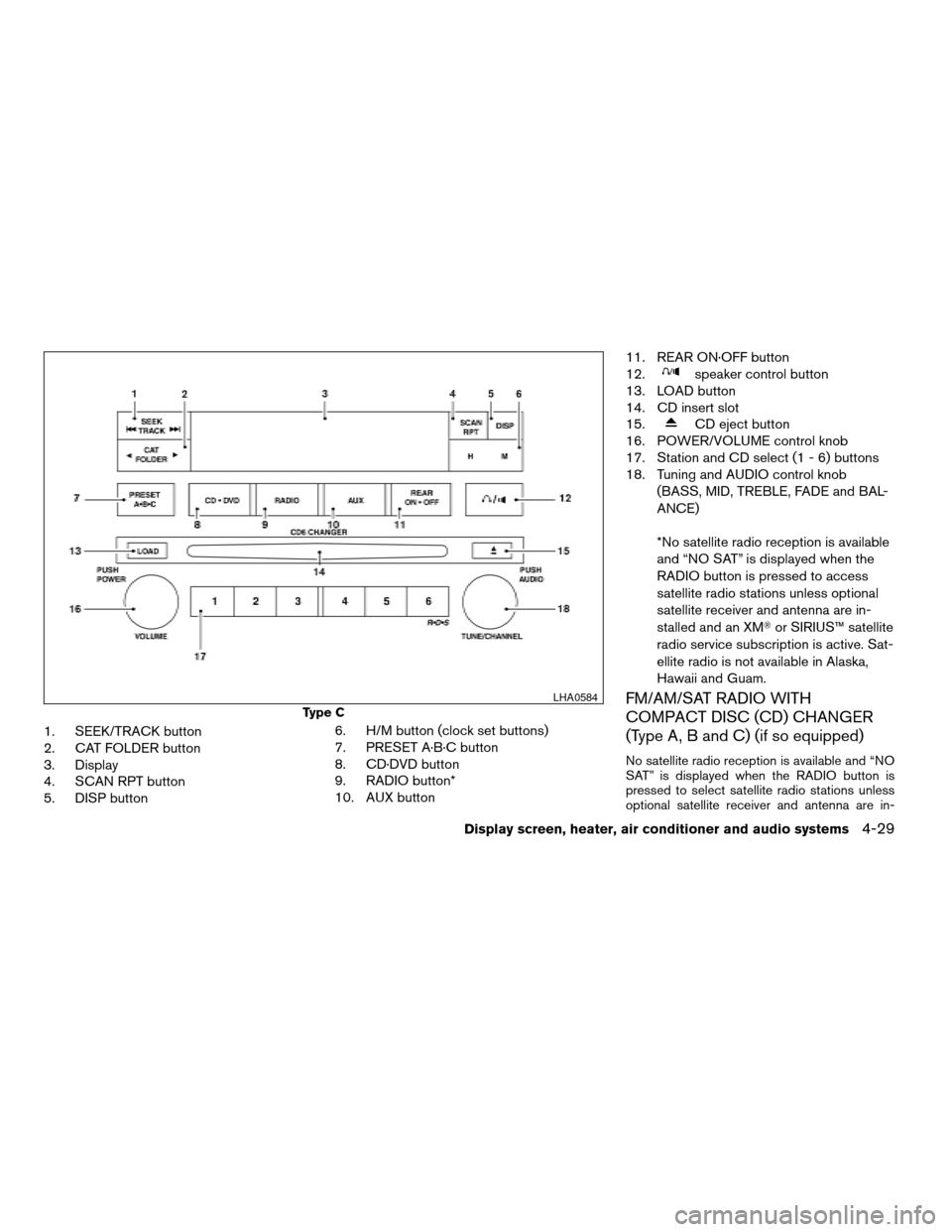
1. SEEK/TRACK button
2. CAT FOLDER button
3. Display
4. SCAN RPT button
5. DISP button6. H/M button (clock set buttons)
7. PRESET A·B·C button
8. CD·DVD button
9. RADIO button*
10. AUX button11. REAR ON·OFF button
12.
speaker control button
13. LOAD button
14. CD insert slot
15.
CD eject button
16. POWER/VOLUME control knob
17. Station and CD select (1 - 6) buttons
18. Tuning and AUDIO control knob
(BASS, MID, TREBLE, FADE and BAL-
ANCE)
*No satellite radio reception is available
and “NO SAT” is displayed when the
RADIO button is pressed to access
satellite radio stations unless optional
satellite receiver and antenna are in-
stalled and an XMTor SIRIUS™ satellite
radio service subscription is active. Sat-
ellite radio is not available in Alaska,
Hawaii and Guam.
FM/AM/SAT RADIO WITH
COMPACT DISC (CD) CHANGER
(Type A, B and C) (if so equipped)
No satellite radio reception is available and “NO
SAT” is displayed when the RADIO button is
pressed to select satellite radio stations unless
optional satellite receiver and antenna are in-
Type C
LHA0584
Display screen, heater, air conditioner and audio systems4-29
ZREVIEW COPYÐ2007 Armada(wzw)
Owners ManualÐUSA_English(nna)
07/08/06Ðtbrooks
X
Page 192 of 344

TUNE/FOLDER·CAT
(tuning) button (Type A
and B only):
To manually tune the radio, press the
TUNE/FOLDER·CAT button
oror
turn the tuning knob to right or left.
To move quickly through the channels, press and
hold either the
orbutton down for
more than 1.5 seconds.
CAT FOLDER (tuning)
button (Type C only):
To manually tune the radio, press the CAT
FOLDER button
oror turn the tun-
ing knob to right or left.
To move quickly through the channels, press and
hold either the
orbutton down for
more than 1.5 seconds.
SEEK/TRACK (tuning)
button (Type A and B
only):
Press the SEEK/TRACK button
orfor less than 1.5 seconds to tune from high to low
or low to high frequencies and stop at the next
broadcasting station.
To seek quickly through the channels, press and
hold the SEEK/TRACK button for more than 1.5seconds. When the button is released the radio
will seek to the next broadcasting station.
SEEK/TRACK (tuning)
button (Type C only):
Press the SEEK/TRACK button
orfor less than 1.5 seconds to tune from high to low
or low to high frequencies and stop at the next
broadcasting station.
To seek quickly through the channels, press and
hold the SEEK/TRACK button for more than 1.5
seconds. When the button is released the radio
will seek to the next broadcasting station.
SCAN/RPT tuning button:
Press the SCAN/RPT button for more than 1.5
seconds to stop at each broadcasting station
(AM, FM or SAT, if so equipped) for 5 seconds.
Pressing the button again during this 5 second
period will stop scan tuning and the radio will
remain tuned to that station. If the SCAN/RPT
button is not pressed within 5 seconds, scan
tuning moves to the next station.
PRESET A·B·C (Station memory opera-
tions):
18 stations can be set for the FM, AM and SAT
(satellite, if so equipped) radio to the A, B and C
preset button in any combination of FM, AM or
SAT stations.1. Choose preset bank A, B or C using the
PRESET A·B·C select button.
2. Select the desired FM, AM or SAT station
band.
3. Tune to the desired station using manual,
SEEK or SCAN tuning. Press and hold any
of the desired station memory buttons (1 –
6) until a beep sound is heard.
4. The channel indicator will then come on and
the sound will resume. Programming is now
complete.
5. Other buttons can be set in the same man-
ner.
If the battery cable is disconnected, or if the fuse
opens, the radio memory will be canceled. In that
case, reset the desired stations.
Radio data system (RDS):
RDS stands for Radio Data System, and is a data
information service transmitted by some radio
stations on the FM band (not AM band) . Cur-
rently, most RDS stations are in large cities, but
many stations are now considering broadcasting
RDS data.
RDS can display:
cStation call sign, such as “WHFR 98.3”.
cStation name, such as “The Groove”.
4-32Display screen, heater, air conditioner and audio systems
ZREVIEW COPYÐ2007 Armada(wzw)
Owners ManualÐUSA_English(nna)
07/08/06Ðtbrooks
X
Page 194 of 344

TUNE/FOLDER·CAT but-
ton (Type A and B only):
CD:
cWhile playing a CD press the
TUNE/FOLDER·CAT button
orto fast forward or rewind a track on a CD.
MP3 CD:
cWhile playing an MP3 CD, press the
TUNE/FOLDER·CAT button
orto scan backward or forward through avail-
able folders.
cPress and hold the TUNE/FOLDER·CAT
button
orto fast forward or re-
wind a track on an MP3 CD.
CAT FOLDER button
(Type C only):
CD:
cWhile playing a CD press the CAT FOLDER
button
orto fast forward or re-
wind a track on a CD.
MP3 CD:
cWhile playing an MP3 CD, press the CAT
FOLDER button
orto scan
backward or forward through available fold-
ers.cPress and hold the CAT FOLDER
button
orto fast forward or re-
wind a track on an MP3 CD.
CD select buttons:
To play another CD that has been loaded, press a
CD select button (1 – 6) .
SCAN/RPT:
When the SCAN/RPT play button is pushed
while the compact disc is played, the play pattern
can be changed as follows:
ALL DISC RPT!1 DISC RPT!1 TRACK RPT
!ALL DISC RDM!1 DISC RDM!ALL DISC
RPT
ALL DISC RPT: All discs loaded will be repeated.
1 DISC RPT: The disc that is currently playing will
be repeated.
1 TRACK RPT: The track that is currently playing
will be repeated
ALL DISC RDM: Tracks from all discs will be
played randomly
1 DISC RDM: Tracks from the disc that is cur-
rently playing will be played randomly
REAR ON·OFF:
Pressing the REAR ON·OFF button turns the rear
seat audio controller on. REAR CONT ON will
display. Pressing it again will turn the rear seat
audio controller off. REAR CONT OFF will dis-play. If the vehicle is not equipped with a rear seat
audio controller, the display will show “REAR AV
N/A”.
(SPEAKER CONTROL) button:
Press the
button to turn the rear speakers
off and headphones on. Press this button again
to turn rear seat speakers back on and head-
phones off.
CD EJECT:
Current/Selected disc:
cPress the
button, then press the slot
number (1 – 6) for the desired disc. The
compact disc will be ejected. If no slot num-
ber (1 – 6) is pressed, the current loaded
disc will be ejected. Also, if the ejected disc
is not removed within 15 seconds, the disc
will reload.
All discs:
cPress and hold the
button for more
than 1.5 seconds. The compact discs will be
ejected one by one. If a disc is not removed
within 15 seconds, or the
button is
pressed again during the eject sequence,
the entire disc eject sequence will be can-
celed.
4-34Display screen, heater, air conditioner and audio systems
ZREVIEW COPYÐ2007 Armada(wzw)
Owners ManualÐUSA_English(nna)
07/08/06Ðtbrooks
X
Page 205 of 344

ENTER:
In MENU mode, press the ENTER button to se-
lect MENU items.
In the display menu, press the ENTER button to
select items for modification, as per the on-
screen instructions.
MENU:
If the media is in PLAY mode and the MENU
button is pressed, the DVD menu will appear on
the screen. Use Navigation Keys to navigate
within the menu, and use ENTER to select the
item.
Press the MENU button again to return to PLAY
mode.
TITLE (Remote control only):
Press TITLE button to return the DVD media to
the “title” of the DVD.
Press TITLE button again to return to the previous
stop point and play.
BACK (Remote control only):
Press the BACK button to exit the current active
menu and return to the previous menu.
SUBTITLE (Remote control only):
Press the SUBTITLE button to call up subtitle
selection menu.Repeatedly press the SUBTITLE button to cycle
through each available subtitle.
AUDIO (Remote control only):
Press the AUDIO button to call up audio menu.
Repeatedly press the AUDIO button to cycle
through each available audio track.
ANGLE (Remote control only):
Press the ANGLE button to call up camera angle
menu.
Repeatedly press the ANGLE button to cycle
through each available angle.
CLEAR (Remote control only):
Press the CLEAR button to clear all numeric
inputs, if actuated prior to expiration of the
3-second timer.
NUMERIC KEYPAD (0–9 &¸10) (Remote
control only):
Press the NUMERIC KEYPAD to directly access
disc chapters, titles or tracks by inputting their
numeric value.
The “¸10” button input numbers greater than or
equal to 10, allowing up three digits to be input
for selecting chapter/title/track number.The subsequent actuation of numeric buttons will
continuously shift the previously input number to
the “left”.
The chapter/title/track number will be automati-
cally selected (if valid, based on media content) if
3 seconds expire without any keypad inputs.
The operator can cancel the input
chapter/title/track number by actuating the
CLEAR control prior to the expiration of the
3-second timer.
These functions can be used only for the DVD
discs which correspond to them.
Auxiliary input jacks
The auxiliary input jacks are located on the control
panel. Compatible devices such as video games,
camcorders and portable video players can be
connected to the auxiliary jacks.
The auxiliary jacks are color coded for identifica-
tion purposes.
cYellow - video input
cWhite - left channel audio input
cRed - right channel audio input
Display screen, heater, air conditioner and audio systems4-45
ZREVIEW COPYÐ2007 Armada(wzw)
Owners ManualÐUSA_English(nna)
07/08/06Ðtbrooks
X
Page 336 of 344
Cigarette lighter.................2-32
Cleaning exterior and interior..........7-2
Clock......................4-30
(models with navigation system)......4-12
Clock set....................4-12
C.M.V.S.S. certification label..........9-11
Cold weather driving..............5-30
Compass display.................2-8
Console box...............2-33, 2-40
Control panel buttons..............4-2
Brightness/contrast button.........4-13
Back button..................4-3
Enter button..................4-2
Setting button................4-7
Startup screen................4-3
Trip button..................4-3
Controls
Audio controls
(steering wheel)...............4-36
Heater and air conditioner controls. . . .4-17
Rear audio controls.............4-38
Rear seat air conditioner..........4-20
Coolant
Capacities and recommended
fuel/lubricants.................9-2
Changing engine coolant..........8-8
Checking engine coolant level........8-7
Engine coolant temperature gauge.....2-5
Corrosion protection...............7-5
Cruise control..................5-15
Cup holders...................2-37
Curtain side-impact and rollover air bag . . .1-59D
Daytime running light system
(Canada only)..................2-26
Defroster switch
Rear window and outside mirror
defroster switch...............2-24
Digital video disc DVD.............4-39
Dimensions and weights.............9-9
Dimmer switch for instrument panel......2-27
Display controls (see control panel buttons) . .4-2
Distance to empty................4-4
Door locks....................3-3
Door open warning light............2-14
Drive belts....................8-15
Drive positioner, Automatic...........3-20
Driving
Cold weather driving............5-30
Driving with automatic
transmission.............5-10, 5-11
Precautions when starting and driving . . .5-2
E
Economy - fuel.................5-17
Emission control information label.......9-11
Emission control system warranty.......9-29
Engine
Before starting the engine..........5-9
Capacities and recommended
fuel/lubricants.................9-2
Changing engine coolant..........8-8
Changing engine oil.............8-9
Changing engine oil filter..........8-10Checking engine coolant level........8-7
Checking engine oil level..........8-8
Engine compartment check locations. . . .8-6
Engine coolant temperature gauge.....2-5
Engine cooling system............8-7
Engine oil...................8-8
Engine oil and oil filter recommendation . .9-6
Engine oil viscosity..............9-6
Engine serial number............9-11
Engine specifications.............9-8
Starting the engine.............5-10
Engine oil pressure gauge............2-6
Engine oil pressure low/engine coolant
temperature high warning light.........2-14
English/metric setting..............4-11
Enter button....................4-2
Event data recorders..............9-31
Exhaust gas (Carbon monoxide)........5-2
Eyeglass case..................2-35
F
Flashers
(See hazard warning flasher switch)......2-28
Flat tire......................6-2
Floor mat positioning aid.............7-4
Fluid
Brake fluid..................8-12
Capacities and recommended
fuel/lubricants.................9-2
Engine coolant................8-7
Engine oil...................8-8
Power steering fluid.............8-11
Window washer fluid............8-12
F.M.V.S.S. certification label..........9-11
10-2
ZREVIEW COPYÐ2007 Armada(wzw)
Owners ManualÐUSA_English(nna)
07/08/06Ðtbrooks
X