2007 NISSAN ARMADA buttons
[x] Cancel search: buttonsPage 145 of 344
The hazard warning lights will flash three times to
confirm that the horn beep feature has been
deactivated.
To activate:Press and hold the
andbuttonsfor at least 2 seconds
once more.
The hazard warning lights will flash once and the
horn will sound once to confirm that the horn
beep feature has been reactivated.
Deactivating the horn beep feature does not si-
lence the horn if the alarm is triggered.
Using the interior lights
Push thebutton on the keyfob once to turn
on the interior lights and puddle lamps (if so
equipped) .
For additional information, refer to “Interior light”
in the “Instruments and controls” section earlier in
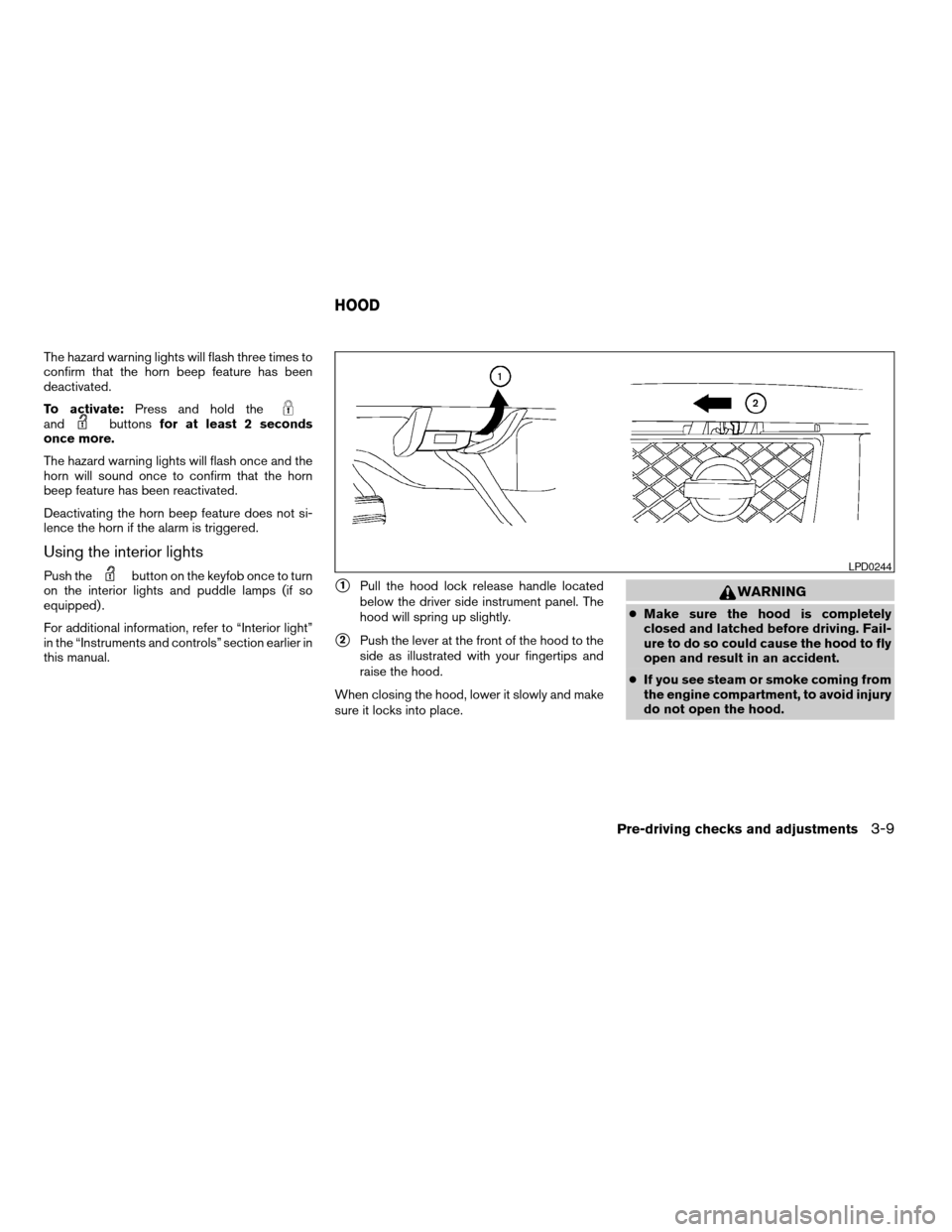
this manual.s1Pull the hood lock release handle located
below the driver side instrument panel. The
hood will spring up slightly.
s2Push the lever at the front of the hood to the
side as illustrated with your fingertips and
raise the hood.
When closing the hood, lower it slowly and make
sure it locks into place.
WARNING
cMake sure the hood is completely
closed and latched before driving. Fail-
ure to do so could cause the hood to fly
open and result in an accident.
cIf you see steam or smoke coming from
the engine compartment, to avoid injury
do not open the hood.
LPD0244
HOOD
Pre-driving checks and adjustments3-9
ZREVIEW COPYÐ2007 Armada(wzw)
Owners ManualÐUSA_English(nna)
07/08/06Ðtbrooks
X
Page 161 of 344

4 Display screen, heater, air conditioner
and audio systems
Control panel buttons (if so equipped)...............4-2
How to use the joystick and ENTER button........4-3
How to use the BACK button....................4-3
Setting up the start-up screen...................4-3
How to use the TRIP button.....................4-3
How to use the SETTING button.................4-7
button..................................4-13
Rearview monitor (if so equipped)..................4-14
How to read the displayed lines.................4-14
Adjusting the screen...........................4-15
Operating tips.................................4-15
Ventilators.......................................4-16
Heater and air conditioner (automatic)..............4-17
Automatic operation...........................4-17
Manual operation..............................4-18
Rear control button............................4-19
Operating tips.................................4-19
Rear seat air conditioner..........................4-20
Controls......................................4-20
Servicing air conditioner...........................4-20
Audio system....................................4-21Radio........................................4-21
FM radio reception............................4-21
AM radio reception............................4-21
Satellite radio reception (if so equipped).........4-21
Audio operation precautions....................4-22
FM/AM/SAT radio with compact disc (CD)
changer (Type A, B and C) (if so equipped).......4-29
CD care and cleaning..........................4-35
Steering wheel switch for audio control
(if so equipped)...............................4-36
Rear audio controls (if so equipped).............4-38
Antenna......................................4-38
NISSAN mobile entertainment system (MES)
(if so equipped)..................................4-39
Digital video disc (DVD) player controls..........4-40
Remote control................................4-41
Flip-down screen..............................4-41
Playing a digital video disc (DVD)...............4-42
Care and maintenance.........................4-46
How to handle the DVD........................4-46
Car phone or CB radio............................4-49
ZREVIEW COPYÐ2007 Armada(wzw)
Owners ManualÐUSA_English(nna)
07/08/06Ðtbrooks
X
Page 162 of 344
WARNING
cPositioning of the heating or air condi-
tioning controls and display controls
should not be done while driving in or-
der that full attention may be given to
the driving operation.
cDo not disassemble or modify this sys-
tem. If you do, it may result in accidents,
fire, or electrical shock.
cDo not use this system if you notice any
abnormality, such as a frozen screen or
lack of sound. Continued use of the
system may result in accident, fire or
electric shock.
cIn case you notice any foreign object in
the system hardware, spill liquid on it,
or notice smoke or smell coming from
it, stop using the system immediately
and contact your nearest NISSAN
dealer. Ignoring such conditions may
lead to accidents, fire or electrical
shock.
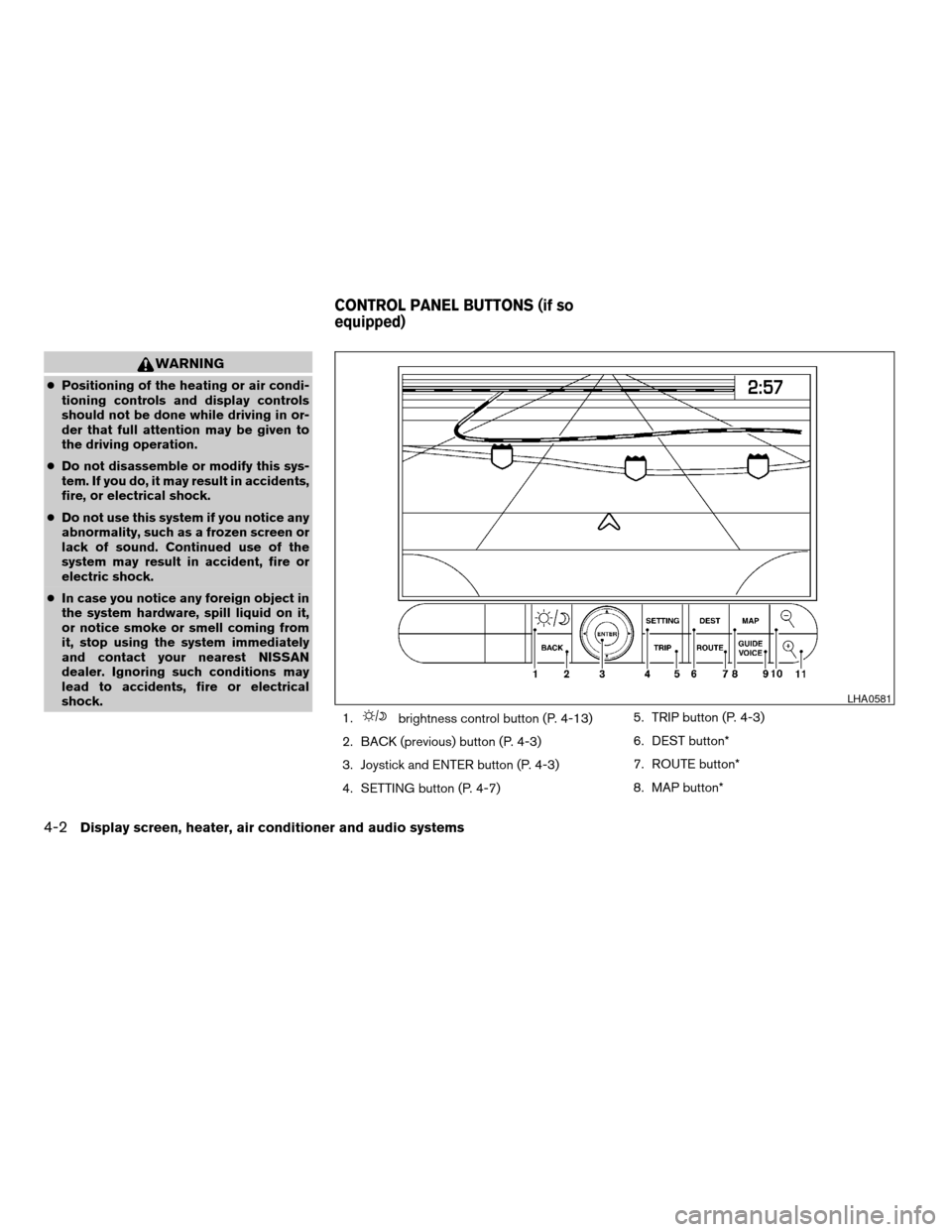
1.
brightness control button (P. 4-13)
2. BACK (previous) button (P. 4-3)
3. Joystick and ENTER button (P. 4-3)
4. SETTING button (P. 4-7)5. TRIP button (P. 4-3)
6. DEST button*
7. ROUTE button*
8. MAP button*
LHA0581
CONTROL PANEL BUTTONS (if so
equipped)
4-2Display screen, heater, air conditioner and audio systems
ZREVIEW COPYÐ2007 Armada(wzw)
Owners ManualÐUSA_English(nna)
07/08/06Ðtbrooks
X
Page 163 of 344

9. GUIDE VOICE button*
10.
zoom out button*
11.
zoom in button*
*For Navigation system control buttons, refer to
the separate Navigation System Owner’s
Manual.
When you use this system, make sure the engine
is running.
If you use the system with the engine not
running (ignition ON or ACC) for a long
time, it will use up all the battery power,
and the engine will not start.
Reference symbols:
ENTER button — This is a button on the control
panel.
Display key — This is a select key on the screen.
By selecting this key you can proceed to the next
function.
HOW TO USE THE JOYSTICK AND
ENTER BUTTON
Use the joystick to choose an item on the display
screen. Move the joystick up, down, left or right to
highlight an item. Then press the ENTER button
to select the item or perform the action.
HOW TO USE THE BACK BUTTON
This button has two functions.
cGo back to the previous display (cancel) .
If you press the BACK button during setup, the
setup will be canceled and/or the display will
return to the previous screen.
cFinish setup.
In some screens pressing the BACK button ac-
cepts the changes made during setup.
SETTING UP THE START-UP
SCREEN
When you turn the ignition key to ACC or ON, the
system start-up warning is displayed on the
screen. Read the warning and select the “OK”
key by pressing the ENTER button.
If you do not press the ENTER button, the Navi-
gation system will not proceed to the next step in
the Navigation display.
If you do not touch a button or screen key for
more than 1 minute on the system start-up warn-
ing screen, the screen will change to the audio
screen automatically.
To proceed to the next step, refer to the separate
Navigation System Owner’s Manual.HOW TO USE THE TRIP BUTTON
When the TRIP button is pressed, the following
modes will display on the screen.
Warning message (if any)!TRIP 1!TRIP 2!
FUEL ECONOMY!MAINTENANCE!Audio
or OFF!TRIP 1
Each trip display tracks an independent trip and
displays the following:
cElapsed Time - Journey time since the last
reset up to a maximum of 99 hours and 59
minutes.
cDriving Distance - Distance driven (mile or
km) since the last reset.
LHA0572
Display screen, heater, air conditioner and audio systems4-3
ZREVIEW COPYÐ2007 Armada(wzw)
Owners ManualÐUSA_English(nna)
07/08/06Ðtbrooks
X
Page 168 of 344

Brightness/contrast:
Select the “Brightness/Contrast” key to adjust
the brightness and contrast of the map back-
ground. Use the joystick to adjust the brightness
to darker or brighter and the contrast to lower or
higher.
The new settings are automatically saved when
you exit the setting screen by pressing the BACK
button or any other mode button.Display off:
Select the “Display Off” key. The indicator of the
“Display Off” turns amber and the message
above will be displayed briefly. When the audio,
HVAC (Heater and air conditioner) , or any mode
button on the control panel is operated, the dis-
play turns on for that operation. If one of the
control panel buttons is pressed, the display will
not automatically turn off until that operation is
finished. Otherwise, the screen turns off auto-
matically after 5 seconds.To turn the screen on,
cPress the SETTING button and select the
“Display” key and then select the “Display
Off” key. Then set the screen to on by press-
ing the ENTER button, or
cHold the
button for approximately 2
seconds and the message “resuming dis-
play” will appear and the “Display Off” key
will be automatically turned on (no amber
indicator) .
WHA0716LHA0642
4-8Display screen, heater, air conditioner and audio systems
ZREVIEW COPYÐ2007 Armada(wzw)
Owners ManualÐUSA_English(nna)
07/08/06Ðtbrooks
X
Page 179 of 344

1. Rear fan speed control dial.
2. Rear temperature control dial.
REAR CONTROL BUTTON
You can adjust the climate control system for rear
seat passengers using the buttons on the main
control panel. Front passengers can control the
rear functions by placing the controls on any
setting other than the “R”.
OPERATING TIPS
cWhen the engine coolant temperature and
outside air temperature are low, the air flow
from the foot outlets may not operate for a
maximum of 150 seconds. However, this is
not a malfunction. After the coolant tempera-
ture warms up, air flow from the foot outlets
will operate normally.
The sunload sensor
s1, located on the top center
of the instrument panel, helps the system main-
tain a constant temperature. Do not put anything
on or around this sensor.
WHA0509LIC0836
Display screen, heater, air conditioner and audio systems4-19
ZREVIEW COPYÐ2007 Armada(wzw)
Owners ManualÐUSA_English(nna)
07/08/06Ðtbrooks
X
Page 187 of 344

1. SEEK/TRACK button
2. TUNE/FOLDER·CAT button
3. DISP button
4. SCAN RPT button
5. PRESET A·B·C button6. CD·DVD button
7. RADIO button*
8. AUX button
9. REAR ON·OFF button
10.
speaker control button11. LOAD button
12. CD insert slot
13.
CD eject button
14. POWER/VOLUME control knob
15. Station and CD select (1 - 6) buttons
16. Tuning and AUDIO control knob
(BASS, MID, TREBLE, FADE and BAL-
ANCE)
*No satellite radio reception is available
and “NO SAT” is displayed when the
RADIO button is pressed to access
satellite radio stations unless optional
satellite receiver and antenna are in-
stalled and an XMTor SIRIUS™ satellite
radio service subscription is active. Sat-
ellite radio is not available in Alaska,
Hawaii and Guam.
Type A
WHA0769
Display screen, heater, air conditioner and audio systems4-27
ZREVIEW COPYÐ2007 Armada(wzw)
Owners ManualÐUSA_English(nna)
07/08/06Ðtbrooks
X
Page 188 of 344

1. SEEK/TRACK button
2. TUNE/FOLDER·CAT button
3. DISP button
4. SCAN RPT button
5. PRESET A·B·C button6. CD button
7. RADIO button*
8. DVD button
9. REAR ON·OFF button
10.
speaker control button11. LOAD button
12. CD insert slot
13.
CD eject button
14. POWER/VOLUME control knob
15. Station and CD select (1 - 6) buttons
16. Tuning and AUDIO control knob
(BASS, MID, TREBLE, FADE and BAL-
ANCE)
*No satellite radio reception is available
and “NO SAT” is displayed when the
RADIO button is pressed to access
satellite radio stations unless optional
satellite receiver and antenna are in-
stalled and an XMTor SIRIUS™ satellite
radio service subscription is active. Sat-
ellite radio is not available in Alaska,
Hawaii and Guam.
Type B
WHA0771
4-28Display screen, heater, air conditioner and audio systems
ZREVIEW COPYÐ2007 Armada(wzw)
Owners ManualÐUSA_English(nna)
07/08/06Ðtbrooks
X