2007 NISSAN ALTIMA radio
[x] Cancel search: radioPage 204 of 344

module when the ignition switch is turned to the
ON position with the paired cellular phone turned
on and carried in the vehicle.
You can register up to 5 different BluetoothT
cellular phones to the in-vehicle phone module.
However, you can talk on only one cellular phone
at a time.
NISSAN Voice Recognition system supports the
phone commands, so dialing a phone number
using your voice is possible. For more details, see
NISSAN Voice Recognition System later in this
section.
Before using the BluetoothTHands-Free Phone
System, refer to the following notes.
cSet up the wireless connection between a
cellular phone and the in-vehicle phone
module before using the hands-free phone
system.
cSome BluetoothTenabled cellular phones
may not be recognized by the in-vehicle
phone module. Please visit
www.nissanusa.com/bluetooth for a recom-
mended phone list.
cYou will not be able to use a hands-free
phone under the following conditions:
– Your vehicle is outside of the cellular ser-
vice area.– Your vehicle is in an area where it is
difficult to receive cellular signal; such as
in a tunnel, in an underground parking
garage, near a tall building or in a moun-
tainous area.
– Your cellular phone is locked to prevent it
from being dialed.
cWhen the radio wave condition is not ideal
or ambient sound is too loud, it may be
difficult to hear the other person’s voice dur-
ing a call.
cImmediately after the ignition switch is
pushed to the ON position or the DVD-ROM
for the navigation system is inserted into the
player, it may be impossible to receive a call
for a short period of time.
cDo not place the cellular phone in an area
surrounded by metal or far away from the
in-vehicle phone module to prevent tone
quality degradation and wireless connection
disruption.
cWhile a cellular phone is connected through
the BluetoothTwireless connection, the bat-
tery power of the cellular phone may dis-
charge quicker than usual. The BluetoothT
Hands-Free Phone System cannot charge
cellular phones.cIf the hands-free phone system seems to be
malfunctioning, please refer to “Trouble-
shooting guide” later in this section. You can
also visit www.nissanusa.com/bluetooth for
troubleshooting help.
cRefer to the cellular phone Owner’s Manual
regarding the telephone charges, cellular
phone antenna and body, etc.
cThe signal strength display on the monitor
will not coincide with the signal strength
display of some cellular phones.
This device complies with Part 15 of the
FCC Rules. Operation is subject to the fol-
lowing two conditions: (1) this device may
not cause harmful interference, and (2) this
device must accept any interference re-
ceived, including interference that may
cause undesired operation.
FCC Radiation Exposure Statement:
This equipment complies with FCC radiation ex-
posure limits set forth for an uncontrolled envi-
ronment. This equipment should be installed and
operated with minimum distance of 8 inches (20
cm) between the radiator and your body. This
Transmitter must not be co-located or operating
in conjunction with any other antenna or transmit-
ter.
4-60Monitor, climate, audio, phone and voice recognition systems
ZREVIEW COPYÐ2007 Altima(alt)
Owners ManualÐUSA_English(nna)
10/27/06Ðdebbie
X
Page 218 of 344
cThe TPMS will activate only when the vehicle
is driven at speeds above 16 MPH (25
km/h) . Also, this system may not detect a
sudden drop in tire pressure (for example a
flat tire while driving) .
cThe low tire pressure warning light does not
automatically turn off when the tire pressure
is adjusted. After the tire is inflated to the
recommended pressure, the vehicle must be
driven at speeds above 16 MPH (25 km/h)
to activate the TPMS and turn off the low tire
pressure warning light. Use a tire pressure
gauge to check the tire pressure.
cTire pressure rises and falls depending on
the heat caused by the vehicle’s operation
and the outside temperature. Low outside
temperature can lower the temperature of
the air inside the tire which can cause a
lower tire inflation pressure. This may cause
the low tire pressure warning light to illumi-
nate. If the warning light illuminates in low
ambient temperature, check the tire pres-
sure for all four tires.
For additional information, see “Low tire pressure
warning light” in the “Instruments and controls”
section and “Tire Pressure Monitoring System
(TPMS)” in the “In case of emergency” section.WARNING
cIf the low tire pressure warning light
illuminates while driving, avoid sudden
steering maneuvers or abrupt braking,
reduce vehicle speed, pull off the road
to a safe location and stop the vehicle
as soon as possible. Serious vehicle
damage could occur and may lead to an
accident and could result in serious
personal injury. Check the tire pressure
for all four tires. Adjust the tire pressure
to the recommended COLD tire pres-
sure shown on the Tire and Loading
Information label to turn the low tire
pressure warning light OFF. If you have
a flat tire, replace it with a spare tire as
soon as possible. (See “Flat tire” in the
“In case of emergency” section for
changing a flat tire.)
cWhen a spare tire is mounted or a wheel
is replaced, the TPMS will not function
and the low tire pressure warning light
will flash for approximately 1 minute.
The light will remain on after 1 minute.
Contact your NISSAN dealer as soon as
possible for tire replacement and/or
system resetting.cReplacing tires with those not originally
specified by NISSAN could affect the
proper operation of the TPMS.
cDo not inject any tire liquid or aerosol
tire sealant into the tires, as this may
cause a malfunction of the tire pressure
sensors.
CAUTION
Do not place metalized film or any metal
parts (antenna, etc.) on the windows. This
may cause poor reception of the signals
from the tire pressure sensors, and the
TPMS will not function properly.
Some devices and transmitters may temporarily
interfere with the operation of the TPMS and
cause the low tire pressure warning light to illu-
minate.
Some examples are:
– Facilities or electric devices using similar radio
frequencies are near the vehicle.
– If a transmitter set to similar frequencies is
being used in or near the vehicle.
– If a computer (or similar equipment) or a
DC/AC converter is being used in or near the
vehicle.
5-4Starting and driving
ZREVIEW COPYÐ2007 Altima(alt)
Owners ManualÐUSA_English(nna)
10/27/06Ðdebbie
X
Page 221 of 344
Some indicators and warnings for operation are
displayed on the vehicle information display. See
“Vehicle information display” in the “Instruments
and controls” section.
PUSH-BUTTON IGNITION SWITCH
POSITIONS
LOCK (Normal parking position):
The ignition switch can only be locked in this
position.
The ignition switch will be unlocked when it is
pushed to the ACC position while carrying the
Intelligent Key or with the Intelligent Key inserted
in the port.
The ignition switch will lock when any door is
opened or closed with the ignition switched off.
OFF:
The ignition switch is in the off position when the
engine is turned off using the ignition switch. No
lights will illuminate on the ignition switch.
ACC (Accessories):
This position activates electrical accessories
such as the radio, when the engine is not running.
ON (Normal operating position):
This position turns on the ignition system and
electrical accessories.
CAUTION
Do not leave the vehicle with the ignition
switch in ACC or ON positions when the
engine is not running for an extended pe-
riod. This can discharge the battery.
INTELLIGENT KEY BATTERY
DISCHARGE
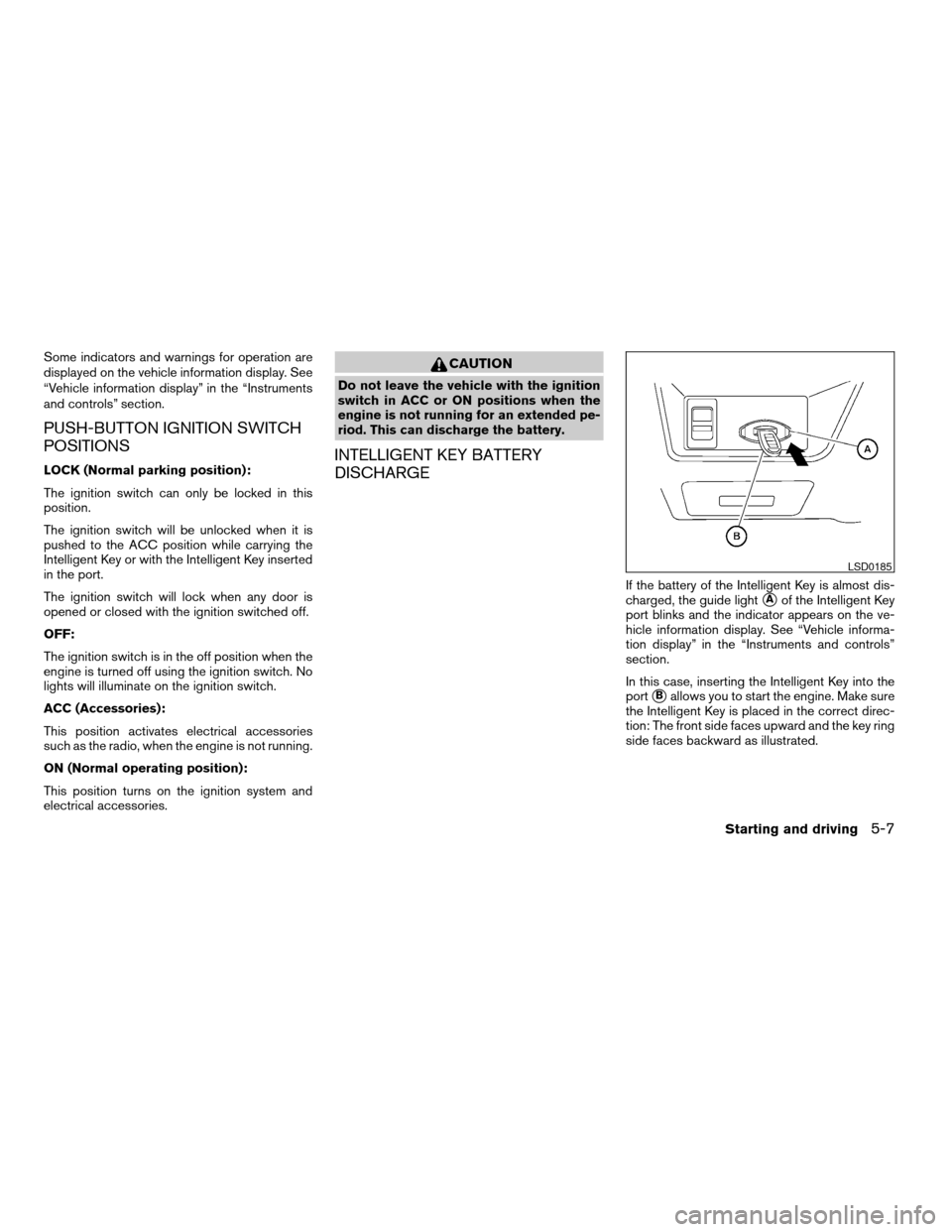
If the battery of the Intelligent Key is almost dis-
charged, the guide light
sAof the Intelligent Key
port blinks and the indicator appears on the ve-
hicle information display. See “Vehicle informa-
tion display” in the “Instruments and controls”
section.
In this case, inserting the Intelligent Key into the
port
sBallows you to start the engine. Make sure
the Intelligent Key is placed in the correct direc-
tion: The front side faces upward and the key ring
side faces backward as illustrated.
LSD0185
Starting and driving5-7
ZREVIEW COPYÐ2007 Altima(alt)
Owners ManualÐUSA_English(nna)
10/27/06Ðdebbie
X
Page 257 of 344
REMOVING SPOTS
Remove tar and oil spots, industrial dust, insects,
and tree sap as quickly as possible from the
surface of the paint to avoid lasting damage or
staining. Special cleaning products are available
at a NISSAN dealer or any automotive accessory
store.
UNDERBODY
In areas where road salt is used in winter, it is
necessary to clean the underbody regularly in
order to prevent dirt and salt from building up and
causing the acceleration of corrosion on the un-
derbody and suspension. Before the winter pe-
riod and again in the spring, the underseal must
be checked and, if necessary, retreated.
GLASS
When cleaning the rear window, it may be easier
to clean if the high-mounted stop light is removed
first.
Be careful when removing the high-mounted
stop light to reduce the risk of damaging the
high-mounted stop light wires.
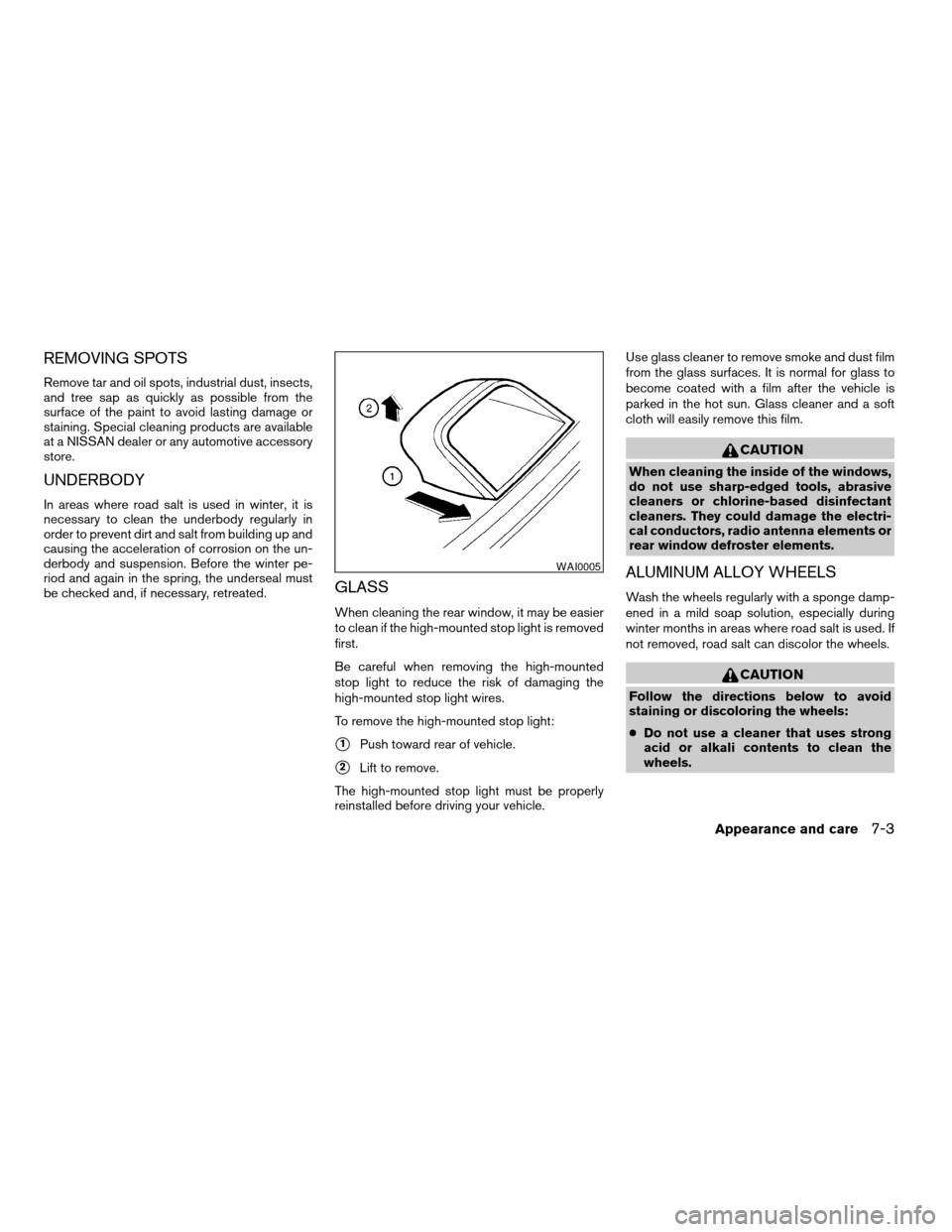
To remove the high-mounted stop light:
s1Push toward rear of vehicle.
s2Lift to remove.
The high-mounted stop light must be properly
reinstalled before driving your vehicle.Use glass cleaner to remove smoke and dust film
from the glass surfaces. It is normal for glass to
become coated with a film after the vehicle is
parked in the hot sun. Glass cleaner and a soft
cloth will easily remove this film.
CAUTION
When cleaning the inside of the windows,
do not use sharp-edged tools, abrasive
cleaners or chlorine-based disinfectant
cleaners. They could damage the electri-
cal conductors, radio antenna elements or
rear window defroster elements.
ALUMINUM ALLOY WHEELS
Wash the wheels regularly with a sponge damp-
ened in a mild soap solution, especially during
winter months in areas where road salt is used. If
not removed, road salt can discolor the wheels.
CAUTION
Follow the directions below to avoid
staining or discoloring the wheels:
cDo not use a cleaner that uses strong
acid or alkali contents to clean the
wheels.
WAI0005
Appearance and care7-3
ZREVIEW COPYÐ2007 Altima(alt)
Owners ManualÐUSA_English(nna)
10/27/06Ðdebbie
X
Page 331 of 344

10 Index
A
Active head restraint...............1-8
Air bag (See supplemental restraint system). .1-35
Air bag system
Front (See supplemental front impact
air bag system)...............1-42
Air bag warning light...........1-50, 2-12
Air cleaner housing filter............8-18
Air conditioner
Air conditioner operation..........4-13
Air conditioner service...........4-20
Air conditioner specification label.....9-11
Air conditioner system refrigerant and oil
recommendations..............9-6
Heater and air conditioner
controls................4-10, 4-18
Servicing air conditioner..........4-20
Air flow charts..................4-14
Alarm system (See vehicle security system). .2-23
Anchor point locations.............1-20
Antenna.....................4-44
Anti-lock brake warning light..........2-9
Anti-lock braking system (ABS)........5-22
Armrests.....................1-7
Audible reminders................2-15
Audio system..................4-20
Compact Disc (CD) changer. . . .4-34, 4-40
Compact disc (CD) player.........4-29
FM-AM radio with compact disc (CD)
player....................4-27FM/AM/SAT radio with compact disc (CD)
changer................4-31, 4-38
Radio....................4-20
Autolight switch.................2-28
Automatic
Automatic power window switch.....2-43
Transmission selector lever lock release. .5-13
Automatic anti-glare inside mirror.......3-23
AUX jack..............4-30, 4-36, 4-42
B
Battery......................8-15
Charge warning light............2-10
Before starting the engine............5-8
Belts (See drive belts).............8-16
BluetoothThands-free phone
system..................4-45, 4-59
Booster seats..................1-30
Brake
Anti-lock braking system (ABS)......5-22
Brake fluid..................8-13
Brake light (See stop light).........8-27
Brake system................5-21
Brake warning light.............2-10
Brake wear indicators........2-15, 8-21
Parking brake operation..........5-16
Self-adjusting brakes............8-21
Brakes......................8-21
Break-in schedule................5-19Brightness control
Instrument panel..............2-30
Brightness/contrast button...........4-6
Bulb check/instrument panel..........2-9
Bulb replacement................8-27
C
Capacities and recommended
fuel/lubricants...................9-2
Car phone or CB radio.............4-45
Cargo (See vehicle loading information) . . .9-12
CD care and cleaning.............4-42
CD changer (See audio system). . . .4-34, 4-40
CD player (See audio system).........4-29
Child restraint with top tether strap......1-20
Child restraints.......1-11, 1-12, 1-16, 1-18
Precautions on child
restraints............1-16, 1-24, 1-30
Top tether strap anchor point locations . .1-20
Child safety rear door lock............3-5
Chimes, audible reminders...........2-15
Cleaning exterior and interior..........7-2
Clock.............4-5, 4-28, 4-32, 4-38
(models with navigation system)......4-5
(models without navigation
system)................4-28, 4-32
Clock set..............4-5, 4-28, 4-32
Clutch
Clutch fluid.................8-14
C.M.V.S.S. certification label..........9-10
ZREVIEW COPYÐ2007 Altima(alt)
Owners ManualÐUSA_English(nna)
10/27/06Ðdebbie
X
Page 334 of 344

Low tire pressure warning light......2-11
Low washer fluid warning light.......2-21
Passenger air bag and status light.....1-44
Spotlights (See map light).........2-46
Trunk light..................2-46
Warning/indicator lights and audible
reminders...................2-9
Lights
Map lights..................2-46
Lock
Child safety rear door lock..........3-5
Door locks..................3-3
Fuel-filler door lock opener lever......3-19
Glove box lock...............2-38
Power door locks...............3-5
Trunk lid lock opener lever.........3-17
Low fuel warning light..........2-12, 2-21
Low tire pressure warning light........2-11
Low washer fluid warning light.........2-21
Luggage (See vehicle loading information) . .9-12
M
Maintenance
General maintenance............8-2
Inside the vehicle...............8-3
Maintenance precautions..........8-5
Outside the vehicle..............8-2
Seat belt maintenance...........1-16
Under the hood and vehicle.........8-4
Malfunction indicator light...........2-13
Manual front seat adjustment..........1-2
Map lights....................2-46
Map pocket...................2-35
Meters and gauges................2-3Instrument brightness control.......2-30
Mirror
Automatic anti-glare inside mirror.....3-23
Inside mirror.................3-22
Outside mirrors...............3-23
Vanity mirror.................3-22
N
NISSAN vehicle immobilizer system......2-24
NISSAN voice recognition system.......4-66
O
Octane rating (See fuel octane rating).....9-4
Odometer.....................2-3
Oil
Capacities and recommended
fuel/lubricants.................9-2
Changing engine oil............8-10
Changing engine oil filter..........8-11
Checking engine oil level..........8-9
Engine oil...................8-9
Engine oil and oil filter recommendation . .9-5
Engine oil viscosity..............9-5
Outside mirrors.................3-23
Overheat
If your vehicle overheats...........6-9
Owner’s manual order form..........9-26
Owner’s manual/service manual order
information....................9-26P
Parking
Parking brake operation..........5-16
Parking/parking on hills...........5-20
Phone, BluetoothThands-free system .4-45, 4-59
Power
Power door locks...............3-5
Power outlet.................2-34
Power rear windows............2-42
Power steering fluid.............8-13
Power steering system...........5-21
Power windows...............2-41
Rear power windows............2-42
Precautions
Maintenance precautions..........8-5
Precautions on child restraints . . .1-16, 1-24,
1-30
Precautions on seat belt usage.......1-9
Precautions on supplemental restraint
system....................1-35
Precautions when starting and driving . . .5-2
Programmable features.............4-3
Push starting...................6-8
R
Radio
Car phone or CB radio...........4-45
Compact Disc (CD) changer. . . .4-34, 4-40
FM-AM radio with compact disc (CD)
player....................4-27
FM/AM/SAT radio with compact disc
(CD) changer.............4-31, 4-38
10-4
ZREVIEW COPYÐ2007 Altima(alt)
Owners ManualÐUSA_English(nna)
10/27/06Ðdebbie
X