2007 NISSAN ALTIMA HYBRID child lock
[x] Cancel search: child lockPage 59 of 344
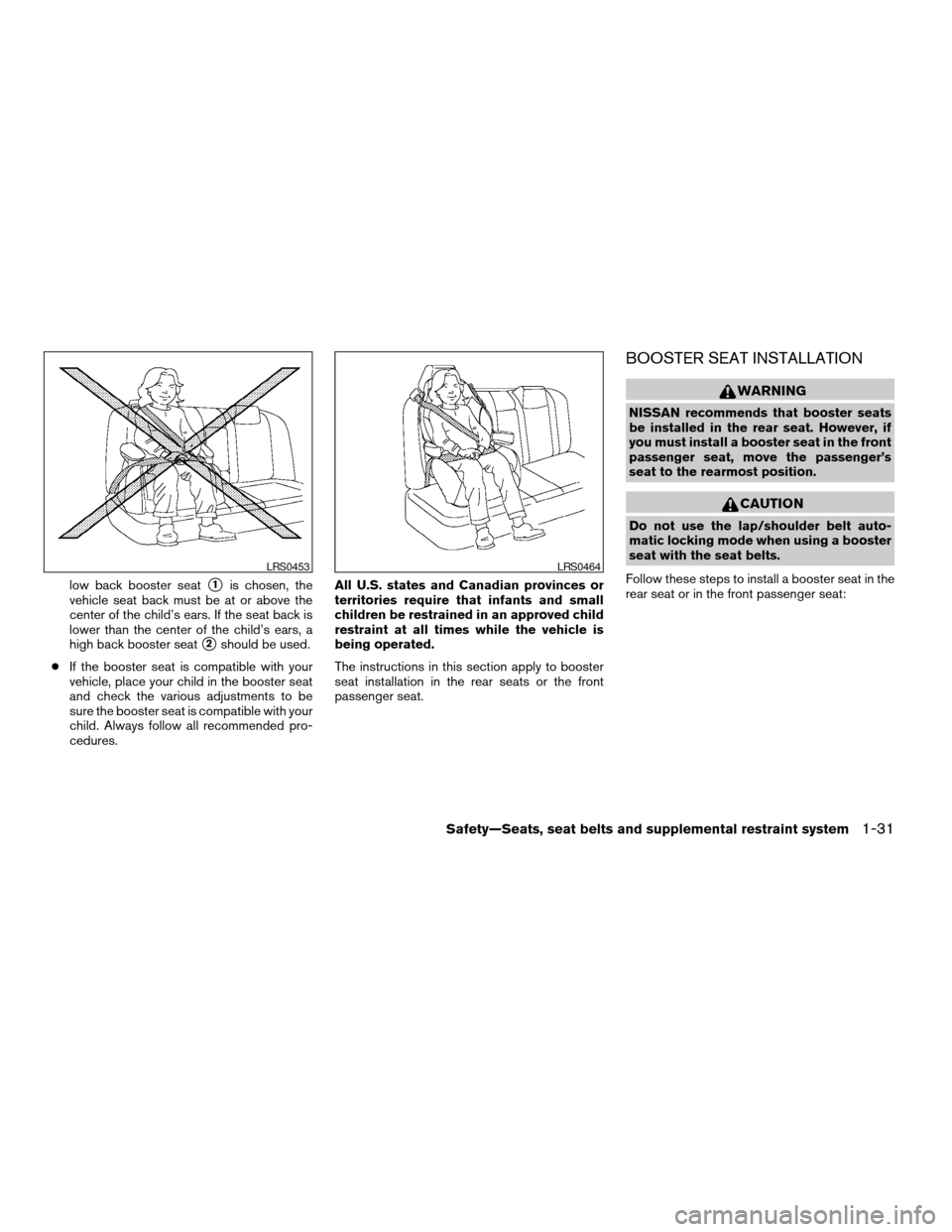
low back booster seats1is chosen, the
vehicle seat back must be at or above the
center of the child’s ears. If the seat back is
lower than the center of the child’s ears, a
high back booster seat
s2should be used.
cIf the booster seat is compatible with your
vehicle, place your child in the booster seat
and check the various adjustments to be
sure the booster seat is compatible with your
child. Always follow all recommended pro-
cedures.All U.S. states and Canadian provinces or
territories require that infants and small
children be restrained in an approved child
restraint at all times while the vehicle is
being operated.
The instructions in this section apply to booster
seat installation in the rear seats or the front
passenger seat.
BOOSTER SEAT INSTALLATION
WARNING
NISSAN recommends that booster seats
be installed in the rear seat. However, if
you must install a booster seat in the front
passenger seat, move the passenger’s
seat to the rearmost position.
CAUTION
Do not use the lap/shoulder belt auto-
matic locking mode when using a booster
seat with the seat belts.
Follow these steps to install a booster seat in the
rear seat or in the front passenger seat:
LRS0453LRS0464
Safety—Seats, seat belts and supplemental restraint system1-31
ZREVIEW COPYÐ2007 Altima Hybrid Electric
(ahv)
Owners ManualÐUSA_English(nna)
11/27/06Ðdebbie
X
Page 72 of 344
restraints and booster seats be properly installed
in a rear seat. If this is not possible, the occupant
classification sensor is designed to operate as
described above to turn the front passenger air
bag OFF for specified child restraints as required
by the regulations. Failing to properly secure
child restraints and to use the automatic locking
mode (child restraint mode) may allow the re-
straint to tip or move in an accident or sudden
stop. This can also result in the passenger air bag
inflating in a crash instead of being OFF. See
“Child restraints” earlier in this section for proper
use and installation.
If the front passenger seat is not occupied the
passenger air bag is designed not to inflate in a
crash. However, heavy objects placed on the
seat could result in air bag inflation, because of
the object being detected by the occupant clas-
sification sensor. Other conditions could also
result in air bag inflation, such as if a child is
standing on the seat, or if two children are on the
seat, contrary to the instructions in this manual.
Always be sure that you and all vehicle occupants
are seated and restrained properly.
Using the passenger air bag status light, you can
monitor when the front passenger air bag is au-
tomatically turned OFF with the seat occupied.
The light will not illuminate when the front pas-
senger seat is unoccupied.If an adult occupant is in the seat but the passen-
ger air bag status light is illuminated (indicating
that the air bag is OFF) , it could be that the
person is a small adult, or is not sitting on the seat
properly.
If a child restraint must be used in the front seat,
the passenger air bag status light may or may not
be illuminated, depending on the size of the child
and the type of child restraint being used. If the air
bag status light is not illuminated (indicating that
the air bag might inflate in a crash) , it could be
that the child restraint or seat belt is not being
used properly. Make sure that the child restraint is
installed properly, the seat belt is used properly
and the occupant is positioned properly. If the air
bag status light is not illuminated, reposition the
occupant or child restraint in a rear seat.
If the passenger air bag status light will not illu-
minate even though you believe that the child
restraint, the seat belts and the occupant are
properly positioned, the system may be sensing
an unoccupied seat (in which case the air bag is
OFF) . Your NISSAN dealer can check that the
system is OFF by using a special tool. However,
until you have confirmed with your dealer that
your air bag is working properly, reposition the
occupant or child restraint in a rear seat.The air bag system and passenger air bag status
light will take a few seconds to register a change
in the passenger seat status. However, if the seat
becomes unoccupied, the air bag status light will
remain off.
If a malfunction occurs in the front passenger air
bag system, the supplemental air bag warning
light
, located in the meter and gauges area
in the center of the instrument panel, will blink.
Have the system checked by a NISSAN dealer.
Other supplemental front air bag precau-
tions
WARNING
cDo not place any objects on the steer-
ing wheel pad or on the instrument
panel. Also, do not place any objects
between any occupant and the steering
wheel or instrument panel. Such ob-
jects may become dangerous projec-
tiles and cause injury if the supplemen-
tal front air bag inflates.
1-44Safety—Seats, seat belts and supplemental restraint system
ZREVIEW COPYÐ2007 Altima Hybrid Electric
(ahv)
Owners ManualÐUSA_English(nna)
11/27/06Ðdebbie
X
Page 121 of 344
POWER WINDOWS
WARNING
cMake sure that all passengers have
their hands, etc. inside the vehicle while
it is in motion and before closing the
windows. Use the window lock switch
to prevent unexpected use of the power
windows.
cDo not leave children unattended inside
the vehicle. They could unknowingly ac-
tivate switches or controls and become
trapped in a window. Unattended chil-
dren could become involved in serious
accidents.
The power windows operate when the ignition
switch is in the ON position, or for about 45
seconds after the ignition switch is turned to the
OFF position. If the driver’s or passenger’s door
is opened during this period of about 45 sec-
onds, power to the windows is canceled.
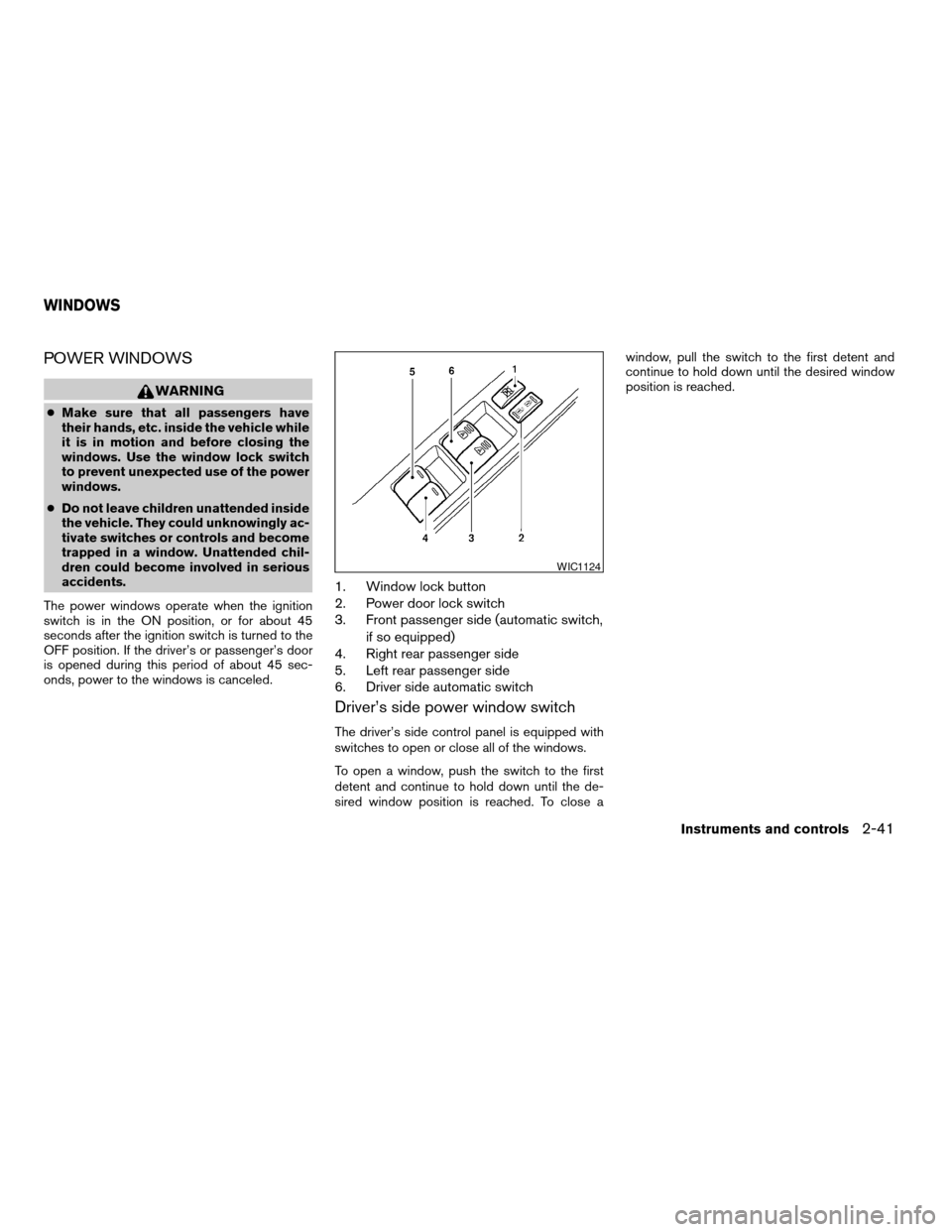
1. Window lock button
2. Power door lock switch
3. Front passenger side (automatic switch,
if so equipped)
4. Right rear passenger side
5. Left rear passenger side
6. Driver side automatic switch
Driver’s side power window switch
The driver’s side control panel is equipped with
switches to open or close all of the windows.
To open a window, push the switch to the first
detent and continue to hold down until the de-
sired window position is reached. To close awindow, pull the switch to the first detent and
continue to hold down until the desired window
position is reached.
WIC1124
WINDOWS
Instruments and controls2-41
ZREVIEW COPYÐ2007 Altima Hybrid Electric
(ahv)
Owners ManualÐUSA_English(nna)
11/27/06Ðdebbie
X
Page 131 of 344

3 Pre-driving checks and adjustments
Keys .............................................3-2
Intelligent Keys.................................3-2
Doors............................................3-3
Locking with key................................3-4
Locking with inside lock knob....................3-4
Locking with power door lock switch.............3-5
Child safety rear door lock.......................3-5
Intelligent Key system..............................3-6
Operating range................................3-8
Door locks/unlocks precaution...................3-8
Intelligent Key operation.........................3-9
How to use the remote keyless entry
function......................................3-12
Warning signals...............................3-15
Troubleshooting guide.........................3-15
Hood...........................................3-17
Trunk lid.........................................3-17Opener operation..............................3-17
Secondary trunk lid release.....................3-18
Interior trunk lid release........................3-19
Fuel-filler door...................................3-20
Opener operation..............................3-20
Fuel-filler cap.................................3-20
Tilting telescopic steering column..................3-21
Tilt operation..................................3-21
Telescopic operation...........................3-22
Sun visors.......................................3-22
Vanity mirrors.................................3-23
Mirrors..........................................3-23
Rearview mirror (if so equipped).................3-23
Automatic anti-glare rearview mirror
(if so equipped)...............................3-23
Outside mirrors...............................3-24
ZREVIEW COPYÐ2007 Altima Hybrid Electric
(ahv)
Owners ManualÐUSA_English(nna)
11/27/06Ðdebbie
X
Page 133 of 344
Mechanical key
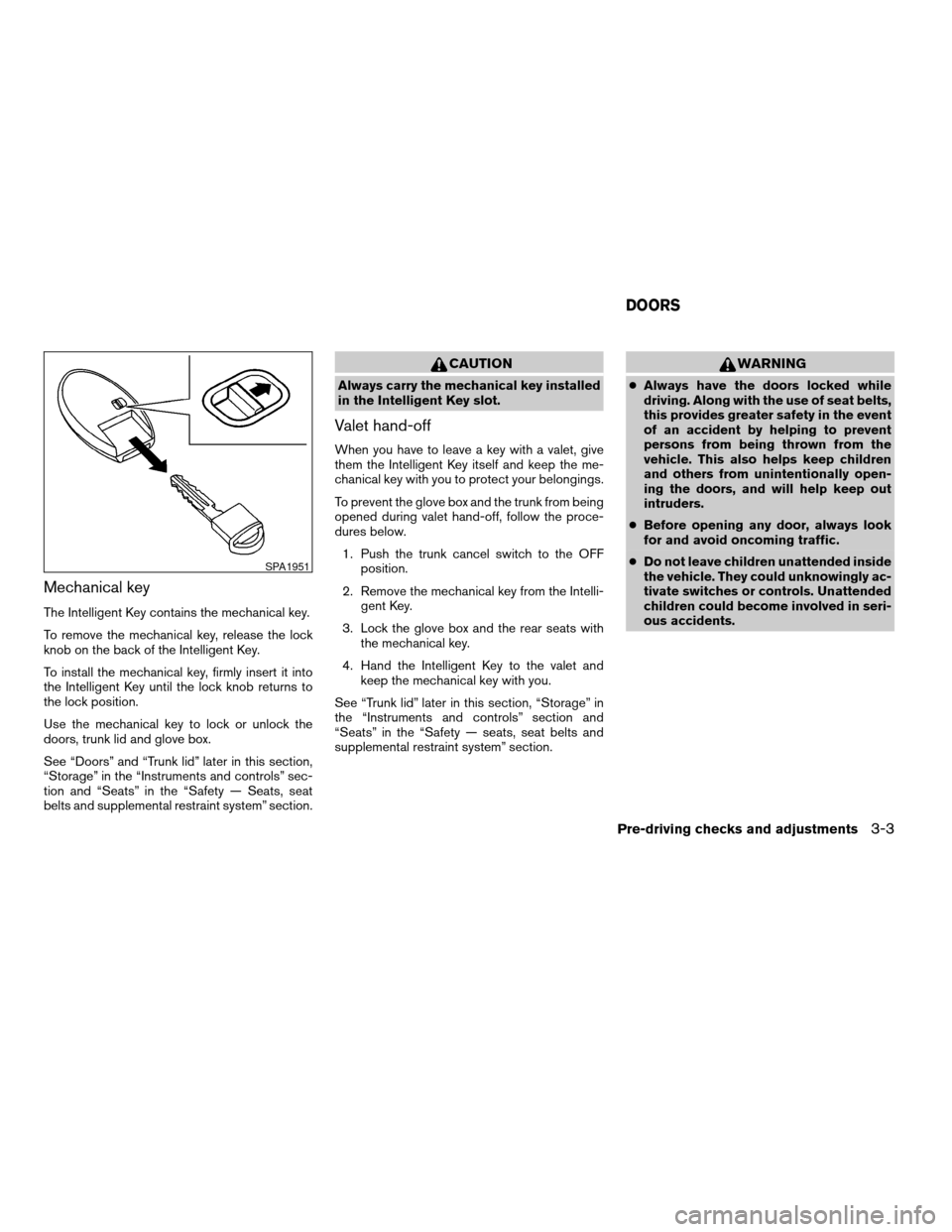
The Intelligent Key contains the mechanical key.
To remove the mechanical key, release the lock
knob on the back of the Intelligent Key.
To install the mechanical key, firmly insert it into
the Intelligent Key until the lock knob returns to
the lock position.
Use the mechanical key to lock or unlock the
doors, trunk lid and glove box.
See “Doors” and “Trunk lid” later in this section,
“Storage” in the “Instruments and controls” sec-
tion and “Seats” in the “Safety — Seats, seat
belts and supplemental restraint system” section.
CAUTION
Always carry the mechanical key installed
in the Intelligent Key slot.
Valet hand-off
When you have to leave a key with a valet, give
them the Intelligent Key itself and keep the me-
chanical key with you to protect your belongings.
To prevent the glove box and the trunk from being
opened during valet hand-off, follow the proce-
dures below.
1. Push the trunk cancel switch to the OFF
position.
2. Remove the mechanical key from the Intelli-
gent Key.
3. Lock the glove box and the rear seats with
the mechanical key.
4. Hand the Intelligent Key to the valet and
keep the mechanical key with you.
See “Trunk lid” later in this section, “Storage” in
the “Instruments and controls” section and
“Seats” in the “Safety — seats, seat belts and
supplemental restraint system” section.
WARNING
cAlways have the doors locked while
driving. Along with the use of seat belts,
this provides greater safety in the event
of an accident by helping to prevent
persons from being thrown from the
vehicle. This also helps keep children
and others from unintentionally open-
ing the doors, and will help keep out
intruders.
cBefore opening any door, always look
for and avoid oncoming traffic.
cDo not leave children unattended inside
the vehicle. They could unknowingly ac-
tivate switches or controls. Unattended
children could become involved in seri-
ous accidents.
SPA1951
DOORS
Pre-driving checks and adjustments3-3
ZREVIEW COPYÐ2007 Altima Hybrid Electric
(ahv)
Owners ManualÐUSA_English(nna)
11/27/06Ðdebbie
X
Page 135 of 344

LOCKING WITH POWER DOOR
LOCK SWITCH
To lock all the doors without a key, push the door
lock switch (driver’s or front passenger’s side) , to
the lock position
s1. When locking the door this
way, be certain not to leave the key inside the
vehicle.
To unlock all the doors without a key, push the
door lock switch (driver’s or front passenger’s
side) to the unlock position
s2.
Lockout protection
When the power door lock switch (driver’s or
front passenger’s side) is moved to the lock
position with the Intelligent Key in the port and
any door open, all doors will lock and unlock
automatically. With the Intelligent Key left in the
vehicle (not in the Intelligent Key port) and any
door open, all doors will unlock automatically and
a chime will sound after the door is closed.
CHILD SAFETY REAR DOOR LOCK
Child safety locks help prevent the rear doors
from being opened accidentally, especially when
small children are in the vehicle.
The child safety lock levers are located on the
edge of the rear doors.
When the lever is in the unlock position
s1, the
door can be opened from the outside or the
inside.
When the lever is in the lock position
s2,
the door can be opened only from the out-
side.
Door lock switch
WPD0381LIC0716
Pre-driving checks and adjustments3-5
ZREVIEW COPYÐ2007 Altima Hybrid Electric
(ahv)
Owners ManualÐUSA_English(nna)
11/27/06Ðdebbie
X
Page 148 of 344
cClosely supervise children when they
are around cars to prevent them from
playing and becoming locked in the
trunk where they could be seriously in-
jured. Keep the car locked, with the rear
seatback and trunk lid securely latched
when not in use, and prevent children’s
access to car keys.
To open the trunk lid, push the opener lever down.
To close the trunk lid, lower and push the trunk lid
down securely.
NOTE:
You can open the trunk lid with the Intelli-
gent Key. Refer to “Intelligent Key system”
earlier in this section.
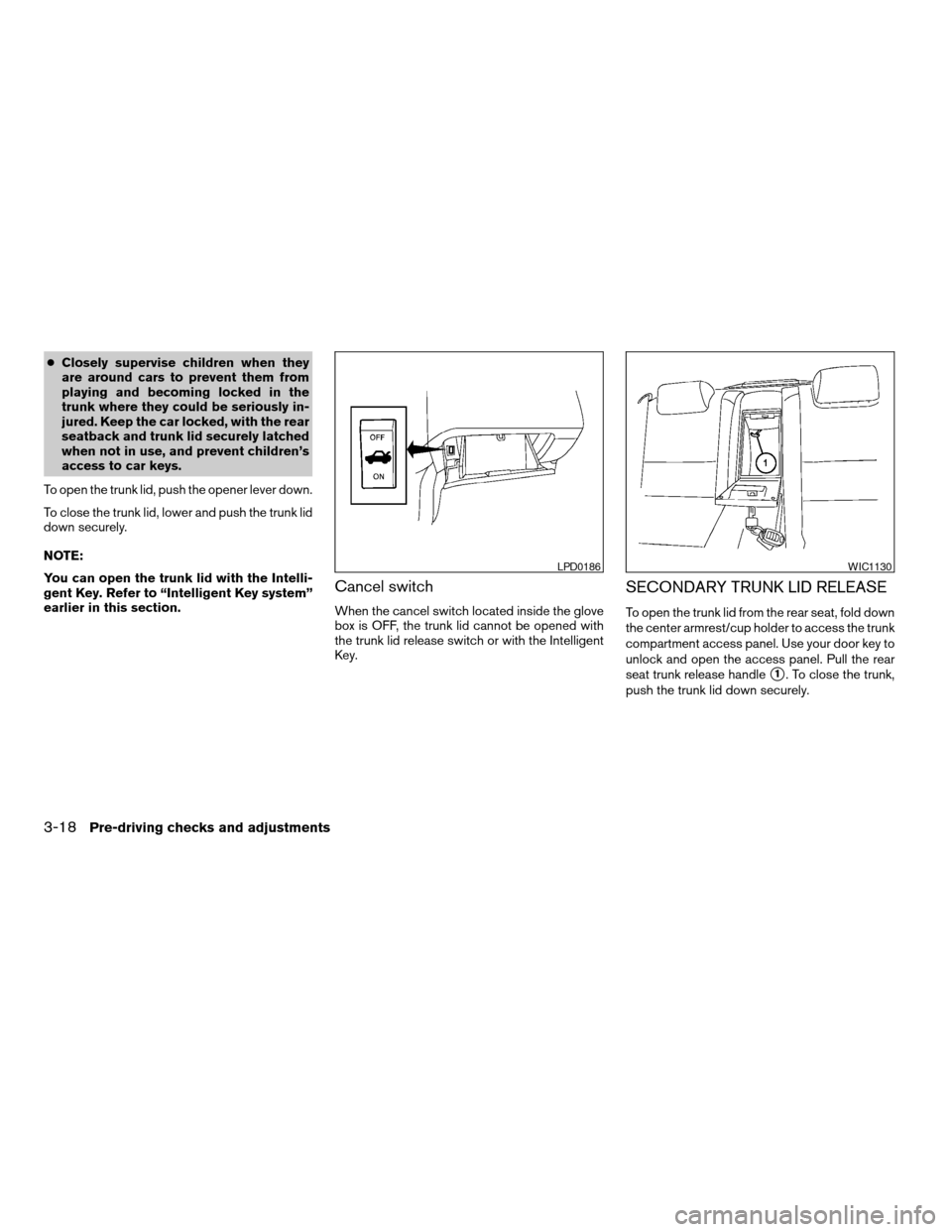
Cancel switch
When the cancel switch located inside the glove
box is OFF, the trunk lid cannot be opened with
the trunk lid release switch or with the Intelligent
Key.
SECONDARY TRUNK LID RELEASE
To open the trunk lid from the rear seat, fold down
the center armrest/cup holder to access the trunk
compartment access panel. Use your door key to
unlock and open the access panel. Pull the rear
seat trunk release handle
s1. To close the trunk,
push the trunk lid down securely.
LPD0186WIC1130
3-18Pre-driving checks and adjustments
ZREVIEW COPYÐ2007 Altima Hybrid Electric
(ahv)
Owners ManualÐUSA_English(nna)
11/27/06Ðdebbie
X
Page 149 of 344
NOTE:
In order to remove your key from trunk
compartment access panel, you must close
and lock the panel.
CAUTION
Do not leave the access panel open. Do
not store or place any items in the area
behind the seats. This area contains the
high voltage battery and other high volt-
age components. Storage of items in this
area could possibly short out the high
voltage battery and lead to Hybrid System
failure.
INTERIOR TRUNK LID RELEASE
WARNING
Closely supervise children when they are
around cars to prevent them from playing
and becoming locked in the trunk where
they could be seriously injured. Keep the
car locked, with the rear seatback and
trunk lid securely latched when not in use,
and prevent children’s access to car keys.
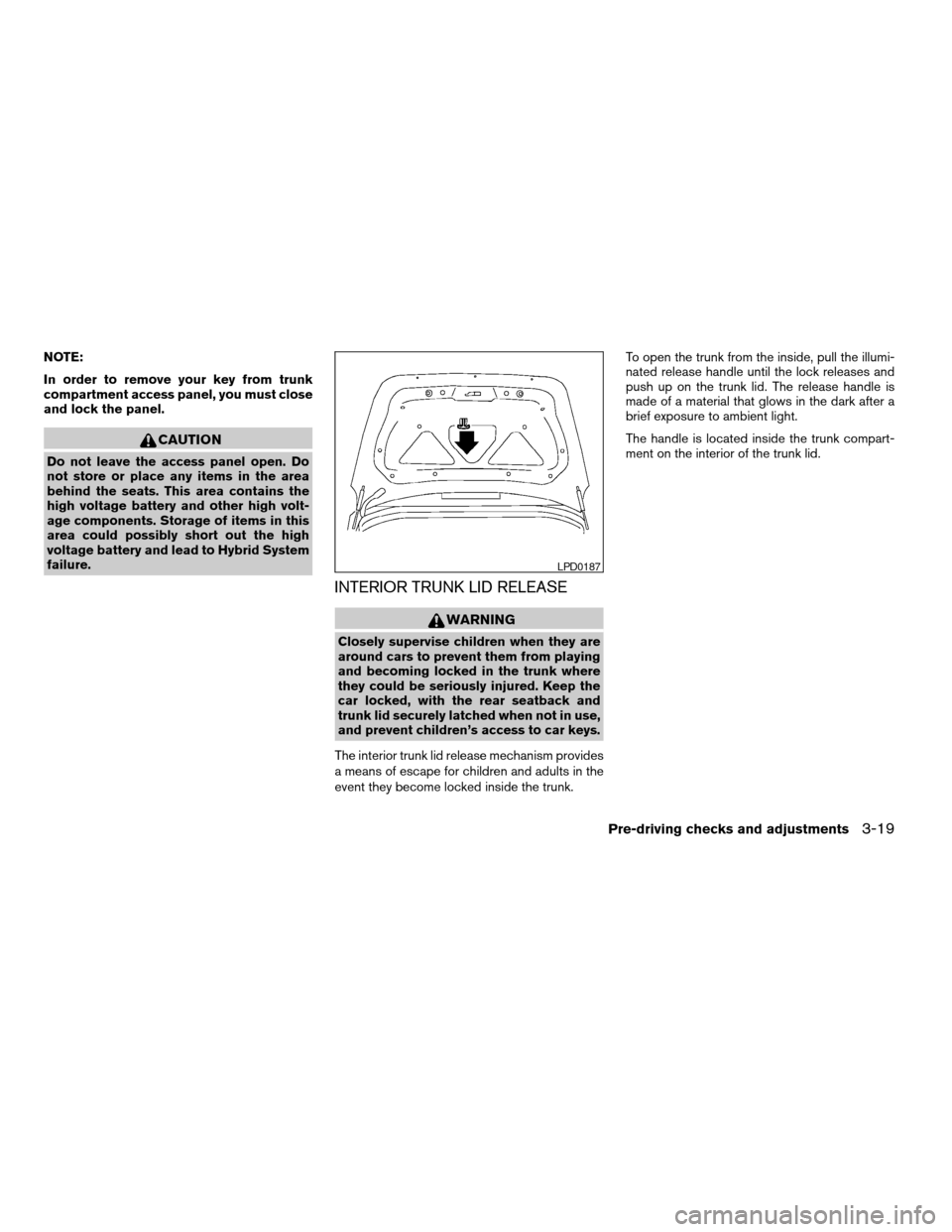
The interior trunk lid release mechanism provides
a means of escape for children and adults in the
event they become locked inside the trunk.To open the trunk from the inside, pull the illumi-
nated release handle until the lock releases and
push up on the trunk lid. The release handle is
made of a material that glows in the dark after a
brief exposure to ambient light.
The handle is located inside the trunk compart-
ment on the interior of the trunk lid.
LPD0187
Pre-driving checks and adjustments3-19
ZREVIEW COPYÐ2007 Altima Hybrid Electric
(ahv)
Owners ManualÐUSA_English(nna)
11/27/06Ðdebbie
X