Page 615 of 720
DTC P1572 ASCD BRAKE SWITCH
EC-615
C
D
E
F
G
H
I
J
K
L
MA
EC
Revision: 2006 November2007 350Z
Specification data are reference values and are measured between each terminal and ground.
CAUTION:
Do not use ECM ground terminals when measuring input/output voltage. Doing so may result in dam-
age to the ECM's transistor. Use a ground other than ECM terminals, such as the ground.
Diagnostic ProcedureNBS000G5
A/T MODELS
1. CHECK OVERALL FUNCTION-I
With CONSULT-III
1. Turn ignition switch ON.
2. Select “BRAKE SW1” in “DATA MONITOR” mode with CONSULT-III.
3. Check “BRAKE SW1” indication under the following conditions.
Without CONSULT-III
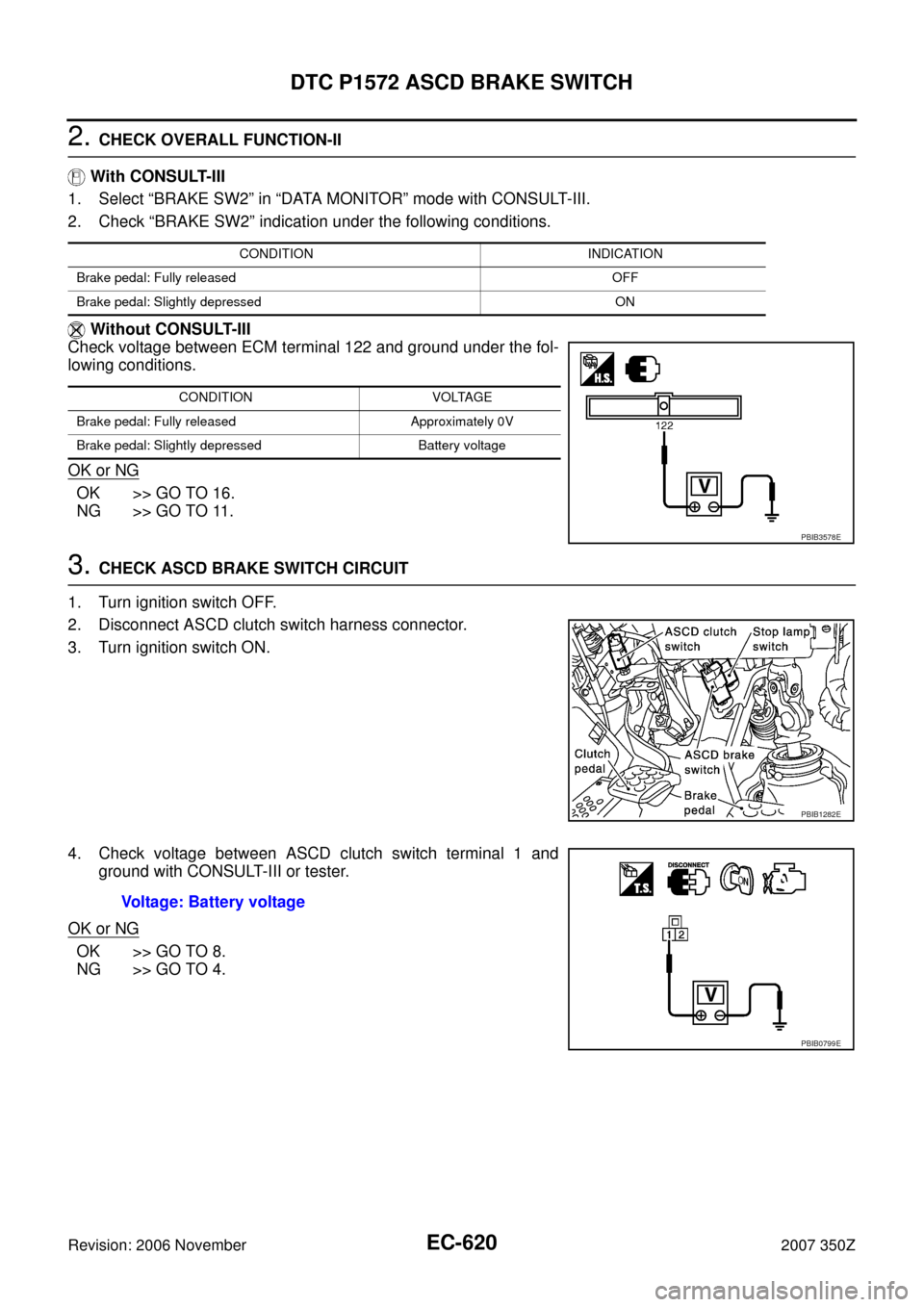
1. Turn ignition switch ON.
2. Check voltage between ECM terminal 126 and ground under the
following conditions.
OK or NG
OK >> GO TO 2.
NG >> GO TO 3.
TER-
MINAL
NO.WIRE
COLORITEM CONDITION DATA (DC Voltage)
122 P/L Stop lamp switch[Ignition switch: OFF]
�Brake pedal: Fully released0V
[Ignition switch: OFF]
�Brake pedal: Slightly depressedBATTERY VOLTAGE
(11 - 14V)
126 L/OR ASCD brake switch[Ignition switch: ON]
�Brake pedal and/or clutch pedal: Slightly
depressed0V
[Ignition switch: ON]
�Brake pedal and clutch pedal: Fully releasedBATTERY VOLTAGE
(11 - 14V)
CONDITION INDICATION
Brake pedal: Slightly depressed OFF
Brake pedal: Fully released ON
CONDITION VOLTAGE
Brake pedal: Slightly depressed Approximately 0V
Brake pedal: Fully released Battery voltage
PBIB3577E
Page 619 of 720
DTC P1572 ASCD BRAKE SWITCH
EC-619
C
D
E
F
G
H
I
J
K
L
MA
EC
Revision: 2006 November2007 350Z
12. CHECK STOP LAMP SWITCH
Refer to EC-624, "
Component Inspection"
OK or NG
OK >> GO TO 13.
NG >> Replace stop lamp switch.
13. CHECK INTERMITTENT INCIDENT
Refer to EC-141, "
TROUBLE DIAGNOSIS FOR INTERMITTENT INCIDENT" .
>>INSPECTION END
M/T MODELS
1. CHECK OVERALL FUNCTION-I
With CONSULT-III
1. Turn ignition switch ON.
2. Select “BRAKE SW1” in “DATA MONITOR” mode with CONSULT-III.
3. Check “BRAKE SW1” indication under the following conditions.
Without CONSULT-III
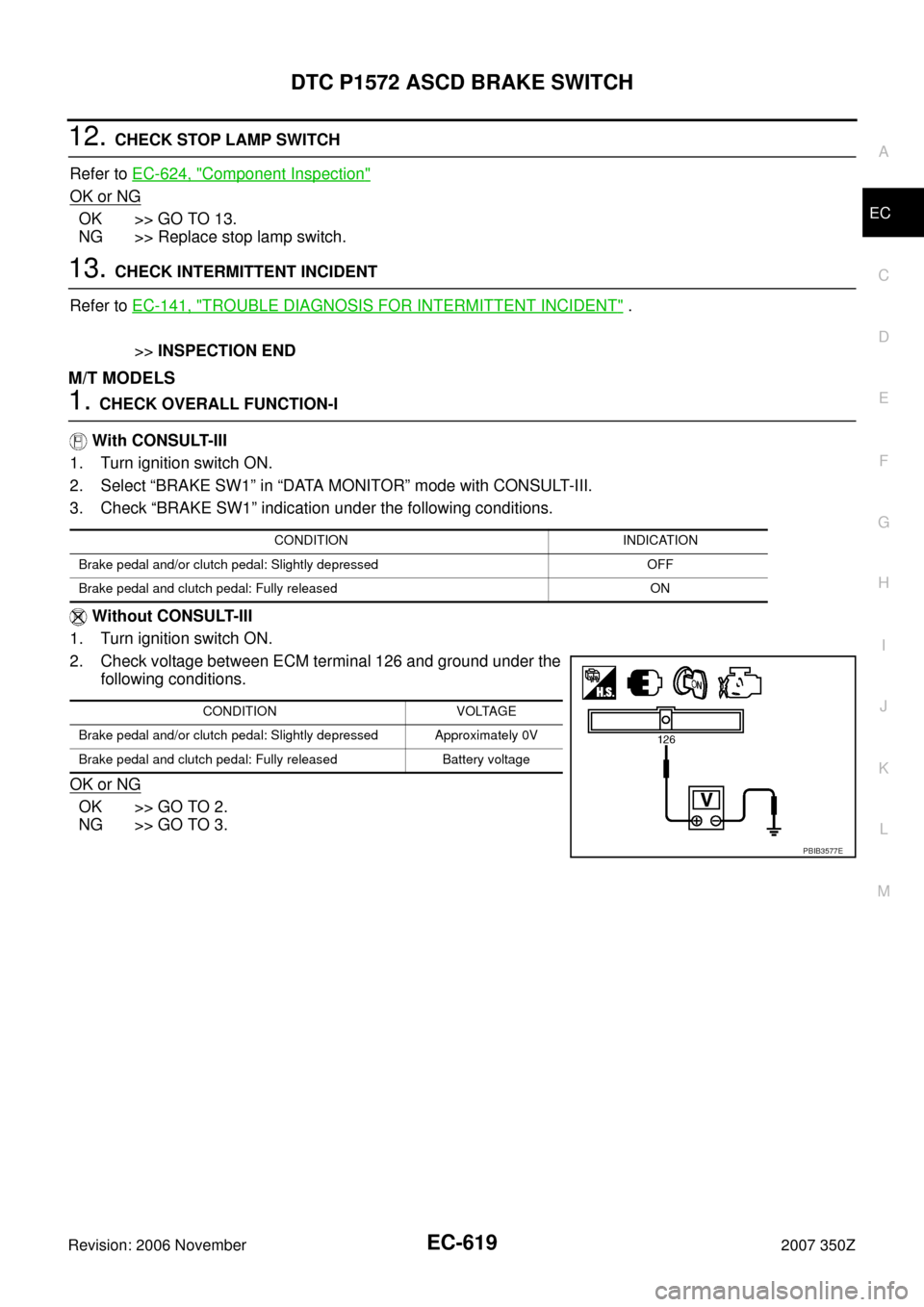
1. Turn ignition switch ON.
2. Check voltage between ECM terminal 126 and ground under the
following conditions.
OK or NG
OK >> GO TO 2.
NG >> GO TO 3.
CONDITION INDICATION
Brake pedal and/or clutch pedal: Slightly depressed OFF
Brake pedal and clutch pedal: Fully released ON
CONDITION VOLTAGE
Brake pedal and/or clutch pedal: Slightly depressed Approximately 0V
Brake pedal and clutch pedal: Fully released Battery voltage
PBIB3577E
Page 620 of 720
EC-620
DTC P1572 ASCD BRAKE SWITCH
Revision: 2006 November2007 350Z
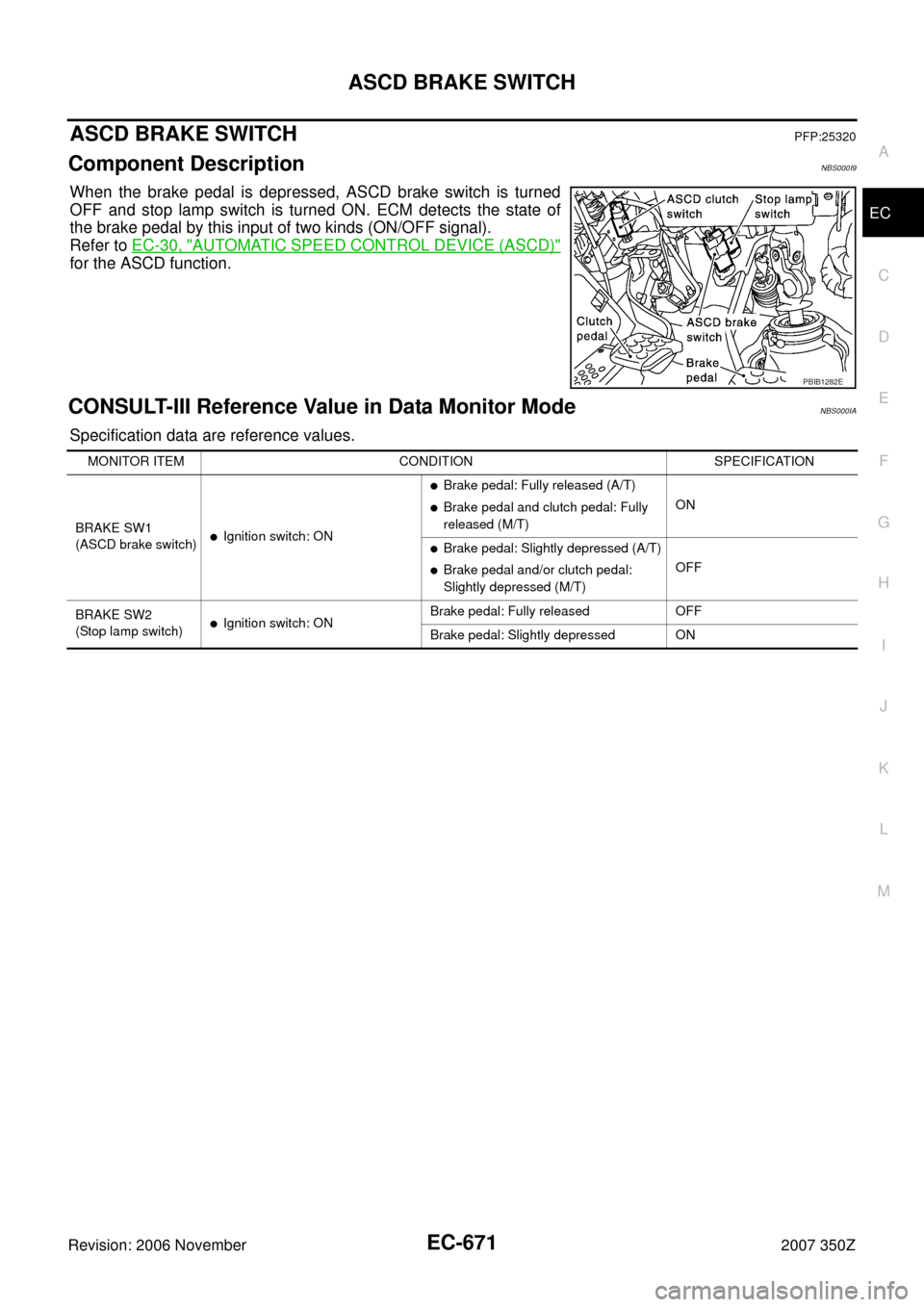
2. CHECK OVERALL FUNCTION-II
With CONSULT-III
1. Select “BRAKE SW2” in “DATA MONITOR” mode with CONSULT-III.
2. Check “BRAKE SW2” indication under the following conditions.
Without CONSULT-III
Check voltage between ECM terminal 122 and ground under the fol-
lowing conditions.
OK or NG
OK >> GO TO 16.
NG >> GO TO 11.
3. CHECK ASCD BRAKE SWITCH CIRCUIT
1. Turn ignition switch OFF.
2. Disconnect ASCD clutch switch harness connector.
3. Turn ignition switch ON.
4. Check voltage between ASCD clutch switch terminal 1 and
ground with CONSULT-III or tester.
OK or NG
OK >> GO TO 8.
NG >> GO TO 4.
CONDITION INDICATION
Brake pedal: Fully released OFF
Brake pedal: Slightly depressed ON
CONDITION VOLTAGE
Brake pedal: Fully released Approximately 0V
Brake pedal: Slightly depressed Battery voltage
PBIB3578E
PBIB1282E
Voltage: Battery voltage
PBIB0799E
Page 621 of 720
DTC P1572 ASCD BRAKE SWITCH
EC-621
C
D
E
F
G
H
I
J
K
L
MA
EC
Revision: 2006 November2007 350Z
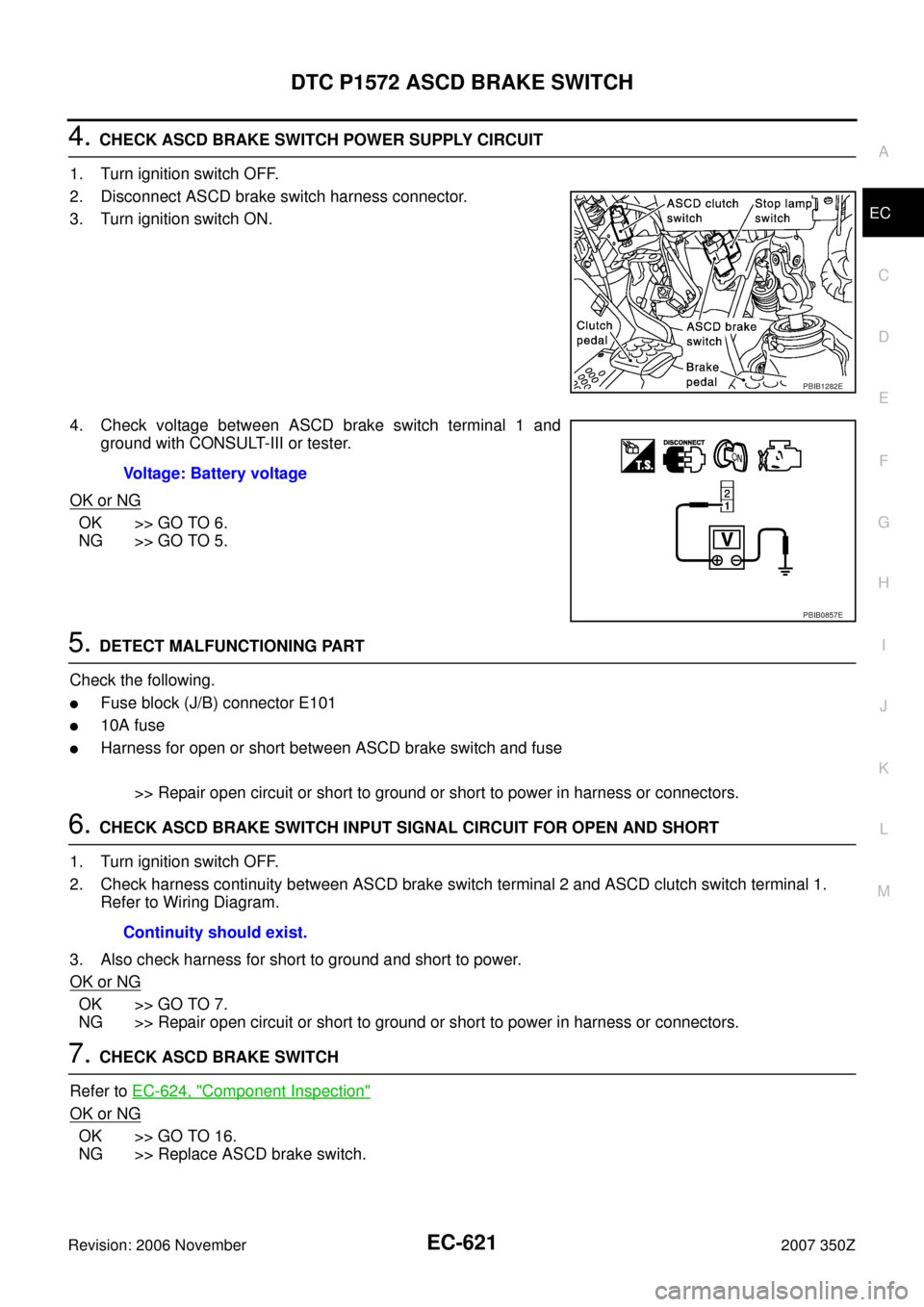
4. CHECK ASCD BRAKE SWITCH POWER SUPPLY CIRCUIT
1. Turn ignition switch OFF.
2. Disconnect ASCD brake switch harness connector.
3. Turn ignition switch ON.
4. Check voltage between ASCD brake switch terminal 1 and
ground with CONSULT-III or tester.
OK or NG
OK >> GO TO 6.
NG >> GO TO 5.
5. DETECT MALFUNCTIONING PART
Check the following.
�Fuse block (J/B) connector E101
�10A fuse
�Harness for open or short between ASCD brake switch and fuse
>> Repair open circuit or short to ground or short to power in harness or connectors.
6. CHECK ASCD BRAKE SWITCH INPUT SIGNAL CIRCUIT FOR OPEN AND SHORT
1. Turn ignition switch OFF.
2. Check harness continuity between ASCD brake switch terminal 2 and ASCD clutch switch terminal 1.
Refer to Wiring Diagram.
3. Also check harness for short to ground and short to power.
OK or NG
OK >> GO TO 7.
NG >> Repair open circuit or short to ground or short to power in harness or connectors.
7. CHECK ASCD BRAKE SWITCH
Refer to EC-624, "
Component Inspection"
OK or NG
OK >> GO TO 16.
NG >> Replace ASCD brake switch.
PBIB1282E
Voltage: Battery voltage
PBIB0857E
Continuity should exist.
Page 622 of 720
EC-622
DTC P1572 ASCD BRAKE SWITCH
Revision: 2006 November2007 350Z
8. CHECK ASCD CLUTCH SWITCH INPUT SIGNAL CIRCUIT FOR OPEN AND SHORT
1. Turn ignition switch OFF.
2. Disconnect ECM harness connector.
3. Check harness continuity between ASCD clutch switch terminal 2 and ECM terminal 126.
Refer to Wiring Diagram.
4. Also check harness for short to ground and short to power.
OK or NG
OK >> GO TO 10.
NG >> GO TO 9.
9. DETECT MALFUNCTIONING PART
Check the following.
�Harness connectors E108, M15
�Harness for open or short between ECM and ASCD clutch switch
>> Repair open circuit or short to ground or short to power in harness or connectors.
10. CHECK ASCD CLUTCH SWITCH
Refer to EC-624, "
Component Inspection" .
OK or NG
OK >> GO TO 16.
NG >> Replace ASCD clutch switch.
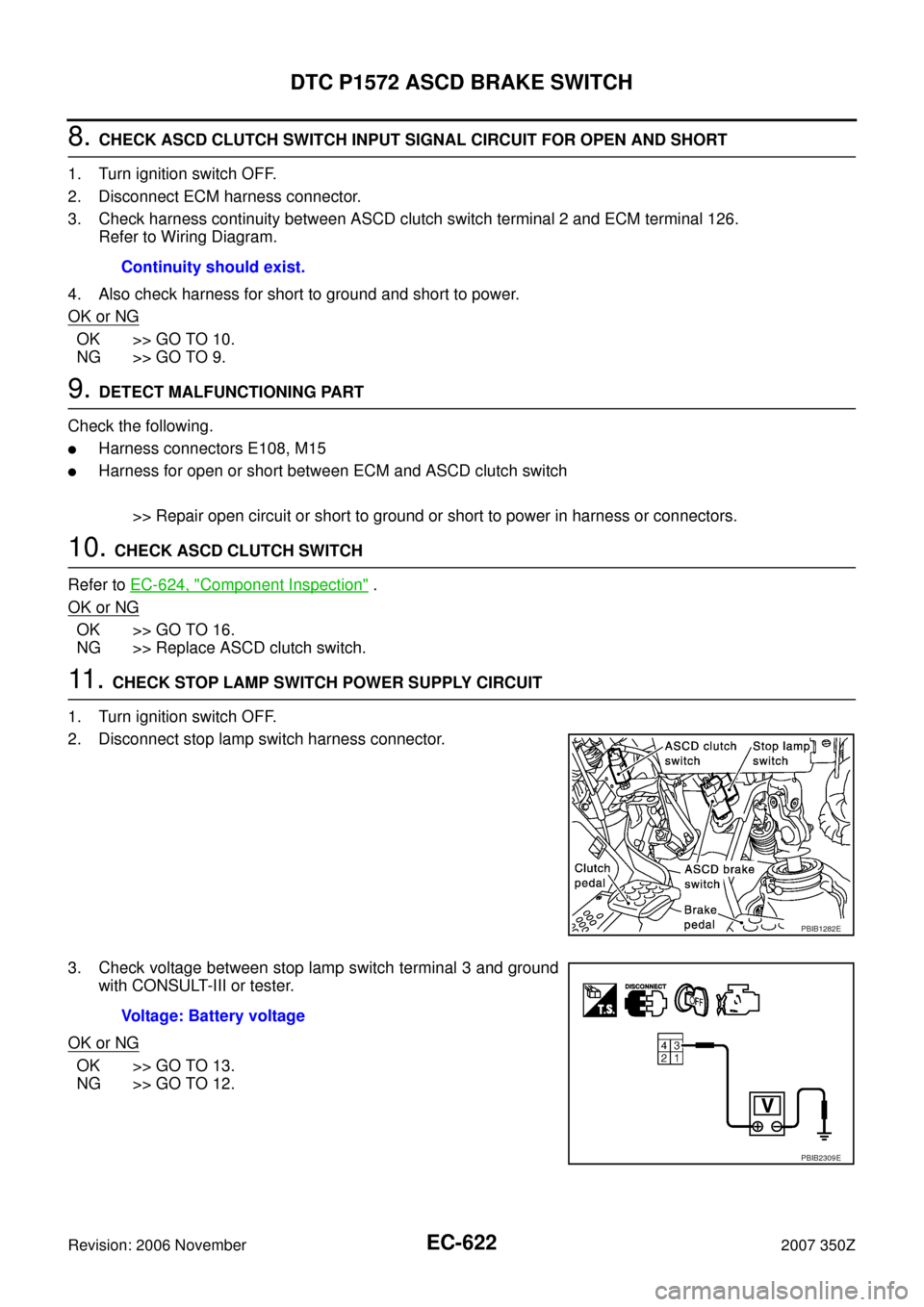
11 . CHECK STOP LAMP SWITCH POWER SUPPLY CIRCUIT
1. Turn ignition switch OFF.
2. Disconnect stop lamp switch harness connector.
3. Check voltage between stop lamp switch terminal 3 and ground
with CONSULT-III or tester.
OK or NG
OK >> GO TO 13.
NG >> GO TO 12.Continuity should exist.
PBIB1282E
Voltage: Battery voltage
PBIB2309E
Page 624 of 720
EC-624
DTC P1572 ASCD BRAKE SWITCH
Revision: 2006 November2007 350Z
Component InspectionNBS000G6
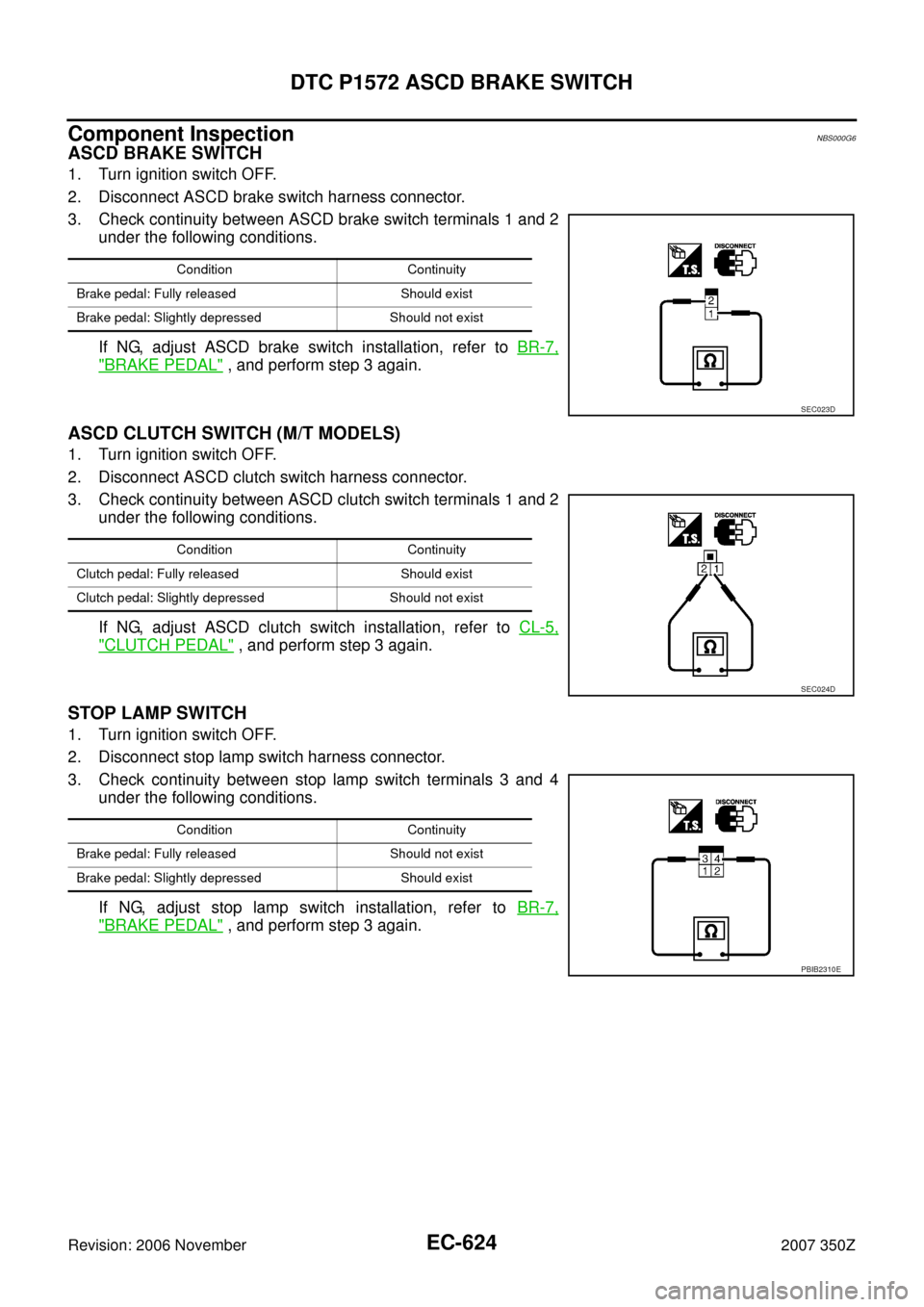
ASCD BRAKE SWITCH
1. Turn ignition switch OFF.
2. Disconnect ASCD brake switch harness connector.
3. Check continuity between ASCD brake switch terminals 1 and 2
under the following conditions.
If NG, adjust ASCD brake switch installation, refer to BR-7,
"BRAKE PEDAL" , and perform step 3 again.
ASCD CLUTCH SWITCH (M/T MODELS)
1. Turn ignition switch OFF.
2. Disconnect ASCD clutch switch harness connector.
3. Check continuity between ASCD clutch switch terminals 1 and 2
under the following conditions.
If NG, adjust ASCD clutch switch installation, refer to CL-5,
"CLUTCH PEDAL" , and perform step 3 again.
STOP LAMP SWITCH
1. Turn ignition switch OFF.
2. Disconnect stop lamp switch harness connector.
3. Check continuity between stop lamp switch terminals 3 and 4
under the following conditions.
If NG, adjust stop lamp switch installation, refer to BR-7,
"BRAKE PEDAL" , and perform step 3 again.
Condition Continuity
Brake pedal: Fully released Should exist
Brake pedal: Slightly depressed Should not exist
SEC023D
Condition Continuity
Clutch pedal: Fully released Should exist
Clutch pedal: Slightly depressed Should not exist
SEC024D
Condition Continuity
Brake pedal: Fully released Should not exist
Brake pedal: Slightly depressed Should exist
PBIB2310E
Page 671 of 720
ASCD BRAKE SWITCH
EC-671
C
D
E
F
G
H
I
J
K
L
MA
EC
Revision: 2006 November2007 350Z
ASCD BRAKE SWITCHPFP:25320
Component DescriptionNBS000I9
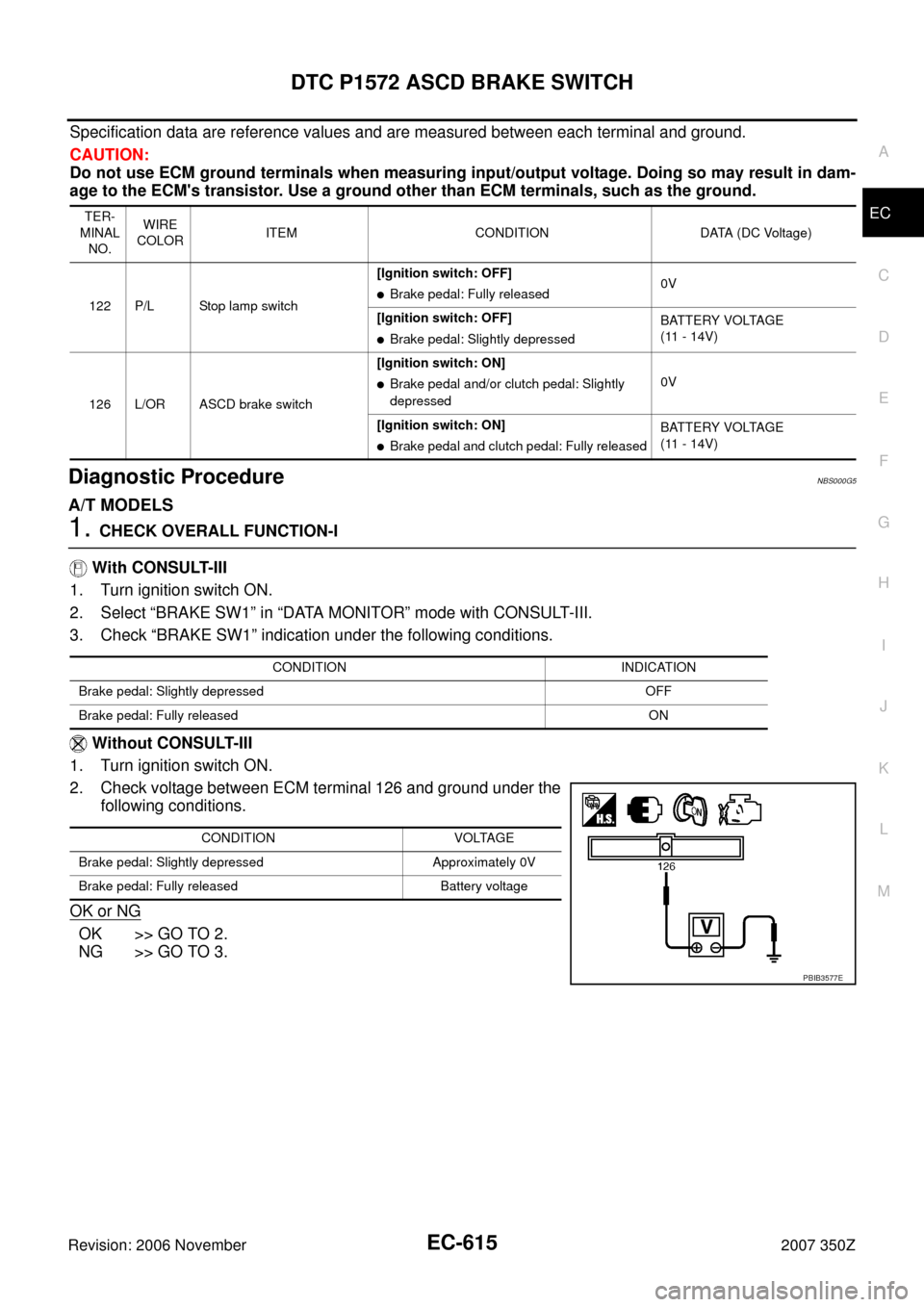
When the brake pedal is depressed, ASCD brake switch is turned
OFF and stop lamp switch is turned ON. ECM detects the state of
the brake pedal by this input of two kinds (ON/OFF signal).
Refer to EC-30, "
AUTOMATIC SPEED CONTROL DEVICE (ASCD)"
for the ASCD function.
CONSULT-III Reference Value in Data Monitor ModeNBS000IA
Specification data are reference values.
PBIB1282E
MONITOR ITEM CONDITION SPECIFICATION
BRAKE SW1
(ASCD brake switch)
�Ignition switch: ON
�Brake pedal: Fully released (A/T)
�Brake pedal and clutch pedal: Fully
released (M/T)ON
�Brake pedal: Slightly depressed (A/T)
�Brake pedal and/or clutch pedal:
Slightly depressed (M/T)OFF
BRAKE SW2
(Stop lamp switch)
�Ignition switch: ONBrake pedal: Fully released OFF
Brake pedal: Slightly depressed ON
Page 675 of 720
ASCD BRAKE SWITCH
EC-675
C
D
E
F
G
H
I
J
K
L
MA
EC
Revision: 2006 November2007 350Z
Specification data are reference values and are measured between each terminal and ground.
CAUTION:
Do not use ECM ground terminals when measuring input/output voltage. Doing so may result in dam-
age to the ECM's transistor. Use a ground other than ECM terminals, such as the ground.
Diagnostic ProcedureNBS000IC
A/T MODELS
1. CHECK OVERALL FUNCTION-I
With CONSULT-III
1. Turn ignition switch ON.
2. Select “BRAKE SW1” in “DATA MONITOR” mode with CONSULT-III.
3. Check “BRAKE SW1” indication under the following conditions.
Without CONSULT-III
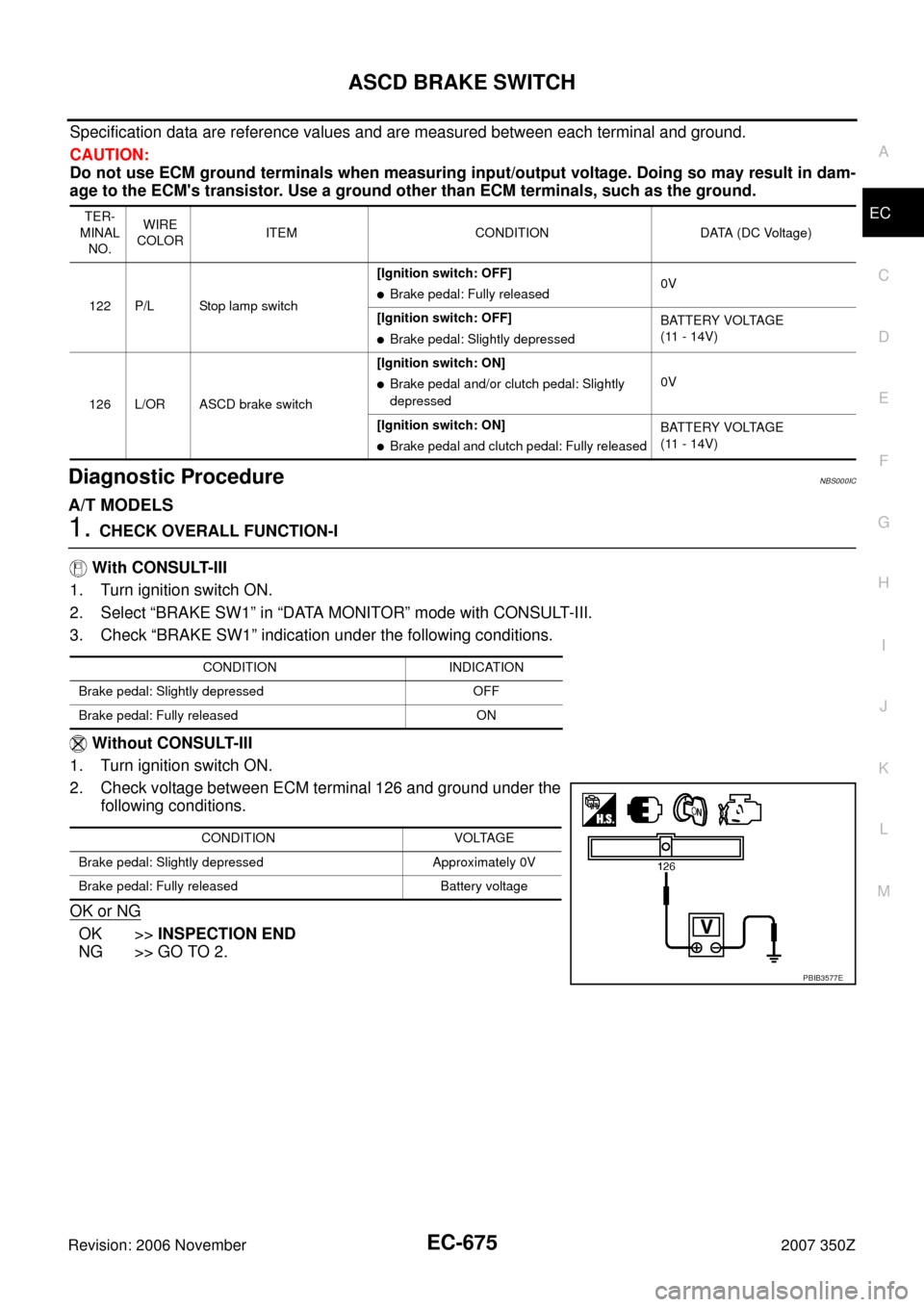
1. Turn ignition switch ON.
2. Check voltage between ECM terminal 126 and ground under the
following conditions.
OK or NG
OK >>INSPECTION END
NG >> GO TO 2.
TER-
MINAL
NO.WIRE
COLORITEM CONDITION DATA (DC Voltage)
122 P/L Stop lamp switch[Ignition switch: OFF]
�Brake pedal: Fully released0V
[Ignition switch: OFF]
�Brake pedal: Slightly depressedBATTERY VOLTAGE
(11 - 14V)
126 L/OR ASCD brake switch[Ignition switch: ON]
�Brake pedal and/or clutch pedal: Slightly
depressed0V
[Ignition switch: ON]
�Brake pedal and clutch pedal: Fully releasedBATTERY VOLTAGE
(11 - 14V)
CONDITION INDICATION
Brake pedal: Slightly depressed OFF
Brake pedal: Fully released ON
CONDITION VOLTAGE
Brake pedal: Slightly depressed Approximately 0V
Brake pedal: Fully released Battery voltage
PBIB3577E