Page 57 of 473

56 Getting started
Driving
�Press the combination switch in
direction of arrow1 or2.
The corresponding turn signal indicator
lampKorL in the instrument
cluster flashes (
�page 26).
The combination switch resets auto-
matically after major directional chang-
es.
Windshield wipers
The combination switch is located on the
left of the steering column.
Combination switch
1Single wipe
Wiping with windshield washer fluid
2Switching on windshield wipers
�Switch on the ignition (�page 37).
iTo signal minor directional changes such as
changing lanes, press combination switch only
to point of resistance and release. The corre-
sponding turn signals will flash three times.
!Do not operate the windshield wipers when
the windshield is dry. Dust that accumulates on
a windshield might scratch the glass and/or
damage the wiper blades when wiping occurs on
a dry windshield. If it is necessary to operate the
windshield wipers in dry weather conditions,
always operate the windshield wipers with
windshield washer fluid (
�page 58).
!If anything blocks the windshield wipers
(leaves, snow, etc.), switch them off
immediately.
�For safety reasons, stop the vehicle in a safe
location, turn off the engine and remove the
SmartKey from the starter switch before
attempting to remove any blockage.
�Remove blockage.
�Turn the windshield wipers on again.
If the windshield wipers fail to function at all with
the combination switch in positionI,
�set the combination switch to the next
higher wiper speed
�have the windshield wipers checked at the
nearest authorized Mercedes-Benz Center
Page 116 of 473

115 Controls in detail
Lighting
Switching off corner-illuminating front
fog lamps
The combination switch for the turn signal
resets automatically after major steering
wheel movements. This will switch off the
corner-illuminating front fog lamps if they
where activated by switching on the left or
right turn signal.
If the turn signal should stay on after
making the turn, the turn signal and
corner-illuminating front fog lamp can be
switched off by returning the combination
switch to its original position.Driving in reverse
Switching on corner-illuminating front
fog lamps
�Place the gearshift lever (automatic
transmission*: gear selector lever) in
positionR.
The front fog lamp opposite to your
steering direction comes on.
Switching off corner-illuminating front
fog lamps
�Place the gearshift lever (automatic
transmission*: gear selector lever) out
of positionR.
The respective front fog lamp goes out.
Hazard warning flasher
The hazard warning flasher can be
switched on at all times, even with the
SmartKey removed from the starter
switch.
The hazard warning flasher switches on
automatically when an air bag deploys.
The hazard warning flasher switch is
located on the upper part of the center
console.
1Hazard warning flasher switch
iThere may be a brief delay before the
corner-illuminating front fog lamps switch off.
Page 127 of 473
126 Controls in detail
Control system
Menus, submenus and functions
Menu5Menu6Menu7Menu8
Vehicle status message
memory1SettingsTrip computerTEL*
(�page 135)(�page 136)(�page 148)(�page 149)
Commands/submenus
Calling up vehicle malfunction,
warning and system status
messages stored in memoryResetting to factory settingsFuel consumption statistics
since startLoading phone book
Instrument cluster submenu Fuel consumption statistics
since last resetSearching for name in phone
book
Time/Date submenuResetting fuel consumption
statisticsRedialing
Lighting submenuDistance to empty
Vehicle submenu
Convenience* submenu
1The vehicle status message memory menu is only displayed if there is a message stored.
Page 169 of 473
168 Controls in detail
Good visibility
For information on the windshield wipers,
see “Windshield wipers” (
�page 56).
Headlamp cleaning system*
The button is located on the left side of the
dashboard.
1Headlamp cleaning button
�Switch on the ignition (�page 37).
�Press button1.
The headlamps are cleaned with a
high-pressure water jet.For information on filling up the washer
reservoir, see “Windshield washer system
and headlamp cleaning system*”
(
�page 302).
Rear view mirrors
For more information on setting the rear
view mirrors, see “Mirrors” (
�page 46).
Interior rear view mirror, antiglare
position
�Tilt the mirror to the antiglare night
position by moving the lever towards
the windshield.
The interior rear view mirror is dimmed.
iThe headlamps will automatically be
cleaned when you have
�switched on the headlamps
and
�operated the windshield wipers with wind-
shield washer fluid fifteen times
When you switch off the ignition, the counter
resets.
Page 206 of 473
205 Controls in detail
Audio system
�Press ESN soft key.
The twelve-digit electronic serial
number (ESN) of the SAT tuner*
installed in your vehicle is displayed.
This information is required to call the
SIRIUS Service Center for an activation
request.
After activation of the satellite radio
service
The satellite radio main menu appears.
The radio station selected last is audible,
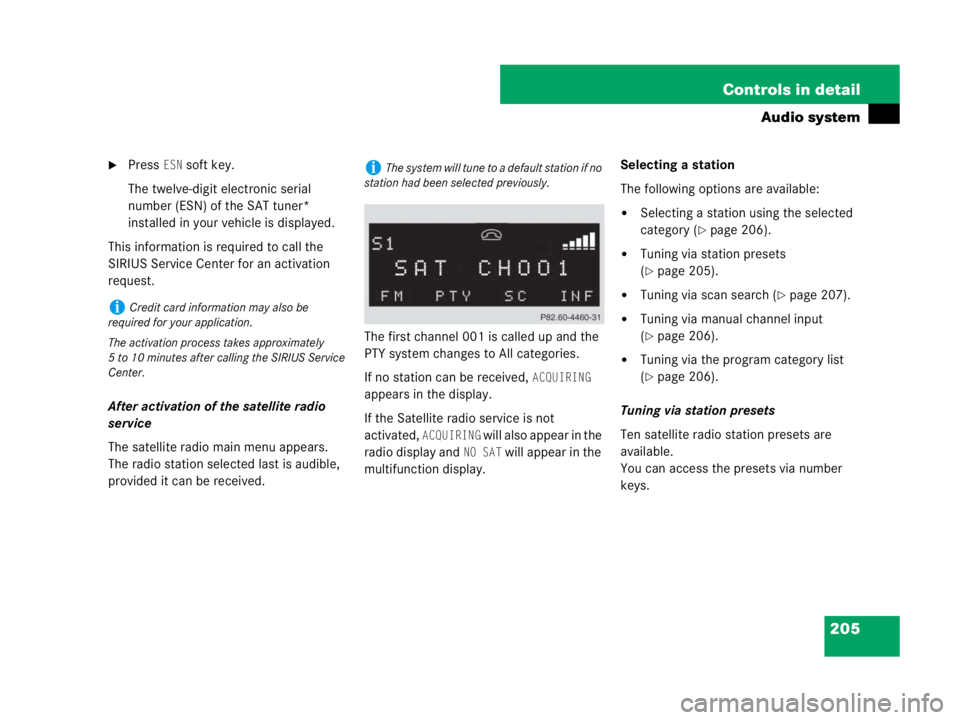
provided it can be received.The first channel 001 is called up and the
PTY system changes to All categories.
If no station can be received,
ACQUIRING
appears in the display.
If the Satellite radio service is not
activated,
ACQUIRING will also appear in the
radio display and
NO SAT will appear in the
multifunction display.Selecting a station
The following options are available:
�Selecting a station using the selected
category (
�page 206).
�Tuning via station presets
(
�page 205).
�Tuning via scan search (�page 207).
�Tuning via manual channel input
(
�page 206).
�Tuning via the program category list
(
�page 206).
Tuning via station presets
Ten satellite radio station presets are
available.
You can access the presets via number
keys.
iCredit card information may also be
required for your application.
The activation process takes approximately
5 to 10 minutes after calling the SIRIUS Service
Center.
iThe system will tune to a default station if no
station had been selected previously.
Page 209 of 473
208 Controls in detail
Audio system
Storing stations
�Tune in desired station.
�Press and hold desired station
button1 to R until a brief signal
tone is heard.
The frequency is stored on the selected
station button.
The radio saves the current station at
the memory preset selected. The
memory preset selected appears in the
status line, e.g. S3.Calling up the ESN information menu
�Press INF soft key.
�Press ESN soft key.
The twelve-digit electronic serial
number (ESN) of the SAT tuner*
installed in your vehicle is displayed.
�Press RET soft key to exit the menu.
CD mode
Safety precautions
iThere are ten presets available.
An existing entry is overwritten in the memory
list when a new entry is given.
Warning!G
The single CD player and the CD changer*
are Class 1 laser products. There is a danger
of invisible laser radiation if the housing is
opened or damaged.
Do not open the housing. The single CD
player and the CD changer* do not contain
any parts that can be serviced by the user.
For safety reasons, have any service work
which may be necessary performed only by
qualified personnel.

