Page 167 of 585
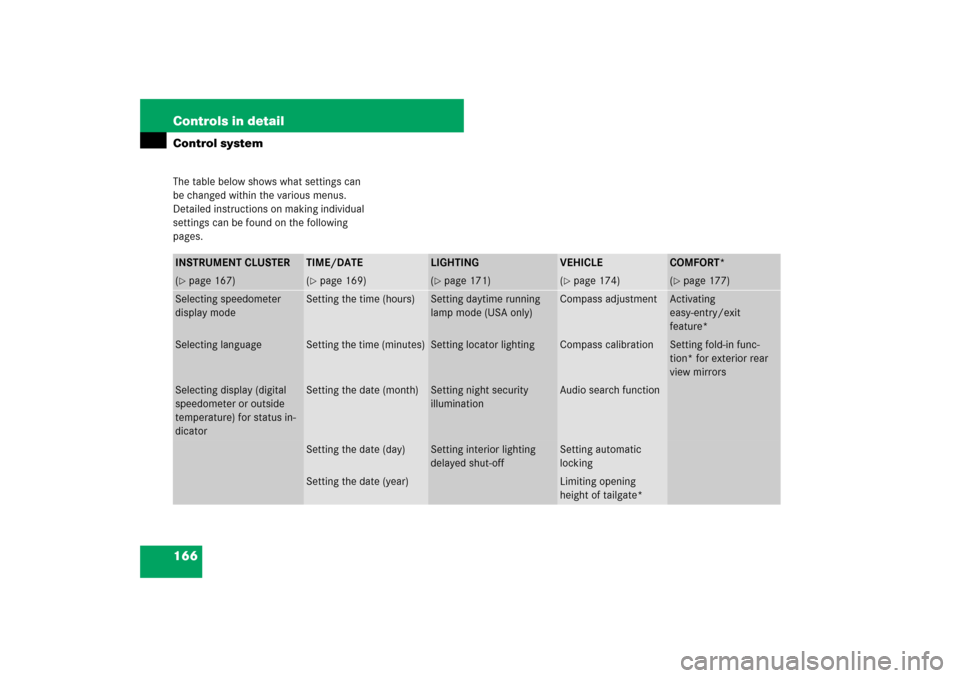
166 Controls in detailControl systemThe table below shows what settings can
be changed within the various menus.
Detailed instructions on making individual
settings can be found on the following
pages.INSTRUMENT CLUSTER
TIME/DATE
LIGHTING
VEHICLE
COMFORT*
(�page 167)
(�page 169)
(�page 171)
(�page 174)
(�page 177)
Selecting speedometer
display mode
Setting the time (hours)
Setting daytime running
lamp mode (USA only)
Compass adjustment
Activating
easy-entry/exit
feature*
Selecting language
Setting the time (minutes)
Setting locator lighting
Compass calibration
Setting fold-in func-
tion* for exterior rear
view mirrors
Selecting display (digital
speedometer or outside
temperature) for status in-
dicator
Setting the date (month)
Setting night security
illumination
Audio search function
Setting the date (day)
Setting interior lighting
delayed shut-off
Setting automatic
locking
Setting the date (year)
Limiting opening
height of tailgate*
Page 168 of 585

167 Controls in detail
Control system
Instrument cluster submenu
Access the
Instr. cluster
submenu via
the
Settings
menu. Use the
Instr.
cluster
submenu to change the instru-
ment cluster display settings.
The following functions are available:Selecting speedometer display mode
�
Move the selection marker with
buttonæ orç to the
Instr.
cluster
submenu.
�
Press buttonj ork repeatedly
until the message
Display unit
Digital speedometer
appears in the
multifunction display.
The selection marker is on the current
setting.
�
Press buttonæ or ç to set
speedometer unit to
km or
miles
.Selecting language
�
Move the selection marker with
buttonæ orç to the
Instr.
cluster
submenu.
�
Press buttonj ork repeatedly
until the message
Language
appears in
the multifunction display.
The selection marker is on the current
setting.
�
Press buttonæ orç to select
the language to be used for the
multifunction display messages.
Function
Page
Selecting speedometer display
mode
167
Selecting language
167
Selecting display (digital
speedometer or outside
temperature) for status indica-
tor
168
��
Page 170 of 585

169 Controls in detail
Control system
Time/Date submenu
Access the
Time/Date
submenu via the
Settings
menu. Use the
Time/Date
submenu to change the time and date
settings.
The following functions are available:Setting the time (hours)
This function is not available if your vehicle
is equipped with the COMAND system and
navigation module*.
�
Move the selection marker with
buttonæ or ç to the
Time/Date
submenu.
�
Press buttonj ork repeatedly
until the message
Clock Set hour
appears in the multifunction display.
The selection marker is on the hour
setting.
�
Press buttonæ orç to set the
hour.Setting the time (minutes)
This function is not available if your vehicle
is equipped with the COMAND system and
navigation module*.
�
Move the selection marker with
buttonæ or ç to the
Time/Date
submenu.
�
Press buttonj ork repeatedly
until the message
Clock Set
minute(s)
appears in the multifunction
display.
The selection marker is on the minute
setting.
�
Press buttonæ orç to set the
minutes.
Function
Page
Setting the time (hours)
169
Setting the time (minutes)
169
Setting the date (month)
170
Setting the date (day)
170
Setting the date (year)
170
i
If your vehicle is equipped with the
COMAND system and navigation module*, see
separate COMAND system operating instruc-
tions for information on how to set the date and
time.
Page 172 of 585

171 Controls in detail
Control system
Lighting submenu
Access the
Lighting
submenu via the
Settings
menu. Use the
Lighting
submenu to change the lamp and lighting
settings on your vehicle.
The following functions are available:
Setting daytime running lamp mode
(USA only)
�
Move the selection marker with
buttonæ orç to the
Lighting
submenu.
�
Press buttonj ork repeatedly
until the message
Lamp circuit
headlamp
appears in the multifunction
display.
The selection marker is on the current
setting.
�
Press buttonæ orç to select
manual operation (
Manual
) or daytime
running lamp mode (
Constant
).
With daytime running lamp mode activated
and the exterior lamp switch at
positionMorU, the low beam
headlamps are switched on when the
engine is running.In low ambient light conditions the
following lamps will switch on additionally:
�
Parking lamps
�
Tail lamps
�
License plate lamps
�
Side marker lamps
For more information on the daytime
running lamp mode, see “Lighting”
(
�page 136).
Function
Page
Setting daytime running lamp
mode (USA only)
171
Setting locator lighting
172
Setting night security illumination
172
Setting interior lighting delayed
shut-off
173
i
This function is not available in countries
where the daytime running lamp mode is
mandatory and therefore in a constant mode.
i
For safety reasons, changing the setting for
the daytime running lamp mode is not possible
while the vehicle is in motion. The following
message appears in the multifunction display:
Settings
only possible
at standstillFor safety reasons, resetting to factory settings
(�page 165) while driving will not deactivate the
daytime running lamp mode.
Page 175 of 585
174 Controls in detailControl systemVehicle submenu
Access the
Vehicle
submenu via the
Settings
menu. Use the
Vehicle
submenu
to make general vehicle settings.
The following functions are available:Compass adjustment
This function is not available if your vehicle
is equipped with the COMAND system and
navigation module*.
Determine your location on the basis of the
following zone maps.
Zone map North AmericaZone map South America
�
Press buttonæ orç to move
the selection marker to the
Vehicle
submenu.
Function
Page
Compass adjustment
174
Compass calibration
175
Audio search function
176
Setting automatic locking
176
Limiting opening height of
tailgate*
177
Page 178 of 585
177 Controls in detail
Control system
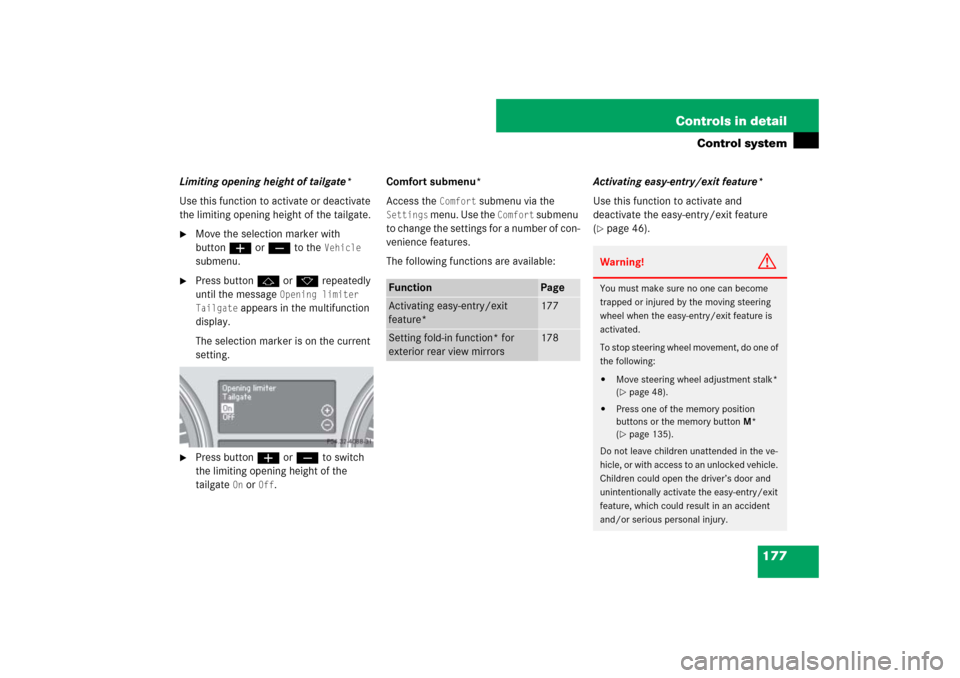
Limiting opening height of tailgate*
Use this function to activate or deactivate
the limiting opening height of the tailgate.�
Move the selection marker with
buttonæ orç to the
Vehicle
submenu.
�
Press buttonj ork repeatedly
until the message
Opening limiter
Tailgate
appears in the multifunction
display.
The selection marker is on the current
setting.
�
Press buttonæ orç to switch
the limiting opening height of the
tailgate
On or
Off
.Comfort submenu*
Access the
Comfort
submenu via the
Settings
menu. Use the
Comfort
submenu
to change the settings for a number of con-
venience features.
The following functions are available:Activating easy-entry/exit feature*
Use this function to activate and
deactivate the easy-entry/exit feature
(
�page 46).
Function
Page
Activating easy-entry/exit
feature*
177
Setting fold-in function* for
exterior rear view mirrors
178
Warning!
G
You must make sure no one can become
trapped or injured by the moving steering
wheel when the easy-entry/exit feature is
activated.
To stop steering wheel movement, do one of
the following:�
Move steering wheel adjustment stalk*
(�page 48).
�
Press one of the memory position
buttons or the memory buttonM*
(�page 135).
Do not leave children unattended in the ve-
hicle, or with access to an unlocked vehicle.
Children could open the driver’s door and
unintentionally activate the easy-entry/exit
feature, which could result in an accident
and/or serious personal injury.
Page 210 of 585

209 Controls in detail
Climate control
The climate control is operational whenev-
er the engine is running. You can operate
the climate control system in either the
automatic or manual mode. The system
cools or heats the interior depending on
the selected interior temperature and the
current outside temperature.Nearly all dust particles, pollutants and
odors are filtered out before outside air en-
ters the passenger compartment through
the air distribution system.
The air conditioning will not engage (no
cooling) if the A/C mode is deactivated
(
�page 216).
Warning!
G
When operating the climate control, the air
that enters the passenger compartment
through the air vents can be very hot or very
cold (depending on the set temperature).
This may cause burns or frostbite to unpro-
tected skin in the immediate area of the air
vents.
Always keep sufficient distance between un-
protected parts of the body and the air
vents. If necessary, use the air distribution
controls (
�page 208) to direct the air to air
vents in the vehicle interior that are not in
the immediate area of unprotected skin.
Warning!
G
Follow the recommended settings for heat-
ing and cooling given on the following pag-
es. Otherwise the windows could fog up,
impairing visibility and endangering you and
others.
i
Severe conditions (e.g. strong air pollution)
may require replacement of the filter before its
scheduled interval. A clogged filter will reduce
the air volume to the interior.
If the vehicle interior is hot, ventilate the interior
before driving off, see “Summer opening fea-
ture” (�page 239). The climate control will then
adjust the interior temperature to the set value
much faster.
Keep the air intake grille in front of the wind-
shield free of snow and debris.
Page 211 of 585

210 Controls in detailClimate controlDeactivating the climate control system
Deactivating�
Press button´ (
�page 208).
The indicator lamp on the button
comes on.Reactivating
�
Press buttonU (
�page 208).
Operating the climate control system
in automatic modeActivating
�
Press buttonU (
�page 208) while
the engine is running.
The indicator lamp on the button
comes on. The air volume and air distri-
bution are adjusted automatically.
�
Use temperature controls1 and7
(�page 208) to separately adjust the
air temperature on each side of the
passenger compartment.
The interior air temperature is adjusted
automatically.
Warning!
G
When the climate control system is
switched off, the outside air supply and cir-
culation are also switched off. Only choose
this settings for a short time. Otherwise the
windows could fog up, impairing visibility
and endangering you and others.
i
You can also press button´
(
�page 208) on the climate control panel.
If you press button0 (
�page 208) to
reactivate the climate control system, the
defrosting mode is activated.
i
When operating the climate control system
in automatic mode, you will only rarely need to
adjust the temperature, air volume and air distri-
bution.
In automatic mode, cooling with dehumidify is
switched on. This function can be switched off if
necessary (
�page 216).
i
The settings for the passenger side are also
used for the rear passenger compartment.