Page 77 of 187
76 Satellite radio*
Satellite radio operation
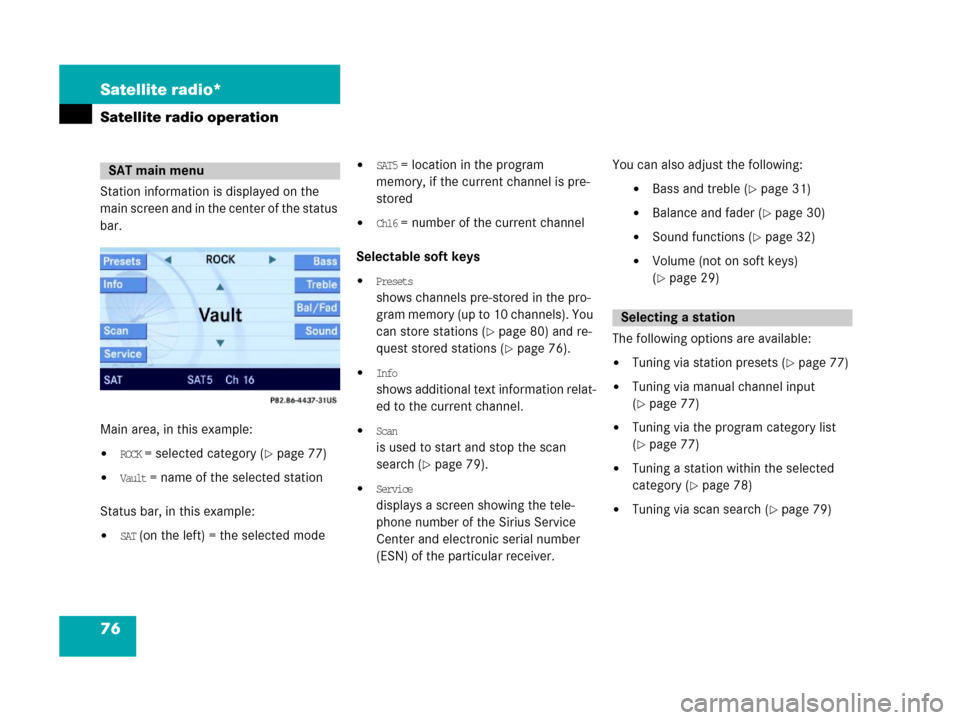
Station information is displayed on the
main screen and in the center of the status
bar.
Main area, in this example:
�ROCK = selected category (�page 77)
�Vault = name of the selected station
Status bar, in this example:
�SAT (on the left) = the selected mode
�SAT5 = location in the program
memory, if the current channel is pre-
stored
�Ch16 = number of the current channel
Selectable soft keys
�Presets
shows channels pre-stored in the pro-
gram memory (up to 10 channels). You
can store stations (
�page 80) and re-
quest stored stations (
�page 76).
�Info
shows additional text information relat-
ed to the current channel.
�Scan
is used to start and stop the scan
search (
�page 79).
�Service
displays a screen showing the tele-
phone number of the Sirius Service
Center and electronic serial number
(ESN) of the particular receiver.You can also adjust the following:
�Bass and treble (�page 31)
�Balance and fader (�page 30)
�Sound functions (�page 32)
�Volume (not on soft keys)
(
�page 29)
The following options are available:
�Tuning via station presets (�page 77)
�Tuning via manual channel input
(
�page 77)
�Tuning via the program category list
(
�page 77)
�Tuning a station within the selected
category (
�page 78)
�Tuning via scan search (�page 79)
SAT main menu
Selecting a station
Page 78 of 187
77 Satellite radio*
Satellite radio operation
Tuning via station presets
Ten Satellite radio station presets are
available.
You can access the presets via number
keys or via the Presets menu.
Accessing via number keys
�Press one of the number keys
! - ".
The system will tune to the station
stored under this number.
Accessing via Presets menu.
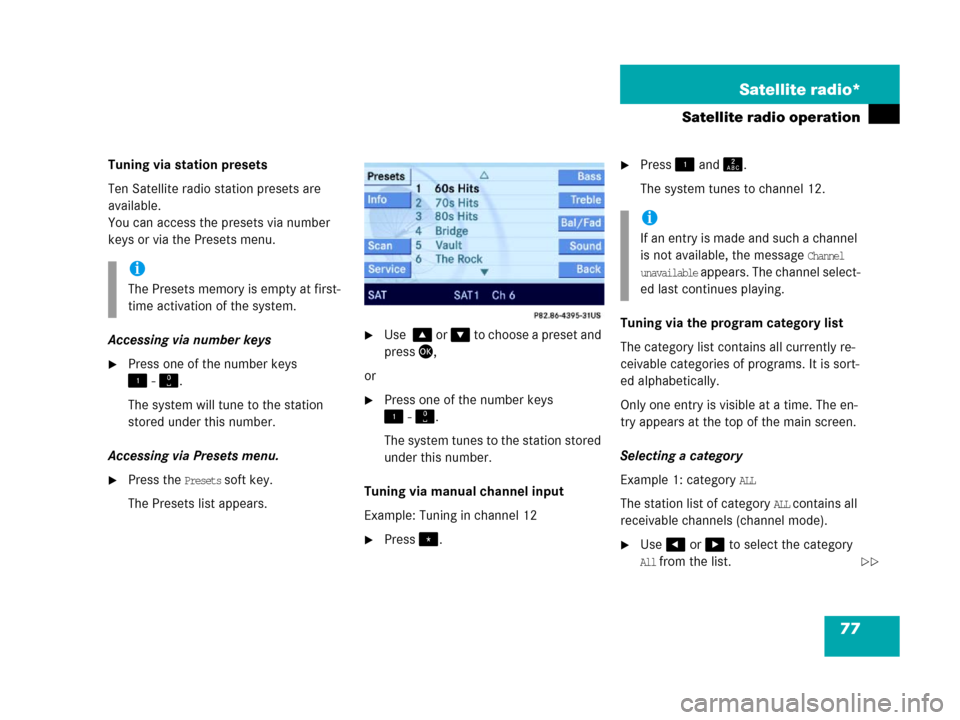
�Press the Presets soft key.
The Presets list appears.
�Use % or & to choose a preset and
press',
or
�Press one of the number keys
! - ".
The system tunes to the station stored
under this number.
Tuning via manual channel input
Example: Tuning in channel 12
�Press..
�Press ! and A.
The system tunes to channel 12.
Tuning via the program category list
The category list contains all currently re-
ceivable categories of programs. It is sort-
ed alphabetically.
Only one entry is visible at a time. The en-
try appears at the top of the main screen.
Selecting a category
Example 1: category
ALL
The station list of category
ALL contains all
receivable channels (channel mode).
�Use# or $ to select the category
All from the list.
i
The Presets memory is empty at first-
time activation of the system.
i
If an entry is made and such a channel
is not available, the message
Channel
unavailable appears. The channel select-
ed last continues playing.
��
Page 79 of 187

78 Satellite radio*
Satellite radio operation
The station listened to before remains
tuned.
Example 2: category
POP
In the station list, only channels of catego-
ry
POP are available (category mode).
�Use# or $ to select the category
POP from the list.If the station listened to before was of
POP category, the channel remains
tuned. Otherwise the system switches
to the station of
POP category that was
selected last in this category.
The system will automatically switch to
a station of
POP c a t e g or y i f t h e c u rr e n t l y
selected station is not of the
POP cate-
gory. Otherwise, the currently selected
station remains tuned.Tuning a station within the selected
category
The channels identified for the currently
selected category are sorted numerically
by channel number, which appear in the
status bar one at a time.
Tuning using COMAND control unit
�Press+ or %.
The search proceeds in ascending or-
der.
or
�Press, or &.
The search proceeds in descending or-
der and stops at the first receivable
station.
Page 80 of 187
79 Satellite radio*
Satellite radio operation
Tuning using the multifunction steering
wheel
�Switch the multifunction display in the
instrument cluster to Satellite radio
display (
�page 25).
�Pressk.
The search proceeds in ascending or-
der.
or
�Pressj.
The search proceeds in descending or-
der and stops at the first receivable
station. Tuning via scan search
Scan search is characterized as follows:
�Scan search plays a channel for
approx. 8 seconds and then skips to
the next channel within the current
category.
�Scan search can be ended manually.
�Scan search stops automatically at the
station that was playing when scan
search was started.
�Press the Scan soft key.
The scan search starts.
�Press the Scan soft key again.
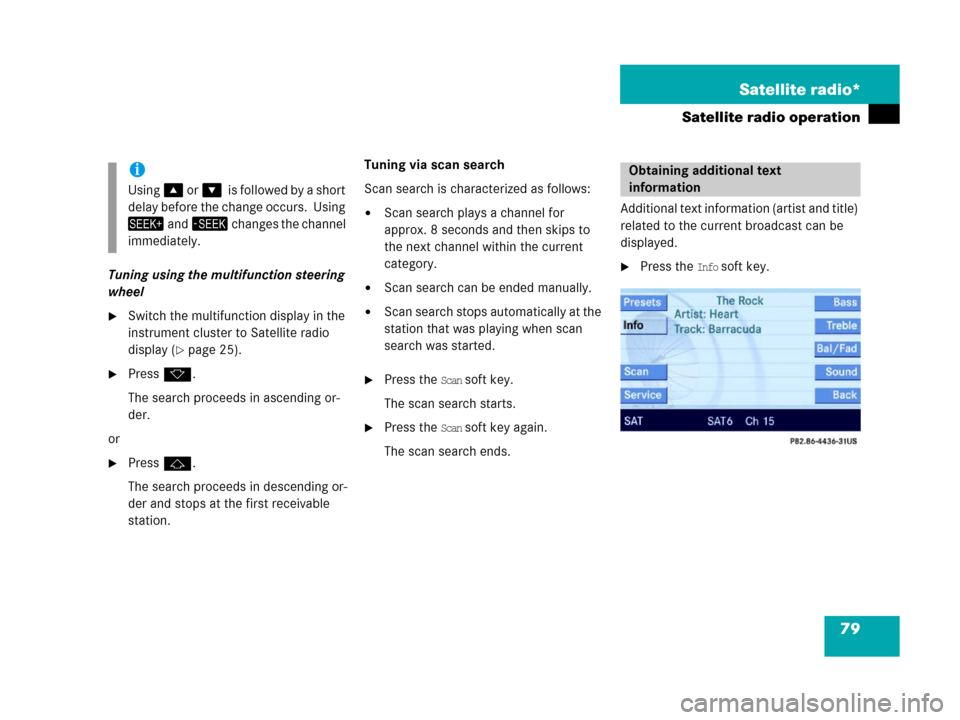
The scan search ends.Additional text information (artist and title)
related to the current broadcast can be
displayed.
�Press the Info soft key.
i
Using% o r&0i s f o l l o w e d b y a s h o r t
delay before the change occurs. Using
+ a n d, changes the channel
immediately.
Obtaining additional text
information
Page 81 of 187
80 Satellite radio*
Satellite radio operation
Two options are available:
�Storing using the number keys
�Storing using the Presets menu
Storing via number keys
�Press and hold a number key between
! and " for more than 2 seconds.
The currently selected station is stored
in the corresponding preset location.
Storing via Presets menu
�Press the Presets soft key.
The Preset list appears.
�Use% or & to select a preset loca-
tion.
�Press' for more than 2 seconds.
The currently selected station is stored
in the corresponding preset location.
Resetting Presets menu
The
Presets soft key is active indicated by
its color changed.
�Press the Presets soft key.
All channels in the Preset list are delet-
ed.
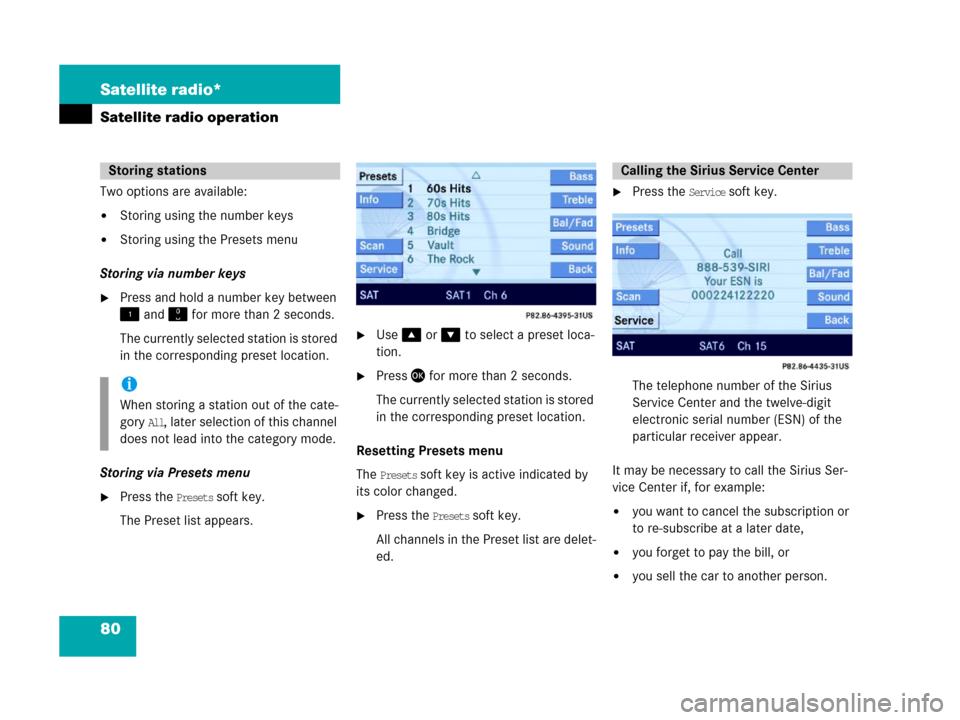
�Press the Service soft key.
The telephone number of the Sirius
Service Center and the twelve-digit
electronic serial number (ESN) of the
particular receiver appear.
It may be necessary to call the Sirius Ser-
vice Center if, for example:
�you want to cancel the subscription or
to re-subscribe at a later date,
�you forget to pay the bill, or
�you sell the car to another person.
Storing stations
i
When storing a station out of the cate-
gory
All, later selection of this channel
does not lead into the category mode.
Calling the Sirius Service Center
Page 146 of 187
145 Navigation*
During route guidance
You can set the following to be displayed in
the status bar:
�Time of arrival/Dist. to Dest.
If the full-screen map display is activat-
ed (
�page 131), the estimated time of
arrival and the remaining distance to
the destination will be displayed. If you
have entered a stopover destination
(
�page 140), the corresponding data
will be displayed.
�Current-Location display
If the full-screen map display is activat-
ed (
�page 131), the following data will
be displayed:
�The current position as coordi-
nates.
�The number of satellites that can
currently be received.
�The current elevation (ALT = alti-
tude) above sea level.
�No display
The name of the current road is dis-
played.
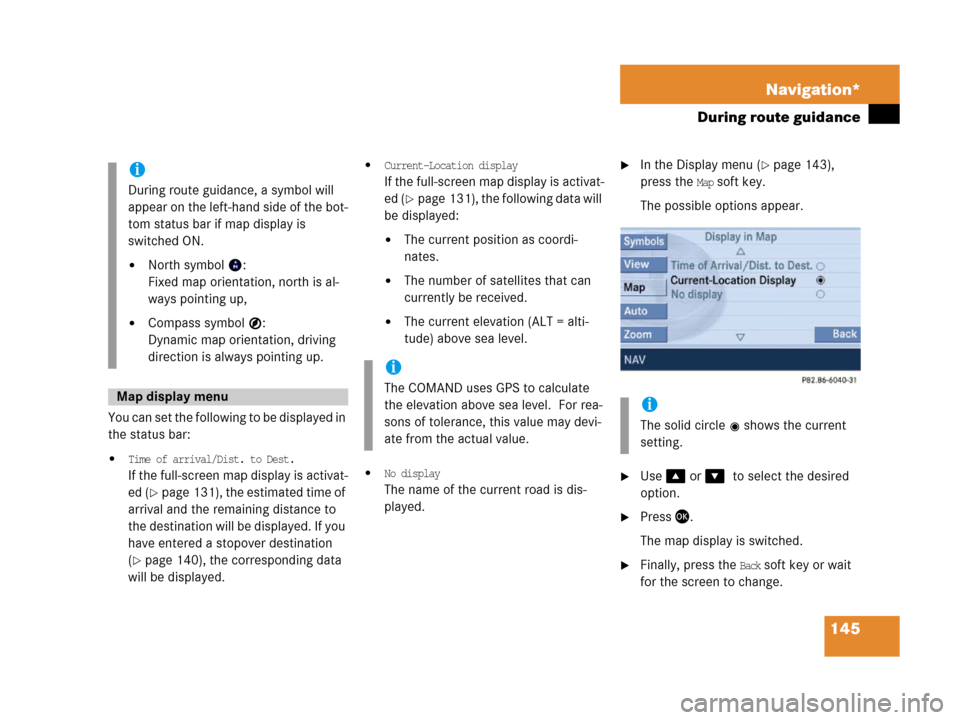
�In the Display menu (�page 143),
press the
Map soft key.
The possible options appear.
�Use % or &0to select the desired
option.
�Press '.
The map display is switched.
�Finally, press the Back soft key or wait
for the screen to change.
i
During route guidance, a symbol will
appear on the left-hand side of the bot-
tom status bar if map display is
switched ON.
�North symbol :
Fixed map orientation, north is al-
ways pointing up,
�Compass symbol :
Dynamic map orientation, driving
direction is always pointing up.
Map display menu
i
The COMAND uses GPS to calculate
the elevation above sea level. For rea-
sons of tolerance, this value may devi-
ate from the actual value.
i
The solid circle shows the current
setting.
Page 166 of 187

165 System
System settings
Setting the time
The UTC time transmitted by the GPS sat-
ellites has to be set to the local time zone.
This enhances
�correct navigation for routes with time-
dependent traffic guidance, and
�correct calculation of the estimated
time of arrival.
�Use# or $ to select the hours or
the minutes.
�Press% or &.
Depending on the selection, hours or
minutes are set.
Setting the minutes:
With GPS reception, each time you
press % o r & changes the time in in-
crements of 30 minutes. Without GPS
reception, the time is changed in 1
minute increments.
Setting the hours:
Each time you press % or &, the
hours change in increments of 1 hour.
�Press the Back soft key.
The new setting is stored.Setting the date
�Use# or $ to select the day, the
month or the year.
�Press% or &.
Depending on the selection, the day,
the month, or the year is set.
�Press the Back soft key.
The new setting is stored.
Setting the date/Time format
�Press the Format soft key.
You will see the date and time following
the currently selected format, as well
as a list of possible formats.
i
There is no automatic change from day-
light saving time to standard time.
This has to be changed manually.
When you change the time zone, the
clock time also changes automatically.
If you enter an incorrect time, the time
difference remains unchanged when
you change time zone.
i
The date can be set only if GPS recep-
tion is available.
��
Page 174 of 187
173 Glossary
Autostore
Enters the stations with the best recep-
tion (signal strength) into the autostore
memory in order of their reception
quality (from strong to weak).
Balance
Volume adjustment between left and
right speakers.
Bit
(Bi
nary digit)
The smallest unit of digital information.
Bit rate
Measurement of transmission speed.
Indicates the number of ->bits trans-
mitted per time unit.
CD
(C
ompact Disc)
Digital storage medium in disc form.
CD-R
(CD
Recordable)
- > C D w h i c h c a n b e r e a d a n d w r i t t e n b u t
not deleted.CD-RW
(CD
Rewriteable)
->CD which can be read, written and
deleted.
COMAND
(Co
ckpit Management and Data Sys-
tem)
Information and operating center for
vehicle sound and communication sys-
tems, including the radio and CD play-
er, as well as for other optional
equipment (CD changer*, telephone*,
satellite radio*, navigation*).
Coordinates
Indicate the geographical position on
the earth's surface.
DVD
(D
igital Versatile Disc)
Digital storage medium in disc form for
storing large volumes of data.Fader
(Fader control)
Volume control between front and rear
speakers.
Folder
Alternative designation for directories.
Data saved on a storage medium can
be organized into directories for im-
proved clarity. Can be likened to a filing
cabinet containing a number of folders,
each of which holds a number of docu-
ments.
Greenwich meridian
A specific north-south line running
through Greenwich, England.
GPS
(G
lobal Positioning System)
Satellite-based system for relaying
geographic location information to and
from vehicles equipped with special re-
ceivers. Employs DVD digital maps for
navigation.
Glossary