Page 57 of 202

55 Audio
CD changer* operation
Removing the magazine:
�Slide the cover of the CD changer*
open.
1Cover of the CD changer*
2l button
3Magazine
�Press the l button on the
CD changer*.
The magazine will slide out. The
message
No magazine will appear on
the COMAND.Inserting CDs:
�Pull the disc tray forward until it stops.
If necessary, remove CDs already
inserted.
�Place a CD in the tray. The CD should
be inserted with the label side up.
�Push the CD tray into the magazine
completely.
�Repeat these three steps to load more
CDs into the magazine.Reading the magazine in:
�Slide the magazine into the CD
changer* until it clicks into place
(listen for the click).
�Slide the cover of the CD changer*
closed.
i
You can also slide out the magazine if
COMAND is switched off. However, the
l button will not function if the
vehicle battery is not connected or
discharged.
i
When you push the magazine in, the
arrow on the upper side of the
magazine must point in the direction of
the CD changer*.
Page 58 of 202

56 Audio
CD operation
� CD operation
Playback locations for audio CDs are:
�the CD drive in the COMAND
�the CD changer*.
CD drive
CD changer*
�In the Audio menu (�page 40), press
the
CD or theCD soft key.
CD changer* main menu
1CD number or name of the CD currently
playing
2Track number or name of the track
currently playing
3CD - CD changer*
CD - CD drive
Actual track number/max. track
number on CD and elapsed playback
time
4Symbol for inserted CD
Switching to CD operation
i
The CD drive is located behind of the
display unit (
�page 52).
i
The CD changer* can accomodate up
to 6 audio or MP3 CDs. The CD
changer* is located in the glove box.
If a CD changer* is connected to the
COMAND, the
CD soft key is
available.
i
The Magaz. soft key is only assigned
when the CD changer* is active.
If the CD changer* has already read the
magazine, the Magazine menu will
appear (
�page 59) when you press the
Magaz. soft key.
Otherwise the message
Magazine
scan Please wait
will appear first.
Page 59 of 202
57 Audio
CD operation
CD drive
�Activate the Audio menu (�page 40).
�Press the CD soft key.
The CD main menu is displayed.
If no audio CD has been inserted, the
message
No CD inserted will
appear.
�Load an audio CD into the CD drive
(
�page 51).
CD main menu
CD changer*
�Activate the Audio menu (�page 40).
�Press the CD soft key.
The CD changer* main menu will
appear. The CD last played is played
back.
CD changer* main menu
If the last played CD is not available, the
next available audio CD or MP3 CD is
played back.
No CD in the magazine:
The message
Magazine empty will
appear.
�Load audio CDs into the CD changer*
(
�page 54).
Switching oni
The name of the CD and the name of
the track played are displayed if the
information is available.
i
The CD soft key is available if a CD
changer* is connected to the
COMAND.
i
The name of the CD and the name of
the track played are displayed if the
information is available.
Page 60 of 202
58 Audio
CD operation
You can select an audio or MP3 CD:
�in the CD list (�page 58)
�with the number keypad (�page 58)
�in the magazine menu (�page 59)
In the CD listThe CD list includes all loaded CDs. Only
one list entry is visible at a time.
The entry is displayed above the track
indication. It shows the number of the CD
currently playing.
�Push the joystick to H or h to
select another CD from the list.
Loading CD is displayed.
After the CD is loaded, playback
begins.
With the number keypad
Selecting a CD (CD changer* only)
i
Selection is possible if the
CD changer* has loaded the magazine
(COMAND knows the position of filled
and empty slots) and at least two audio
or MP3 CDs are loaded.
i
The number keys 1 - 6 can be used
for direct selection.
Keys
1 - 6 magazine slots 1 to 6
of the CD changer*
Page 62 of 202
60 Audio
CD operation
Previous track or start of title (if more
than 10 seconds of playing time has
elapsed)
�Press g.
Playback begins.
Select any desired track
�Press g or h as many times as
necessary.
With the joystick
�Push the joystick to g or G to play
the next or previous track.With the number keypad
�Activate the CD main menu
(
�page 57).
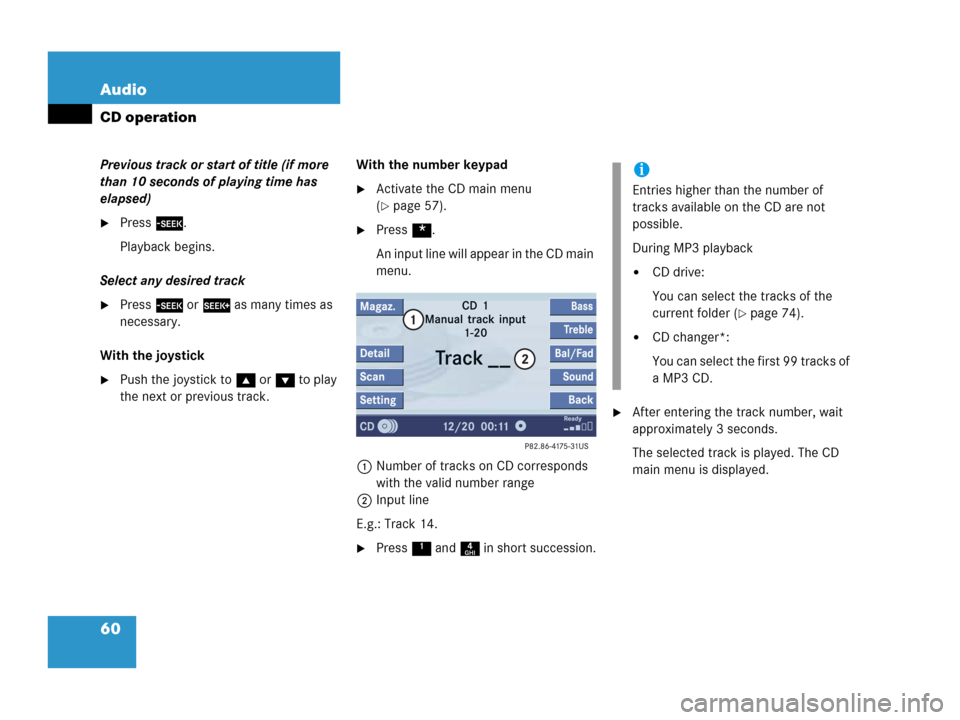
�Press *.
An input line will appear in the CD main
menu.
1Number of tracks on CD corresponds
with the valid number range
2Input line
E.g.: Track 14.
�Press 1 and 4 in short succession.
�After entering the track number, wait
approximately 3 seconds.
The selected track is played. The CD
main menu is displayed.
i
Entries higher than the number of
tracks available on the CD are not
possible.
During MP3 playback
�CD drive:
You can select the tracks of the
current folder (
�page 74).
�CD changer*:
You can select the first 99 tracks of
a MP3 CD.
Page 64 of 202
62 Audio
CD operation
On
�Press J during playback.
The CD operation is muted and theß
symbol is displayed in the status bar.
The soft keys on the left side are
greyed out in some submenus.
Off
�Press J again.
Playback will resume.
The ß disappears from the status bar.
The soft keys on the left side are
selectable again.The following options are available:
�Normal sequence (�page 63)
�Track mix (�page 64)
�CD mix (�page 64)
�Repeat track (�page 64)
�Repeat CD (�page 64)
Mutingi
COMAND will also deactivate if you
�Press A, B, g, h
�Change the volume at COMAND or
the multifunction steering wheel
�Operate the joystick
�Press any keypad button except #
�Press j or k at the
multifunction steering wheel if the
audio menu is selected
�Press any soft key.
Playback mode
i
If the CD changer* is connected, the
playback modes
Repeat CD and
CD mix are available additionally.
Page 65 of 202
63 Audio
CD operation
Activating playback mode
E.g.:
Mode
Repeat track
�Press the Setting soft key.
The setting menu will appear.
CD changer* setting menu
�Push the joystick to g or G to
select the playback mode
Repeat
track
.
�Press E.
The mode is activated. The CD
changer* main menu will then appear.
REPEAT TRACK will appear in the
status bar.Explanation of the playback modes
�Normal sequence
Tracks are played in ascending order
(e.g. 1, 2, 3 and so on). If just one CD is
inserted, the first track is played when
the last one is over.
If more than one CD is available, the
first track of the next CD is played
when the last track of the current CD is
over. The CDs are changed in normal
order.
i
The playback mode Normal sequence
is not displayed in the status bar.
Page 66 of 202
64 Audio
CD operation
�Track mix
Tracks are played in random order. If
more than one CD is available, the next
available CD is played when the current
CD is over. The CDs are changed in
normal order.
�CD mix (CD changer* only)
At least 4 tracks of any CD are played
in random order. Then follows the next
available CD. The CDs are changed in
random order.
�Repeat track
The system repeats the current track
until you switch the function off.
�Repeat CD (CD changer* only)
The system repeats the current CD
until you switch the function off.View track detail
At any time during playback an expanded
view of a track title can be displayed in the
CD main menu via a separate window.
�Press the Detail soft key.
To cancel
�Press the Detail soft key again.
or
The window will automatically disappear in
approx. 5 seconds.