Page 203 of 384

Black plate (203,1)
lA new CD may have rough edges on
its inner and outer perimeters. If a disc
with rough edges is used, proper
setting will not be possible and the CD
player/In-dash CD changer will not
play the CD. In addition, the disc may
not eject resulting in a malfunction.
Remove the rough edges in advance by
using a ball-point pen or pencil as
shown below. To remove the rough
edges, rub the side of the pen or pencil
against the inner and outer perimeter of
the CD.
lWhen driving over uneven surfaces,
the sound may jump.
lThe CD player/In-dash CD changer has
been designed to play CDs bearing the
identification logo as shown. No other
discs can be played.
lUse discs that have been legitimately
produced. If illegally-copied discs such
as pirated discs are used, the system
may not operate properly.CD Player
In-dash CD changer
lBe sure never to touch the signal
surface when handling the CDs. Pick
up a CD by grasping the outer edge or
the edge of the hole and the outer edge.
lDo not stick paper or tape on the CD.
Avoid scratching the reverse side (the
side without a label). The disc may not
eject resulting in a malfunction.
lDust, finger smudges, and dirt can
decrease the amount of light reflected
from the signal surface, thus affecting
sound quality. If the CD should
become soiled, gently wipe it with a
soft cloth from the center of the CD to
the edge.
Interior Comfort
Audio System
6-21
Mazda6_8W89-EA-06K_Edition1 Page203
Tuesday, November 14 2006 1:24 PM
Form No.8W89-EA-06K
Page 204 of 384

Black plate (204,1)
lDo not use record sprays, antistatic
agents, or household spray cleaners.
Volatile chemicals such as benzine and
thinner can also damage the surface of
the CD and must not be used. Anything
that can damage, warp, or fog plastic
should never be used to clean CDs.
lInsert discs one by one. If two discs are
inserted at the same time, the system
may not operate properly.
lCD TEXT textual information cannot
be displayed by audio units other than
the In-dash CD changer (MP3 support
type only). (Only playback is possible.)
lThe following player can play MP3
files recorded in CD-ROM, CD-R, and
CD-RW.
· In-dash CD changer (MP3 filesupport type only)
lThe CD player/In-dash CD changer
ejects the CD if the CD is inserted
upside down. Also dirty and/or
defective CDs may be ejected.
lAn 8 cm (3 in) CD cannot be played in
the CD player even if an 8 cm (3 in)
CD adapter is used.
The In-dash CD changer is specially
made for 12 cm (5 in) CDs.
An 8 cm (3 in) CD can be played in the
In-dash CD changer if an 8 cm (3 in)
CD adapter is used.
If an 8 cm (3 in) CD adapter is not
used, the In-dash CD changer may be
damaged. Always use a CD adapter.
lDo not insert cleaning discs in the CD
player/In-dash CD changer.
lDo not insert any disc with a peel-off
seal affixed to it.
Handling the In-dash CD changer
lThis unit may not be able to play
certain CD-R/CD-RWs made using a
computer or music CD recorder due to
disc characteristics, scratches,
smudges, dirt, etc., or due to dust or
condensation on the lens inside the
unit.
lStoring CDs in the vehicle exposed to
direct sunlight or high temperature may
damage the CD-R/CD-RWs, and make
them unplayable.
lCD-R/CD-RW exceeding 700 MB
cannot be played.
lThis unit may not be able to play
certain discs made using a computer
due to the application (writing
software) setting used. (For details,
consult the store where the application
was purchased.)
lIt is possible that certain text data, such
as titles, recorded on a CD-R/CD-RW
may not be displayed when musical
data (CD-DA) is playing.
lThe period from when a CD-RW is
inserted to when it begins playing is
longer than a normal CD or CD-R.
lCompletely read the instruction manual
and cautions for CD-R/CD-RWs.
lDo not use discs with cellophane tape
adhering, partially peeled off labels, or
adhesive material exuding from the
edges of the CD label. Also, do not use
discs with a commercially-available
CD-R label affixed. The disc may not
eject resulting in a malfunction.
6-22
Interior Comfort
Audio System
Mazda6_8W89-EA-06K_Edition1 Page204
Tuesday, November 14 2006 1:24 PM
Form No.8W89-EA-06K
Page 209 of 384

Black plate (209,1)
Audio Set
Illustration is of a representative audio unit.
Cassette Tape Player
CD Player In-Dash CD Changer (Music CD Player)
In-Dash CD Changer (Music CD/MP3 CD Player)
Power/Volume/Sound Controls .............................................................................. page 6-28
Operating the Radio ............................................................................................... page 6-30
Operating the Cassette Tape Player ........................................................................ page 6-34
Operating the Compact Disc (CD) Player .............................................................. page 6-36
Operating the In-Dash CD Changer ....................................................................... page 6-38
Error Indications ..................................................................................................... page 6-44
Interior Comfort
Audio System
6-27
Mazda6_8W89-EA-06K_Edition1 Page209
Tuesday, November 14 2006 1:24 PM
Form No.8W89-EA-06K
Page 220 of 384

Black plate (220,1)
qOperating the In-Dash CD Changerí
Fast-forward
button
Disc down
button
Track down
button Track up
button
Scan
button
Channel preset buttons
CD eject button
CD slot
Load button
Reverse button
Disc up button Random button
Repeat button CD play button
(Music CD player)
(Music CD/MP3 CD player)
There are two types of In-dash CD
changers. Check which In-dash CD
changer type you own.
Type
Playable data
Music CD player · Music data (CD-DA)
Music CD/MP3 CD
player · Music data (CD-DA)
· MP3 file
NOTE
If a disc has both music data (CD-DA)
and MP3 files, playback of the two file
types differs depending on how the disc
was recorded.
Inserting the CD
The CD must be label-side up when
inserting. The auto-loading mechanism
will set the CD and begin play. There will
be a short lapse before play begins while
the player reads the digital signals on the
CD.
The disc number and the track number
will be displayed.
6-38
Interior Comfort
íSome models.
Audio System
Mazda6_8W89-EA-06K_Edition1 Page220
Tuesday, November 14 2006 1:24 PM
Form No.8W89-EA-06K
Page 227 of 384
Black plate (227,1)
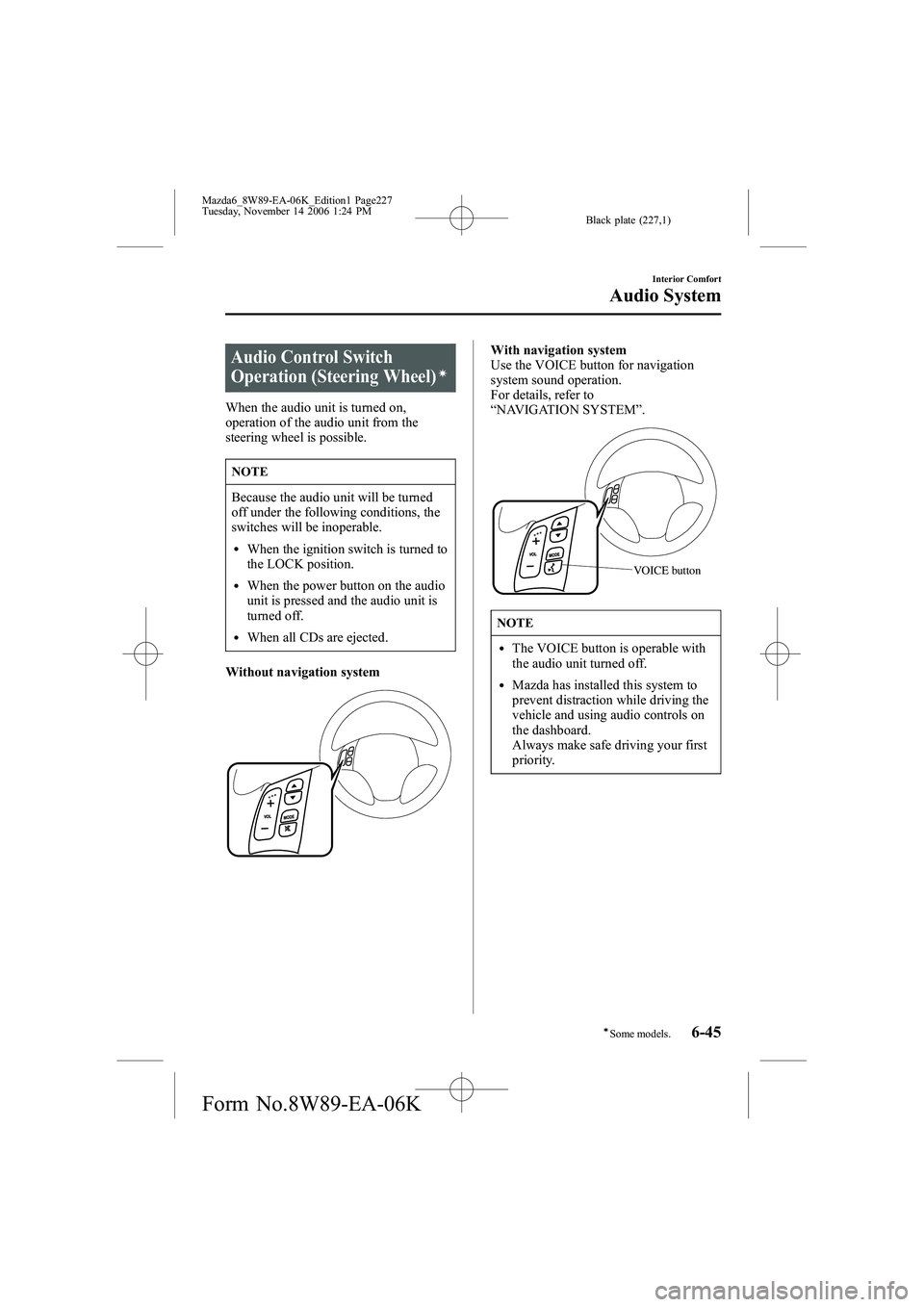
Audio Control Switch
Operation (Steering Wheel)í
When the audio unit is turned on,
operation of the audio unit from the
steering wheel is possible.
NOTE
Because the audio unit will be turned
off under the following conditions, the
switches will be inoperable.
lWhen the ignition switch is turned to
the LOCK position.
lWhen the power button on the audio
unit is pressed and the audio unit is
turned off.
lWhen all CDs are ejected.
Without navigation system
With navigation system
Use the VOICE button for navigation
system sound operation.
For details, refer to
“ NAVIGATION SYSTEM ”.
VOICE button
NOTE
lThe VOICE button is operable with
the audio unit turned off.
lMazda has installed this system to
prevent distraction while driving the
vehicle and using audio controls on
the dashboard.
Always make safe driving your first
priority.
Interior Comfort
Audio System
6-45íSome models.
Mazda6_8W89-EA-06K_Edition1 Page227
Tuesday, November 14 2006 1:24 PM
Form No.8W89-EA-06K
Page 316 of 384

Black plate (316,1)
DESCRIPTIONFUSE
RATING PROTECTED COMPONENT
16 TCM 15A
*1TCM
10A*2
17 ENG+B 7.5A PCM, TCM
18 FUEL PUMP 15A Fuel pump
19 IG KEY1 30A Engine control unit, Lighter
20 P.WIND 30A Power window
21 ―― ―
22 DRL 20A DRL
23 ―― ―
24 BLOWER 40A Blower motor
25 BTN 40A Overhead light, Power door lock
26 IG KEY2 40ARear wiper motor
í, Heater control unit, Windshield wiper and
washer
27 DEFOG 40A Rear window defroster
28 ABS 60A ABS
í
29 AD FAN*130A Cooling fan
FAN2*2
30 FA N*130A Cooling fan
FAN1*2
31 TAIL 10A Taillights, License plate lights, Parking lights
32 ILLUMI 10A Dashboard illumination
33 MAG 10A Magnet clutch
34 AUDIO 15A Audio system
35 P.SEAT 30A Power seat
í
36 OPENER7.5A Trunk opener motorí
37―― ―
38― *1――
IG1*215A CAT SSR
39 FOG 15A Fog lightsí
40 MAIN 120A For protection of all circuits
*1 2.3-liter engine
*2 3.0-liter engine
8-52
Maintenance and Care
íSome models.
Owner Maintenance
Mazda6_8W89-EA-06K_Edition1 Page316
Tuesday, November 14 2006 1:25 PM
Form No.8W89-EA-06K
Page 323 of 384

Black plate (323,1)
Interior Care
qDashboard Precautions
Prevent caustic solutions such as perfume
and cosmetic oils from contacting the
dashboard. They'll damage and discolor it.
If these solutions get on the dashboard,
wipe them off immediately.
CAUTION
Do not use glazing agents.
Glazing agents contain ingredients
which may cause discoloration,
wrinkling, cracks and peeling.
qCleaning the Upholstery and
Interior Trim
Vinyl
Remove dust and loose dirt from vinyl
with a whisk broom or vacuum cleaner.
Clean vinyl with a leather-and-vinyl
cleaner.
Leatherí
Real leather isn't uniform and may have
scars, scratches, and wrinkles. Clean it
with a leather cleaner or mild soap.
Wipe it with a dampsoft cloth; then dry
and buff it with a drysoft cloth.
Fabricí
Remove dust and loose dirt from fabric
with a whisk broom or vacuum cleaner.
Clean it with a mild soap solution good
for upholstery and carpets. Remove fresh
spots immediately with a fabric spot
cleaner. To keep the fabric looking clean and
fresh, take care of it. Otherwise its color
will be affected, it can be stained easily,
and its fire-resistance may be reduced.
CAUTION
Use only recommended cleaners and
procedures. Others may affect
appearance and fire-resistance.
q
Cleaning the Lap/Shoulder Belt
Webbing
Clean the webbing with a mild soap
solution recommended for upholstery or
carpets. Follow instructions. Don't bleach
or dye the webbing; this may weaken it.
After cleaning the belts, thoroughly dry
the belt webbing and make sure there is
no remaining moisture before retracting
them.
WARNING
Damaged Seat Belt:
Using damaged seat belts is
dangerous. In a collision, damaged
belts cannot provide adequate
protection. Have an Authorized Mazda
Dealer replace damaged belts
immediately.
Maintenance and Care
Appearance Care
8-59íSome models.
Mazda6_8W89-EA-06K_Edition1 Page323
Tuesday, November 14 2006 1:25 PM
Form No.8W89-EA-06K
Page 327 of 384
Black plate (327,1)
3. Vehicle Identification Number (17 digits, noted on your registration or title or located onthe upper driver's side corner of the dash)
4. Purchase date and current mileage
5. Your dealer's name and location
6. Your question(s)
If you live outside the U.S.A., please contact your nearest Mazda Distributor.
Customer Information and Reporting Safety Defects
Customer Assistance
9-3
Mazda6_8W89-EA-06K_Edition1 Page327
Tuesday, November 14 2006 1:25 PM
Form No.8W89-EA-06K
