Page 60 of 272

Increasing speed while using speed control
There are two ways to set a higher
speed:
•Press and hold the SET + control
until you get to the desired
speed, then release the control.
You can also use the SET +
control to operate the Tap-Up
function. Press and release this
control to increase the vehicle set
speed in small amounts by 1 mph
(1.6 km/h).
•Use the accelerator pedal to get to the desired speed. When the
vehicle reaches that speed press and release the SET + control.
Reducing speed while using speed control
There are two ways to reduce a set
speed:
•Press and hold the SET - control
until you get to the desired
speed, then release the control.
You can also use the SET -
control to operate the Tap-Down
function. Press and release this
control to decrease the vehicle
set speed in small amounts by 1
mph (1.6 km/h).
•Depress the brake pedal until the desired vehicle speed is reached and
press the SET control.
2007 Zephyr(378)
Owners Guide (post-2002-fmt)
USA(fus)
Driver Controls
60
Page 61 of 272
Turning off speed control
There are two ways to turn off the speed control:
•Depress the brake pedal. This will
not erase your vehicle’s
previously set speed.
•Press the speed control OFF
control.
Note:When you turn off the speed
control or the ignition, your speed
control set speed memory is erased.
STEERING WHEEL CONTROLS
Radio control features
Press MEDIA to select:
•AM, FM1, FM2, or CD
•LINE IN (Auxiliary input jack)
In Radio mode:
•Press
to access the
next/previous preset station.
In CD mode:
•Press
to listen to the
next track on the disc.
2007 Zephyr(378)
Owners Guide (post-2002-fmt)
USA(fus)
Driver Controls
61
Page 72 of 272

Trip elapsed drive time
Select this function from the INFO
menu to display a timer.
To operate the Trip Elapsed Drive
Time perform the following:
1. Press and release RESET in order
to start the timer.
2. Press and release RESET to pause the timer.
3. Press and hold RESET for 2 seconds in order to reset the timer.
Setup menu
Press this control for the following
displays:
•System Check
•Units (English/Metric)
•Language
•Easy entry/exit seat
System check
Selecting this function from the
SETUP menu causes the message
center to cycle through each of the
systems being monitored. For each
of the monitored systems, the
message center will indicate either an OK message or a warning message
for two to four seconds.
Pressing the RESET control cycles the message center through each of
the systems being monitored.
The sequence of the system check report is as follows:
1. DOORS CLOSED
2. ENGINE TEMPERATURE
3. OIL PRESSURE
4. BRAKE FLUID LEVEL
5. EXTERIOR LAMPS
6. FUEL LEVEL
7. DISTANCE TO EMPTY
2007 Zephyr(378)
Owners Guide (post-2002-fmt)
USA(fus)
Driver Controls
72
Page 74 of 272

The message center will display the last selected feature if there are no
more warning messages. This allows you to use the full functionality of
the message center after you acknowledge the warning by pressing the
RESET control and clearing the warning message.
Warning messages that have been reset are divided into three categories:
•They will not disappear until a condition is changed.
•They will reappear on the display ten minutes from the reset.
•They will not reappear until an ignition LOCK/OFF-ON cycle has been
completed.
This acts as a reminder that these warning conditions still exist within
the vehicle.
Warnings Status
Driver door ajar Warning cannot be reset
(PLEASE CLOSE DOOR) will
be displayed Passenger door ajar
Rear left door ajar
Rear right door ajar
Park brake engaged RELEASE PARK BRAKE will be
displayed
Low fuel level Warning returns after 10
minutes
Check brake system
Low brake fluid Warning returns after the
ignition key is turned from
LOCK/OFF to RUN Trunk ajar
Compass error
Check left headlamp (if equipped)
Check right headlamp (if equipped)
Check LF turn lamp
Check RF turn lamp
Check LR turn lamp
Check RR turn lamp
Integrated key programming status Maximum number of Integrated
Keys exceeded
DRIVER DOOR AJAR.Displayed when the driver’s door is not
completely closed.
PASSENGER DOOR AJAR.Displayed when the passenger side door is
not completely closed.
2007 Zephyr(378)
Owners Guide (post-2002-fmt)
USA(fus)
Driver Controls
74
Page 75 of 272

REAR LEFT DOOR AJAR.Displayed when the rear left door is not
completely closed.
REAR RIGHT DOOR AJAR.Displayed when the rear right door is not
completely closed.
PARK BRAKE ENGAGED.Displayed when the park brake is engaged.
If the warning stays on after the park brake is off, contact your
authorized dealer as soon as possible.
CHECK BRAKE SYSTEM.Displayed when the brake system needs
servicing. If the warning stays on or continues to come on, contact your
authorized dealer as soon as possible.
LOW BRAKE FLUID.Indicates the brake fluid level is low and the
brake system should be inspected immediately. Refer toBrake fluid
reservoirin theMaintenance and Specificationschapter.
TRUNK AJAR.Displayed when the trunk is not completely closed.
COMPASS ERROR.Displayed when the compass is not operating
properly. If the warning stays on or continues to come on, contact your
authorized dealer as soon as possible.
CHECK LEFT OR RIGHT HEADLAMPS (if equipped).Displayed
when the headlamps are activated and at least one low beam is burned
out. This warning will not display for the optional HID low beam bulb.
Check the lamps as soon as possible and have the burned out lamp
replaced. Refer toReplacing headlamp bulbsin theLightschapter.
CHECK LF OR RF TURN LAMPS.Displayed when the turn signals are
activated and at least one is burned out. Check the lamps as soon as
safely possible and have the burned out lamp replaced. Refer to
Replacing headlamp bulbsin theLightschapter.
CHECK LR OR RR TURN LAMPS.Displayed when the rear turn
signals are activated and at least one is burned out. Check the lamps as
soon as safely possible and have the burned out lamp replaced. Refer to
Replacing headlamp bulbsin theLightschapter.
INTEGRATED KEY PROGRAMMING STATUS.Displayed when an
attempt is made to program a fifth Integrated Key to the Remote Key
Entry System. For more information on Integrated Key, refer toLocks
and Securitychapter in this manual.
2007 Zephyr(378)
Owners Guide (post-2002-fmt)
USA(fus)
Driver Controls
75
Page 112 of 272

Combination lap and shoulder belts
1. Insert the belt tongue into the
proper buckle (the buckle closest to
the direction the tongue is coming
from) until you hear a snap and feel
it latch. Make sure the tongue is
securely fastened in the buckle.
2. To unfasten, push the release
button and remove the tongue from
the buckle.
All restraints in the vehicle are combination lap and shoulder belts.
While you are fastened in the safety belt, the combination lap/shoulder
belt adjusts to your movement. However, if you brake hard, turn hard, or
if your vehicle receives an impact of 5 mph (8 km/h) or more, the safety
belt will become locked and help reduce your forward movement.
Energy Management Feature — Front Outboard
•This vehicle has a safety belt system with an energy management
feature at the front seats to help further reduce the risk of injury in
the event of a head-on collision.
•This safety belt system has a retractor assembly that is designed to
extend the safety belt webbing in a controlled manner. This helps
reduce the belt force acting on the user’s chest.
Failure to inspect and replace if necessary the Belt and
Retractor assembly after an accident could increase the risk of
injury in a collision.
REVIEW COPY ——
2007(com), Owners Guide (post-2002-fmt)(own2002),Market:USA(fus)
Seating and Safety Restraints
112
Page 113 of 272
All safety restraints in the vehicle are combination lap and shoulder
belts. All of the passenger combination lap and shoulder belts have two
types of locking modes described below:
Vehicle sensitive mode
This is the normal retractor mode, which allows free shoulder belt length
adjustment to your movements and locking in response to vehicle
movement. For example, if the driver brakes suddenly or turns a corner
sharply, or the vehicle receives an impact of approximately 5 mph (8
km/h) or more, the combination safety belts will lock to help reduce
forward movement of the driver and passengers.
Automatic locking mode
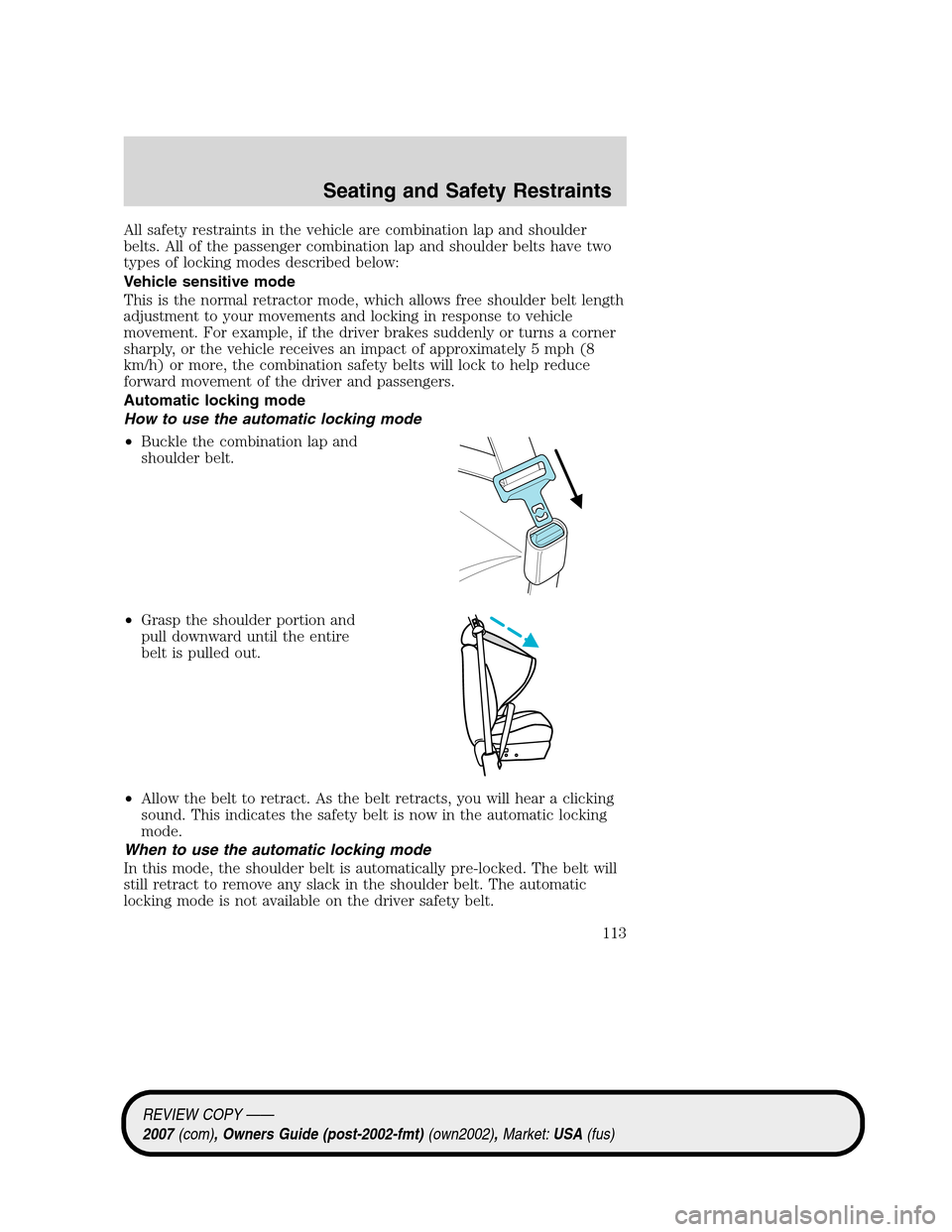
How to use the automatic locking mode
•Buckle the combination lap and
shoulder belt.
•Grasp the shoulder portion and
pull downward until the entire
belt is pulled out.
•Allow the belt to retract. As the belt retracts, you will hear a clicking
sound. This indicates the safety belt is now in the automatic locking
mode.
When to use the automatic locking mode
In this mode, the shoulder belt is automatically pre-locked. The belt will
still retract to remove any slack in the shoulder belt. The automatic
locking mode is not available on the driver safety belt.
REVIEW COPY ——
2007(com), Owners Guide (post-2002-fmt)(own2002),Market:USA(fus)
Seating and Safety Restraints
113
Page 120 of 272
Read Steps1-4thoroughly before proceeding with the
deactivation/activation programming procedure.
Note: The driver and front passenger BeltMinder�features must be
disabled/enabled separately. Both cannot be disable/enabled during the
same key cycle.
The driver and front passenger BeltMinder�features can be
deactivated/activated by performing the following procedure:
Before following the procedure, make sure that:
•The parking brake is set
•The gearshift is in N (Neutral) (manual transmission)
•The gearshift is in P (Park) (automatic transmission)
•The ignition switch is in the OFF position
•The driver and front passenger safety belts are unbuckled
While the design allows you to deactivate your BeltMinder�,this
system is designed to improve your chances of being safely
belted and surviving an accident. We recommend you leave the
BeltMinder�system activated for yourself and others who may use the
vehicle. To reduce the risk of injury, do not deactivate/activate the
BeltMinder�feature while driving the vehicle.
1. Turn the ignition switch to the RUN (or ON) position. (DO NOT
START THE ENGINE)
2. Wait until the safety belt warning light turns off. (Approximately 1–2
minutes)
•Step 3 must be completed within 50 seconds after the safety belt
warning light turns off.
3. For the seating position being disabled, at a moderate speed, buckle
then unbuckle the safety belt 9 times, ending in the unbuckled state.
(Step 3 must be completed within 50 seconds after the safety belt
warning light turns off.)
•After Step 3, the safety belt warning light will be turned on for three
seconds.
4. Within 10 seconds of the light turning on, at a moderate speed, buckle
then unbuckle the safety belt.
•This will disable the BeltMinder�feature for that seating position if it
is currently enabled. As confirmation, the safety belt warning light will
flash 4 times per second for 3 seconds.
REVIEW COPY ——
2007(com), Owners Guide (post-2002-fmt)(own2002),Market:USA(fus)
Seating and Safety Restraints
120
