2007 KIA Sorento lock
[x] Cancel search: lockPage 122 of 325

3 113
Knowing your vehicle
6. File Search KnobRotate the knob clockwise or counter-
clockwise to manually advance up or
down the track list of the CD currently
played. This function allows you to quick-
ly scroll to a specific track number. It is
especially useful if you are playing a MP3
or WMA CD which contains many direc-
tories and tracks. The LCD screen dis-
plays the track number you have scrolled
to.
Once the track number you want is dis-
played, press the File Search knob to
ENTER your selection and begin play-
back of the selected track.✽ ✽ NOTICEYou must push the File Search knob to
select the track for playback. Otherwise,
the CD player will not jump to the track
number displayed in the number count-
er.
Use the File Search knob and the DIR
and buttons in together to quick-
ly search for a track you want on a MP3
CD with many directories and tracks.
7. RPT, RDM, MARK & INFO buttons These buttons correspond to the Repeat,
Random Playback, Marklist and Disc
Information functions.
Turn to the next section of your handbook
for detailed instructions.
Playing CDs, MP3 and WMA discs1. Loading CDsModel D446:
Only one CD can be loaded at any one
time. If there is already a disc inserted in
the CD player, eject the disc before load-
ing a new CD.
To load a CD, gently insert the CD into
the CD slot. The CD will be automatically
loaded. The CD player then starts to play
the CD.✽ ✽ NOTICE• Do not force-load the CD as it will
damage the loading mechanism and
cause your disc to jam in the player.
• If a CD cannot be loaded, check if there is already a disc in the player
and eject it first.
Only one CD can be loaded at any one
time.
Page 127 of 325
Knowing your vehicle118
3Using External Controls1. The Dimmer control
The Dimmer control setting determines
the brightness of the entire vehicle's dis-
plays.
Turn the scroll wheel up or down to
increase or decrease the brightness of
the vehicle's instrument panels, backlit
displays and the audio system's LCD
screen and backlit controls.
2. Steering wheel audio controls
Steering wheel-mounted audio controls
allow you to make adjustments to the
most frequently used audio controls with-
out taking your eyes off the road.
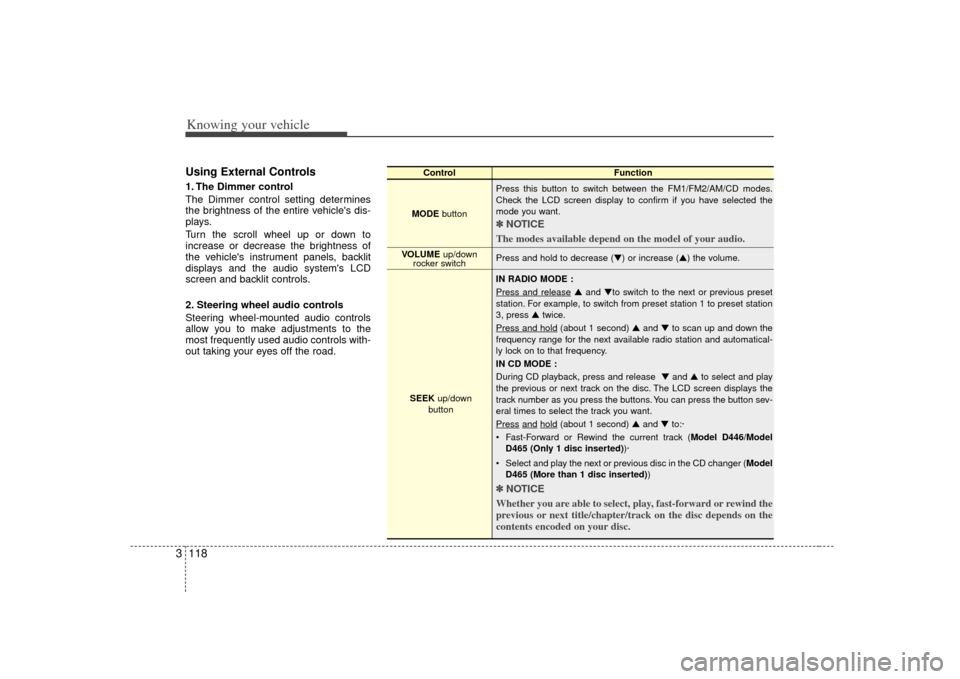
Control Function
MODE button Press this button to switch between the FM1/FM2/AM/CD modes.
Check the LCD screen display to confirm if you have selected the
mode you want.
✽ ✽
NOTICE
The modes available depend on the model of your audio. Press and hold to decrease (▼) or increase (▲) the volume.
IN RADIO MODE :
Press and release
▲ and ▼to switch to the next or previous preset
station. For example, to switch from preset station 1 to preset station
3, press ▲ twice.
Press and hold
(about 1 second) ▲ and ▼to scan up and down the
frequency range for the next available radio station and automatical-
ly lock on to that frequency.
IN CD MODE :
During CD playback, press and release ▼ and ▲to select and play
the previous or next track on the disc. The LCD screen displays the
track number as you press the buttons. You can press the button sev-
eral times to select the track you want.
Press
and
hold
(about 1 second) ▲ and ▼to:·
Fast-Forward or Rewind the current track ( Model D446/Model
D465 (Only 1 disc inserted) )·
Select and play the next or previous disc in the CD changer (Model D465 (More than 1 disc inserted) )
✽ ✽
NOTICE
Whether you are able to select, play, fast-forward or rewind the
previous or next title/chapter/track on the disc depends on the
contents encoded on your disc.
VOLUME up/down
rocker switch
SEEK up/down
button
Page 128 of 325
3 119
Knowing your vehicle
Troubleshooting Poor Radio
ReceptionProblem:
Fading Signals / Interference /
Increased interference/ Static
FM Broadcasts - The further you move
away from the radio station's transmitting
source (normally within a city or town),
the weaker the signal will be. You might
experience abrupt breaks in transmis-
sion, garbled sound and also static even
though your radio remains tuned to the
same frequency.
AM Broadcasts - Even though AM radio
signals travel further and stronger than
FM radio signals, weather or terrain con-
ditions might adversely affect your radio's
ability to receive the signals.
Solution:
Use your audio system's Scan function to
automatically search for and select
another radio station with good signal
strength. Problem:
High-pitched static, distortion or a
'fluttering' sound (Multi-Path
Cancellation)
Radio stations transmitting on frequen-
cies that are very close to each other
may cause distortion or 'fluttering'. This
effect is known as Multi-Path
Cancellation. This normally occurs when
your tuner is receiving a station's trans-
mission as both direct and 'reflected'
radio signals or when your tuner receives
signals from more than 1 radio station
transmitting on frequencies that are very
close to each other.
Solution:
If the problem is caused by a temporary
deterioration in the signal strength of one
station's transmission, reduce the levels
of your audio system's Treble and Middle
settings to suppress the sound. If the
problem is caused by interference from
another station, select another radio sta-
tion with good and clear signal strength.
Problem:
Interference from another FM radio
broadcast ('station-swapping')
FM radio stations transmit on frequen-
cies that are very close to each other on
the FM band. When you travel further
and further away from a transmitting
source, the signal strength of that trans-
mission decreases. Your radio's ability to
'lock' on to that specific frequency is
affected. This is because your radio is
designed to lock on to the strongest sig-
nal it can detect. Therefore, another radio
station broadcasting on a frequency very
close to your original station could 'inter-
fere' with your reception and you might
start to hear the broadcast of the second
station. You will normally experience this
when you are moving away from a weak
signal and towards a stronger one.
Page 132 of 325

Driving your vehicle24Illuminated ignition switch
(if equipped)Whenever a door is opened, the ignition
switch will be illuminated for your con-
venience, provided the ignition switch is
not in the ON position. The light will go off
approximately 30 seconds after closing
the door or when the ignition switch is
turned on.
Ignition switch and anti-theft
steering column lock
Ignition switch positionLOCKThe steering wheel locks to protect
against theft. The ignition key can be
removed only in the LOCK position.
When turning the ignition switch to the
LOCK position, push the key inward at
the ACC position (Type A) and turn the
key toward the LOCK position.
ACC (Accessory)
The steering wheel is unlocked and elec-
trical accessories are operative.
ON
The warning lights can be checked
before the engine is started. This is the
normal running position after the engine
is started.Do not leave the ignition switch ON if theengine is not running to prevent batterydischarge.
IGNITION SWITCH
PUSH
LOCKACCONSTART
E2BLA401A
1KMA30131KMB3013
Type AType B
Page 133 of 325

43
Driving your vehicle
START
Turn the ignition key to the START posi-
tion to start the engine. The engine will
crank until you release the key; then it
returns to the ON position. The brake
warning lamp can be checked in this
position.✽ ✽NOTICEIf difficulty is experienced in turning the
ignition key, turn the steering wheel
right and left to release the tension and
then turn the key.
Automatic transmissionWhen turning the ignition switch to the
LOCK position, the shift lever must be in
the P (Park) position.
WARNING
- Ignition key
• Never turn the ignition switch to
LOCK or ACC while the vehicle is
moving. This would result in loss
of directional control and braking
function, which could cause an
immediate accident.
Before leaving the driver’s seat, always make sure the shift lever
is engaged in 1
stgear for manual
transmission or P (Park) for auto-
matic transmission, set the park-
ing brake fully and shut the
engine off. Unexpected and sud-
den vehicle movement may occur
if these precautions are not
taken.
(Continued)
(Continued)
Never reach for the ignitionswitch, or any other controls
through the steering wheel while
the vehicle is in motion. The pres-
ence of your hand or arm in this
area could cause a loss of vehicle
control, an accident and serious
bodily injury or death.
Do not place any movable objects around the driver’s seat as they
may move while driving, interfere
with the driver and lead to an
accident.
Page 135 of 325
45
Driving your vehicle
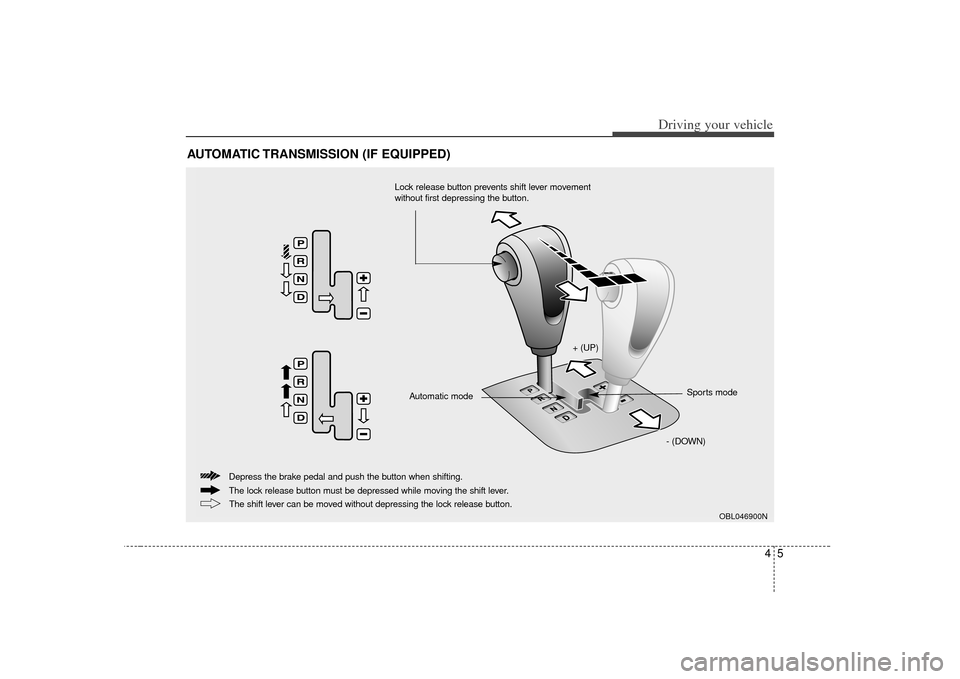
AUTOMATIC TRANSMISSION (IF EQUIPPED)
OBL046900N
+ (UP)- (DOWN)Sports mode
Automatic mode
The lock release button must be depressed while moving the shift lever. Depress the brake pedal and push the button when shifting.
The shift lever can be moved without depressing the lock release button.
Lock release button prevents shift lever movement
without first depressing the button.
Page 136 of 325

Driving your vehicle64Automatic transmission operationAll normal forward driving is done with
the shift lever in the D (Drive) position.
To move the shift lever from the P (Park)
position, the brake pedal must be
depressed and the lock release button
must be depressed.
For smooth operation, depress the brakepedal when shifting from N (Neutral) to a forward or reverse gear.
WARNING
- Automatic transmission
Before leaving the driver’s seat,
always make sure the shift lever is
in the P (PARK) position; then set
the parking brake fully and shut the
engine off. Unexpected and sudden
vehicle movement can occur if
these precautions are not followed
in the order identified.
OBL046900
+ (UP)
- (DOWN)
Automatic
modeSports mode
CAUTION
To avoid damage to your trans-
mission, do not accelerate theengine in R (Reverse) or any for-ward gear position with the brakes on.
When stopped on an upgrade, do not hold the vehicle stationarywith engine power. Use the serv-ice brake or the parking brake.
Do not shift from N (Neutral) or P (Park) into D (Drive), or R(Reverse) when the engine is above idle speed.
Page 137 of 325

47
Driving your vehicle
Transmission rangesP (park)Always come to a complete stop before
shifting into P. This position locks the
transmission and prevents the front
wheels from rotating.
R (reverse)Use this position to drive the vehicle
backward.N (neutral)The wheels and transmission are not
locked. The vehicle will roll freely even on
the slightest incline unless the parking
brake or service brakes are applied.D (drive)This is the normal forward driving posi-
tion. The transmission will automatically
shift through a 4-gear sequence, provid-
ing the best fuel economy and power.
For extra power when passing another
vehicle or climbing grades, depress the
accelerator fully, at which time the trans-
mission will automatically downshift to
the next lower gear.
(Continued)
Before leaving the driver’s seat,always make sure the shift lever
is in the P (PARK) position. Set
the parking brake fully, shut the
engine off and take the key with
you. Unexpected and sudden
vehicle movement can occur if
you do not follow these precau-
tions in the order specified.
Never leave a child unattended in a vehicle.
WARNING
- Automatic
transmission
Shifting into P (Park) while thevehicle is in motion will cause the
drive wheels to lock which will
cause you to lose control of the
vehicle.
Do not use the P (Park) position in place of the parking brake.
Always make sure the shift lever
is latched in the P (Park) position
so that it cannot be moved unless
the lock release button is pushed
in, AND set the parking brake
fully.
(Continued)
CAUTION
The transmission may be damagedif you shift into P (Park) while thevehicle is in motion.
CAUTION
Always come to a complete stopbefore shifting into or out of R(Reverse); you may damage the transmission if you shift into Rwhile the vehicle is in motion.